
Guys, you can relax! These best AI plugins for musicians are not here to steal our jobs: they’re here to make life way easier.
At first, I was side-eyeing AI in music like, “Yeah, sure, you’re gonna mix my track better than me?” But after trying some of these tools… okay, I’ll admit it, they’re kinda genius.
I love how they take care of the boring stuff like mixing levels, cleaning up messy vocals, and even mastering, so I can focus on making music instead of tweaking a million knobs.
They balance, enhance, and sometimes even surprise me with ideas I wouldn’t have thought of. And yeah, they don’t get tired, complain, or ghost me mid-project, so that’s a plus. So here are some of my top AI plugins for mixing, mastering, and everything about music!
| Plugin | Best For | Strength |
|---|---|---|
| The Him DSP Kick Ninja 2 | Kick design & layering | AI sample import + deep envelope control |
| Waves Clarity Vx DeReverb | Cleaning vocal room reverb | One-knob AI de-reverb (fast results) |
| LANDR Mastering Plugin PRO | Fast mastering inside DAW | AI mastering chain + real-time tweaks |
| Baby Audio TAIP | Tape warmth & saturation | AI-modeled tape tone + glue compression |
| Supertone CLEAR | De-noise + de-reverb | 3-channel separation (voice/ambience/reverb) |
| Session Loops DrumNet | Generating fresh drum samples | Infinite AI sample creation + sequencer |
| iZotope Neoverb | Quick “right” reverb spaces | Reverb Assistant + unmasking |
| sonible pure:limit | Easy loudness & limiting | Auto-parameter limiting + style profiles |
| Algonaut Atlas 2 | Organizing drum libraries | AI sample mapping + kit builder |
| VOCALOID6 | AI vocal synthesis | Expressive virtual vocals + multilingual support |
| Antares Vocal Reverb | Vocal-focused reverb | AI suggestions + vocal-tuned algorithms |
| Orb Producer Suite 3 (Bonus) | Composition help | AI chords/melody/bass/arp + polyrhythms |
1. The Him DSP Kick Ninja

| Plugin | The Him DSP Kick Ninja 2 |
|---|---|
| Description | AI-assisted kick rebuilding plus deep kick synthesis and layering control |
| Award | Best for Drums |
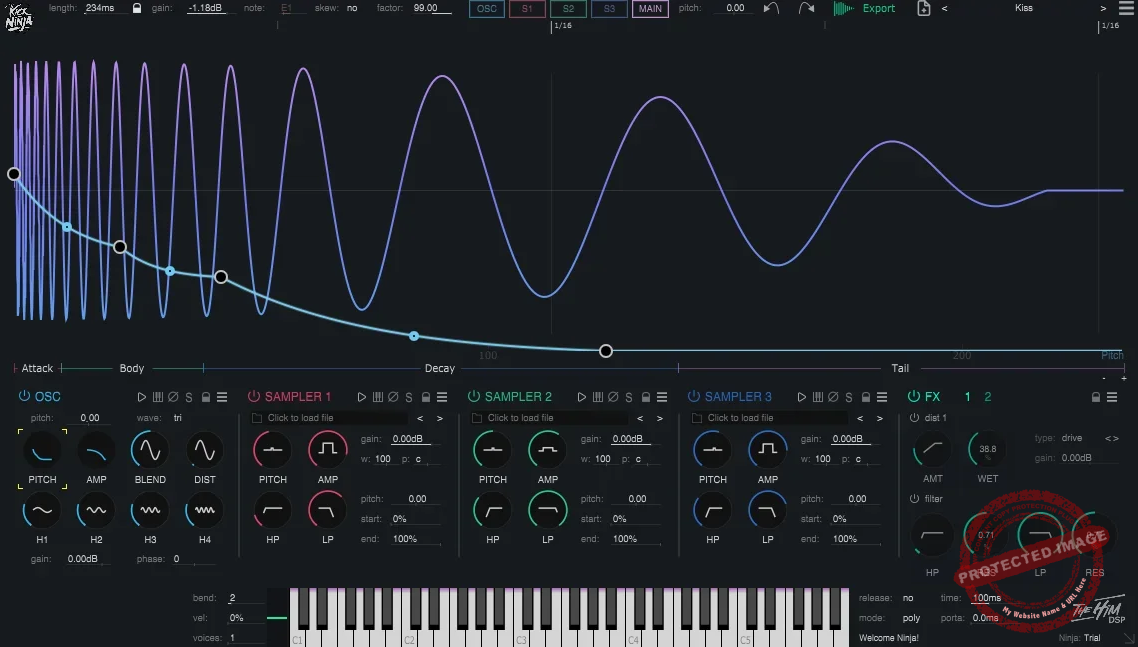
The first AI VST on the list, Kick Ninja 2 is a full-on kick drum sculpting powerhouse.
Whether I’m tweaking an 808, designing punchy EDM kicks, or layering acoustic and electronic elements, this thing puts every detail under your control.
I was really impressed by the oscillator section, which blends a pure sine wave with selectable waveforms and a harmonic oscillator for added richness. On top of that, 28 sample-accurate envelopes give you extreme precision over pitch, amplitude, distortion, and even subtle dynamic shifts.
- AI-Powered Sample Import
What sets Kick Ninja apart for me is its AI-powered import feature, just drop in any kick sample, and it instantly analyzes and rebuilds it with tunable pitch and amp curves. That means you can recreate, enhance, or completely transform your favorite kicks without losing their core vibe.
- Phase Locking & Time Skew
You can keep the low end consistent and punchy by locking the phase of the tail while editing the attack. The time skew feature helps zoom in on the crucial parts of your kick for ultra-precise shaping.
- Deep Multi-Layer Control
You get 3 additional sample layers for adding attack, texture, or noise, each with its own filter, pitch, and amp envelope controls. That means 4 perfectly synced layers to create custom hybrid kicks that hit exactly how you want.
- Oversampling & FX Section
The two FX sections include 9 types of distortion, a compressor, and a filter, all oversampled for pristine quality.
I also liked the preset library covers everything from EDM thumps to analog 808s, but once you start tweaking, it feels like you’re designing your own signature drum sound from scratch.
Kick Ninja 2 comes in VST3, AU, and AAX formats for macOS and Windows.
2. Waves Clarity Vx DeReverb
| Plugin | Waves Clarity Vx DeReverb |
|---|---|
| Description | Real-time vocal de-reverb that reduces room reflections with minimal controls |
| Award | Best One-Knob Fix |
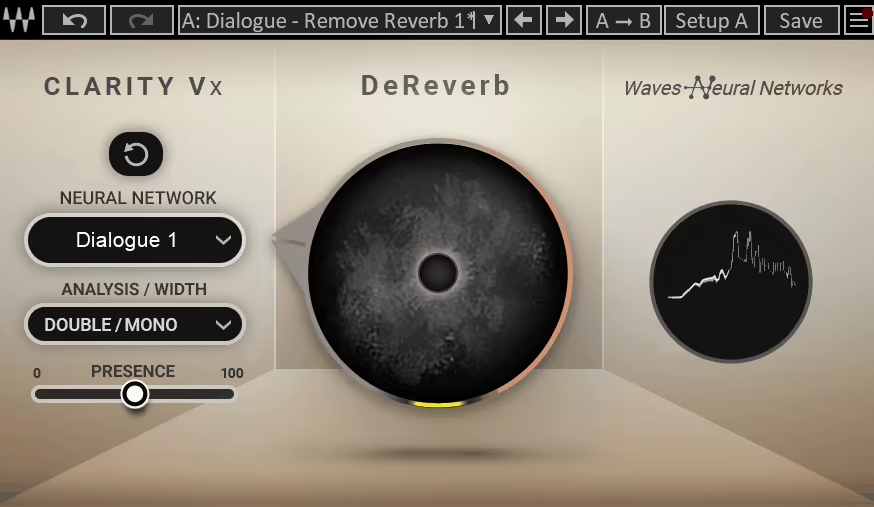
Dealing with unwanted reverb on vocals used to be a tedious process, but Clarity Vx DeReverb flips the script completely.
Instead of wrestling with EQ, gates, and multi-step processing, this VST AI isolates the voice from reverb in real time with a single knob. So, it lifts the need for complex setups or trial-and-error tweaking; just dial it in and hear the magic happen.
Whether I was working with vocals recorded in a bad room or dialogue filled with reflections, Clarity Vx DeReverb made it sound like I had a pro studio setup all along.
- One-Knob Simplicity
No deep menus, no overwhelming controls, just turn the knob and watch the reverb disappear.
- Real-Time Processing
The instant response makes it perfect for live streaming, broadcasting, or podcasting, not just post-production.
- AI-Powered Voice Separation
The Neural Network processing intelligently isolates the dry vocal, without artifacts or weird phasing issues.
- Broad & ECO Modes
When I need super-clean results, the Broad mode is my go-to, as it takes the cleaning to another level. But when I want less CPU load, the ECO mode keeps performance smooth while still reducing reverb.
The only downside is that it can be CPU-heavy, especially if you’re running multiple instances or the Broad mode. But considering how much time and frustration it saves, that’s a small price to pay.
If you’re a music producer, voiceover artist, podcaster, or sound designer, this plugin is a game-changer.
Clarity Vx DeReverb is available in VST, AU, and AAX formats for macOS and Windows.
3. LANDR Mastering Plugin PRO

| Plugin | LANDR Mastering Plugin PRO |
|---|---|
| Description | AI mastering inside your DAW with quick profiles and adjustable final controls |
| Award | Best for Beginners |
Mastering used to feel like a high-stakes guessing game, but LANDR Mastering Plugin PRO makes it simple, fast, and shockingly effective.
Instead of bouncing tracks and uploading them for processing, this AI VST brings LANDR’s signature mastering tech directly into your DAW, cutting out the middleman and giving you instant results. Unlike generic presets, here the AI analyzes your track and tailors a mastering chain specifically for it.
EQ balancing, compression, or stereo enhancement… The AI plugin does the heavy lifting, but you still have full control over the final adjustments.
- AI-Powered Mastering Engine
LANDR listens to your track and automatically applies the best processing. It creates special adjustments depending on the mix.
- Instant Previews & Real-Time Adjustments
With the instant previews and real-time adjustments, you can hear exactly how your tweaks affect the final sound without re-rendering.
- Customizable Sound Shaping
What I like most here is that I can choose between Warm, Balanced, and Open profiles, then fine-tune with EQ, compression, stereo width, and loudness controls, giving me more mastering options.
- Seamless DAW Integration
Another strong point is that the VST works without exporting, uploading, or waiting, as it’s all done inside your session, making revisions a breeze.
If you’ve ever struggled with getting that “final polish” on your mix, one of the most popular and best AI plugins, LANDR Mastering Plugin PRO, is like having a personal mastering assistant on standby and one that never gets tired.
LANDR Mastering Plugin PRO is available in VST3, AU, and AAX formats for macOS and Windows.
4. Baby Audio TAIP
| Plugin | Baby Audio TAIP |
|---|---|
| Description | AI-modeled tape emulation with Drive, Dual mode, frequency shaping, and Wear for wow/flutter |
| Award | Most Versatile |
TAIP brings real analog tape, the warmth, the saturation, the slight imperfections that give tracks character into the digital realm, but with a fresh, modern approach in AI form.
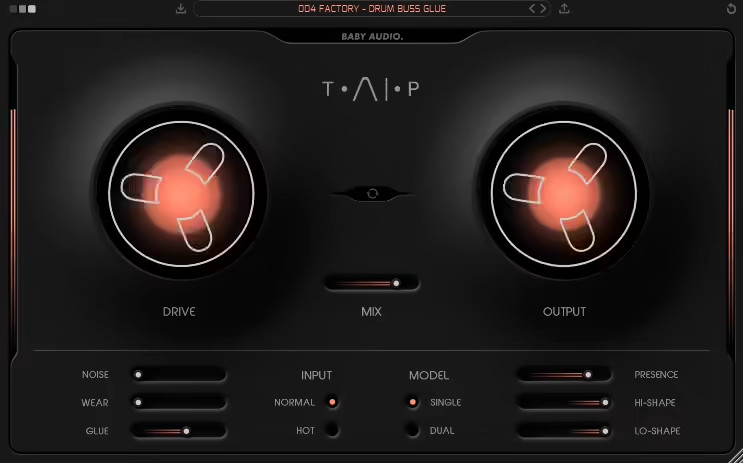
TAIP by Baby Audio hooked me from the moment I pushed the Drive knob. When I wanted a subtle saturation to warm up a vocal or full-on tape distortion to smash a drum bus, TAIP handled it effortlessly.
The Lo-Shape and Hi-Shape controls are great in my experience, letting me target specific frequency ranges for precise saturation control. This VST AI is ideal for thickening bass lines or adding shimmer to synths and vocals without muddying the mix.
- AI-Powered Tape Emulation
TAIP does not rely on traditional DSP; instead, it uses AI modeling to recreate the unique sonic characteristics of analog tape. This advanced approach results in a more natural and dynamic sound, making it stand out from many other tape emulation plugins.
- Drive & Dual Mode
The Drive control allows users to shape their sound by adding anything from subtle warmth to aggressive tape-style distortion. Additionally, Dual Mode applies two layers of tape processing, creating an extra-thick, cohesive sound that enhances depth and glue in the mix.
- Tape Compression & Saturation Control
The Glue feature replicates the natural compression effect of analog tape, helping elements sit together smoothly. The Lo-Shape and Hi-Shape controls provide precise saturation adjustments to different parts of the frequency spectrum, ensuring the perfect balance of warmth and clarity.
- Mix & Wear for Tape Flanging
The Mix knob enables parallel processing, allowing users to blend the dry and processed signals for the ideal tape character. The Wear control introduces wow, flutter, and pitch inconsistencies, accurately emulating the behavior of aging tape and enabling classic tape-flanging effects.
- Auto-Gain
TAIP includes an Auto-Gain function that automatically adjusts the output level, maintaining a consistent volume as users tweak the saturation and drive settings. This ensures a seamless workflow without constant gain adjustments.
I enjoyed trying out TAIP as it gave me subtle saturation or extreme tape warping, bringing analog soul into the digital workflow.
TAIP is available in VST, VST3, AU, and AAX formats for macOS and Windows.
5. Supertone CLEAR
| Plugin | Supertone CLEAR |
|---|---|
| Description | AI voice cleanup that separates voice, ambience, and reverb for precise de-noise and de-reverb control |
| Award | Best for Professionals |
Ever had a great take ruined by background noise or excessive reverb? CLEAR makes that problem disappear, literally.
This AI-powered de-noise and de-reverb plugin CLEAR gives you surgical control over your audio, helping you achieve pristine voice clarity with minimal effort.
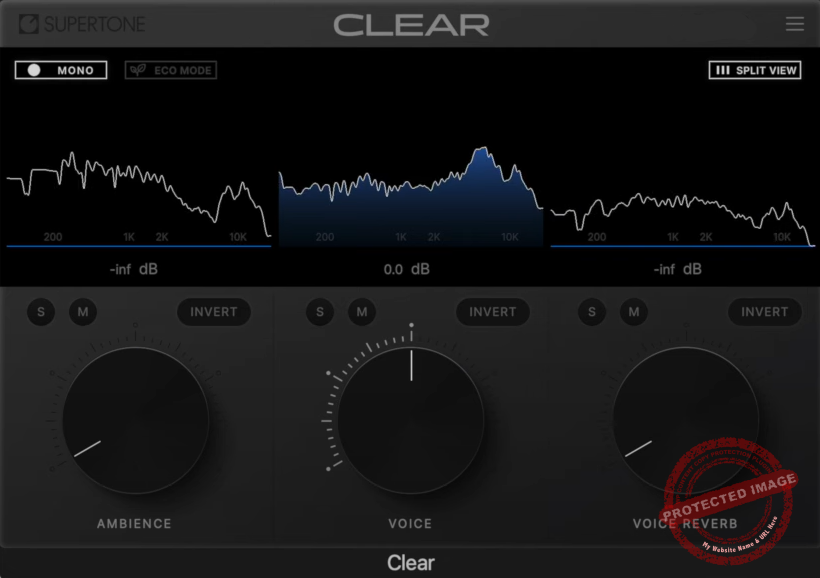
With the 3-channel interface, which separates ambiance, voice, and reverb into distinct layers, CLEAR allows you to dial in exactly how much environment you want to keep or completely isolate vocals without losing their natural tone.
- Best-in-Class De-Noise & De-Reverb Performance
Advanced AI separation technology removes unwanted background noise and room reflections without introducing unnatural artifacts.
- 3-Channel Control for Full Customization
I like that you can adjust ambiance, voice, and reverb levels independently, allowing for precise vocal enhancement tailored to your needs.
- Real-Time & Offline Processing
I think the use of versatility is important here, too as you can use it while recording, streaming, or in post-production to instantly clean up dialogue, podcasts, vocals, and voiceovers.
I think this is one of the most straightforward AI VST plugins out there for mixing music, editing a podcast, or broadcasting live, and think it’s a handy tool for professional-grade audio clarity.
Supertone CLEAR is available in VST, VST3, AU, and AAX formats for macOS and Windows.
6. Session Loops DrumNet
| Plugin | Session Loops DrumNet |
|---|---|
| Description | AI-driven drum sample generation with deep resampling, kit creation, and a built-in step sequencer |
| Award | Best for Creativity |
Drum programming can sometimes feel like a repetitive chore, but DrumNet makes it an inspiring, creative process.
This AI VST plugin generates unique drum samples on demand, giving you fresh, original sounds with every session, instead of sifting through endless drum libraries.
- AI-Powered Infinite Sample Generation
DrumNet uses Deep Resampling technology, which is the heart of this AI VST for me, to create an endless variety of drum samples, giving you fresh and original sounds every time you generate new kits.
- Customizable Sample Import
You can import your own samples and let DrumNet create unlimited variations, ensuring that your drum sound stays unique while retaining your personal style.
- Built-In 32-Step Sequencer
The intuitive sequencer allows you to shape your rhythms with velocity, swing, and note repeat controls, making it easy to create human-like grooves with depth and character.
- Genre-Based Presets for Instant Inspiration
With 200 factory presets covering genres like Hip-Hop, House, R&B, and Disco, you can quickly find a starting point and tweak it to fit your track.
What I love most about DrumNet is that it makes drum programming feel fresh every time. The AI-driven approach ensures that you’re never stuck using the same static loops, and the user-friendly interface keeps things simple while still offering deep customization.
My only wish is for more real-time effects for sound shaping, but even without them, the sample generation capabilities make this an incredibly powerful tool.
DrumNet is available in AU and VST3 formats for macOS and Windows.
7. iZotope Neoverb

| Plugin | iZotope Neoverb |
|---|---|
| Description | AI-assisted reverb that helps you build a clean space fast, with blendable reverb types and unmasking |
| Award | Best Value |
If you want a decent reverb to bring life to a mix without completely overwhelming it, Neoverb VST AI plugin can always find the perfect balance with the AI.
I really like how Neoverb simplifies complex reverb processing while still offering deep control for those who want to fine-tune their sound. The intuitive interface makes it easy to create space and depth without overcomplicating your workflow.
- AI-Powered Reverb Assistant
For my workflow, the Reverb Assistant is a lifesaver. Instead of manually adjusting decay, reflections, and EQ, it guides you through a few simple steps, setting up a polished reverb in seconds.
Neoverb’s Reverb Assistant listens to your track and helps you dial in the perfect reverb settings without endless trial and error.
- Blend Pad for Custom Reverb Spaces
You can mix between Reflections, Chamber, and Plate reverb in real time, allowing you to sculpt your own unique reverb character.
- Intelligent Unmasking for a Clean Mix
The Unmasking feature analyzes your mix and removes clashing frequencies, ensuring that your reverb enhances rather than muddies the sound.
- Advanced Pre and Post EQ
The built-in Pre-EQ and Auto Cut clean up unwanted frequencies before they hit the reverb, while Post-EQ shaping keeps your tail smooth and controlled.
- Modulation for Lush, Evolving Tails
The Mod Pad adds movement to the reverb, introducing subtle pitch shifts and randomized variations to make the tail sound more organic.
Whether you’re working on vocals, instruments, or entire mixes, this quickly became one of my go-to AI reverb plugins.
Neoverb is available in VST2, VST3, AU, and AAX formats for macOS and Windows.
8. sonible pure:limit
| Plugin | sonible pure:limit |
|---|---|
| Description | AI-guided limiter that auto-sets parameters for loudness while keeping dynamics under control |
| Award | Best for Quick Results |
Limiting can be tricky, cause when you push too hard, you kill dynamics; when you go too soft, your mix lacks punch. Come in pure:limit, delivering AI-powered, genre-tailored limiting!
I love pure:limit as it makes your track loud, clear, and well-balanced with minimal effort. With this AI VST plugin, you don’t need to manually tweak the attack, release, or threshold, as it’s all handled intelligently, letting you focus on creativity.
- AI-Powered, Automatic Limiting
For me, the highlight here is the automatic parametrization, which analyzes your audio in real time and applies the ideal limiting settings. Pure:limit automatically adjusts parameters to preserve dynamics while achieving professional loudness.
- Genre-Based Profiles
Whether you’re working with soulful vocals, aggressive bass, or smooth podcast voices, this plugin adapts to different styles for optimal results.
- Style Selector for Custom Loudness Control
I appreciate they put the choices like Hard, Neutral, or Soft limiting, deciding on how aggressively you want the limiter to shape your sound.
- Inflate Parameter for Extra Depth & Warmth
When I need a richer, fuller mix, the inflate control adds depth and vibrancy, making the tracks sound more dynamic and engaging.
- Clean & Intuitive Interface
The real-time visualizer shows you exactly how the limiter is working, ensuring both beginners and professionals can dial in the perfect sound with ease.
With pure:limit, achieving polished, release-ready loudness is as simple as pressing a button, which is great for beginners and fast workflows.
sonible pure:limit is available in VST, VST3, AU, and AAX formats for macOS and Windows.
9. Algonaut Atlas 2
| Plugin | Algonaut Atlas 2 |
|---|---|
| Short Description | AI sample mapping tool that visually organizes drum libraries and builds kits with a built-in sequencer. |
| Award | Best for Organization |
Digging through sample folders looking for the right drum sounds can kill creativity fast. Atlas 2 fixes that with an AI-powered system that maps your samples into a visual, interactive grid.
This AI plugin saves so much time in my workflow, as instead of scrolling through endless files, I can see my sounds laid out like a topographical map, making it ridiculously easy to find and mix the perfect drum hits.
- AI-Powered Sample Mapping
One of my favorite things about this plugin is how intuitive the AI-based sample organization is. You can zoom in and out of different clusters of similar sounds, instantly discovering kicks, snares, and percussion that match your groove.
The plugin analyzes and categorizes your entire drum library, grouping similar sounds together visually, so you can find the perfect sample in seconds instead of minutes.
- Built-In Drum Kit & Sequencer
You can build custom kits from your mapped samples and program beats directly inside Atlas 2, using velocity control, swing, and step sequencing to add groove and variation.
- Deep Editing & FX Control
Atlas 2 lets you tweak pitch, decay, filtering, and other sound parameters to fine-tune your drum sounds. You can even add effects to sculpt your kits in real-time.
- Drag-and-Drop Workflow
Whether you want to export individual sounds, full kits, or MIDI sequences, Atlas 2 makes it seamless to drop elements straight into your DAW for further processing.
- Customizable Layout & Hardware Integration
You can adjust the pad layout to match any MIDI controller, whether you’re using a Launchpad, Maschine, or MPC-style workflow.
The AI-generated sample maps are shockingly good at surfacing hidden gems in your library, but if you need more control, you can create multiple maps to suit different projects or genres.
Atlas 2 is available in VST, VST3, AAX and AU formats for macOS and Windows.
10. VOCALOID6
| Plugin | VOCALOID6 |
|---|---|
| Description | AI vocal synthesis platform for expressive sung performances with strong editing and multilingual support |
| Award | Best for Advanced Users |
I’ll be honest, before trying VOCALOID6, I was skeptical. Could a vocal synthesizer really deliver natural, expressive singing that feels lifelike? Turns out, with this AI, the answer is yes.
VOCALOID6 isn’t just text-to-speech on steroids; it’s a fully-fledged virtual vocalist that can sing with emotion, dynamic phrasing, and even subtle nuances that used to be exclusive to human singers.
The main reason this AI mixing plugin got in to the list is that it does not create any weird transitions or robotic glitches; just fluid, natural-sounding vocals. If you’re working on global productions, this feature alone makes it worth checking out.
- VOCALOID:AI for Realistic Expression
Unlike older versions that sometimes felt stiff, this update breathes life into synthetic vocals with improved vibrato, phrasing, and articulation.
One of the reasons I was surprised was the seamless multilingual support. Switching between English, Japanese, and Chinese in a single vocal performance?
- Real-Time Editing & Doubling
The ability to tweak accents, rhythmic feel, and vibrato instantly makes refining performances intuitive. Plus, the new doubling feature lets you create harmonies effortlessly.
- Vocalo Changer for Personalization
You can import real vocals and have VOCALOID6 mimic your singing style, opening up wild creative possibilities for vocal processing and layering.
- ARA2 & MIDI Export for Better Workflow
Integration with DAWs is now smoother, with MIDI export and real-time syncing, making it easy to build polished vocal arrangements.
Whether you’re crafting lead vocals, harmonies, or robotic vocal textures, VOCALOID6 is a creative powerhouse that pushes the boundaries of vocal synthesis.
VOCALOID6 is available in VST3 and AU formats for macOS and Windows.
11. Antares Vocal Reverb
| Plugin | Antares Vocal Reverb |
|---|---|
| Description | Vocal-focused reverb with AI-assisted suggestions and fast controls for depth without burying clarity |
| Award | Best for Vocals |
Getting vocals to sit perfectly in the mix often comes down to reverb, and Antares Vocal Reverb makes that process surprisingly effortless with the AI assistant.
Antares Vocal Reverb is designed specifically for vocals, meaning every algorithm is fine-tuned to enhance clarity, depth, and presence without muddying up the mix.
I think the intelligent AI-assisted processing is the star here, which analyzes your vocal track and suggests reverb styles that fit its tone and character. Instead of endlessly tweaking, you can choose from vintage plates, modern halls, tight rooms, or even cosmic reverbs with just a few clicks.
While this AI mixing plugin is great for vocals, I found that it also works pretty well on instruments and synths. The reverse gate, compression, and extremely long-decay options give it massive creative potential, making it way more than just a standard reverb.
- AI-Driven Reverb Selection
The built-in assistant analyzes your vocal track and recommends reverb styles that best suit its tone and characteristics. I love this feature eliminates the guesswork and speeds up the mixing process.
- Vocal-Specific Presets & Controls
The plugin offers a range of presets tailored for different vocal applications, including lead vocals, harmonies, and spoken word. With intuitive controls for pre-delay, decay, and tone shaping, it ensures that the reverb enhances rather than overwhelms your vocals.
- Creative Sound Design Features
Another feature I liked is the additional effects section, like built-in delay, pitch shifting, and EQ sculpting. These tools make it easy to thicken vocal textures, create lush ambient effects, or even design unique synth-like pads.
- Super Intuitive Interface
In my opinion, the user interface is clean, well-organized, and easy to navigate, making it quick and simple to adjust settings. Whether you’re an experienced producer or a beginner, the layout ensures a frustration-free workflow.
If you’re looking for a vocal reverb that’s both easy to use and deeply flexible, Antares Vocal Reverb is the right AI tool for you.
Antares Vocal Reverb is available in VST, AU, and AAX formats for macOS and Windows.
Bonus:
Orb Plugins Orb Producer Suite 3
| Plugin | Orb Producer Suite 3 |
|---|---|
| Description | AI composition suite that generates chords, melodies, basslines, and arps with controllable rhythm and harmony |
| Award | Best Free |
You know that feeling when you’re staring at a blank DAW session, waiting for inspiration to strike? Orb Producer Suite 3 takes that pressure off by acting like a creative AI collaborator.
By that, I mean generating melodies, chords, basslines, and arpeggios that feel natural and inspiring. For quick chord progression or a complex polyrhythmic bassline, this suite delivers ideas that sound human, not robotic.
- 4 AI-Powered Plugins
With Orb Chords, Orb Melody, Orb Bass, and Orb Arpeggio, the suite generates harmonically rich patterns while adapting to your creative direction. It’s like having an extra producer in the room who actually knows music theory.
- Polyrhythm Engine for Complex Grooves
Forget basic loops, this feature introduces organic variations that make patterns feel alive. You can tweak harmonic density, note range, and rhythm variations to match your vibe.
What’s crazy for me is how much control you get with Orb Suite 3. The polyrhythm engine lets you push beyond static loops, crafting dynamic rhythms that evolve naturally.
- Wavetable Synth for Instant Inspiration
The built-in synth engine comes loaded with polished presets, so you’re not just working with MIDI; you get instant playable sounds that spark creativity.
- AI-Assisted Workflow
If you ever feel stuck, Orb Producer suggests intelligent progressions and melodies, helping you break creative blocks while keeping full control over the final result.
I especially loved the block chaining feature, which lets you link ideas together into a full song in minutes. It’s a game-changer for sketching out arrangements fast without feeling like the AI is taking over.
Orb Producer Suite 3 is available in VST3 and AU formats for macOS and Windows.
Do AI plugins replace mixing/mastering engineers?
Not really. They replace some repetitive tasks (cleanup, leveling, quick loudness) and help non-engineers get closer to “presentable” results fast. But engineers still win on decisions like arrangement, tone intent, depth, automation, and knowing when not to process. Think: AI = good helper, human = final judgment.
How do I avoid over-processing with AI mixing tools?
A simple rule: dial it until it sounds better, then back off 10–20%.
- Use mix/blend controls whenever possible.
- A/B at matched loudness (level-match output).
- If the vocal starts sounding “too isolated,” or the reverb tail gets weird, you’ve gone too far.
- Print a version and take a 5-minute break, over-processing is easiest to hear after a reset.
What should I prioritize first: AI cleanup, AI mixing, or AI mastering?
Start with cleanup, then mixing, then mastering:
- Cleanup (de-noise/de-reverb) so you’re not EQ’ing problems forever
- Balance (levels + basic tone) so the mix feels right
- Mastering last, for loudness/finishing—not fixing mix issues
If you do mastering first, you’ll usually end up fighting the chain instead of improving the track.
Last Words
These are some of the most popular and best AI plugins for producers who want faster results without sacrificing control.
- If your priority is cleaner vocals, start with Clarity Vx DeReverb or Supertone CLEAR.
- For quick mastering, LANDR Mastering Plugin PRO and sonible pure:limit get you to release-ready loudness fast.
- Need fresh drums or tighter low-end? Kick Ninja 2, DrumNet, and Atlas 2 cover everything from kick design to sample discovery. F
- For color, Baby Audio TAIP adds analog-style tape saturation in seconds.
Pick the tools that solve your biggest bottleneck first; that’s where AI plugins make the biggest difference!
