
The more experience you gain as a music producer, the more you realize how important the low end is, and I cannot stress or emphasize it enough. Using some of these best 808 bass plugins can truly elevate your low-end game!
Bass carries the entire track on its shoulders, both sonically and musically. Whenever you listen to an unturned bass on the track, something feels so off about it.
On the other hand, there are some songs with just a single bass note throughout the track, but it still sounds earth-shaking and cool.
Mastering the low end is so tricky, and that’s why I have some tools that I find reliable whenever programming or producing music. I have curated a list of the best 808 plugins, plugins for synth bass, and other low-end instruments you could use in your productions that I am sharing with you here!
| Plugin | Type | Best For | Strength |
|---|---|---|---|
| AIR Sub Factory | Bass synth (wavetable + sampler) | Custom 808s + layered bass design | Versatile engine, deep modulation |
| Moog Mariana | Analog-style bass synth | Cinematic subs, trap/hip-hop, modern bass | Huge low end, Moog filters, modulation depth |
| u-he Diva | Virtual analog synth | Warm analog basslines | Authentic analog tone, classic filters |
| Softube Monoment Bass | Bass synth (hardware-sampled waves) | Quick modern 808 basslines | Fast workflow, bass-safe FX |
| Initial Audio 808 Studio 2 | 808 instrument | Punchy 808s with minimal setup | Easy workflow, built-in FX + sequencer |
| Waves Submarine | Subharmonic generator | Adding subs to existing bass/kick | Very fast results, dual sub generators |
| SubLab XL | 808/bass instrument | Modern 808 production | Mix-ready engine, modular FX, macros |
| SoundFingers BassTone X | Hybrid instrument (bass guitar + sub synth) | Realistic bass + sub layering | Sample realism + synth power |
| Loopmasters Bass Master | Sample-based bass synth | Preset-driven bass writing | Lots of waveforms, strong filters |
| Xfer Records Serum | Wavetable synth | Modern digital bass & sound design | Extreme flexibility, big ecosystem |
| G-Sonique Swede Trap Bass | Trap/808 instrument | Trap bass/808 glide sounds | Punchy tone, built-in distortion |

1. AIR Sub Factory
| Plugin | AIR Sub Factory |
|---|---|
| Description | Dual wavetable + sampler bass instrument built for subs and 808s, with deep modulation and a clean interface |
| Award | Most Versatile |
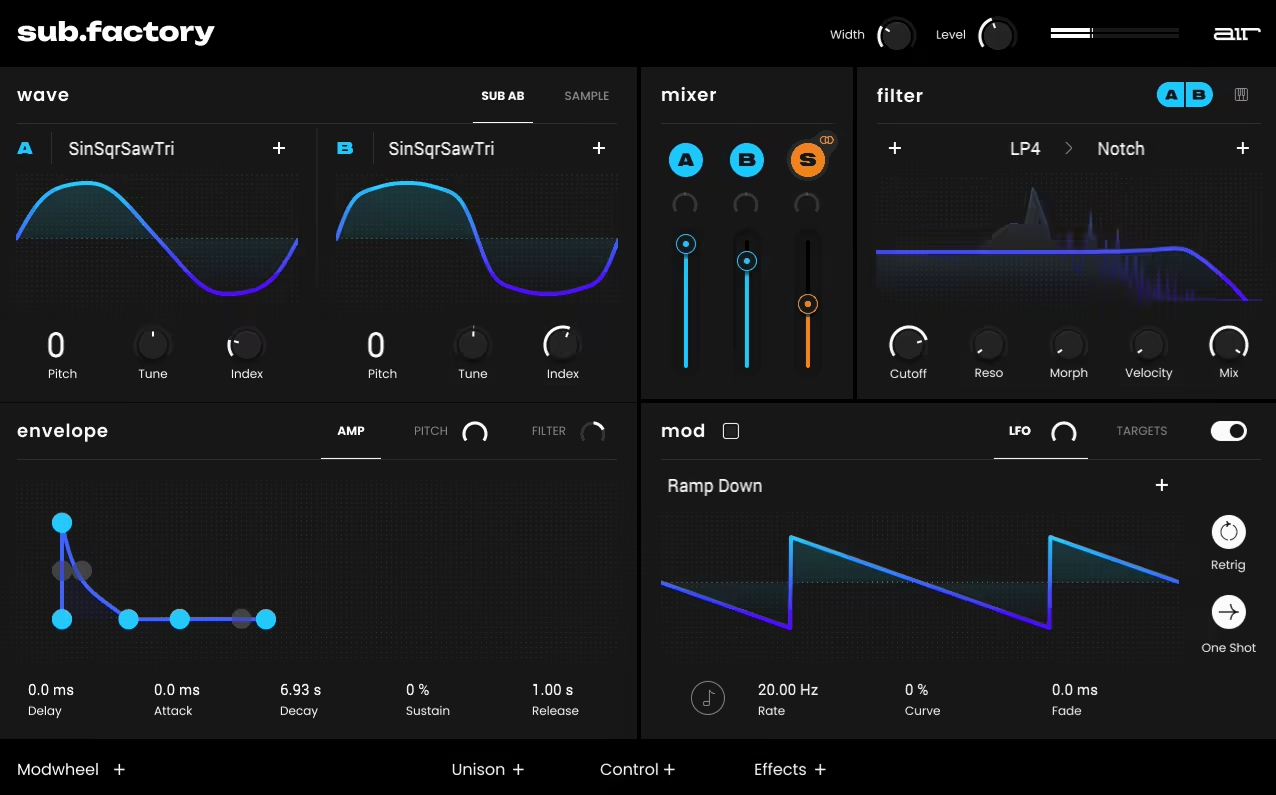
Sub Factory 808 VST plugin combines modern wavetable synthesis with classic sampling techniques and focuses mainly on subs, 808s, and other similar bass sounds.
In the dual wavetable engines, Sub Factory has hundreds of waves to choose from, everything from buttery analog to razor-sharp digital.
If you’re into tweaking sounds, each wavetable has 127 index points, so you can precisely shape the low frequencies. There’s also a sample-based engine that adds even more flexibility. Think kick drums, 808 loops, one-shots, noise layers, and FX.
I’ve had a blast layering these with the wavetables to create basses that feel super unique. Its ability to tweak sample start points, pitch, and filtering just takes it up another level.
- Complete Sound Design Machine
Every track I work on needs a different kind of bass vibe. Sometimes, it’s a deep, clean sub; other times, I want something gritty and aggressive. Sub Factory has the potential to deliver both. Its filters are killer, as you can layer and morph them to create rich resonances.
Its envelope controls (amp, pitch, and filter) let you fine-tune the attack and decay. Additionally, there’s an envelope, an LFO, and a filter control, along with a very flexible and hands-on filter. There’s also a modulation matrix window that lets you do in-depth modulations.
- Modulation & Effects
The modulation section is intuitive but deep, and you can use its LFOs to add subtle movement to basslines or create evolving textures.
You can also add effects like Drive and Ring Modulation, which can add so much more character to your sounds. A little grit goes a long way, and the ring mod can make things sound wild (in a good way).
- Presets & Limitations
Sub Factory has a ton of presets that cover everything from classic 808s to futuristic, experimental bass sounds.
You can consider this synth bass plugin like a mini Serum, except that it’s monophonic. At least I haven’t heard any polyphonic preset or sound in the plugin, which works well for bass sounds but restricts its use to just bass.
AIR Sub Factory is available in AAX, VST 2/3, and AU plugin formats and is compatible with macOS 12 Monterey – macOS 14 Sonoma and Windows 10 and later operating systems.
2. Moog Mariana
| Plugin | Moog Mariana |
|---|---|
| Description | Dual-layer Moog bass synth with massive low-end weight, filter morphing, deep modulation, and built-in saturation/compression |
| Award | Best for Advanced Users |
Right out of the gate, Mariana’s low end is insane. Moog has clearly built this plugin with bass in mind, and it delivers that signature analog warmth and depth while still feeling fresh and modern.
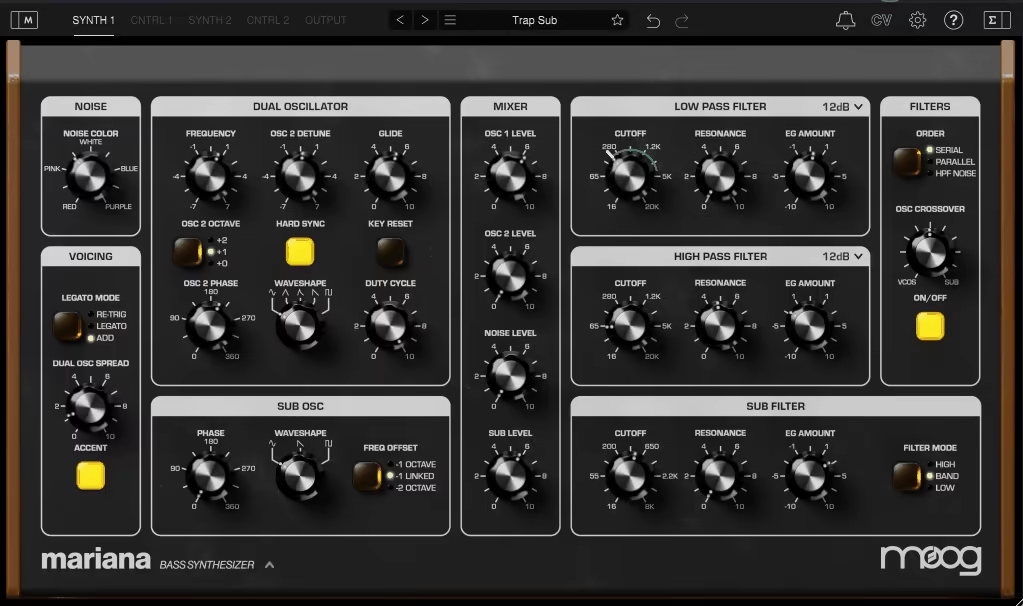
I think what makes this bass VST special is the dual-layer engine. Each layer is essentially its own synth, featuring two oscillators (with options for analog, digital, and hybrid tones) and one sub-oscillator to anchor the low end with serious weight.
You can layer complementary tones like a clean sine wave for the sub and a harmonically rich saw wave for texture or go completely experimental with duo phonic patches.
Every layer has its own set of controls, so you’re not locked into working in parallel. You can filter one aggressively, keep the other wide open, or even use Mariana’s crossover filtering to balance stereo width while maintaining mono integrity in the subfrequencies.
- Deep Modulation Options
One of the things I was most impressed by is Mariana’s modulation system. It’s incredibly deep, but Moog has managed to make it intuitive. Each sound includes three LFOs, three envelopes (amp, filter, and pitch, with custom routing options), and two random generators for adding organic, unpredictable motion.
The modulation matrix editor is where it all comes together. Mariana also supports MIDI Polyphonic Expression (MPE), which makes it insanely responsive.
- Built-In Effects
Mariana’s built-in saturation options (tube, tape, and overdrive) add harmonic richness to any patch. I’ve found myself dialing in a touch of tube saturation for warmth or cranking the overdrive for aggressive, distorted basslines.
Its compressor is not just there to glue layers together; it also helps shape transients to make basslines punch through the mix without overwhelming it.
The delay and chorus effects are also a great touch, especially since they can be applied independently to each layer. I’ve used the chorus to subtly widen midrange elements while keeping the bass frequencies tight and focused.
- Filters That Define Character
Moog’s filters have always been legendary, and Mariana keeps that legacy alive. There are two resonant filters per layer and an additional one dedicated to the sub-oscillator. These filters are endlessly tweakable and bring a distinct character to the sound, so I will give you an example of how I’ve been using them.
So, for example, if I want something growling or distorted, I crank up the resonance on the primary layer filter, sweep it slowly, and let Mariana’s modulation matrix handle subtle movement over time. For a deep, cinematic sub, I’ll keep the sub-oscillator filter clean, rolling off any unnecessary highs to ensure the low-end stays focused.
- Filter Morphing
I also like the filter morphing feature that allows you to blend two filter types in real time, creating evolving timbres that feel alive in a mix.
Another aspect that impressed me greatly was the compatibility of the virtual CV. Pairing Mariana with Moog’s other plugins, like the Moogerfooger Effects, opens up modular-style routing inside the DAW. This ecosystem makes Mariana feel like part of a much larger toolset rather than just a standalone synth.
As one of the advanced bass plugins, I would use this one for producing trap, hip-hop, cinematic sound bass/sub-bass design and experimental electronic tracks.
Moog Mariana is available in AAX, VST, and AU plugin formats and is compatible with macOS 11.7 or newer, Windows 10 and later, and iPadOS 14.4 or newer operating systems.
3. u-he Diva
| Plugin | u-he Diva |
|---|---|
| Description | Classic virtual-analog synth known for authentic oscillators and filters, great for warm, punchy analog bass design. |
| Award | Best for Analog Bass |
If you’ve ever explored virtual analog synthesis, you’ve probably heard of U-He Diva. It’s widely celebrated for its incredible analog emulation, and while it excels across the board, I’ve found it to be a great alternative for bass sound design, too, especially for analog bass sounds.
Diva by u-He is capable of delivering everything from vintage warmth, gritty growls, or thick, modern tones for richness and depth that’s hard to beat.
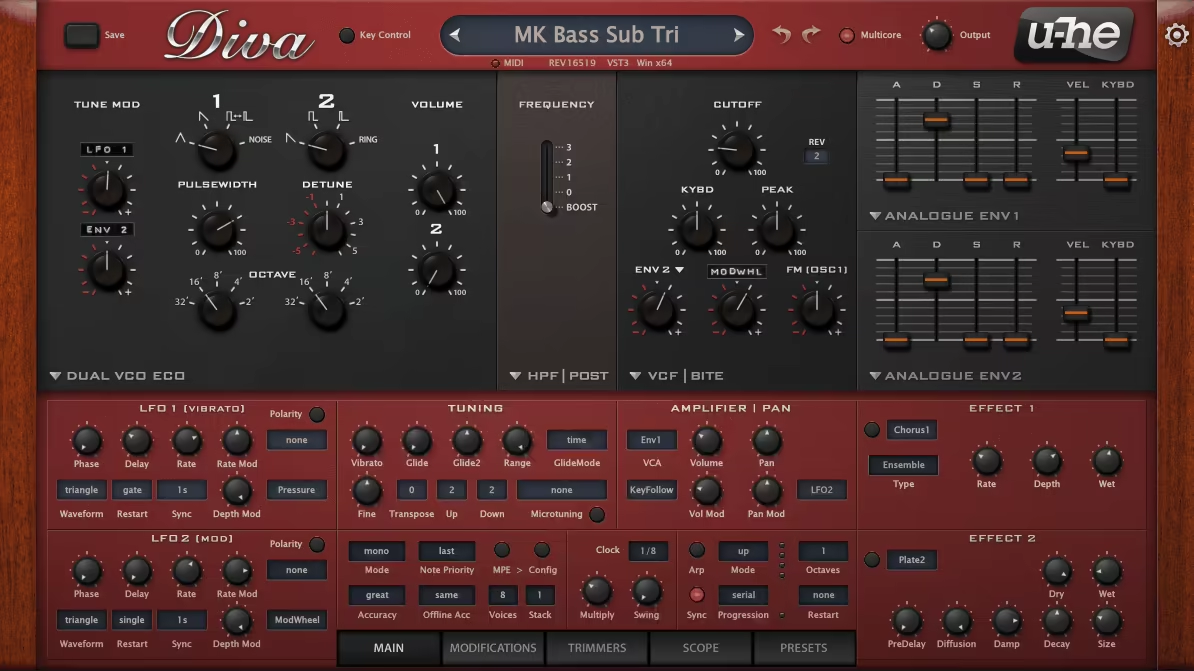
It offers a mix-and-match approach to synthesis, letting you combine oscillators, filters, and envelopes modeled after classics like the Minimoog, Roland Jupiter-8, and Korg MS-20.
- Right Oscillators
For bass, I usually gravitate towards the Triple VCO oscillator module, which gives me a huge, harmonically rich starting point. Paired with the Ladder filter, the results are pure analog goodness: smooth, fat, and warm.
The plugin’s oscillators give you great potential for diverse and high-quality bass production. I like to stick with waveforms that pack a punch in the low frequencies, like sine and triangle waves for clean, deep subs, sawtooth waves for aggressive, textured basslines, and pulse waves with adjustable width for more movement and bite.
- Perfect Filters
In my experience, Diva’s filters are the heart of its sound, and they’re stunningly authentic. Its Ladder filter (based on the Minimoog) is my go-to, as it’s perfect for creating smooth, rounded low ends with that classic Moog-style resonance.
I also like the MS-20-inspired OTA filter, which is incredible for aggressive, growling basslines, especially when you crank up the resonance.
For more modern sounds, the Multimode filter offers surgical control with low-pass, band-pass, and high-pass options. A cool feature I’ve been leveraging is Diva’s filter drive. Adding just a touch of drive enhances harmonics, making the bass cut through the mix without being overly harsh.
- Modulation for Movement
The modulation capabilities of this plugin are deceptively deep. While its interface stays true to analog simplicity, it offers enough flexibility to craft evolving, dynamic bass patches. Here’s how you can use it. You can modulate filter cutoff or pulse width to add a subtle wobble or groove to a bassline.
You can also use its fast, snappy envelopes, perfect for defining attack and decay, whether I’m going for a plucky bass stab or a long, sustained growl. One of my favorite techniques is routing an LFO to oscillator pitch for slight pitch drift. It mimics the natural instability of analog synths, giving the bass more character.
- Polyphony
Diva also offers multiple voice modes, including unison, which is fantastic for thickening bass patches. Except for the actual bass frequencies, a trick you can use is to layer the bass with stereo higher frequency content for more impact.
In unison mode, I like to detune the voices slightly and pan them for stereo width while still keeping the fundamental frequencies in mono for a clean, centered low end.
For a rawer, more vintage vibe, the “accurate” and “divine” voice modes simulate the subtle imperfections of analog circuits, adding organic warmth and movement to the sound.
u-he Diva is available in CLAP, AU, VST2/3, and AAX plugin formats and is compatible with Mac OS X 10.10 or later, Windows 7 or newer, or Linux operating systems.
4. Softube Monoment Bass
| Plugin | Softube Monoment Bass |
|---|---|
| Description | Bass synth built around stereo source waves from hardware, with punch shaping, aging, and bass-safe effects |
| Award | Best Fast Workflow |
When it comes to crafting modern 808 basslines, Softube Monoment Bass is one of the most powerful 808 bass VST plugins I’ve come across.
Whether I’m producing club tracks, cinematic soundscapes, or even pop hits, this is one of the best 808 VSTS, as it simplifies the process of building a lively and full-of-character low-end foundation.
- Stereo Waves with Organic Depth
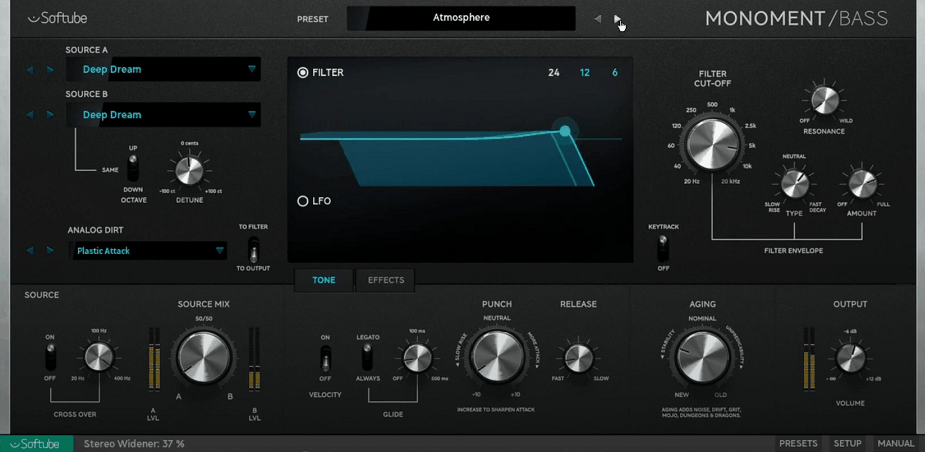
Monoment‘s stereo source waves are recorded from boutique hardware synths and aren’t your typical static waveforms. They’re full of subtle movement and variations that make them feel almost acoustic.
Each note is made from 3 separate recordings, ensuring that no two hits feel exactly the same. This randomness gives your basslines a natural, organic quality that cuts through dense mixes.
I’ve found this especially useful in tracks where I want the bass to feel dynamic without piling on extra effects or automation.
- Simple Yet Powerful Controls
What I love about this plugin is how it balances simplicity with depth. The interface is streamlined, but each control is impactful. It has an aging knob that adds subtle unpredictability to the sound by emulating the imperfections of analog gear.
Then there’s also the Punch Control, which shapes the amp envelope, allowing you to quickly dial in sharp, plucky attacks or smooth, sustained notes.
Next, its filter section offers 3 filter curves and easy envelope control, and the built-in LFO lets you transform static notes into pulsing basslines with minimal effort.
- Comprehensive Effects
Monoment Bass includes a suite of built-in effects designed specifically for bass, saving you the hassle of loading up extra plugins.
These effects aren’t just convenient and are fine-tuned to make your basslines stand out. For example, an effect called Drive can add a strong crunch and harmonic distortion, which is perfect for aggressive or gritty bass sounds.
Also, the 5 spatial algorithms let you add just the right amount of roominess or depth without muddying the low end.
I gotta say the custom-built compressor is also a good addition, as it keeps your bass tight and balanced, ensuring the lows remain even and consistent.
Lastly, you also get a tilt EQ that lets you favor high or low frequencies, while the spatializer controls how the stereo image is handled. You can set the low end to mono and widen the mids and highs, which can sometimes be critical for maintaining clarity in busy mixes.
Softube Monoment Bass is compatible with Monterey 12, Ventura 13, Sonoma 14, and Windows 10 and later operating systems and is available in AAX, VST 3, VST, and AU plugin formats.
5. Initial Audio 808 Studio 2
| Plugin | Initial Audio 808 Studio 2 |
|---|---|
| Description | 808-focused instrument with sample oscillator, sub layer, extra oscillators, modulation tools, and built-in FX |
| Award | Best for Beginners |
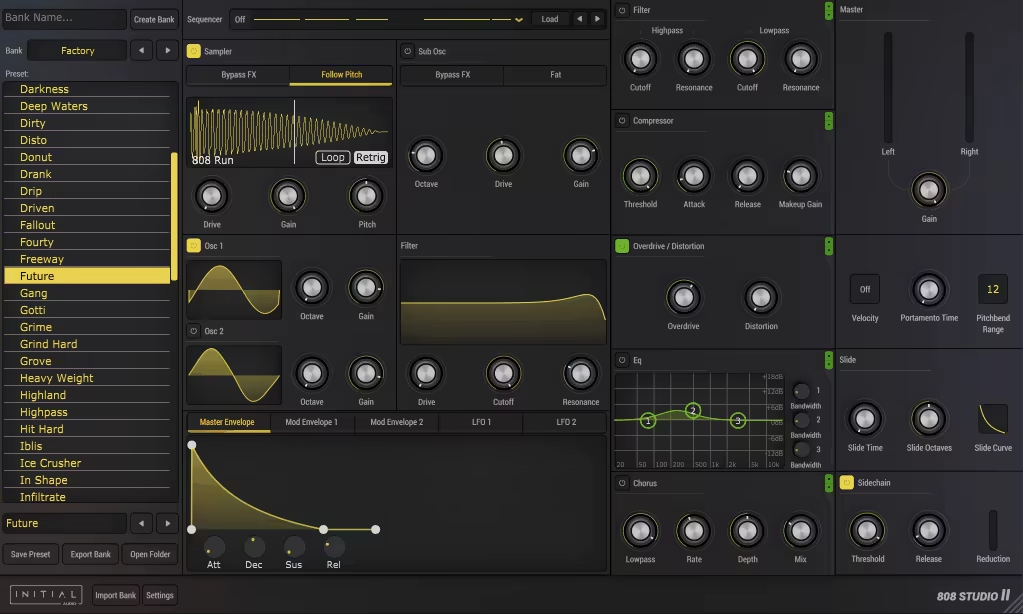
If you want to create hard-hitting, punchy 808s that dominate your mix, 808 Studio 2 delivers everything you need to shape impactful bass sounds while keeping the process intuitive and hassle-free.
At its heart, 808 Studio 2 offers a sample oscillator, letting you drag and drop custom samples or use the included library to craft unique bass textures.
There’s also a sub-oscillator designed for deep, rumbling low-end, featuring “fat mode” and overdrive options for added weight.
These are complemented by two additional oscillators powered by oversampled waveforms to ensure every note is rich with harmonic detail and clarity.
- Modulations
When I tried this 808 plugin, I saw that the strong point here is the 2 modulation envelopes and 2 LFOs, allowing me to assign modulations to nearly any parameter using an intuitive drag-and-drop system.
This makes it easy to add movement and complexity to your basslines. Plus, the plugin also includes a built-in sequencer with pre-made sequences, so you can sketch ideas or build full basslines directly in the synth.
- Effects
To polish my 808s and give them extra character, 808 Studio 2 features an effect rack with 5 essential tools, including a must-needed Overdrive/Distortion effect that adds grit and aggression to your bass.
Further, the Compressor keeps the low end tight and controlled, which is super handy for my workflow. The 3-Band Equalizer of the plugin shapes your bass tone to sit perfectly in the mix.
You can also use the Chorus effect to add subtle width to midrange elements without compromising mono compatibility. It also has a Filter effect that includes high-pass and low-pass modes for precise tonal control, but I gotta admit that’s not one of the strong points of this plugin.
You get a resizable HD interface as well, so the plugin adapts perfectly to your screen size, giving you the freedom to focus on creativity without visual clutter. For beginners, who want to explore the lower bass realms, I think this is one of the best 808 VSTs out there!
Initial Audio 808 Studio 2 is available in AAX, Audio Unit, and VST3/2 plugin formats and is compatible with Windows and Mac operating systems.
6. Waves Submarine
| Plugin | Waves Submarine |
|---|---|
| Description | Subharmonic generator that adds one/two octaves below your source with range control, drive, and dynamics shaping |
| Award | Best for Quick Results |
Submarine can help you add more depth and power to your 808s.
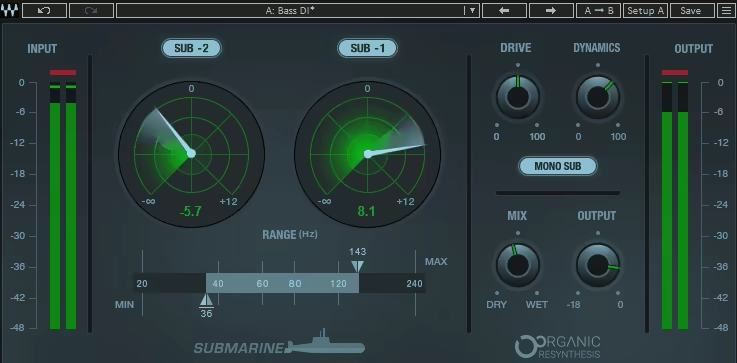
At the heart of Waves Submarine are two subharmonic generators that create frequencies one and two octaves below your source material, which work independently and allow you to mix and match their levels for the perfect balance.
You can toggle each generator on or off and adjust its intensity to craft anything from subtle low-end reinforcement to massive, floor-shaking subs.
- Precise Frequency Range Control
I like the frequency range selector in the plugin, cause it defines the portion of your input signal used to generate subharmonics. This tool ensures that only the desired frequencies are enhanced, avoiding unnecessary muddiness or harmonic clashes.
- Harmonic Enhancement with Drive and Dynamics
To add warmth and cohesion to the generated subs, Submarine includes a Drive control, which introduces subtle harmonic distortion. This feature helps glue the subharmonics to the original sound, ensuring a natural and musical blend. The Dynamics knob adds another layer of control, acting as a compressor for the generated subs.
- Stereo and Mono Flexibility
For tracks with stereo information, Submarine offers a stereo/mono toggle to control how the subharmonics are processed.
Mono subs are ideal for maintaining a focused low end, especially in club tracks or cinematic mixes where clarity is essential. Conversely, stereo subs can be used for creative sound design or to add width to certain elements without compromising the low-end foundation.
- Powered by Organic ReSynthesis Technology
This plugin is based on Waves’ proprietary Organic ReSynthesis engine, which is an advanced technology that breaks down the incoming audio into core components, like pitch, timing, and formants, processes them individually, and then reconstructs the signal with added subharmonics.
Unlike traditional EQ-based sub-generators, this approach results in crystal-clear, phase-accurate low frequencies that retain the musicality and timing of the original sound, making it one of the fastest 808 bass VSTs.
Waves Submarine is available in macOS Monterey 12, Sequoia 15, Ventura 13, Sonoma 14, and Windows 10 and later operating systems and is compatible with DAWs/hosts that support AU, AAX, and VST plugin formats.
7. SubLab XL

| Plugin | SubLab XL |
|---|---|
| Description | Three-layer 808 engine (synth, sample, X-sub) with modular FX, macros, and mix-ready low-end design |
| Award | Best Overall |
Simply, one of the best 808 VST plugins out there. I love SubLab XL for its high-quality sound engines and bass generation. The bass coming out of this plugin is so fresh, deep, and ready to use that most of the time, I don’t even need to add any external effects to mix it.
SubLab XL is essentially based on its three-layer sound engine, which consists of a Synth Layer (featuring a four-waveform oscillator with volume, pitch, and filter modulation), Sample Layer (250 curated drum machine samples, or you can drag and drop your own), and X-Sub Layer (30–65 Hz).
- Beautiful Effects
SubLab XL consists of 4 distinct types (overdrive, tape, bit crusher, and wave shaper) with Drive, Heat, and Gain controls. The Compression effect in the plugin includes standard controls like threshold, ratio, gain, and release, with a sidechain input.
Further, a simple yet effective EQ boosts or cuts harmonics to carve out the perfect low end. A dedicated Tone knob lets you add or subtract upper harmonic content to refine your bass.
The effects are modular, meaning you can add up to 5 and rearrange their order to create unique signal chains, which provides a good versatility that is important for my workflow.
- Macro Controls and Modulation
SubLab XL introduces assignable macro controls, giving you a streamlined way to shape your sound on the fly. You can drag and drop parameters to assign them to macros, then tweak multiple settings with a single slider.
The modulation section now includes LFOs alongside volume, pitch, and filter envelopes. This added functionality makes it easy to create evolving basslines or add subtle movement to static sounds.
- Real-Time Visual Feedback
A built-in spectrum analyzer splits the frequency spectrum into sub, main bass, and harmonics, allowing you to see exactly where your sound sits in the mix.
- Comprehensive Presets
SubLab XL comes loaded with over 300 presets and samples, covering everything from classic 808s to experimental bass tones. You can also start from scratch, using the “new preset” feature to build your bass from the ground up.
I personally start with any preset that’s closest to the sound I want, and then I start tweaking it and adjusting the sound to my liking. It also includes 808 presets from popular songs like Bank Account, Gucci Gang, God’s Plan, Humble, etc., in its DNA Hits Vol. 1 preset pack. I can honestly say this is my go-to 808 bass VST!
SubLab XL is available in VST2, VST3, AU, and AAX plugin formats and is compatible with Mac OS 10.12 and higher and Windows 8 and higher operating systems.
8. SoundFingers BassTone X
| Plugin | SoundFingers BassTone X |
|---|---|
| Description | Hybrid bass instrument combining sampled bass guitar with a sub-synth engine, plus flexible filtering and multiband shaping |
| Award | Best for Realistic Bass |
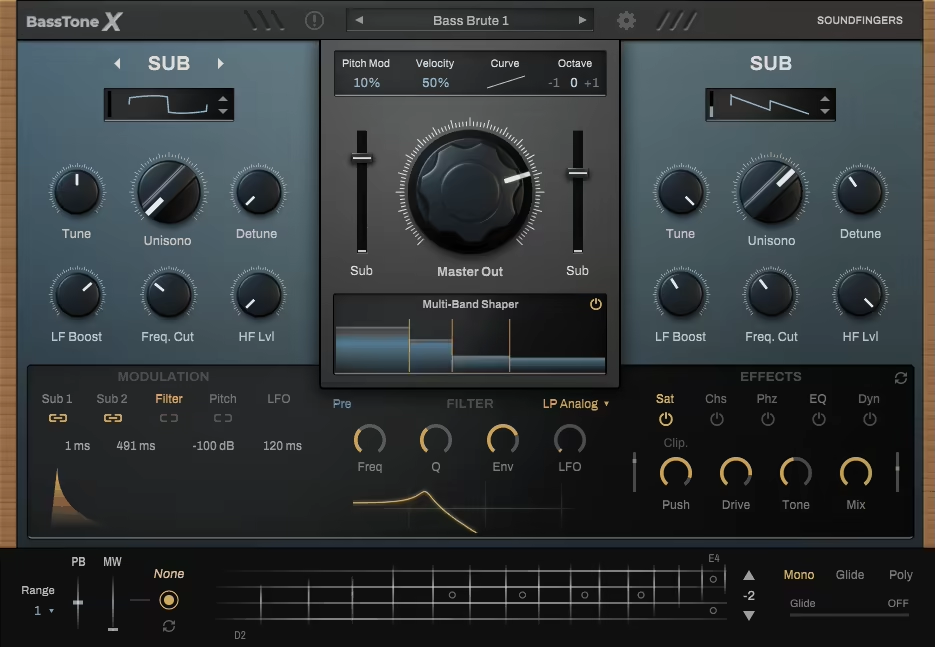
BassTone X is based on a dual-layer architecture for creating rich, resonant bass sounds. Whether I’m crafting deep, dubby grooves, laying down a funky bass guitar line, or building a heavy, distorted synth bass, this plugin just gets it.
Well, the first layer is the Bass Guitar Engine, which features over 600 meticulously sampled bass guitar sounds, each with 3 velocity layers and 8 round robins for dynamic, realistic playback. You can further shape the tone with 16 original bass amp models, complete with classic controls like gain, drive, and EQ controls.
The second is the Sub Synth Engine, which is my favorite, generating deep, powerful low frequencies using 16 custom-built sub-waveforms. These two layers combined give you one of the most realistic 808 bass VST in the market.
- Advanced Modulation and Filtering
One of the things I love about BassTone X is how much control it gives you over your sound. The modulation system is highly flexible, with envelope controls for amplitude, filter, and pitch modulation. You can tweak the attack, sustain, and decay for each layer separately.
There’s also a low-pass filter section with 5 filter types, plus resonance and cutoff controls. You can even decide whether the filter goes before or after your effects, which is a small detail but makes a huge difference when you’re shaping your tone.
Then there’s the LFO system, which is so intuitive that parameters like filter cutoff, pitch, or amplitude can be assigned to create more dynamic sounds.
- Precision with Multi-Band Shaping
If you’re like me and obsess over getting your bass to sit perfectly in the mix, you’ll love the multi-band shaper module. You can split the frequency spectrum into up to 4 bands and apply different effects to each range.
- Live Control for Maximum Expression
For those who perform live or love real-time tweaking, the mod-wheel assignments are a game-changer. You can hook up your keyboard’s mod wheel to control just about any parameter: filters, oscillators, effects, you name it.
SoundFingers BassTone X is available in VST2, VST3, AU, and AAX plugin formats and is compatible with Windows 7 64-bit or later and MacOS 10.11 or later.
9. Loopmasters Bass Master
| Plugin | Loopmasters Bass Master |
|---|---|
| Description | Two-layer sample-based bass synth with a huge waveform library, strong filters, and performance macros |
| Award | Best Value |
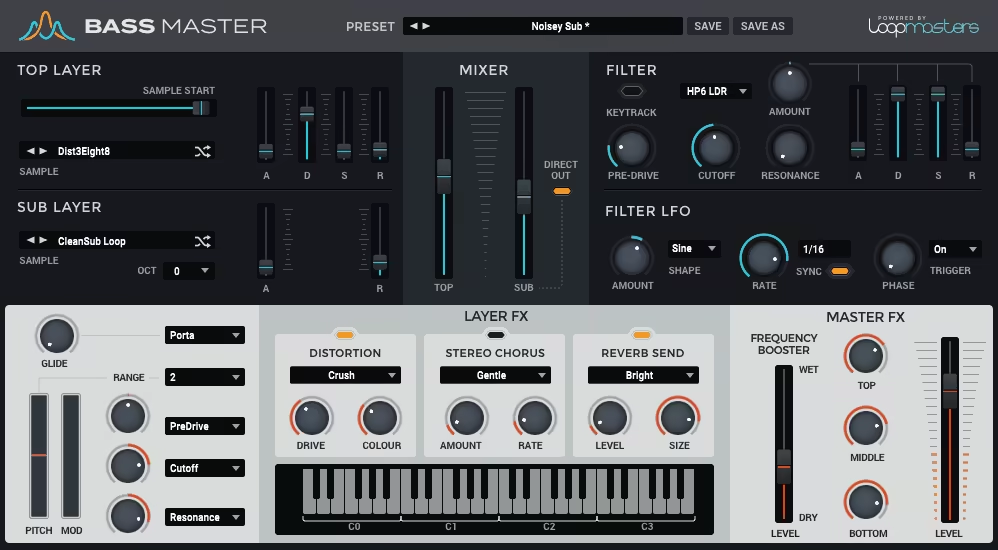
Bass Master works around two sample-based oscillators loaded with 217 curated waveforms.
These aren’t just random sounds; they are pulled/recorded from legendary hardware and cutting-edge synth designs.
You get two oscillators: a sub-layer for the deep, clean foundation and a Top Layer for adding texture and character.
Between the two, there are 217 curated waveforms to mix and match, all sampled from iconic hardware and cutting-edge synths. Do the math, and that’s nearly 50,000 possible combinations. Yes, you heard it right, the numbers are pretty impressive!
- Presets That Actually Inspire
Sometimes I just want to dive in and start creating without building a sound from scratch. That’s where the 350+ presets in Bass Masters really shine. They’re mix-ready, covering everything from vintage analog vibes to modern, hard-hitting basslines.
- Filters That Bring It All Together
Now, let’s talk filters. Bass Master’s 13 filter types are some of the most versatile I’ve used. You get everything from standard low-pass and high-pass filters to ladder and comb filters that add real character.
For me, the filter envelope (ADSR) and LFO are where the fun really begins. I’ve created sweeping intros, tight plucks, and even some growling, distorted basslines with just a few tweaks.
- Performance Features That Make It Shine
One thing I didn’t expect to find so useful was the mod-wheel macro system. Every patch comes with three pre-mapped parameters, so it’s easy to add expression and movement.
Pair that with legato and portamento playback and a pitch bend range of up to 12 semitones, you get a pretty versatile 808 VST with a really good deal!
SoundFingers BassTone X is available in VST and AU plugin formats and is compatible with Windows 7 – 10 and macOS 10.12 Sierra – macOS 10.15 Catalina operating systems.
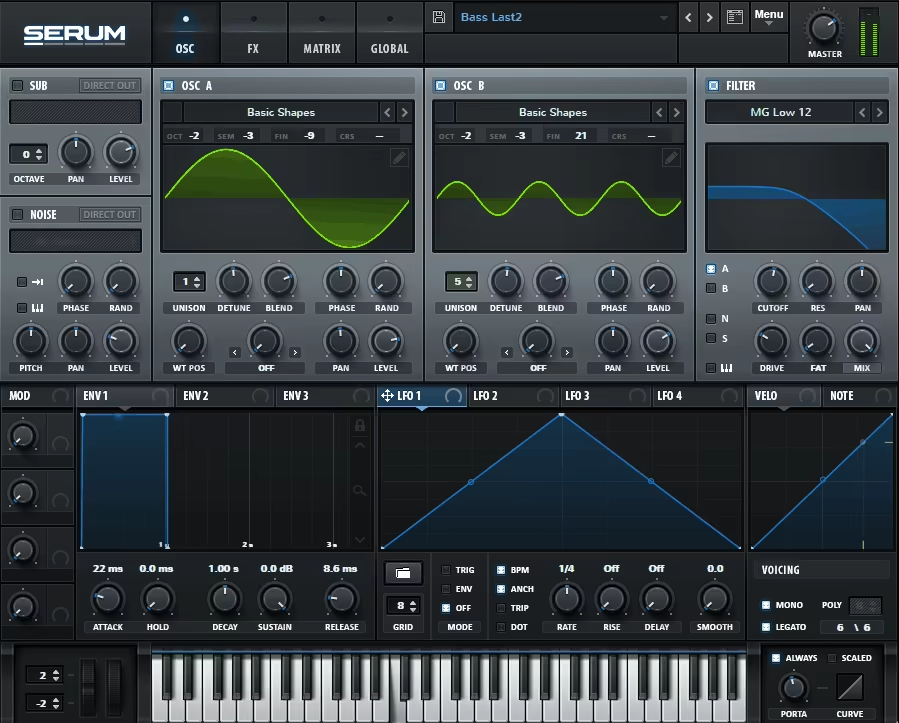
10. Xfer Records Serum
| Plugin | Xfer Records Serum |
|---|---|
| Description | Wavetable synth for modern bass and 808 design with deep modulation, advanced warp modes, and a huge preset ecosystem |
| Award | Most Popular Choice |
Serum is super versatile for digital bass sounds across genres like dubstep, future bass, trap, drill, house, and many more. You can make precise 808 and bass sounds with this synth. Recently, there was a SERUM 2 released, you can check it out here.
Because of its wavetable synthesis engine, you can literally create any digital/electronic bass sound in Serum. The best part is that you can also find many preset packs (both free and paid), so that way, it becomes accessible to everyone, including beginners.
- Possibility of Experimental Sound Design
You’re not just limited to static waveforms and can actually morph and manipulate them in ways that bring your basslines to life. The real-time wavetable editor is insane. I’ve spent hours tweaking waveforms, adding harmonics, and experimenting with spectral morphing to create bass sounds that feel completely unique.
The Warp modes, like FM, AM, and Bend, are a game-changer for bass sound design. I often use them to add grit or movement to my basslines. For example, cranking up FM from a sine wave can create those aggressive, metallic tones that cut through a busy mix.
- Sub Oscillator: The Backbone of Clean Low-End
One of my favorite bass features is Serum’s dedicated sub-oscillator, which is suitable for adding a solid, clean foundation to your sounds.
In my experience, Serum’s filter section is another standout feature. With over 70 filter types, including analog-style low-pass, high-pass, and band-pass, as well as more creative options like flangers, comb filters, and phasers, the possibilities are endless.
- OTT/Multiband Compressor Flavour
I’m a huge fan of the Multiband Compressor (OTT), which is built right into Serum’s FX section. It adds that polished, punchy character to bass sounds, especially when you’re working on aggressive genres like dubstep or drum and bass.
- Modulation Madness
The modulation system in Serum is based on a simple drag-and-drop workflow, but it’s capable of insanely complex results. I love using LFOs to automate filter sweeps, wavetable positions, or even panning to create basslines that evolve and breathe.
For instance, I recently made a growly bass patch by assigning an LFO to the wavetable position and another to the filter cutoff. With just a few tweaks, I had a bassline that pulsed and growled in sync with my track’s rhythm. I use Serum for many projects, but as an 808 plugin, it never disappoints.
Xfer Records Serum is available in VST2, AAX, and AU plugin formats and is compatible with Windows 7 SP or later and macOS 10.11 or newer operating systems.
11. G-Sonique’s Swede Trap Bass

| Plugin | G-Sonique’s Swede Trap Bass |
|---|---|
| Description | Trap/hip-hop bass and 808 plugin with punchy oscillators, multiple filters, pitch envelope, and built-in distortion/saturation |
| Award | Best for Trap & Hip-Hop |
Designed by G-Sonique in collaboration with RIAA Platinum producer Swede (who’s worked with artists like Lil Wayne, DJ Khaled, and Gucci Mane), Swede Trap Bass is a very quirky-looking and “bold” sounding bass and 808 VST plugin.
One of the first things I noticed about this synth is how it combines the best of both worlds: the warmth and smoothness of analog with the precision and flexibility of digital. It comes with 20 kick oscillators, 8 filters, and a wave-shaping algorithm that gives you insane control over your sound.
The oscillator section includes everything from classic sine waves to wild, overdriven options like “Brutal Overdriven” and “Detroit Analog.” Each oscillator has its own tone, pitch, and phase controls, so you can fine-tune your kicks and basslines how you prefer.
- Customization That Doesn’t Overwhelm
I love plugins that offer a lot of control but don’t bog you down with complexity, and Swede Trap Bass is pretty good with that balance. The filters are a great example: you get 8 different types, from analog low-pass and notch filters to more modern DSP designs. You can easily tweak the cutoff, resonance, and modulation to fine-tune your sound.
Regarding filters, you’ve got options like Dirty Analog Low-Pass and Notch filters that add so much character to the sound. Whether I’m going for a warm, round kick or a razor-sharp, aggressive tone, the filters always deliver.
Then there’s the pitch envelope, which is inspired by vintage drum machines. It’s perfect for creating those iconic trap-style 808s that glide or hit with an aggressive snap.
- Built-In Distortion and Saturation
No bass or kick is complete without a little dirt, and Swede Trap Bass delivers its analog distortion circuit, which is modeled after classic guitar pedals, giving you everything from warm saturation to heavy, in-your-face distortion.
Next, the parametric saturation module lets you sculpt the overall tone of your sound with precision, from subtle harmonic enhancements to full-on growls. You can even adjust the saturation shape and blend it with the dry/wet knob for a perfectly balanced mix.
While Swede Trap Bass is considered the best bass plugin for trap and hip-hop, it’s surprisingly versatile. I’ve used it to make booming kicks for various other genres as well.
G-Sonique’s Swede Trap Bass is available in VST plugin formats and is compatible with Windows XP and later operating systems.
FAQ 2- What are 808s used for?
808s are used to craft basslines and kicks in genres like hip-hop, trap, EDM, and pop. Producers rely on them for their ability to deliver both melodic depth and rhythmic drive, making them a key element in modern music production.
FAQ 3- Why is 808 so popular?
808s are popular because of their iconic sound, versatility, and ability to adapt to various genres. Their deep bass and rhythmic qualities became a staple in hip-hop and trap, influencing modern music and shaping its low-end soundscape.
FAQ 4- Is 808 bass or kick?
An 808 can function as both a bass and a kick. Originally a kick drum sound from the Roland TR-808 drum machine, producers now use it as a melodic bassline, rhythmic kick, or even a combination of both in their tracks.
Last Words
This list of the best 808 plugins is for anyone who wants cleaner, heavier, more controlled low end without fighting their mix for hours.
- If you’re building modern 808s fast, start with purpose-built tools like SubLab XL, 808 Studio 2, or Monoment Bass.
- If you want a “do-everything” bass engine for sound design, Serum, Sub Factory, and Mariana give you the deepest range.
- When your bass is already good but just needs more weight, Waves Submarine is the quick reinforcement option.
Pick based on your workflow: instrument plugins for designing the bass, sub generators for enhancing what you already have, and always check your low end in mono before you commit!

Shaurya discovered his passion at the intersection of writing and music. Starting his career as a songwriter and rapper, he gradually picked up FL Studio and soon delved deep into the world of audio engineering and music production. Based in Delhi, India, he has worked with top studios, been featured on Red FM, garnered millions of streams on Spotify, and released music with major labels like Sony and Hitz.