
When talking about pro-level mixes, one of the first plugin makers to come to mind is Solid State Logic. So, here are some of the best SSL VST Plugins to get you those great mixes.
Whether it’s the legendary G-Series bus compressor, the punchy E-Series channel strip, or those silky EQ curves, SSL gear has shaped countless records, from ’80s rock to modern pop and hip-hop.
And the best part? You don’t need to sell a kidney for a hardware console; these plugins bring that same analog punch, glue, and character straight into your DAW.
SSL has quite a bit of variety in the plugin collection. Some are faithful recreations, down to the quirks of the original circuits, while others take modern twists with extra features. Well, not every plugin needs to be a 1:1 emulation, in my opinion. They know that sometimes we want surgical control, but sometimes we just need a one-knob solution that makes everything sound better.
That’s why I’ve tested, compared, and obsessed over the best VSTs out there. Whether you need a gluey bus compressor, a punchy channel strip, or an EQ that just makes things “pop,” I’ve got you covered. So get ready with a coffee (or a beer; mixing is an art, not a science), and let’s check out the best SSL plugins for mixing music in 2025.
1. Native Vocalstrip 2
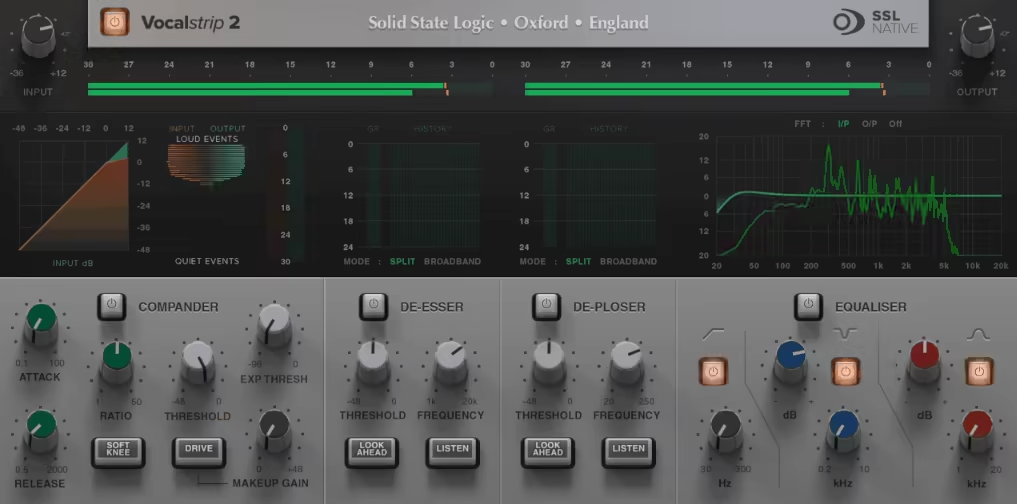
Mixing professional-sounding vocals can be a challenge; they require too much processing, sound unnatural, and sound too little, and they get lost in the mix. That’s where SSL Vocalstrip 2 comes in.
Vocalstrip 2 is a 4-in-1 vocal processing powerhouse designed to clean up, shape, and enhance vocals with minimal effort. If you don’t already have a go-to vocal chain (or just want something fast and effective), this plugin makes life a whole lot easier.
The interface is sleek and intuitive, giving you quick access to de-essing, de-plosing, compression, and EQ, all designed specifically for vocals. The real-time visual feedback is well-made, showing exactly how each effect is shaping my sound.
- 4 Essential Vocal Processors
I enjoyed that Vocalstrip 2 combines a Compander (compression + expander), De-Esser, De-Ploser, and a transparent 3-band EQ, covering everything from smoothing dynamics to removing harsh sibilance and plosives. It’s like having a full vocal chain in a single plugin.
- Intelligent De-Esser and De-Ploser
Harsh “S” sounds and boomy plosives are two of the biggest vocal mixing headaches in my workflows. The De-Esser and De-Ploser automatically target problem frequencies, making it easier than ever to clean up vocals without over-processing.
- Surgical & Musical EQ
The 3-band EQ includes a high-pass filter, an asymmetric notch for problem areas, and an “Air” band that adds crisp, open top-end, perfect for giving vocals that modern, polished sound.
While Vocalstrip 2 won’t replace a fully customized vocal chain, I think it’s fast, effective, and gets the job done with minimal tweaking. If you want great vocals without the hassle, SSL has built a powerful one-stop solution that makes mixing easier and more efficient.
SSL Vocalstrip 2 comes in VST2, VST3, AU, and AAX formats for macOS and Windows users.
2. X-Limit
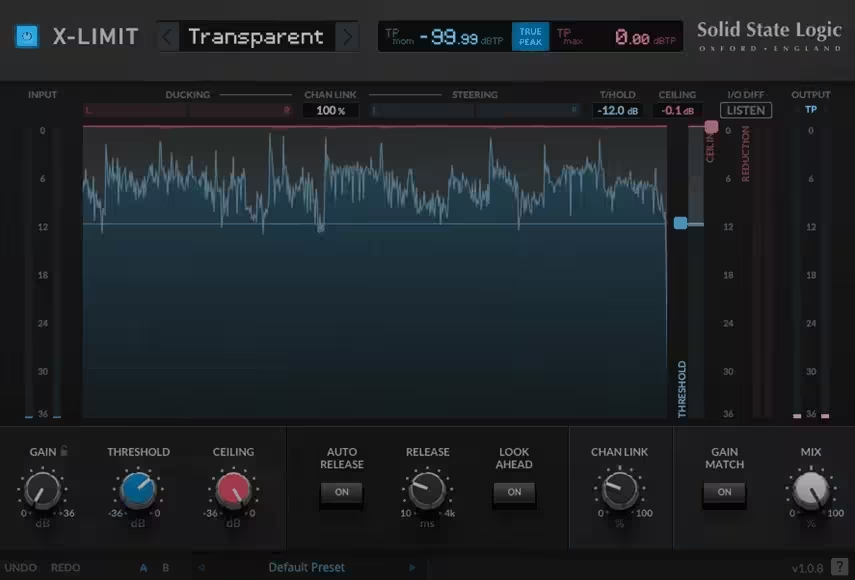
X-Limit is a simple, visual, and ridiculously effective limiter for catching peaks on a vocal, tightening up a drum bus, or squeezing extra loudness out of a full mix.
The interface is clean and easy to navigate, with an intuitive waveform display that lets you see exactly how your audio is being limited. But what really makes X-Limit stand out for me are the 4 preset limiter styles, Transparent, Glue, Punch, and Auto, each offering a different character for subtle or aggressive processing.
- 4 Limiting Styles
Whether you need clean peak control (Transparent), a smooth, glued-together sound (Glue), punchy dynamics (Punch), or an adaptive “set and forget” mode (Auto), X-Limit makes it effortless to dial in the perfect amount of limiting.
- True Peak Limiting & Smart Stereo Control
X-Limit’s True Peak mode ensures your mix won’t clip even after conversion, a lifesaver for mastering. Meanwhile, the Steering and Ducking meters help you keep the stereo balance intact by showing how limiting affects the width of your signal.
- Visual Feedback & Gain Match
The waveform display, threshold/ceiling sliders, and real-time meters make it easy to see exactly how much limiting is happening. The Gain Match feature lets you bypass the loudness increase, allowing me to judge changes objectively.
I’ve tried a lot of limiters, and not all are created equal, some squash dynamics too aggressively, while others don’t push hard enough. SSL X-Limit hits that sweet spot of musicality and precision, making it a fantastic tool for mixing and mastering alike.
SSL X-Limit comes in VST2, VST3, AU, and AAX formats for macOS and Windows users.
3. SubGen
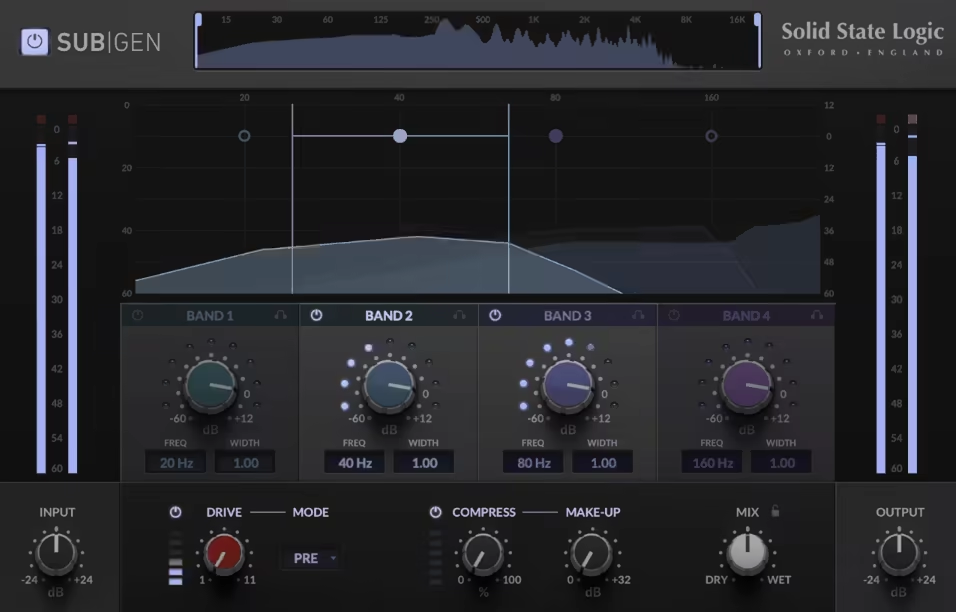
SubGen SSL plugin is a sub-harmonic generator, meaning it doesn’t just boost what’s already there, it creates new, deeper bass frequencies, filling out the bottom end with rich, extended lows.
- 4 Sub-Harmonic Bands
Unlike simple bass boosters, SubGen lets me synthesize and mix multiple sub-frequencies at once. You can focus on a single frequency range or stack multiple layers to create a massive low-end foundation.
- 3 Drive Modes
The Drive section adds warmth and character to the generated sub-frequencies, with Pre for smooth overdrive, Kick for punch, and Bass for aggressive grit. It helps my low-end cut through without muddying the mix.
- Built-In Compressor
The one-knob compressor is tuned specifically for bass, keeping sub-frequencies in check while preserving dynamics. Combined with the wet/dry mix control, it’s easy to blend in just the right amount of weight.
I must say that one thing to note is that stacking too many subbands at the same frequency can get unpredictable but with a little tweaking,
SubGen makes dialing in powerful, clean, and low-end easier than ever. Whether you’re producing electronic music, hip-hop, rock, or film scores, this plugin delivers the deep, thick bass you didn’t know you were missing.
SSL SubGen comes in VST2, VST3, AU, and AAX formats for macOS and Windows users.
4. LMC+
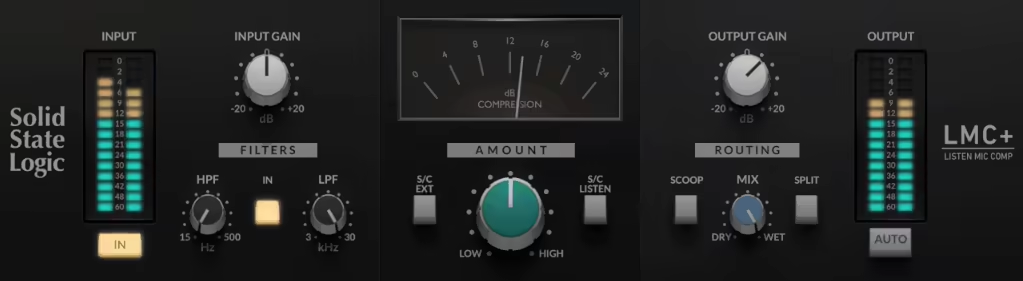
If you love crushed, explosive drums, then you owe a debt to the LMC+. This plugin is a modern reimagining of the legendary Listen Mic Compressor from the 4000E console, the same accidental discovery that led to the iconic gated-reverb drum sound of the ’80s.
LMC+ plugin is aggressive, dirty, and absolutely perfect for smashing room mics, pumping guitars, and adding attitude to vocals.
For me, the interface keeps things simple and intuitive, with fixed attack and release curves that slam transients hard. But SSL didn’t stop at just recreating the original; they added modern features like an external sidechain, highpass/lowpass filters, and unique Scoop and Split modes for even more flexibility.
- Authentic SSL Listen Mic Compressor
The original LMC was a secret weapon for producers, and this version takes it even further with adjustable filters, parallel processing, and a sidechain input, giving you more control over how you shape the destruction.
- Scoop & Split Modes
I love the Scoop function, as it phase-inverts the wet signal, which can lead to some wild, hollowed-out textures, while Split mode engages a bandpass-subtraction effect, creating punchy, lo-fi goodness.
- Mix Control
Wanna blend the smashed signal with your dry track? The Mix knob makes it easy, letting you dial in just the right amount of grit and energy without overwhelming the mix.
LMC+ is not a subtle compressor, it’s a character tool, perfect for slamming drums, adding crunch to guitars, or wrecking a vocal in the best way possible.
If you want clean, transparent compression, look elsewhere. But if you want attitude, rawness, and vintage mojo, this is your plugin.
LMC+ comes in VST2, VST3, AU, and AAX formats for macOS and Windows users.
5. Native X-Saturator
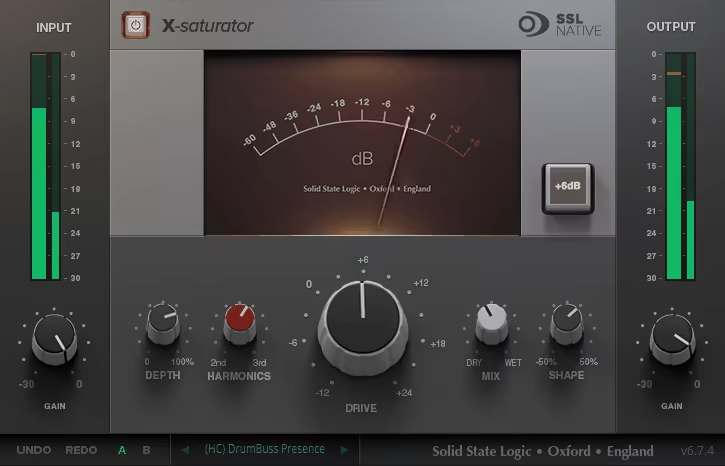
Saturation is like salt in a dish: too little, and everything tastes (or, in this case, sounds) dull; too much, and you’ve ruined dinner. But get it just right, and suddenly your vocals shine, your drums hit harder, and your mix has that warm, analog magic. That’s exactly what X-Saturator does.
X-Saturator SSL plugin is an easy-to-use, super flexible analog-style distortion plugin that can go from a touch of warmth to full-on sonic annihilation.
Well, let me start with the interface: it is straightforward, which I love because I don’t want to spend 20 minutes tweaking a saturation plugin.
You get two flavors of distortion: valve-style (for that smooth, buttery warmth) and transistor-style (for an edgy, aggressive bite). And here’s the best part, at least for me: you don’t have to pick just one. You can blend the two for the perfect balance. Want subtle analog sweetness? Done. Need filthy, broken-amp chaos? Crank it up.
- Tube & Transistor Saturation
In my experience, some plugins force you into one type of saturation, but here, you can blend between creamy tube warmth and gritty transistor crunch; it’s like having two flavors of distortion in one box.
- Shape & Wet-Dry Controls
The Shape knob adjusts how hard or soft the distortion hits, while the Wet/Dry knob lets you blend it in smoothly. For a touch of saturation on a vocal or for making the drums sound like they’ve been through a blender, X-Saturator’s got your back.
- Simple Yet Effective Design
Some plugins make you scroll through menus for days, but X-Saturator keeps things easy so you can get the right sound fast without overthinking it.
Look, this plugin has been around for a while, and sure, there are newer saturation plugins with 500 extra knobs, but X-Saturator still holds its own. If you just want great-sounding, SSL-approved saturation without the fluff, this is a steal, especially when it’s on sale (which is surprisingly often).
X-Saturator comes in VST2, VST3, AU, and AAX formats for macOS and Windows users.
6. SSL X-Gate
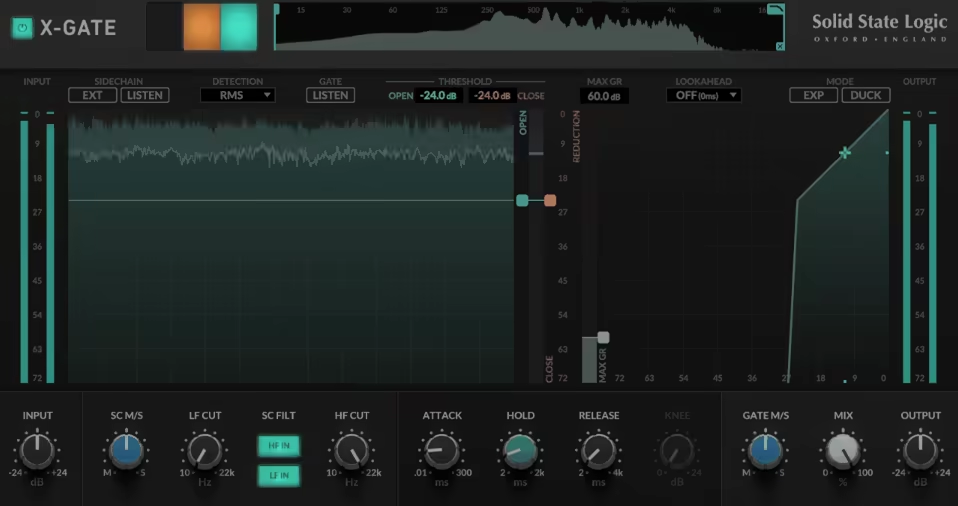
Most gates plugins usually get a bad rep, as they’re often seen as boring, technical, and “just get rid of the noise” tools, but let me tell you, SSL X-Gate is different.
It’s not just here to clean up the mic bleed and background hum (though it does that beautifully). X-Gate is actually fun to use. It’s like having an ultra-precise noise ninja that lets you sculpt transients, create pumping effects, and even manipulate the stereo field in ways I didn’t know I needed.
One of my favorite things is the rolling waveform graph. Most gates feel like a guessing game, set a threshold and pray for the best. But X-Gate shows you exactly what’s happening in real-time, making it ridiculously easy to dial in perfectly natural gating or go full-on creative with expansion and ducking modes.
- Intelligent Gating With Hysteresis
Ever had a gate that slams open and shut like an old screen door? Not here. X-Gate lets you set separate open and close thresholds, meaning no more choppy or unnatural cuts. It’s like upgrading from a cheap apartment door to a luxury hotel entrance, smooth and controlled.
- Mid/Side & External Sidechain Pptions
When you need to gate just the sides of a stereo signal or maybe duck a synth pad every time your kick hits, this is a super handy tool. With the mid/side processing, I love how easy it is to set up sidechain triggering for rhythmic effects.
- EXP & DUCK modes
Expansion mode is like giving your dynamics a little breathing room, making quiet parts even quieter without killing the vibe. Duck mode? That’s your classic “lower the music when I talk” effect, but you can also use it for some seriously creative volume-pumping tricks.
I’ll be honest: I didn’t think I’d get this excited about a gate plugin, but here we are. SSL made something that’s not just useful but actually inspiring to tweak. Whether you’re cleaning up live recordings, tightening up drums, or going full experimental, this thing delivers.
X-Gate comes in VST2, VST3, AU, and AAX formats for macOS and Windows users.
7. Native Channel Strip 2
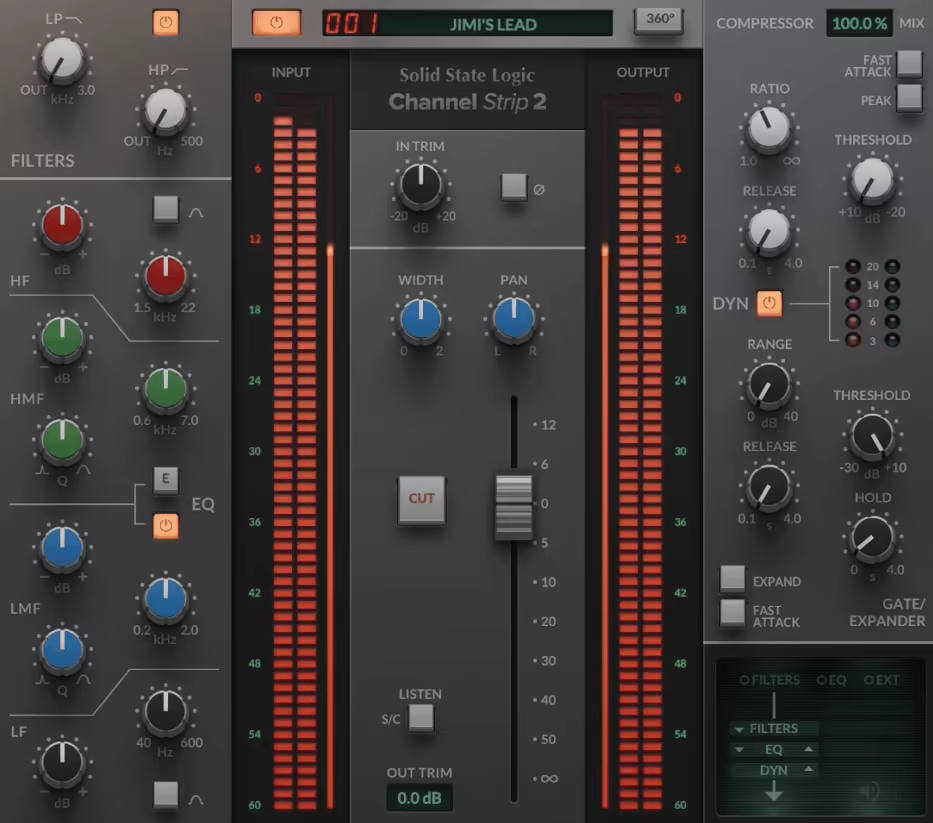
If you’ve ever dreamed of mixing on a real SSL 9000K console, Native Channel Strip 2 is the next best thing.
Native Channel Strip 2 delivers the legendary tone, workflow, and flexibility of an SSL channel strip, packed with E- and G-Series EQ options, powerful dynamics, and customizable signal routing.
When I’m shaping vocals, tightening up drums, or adding punch to a mix, this plugin gives me the full experience, minus the massive console taking up your studio space.
The EQ section is a classic 4-band design, with fully parametric mid bands and switchable LF and HF shelving. It even allows me to switch between E- and G-Series characteristics, giving me two flavors of SSL tone.
The dynamics section brings a smooth yet powerful compressor (switchable between soft and hard knee) and a natural-sounding gate/expander. Plus, the high and low-pass filters can be applied to the sidechain, making frequency-dependent compression a breeze.
- E- and G-Series EQ Modes
The EQ section lets you switch between the punchy, aggressive G-Series sound and the smoother, more open E-Series character, giving you two distinct tonal flavors.
- Flexible Dynamics Processing
The dynamics section features a compressor with both soft and hard knee modes, along with a natural-sounding gate/expander, making it easy to control dynamics in a musical way.
- Customizable Signal Routing
You can rearrange how the EQ, filters, and dynamics interact, allowing for more flexible processing chains tailored to your mix.
- Sidechain Processing
The plugin includes an external sidechain input, perfect for frequency-dependent compression, de-essing, or pumping effects.
- Seamless SSL Hardware Integration
It works with SSL 360 software and integrates with UC1 and UF8 controllers, giving you a hands-on, console-like experience.
I love how they kept everything true to the original console workflow while adding modern digital enhancements like anti-cramping EQ technology and external sidechain input.
If you want that polished, pro-mix sound with SSL’s signature clarity and punch, this is a must-have.
Native Channel Strip 2 comes in VST2, VST3, AU, and AAX formats for macOS and Windows users.
8. Native X-EQ 2
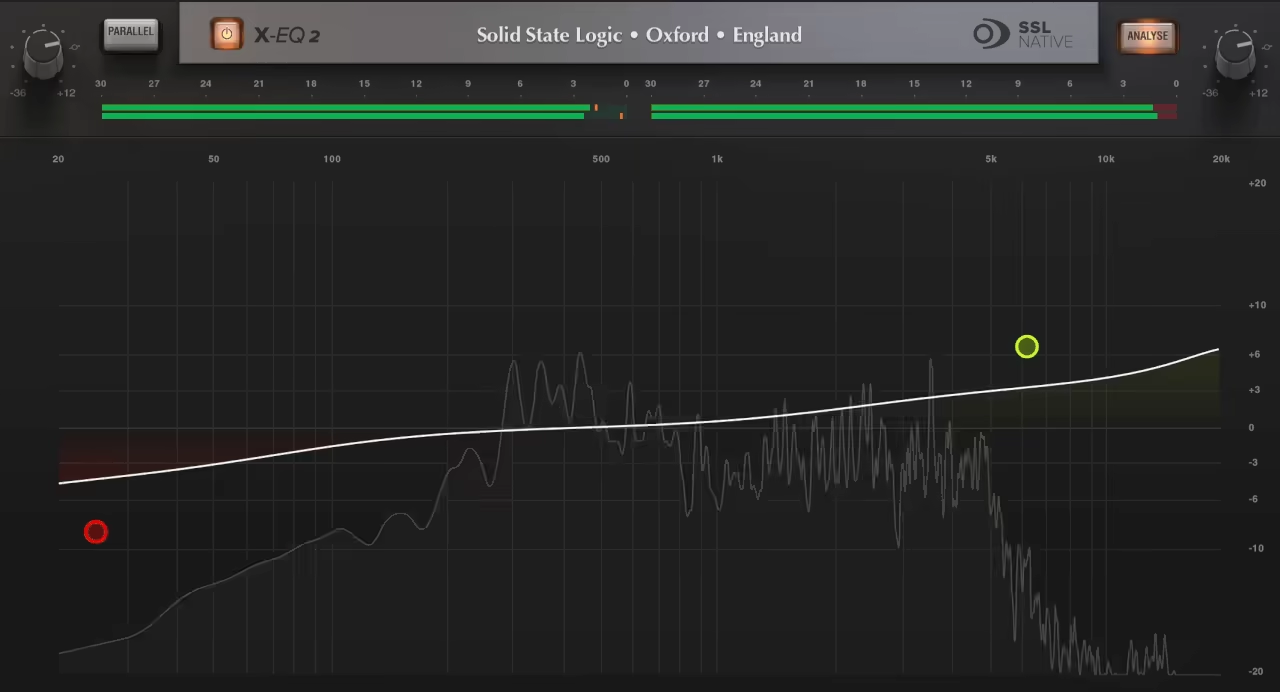
Equalization can make or break a mix, get it right, and everything feels clear and polished; get it wrong, and your track sounds lifeless. That’s why SSL plugins have been a go-to for pros, and X-EQ 2 is no exception.
This VST is a high-end, fully parametric EQ built for precision mixing and mastering. It features 24 bands, mid/side processing, and an innovative parallel mode that lets you tweak frequencies with pinpoint accuracy.
One of the standout features of X-EQ 2 is SSL’s proprietary anti-cramping algorithm, which preserves high-end clarity without CPU-heavy oversampling. If you’ve ever pushed a high shelf and ended up with a harsh digital mess, you’ll appreciate this.
- 24-band Parametric EQ
I really appreciate the versatility here. With fully adjustable bands, you get total control over your frequencies for mixing, mastering, and surgical tone shaping.
- Anti-cramping Algorithm
SSL’s proprietary technology prevents distortion and harshness in high-frequency boosts without the CPU strain of oversampling.
- Versatile Filter Options
You get 17 filter types, including cut filters, bells, shelves, and a unique parallel mode for more natural tonal shaping.
- Intuitive Workflow & Spectrum Analysis
Graph-based EQ adjustments, draggable nodes, and numerical data entry make dialing in the perfect curve quick and precise.
- Mid/Side & Left/Right Processing
You can EQ stereo channels independently, making it perfect for widening, cleaning up muddiness, or controlling harsh highs in a mix.
I won’t lie; this is a pretty pricey VST, especially when FabFilter Pro-Q 3 offers more advanced features for less. But when SSL VSTs go on sale, X-EQ 2 becomes a serious contender.
If you love the clean, transparent sound of SSL plugins and want an EQ that delivers pristine detail, this is a solid choice. When discounted, it’s a no-brainer for anyone serious about mixing.
Native X-EQ 2 comes in VST2, VST3, AU, and AAX formats for macOS and Windows users.
9. Native FlexVerb
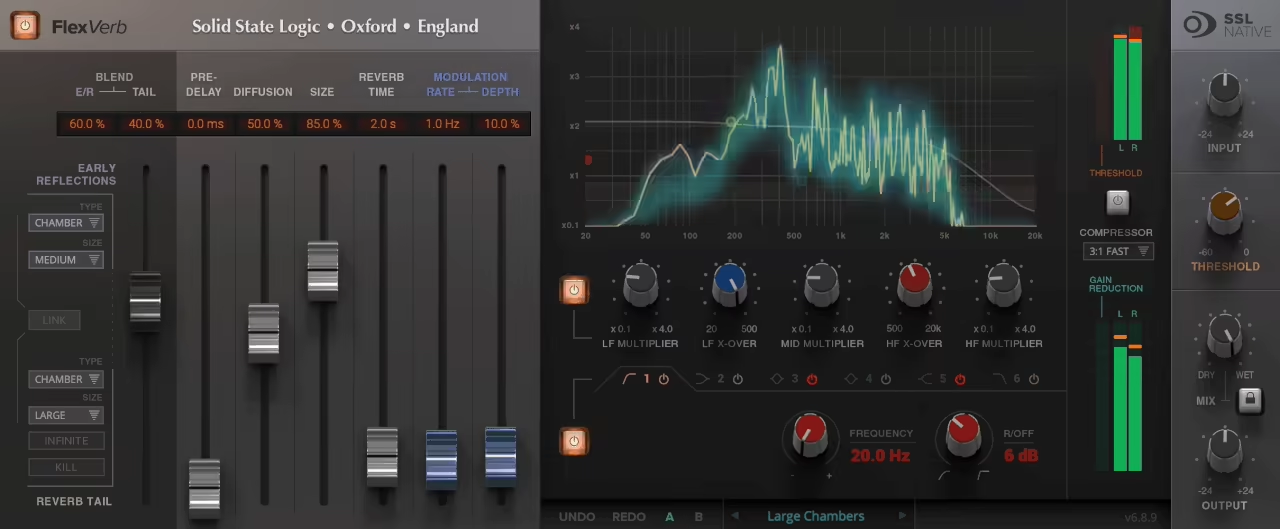
Reverb can be the glue that holds a mix together or the thing that makes it fall apart. A great reverb creates depth and space without overwhelming the track, and FlexVerb is designed to do just that.
With 4 reverb algorithms, independent early and late reflection controls, and built-in compression, this SSL plugin aims to keep your mixes clean, spacious, and professional.
What sets FlexVerb apart for me is its split early-late reflection system, allowing for precise control over how the reverb sits in the mix.
From tight, punchy ambiance to a massive, ethereal wash, it’s just a few tweaks away. Add in an infinite reverb hold and a kill switch, and you’ve got a tool that works just as well for subtle mixing as it does for creative sound design.
- Independent Early and Late Reflection Control
Unlike most reverbs that lump everything together, FlexVerb lets you shape early reflections and tails separately. This means you can create tight, realistic spaces without overpowering the dry signal.
- Built-in 6-Band EQ
Instead of needing an extra EQ after your reverb, this lets you carve out muddiness or boost presence directly within the plugin, keeping the mix clean.
- Integrated Output Compressor
I’ve found this especially useful for keeping the reverb in check, making sure it doesn’t wash out the dry signal while still adding the right amount of depth.
Opinions on SSL plugins tend to be divided, and FlexVerb is no exception. Some users rave about its polished, mix-ready sound, while others say it lacks the character of more boutique reverbs.
I’d call it a clean, professional option that does the job well, though it may not replace your go-to reverb if you prefer something more colorful.
For transparent, versatile reverb that integrates seamlessly into an SSL workflow, FlexVerb is a strong contender. If you’re after vintage tones or wild, modulated textures, you might find it a little too safe.
FlexVerb comes in VST2, VST3, AU, and AAX formats for macOS and Windows users.
10. Native X-Echo
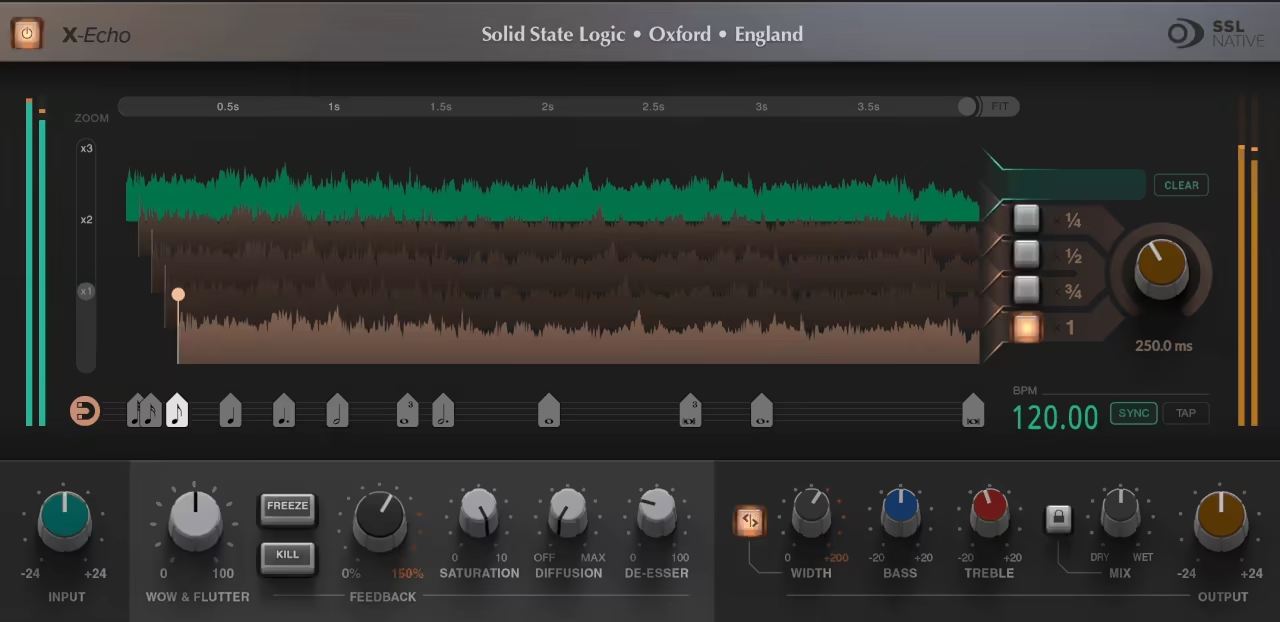
What I love about X-Echo is that it doesn’t just deliver vintage tape-style echoes; it blends them with modern features like built-in reverb, de-essing, and DAW-friendly workflow.
Whether I need a classic slapback for guitars, a warm, decayed delay for vocals, or experimental textures with modulation and saturation, X-Echo does it all while keeping that smooth SSL sound.
The interface offers a clear visual representation of how the four tape heads interact. You can sync delays to tempo with a click, tweak the wow & flutter for analog imperfections, or crank up the diffusion knob for a reverb-like wash.
It’s incredibly easy to dial in exactly the kind of delay I need, whether I’m going for subtle and clean or wild and experimental.
- Authentic Tape-Style Delay
X-Echo nails the character of vintage tape echoes, modeling EQ loops, soft clipping, self-oscillation, and gentle tape hiss to create a convincing analog vibe.
- Built-in Diffusion & Reverb
The Diffusion control transforms hard tape repeats into a smooth, spacious ambiance, allowing for everything from clean rhythmic echoes to dreamy, blurred textures.
- Wow & Flutter with Saturation
The Wow & Flutter controls replicate the mechanical instability of tape, adding warble and movement, while Saturation warms up the delay signal with the signature distortion.
The Freeze and Kill functions are a welcome bonus for creative sound design, making it easy to build swells, risers, and dramatic transitions.
If I had to nitpick, I’d say this isn’t a strict tape echo emulation; it’s more of an SSL-style hybrid. But honestly, that’s why I love it cause it doesn’t just chase the past; it expands what’s possible with delay.
For anyone looking for a versatile, great-sounding delay that fuses vintage warmth with modern control, SSL X-Echo is a fantastic choice. Whether it’s rock, pop, ambient, or electronic music, this plugin delivers both classic tones and fresh, creative possibilities.
X-Echo comes in VST2, VST3, AU, and AAX formats for macOS and Windows users.
11. Guitarstrip
When it comes to guitar tone shaping, SSL Guitarstrip is the all-in-one solution that I didn’t know I needed until I tried it.
Whether I’m processing electric, acoustic, or bass guitars, Guitarstrip makes dialing in compression, EQ, and amp-style saturation incredibly intuitive.
It feels like having a full channel strip dedicated to guitar and bass processing, complete with drive emulation, phase correction, and dynamic shaping.
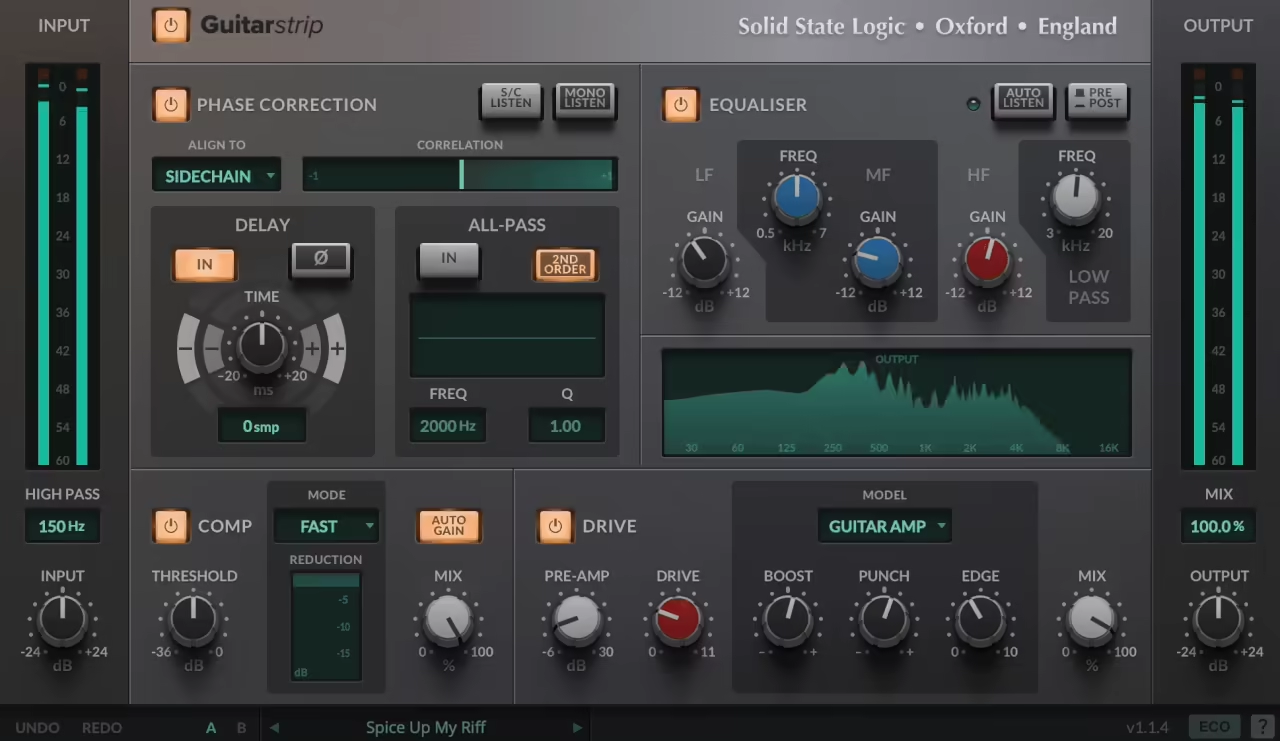
The well-organized interface lets me quickly shape my sound without jumping between multiple plugins. With so many features, it can be overwhelming initially, especially for beginners, but you get used to it pretty fast, thanks to the intuitive design.
- Drive Module
Classic tube amp-style saturation with Guitar Amp and Bass Amp models. The Drive knob lets you add overdrive, while Boost, Punch, Edge, and Shape controls help sculpt harmonic content.
- Phase Correction Module
The features allow you to fix phase issues between amp and DI recordings. The Sidechain mode allows for external phase alignment, while the Allpass filter enables frequency-dependent corrections.
- Compressor Module
This VST SSL features 5 compressor presets tailored for guitar and bass processing. The auto-gain function keeps levels in check, and the mix control allows for parallel compression.
- EQ Module
A 3-band channel EQ with asymmetrical low-gain control and auto-listen functionality. The pre/post option lets me choose EQ placement in the signal chain.
I love how Guitarstrip simplifies the workflow, reducing the need for multiple plugins to achieve the perfect guitar tone. The phase correction module is a lifesaver for dealing with multi-mic setups, and the Drive section brings character to DI signals.
If I had to nitpick, I’d say it’s more of a tone-shaping tool than a full-on amp sim, but that’s exactly why it fits so well in a mix.
Guitarstrip is a must-have for anyone who works with guitar-heavy tracks. It’s perfect for adding warmth, presence, and balance while keeping everything simple and efficient.
Guitarstrip comes in VST2, VST3, AU, and AAX formats for macOS and Windows users.
If you want to see some of the best SSL compressors, we also have those covered in another article!
