
Check out some of the best Waves plugins for mixing drums in a way that makes your mix shine.
I always think that mixing drums is where the magic happens in any track. Get it right, and your mix has punch, groove, and a backbone that makes everything else shine. Mess it up, though, and your track can feel flat or lifeless, no matter how great the other elements are. That’s where the right plugins come in.
I’ve spent countless hours tweaking drum mixes, and let me tell you, Waves has some absolute gems for getting that perfect balance of power, clarity, and character. Whether you need to tighten up your kick, add warmth to your snare, or make your overheads shimmer, there’s a Waves VST plugin ready to deliver. These tools don’t just process your sound, as they let you craft it, shaping your drums into exactly what your mix needs.
Through the article I will talk about some of the plugins that I use for mixing drums in my projects. From EQs to compressors or saturators, each unit here puts something special to the table. Ready to make your drums shine? Let’s get into it!
1. Curves Equator
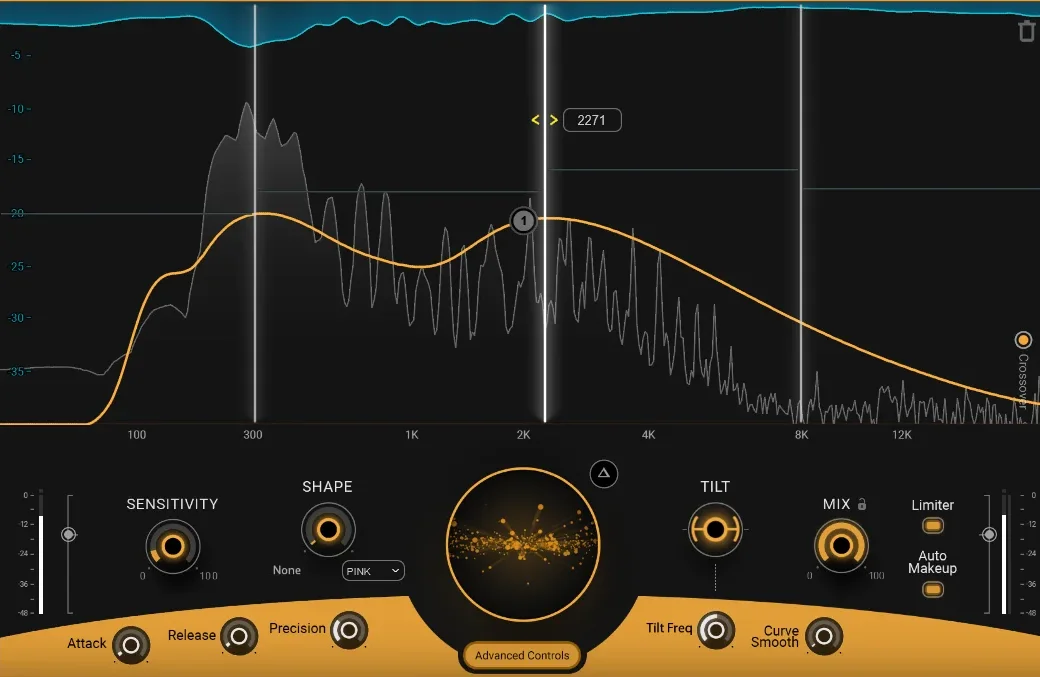
Mixing drums can be tricky, especially when resonances, mud, or harshness take away the clarity and punch. That is where the responsibility comes to Curves Equator.
Equator is not just another EQ plugin; it’s a smart, dynamic equalizer designed to tame problematic frequencies while keeping the energy and vibe intact. Whether you’re wrestling with a boxy kick, a harsh snare, or cymbals that take over your mix, Curves Equator adjusts dynamically to smooth things out without killing the groove.
- Learn Feature
For me, this is a lifesaver for drums thanks to its Learn feature, which analyzes your track and generates a personalized suppression curve to tackle problem areas.
Even better, the sidechain functionality lets you carve out space for other elements in your mix, making it great for ensuring your drums stay present without overpowering everything else. It’s like having a mix engineer in your DAW, constantly fine-tuning the spectral balance.
- Dynamic Resonance Suppression
Curves Equator dynamically identifies and attenuates resonances, smoothing out kicks, snares, and toms without losing their natural tone. This is perfect for taming boomy lows or harsh cymbals.
- Sidechain Spectral Ducking
With sidechain input, the plugin creates an inverse EQ curve based on another track, like bass or vocals, allowing your drums to sit better in the mix without fighting for space.
- Customizable Bands and Nodes
3 adjustable crossovers split your drums into low, mid, and high bands, giving you precision control. I like that it allows e to add up to 8 nodes to tailor suppression for problematic frequencies.
Drums need both power and balance, and Curves Equator delivers exactly that.
I found out that it’s especially useful for group buses, where it can tighten up the overall kit and ensure every element shines through. Just remember to use it with care. A little resonance control goes a long way in keeping your drums punchy and alive.
Waves Curves Equator is available in VST, AU, and AAX formats for macOS and Windows
2. Smack Attack
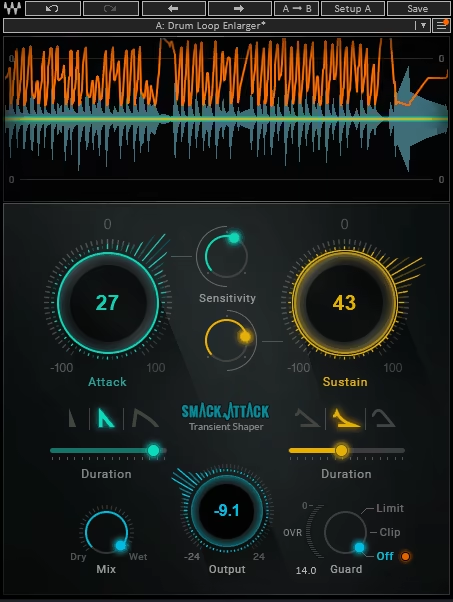
Smack Attack is a transient-shaping Waves plugin that takes drum mixing to the next level.
It’s designedd to emphasize the energy of your tracks while keeping their natural dynamics intact, making it an invaluable asset for mixing drums and other percussive instruments.
I fired up the VST and the first thing to notice was the clean, intuitive interface, but don’t let its simplicity fool you, as Smack Attack offers a depth of control that rewards experimentation.
While some transient shapers focus solely on boosting or reducing transients, this plugin provides advanced features that allow you to fine-tune every detail of a sound’s attack and sustain.
- Sensitivity Thresholds for Precise Control
The Sensitivity control lets you define which transients are processed based on their amplitude. This makes it easy to isolate the loudest hits or apply processing evenly across a dynamic track.
- Flexible Envelope Shaping
You can choose from 3 Attack and Sustain shapes to tailor the transient profile. Whether you need sharp, aggressive hits or smoother transitions, the adjustable duration sliders give you full control over the sound.
- Parallel Processing with the Mix Knob
The Mix knob allows for seamless parallel processing, blending the dry and processed signals for subtle or dramatic effects without losing the track’s original character.
- Guard Mode for Clipping Protection
Guard mode prevents distortion by offering Limiter, Clipper, and Off options. I like this feature as this ensures your transients stay controlled while maintaining their impact.
- Real-Time Visual Feedback
Smack Attack’s real-time display shows input waveforms, gain adjustments, and sensitivity thresholds, making it easy to see exactly how your tweaks are shaping the sound.
Smack Attack is a versatile tool for enhancing kicks, snares, and cymbals, as well as loops and melodic instruments.
My tip would be to use softer Sustain shapes to control cymbals and overheads while boosting the Attack to make your kicks and snares stand out. Though a multiband option could have added more flexibility, the plugin’s precision and creative potential make it an excellent choice for any mixing session.
Waves Smack Attack is available in VST, AU, AAX Native, and AudioSuite formats for macOS and Windows.
3. Torque
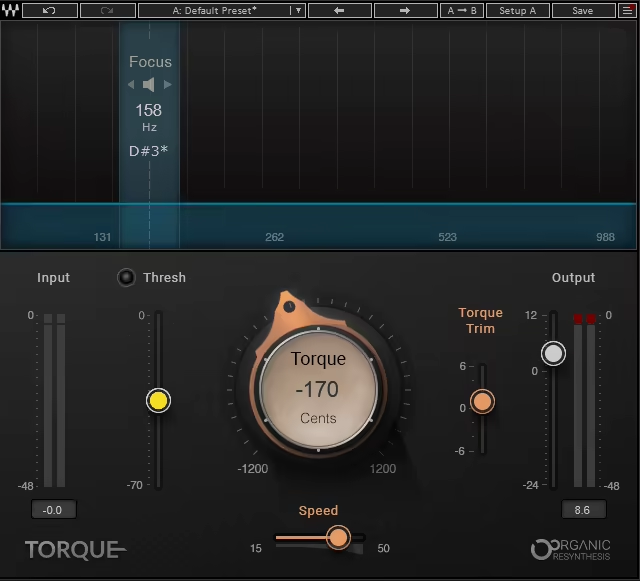
When your drums just don’t sit right in the mix and the kick feels a bit off, or the toms aren’t singing the way you want them to, it is time to check out Torque.
I think this can be seen as a smart pitch shifter. Using their Organic ReSynthesis technology, Torque adjusts your drums’ pitch and formants without messing up their natural attack or tone. Honestly, it’s like having a drum tech right inside your DAW.
I’ve used Waves Torque on many projects with kicks as well as full drum loops, and it worked wonders for me. I love the simple interface, and it makes you feel that there is a lot going on under the hood.
Whether you’re adding weight to a kick or tweaking toms to fit better with the bassline, this thing just works. Sure, extreme shifts might get a little funky with artifacts, but for subtle or moderate adjustments, it’s a game-changer.
- Focus Area for Targeted Tuning
The Focus display is super handy. It helps you zero in on the exact part of the drum sound you want to tweak. I’ve found it works best when you aim at either the fundamental pitch or the second harmonic as experimenting here can lead to some surprisingly great results.
- Transparent Pitch Shifting
Using the Torque knob, you can shift pitches up or down by up to an octave in musical steps, maintaining the integrity of your drum’s attack and body. This feature avoids the smearing and artifacts common with traditional pitch shifters.
- Speed and Trim Adjustments
The Speed control is one of my favorite features. You can time the pitch shift to kick in instantly or let it happen after the attack, which feels way more musical. And the Trim slider? Perfect for taming any low-end buildup after you tweak a kick.
- Threshold for Selective Processing
I love how the Threshold slider keeps things neat. It only processes signals above a set volume level, which is great for focusing on loud hits like kicks or snares without touching softer elements like cymbals.
If you’re like me and spend way too much time trying to get drums to sound just right, Torque is a no-brainer. Try focusing on the second harmonic for added richness in percussion, or use Trim to avoid excessive low-end buildup after tuning your kick drum.
Waves Torque is available in VST, AU, AAX, and Waves SoundGrid formats for macOS and Windows. Learn more here.
4. Aphex Vintage Aural Exciter

Ever had a track that sounded fine but just lacked that extra bit of life? Check out Aphex Vintage Aural Exciter Waves plugin.
Inspired by the legendary hardware unit from the ’70s, this plugin adds sparkle, air, and a touch of magic to your mix without feeling like you just turned up the treble.
I see this unit as a kind of nuanced EQ, restoring vibrancy and clarity with controlled harmonic distortion.
I’ve used it many times to rescue dull vocal tracks and bring some shine to snares and cymbals. I enjoy using it for polishing a master or giving individual instruments more presence cause the Aural Exciter is all about subtlety.
Sure, it can be pushed too far (and trust me, you’ll know when that happens), but when used sparingly, it’s a great tool for adding excitement to your mix.
- Restores Highs Without Harshness
Unlike EQs, the Aural Exciter doesn’t just boost the treble as it adds harmonic detail to the higher frequencies. This creates a bright and airy sound without introducing hiss or harshness.
- 3 Distinct Modes for Flexibility
The plugin offers MIX1, MIX2, and AX modes, each with its own character. MIX1 is clean and great for inserts, MIX2 delivers a more colorful tone, and AX mode shines when used on aux sends for parallel processing.
- Controlled Distortion for Extra Bite
By generating 2nd and 3rd harmonics, the Aural Exciter gives instruments like vocals, guitars, and drums added presence and energy without losing their natural tone. I think this is quite handy when you need a bit of extra bite for genres like rock, metal and more.
- Simple Yet Effective Controls
With straightforward knobs for input, output, and mix, you can quickly dial in the right amount of “excitement.” Plus, the analog modeling option lets you emulate vintage circuit noise if that’s your vibe.
While it’s not a “fix-all” tool, the Aphex Vintage Aural Exciter excels at adding subtle enhancement to tracks that need a lift. Try using it in AX mode on a drum bus for crisp, lively snares and kicks that cut through without sounding harsh.
But I must warn you here that less is more with this one. Don’t overdo it or you will end up with a too obvious into-your-face sound.
Waves Aphex Vintage Aural Exciter is available in VST, AU, AAX, and RTAS formats for macOS and Windows.
5. API 2500
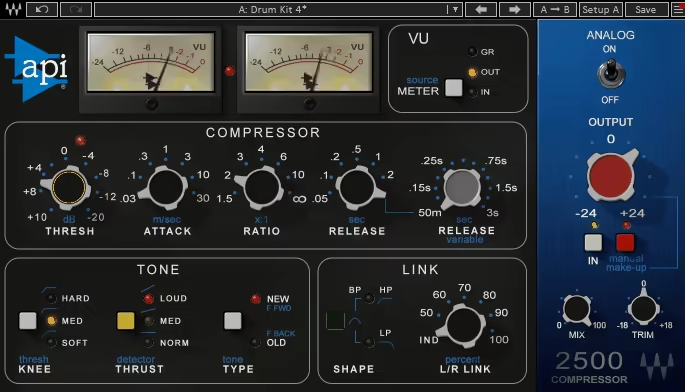
When you mix a drum, if you feel like something just isn’t locking in, the Waves VST API 2500 might be your answer.
This compressor is the go-to for adding punch, glue, and character to mixes. Whether I’m looking to enhance drum buses, add weight to bass, or give your stereo mix that polished, cohesive feel, the API 2500 delivers.
The first thing that strikes me about this audio tool is its ability to handle complex mixes without falling into the “pumping” trap.
You know, some compressors overreact to transients, leaving the track feeling lifeless. Not here. I love the API 2500, as it strikes a balance, letting you tame dynamics while keeping the energy alive.
It’s versatile enough for gentle mix-bus compression and aggressive drum shaping, making it a must-have for any producer or engineer.
- Vintage Feedback vs. Modern Feedforward Compression
The API 2500 offers two compression types: feedback for that smooth, vintage vibe and feedforward for punchier, modern tones. Whether you want subtle dynamics control or aggressive impact, you’ve got options.
- Thrust High-Pass Filter for Low-End Clarity
The Thrust feature is a great tool, allowing me to shape how low frequencies affect the compression. I take advantage of it for maintaining kick and bass energy without muddying the mix.
- Advanced Tone Shaping Controls
From knee curves (soft, medium, hard) to variable release times, the API 2500 lets you fine-tune the compression response to suit any material. The added Mix control makes parallel compression easy to dial in for extra punch and depth.
- Flexible Stereo Linking
The variable stereo link feature lets you control how much the left and right channels interact. Use it to create tight, cohesive mixes or give your stereo field more freedom.
The Waves API 2500 is a dynamic sculpting tool that can handle everything from gluing mixes to taming unruly vocals. I like using it on drum buses with Thrust mode engaged, as it gives your drums a kick without sacrificing clarity or energy.
Waves API 2500 is available in VST, AU, and AAX formats for macOS and Windows
6. BB Tubes
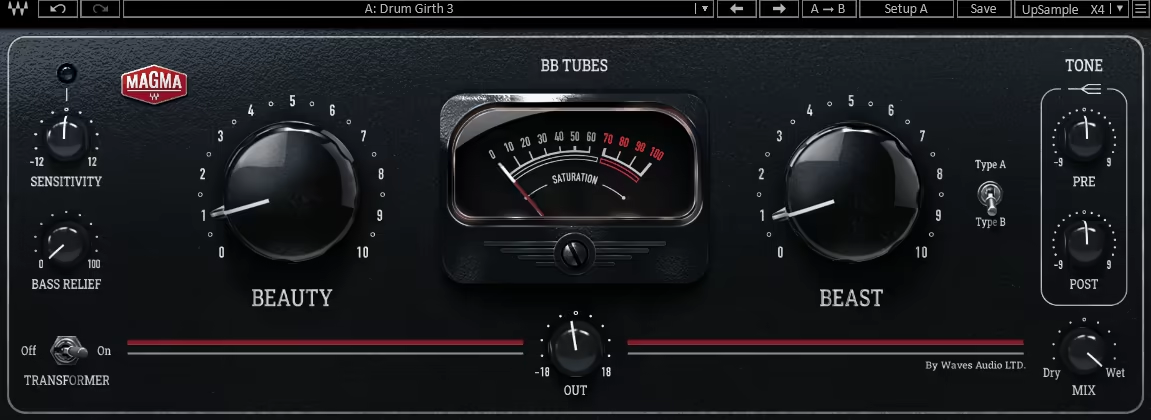
BB Tubes is the way to go for leaping tracks out of the speakers with warmth, punch, and a touch of controlled chaos.
Part of Waves’ Magma series, this plugin captures the essence of tube saturation in a user-friendly package that makes your mixes sound expensive. For polishing vocals, fattening up drums, or adding grit to guitars, BB Tubes offers a spectrum of tones that can transform your sound with minimal effort.
What I love most about this audio tool is its intuitive design, as it doesn’t require you to be a tech wizard to dial in great tones. Just play with the Beauty knob for smooth, harmonic warmth, or crank the Beast knob for aggressive, gritty distortion.
It’s like having a polite jazz musician and a rockstar in one plugin, ready to shape your tracks however you need.
- Blend Beauty and Beast for Versatile Saturation
The Beauty knob delivers sweet, even harmonics for warmth and depth, while the Beast knob adds odd harmonics for bold, aggressive tones. I often blend the two to craft anything from delicate textures to in-your-face distortion.
- Tube and Transformer Options for Added Color
I like switching between 2 emulated tube types, each offering unique harmonic profiles. Engage the transformer for a low-end bump that adds weight and character, even when the saturation is minimal.
- Bass Relief for Clean Low-End Focus
The Bass Relief control prevents low frequencies from hitting the tubes, keeping your bass tight and articulate while still benefiting from saturation. Perfect for kicks, bass guitars, and toms.
- Tone Controls for Tailored Harmonics
With pre- and post-saturation high-shelf EQs, I can shape the brightness of your signal before and after saturation. Adjust Sensitivity to control how much signal reaches the tubes, giving you ultimate dynamic control.
- Mix Knob for Parallel Saturation
Use the Mix control to blend the processed and dry signals, allowing for subtle enhancements or fully saturated tones without overcooking your mix.
I recommend combining Beauty and Beast on drum buses to get that perfect balance of punch and grit. BB Tubes is the one for adding warmth, punch, and character to any track, but the key is restraint. It’s tempting to slap it on everything (and honestly, it’ll sound great), but keeping some elements clean will make your mix feel dynamic and spacious.
Waves BB Tubes is available in VST, AU, and AAX formats for macOS and Windows.
7. Renaissance Compressor
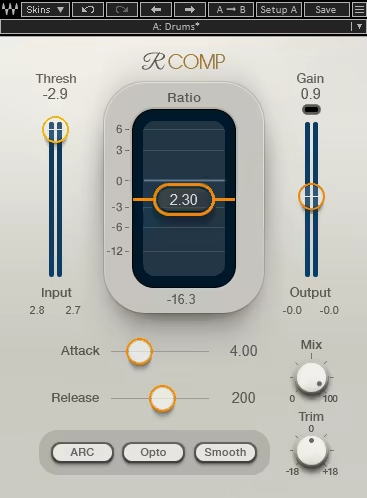
If there’s one plugin that feels like a warm hug for your audio tracks, it’s the Waves plugin Renaissance Compressor.
Known for its balance of analog-inspired warmth and modern precision, this compressor doesn’t just control dynamics and it gives your tracks a polished, professional sound that’s hard to ignore. If you are aiming for a smooth vocal performance or punchy drums, R-Comp has you covered.
- Vintage Opto and Modern Electro Compression Modes
One of my favorite things about R-Comp is the ability to switch between Opto mode, which provides that classic, warm compression we all adore, and Electro mode, offering a faster, more precise response for modern productions. It’s like having two compressors in one plugin tailored to whatever vibe your track needs.
- Auto Release Control (ARC)
The ARC feature intelligently adjusts release times, giving your mix consistent energy without any of that over-compressed “pumping” effect. I think it’s perfect for keeping vocals natural or for giving bass lines a smooth, consistent presence.
- Built-in Brickwall Limiter
Well, just say goodbye to clipping with R-Comp’s internal brick wall limiter. This handy feature ensures your output stays clean and controlled, even when you push the compression to its limits.
- Customizable Skins and Precise Metering
With its 3 interface options, you can choose a look that inspires your workflow. Plus, the detailed metering, including a limiting indicator, lets you see exactly what’s happening to your signal.
What sets the Renaissance Compressor apart for me is its ability to handle any dynamic challenge while enhancing the character of your sound. Whether you’re compressing vocals, shaping drums, or adding punch to a mix bus, it performs beautifully. For drum buses, I love going with the Electro mode, as it offers that tight and modern punch.
Renaissance Compressor is available for both macOS and Windows in all major formats, including AAX Native, VST, AU, and SoundGrid.
8. PuigTec EQs
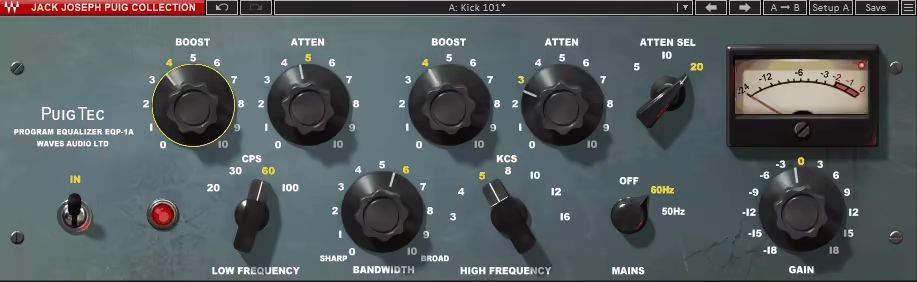
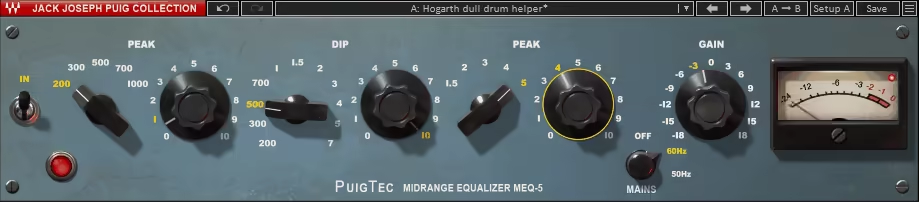
Sometimes, classics become classics for a reason, and the PuigTec EQP-1A and MEQ-5 are proof of that.
Faithfully emulating the iconic Pultec passive EQs, these plugins deliver the smooth, warm tone-shaping that’s been a go-to for engineers for over half a century. With their origins in the personal collection of Jack Joseph Puig, PuigTec EQs don’t just promise authenticity as they deliver it, track after track.
- Shape Fat Lows and Smooth Mids
I love how the EQP-1A Waves can make bass and drums punch without overwhelming the mix. The magic lies in its ability to boost and cut the same low frequencies, tightening everything up while still keeping it rich and full.
And for mids? That’s where the MEQ-5 comes in with its high clarity and presence on vocals, guitars, drums, and even synths. It feels like a cheat code for adding polish without overthinking it.
- Passive Circuitry for Subtle Sweetening
What really stands out to me about these plugins is their passive circuitry. Unlike some EQs that can feel heavy-handed, the PuigTec keeps things subtle. You’re not just EQing; you’re enhancing.
It’s like giving your tracks a gentle nudge in the right direction rather than a shove. I find it especially handy during mastering when I want to refine the tone without coloring it too much.
- Classic Pultec Sound with Harmonic Character
Here’s the fun part: the EQP-1A introduces just the right amount of harmonic distortion when you push it. Turning up the low shelf at 100Hz doesn’t just boost the bass cause it adds this warm, slightly gritty texture that feels oh-so-analog. It’s that extra touch that makes everything sound alive, whether it’s a kick drum or a bass guitar.
Honestly, the PuigTec EQP-1A and MEQ-5 have become some of my favorite go-to tools. They’re not flashy, but they deliver every time. If you want a quick trick, try the EQP-1A’s cut/boost combo on your bass or kick drum, I think it’s like tightening a belt without losing any heft.
PuigTec EQs are available for both macOS and Windows in all major formats including AAX, VST, and AU formats.
9. Scheps Omni Channel 2
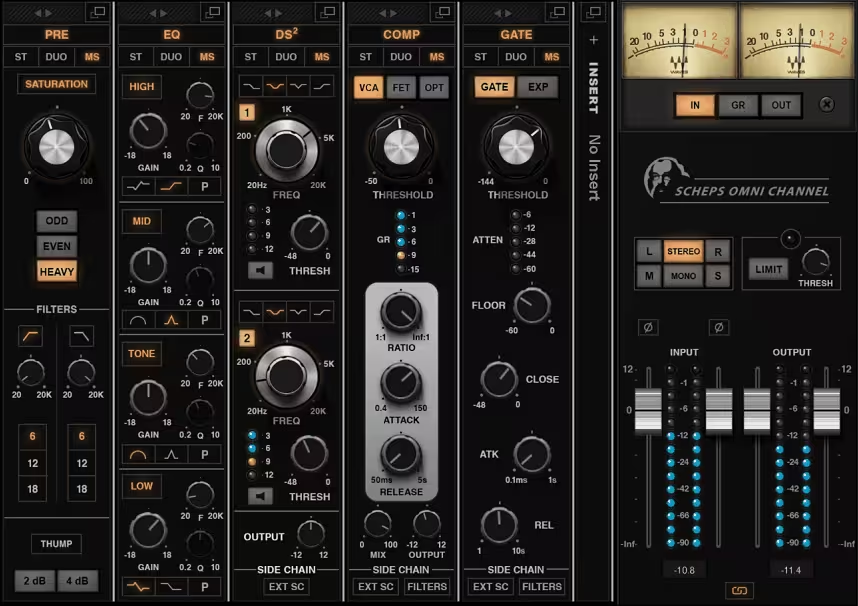
Designed by Grammy-winning mixer Andrew Scheps, Scheps Omni Channel takes the best of analog channel strips, mixes it with modern digital flexibility, and serves it up in a single, intuitive interface.
Whether I’m dialing in subtle warmth or reshaping a track entirely, Scheps Omni Channel 2 has become my go-to for just about everything.
- Modular Channel Strip with Total Flexibility
At the core of the Omni Channel are 5 modules, including preamp, EQ, compression, de-essing, and gating. What I love is the ability to reorder them on the fly, tailoring the signal flow to fit my mix.
The preamp section adds a gorgeous saturation, especially when using the Thump option for low-end heft. It’s perfect for giving kick drums or basslines that extra punch.
- 4 Compressors, Infinite Vibes
This is where things get really interesting for me. The compressor module offers VCA, FET, Opto, and the new Soft modes. Each one has a distinct flavor, from clean and snappy to warm and smooth.
My personal favorite? The Soft mode as it’s like wrapping vocals or drums in a cozy blanket. And if I want parallel compression? The built-in mix knob makes it a breeze.
- Precision EQ for Any Task
The EQ section is as versatile as it gets, with high and low shelves and two peaking bands. It feels familiar and musical, whether I’m taming harsh frequencies or boosting presence on vocals and drums.
When I need even more control, flipping to parametric mode is seamless. This EQ isn’t flashy, but it’s ridiculously effective.
- Fix-it Tools
The DS2 de-esser and gate are lifesavers for problem-solving, and the dual-band de-esser lets me target sibilance and other tricky spots with surgical precision, while the gate does a fantastic job cleaning up drum tracks or reducing bleed.
Bonus points for the sidechain options, as they’re a game-changer when I need to isolate specific frequencies.
- Expand with Your Own Plugins
Here’s the kicker: you can host any VST3 plugin within the Omni Channel. Need a reverb or delay? Just drop it into the chain. This flexibility makes it feel like a complete mixing ecosystem, not just a channel strip.
When working on drums, I suggest trying the Thump feature on the preamp and the FET compressor for a punchy, modern sound. Pair that with some subtle EQ boosts, and you’ll have a drum bus that slaps in no time.
The Scheps Omni Channel gives you a good amount of creativity. I trust it for mixing acoustic tracks as well as heavy-rock anthems as it adapts to the needs easily. It provides great drum tracks on all occasions, and for the price offered, I think it is a must-have.
Scheps Omni Channel 2 is available in VST, AU, and AAX formats for macOS and Windows.
10. SSL G-Master Buss Compressor
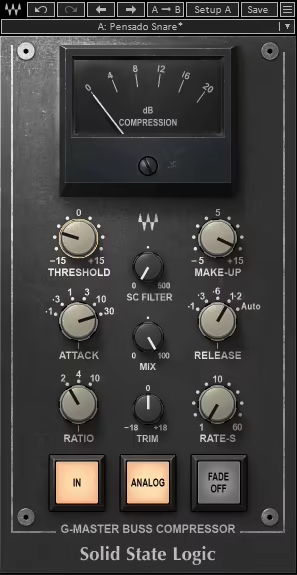
You hear some mixes that just sound more cohesive like every element is working in perfect harmony. That’s the “glue” of the SSL G-Master Buss Compressor, and Waves has done a great job capturing it.
Modeled after the legendary SSL 4000 G console’s master bus compressor, Waves plugin the SSL G-Master Buss Compressor brings that sought-after “glue” to your mixes for tightening up a drum bus, polishing vocals, or finalizing a track.
- Mix Cohesion
The SSL G-Master Buss Compressor excels at blending your mix into a cohesive whole without losing individual clarity. I find it great for drum buses; it just needs a touch of compression, and the kit feels tighter and punchier. The master bus adds a polished, professional vibe that instantly levels up any mix.
- Sidechain Feature
Waves didn’t just replicate the original; they improved on it. The sidechain filter is a game-changer, letting you avoid overcompressing low-end-heavy elements like kicks and bass. This gives me more control, ensuring the compression feels natural, not heavy-handed, which I really enjoy using for drum recordings.
- Flexible Modern Features
The Mix control is a lifesaver for parallel compression. Whenever I want a subtle lift or a more aggressive squeeze, I can blend in just the right amount.
The added Trim control is another handy touch for quick level adjustments without diving into your DAW settings.
My tip would be to use a slow attack and fast release on your drum bus to emphasize transients, giving the drums more energy and punch while keeping them glued together.
SSL G-Master Buss Compressor is available in VST, AU, and AAX formats for macOS and Windows.
11. CLA-2A

If you’re after warm, smooth compression that feels like a warm hug for your tracks, the Waves CLA-2A is the tool.
Modeled after the iconic Teletronix LA-2A compressor and specifically Chris Lord-Alge’s personal unit, CLA-2A brings the analog magic to your DAW without needing a second mortgage.
With its buttery compression and musical tube saturation, the CLA-2A is an ideal tool for vocals, bass, drums, and more. I use it in different projects from soulful ballads to gritty rock tracks, it locks your sound in place and adds that polished sound to drums that sounds authentically vintage.
- A Modern Classic for Drums and Vocals
The CLA-2A shines on vocals and drums, delivering that larger-than-life quality you’ve heard on countless hits.
I loved how effortlessly it glued a vocal in the mix, making it sound up-front and cohesive. For drums, it adds a bit of punch from the tube emulation, which locks the groove without sounding harsh.
- Analog Warmth
The plugin’s optical compression and tube saturation give it that unmistakable analog vibe. Push the gain to add subtle harmonics or crank it for more grit, as it’s all about what your track needs.
I also enjoyed playing with the limiter mode, cause it adds sustain to instruments, making guitars sing and drums punch.
- Simple Yet Powerful Controls
What I like most? The interface is refreshingly straightforward: Gain, Peak Reduction, and a compression/limiting toggle. You don’t need a degree in audio engineering to get stellar results. Just tweak, listen, and enjoy.
For chasing silky smooth vocals and rock-solid drums, this plugin delivers classic compression with modern flexibility.
CLA-2A is available in VST, AU, and AAX formats for macOS and Windows.
