
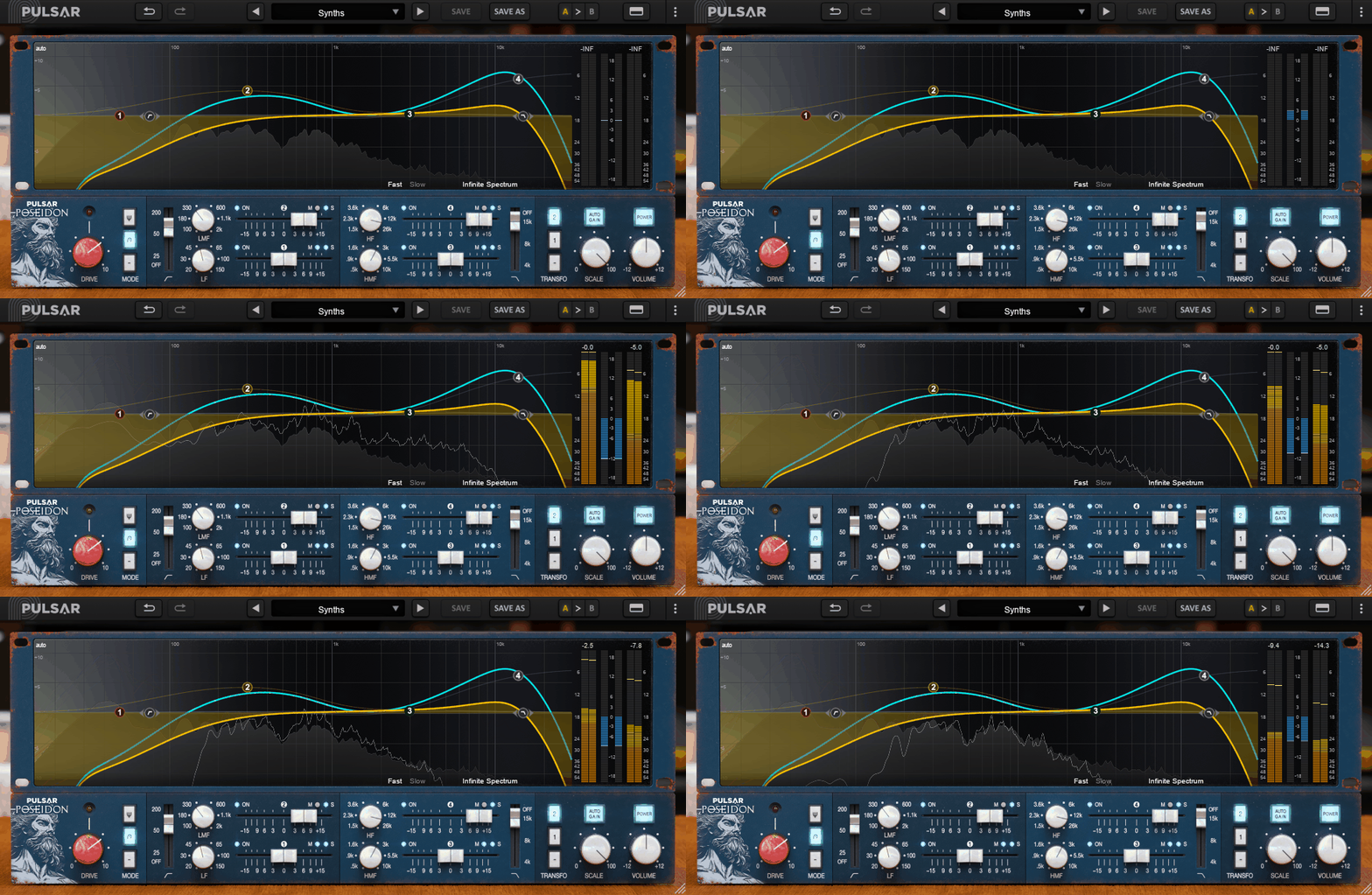
The best EQ plugins for clean mixing are the real MVPs when it comes to turning a messy mix into something crisp and pro. So, here are my top picks to save your mixes!
I used to think EQ was just about boosting highs and hoping for the best, but nope, it’s the secret weapon for clarity, balance, and actually making room for everything.
A solid EQ lets me cut the mud, tame the harshness, and shape my sound without overthinking it.
Some of these plugins are surgical precision tools, others bring that smooth analog warmth, and a few even have AI-powered tricks that make me feel like I have a personal mixing assistant (minus the attitude).
For cleaning up muddy lows or adding that perfect shimmer to the highs, with the right EQ here the job is easy. So if your mix is feeling cluttered, dull, or just plain off, don’t sweat it.
These EQ plugins will have your tracks sounding polished in no time! So, let’s start before wasting more time!
1. Pulsar Audio Poseidon
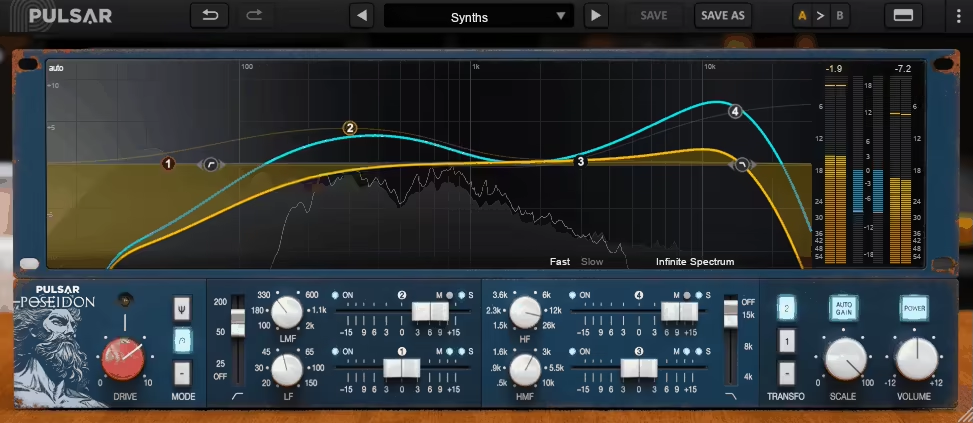
Ever wonder what it’d be like to have a rare, mythical console EQ inside your DAW without needing a time machine or a six-figure studio budget? Well, Poseidon EQ does just that.
I love how Pulsar Poseidon captures the soul of a legendary inductor-based EQ and slaps it into an easy-to-use plugin that doesn’t require a PhD in vintage gear.
The first thing that grabbed me was the on-screen curve editing. This makes dialing in frequencies feel way more intuitive, almost like painting your sound instead of just cranking knobs blindly.
And since Poseidon models the unique band interactions of the original hardware, the EQ curves move together dynamically, letting you shape your sound in a way you just can’t get with most parametric EQs.
- Mid/Side Processing for Stereo Control
Want to add shimmer to just the sides? Push the mids forward without touching the air? Poseidon’s Mid/Side bands let you sculpt width and focus without needing extra plugins.
- Saturation That Feels Like Magic
For me this is great EQplugin for mixing, with its two saturation modes that give your mix extra warmth, presence, and depth. Think of it like adding a hint of analog mojo, without the hassle of routing through outboard gear.
- Auto-Gain & Oversampling for a Smarter Mix
Ever boost an EQ and suddenly your mix feels like it’s exploding? Auto-Gain keeps your levels steady while you tweak.
And if you’re working with hi-fi mastering projects, the oversampling mode ensures pristine clarity even at high sample rates.
- Output Transformer Emulations
The original console didn’t have an output transformer, but Poseidon gives you two transformer options to enhance low-end harmonics and give your mix that extra vintage thickness.
The only thing that left me wanting more? A bigger preset library and maybe a couple more saturation flavors. But honestly, this plugin is built for tweakers and hands-on mix engineers, so presets wouldn’t do it justice anyway.
If you want pure digital transparency, look elsewhere, Poseidon is all about character, color, and movement.
Slap it on drums, vocals, buses, or even your master chain, and it’s like giving your mix a little secret sauce from the golden era of recording.
Poseidon EQ is available in VST, VST3, AU, and AAX formats for macOS and Windows.
2. Antares Auto-Tune Vocal EQ
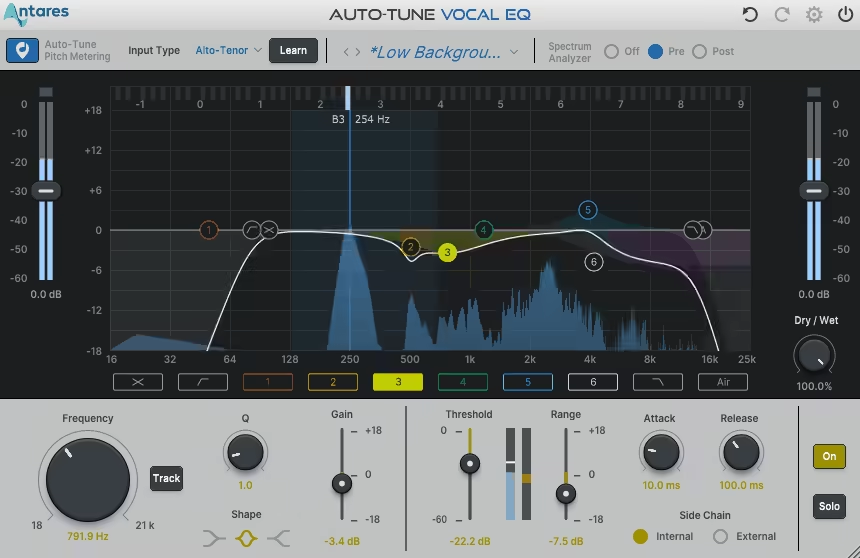
If EQs had a VIP section, Auto-Tune Vocal EQ would be sitting front row with a drink in hand.
Auto-Tune Vocal EQ is a special EQ VST, with its pitch-tracking magic baked right in, meaning it actually follows your vocal’s fundamental pitch as it moves.
That’s right, no more blindly sweeping through frequencies hoping to catch that one rogue resonance, this thing locks in and does the hunting for you.
And let me talk about the Vocal Learning feature. This bad boy listens to your vocal and figures out where the fundamentals and harmonics sit, so you’re not just EQ’ing based on a guess, as you’re making precision moves that actually make sense.
- Pitch-Tracking EQ Bands
Instead of static frequency boosts and cuts, Auto-Tune Vocal EQ’s bands follow the pitch of your vocal. This means your EQ adjustments stay relevant even if the singer decides to go full Mariah Carey mid-song.
- Frequency Masking Visualizer
Ever feel like your vocal is fighting for space with the synths or guitars? This visualizer shows exactly where the problem is, so you can carve out the room without muddying things up. I think this is an amazing feature for beginners to get used to EQ balancing.
- Tilt & Air Bands for Instant Shine
The Tilt EQ is a lifesaver when you just need to brighten or darken a vocal fast, while the Air Band gives that smooth, high-end polish without sounding harsh.
- Dynamic EQ That Moves With You
Unlike regular dynamic EQs, this one adjusts its response in real-time based on the fundamental pitch, so if a note gets too sibilant or honky, it automatically tames just that frequency, only when needed.
Now, it’s not an all-in-one EQ for everything, cause it’s hyper-focused on vocals, so don’t expect it to be your go-to for bass or drums. But when it comes to vocal production, it’s basically a cheat code.
My personal tip? Use the Tilt EQ early in the mix to get the overall balance right, then fine-tune with the pitch-tracking bands. Trust me, once you see your EQ following the vocal like it’s got a GPS tracker, you won’t want to go back to regular EQing.
Auto-Tune Vocal EQ is available in VST, VST3, AU, and AAX formats for macOS and Windows.
3. FabFilter Pro-Q 4
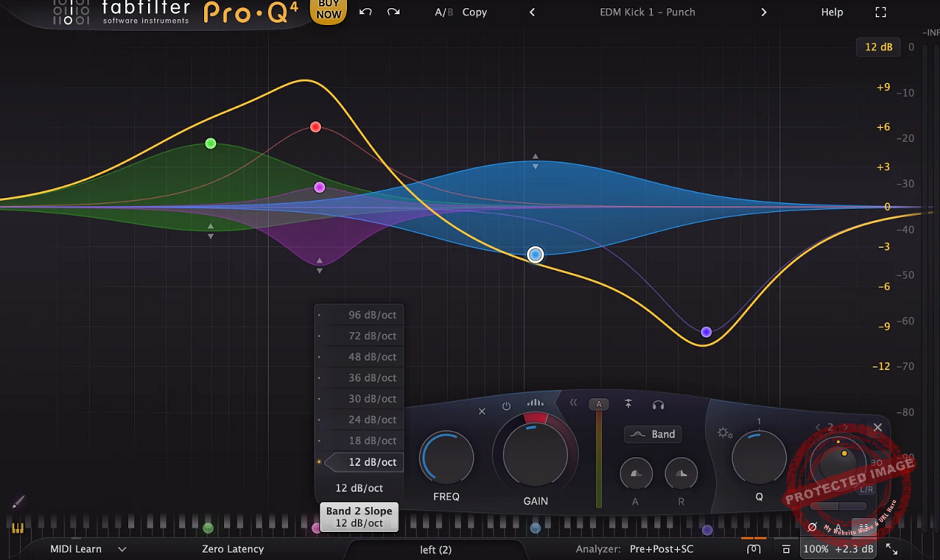
FabFilter Pro-Q 4 is basically the Swiss Army knife of EQs but with a jetpack strapped to it.
I’ve been rocking with Pro-Q for years, and every time I think, “There’s no way they can make this better”, FabFilter pulls some Jedi-level wizardry and proves me wrong. Their final game, Pro-Q 4, is hands-off one of my all-time favorite EQs.
For me, the big game-changer is the EQ Sketch Mode, as this thing lets you literally draw your EQ curve like you’re doodling on a napkin.
No more adding a band, tweaking the Q, moving the frequency, questioning your life choices… Just sketch it out, and voila, your mix is already thanking you.
And let’s not even start on the Spectral Dynamics Mode, as this feels like Soothe on steroids, but baked right into your EQ. If you’ve ever wanted to magically tame harshness without nuking the life out of your mix, welcome to your new best friend.
- EQ Sketch Mode
You ever tried to EQ something and felt like you were solving a Sudoku puzzle with no instructions? Same. This feature lets you scribble in your EQ moves like a mad scientist and instantly get results.
I’ve been using it to carve out vocal space in dense mixes in seconds, and honestly, it feels borderline illegal how easy it is.
- Spectral Dynamics
I hate it when an EQ sounds killer in some spots but then suddenly turns into a harsh, honky mess in others. Spectral Dynamics section tackles that, thankfully.
Instead of manually automating EQ moves (ain’t nobody got time for that), this mode only cuts frequencies when they actually get annoying. It’s like having a built-in mix assistant who actually knows what they’re doing.
- Instance View
If you’ve ever had ten Pro-Qs open and wished you had one master command center, congrats, you now have one.
You can see and tweak every instance of Pro-Q in your project from a single window. Balancing kick and bass? Done. Checking guitar layers? Easy. Adjusting your life choices? Well… still working on that.
Well, not gonna lie, I could do without the Character Modes. I mean, they add some color, but if you’re looking for thick, juicy analog saturation, you’re probably still gonna reach for a dedicated saturation plugin.
Also, Spectral Dynamics is a beast, but if you overdo it, your mix might end up sounding a little too smooth, like a radio pop song from 2015. Use with caution.
I don’t even think about EQs anymore, I just grab Pro-Q 4 and let it do its thing. If you want an EQ that works at the speed of your brain (but with fewer existential crises), this is the one.
FabFilter Pro-Q 4 comes in VST, VST3, AU, and AAX formats for macOS and Windows.
4. Waves SSL G-Equalizer

If EQs had a “cool vintage” club, the SSL G-Equalizer would be chilling in the VIP booth, sipping an Old Fashioned.
Modeled after the legendary SSL G Series EQ292, this bad boy doesn’t just tweak frequencies, as it injects that classic SSL mojo straight into your mix. It’s not just about shaping sound; it’s about giving your mix that polished, expensive feel, like putting your track in a designer suit.
What I love about SSL G-Equalizer is how natural it sounds. It’s got 4 parametric bands, low/high shelves, and filters, but the real magic is in the Proportional-Q behavior.
That means when you boost or cut, the bandwidth automatically adjusts, making sure your changes sound smooth and musical. And let’s not ignore the Analog Mode, which sneaks in just the right amount of harmonic richness, adding some extra warmth and glue.
- Proportional-Q Magic
Proportional-Q Magic makes this EQ stupidly easy to use. The more you boost or cut, the narrower the bandwidth gets.
No weird phasing, no harshness, just clean, professional tone-shaping that works every time. It’s why this EQ never feels surgical, it’s got that classic, musical response that fits into any mix effortlessly.
- Pre-Boost Dip & Pre-Cut Rise
As my favorite feature here, this is one of those subtle but genius SSL tricks.
When you boost, it gently dips the frequencies before it, and when you cut, it slightly lifts the surrounding ones. This makes adjustments feel smoother and more transparent, especially in the mids, where things can get honky real fast.
- High-Pass & Low-Pass Filters
As always, these filters are a lifesaver for cleaning up the mix. Whether I’m tightening up low-end on a bass or getting rid of rumble on a vocal, these filters let me carve out space without sucking the life out of the sound.
I gotta admit that it’s not the most high-tech EQ out there. No dynamic bands, no spectrum analyzers, just straight-up tone shaping.
But honestly? That’s the whole point. Sometimes, you don’t need an EQ that looks like it belongs in a NASA lab, you just need one that sounds incredible and gets the job done fast.
My tip? Pair this with a good compressor and let it cook. Boost the mids a little, tame the lows, and flip that Analog Mode on for some extra flavor. If you want a smooth, polished tone with a side of rockstar attitude, this one’s a must-have.
Waves SSL G-Equalizer comes in VST, VST3, AU, and AAX formats for macOS and Windows users.
5. Sonnox Claro
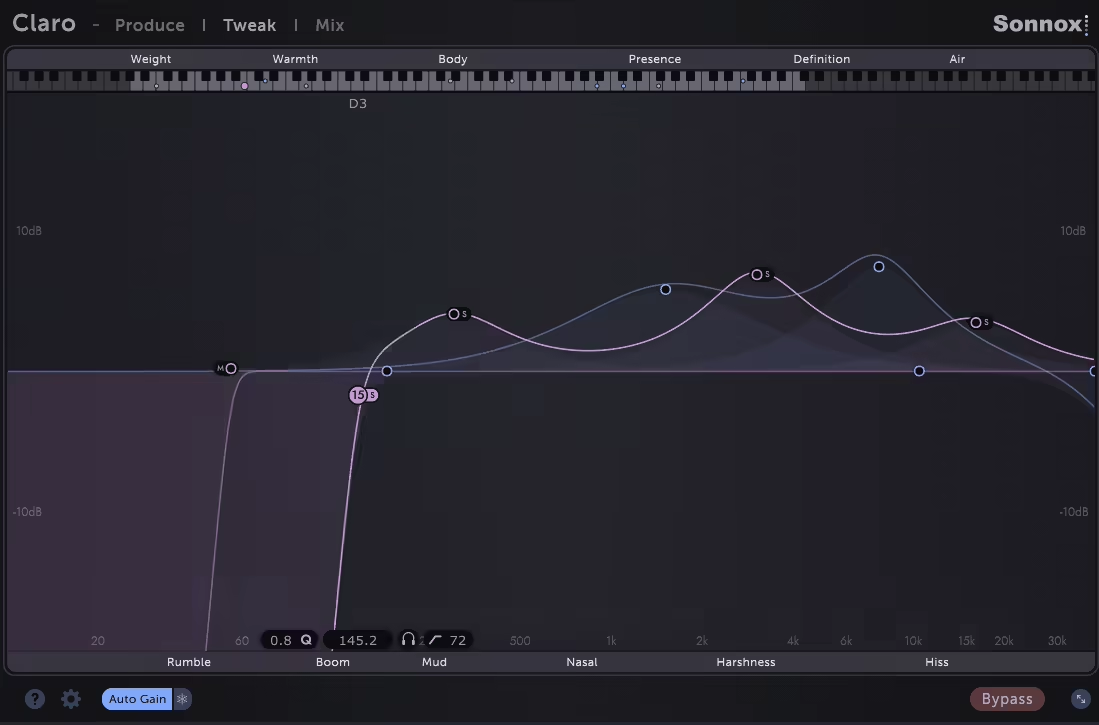
Sonnox Claro is like that friend who actually gives you good advice instead of just nodding along while you ruin your mix.
Sonnox Claro isn’t just an EQ, it’s a mixing coach in plugin form. It doesn’t throw a bunch of knobs at you and say, “Figure it out, champ.” Nope, it guides you through the whole process, making sure you actually know what you’re doing instead of just boosting random frequencies and hoping for the best.
I think what makes it wild is the 3-stage workflow: Produce, Tweak, and Mix. Think of it like a “glow-up” process for your sound.
First, you start in Produce mode, where you can make quick, broad tonal moves, no stress, no clutter, just getting things to sound better without overthinking.
Then, when it’s time to get surgical, you hop into Tweak mode, which has a real-time spectrum analyzer and all the deep EQ controls you’d expect.
And just when you think it can’t get cooler, there’s Mix mode, where you can see how all your tracks interact in one place, like some kind of mix engineer superpower.
- Frequency Masking Detection
Ever spent way too long wondering why your vocal and guitar sound like they’re fighting for attention like siblings on a road trip? Claro just highlights the problem areas for you. No more blind guessing, just quick fixes.
- Resonance Suppression
Some EQs just obliterate resonances like they owe them money, but Claro is way more chill about it.
Instead of auto-zapping everything, it waits until you actually start sweeping and then subtly hints, “Yo, maybe check this frequency?” It’s like a gentle nudge in the right direction, not a full-on intervention.
- Mix View
This is where things get ridiculously handy. Instead of flipping back and forth between tracks trying to balance everything, you just see all instances of Claro in one window. It’s like having a cheat sheet for your mix, except it’s totally legal.
Now, I gotta say, Claro can be addictive. Just because Claro tells you two tracks are clashing doesn’t mean you need to separate them like a high school principal breaking up drama.
Well, some frequency overlap is actually a good thing. My tip would be to use masking detection early on, fix the major clashes, but then trust your ears instead of blindly following the visuals.
Honestly, Claro is one of those plugins that makes you a better mixer just by using it. It’s fast, intuitive, and actually teaches you how to make smarter EQ moves instead of just twisting knobs and hoping for the best.
If you’re tired of second-guessing your EQ decisions, this thing is a no-brainer.
Sonnox Claro comes in VST3, AU, and AAX formats for macOS and Windows users.
6. Pulsar Audio w495
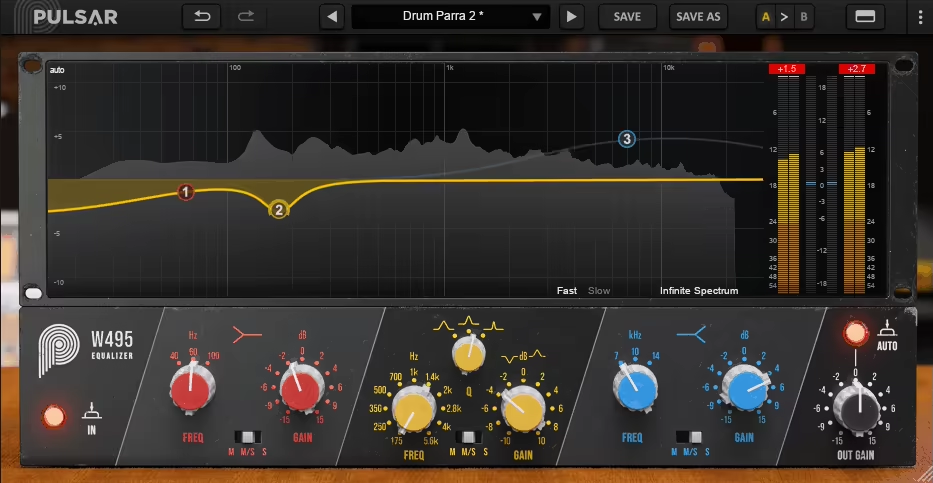
Pulsar Audio w495, a plugin that pays homage to the Neumann w495, an EQ that was basically the secret sauce behind 90% of vinyl records from the ’70s to the ’90s. No joke, this thing is that iconic.
Ever feel like you want to channel the spirit of those legendary mastering engineers who shaped decades of music, but without selling your car to afford vintage gear? Same here. Come in w495!
Pulsar Audio already has a rep for nailing vintage emulations, and they’ve seriously knocked it out of the park again. The w495 EQ gives this studio classic a fresh twist for the modern world, and honestly, I was hooked the moment I loaded it up.
We’re talking a 3-band EQ with low shelf, mid bell, and high shelf. That’s it. And sometimes, that’s all you need to make a track sit just right. It’s crazy how such a simple layout can be so powerful.
- Classic Sound with Modern Flexibility
The w495 nails that clean, smooth, musical tone, the hardware was famous for. You can boost or cut quite a bit, and it never sounds harsh, just buttery and sweet.
But here’s the kicker: Pulsar added smart modern touches that make it even better in a digital setup.
- Mid/Side Magic on Each Band
One of the hooks for me here is that each EQ band has its own Mid/Side switch. Wanna add low-end weight just to the center of your mix or need to make those high frequencies sparkle on the sides? Easy.
It opens up a whole new world of stereo tone shaping, and I find myself reaching for it all the time.
- Visual Curve Editing & Analyzer
As much as I love the tactile feel of good old knobs, having an on-screen analyzer and the ability to visually edit your EQ curve is a massive win.
I can toggle between classic mode, visual mode, or both, which is perfect depending on my mood or the session. It’s also super handy when I want to teach someone or just speed things up.
- Stepped or Smooth, Your Choice
This one’s underrated. I’m a sucker for that satisfying “click” of stepped EQ settings, but sometimes I want more fluid, in-between tweaks.
The w495 lets me do stepped, smooth, or even half-step adjustments. Honestly, this flexibility makes the plugin feel like it was built for me.
- Auto Gain & Transformer Goodness
I’m always second-guessing whether something sounds better or just sounds louder. That’s why the Auto Gain feature is so clutch, it helps keep your level consistent while you’re EQ’ing. Plus, they modeled the Haufe RK 756 transformer, which brings in this subtle analog warmth that just glues everything together.
I’ve thrown this thing on everything lately, including guitars, vocals, buses, you name it and I think it’s especially killer on drums, where just a touch of boost can make a snare pop or help a kick sit perfectly in the mix. And on the master bus? Oh man. A gentle low boost, a little sparkle on top, and you’re golden. It just feels… effortless.
Now, don’t expect surgical precision here. This isn’t your go-to for crazy notching and dynamic EQ wizardry. But that’s the whole point. The w495 shines when you’re making broad, bold moves that just work.
If I had to nitpick, I’d say its simplicity is both its strength and its limit. If you’re looking for ten bands, dynamic EQ, or complex mod routing, you’ll want something else. But if you want musical tone-shaping with vintage soul and modern smarts, this thing is an absolute joy to use.
Pulsar Audio w495 comes in VST2.4, VST3, AU, and AAX formats for macOS and Windows.
7. Tone Empire Res Q
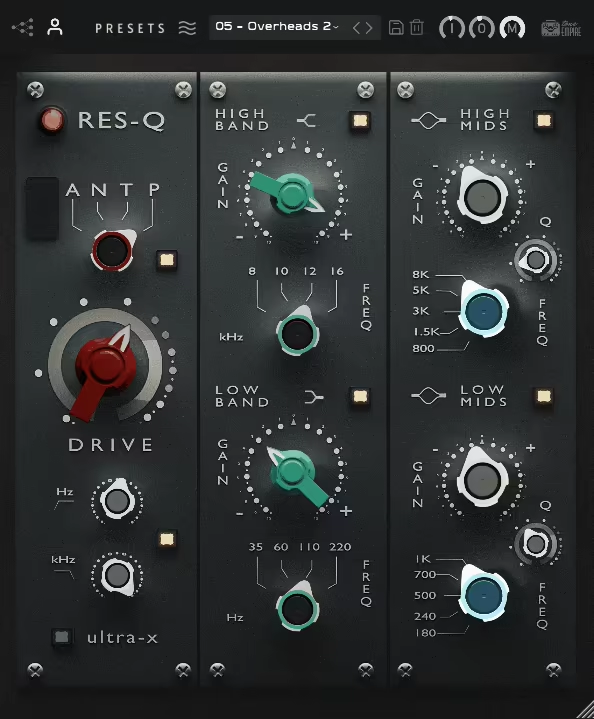
One of the most fun EQs to use, Tone Empire Res Q is that one-button magic trick for your mix.
It’s not the kind of EQ you reach for when you’re trying to carve out a thousand tiny notches; it’s the one you grab when your mix needs instant vibe, depth, and warmth without a ton of tweaking.
Res Q isn’t here to give you a science lesson on frequency balancing; it’s here to make everything sound better, fast.
What makes it stand out for me is the built-in harmonic saturation that adds a rich, vintage-style warmth to your sound.
The harder you push it, the more it breathes life into dull or flat tracks. Instead of just adjusting EQ curves, it actually enhances the tone in a way that makes everything feel more alive.
- Dual-Band Simplicity
Forget endless parametric controls, Res Q keeps it stupidly simple with just two bands: one for the lows, one for the highs.
Whether I’m adding weight to the bottom end or smoothing out the top, it’s got zero fuss, all results.
- Harmonic Saturation
This is where Res Q gets spicy. The 4-mode preamp section lets you infuse your signal with different kinds of analog mojo, from transformer-based color to tube-style richness. It’s not just boosting EQ; it’s shaping your sound in a way that feels musical.
- CPU-Friendly
With the latest update, Res Q now runs way more efficiently, meaning you can slap it on multiple tracks without frying your CPU. No more choosing between good tone and a functioning DAW, now you can have both.
The only thing to keep in mind is that this isn’t a surgical EQ. It’s not for precise frequency cuts or problem-solving, it’s for enhancing and sweetening your sound.
My go-to move? A gentle high-end boost with saturation on vocals, overheads, or synths to make them shimmer in the mix.
If your mix ever feels like it’s missing that final bit of polish and depth, Res Q is the fast-track to pro-sounding results. Sometimes, simple is better, and this plugin proves it.
Tone Empire Res Q comes in VST3, AU, and AAX formats for macOS and Windows users.
8. Minimal Audio Morph EQ

Minimal Audio Morph EQ feels like an interactive, shapeshifting sound sculptor that refuses to stay still.
Morph EQ VST plugin doesn’t just let you tweak frequencies; it lets you draw custom filter paths, morph between settings, and create dynamic, living movements inside your mix. If most EQs are like a surgeon with a scalpel, this one is like an artist with a paintbrush and a whole lot of caffeine.
Well, the 7 filter types are just the beginning. I think what really makes this one stand out is how you can seamlessly morph between different states with a single knob.
It’s not just about cutting and boosting, it’s about motion, about making an EQ feel like an instrument rather than just a utility tool.
- Custom Filter Morphing
If you wished your EQ settings could just glide between shapes like they’re dancing. With drawable filter morph paths, you can literally sketch how the filters move over time.
One twist of the Morph knob, and you’ve got sweeping, evolving frequency shifts that bring a mix to life.
- Macro Controls
Instead of adjusting everything manually, you can link multiple parameters to the global macros, making it super easy to push your sound in different directions without breaking a sweat. Need a filter sweep, a stereo shift, and a cutoff change all at once? Done.
- Spectrum Analyzer
The real-time spectrum analyzer is clean, precise, and doesn’t lag.
It gives you a crystal-clear view of what’s happening in your sound, so when you make a move, you’re not just guessing, you’re actually seeing and hearing the changes instantly.
The only thing to keep in mind is there’s no per-filter bypass option (yet), which would be handy for A/B testing individual tweaks. But honestly, the morphing engine is so fun to use that you’ll probably just keep experimenting instead of toggling things on and off.
My advice would be to start with the presets, not because you’re lazy, but because they’re actually useful.
They’ll show you just how wild this thing can get. And if you’re working with vocals or synths, try using slow morphing sweeps to add movement without making things messy.
If you’re looking for an EQ that thinks outside the box, makes mixing more creative, and lets you literally shape sound in motion, Morph EQ is an absolute must-have.
Minimal Audio Morph EQ comes in VST, VST3, AU, and AAX formats for macOS and Windows users.
9. Wavesfactory Equalizer
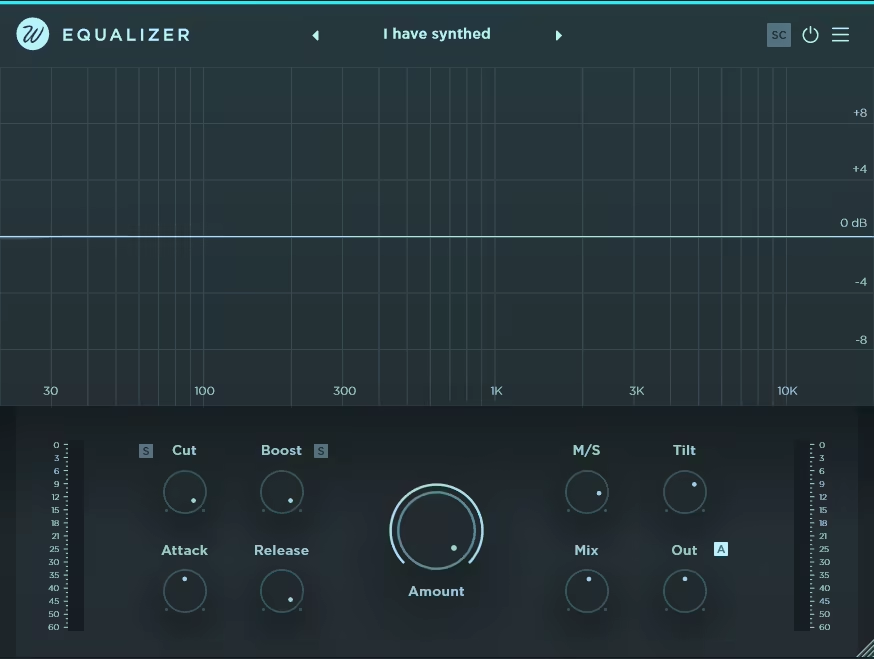
Wavesfactory Equalizer is like that one friend who always gives you great advice but never makes things complicated. You throw it on a track, and boom, it’s already doing half the work for you.
With the smart automatic processing across 32 frequency bands, Wavesfactory Equalizer actually listens to your mix and makes precise, real-time corrections. I love that it shortcuts the endless tweaking without second-guessing but just results.
The Amount knob is a lifesaver. It lets you control how much of the automatic EQ curve is applied, so you’re never stuck with something too aggressive.
And let’s talk about the Tilt control, this thing lets you subtly shift the balance between highs and lows without making the mix sound unnatural. It’s basically a cheat code for instant brightness or warmth.
- Smart Frequency Processing
Instead of randomly boosting and cutting frequencies, Equalizer analyzes your track and automatically balances it out.
I fond out that it’s like having an AI mix assistant, but one that actually understands what you’re trying to do.
- Frequency Soloing
Ever wanted to zoom in on a problem frequency and hear exactly what’s happening? The solo function lets you isolate specific bands and fine-tune them with ridiculous precision. No more guessing which frequency is messing up your mix.
- Zero Latency for Real-Time Use
Unlike some fancy AI-driven plugins, this one processes everything in real-time without adding latency.
That means you can use it live, on stage, or in the studio without worrying about delay issues.
The only catch? If you push it too hard on a full mix, it can start to sound over-processed. But that’s where the Amount knob saves the day, keep it around 50% for subtle corrections, or push it further if you want something more creative.
I’d recommend using Equalizer early in your mix to get everything balanced before stacking on effects.
It’s like setting a strong foundation so you don’t end up fighting your mix later. If you’ve ever wanted an EQ that’s both smart and effortless, this one’s a game-changer.
Wavesfactory Equalizer comes in VST, VST3, AU, and AAX formats for macOS and Windows users.
10. Brainworx Mäag Audio EQ4

Some EQs are all about precision and control, but the Mäag EQ4 is more like flipping on a fancy “make it sound better” switch.
EQ4 is not here for surgical fixes, it’s here to make everything shine effortlessly. And let’s be real, most of the time, that’s exactly what we need.
The first thing I noticed was The Air Band, which is like cracking open a window and letting fresh air into your mix.
I don’t know what kind of sorcery is behind this, but even the slightest push at 10kHz, 20kHz, or even 40kHz makes vocals, synths, and drums pop in the most natural, non-harsh way possible. It’s like adding an expensive studio mic to your track without spending a dime.
- The Air Band
No joke, this is the kind of high-end boost that makes you double-check if you accidentally upgraded your monitors overnight.
Just a slight bump, and suddenly everything feels clearer, smoother, and way more professional. I throw it on vocals, acoustic guitars, and even full mixes, basically, if it exists in a song, it can benefit from some Air Band love.
- 6-band EQ that just gets your mix
No endless scrolling through frequencies, as this thing knows where the magic lives. The 10Hz “Sub” band is perfect for adding some thump without drowning your track in mud, while the 2.5kHz shelf gives midrange elements just the right amount of bite.
It’s all pre-dialed for musicality, so you’re making moves fast instead of second-guessing every tweak.
- Smooth as butter, no nasty phase issues
You ever crank an EQ and suddenly everything sounds weird and phasey? Not here.
The low phase shift design means you can boost as aggressively as you want, and it still sounds clean and natural. Whether I’m adding weight to a bass or making a snare smack harder than a reality TV meltdown, it just works.
I must give one heads-up, though: the Air Band adds plenty of gain like a sneaky little troublemaker, so keep an eye on your levels.
But honestly? That’s a small price to pay for instant radio-ready shine. If you want surgical control, this ain’t the EQ for you. But if you want an effortless vibe and a mix that sounds expensive, you might just fall in love with this one.
Brainworx Mäag Audio EQ4 comes in VST, VST3, AU, and AAX formats for macOS and Windows users.
11. Eventide SplitEQ
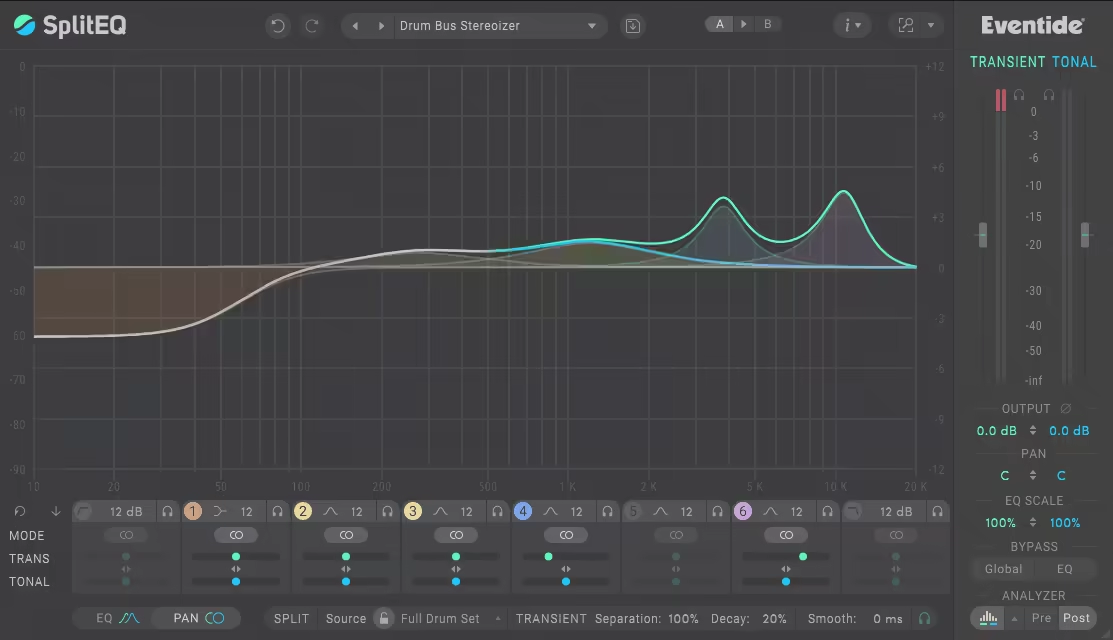
EQs usually fall into two camps: either they’re surgical tools for fixing problems or creative tools for shaping sound. But SplitEQ? This one breaks the rules.
The trick with SplitEQ is that it splits your sound into transient and tonal elements, meaning you can tweak the attack of a snare without touching its body or soften a vocal without killing its presence.
I liked the interface, as it’s surprisingly intuitive for something so advanced. You get an 8-band parametric EQ, with all the classic filter types, plus Mid/Side and Left/Right processing for surgical stereo tweaks.
The real-time spectrum analyzer is a lifesaver, giving you a clear visual of how your transients and tonal elements interact. If you’ve ever struggled to dial in the perfect balance between punch and warmth, this thing makes it feel effortless.
- Structural Split Technology
I think this is the unique feature here cause it lets you separate transients from tonal elements, so you can control attack and sustain independently.
It’s perfect for tightening up kicks, softening harsh plucks, or giving vocals more depth without adding mud. It’s like having an EQ and transient shaper in one.
- Stereo Imaging Control
Stereo Imaging Control is where things get even crazier. You can pan transients and tonal elements separately, meaning you could widen a drum’s attack while keeping its body dead center or push percussive elements outward while leaving the warmth untouched. This is next-level mix control.
- Over 150 Presets
I love it when plugins add a high number of presets to cover everything from surgical fixes to creative sound shaping.
I usually tweak manually, but some of these presets are straight-up time savers. You can fix a harsh vocal or tighten a drum mix in seconds.
It’s not your average grab-and-go EQ, as there’s a learning curve, and you’ll need a bit of patience to fully unlock its power. But once you do, you’ll start hearing mix problems in a whole new way.
It’s one of the best EQ plugins for mixing. My go-to move is to use it on vocals to add air without making sibilance unbearable. Whether you’re fixing a muddy mix or pushing creative boundaries, SplitEQ is a tool you won’t want to mix without.
Eventide SplitEQ comes in VST, VST3, AU, and AAX formats for macOS and Windows users.
Extra: Sonnox Oxford Dynamic EQ
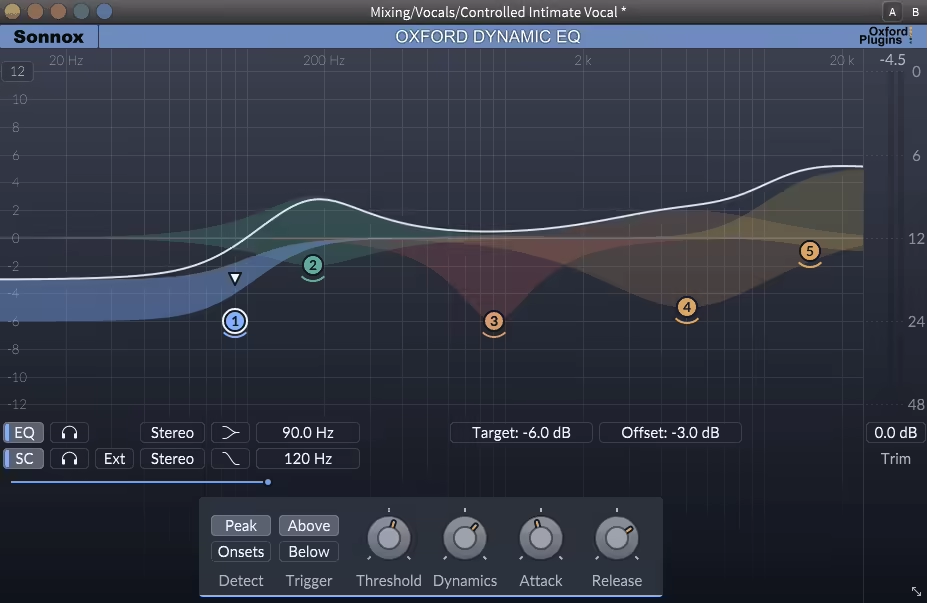
Dynamic EQs can be hit or miss, but my last pick, Oxford Dynamic EQ plugin just gets it. It gives you the precision of a parametric EQ with the flexibility of dynamic processing, meaning you’re not just boosting and cutting, you’re shaping sound in real-time.
If you’ve ever wished your EQ could react to the music instead of staying static, this plugin is your new best friend.
The interface is clean and intuitive, which is exactly what you need when dealing with something as powerful as this. You get 5 fully parametric bands, and each one can function as either a traditional EQ or a frequency-specific compressor/expander.
That means it only kicks in when needed, keeping things transparent and natural. It also supports mid/side processing for precise stereo control, and per-band sidechaining lets you trigger dynamic changes based on other elements in your mix.
- Proportional Q
Proportional Q makes everything sound smoother by narrowing the bandwidth as you boost or cut.
I like this control as it helps keep adjustments musical instead of harsh, which is a game-changer when working on vocals or complex mixes.
- Transient Detection Mode
In my experience, Transient Detection Mode is a secret weapon for drums and percussive elements.
Instead of reacting just to peak levels, it hones in on sudden energy bursts, making it a killer tool for taming snare rings, plosives, or overly sharp transients.
- Real-Time Spectrum Analyzer
Real-Time Spectrum Analyzer keeps you from playing the guessing game. The clear visual feedback lets you see exactly where problem frequencies pop up so you can fix them fast.
I found out that this isn’t the kind of plugin you just slap on and forget about, cause it rewards careful tweaking. It feels like having an assistant who’s constantly making micro-adjustments to keep your mix balanced.
I suggest using it to tame harsh vocal peaks while keeping clarity intact. For mixing, mastering, or fixing problem areas, Oxford Dynamic EQ is the kind of tool that quietly does the heavy lifting behind the scenes.
Sonnox Oxford Dynamic EQ comes in VST, VST3, AU, and AAX formats for macOS and Windows users.
