
Ever since I discovered multiband plugins, my workflow took a massive shift.
I started approaching compression and dynamic processing from a very different angle. Of course, it didn’t replace the normal/single-band compressors in my workflow, and their place remained the same, but I did find a new tool that I could use for processing.
I was quite astonished at first by how you can create multiple bands and process them differently, adjusting ratios, thresholds, and other parameters independently. But now, multiband compressors have become a “routined” and necessary in my everyday sessions.
I can’t go through a single mix without reaching for one of these tools. I also experimented with various plugins and discovered that the algorithms and unique developments behind each one make a huge difference. Each plugin has its own texture, character, and sound signature, which can transform your mix in ways you might not expect.
So, I wanted to share some of my favorite multiband compressor plugins with you. Each one of these brings something special to the table. If you’re looking to buy a new plugin for yourself in this region, I hope this list will help you make the best choice for yourself.
1. Slate Digital MO-TT
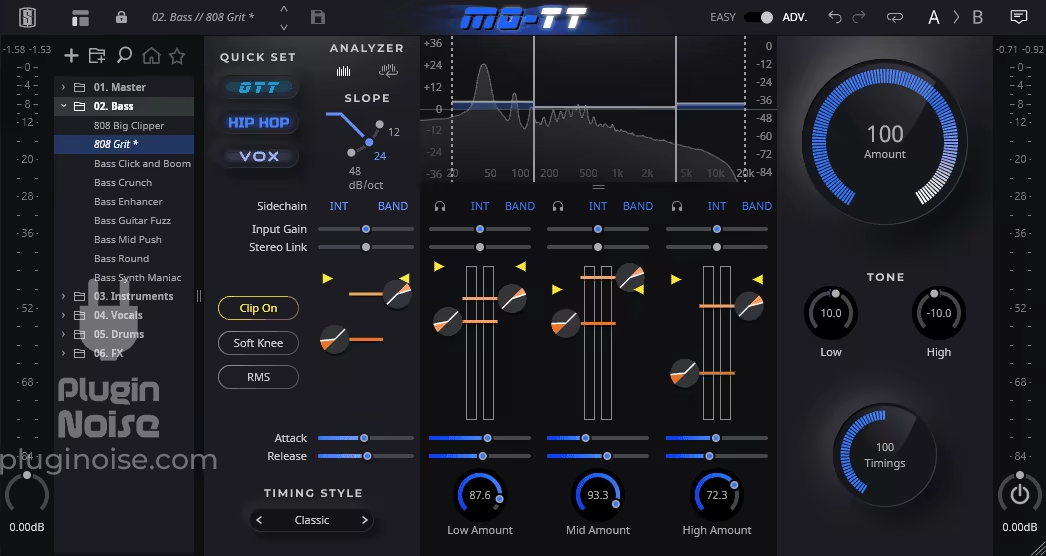
MO-TT stands for “More Than OTT,” and it honestly does live up to its name by delivering a refined, modernized take on the original OTT sound with added versatility and control. MO-TT perfectly fits in this list as a best multiband compressor plugin.
If you have worked with Ableton or Xfer Records Serum, you’d be familiar with OTT (Over The Top) compressors, which many producers use synonymous with multiband compressors. While the original OTT offered a powerful way to shape dynamics with its 3-band compression workflow, it had its limitations and was restricted to customizability and compatibility with only Ableton.
With MO-TT, the box opens up for you further. This multiband plugin brings that same bright, full, and larger-than-life sound and introduces innovative features like Quick Set Modes (OTT, Hip-Hop, and Vox) for instant tonal shaping and Timing Styles (Classic, Smooth, and Smack) to tailor to the behavior of the dynamics of your track(s).
- Quick Set Modes
MO-TT’s Quick Set Modes let you achieve your preferred sound, so you can choose the OTT mode for the classic over-the-top compression sound, Hip-Hop mode for thick, punchy, low-end dynamics, or Vox to add clarity and presence to vocals. You can choose between those options.
- Timing Styles
You get different timing styles at your disposal, like Classic, Smooth, and Smack. They provide different control settings over how MO-TT responds to dynamics and transients. Classic delivers the sharp, aggressive sound of the original OTT, while Smooth ensures a more polished, transparent response. Smack, finally, adds punch and attitude, ideal for drums and bass-heavy elements.
- Global Macros
I am a fan of Global Macros, which offers unprecedented ease of use, letting you adjust the compression intensity and tone across all frequency bands with a single control. That ensures that your adjustments remain cohesive without breaking the preset’s core characteristics. I mean, thank God Slate Digital paid attention to that because that is something I do need in my workflow to not change my settings too much.
- Clip Off, Soft Knee, and RMS buttons
In addition to the basic features of OTT, you also get a ‘Clip Off’ feature/button that prevents harsh clipping during intense compression, maintaining the natural character of your sound even under heavy processing.
I usually prefer the Soft Knee option as it creates a smoother transition into compression, which is ideal for more subtle applications like vocals or acoustic instruments, compared to the more abrupt effect of a hard knee. Finally, its RMS button shifts the focus from peak levels to average loudness, giving you a more consistent and musical compression effect, which I suggest you use for mastering or bus dynamics.
- Graphical Cues
What I love about M-OTT is the visual representation it gives alongside the threshold and ratio sliders to give you a graphical idea of what’s happening with the sound.
This VST multiband plugin also introduces additional High-Pass and Low-Pass bands to refine the frequency range of your compression. Note that Slate Digital also claims that the MO-TT has more “stability” and “robustness” than the original version. I honestly find the original OTT also pretty light, but with added features, I’d say it’s commendable for Slate to achieve this level of usability.
However, MO-TT is restricted to processing just three bands: Low, Mid, and High. While this keeps the interface straightforward and easy to use, it may feel limiting if you’re used to working with deeper multiband processors like the Pro-MB or Saturn by FabFilter.
Slate Digital MO-TT is compatible with DAWs that support VST, AU, and AAX plugin formats and is compatible with macOS 10.15 or later and Windows 10 or higher operating systems.
2. Softube Drawmer 1973
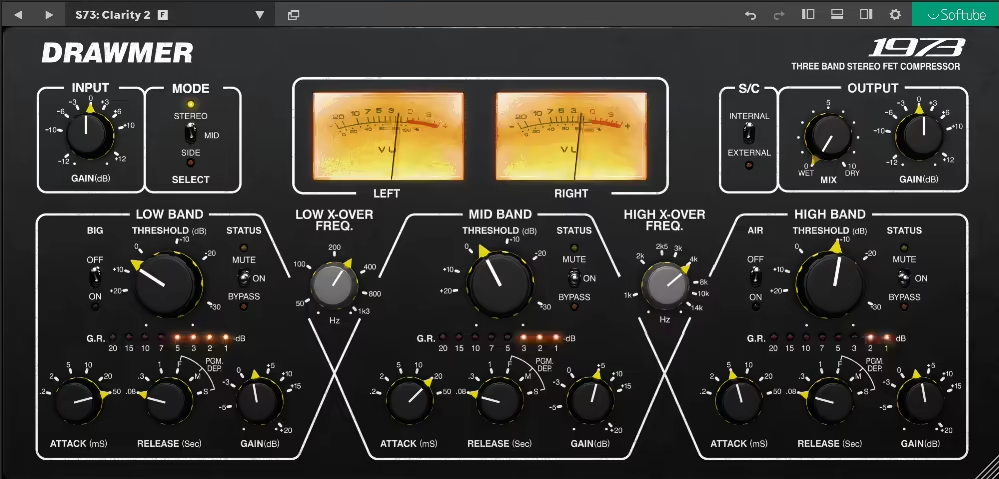
Drawmer 1973 was a hardware compressor unit and this Softube plugin is its is a digital reimagination.
Officially licensed and created in collaboration with Drawmer, I like how this plugin preserves the essence of analog sound while introducing new features like mid/side processing and external sidechain support, making it a versatile tool for mixing, mastering, and sound design.
- Three Bands of Precision and Control
The Drawmer 1973 divides the audio spectrum into three independently controlled bands, each with its own threshold, gain, attack, and release settings. You can use these to tighten low-end dynamics, smooth midrange harshness, or enhance airy highs, all without affecting the integrity of the rest of your mix. Features like the Big Switch for low-end preservation and the Air Switch for high-frequency enhancement also provide added tonal flexibility.
- Effortless Workflow with Analog Character
This plugin feels very hand-in-hand with me, and I think that’s because its design embraces the tactile experience of the original hardware. Softube’s detailed modeling ensures an authentic analog feel, while modern conveniences like program-dependent release times and the absence of fixed ratios streamline the workflow. Instead of selecting ratios, the compression ratio dynamically adjusts based on how much the signal exceeds the threshold, delivering smooth, musical results.
- Mid/Side and Sidechain Features for Creativity
Here’s what the plugin version has that the hardware unit doesn’t. Softube modernizes 1973 with mid/side processing, enabling independent control over the center and sides of your stereo field. That works well for enhancing stereo width or cleaning up muddy low-end in the mid-channel. Further, the external sidechain functionality also expands useability and allows for dynamic effects like rhythmic ducking or frequency-specific compression triggered by an external signal.
I experienced that The Drawmer 1973 shines on both individual tracks and full mixes. You can use it to tighten a kick drum, tame harsh vocals, or bring clarity and balance to a dense mix. Its gentle compression and transparent tone make it a go-to choice for mastering, where subtle glue and enhancement are key.
Moreover, the presets inspired by the simplified S73 plugin also provide helpful starting points for various tasks, from vocal enhancement to parallel drum compression. I would really suggest this multiband VST plugin for its unique multiband analog compression that’s hard to replicate by any other plugin in this list.
Softube Drawmer 1973 is available in VST, AU, and AAX plugin formats and is compatible with Monterey 12, Ventura 13, Sonoma 14, and Windows 10 or later operating systems.
3. FabFilter Pro-MB
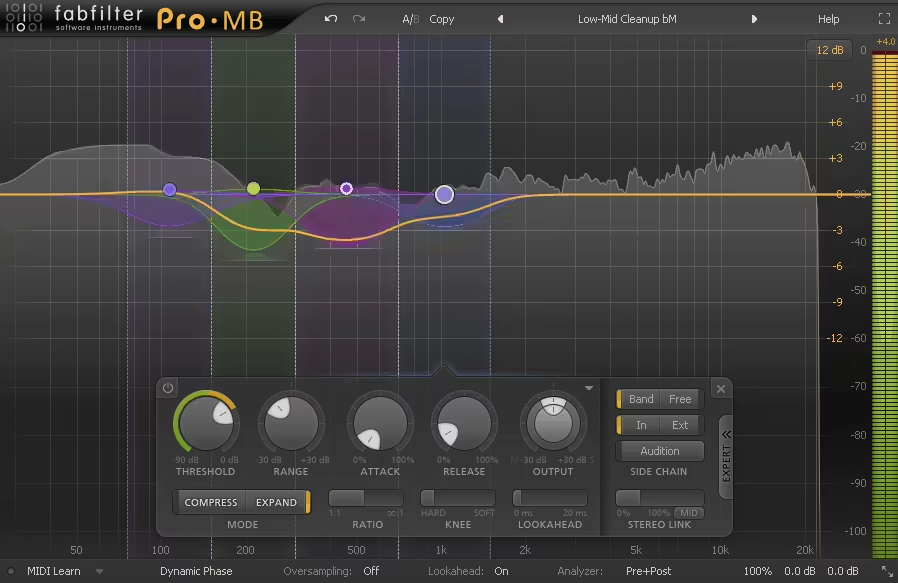
FabFilter Pro-MB is my preferred multiband compressor VST plugin and one of the most versatile dynamic processors I have ever used.
I love its colorful interface, graphical display/frequency analyzer, and overall workflow that delivers up to six customizable bands that can apply downward compression, upward compression, downward expansion, or upward expansion.
- Customizable Crossovers
You can create crossover bands with just a click of a button, and these crossovers are adjustable from 6dB to a steep 48dB per octave, ensuring seamless integration or sharp separation between bands. For each band, you can adjust parameters like attack, release, threshold, range, ratio, knee, and lookahead.
- Advanced Detection Modes
There’s also an Expert tab in the plugin that unlocks powerful detection options, allowing you to measure the internal signal, an external input, or even a specific frequency range to trigger the dynamics. For example, you can set one frequency band to respond to a completely different range or external track, creating a dynamic interplay between elements of your mix.
- Optimization Options
Pro-MB offers three phase modes: Linear Phase, Minimum Phase, and Dynamic Phase, each suited to different workflows. Linear Phase ensures phase coherence across all bands, and I prefer it for mastering where artifacts from phase shifts can be problematic.
However, it introduces latency, which might not suit real-time applications. The next option you get is Minimum Phase, which minimizes latency and is perfect for responsive mixing tasks but may introduce slight phase shifts at crossovers. Dynamic Phase bridges the gap, applying phase adjustments only during active processing, offering a balance between accuracy and low latency. I prefer the Minimum Phase for mixing vocals and the Linear Phase for mastering delicate tracks.
- Compression/Expansion Modes
For each band, you can add different styles of dynamic processing, which I find wonderful. As we all know, Compression reduces dynamic range, making louder parts quieter and maintaining consistency across the frequency band. Expansion, on the other hand, increases dynamic range, making quieter sounds louder relative to the rest.
I turn to downward expansion for noise gating or reducing bleed in certain frequency ranges. Upward expansion, for example, is suitable for adding energy and punch to transients, like bringing more life to a snare drum or accentuating the snap of a kick.
In a dense pop mix, I might use compression to tighten the low end, ensuring the bass and kick drum don’t overpower each other. At the same time, I might apply expansion to the high frequencies of a vocal to add air and presence, giving the performance a polished, studio-quality sheen.
FabFilter Pro-MB is available in AU, VST 2/3, AAX, or CLAP host plugin formats and is compatible with macOS 10.13 or higher and Windows Vista or later operating systems.
4. SSL G3 MultiBusComp
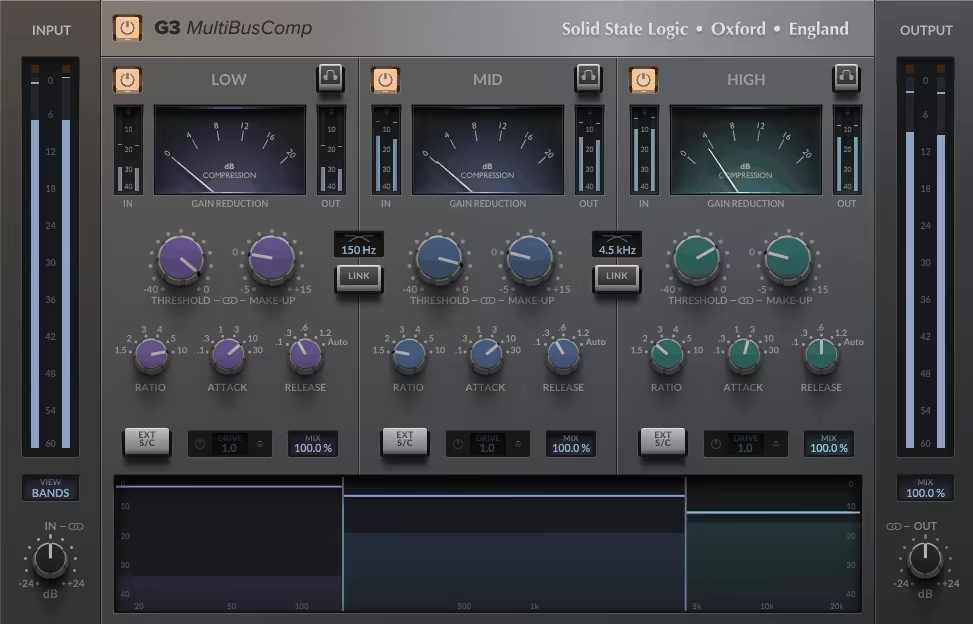
SSL G3 MultiBusComp combines the iconic SSL “glue” compression with the power of multiband processing, offering a highly versatile tool for achieving polished, professional mixes.
With its three independently configurable frequency bands, harmonic drive capabilities, and advanced sidechaining options, SSL G3 MultiBusComp captures the classic SSL sound. Each of its three bands delivers the classic SSL glue, allowing you to tighten up the low end, smooth out mids, or control bright highs independently.
- Per-Band Harmonic Drive and Sidechaining
I read about the latest update in the plugin about the addition of SSL’s ‘4K’ drive circuit to each band, which lets you add warmth and character precisely where it’s needed. Coupled with its advanced sidechaining capabilities, including custom filters and external sidechain inputs, you can shape your mix’s dynamics with pinpoint accuracy, accentuating or diminishing specific frequency ranges effortlessly.
- Band Graph and Intuitive Controls
The band graph view makes setting up crossovers and thresholds intuitive, providing visual feedback that simplifies complex adjustments. Easily dial in the sweet spot for each band using the graphical interface, whether you’re controlling compression intensity or defining how different frequencies interact. It’s a workflow-enhancing feature that ensures quick and informed decision-making.
- Parameter Linking for Efficiency
This feature allows you to make inverse changes between related parameters, such as input/output gain or threshold and makeup gain.
- Resizable Interface
The plugin’s resizable GUI, adjustable from 50% to 200%, ensures a comfortable and customizable user experience. Whether you’re working on a compact laptop screen or a large studio monitor, the interface adapts to your needs, providing an optimal workflow environment.
SSL G3 MultiBusComp is available in VST, AU, and AAX plugin formats and is compatible with macOS 11 Big Sur – macOS 13 Ventura and Windows 10 or later operating systems.
5. BLEASS Multiband Compressor
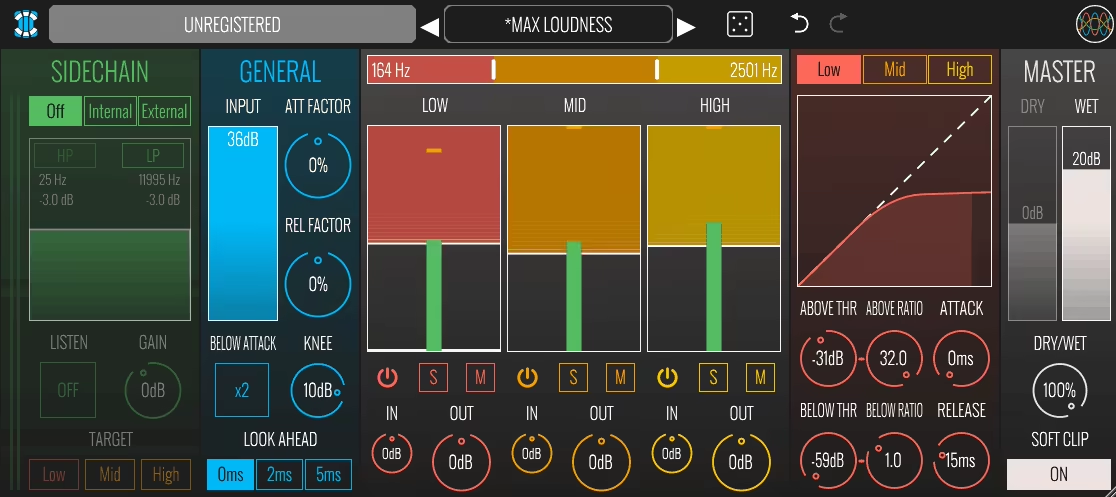
BLEASS can also be considered one of the best Multiband Compressor plugins. It works by dividing your audio signal into three customizable frequency bands, so you get adjustable thresholds, attack, release, and ratio settings in each band.
Of course, you can perform simple operations like solo, mute, or disable compression on individual bands and adjust the crossover points between these bands with a simple, intuitive slider interface, ensuring that the compression affects exactly the range you want. For example, you might isolate the low end for tighter bass control while leaving the mids and highs untouched or independently compressed. But there are some other cool features that I will highlight now.
- Streamlined Global Controls
The first thing my attention went to while using this VST multiband tool was its global features, such as input gain, knee adjustment, and a flexible look-ahead option that allows for smooth attack behavior. The plugin also offers an innovative attack and release factor, enabling synchronized control over all bands for cohesive sound shaping. This simplicity ensures that even complex setups remain easy to manage.
- Creative Sidechain and Modulation
BLEASS further takes multiband compression with its sidechain options. You can assign bands to react to specific frequency ranges of the input signal, enabling advanced effects like having high frequencies respond to low-end activity. That opens up so many creative possibilities, like, let’s say, dynamic interplay between instruments or nuanced ducking effects. That’s the best I could exemplify in words.
- Master Section and Fine-Tuning
The master section features in this multi-band compression plugin include separate gain controls for the dry signal and the compressed output, enabling parallel processing with ease. A soft clipper helps manage peaks during heavy compression, ensuring a smooth and polished sound. This feature is particularly useful for controlling harsh transients in dynamic tracks.
BLEASS Multiband Compressor is available in VST3, AAX, and AU plugin formats and is compatible with macOS 10.9 and later (64-bit only) (including macOS 11 Big Sur and M1/M2 processors) and Windows 8 and later operating systems.
6. ADPTR AUDIO HYPE

Hype comes with a powerful combination of dynamic processing, harmonic enhancement, and stereo width control, all packed in a 3-band workflow.
So, it conveniently has 3 tabs: Compression, Harmonics, and Sereo, for each of which you get multiband controls. You can set the cutoff frequency for all 3 bands and also switch them on and off whenever necessary. For the compressor tab, you can also switch between compressor and gate options.
- Multiple Harmonics and Compression Modes for Diverse Sound Design Applications
With nine harmonic modes (including the newly introduced Clean, Fold Clean, and Fold Over), this VST mutliband plugin offers everything from subtle warmth to gritty, saturated tones. It also has six compressor modes, ranging from the extreme Slam to the smooth Opto, that cater to all styles of dynamic shaping. I particularly appreciate the new multi-band gate feature, which keeps my gate settings consistent even when cycling through presets.
- Stereo Mid/Side Controls
HYPE’s mid/side processing allows precise adjustments to stereo width and depth. I often use this feature, for example, to, let’s say, widen a mix’s high frequencies or add weight and focus to the low end. Paired with the Auto Level function, which maintains consistent loudness during processing, it ensures my mixing decisions remain transparent and objective.
- Advanced Features and Usability
The plugin’s harmonic section now includes THD monitoring, letting me measure harmonic distortion as a percentage, which is great for refining tonal balance. I also like its visual metering in the compressor section, which provides detailed insight into gain reduction and increase across each band. Additionally, the updated linear phase crossover ensures accurate processing with no unwanted phase artifacts, making HYPE suitable for parallel or bus processing as well.
I would also like to mention the 4 different A/B (A/B/C/D) instances you get so you can compare 4 different variations of control settings. For the output, you can also add a clipper to the signal flow.
ADPTR AUDIO HYPE is available in AAX Native/AudioSuite, AU, and VST2/3 plugin formats and is compatible with macOS 15 down to macOS 12 and Windows 10 (or later) operating systems.
7. Harrison Multi-Band Compressor
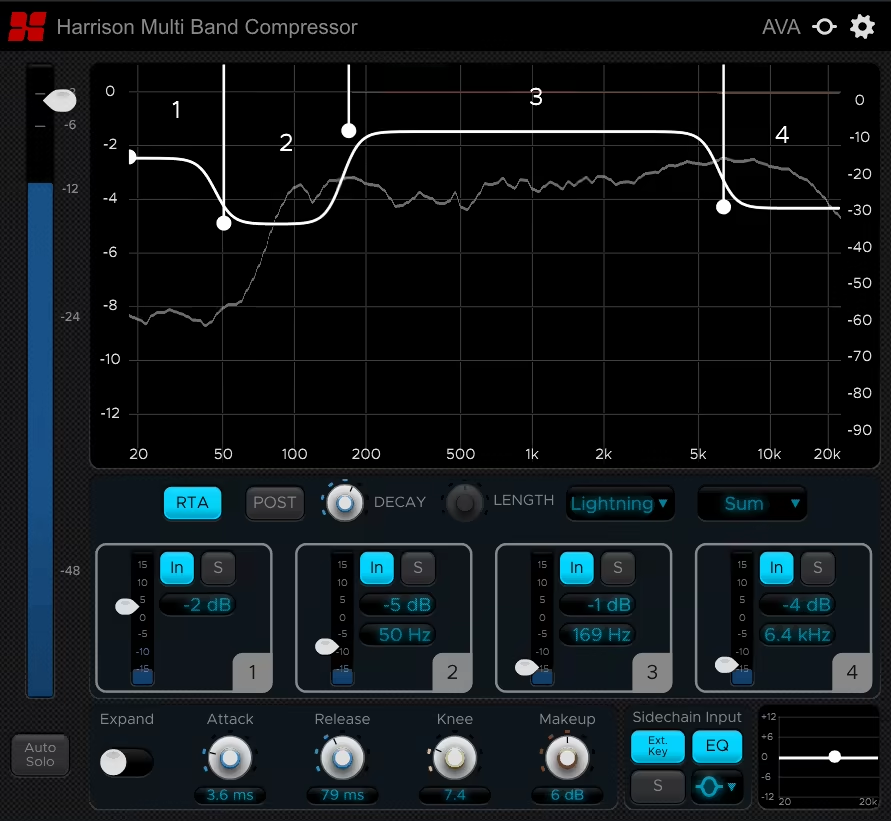
Harrison Multiband Compressor is quite versatile and intuitive multiband VST and can really enhance clarity, punch, and balance across specific frequency ranges in your track(s).
I am impressed by how it uses automation and applies its intelligent algorithm to automatically adjust attack, release, and other parameters for each band, ensuring smooth and natural sound without extensive manual input. With features like Band Solo and Auto-Solo, you can easily isolate and adjust each range, helping you zero in on specific areas of the mix.
Harrison Multi-Band Compressor gives you 4 bands to work with, for each of which you can adjust the attack, release, knee, and makeup controls and turn on the ‘Expander’ mode. You also get unique adjustments for the Decay and Length of your audio.
- Sidechain and Creative Effects
If you’re like me and seek creative effects, I think you’d appreciate the dedicated sidechain input and EQ, which you can use to create dynamic pumping effects, subtle de-essing, or intricate cross-band compression. For example, you can compress your low frequencies based on high-pass filtered signals, allowing you to carve out space in complex mixes while preserving the core elements of your tracks.
- Real-Time Analysis and Visualization
The high-resolution RTA Analyzer provides real-time visual feedback on the frequency spectrum, making it so easy to locate problem areas and see the impact of your adjustments. This visualization helps streamline your workflow, ensuring your changes translate effectively across all listening environments.
- Low Latency for Live Use
With ultra-low latency processing, the Harrison Multiband Compressor is perfectly suited for live sound applications or latency-sensitive projects. Real-time performance ensures you can make adjustments without lag, keeping your workflow seamless and your mixes accurate.
I love the overall functionality of this compressor, but one thing I am not a fan of is its spectral appearance and interface.
SSL and Harrison Multi-Band Compressor plugin is available in VST, AU, and AAX plugin formats and is compatible with macOS 11 Big Sur – macOS 13 Ventura and Windows 10 or later operating systems.
8. Waves C6

What sets the C6 apart is its six-band architecture: four fixed frequency bands and two floating bands.
The floating bands function like dynamic EQ bands, giving you the ability to target specific problem frequencies with precision. Whether you’re tightening the low end on a mix, smoothing out the harshness in the high mids, or adding polish to your master, the plugin is up to the task.
I prefer the C6 multiband compressor for its simplicity and diverse range, as it supports multi-band compression, expansion, Upward Expansion, and Dynamic EQ. I specifically use it for more “surgical” purposes. Why? I shall explain with the next pointers.
- Configurable Frequency Bands
You can independently adjust the crossover points for the four main frequency bands, adjusting them to suit your mix. The two floating bands allow even more precise control by targeting specific problem areas without affecting adjacent frequencies.
- Dynamic EQ Bands
The floating bands in the plugin are particularly effective for addressing issues like muddy mids or harsh high frequencies. This is how I usually go about its workflow. I simply sweep through the spectrum to locate problem areas, set a tight Q value, and apply dynamic processing to fix them in real-time.
- Multiple Release Modes
You can choose from Smooth, Fast, or Automatic release settings to suit your material. Smooth works well for transparent dynamics control, while Fast is ideal for punchy, aggressive tracks. Automatic mode adapts in real-time, offering a balance between responsiveness and natural sound.
- Analog Circuit Modeling
The C6 incorporates Waves’ analog circuitry modeling and adds more warmth, depth, and character to your audio. This subtle flavor can enhance everything from vocals to full mixes, giving your tracks a polished, professional sound.
For more flexibility and creative uses, you also get the external and internal sidechaining options, which I use extensively in both corrective and creative scenarios.
The Waves C6 is available in VST, AU, and AAX formats, making it compatible with most major DAWs. It supports macOS Monterey 12, Ventura 13, Sonoma 14, Sequoia 15, and Windows 10 or higher.
9. PSP oldTimer

PSP OldTimerMB can bring vintage warmth and modern precision to your tracks.
Rooted in the iconic PSP OldTimer compressor, this VST multiband compressor plugin takes its beloved tonal character and expands it into a versatile multiband format. At the core of the OldTimerMB are three independent frequency bands, each offering detailed control over compression parameters.
This tri-band setup allows you to address specific tonal issues, enhance transients, or glue elements together in a cohesive mix. Additionally, what I find really cool is the valve emulation stage that infuses your audio with the harmonic richness and saturation of classic tube equipment.
- Adjustable Crossover Points
If you’re too precise about your settings, I believe you’d appreciate how you can fine-tune the boundaries between the three frequency bands to target specific areas of your mix. The crossover filters come with multiple slope options, including gentle 6 dB/octave settings for transparent transitions and steeper 24 dB/octave filters for precise separation.
- Dynamic Options Per Band
Each band features independent attack, release, ratio, and threshold controls, allowing you to customize the compression behavior to suit your material. Whether you’re smoothing out the low end, taming harsh mids, or adding air to the highs, the OldTimerMB has you covered.
- Tube Emulation
The main reason why I have this multiband VST plugin in my arsenal is its switchable output stage that lets you dial in varying degrees of tube-style warmth and saturation. This feature is quite effective for adding a favourable character to sterile digital recordings or enhancing the presence of vocals, drums, and guitars.
- Valve Emulation Customization
With oldTimer’s Valve Emulation Customization, you can adjust the intensity of the tube emulation effect for subtle harmonic enhancement or bold analog-style saturation. The flexibility here allows you to add just the right amount of color to your mix.
PSP oldTimer Multiband Compressor is available in VST, AU, and AAX formats and works with macOS 10.14 – macOS 14 Sonoma or later and Windows 7 or higher operating systems.
FAQ2 -When should I use multiband compression?
I recommend using multiband compressors to reduce the dynamic range (difference between the loudest and softest parts) of your audio differently in different frequency ranges. That can be used for mastering, mixing, or, more specifically, tightening bass, taming harsh highs, or smoothing midrange dynamics. It's ideal for vocals, mastering, and fixing frequency-specific issues in complex mixes.

Shaurya discovered his passion at the intersection of writing and music. Starting his career as a songwriter and rapper, he gradually picked up FL Studio and soon delved deep into the world of audio engineering and music production. Based in Delhi, India, he has worked with top studios, been featured on Red FM, garnered millions of streams on Spotify, and released music with major labels like Sony and Hitz.