

Looking for free vocal plugins to spice up your tracks? Whether you need smooth compression, lush reverb, or some gritty saturation, there’s a killer freebie waiting to level up your vocals without spending a dime.
You ever have one of those moments where you’re mixing vocals, everything’s going great, and then you realize – wait, I need a better reverb, or maybe some pitch correction, or just something to make the vocals pop?
And then you go down the rabbit hole of expensive plugins, only to end up frustrated? Yeah, been there. But here’s the thing: more and more plugins out there are completely free.
I’m talking about EQs that shape vocals beautifully, compressors that add just the right amount of punch reverbs that make them soar, and even some wild creative effects when you want to get weird (in a good way).
And guess what? You don’t have to spend a single cent to get professional-sounding results.
Over the years, I’ve tested a number of free vocal VST plugins, and I’ve found some amazing ones; some are decent, and some… well, let’s just say they’re free for a reason. But believe me, we’ve got some real gems that punch way above their weight.
So, for any task from recording a singer or processing rap vocals to creating dreamy vocal pads or just messing around with cool effects, this list has got you covered. Here are some of the free tools that will transform your tracks without touching your wallet. Let’s dive in!
1. Slate Digital Fresh Air
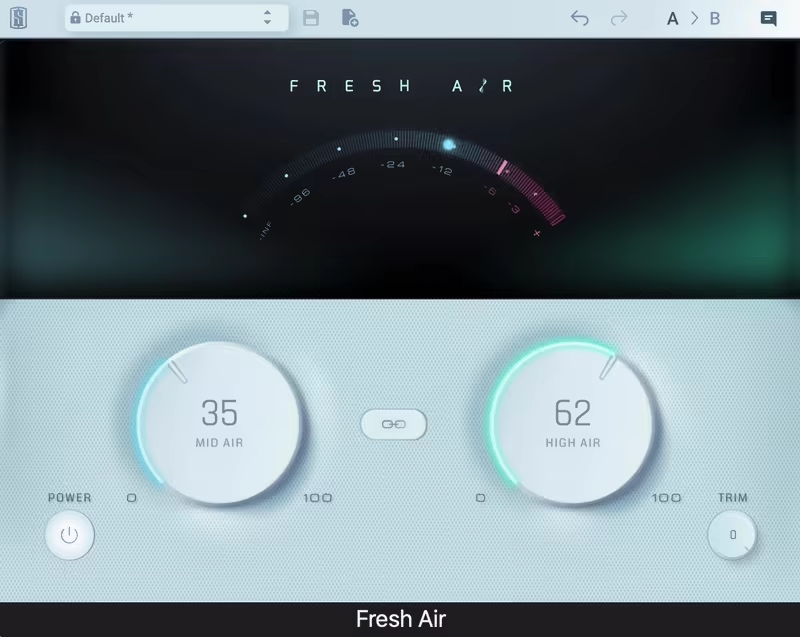
Fresh Air, our first free vocal plugin, is an exciter famous for effortlessly adding top-end clarity without making anything sound harsh or brittle. It’s a great example of a free vocal VST plugin.
I’ve used plenty of exciters before, but Fresh Air stands out for its smooth, natural lift that works like a charm on vocals, drums, and even entire mixes. Also, with its price tag, of course.
The interface is refreshingly simple as it has just two main knobs, Mid Air and High Air, which control how much brightness and shimmer you’re adding. No unnecessary controls, no complicated menus, just instant clarity with a quick twist.
It’s based on classic exciter circuits but uses modern dynamics processing, which makes everything feel more polished and cohesive.
- Lush High-End Without the Harshness
A lot of exciters can get aggressive, but Fresh Air keeps things smooth. It enhances presence without that piercing “radio over-processed” sound. I love how it brightens vocals, making them pop in the mix without needing extra EQ.
- Ideal for Vocals, Drums, and the Mixbus
The magic of the unit lies in the versatility it offers. On vocals, it works great by adding depth and detail. On drums, I like how it makes the cymbals shine without being overbearing. And on the mix bus, it subtly lifts everything, making the mix sound more open and professional.
- Two Knob-Design
Some plugins come with a learning curve but this isn’t one of them. Just adjust Mid Air for the body and High Air for the sparkle, and you’ll hear the difference immediately. I also love that you can link them together for a balanced boost without overthinking it.
The only downside is the iLok activation, which feels like overkill for a free plugin. But once it’s set up, it’s smooth sailing. Fresh Air isn’t a magic fix for every mix, but when used in moderation, it’s a fantastic tool for adding that final polished high-end touch.
Fresh Air comes in VST3, AU, and AAX formats for macOS and Windows users.
2. Techivation T-De-Esser 2
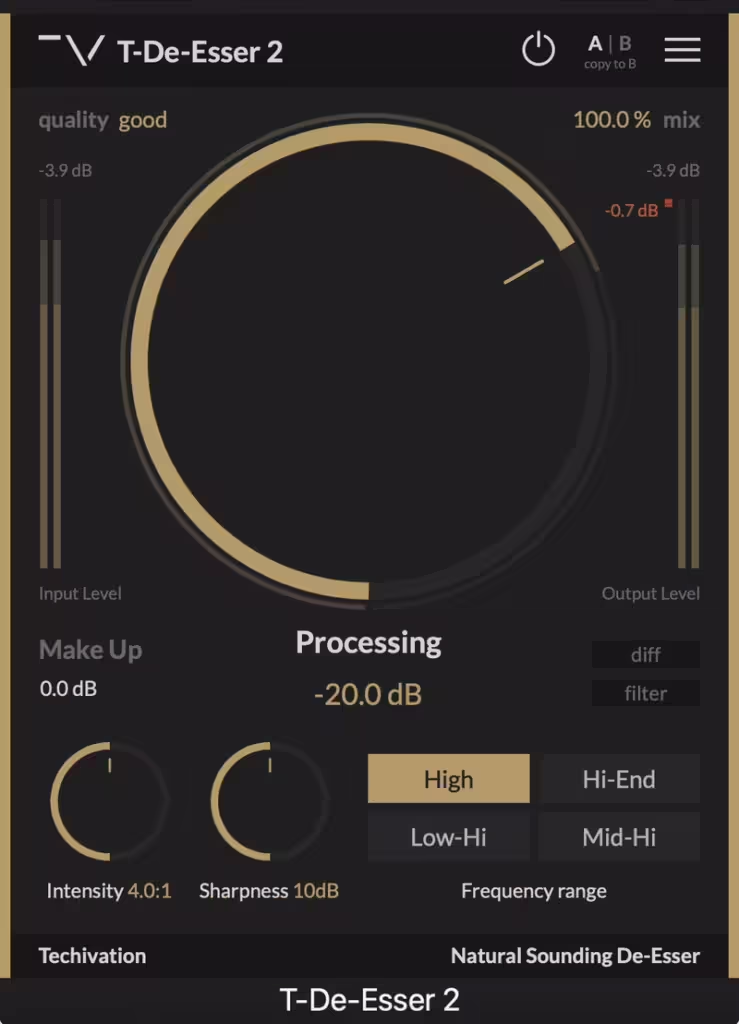
T-De-Esser 2 is one of the best free vocal plugins. Some de-essers either dull the sound or don’t catch enough sibilance, but T-De-Esser 2 keeps things smooth and natural while cutting the harshness exactly where needed.
I love how T-De-Esser 2 vocal VST makes de-essing feel effortless. It does the job without overcomplicating things, whether for taming vocals, bright instruments, or sharp transients.
A big plus is the interface, as it’s easy to understand and get used to. Instead of endless sliders, it keeps things simple with a Processing knob that controls sensitivity, plus Intensity and Sharpness dials to fine-tune how aggressively it works.
I like the frequency range buttons that let me choose where to focus for any task; it’s all right there without the need to dive into menus.
- Smart Frequency Targeting
With 4 selectable frequency bands, I can hone in on exactly where the harshness is coming from. Some de-essers just throw a blanket over everything, but this one lets me target specific problem areas, so the rest of the sound stays intact.
- Musical and Artifact-Free Processing
If you’ve worked with de-essers, you know they can make vocals sound unnatural, but T-De-Esser 2 keeps everything smooth. It reduces harshness without making tracks feel lifeless, for speech, singing, or bright acoustic instruments.
- Minimal Effort, Maximum Control
It’s as simple as setting the Processing knob, adjusting Intensity and Sharpness, and fine-tuning with the Mix control. The built-in Make-Up gain keeps levels consistent, and the A/B comparison tool makes quick before-and-after checks easy.
There’s not much to complain about here. It’s fast, effective, and easy to use. The lack of an overwhelming GUI makes it one of the most intuitive de-essers I’ve used.
If you’re tired of harsh S’s ruining a good vocal take or want to tame overly bright instruments without losing their character, this is ideal free vocal plugin, among free de-esser choices.
T-De-Esser 2 comes in VST, VST3, AU, and AAX formats for macOS and Windows users.
3.Analog Obsession Room041

If you like the vibe of a classic plate reverb, here comes Room041, which excels at giving the character of a real room.
Well, unlike most classic plate reverb units, Room041 is not an exact model of any hardware unit, but it still captures that smooth, organic reverb sound I look for when I want something that feels alive. It’s pretty versatile, offering anything from natural spaces to something more lush and immersive.
My favorite section was the addition of the Preamp section. It has a Drive knob that mimics a tube reverb input, letting me push the sound into warm, vintage saturation. T
here’s also a high-pass filter to clean up low-end rumble before it even hits the reverb. I love dialing in just a little drive to make the reverb tail sit naturally in a mix.
- Shape the Reverb, Your Way
The Decay control ranges from 0.1 to 6 seconds, making it easy to switch between short room reflections and longer plate-style tails.
The Stereo Separation knob is great for widening things out or keeping them focused, which is a cool alternative to just adjusting panning in the DAW.
- Post-EQ for Tone Control
A built-in 2-band EQ lets me shape the reverb’s tone. The low band sweeps from 20Hz to 2kHz, and the high band goes from 200Hz to 20kHz, each with ±24dB gain.
This means I can make the reverb sit exactly where I want darker and moody or bright and airy without needing another free vocal VST plugin.
The Dry/Wet controls instead of a single blend knob are a nice touch, letting me dial in just the right mix. Some users report the Stereo Separation function doesn’t always work in certain DAWs, but for me, the sound quality alone makes this a solid freebie.
Room041 is a free, algorithmic reverb that sounds rich, smooth, and surprisingly natural. It’s lightweight, easy to use, and has just the right balance of control without overcomplicating things. If you want a plate-like reverb with a real room feel, this one’s worth grabbing.
Room041 comes in VST, VST3, and AU formats for macOS and Windows users.
4.Fuse Audio Labs RS-W2395C

I love it when an EQ does more than just shape frequencies, like adding character, and W2395c absolutely nails that.
It’s got that classic Baxandall EQ smoothness, but what really makes RS-W2395C special is the powerful mid-band that can take a mix from flat to full of life in no time. It’s warm, musical and adds a natural analog vibe without getting in the way, making it perfect free plugin for vocals.
With just a handful of controls, the interface is beginner-friendly, yet it offers a surprising amount of flexibility.
The low and high bands are switchable, letting you choose between 80Hz and 110Hz for lows and 2kHz or 5kHz for highs. The semi-parametric mid-band is where the magic happens, offering three Q settings for anything from broad tonal shaping to more precise tweaks.
- Shape Your Mix Without the Fuss
When I tried it I really enjoyed how this EQ enhanced the sound rather than overpowering it.
The high shelf is great for adding clarity to percussion or brightening up vocals, while the low band keeps sub-frequencies under control without muddying things up. The mid-band has a nice balance between natural and punchy, offering good options for anything from vocals to synths.
- Built-in Saturation
Unlike a lot of free EQs, W2395c comes with a Drive control that adds just the right amount of grit, which is surprising. Whether I need a little warmth or a heavier saturation, this feature makes sure my tracks don’t sound too clinical.
It’s an exclusive feature for the plugin version, and I love how it brings an extra dimension to mixes.
The only downside is that preset names don’t always save properly in some DAWs, but that’s a small issue compared to how good it sounds.
It’s light on CPU, easy to use, and one of the most musical-free EQs I’ve tried. If you need a simple but powerful EQ with an analog touch, this one’s a must-have.
W2395c comes in VST, VST3, AU, and AAX formats for macOS and Windows users.
5.Integraudio & Sixth Sample Deelay

There’s always something exciting about the delay plugins that refuse to play it safe, and Deelay does exactly that.
Deelay VST is packed with creative features, from reverse delays and chaos modes to built-in distortion and tape effects, all wrapped in a clean, modern interface. It’s one of those free plugins that makes you wonder why some paid delays even exist.
The interface is fully resizable and intuitive, making it easy to tweak without feeling overwhelmed. The Randomize button is a fun way to stumble upon unexpected sounds, and the A/B switch lets you audition two different settings on the fly.
I appreciated the well-organized preset system with categories like Color, Design, and Reverb, which allows you to quickly find something that fits your track.
- Reverse, Chaos & Experimental Delay Modes
What really makes Deelay stand out is its 5 unique delay modes, including Reverse Forward, Pure Reverse, and Chaos.
The Reverse Forward mode flips the delay tail before sending it back through the feedback system, creating a cool back-and-forth effect. The Chaos mode alters the pitch of each echo randomly, which is perfect for glitchy sound design or creating eerie textures.
- Built-In Distortion & Tape Effects
Deelay isn’t just about repeats, it’s also got 11 different distortion types that can be applied directly to the wet signal.
From classic tube warmth to lo-fi crackle and pixelated grit, it gives the delay an entirely new dimension. The Tape knob adds wow and flutter, giving the echoes a vintage tape delay feel.
- Diffusion for Reverb-Like Textures
One of my favorite features is Diffusion, which blends the delay into a smoother, reverb-like wash. The amount, size, and quality can be adjusted to make the effect subtle or massive, giving you the best of both delay and reverb worlds.
The only downside is that the Tape effect lacks fine-tuning, which would be great for dialing in more precise flutter and saturation settings. But considering this is a free plugin, that’s hardly a dealbreaker.
Deelay is easily one of the most versatile and creative, free plugin delays I’ve tried. Whether you need a subtle slapback, a crazy pitch-shifted echo, or a deep, evolving sound design element, this vocal VST plugin delivers.
Deelay comes in VST3, AU, and AAX formats for macOS and Windows users.
6.iZotope Vocal Doubler

A little extra width and depth can take a vocal from flat to full of life, and Vocal Doubler does it with minimal effort.
Well, this free plugin creates a natural doubling effect that adds subtle richness or a more dramatic stereo spread.
What makes iZotope Vocal Doubler stand out is how ridiculously easy it is to use. Just drag up and down for width or left and right for variation. The visual feedback makes it clear how much you’re affecting the sound, which helps dial things in quickly.
- Instant Stereo Separation
A simple but effective drag-to-control interface lets you widen the vocal in seconds. If you need a subtle double, then you can keep it close to the center. But when you want something more exaggerated, it’s time to pull it out for a wide, modern vocal tone.
- Human-Like Variation
This is not just a static doubler, as Vocal Doubler adds movement by subtly shifting timing and pitch, preventing that robotic, copy-paste sound. It’s great for making backing vocals blend naturally.
- Zero CPU Struggles
Even on heavier sessions, this free vocal VST tool barely touches CPU resources, so it’s perfect for layering without slowing down the mix.
If there’s anything to nitpick, the mouse scroll adjustments feel a bit too sensitive, especially for the mix control. But that’s a small quirk in an otherwise super handy tool.
Vocal Doubler is perfect for quick vocal enhancement, whether it’s a subtle thickening or a full stereo spread. It’s free, easy, and does exactly what it should. One of the top free vocal plugins, and it’s from a super reliable brand.
Vocal Doubler comes in AU, VST2, VST3, and AAX formats for macOS and Windows users.
7. Analog Obsession LALA
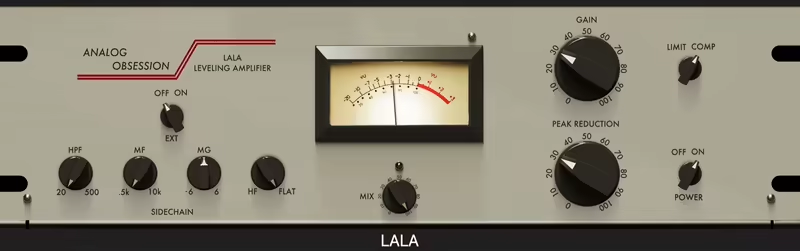
When I need smooth, warm compression that enhances vocals without squashing them, LALA is my go-to.
LALA is Analog Obsession’s free take on the legendary LA-2A optical compressor, and it nails that vintage sound while throwing in some extra features that make it even more versatile.
What sets it apart for me is how it blends simplicity with control. The original LA-2A is famous for its effortless compression, with the set-it-and-forget-it design, but LALA adds a filter sidechain, external sidechain, and mix control, making it much more adaptable for modern production.
- Vintage Tone with Extra Control
LALA keeps the smooth, transparent character of the original, but its filter sidechain lets you focus the compression where it matters.
You can cut lows with the HPF, tweak mids with MF/MG, or keep high frequencies untouched with HF/Flat, a more flexible version of the LA-2A’s classic R37 control.
- External Sidechain
Unlike the original hardware, LALA lets you use an external sidechain, which is perfect for ducking effects or tightening up a mix. Want your vocals to stay upfront while making space for the kick or bass? Easy.
- Parallel Compression Made Simple
I appreciate that LALA features a mix knob, as instead of running it on a separate aux track, you can blend in the compressed signal right in the plugin, which is super handy for adding thickness without over-compressing.
The interface is clean, though some users report occasional GUI glitches in certain DAWs. It’s not a dealbreaker, but if you run into issues, reinstalling usually fixes it.
LALA is a great addition to any vocal chain, and the fact that it’s free makes it even better. It captures the LA-2A magic while offering extra tools for modern mixing.
LALA comes in VST3, AU, and AAX formats for macOS and Windows users.
8.Melda Production MAutoPitch
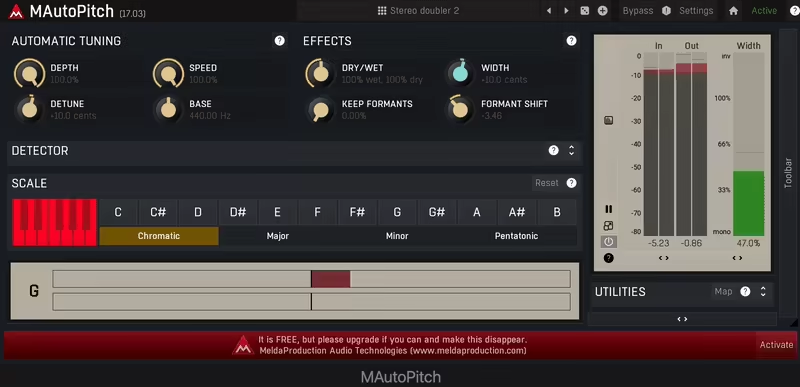
Modern music can’t exist without pitch correction, and MAutoPitch does it for free with surprisingly good results.
Whether you want subtle tuning or full-on robotic hard-tune, MAutoPitch does the job perfectly. And unlike heavyweights like Auto-Tune or Melodyne, it is a simple pick for quick fixes or creative vocal effects.
It’s part of the MeldaProduction FreeFXBundle, which means you’re not just getting a free auto-tune, but a whole suite of useful tools.
The installation can be a little clunky compared to other free plugins, but once it’s up and running, it’s smooth sailing. The interface may not be the prettiest, but it’s straightforward and gets you where you need to go fast.
- Straightforward Pitch Correction with Extras
MAutoPitch offers basic but effective tuning controls, letting you tweak retune speed, depth, and detune to get the right amount of correction.
The formant shifting adds a creative touch, letting you shift vocal character without altering the pitch. The width control is also a nice bonus, helping spread vocals for a wider mix.
- Quick Vocal Fixes
If you don’t need deep editing or individual note correction, MAutoPitch is a fantastic free solution. It’s especially good for real-time tuning, so you can dial in the right vibe instantly.
It also works on other monophonic instruments like guitars, violins, or synth leads, though bass tracks can sound a little weird when processed through it.
It’s not a replacement for premium pitch correction tools, but for a free plugin, it’s an easy win. The built-in preset sharing is a nice touch, making it simple to swap settings with other producers.
MAutoPitch comes in VST, VST3, AU, and AAX formats for macOS and Windows users.
9. Aegean Music Pitchproof

Sometimes, you just need a quick, no-fuss harmonizer that can add instant depth to your guitar or vocals, for those times Pitchproof is there to help.
It blends the old-school charm of classic pitch pedals with modern software precision, giving you smooth harmonies or bold pitch-shifting effects.
Unlike some harmonizers that require complicated setups, Pitchproof keeps it simple. You pick a pitch, blend it with the original signal, and you’re good to go.
It even has a handy guitar tuner built-in, making it an easy pick for guitarists looking for an all-in-one tool. Latency is minimal, and while it won’t match premium pitch processors, it does a solid job for a free plugin.
- Versatile Pitch Shifting and Smart Harmonies
You get a range of harmony options, from major/minor 3rds and 5ths to dissonant 2nds and 7ths. The Detune feature adds subtle pitch variations, making harmonies sound more organic.
For guitar solos and vocal stacking, it works beautifully, but power chords or complex polyphonic signals can get a little messy.
- A Simple, Fun Plugin for Quick Harmonies
Pitchproof is lightweight, CPU-friendly, gets the job done fast and can be considered one of theb best free vocal plugins. If you need instant doubling, harmonizing, or pitch shifting, it’s a great addition to your free plugin collection.
Just don’t expect pristine, glitch-free harmonies on more complex signals like stacked vocals or dense chords.
Pitchproof comes in 32-bit & 64-bit VST formats for Windows users.
10.Valhalla FreqEcho

Some plugins are just fun to mess with, and Valhalla Freq Echo is exactly that, blending frequency shifting and analog echo in this free vocal plugin.
This is not your standard delay, as FreqEcho is a Bode-style frequency shifter mixed with analog echo emulation, which means it can do anything from subtle widening to full-on psychedelic chaos.
If you’re into dub, sci-fi sound design, or trippy experimental textures, this thing will take you to great places.
- Frequency Shift and Analog Echo
The Frequency Shift dial is where things get wild. It controls how much each repeat is pitched up or down, making everything from eerie robotic doubles to infinitely rising glissandos.
Unlike traditional delays that just repeat your signal, this one shifts the pitch of each echo, creating evolving, spiraling effects. A small shift can make your echoes subtly drift, while extreme settings melt your sound into a warped, cascading swirl.
- Extra Controls
With its tempo sync, low- and high-cut filters, and stereo/mono switch, you’ve got a pretty good range of controls for creative sound manipulation.
- Delay Sync
The Delay Sync option locks it to your track’s tempo for rhythmic effects, or you can switch it to free mode for unpredictable shifting madness. It’s simple but incredibly effective, and automation unlocks even more mind-bending possibilities.
Freq Echo isn’t for everything, as it does not have a precision delay or an ultra-clean effect. But if you like mangling sounds, creating swirling textures, or just adding something unexpected, it’s pure gold. Throw it on vocals, synths, drums, or even entire mixes, and see what happens.
Valhalla Freq Echo is available in AAX, RTAS, VST, and AU formats for macOS and Windows.
11.Analog Obsession & BPB – Rare Program Equalizer

There’s something special about Rare BPB that sets it apart from other Pultec-style EQs, which is the pre-EQ gain stage.
This isn’t just an EQ; as it lets you saturate the signal before shaping the tone, giving you an extra layer of analog warmth that most Pultec clones miss.
I love how it adds just the right amount of grit and color without overdoing it, making it an easy pick for vocals, drums, and mix buses.
Navigating Rare BPB is straightforward, which I appreciate. The controls are exactly where you expect them to be, no unnecessary complexity.
The oversampling option is tucked away in the Analog Obsession logo (click it to engage it), keeping the interface clean while giving you high-fidelity processing when needed.
- Boost and Attenuation Knobs
The Boost & Attenuation knobs behave just like a real Pultec, making it effortless to shape lows and highs in a way that feels musical.
- Pre-EQ Gain Stage for Added Warmth
Most Pultec-style EQs focus purely on the equalization, but Rare BPB’s preamp section lets me push the signal before it even hits the EQ circuit.
So, I can add richness and body to a vocal or bass before sculpting the frequencies. It’s a game-changer for getting a more harmonically rich sound with minimal effort.
- Classic Boost & Attenuation for Smooth Shaping
The magic of a Pultec-style EQ lies in its ability to boost and cut at the same time, creating gentle curves that sound natural.
I’ve used this VST on kicks, bass, and vocals, and every time, it adds depth without muddiness. Unlike surgical EQs, this one is all about broad strokes that enhance the musicality of a mix.
- Oversampling for Cleaner Processing
If you’re pushing the saturation, oversampling helps keep things crisp. I like that it’s hidden behind the Analog Obsession logo, so it doesn’t clutter the interface. It keeps the high-end smooth and natural, even when boosting aggressively.
One thing to keep in mind is that oversampling does increase CPU usage. It’s not a dealbreaker, but if you’re running on an older machine, you might want to toggle it off when not needed.
I keep Rare BPB in my go-to EQs because it’s free vocal VST, sounds amazing, and does more than a standard Pultec emulation. Whether I need subtle polish or bold analog character, it delivers every time.
Rare BPB comes in VST, VST3, and AU formats for macOS and Windows users.
