
Analog sound in plugins isn’t just a trend anymore; it’s become a serious part of modern music production. That’s why I’ve put together this list of the 13 best tape emulation plugins for analog sound in 2026.
If you’re a producer who loves warmth, subtle saturation, natural compression, and that slightly imperfect “tape feel,” these plugins are made for you. They recreate the character of real tape machines while giving you the flexibility of working fully in the box.
Whether you’re looking to glue a mix together, add depth to vocals, or bring life to drums and synths, these tape plugins are some of the best tools you can use right now.
| Plugin | Best For | Strength |
| Fuse Audio Labs FLYWHEEL | Mix bus, drums, vocals | Natural tape tone, simple controls |
| UVI Tape Color | Sound design, tone shaping | Fully parametric tape model |
| IK Multimedia Tape Machine 80 | Drums, vocals, buses | Multiple tape formulas, realistic movement |
| Studer A800 | Mixing, tracking, buses | Classic pro studio tape sound |
| Wavesfactory Cassette | Lo-fi, beats, textures | Authentic cassette artifacts |
| SketchCassette II | Experimental, retro FX | Extreme lo-fi control, fun sound design |
| Ampex ATR-102 | Mastering, stereo bus | High-end mastering tape |
| Waves Abbey Road J37 | Mix glue, vintage color | Musical warmth, built-in delay |
| Baby Audio TAIP | Modern mixes, drums | AI-driven, very easy to use |
| XLN Audio RC-20 | Creative processing | Multi-effect vintage toolbox |
| Softube Tape | Everyday mixing | Clean, balanced tape sound |
| Arturia Tape MELLO-FI | Lo-fi, transitions | Tape stop, stereo width, character |
| Wave Alchemy Tapewave | Cassette emulation | Realistic wow & flutter, compression |
1. Fuse Audio Labs FLYWHEEL Reel-To-Reel Tape
| Plugin | Fuse Audio Labs FLYWHEEL |
|---|---|
| Description | Reel-to-reel style tape warmth with musical saturation and subtle movement |
| Award | Best Mix Glue |
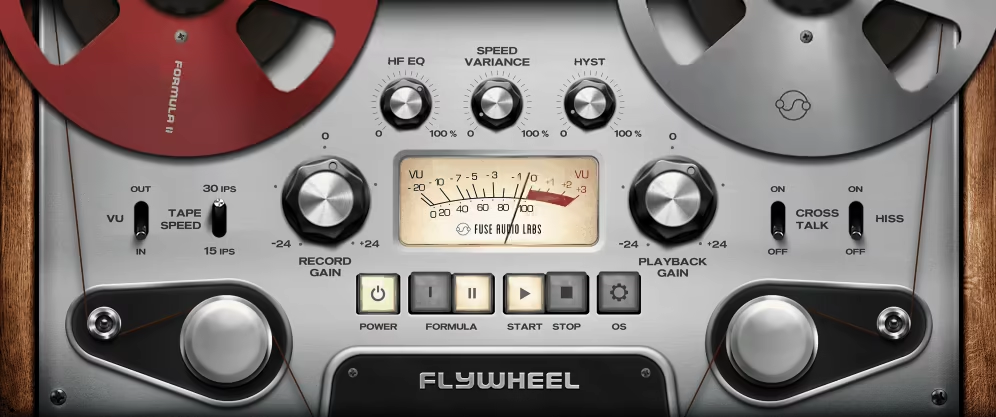
My first pick, Flywheel, distills the lush, warm sound of reel-to-reel tape machines into a user-friendly interface.
Flywheel by Fuse Audio focuses on capturing the essential character and sonic charm of tape as a recording medium instead of replicating a specific tape machine.
- Authentic Tape Controls
With features like saturation, hysteresis, high-frequency loss, and head bumps, this tape emulation VST provides those imperfections that make analog tape so beloved. I have mentioned it in the list because I have discovered that it has the ability to enhance cohesion, warmth, and presence across various audio sources.
- Minimal Yet Powerful Controls
Aside from the simplicity, I love this plugin! The minimal control setting allows for quick results. A few adjustments like record gain, tape speed, and hysteresis give your sound depth, texture, and richness.
- High-Frequency EQ and Hysteresis
The high-frequency EQ and hysteresis controls allow further refinement, enabling you to achieve anything from tape warmth to saturated textures.With adjustable wow and flutter, you get true analog unpredictability, and the oversampling works efficiently without overtaxing the system.
- Tape Start/Stop Effect and Parameter Linking
Flywheel has a great tape start/stop effect, delivering a real reel-to-reel feel, perfect for creative transitions. It also supports parameter linking, letting you control multiple instances in a session with consistent settings across tracks. These modern touches make it more adaptable than typical hardware without losing the nostalgic charm of analog recording.
For producers looking to add warmth and depth without getting lost in complex controls, Flywheel is a fantastic choice.
Fuse Audio Labs FLYWHEEL is available in AU, VST2/3, and AAX plugin formats and is compatible with Mac OS 10.12 or newer and Windows 7 or newer operating systems.
2. Tape Color by UVI (Part of Tape Suite)
| Plugin | UVI Tape Color |
|---|---|
| Description | Fully parametric tape model for dialing anything from clean warmth to heavy texture |
| Award | Most Customizable |
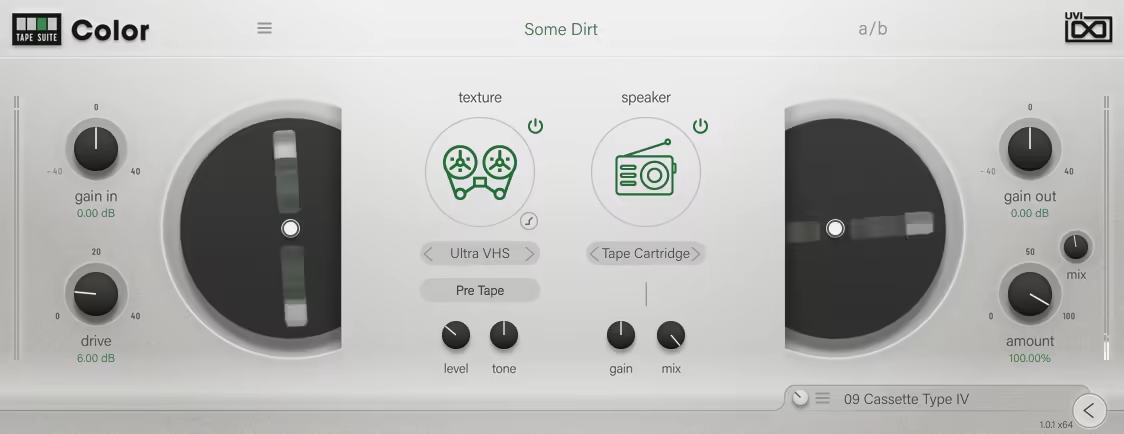
Unlike most plugins that emulate a specific machine, Tape Color offers a fully parametric tape model, letting you explore a broad spectrum of tape characteristics.
- Studio and Cassette Tape Tones
There are the deep, rich tones of studio reel-to-reel machines and the low-key charm of worn cassette recorders. The real strength of this tape VST is its ability to add subtle warmth or create heavily textured effects.
- Magnetic Tape Characteristics and Convolution
It imitates magnetic tape characteristics such as saturation, distortion, and frequency response shifts, but also features a texture processor and a convolver with impulse responses from vintage devices.
- Texture and Speaker Emulation
You get adjustments for texture, which defines the type of tape character, and speaker emulation, which mimics various playback systems. You can even control whether the texture effect is applied before or after the tape simulation, allowing for precise sound sculpting.
- Noise Gate for Dynamic Texture
With a built-in noise gate, you can decide whether tape noise is constant or triggered by incoming audio, adding dynamic texture to your tracks.
If you want complete control over how tape coloration interacts with your mix, Tape Color’s flexibility makes it a great choice.
Tape Color by UVI is available in AU, VST2/3, and AAX plugin formats and is compatible with MacOS 10.14 Mojave to macOS 14 Sonoma and Windows 10 or newer operating systems.
3. IK Multimedia Tape Machine 80
| Plugin | IK Multimedia Tape Machine 80 |
|---|---|
| Description | Studer-style tape tone with multiple tape formulas and realistic tape movement |
| Award | Best Classic Studio Tone |
Tape Machine 80 is modeled after the Studer A80, which is known for its blend of sonic transparency and subtle harmonic enhancement, and similar traits that shaped the sound of countless influential records from the 1970s to the late 1980s.
Tape Machine 80 uses dynamic convolution paired with detailed physical modeling and doesn’t just simulate saturation or compression. To my ears, it sounded like a recreation of the dynamic movement and musicality that tape inherently imparts to audio.
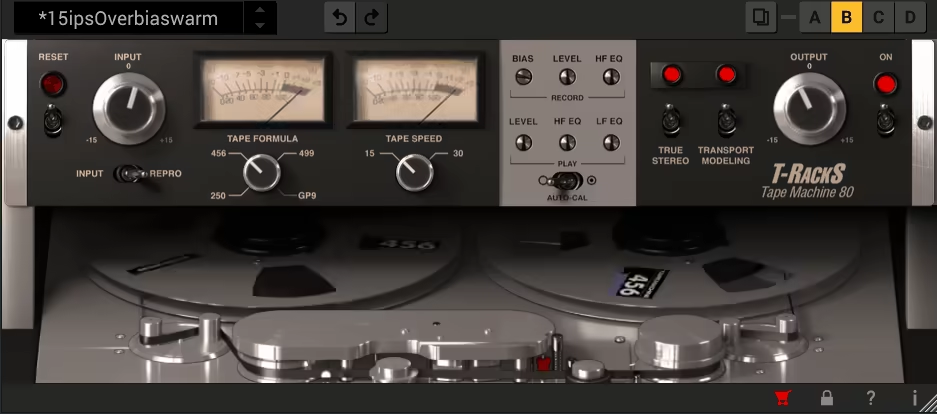
- 4 Tape Formulations
One feature I particularly love is the ability to switch between four different tape formulations:
-
-
- 250: Warm and colored with a touch of grit, perfect for adding vintage richness to tracks.
- 456: The quintessential “tape sound,” offering a warm, rounded tone with just the right amount of saturation.
- GP9: Clean and punchy, ideal for modern mixes that need clarity with a hint of analog charm.
- 499: High-fidelity and slightly brighter, this tape handles higher levels with minimal distortion, making it great for preserving detail while adding analog warmth.
-
- Application and Use Cases
I find myself using the 456 formula on drum buses for its round, musical compression, while the 499 often shines on vocals and master buses for its ability to enhance high-end clarity without losing warmth.
- Tape Speed, Transport Modeling, and True Stereo
The Tape Machine 80 also gives you decent control over how the tape responds to your audio. You get features like tape speed (15 or 30 IPS), transport modeling, and record bias, which let you tweak everything from warmth to harmonic detail.
The “True Stereo” option subtly introduces left-right channel differences to mimic real analog machines’ attributes. For me, it’s these imperfections that breathe life into a mix.
I recommend experimenting with different tape flavors and trying blending multiple formulations across buses for a layered, analog feel. You will love it!
IK Multimedia Tape Machine 80 is available in AU, VST3, and AAX plugin formats and is compatible with MacOS 10.15 or newer and Windows 10 or newer operating systems.
4. Studer A800 Tape Recorder

| Plugin | Studer A800 Tape Recorder |
|---|---|
| Description | Iconic 2 multitrack tape sound for tracking and bus glue with pro calibration control |
| Award | Best for Tracking |
The A800 Tape Recorder has had a huge history behind it. This plugin is one of the best tape plugins out there, modeled after the iconic 2” analog tape machine that defined the sound of countless classic records, and it delivers the warmth, presence, and low-end punch that only a genuine tape machine can provide.
- Classic Tape Sound in Legendary Records
Some common places you’d have heard this machinery’s sound include Stevie Wonder’s soulful grooves and Metallica’s hard-hitting tracks. UAD claims to have worked on the circuit path and tape mechanics of the plugin.
- Tape Formulations for Different Tones
Let me walk you through A800 Tape Recorder workflow now. This tape emulation plugin allows you to select different tape formulations.
The 250 tape formula, for instance, is something I would use for vintage warmth, rolling off harsh transients and adding a pleasing saturation. On the other hand, the 900 tape formula proved to be good at handling modern, bass-heavy mixes with punch and clarity.
- Tape Speed and Calibration for Tonal Control
Tape speed (7.5, 15, or 30 IPS) plays a huge role in tonal shaping, with slower speeds thickening the low end and faster speeds enhancing top-end clarity. Combine this with precise calibration options, and you can dial in everything from gentle harmonic warmth to aggressive saturation that pushes your tracks into bold, creative territories.
- Versatility Across Mixing and Mastering
What I love most about this plugin is its versatility. I can use it to subtly enhance individual tracks, adding cohesion to vocals or softening a bright snare, or I can slap it on a drum bus for a cohesive, punchy groove. For full mixes, I use it to give my project(s) that final glue and polish to make everything feel connected.
- Advanced Tonal Shaping with Repro EQ
One of my favorite features is the ability to dive into the secondary controls for advanced tonal shaping. The Repro EQ, for example, lets you fine-tune the high and low-frequency response to sculpt your sound to perfection.
To get the most out of it, try using subtle saturation on the master bus while pushing the input gain harder on individual instruments for a balanced, analog-style mix.
Studer A800 Tape Recorder is available in AU, VST3, and AAX plugin formats and is compatible with macOS 10.15 Catalina, 11 Big Sur, 12 Monterey, 13 Ventura, and 14 Sonoma, and Windows 10 or newer operating systems.
5. Wavesfactory Cassette
| Plugin | Wavesfactory Cassette |
|---|---|
| Description | Authentic cassette color with hiss, wow/flutter, and artifacts for instant lo-fi vibe |
| Award | Best Lo-Fi Character |
Cassette is a simple yet versatile tape emulation plugin that gives you all the essential controls you need to create your mixes.
- Authentic Cassette Tape Emulation
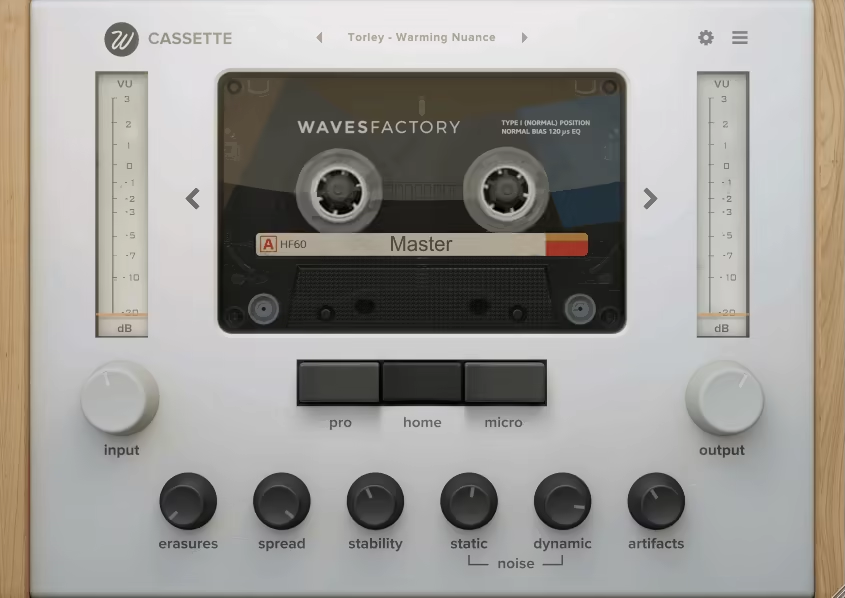
Cassette sounds like a sincere attempt at faithfully recreating the quirks of analog tape, from wow and flutter to hiss and high-frequency compression, with the following main tape types:
-
-
- Type I (Ferric Oxide): The classic, warm sound with a slightly gritty edge, perfect for vintage vibes.
- Type II (Chrome): Offers enhanced high-frequency clarity, ideal for brighter, more modern mixes.
- Type III (Ferro-Chrome): A rare hybrid with a unique tonal balance, blending warmth with crispness.
- Type IV (Metal): Delivers tight bass and extended highs, great for achieving a polished yet analog feel.
-
- Tape Type Selection for Different Moods
I switch between these types depending on my track’s mood. For a lo-fi drum loop, Cassette’s Type I is ideal, while Type IV works best for vocals or synths that need some analog edge.
- Stability Control, Artifacts, and Re-Cassette
You also get stability control, introducing a touch of randomness reminiscent of real cassettes. Meanwhile, the Artifacts setting adds tape catching and dropouts, making your mix feel raw and human. With the innovative Re-Cassette feature, you can run your audio through the tape emulation multiple times, creating degraded textures that feel organic and alive.
- Fine-Tuning and Noise Shaping
You can fine-tune Wow and Flutter, reuse or wear tapes with Erase, and adjust stereo width using the Azimuth control. Plus, the Re-Cassette slider lets you process your audio repeatedly, mimicking the degraded sound of a copied tape.
Combine this with Artifacts for dropouts and high-frequency fluctuations, and you get the best of both worlds: subtle warmth sound and gloriously mangled, grungy tones.
For producers who love lo-fi aesthetics and want to add cassette charm to synths, drums, or full mixes, this plugin is a must-have.
Wavesfactory Cassette is available in VST3 plugin formats and is compatible with 10.9 or higher and Windows 7 or newer operating systems.
6. Aberrant DSP SketchCassette II

| Plugin | Aberrant DSP SketchCassette II |
|---|---|
| Description | 4-track cassette emulation with deep wow/flutter, age, saturation, and creative lo-fi control |
| Award | Most Creative Lo-Fi |
If you are looking for one of the best tape VSTs in terms of fun, SketchCassette II offers great sonic quality, many controls for precision, and quite high versatility, along with a unique GUI.
- Authentic 4-Track Cassette Sound
SketchCassette II gives you the sound of the old 4-track cassette recorders and brings the quirky, nostalgic charm of cheap tape recordings to your DAW, offering everything from subtle analog warmth to full-blown lo-fi destruction.
- Tape Profiles and Quality Settings
You get 12 unique tape profiles that mimic the qualities of Type 1 (ferric), Type 2 (chrome), and Type 4 (metal) cassettes, combined with quality settings like “Cheap,” “Standard,” and “Master.” These options allow you to shape your sound in countless ways, from muffled, low-fidelity textures to surprisingly crisp and dynamic tones. Then, there’s also the Age control to simulate the wear and tear of a well-loved cassette, and you’ve got a sonic time machine at your fingertips.
- Wow, Flutter, and Flanging Effects
I use the Wow and Flutter sections to create pitch warbles and fluctuations, delivering a natural tape effect. In its unique FM mode, even Wow can modulate the Flutter rate, adding an extra layer of movement. The in-built flanging takes it further, introducing dreamy, swirling effects that work beautifully on pads, synths, or guitars.
- Saturation and Noise Reduction
2 saturation models, A (gentle) and B (harsh) let you choose between soft warmth or aggressive distortion, making it adaptable for subtle tone shaping or extreme degradation. The Noise Reduction Compressor, which works by emulating misused tape encoding and decoding, adds brightness and compression for an authentic vintage vibe.
This one is great for tape-based sound design, as SketchCassette II excels at anything from subtle imperfections and extreme lo-fi textures.
Aberrant DSP SketchCassette II is available in AU, VST3, and AAX plugin formats and is compatible with Windows 10 or later and macOS 10.12 Sierra through macOS 14 Sonoma operating systems.
7. Ampex ATR-102 Mastering Tape Recorder

| Plugin | Ampex ATR-102 Mastering Tape Recorder |
|---|---|
| Description | High-end mastering tape finish with tape formulas, head options, and wide stereo polish |
| Award | Best for Mastering |
We’re discussing the best tape emulation plugins, so how could we not include UAD Ampex in this list? The Ampex ATR-102 stands out for its ability to replicate the rich, smooth tape saturation and wide stereo image that made the original hardware a staple in mastering studios.
- Authentic Circuitry and Tape Formulations
The Ampex ATR-102 emulates the original machine’s circuitry, from its transformers and amplifiers to its distinct Repro, Sync, and Input paths. You get Tape Formulations and can choose from classic types like GP9, 456, 900, and 250 to shape the saturation and dynamic response.
- Tape Head Configurations and Speed Control
With Ampex ATR-102, you can experiment with different configurations (¼,” ½,” and 1” tape heads) and speeds to fine-tune the tonal balance, from rich low-end warmth to detailed high-end clarity.
- User-Friendly Features and Seamless Integration
The updated features, like Auto-Gain, make it incredibly intuitive, especially when fine-tuning the Repro and Record levels without worrying about gain staging. Plus, the Retina-optimized interface is a joy to use and is as visually satisfying as it is functional.
For engineers working in mastering or anyone who wants their mixes to sound like they ran through a high-end tape machine, the ATR-102 delivers that classic warmth with deep customization options.
Ampex ATR-102 Mastering Tape Recorder is available in AU, VST3, and AAX plugin formats and is compatible with macOS 10.15 Catalina, 11 Big Sur, 12 Monterey, 13 Ventura, and 14 Sonoma, and Windows 10 or newer operating systems.
8. Waves Abbey Road J37 Tape
| Plugin | Waves Abbey Road J37 Tape |
|---|---|
| Description | Vintage Abbey Road tape color with mix glue, wow/flutter, and built-in delay for vibe |
| Award | Best Vintage Warmth |
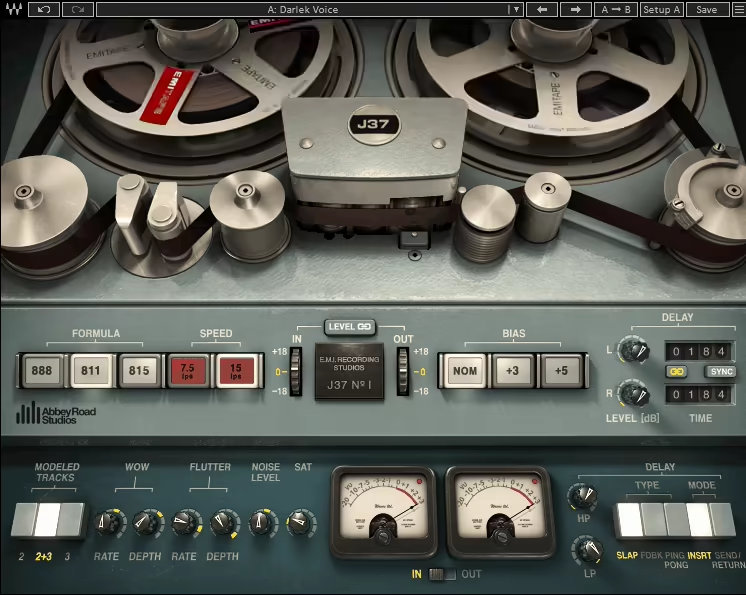
Waves modeled J37 after the iconic Studer J37 tape machine used at Abbey Road Studios during the 1960s and 70s, and they did a great job!
- Tape Warmth and Mixing Cohesion
I will start with what my experience with the plugin has been like. When I compare tracks with and without the plugin, the difference is quite apparent, as without the J37, tracks can feel a little sterile, but with it, they gain depth, warmth, and that elusive “glue” that holds everything together.
- Master Bus Processing and Harmonic Enhancement
I also use the J37 on my master bus as a final step before limiting. It rounds off transients, subtly compresses the audio, and introduces harmonics that make the mix feel alive. Even when pushed, it maintains a natural character that doesn’t feel overly processed.
- Tape Formulas and Speed Variations
As one of the most popular and best tape VST’s, this baby provides 3 tape formulas, each with distinct tonal flavors. For instance, the 811 delivers the vintage warmth of mid-’60s recordings, while the 815 is cleaner and more high-fidelity, perfect for subtle enhancements without adding too much color.
A cool feature is the ability to emulate tape speed variations! I can shape the tonal balance of a track by adjusting the speed, 7.5 or 15 IPS. Slower speeds bring out more low-end warmth, while faster speeds enhance clarity and brightness.
- Analog Imperfections and Lo-Fi Textures
When I’m working on individual tracks like drums or synths, I’ll often experiment with these settings to bring out the best in each element. The wow and flutter controls add an authentic touch of analog imperfection, mimicking the pitch and volume fluctuations of a real tape machine. This is suitable for creating lo-fi textures or adding a nostalgic vibe to a mix.
- Built-in Tape Delay for Creative Effects
One aspect of the J37 that I didn’t expect to use as much as I do is the built-in tape delay. It’s simple to set up, and the sound is quite lush. Whether I’m adding a slapback effect to vocals or syncing rhythmic delays to a track’s tempo, I like the organic and musical results it delivers.
For best results, try automating the delay feedback and wow/flutter settings for evolving, tape-like movement in your mixes.
Waves Abbey Road J37 Tape is available in AU, VST3, and AAX plugin formats and is compatible with macOS Monterey 12, Ventura 13, Sonoma 14, Sequoia 15, and Windows 10 or newer operating systems.
9. Baby Audio TAIP
| Plugin | Baby Audio TAIP |
|---|---|
| Description | AI-driven tape warmth with quick Drive, Dual mode, frequency shaping, and Wear movement |
| Award | Best Fast Workflow |
When I first tried TAIP, what impressed me was how effortlessly it added warmth and musical saturation to my tracks. TAIP truly can be considered one of the best tape plugins out there. It uses an AI-powered algorithm for tape emulation and delivers satisfactory results.
- Tape Saturation and Dual-Mode Processing
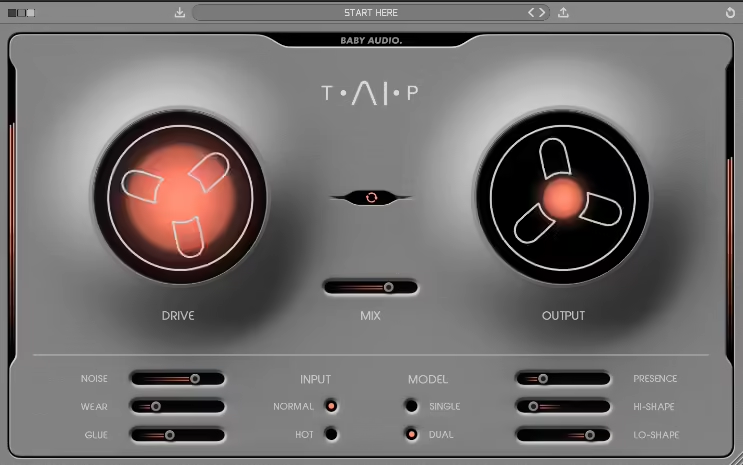
Let me break down all the controls in TAIP that lets you control its analog characteristics. The plugin’s DRIVE knob is its heart and soul, allowing you to control how much tape coloration you want, from a gentle harmonic boost to full-on saturation. And with its DUAL mode, which simulates two tape machines chained together, you can add even more weight and density to a signal.
- Frequency Shaping and Tape Wear
You can adjust parameters like LO-SHAPE and HI-SHAPE to saturate specific frequency ranges, which are perfect for warming up drum buses without muddying the low end or enhancing vocals without harshness. Then there’s the WEAR control that emulates an aging tape machine and adds wow, flutter, and subtle tonal shifts, lending a nostalgic vibe to your mixes.
- Glue Compression and Presets
If I need cohesion, I’d go for the GLUE parameter that mimics tape compression. For inspiration, you also get the 135 factory presets created by renowned producers/engineers like Mark Needham and Eestbound.
- Application on Drums and Vocals
On the drum set, it really brought the kit to life, adding punch and cohesion, making the drums feel tighter and more connected. A touch of tape noise gave it that vintage vibe, adding just the right amount of character.
The plugin worked great on vocals, too. By increasing the drive with auto-gain enabled, I could add richness and warmth without worrying about clipping or level issues.
If you’re looking to thicken your drum buses or give vocals a tape-driven saturation, TAIP is one of the best tape emulation plugins out there.
Baby Audio TAIP is compatible with Mac OS 10.11 and up and Windows 10 and newer operating systems and is available in VST, AU, and AAX plugin formats.
10. XLN Audio RC-20 Retro Color
| Plugin | XLN Audio RC-20 Retro Color |
|---|---|
| Description | Multi-effect vintage toolbox with tape-style wobble, noise, distortion, and texture layers |
| Award | Most Versatile Toolbox |
RC-20 Retro Color is one of my favorite plugins, and I love the distortion, reverb, and magnetic tape effects features. I use it on guitars, sometimes vocals, sometimes drums also, bass, and especially on backing vocals very frequently.
- Creative Sound Design with Modular Effects
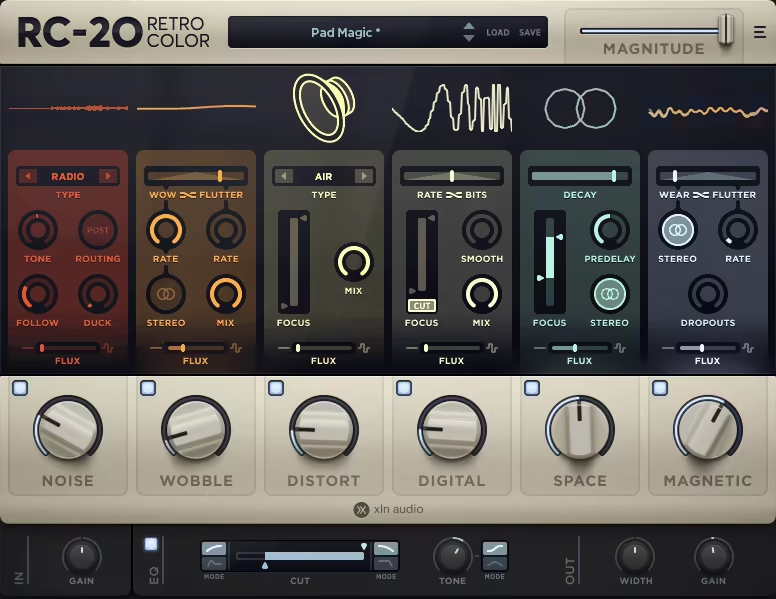
RC-20 Retro Color is essentially a creative sound design plugin, packing six distinct modules: Noise, Wobble, Distort, Digital, Space, and Magnetic, all in a single modular design. You get the Noise module to add a layer of vinyl crackle or tape hiss, which sits beautifully over tracks, lending them a nostalgic, lo-fi vibe.
- Wobble and Digital Processing
The Wobble section can recreate old tape machines’ subtle pitch and time fluctuations. It adds a unique movement to guitar or synth tracks, giving them a dreamy, slightly unstable quality that stands out.
I like the Distort Module in RC-20, and when paired with the Digital module, which models bit reduction and sample rate degradation, I can create gritty, retro-inspired, and 8-bit sounds.
I often use these both modules together when I want to breathe character and life into sterile digital recordings, making them feel raw, textured, and full of personality.
- Space Module for Reverb and Depth
Now, my favorite part, which is the Space module, offers a combination of reverb and resonator effects and can be used to create subtle room reflections to expansive, otherworldly tails. I sometimes use RC-20 instead of dedicated reverb plugins, especially on backing vocals/harmonies, because I just love its tone.
- Magnetic Tape Artifacts and Mix Presence
Then there’s also the Magnetic section that captures the quirks of tape, such as wear, flutter, and dropouts, adding a beautifully imperfect analog quality to the signal. RC-20’s distortion and magnetic effects instantly brighten things up and make them stand out in the mix.
For those experimenting with lo-fi textures or vintage-inspired processing, RC-20 is a must-have tape VST for adding character and depth to any mix.
XLN Audio RC-20 is compatible with macOS 10.13 or later and Windows 7 and newer operating systems and is available in VST, AU, and AAX plugin formats.
11. Softube Tape
| Plugin | Softube Tape |
|---|---|
| Description | Everyday tape glue with three tape types, drive, stability, and easy parallel control |
| Award | Best Mix Glue |
Unlike some tape emulation plugins that can feel overwhelming or overly colorful, I like TAPE for the balance of convenience and utility that it offers. Let me walk you through its basic workflow and framework.
- 3 Tape Types for Different Tones
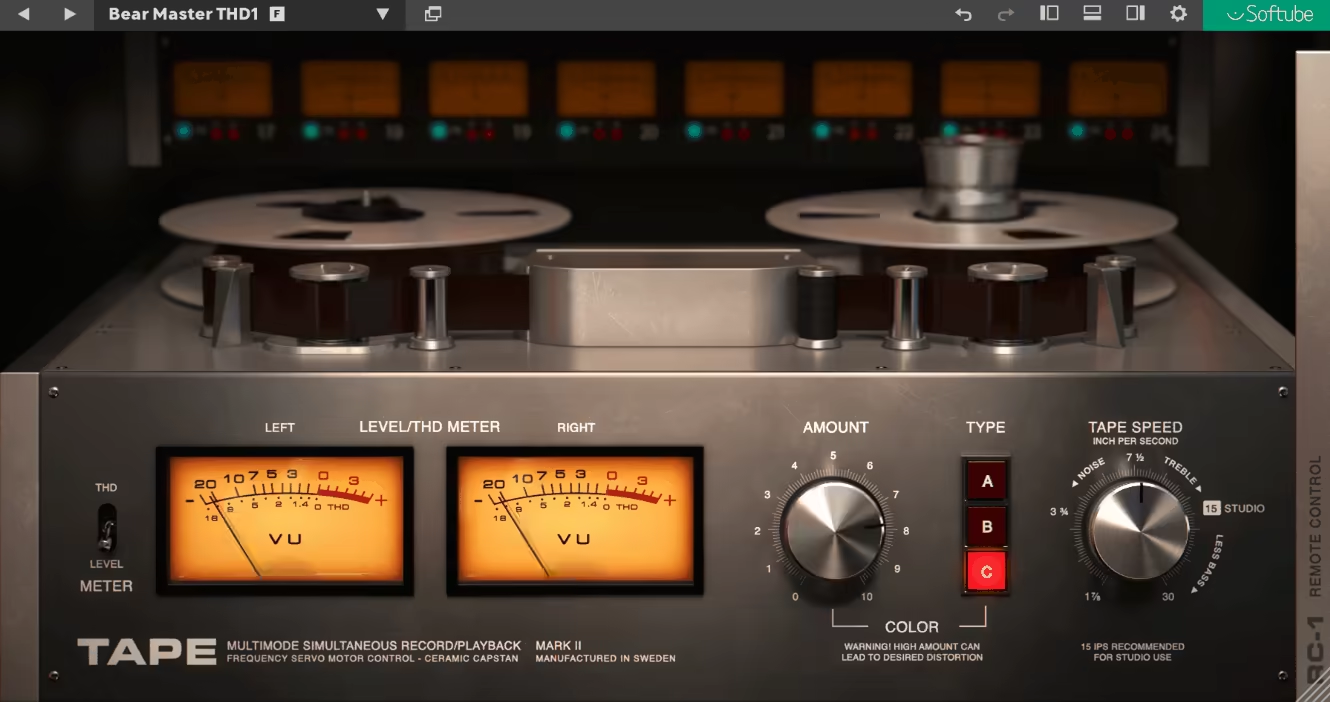
TAPE by Softube provides three distinct tape types: A, B, and C, such that Type A feels smooth and warm, while Type B offers a balanced, more neutral response. Type C leans modern, providing a slightly cleaner and high-fidelity sound.
- Drive Control and Saturation Flexibility
Switching between these is as easy as clicking the reel, and I often find myself testing each to see which fits best with the vibe of the track I’m working on. The Drive control is another essential feature, allowing you to add varying levels of saturation. Whether I’m adding a gentle harmonic lift or pushing it harder for noticeable tape compression, it’s easy to find the sweet spot.
- User-Friendly Interface and Visual Feedback
I like the interface for its dynamic reel animations, which show the tape machine in action as you adjust parameters like tape speed. Moreover, the controls are labeled clearly, with no unnecessary jargon, making it quick to get up and running. This visual feedback not only adds a nostalgic charm but also helps you understand the sonic changes that occur when tweaking the settings.
- Analog Artifacts and Parallel Processing
TAPE also includes additional controls like Speed Stability, which mimics wow and flutter, letting you introduce anything from a slight wobble to extreme pitch variations for a lo-fi vibe. Other features, like Noise and Crosstalk, further enhance the analog feel, and the dry/wet knob lets you create parallel tape effects.
Softube Tape is compatible with macOS Big Sur 11, Monterey 12, Ventura 13, and Windows 7 and newer operating systems and is available in VST, AU, and AAX plugin formats.
12. Arturia Tape MELLO-FI
| Plugin | Arturia Tape MELLO-FI |
|---|---|
| Description | Lo-fi tape character with preamp drive, wow/flutter, wear, and tape-stop transitions |
| Award | Best for Lo-Fi FX |
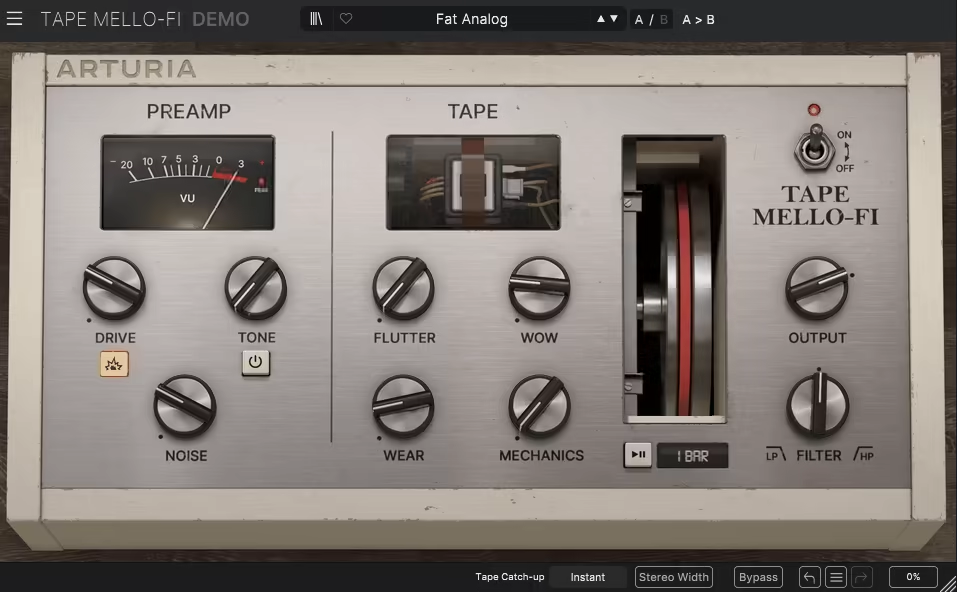
Arturia found a place in our list of the best tape emulation plugins. Tape MELLO-FI sounds like a very versatile lo-fi effect plugin and is inspired by the legendary Mellotron, a tape-based instrument that revolutionized sampling in the 60s. It is built around three key modules: the preamp, tape, and filtering sections.
- Preamp Section for Saturation and Character
The preamp module allows you to shape your sound’s character with drive, tone, and noise controls. Its drive parameter introduces analog-style saturation with gain-compensated boosts, adding warmth and crunch without overloading the signal.
The tone control adjusts high-frequency damping for a mellow, vintage sound, while the noise control layers in authentic tape-like hisses, perfect for creating an old-school feel on pads, strings, or even drums.
- Tape Module and Analog Imperfections
The Tape module imitates vintage tape machine behavior with controls for flutter, wow, wear, and mechanics. Flutter and wow simulate pitch variations caused by uneven tape motor speeds, while the wear parameters add degradation and crunch, making everything sound beautifully worn-in and nostalgic.
- Stereo Width and Tape Stop Effects
Its mechanics’ control introduces motor noise for an authentic analog feel. Another great feature is the stereo width function, which creates independent wow and flutter variations for each stereo channel, adding depth and dimension to your tracks. Additionally, the tape-stop effect offers two modes: instant and fast forward, both allowing for dramatic tape-stop transitions that add flair to breakdowns or intros.
A great trick is to use the Crosstalk feature subtly on a stereo mix to introduce a natural sense of width and depth.
Arturia MELLO-FI is compatible with Mac OS 10.13+, Windows 10, and newer operating systems and is available in VST, AU, and AAX plugin formats.
13. Wave Alchemy Tapewave

| Plugin | Wave Alchemy Tapewave |
|---|---|
| Description | Realistic cassette behavior with multiple tape types, tape age, compression, and organic pitch warble |
| Award | Best Cassette Realism |
Built on a classic cassette machine’s audio analysis, Tapewave’s idea is to capture their unique tonalities and imperfections. Unlike plugins that rely on basic saturation or pitch modulation, Tapewave dives into the intricate behaviors of cassette tapes, from the subtle quirks of compression to the unmistakable texture of degraded tape.
- Versatile Tape Saturation with Minimal Effort
A few knobs are all it takes to achieve everything from warm analog saturation to the stodgy sound of lo-fi nostalgia. Tapewave gives your mix character, whether you’re layering pads, shaping drum loops, or adding a retro edge to vocals.
- 6 Tape Types and Tape Age Control
Tapewave offers six distinct tape types, all of which have distinct sonic fingerprints, ranging from clean and punchy to dark, gritty, and unmistakably lo-fi. It has a Tape Age control that lets you go even deeper, seamlessly transforming each style from pristine and modern to worn, warped, and on the edge of breakdown.
- High-Quality Processing and CPU Efficiency
Combining variety and flexibility, it allows you to craft tape sounds for any project, from subtle coloration to dramatic degradation. With 16x oversampling, it delivers warm, analog sound without sacrificing quality. You can also select efficient processing modes to balance CPU usage with sonic fidelity.
- Analog Compression and Dynamic Control
On top of this, Tapewave features two analog-style compression modes, including an emulation of the legendary Shure Level-Loc. These modes let you crush transients for bold, in-your-face energy or subtly tame dynamics with ease. The ability to place compression before or after the tape processing gives you another layer of dynamic flexibility.
- 1and1-Woo Engine and Pitch Warbles
Also included is a 1and1-woo engine, which imitates the natural pitch fluctuations of analog tape with a level of realism rarely found in plugins. Using stable modulation curves and a tuned Perlin noise generator, Tapewave produces organic pitch warbles. Its drift control adds even more unpredictability to the wow and flutter, creating truly unique effects.
If you love subtle tape movement or extreme warping effects, the drift control offers endless creative possibilities.
Wave Alchemy Tapewave is available in VST3, AU, and AAX formats for macOS and Windows, with native Apple Silicon support.
Last Words
This list of the best tape emulation VSTs is for producers and engineers who want to bring analog character into their digital workflow, whether that means subtle warmth, natural compression, or full-on lo-fi texture. Some of these plugins focus on realism and classic studio behavior, while others lean into creative tape effects and sound design.
The best way to choose is to think about how you actually use tape in your sessions. If you want transparent mix glue, go for studio-style emulations. If you’re after movement, artifacts, and character, cassette and lo-fi models make more sense. In the end, tape plugins are less about accuracy and more about how they shape your sound!

Shaurya discovered his passion at the intersection of writing and music. Starting his career as a songwriter and rapper, he gradually picked up FL Studio and soon delved deep into the world of audio engineering and music production. Based in Delhi, India, he has worked with top studios, been featured on Red FM, garnered millions of streams on Spotify, and released music with major labels like Sony and Hitz.