
We have the best de-esser VST plugins in the menu today, for you to elevate your vocal recordings to a much smoother level.
Harsh sibilance can ruin even the best vocal performance. Those sharp “S” and “T” sounds might not seem like a big deal at first, but once they start cutting through a mix, they’re impossible to ignore.
That’s why a good de-esser is essential. It’s one of those tools that works quietly in the background, taming piercing frequencies without stealing the life from your vocals. I’ve had plenty of mixes where I didn’t realize how bad the sibilance was until I slapped on one of these units; instant relief.
Well, first, a de-esser is basically a compressor with a very specific job. It hones in on those harsh, high frequencies and applies just enough compression to smooth them out, leaving the rest of your vocal untouched. I love how it makes vocals sit naturally in the mix without sounding like they’ve been over-processed.
Modern plugins take this even further, offering adjustable frequency bands, threshold settings, and spectral processing for more precise control. I’ve used them to subtly tame a soft vocal, but they’ve also saved me when I had a singer with an aggressive top end that wouldn’t behave.
In this article, we’re diving into the world of de-essers. From straightforward tools that get the job done quickly to advanced plugins with tons of customization, there’s something here for every workflow. Once you find the right one, trust me, you’ll never want to mix without it.
If you want your vocals to sound polished and professional, you’ll need one of these in your toolkit. Let’s check them out!
1. Antares Vocal De-Esser
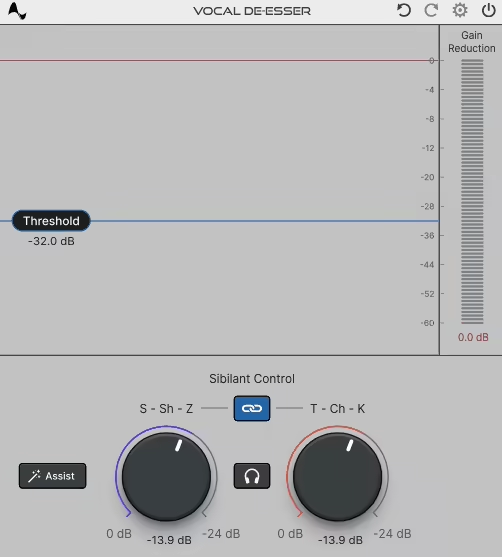
My first pick is the Antares Vocal De-Esser, which stands out with its AI-driven technology.
Instead of blindly chopping out high frequencies, Antares Vocal De-Esser uses AI-driven technology trained on actual vocal recordings, meaning it knows exactly which sibilant sounds to tame without dulling the vocal.
The result? A more natural and musical de-essing process compared to traditional tools.
First of all, I love how simple and clean the interface is. It doesn’t overwhelm you with unnecessary controls, but it still gives you enough flexibility to dial in the perfect amount of de-essing.
Whenever I’m working on a breathy ballad or a hard-hitting rap vocal, it adapts beautifully and keeps the vocal’s character intact. The workflow feels intuitive, making it easy to get results fast.
- AI-Powered Precision
This isn’t just a frequency-based de-esser; it actually understands the human voice. Instead of over-compressing or dulling the top end, it pinpoints only the harshest “S” and “T” sounds while keeping the rest of the vocal intact.
I’ve used it on bright pop vocals, and it smooths out sibilance without sacrificing presence.
- Adaptive Processing
One of my favorite things is how it adjusts to different vocal styles. A soft acoustic track needs a different touch than a punchy hip-hop vocal, and this plugin handles both with ease.
I appreciate that I don’t have to constantly tweak it; once it’s set, it just works.
- Intelligent Detection, Minimal Tweaking
I respect how well the detection algorithm performs. Some de-essers need constant fine-tuning, but here, a few quick adjustments usually get me exactly where I need to be. It lets me focus on mixing rather than fighting with settings.
The only downside can be the iLok activation. Setting up an account and going through the extra steps can be a hassle, especially if you’re used to drag-and-drop installations. But once it’s installed, it’s smooth sailing.
My tip would be to try running it on a duplicate vocal track or as a send effect rather than directly on the main vocal. This way, you can control sibilance without affecting the original dynamics too much.
Despite the extra setup, the results are absolutely worth it; smooth, professional-sounding vocals without sacrificing clarity. If you work with vocals often, this is a must-have tool in your arsenal.
Antares Vocal De-Esser comes in VST3, AU, and AAX formats for macOS and Windows users.
2. FabFilter Pro-DS
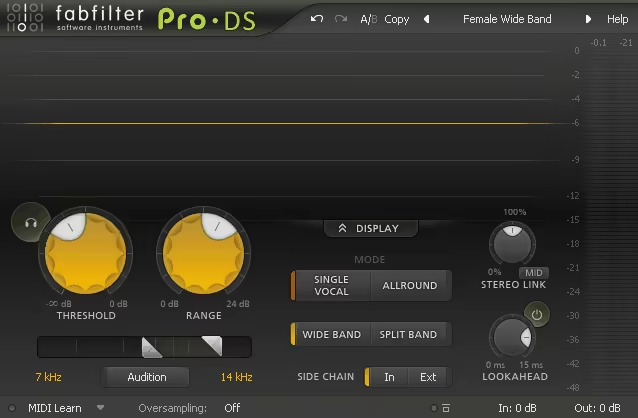
FabFilter Pro-DS is like having a surgical-grade de-esser in your toolkit. What makes this de-esser plugin special is how it removes sibilance without messing with the natural tone of the vocal.
The first thing I can say is that Pro-DS doesn’t offer brute-force frequency reduction, it feels like a skilled engineer gently sculpting the sound, keeping the clarity intact while eliminating sharpness.
One thing I love about FabFilter’s design philosophy is how intuitive the interface feels. The real-time waveform display gives you a clear visual of what’s happening, making adjustments easier and more precise.
- Dual Operating Modes
This plugin gives you two powerful approaches: ‘Wide Band’ for broad de-essing across the entire signal and ‘Split Band’ for targeting only the harshest high frequencies. I take advantage of Split Band for detailed vocal processing, and it works wonders.
- Incredibly Transparent Sound
I respect how natural this plugin sounds. Some de-essers overdo it, but Pro-DS keeps the vocal warm and airy while removing unwanted sibilance.
I’ve even used it on spoken word recordings where too much processing can make things sound robotic, and it handled them beautifully.
- Sidechain Filtering for Precision
This is one of those features that makes fine-tuning so much easier. Instead of guessing, I can dial in the exact frequency range I want to target, which saves a ton of time on tricky tracks.
That said, it’s not a plug-and-play de-esser. If you’re looking for something quick and automatic, this might feel a little advanced at first. But if you’re someone who likes precision and control, it’s absolutely worth it.
Use the sidechain filter to isolate problem frequencies before adjusting the threshold, this way, you won’t accidentally overprocess the vocal.
At the end of the day, FabFilter Pro-DS is a masterclass in subtlety and transparency. It gives you surgical control over sibilance while keeping everything natural. If you want a polished, professional vocal without losing warmth, this is a go-to tool.
FabFilter Pro-DS comes in VST, VST3, Audio Units, CLAP, AAX Native and AudioSuite formats for macOS and Windows users.
3. SSL DeEss
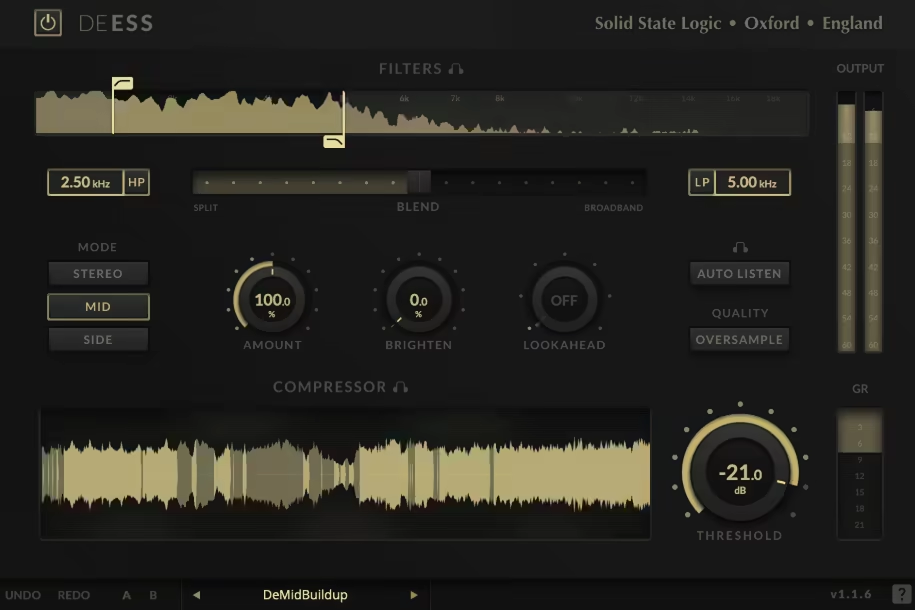
SSL DeEss is one of those plugins that just gets the job done without fluff or unnecessary tweaking, just clean and effective de-essing.
Designed with SSL’s legendary approach to processing, DeEss strips things down to the essentials, letting you control sibilance without sacrificing vocal clarity.
I like how straightforward this plugin is. You get two main controls: Threshold to decide when the de-essing kicks in and Frequency to pinpoint the sibilant range. That’s it. No menus, no extra steps, just fast, precise adjustments with a visual display that shows exactly what’s happening.
- Simple Yet Powerful Controls
Sometimes, less is more, and SSL proves it here. I can dial in settings within seconds, whether I’m taming a sharp vocal or smoothing out cymbals in a drum mix. It’s quick, effective, and keeps me focused on the mix.
- Transparent Processing
I respect how natural this plugin sounds. Some de-essers dull the vocal or make it feel lifeless, but SSL DeEss retains presence while softening harsh “S” sounds. I’ve used it on delicate vocal performances, and it leaves the emotion intact.
- Fast and Efficient Workflow
There’s no learning curve here. If you need a de-esser that works without overthinking settings, this is it. I take advantage of its speed when working under tight deadlines, and it never fails.
That said, this isn’t for deep customization. If you need split-band processing or ultra-fine control, you might want a more advanced option. But its simplicity is also its strength, it’s a plug-and-go solution that just works.
I often use this de-esser before applying broader compression to control sibilance first and then smooth out the overall dynamics for a more polished vocal.
At the end of the day, SSL DeEss is a reliable, no-nonsense de-esser. If you want fast, transparent results without diving into complicated settings, this is a solid choice.
SSL DeEss comes in VST2, VST3, AU, and AAX formats for macOS and Windows users.
4. sonible smart:deess
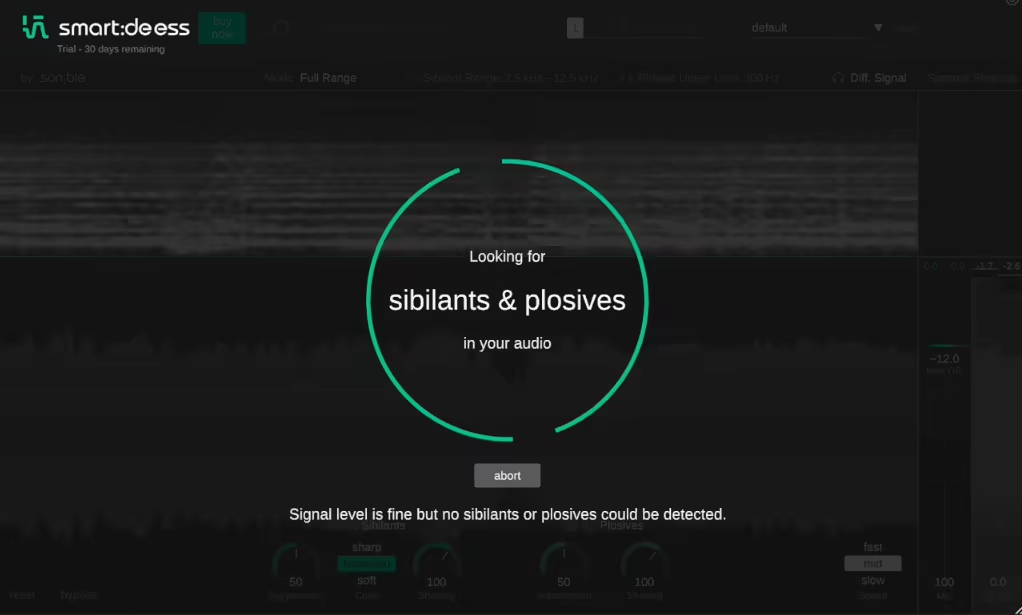
Sonible smart:deess is the kind of plugin you reach for when sibilance is driving you insane.
What sets this de-esser VST apart is its AI-powered detection, which analyzes the vocal in real-time and focuses only on the harsh “S,” “T,” and “Sh” sounds without dulling the entire performance. It’s smart, precise, and makes de-essing feel effortless.
The customizable design of smart:deess is what really got my attention. The “Color” control is one of my favorites here, as it lets you shape how the processed sound sits in the mix, whether you want something soft and natural or slightly edgier.
The interface is clean with a real-time visual display that gives you instant feedback on what’s being processed.
- AI-Powered Sibilance Detection
Instead of setting thresholds and hoping for the best, this plugin actively learns the vocal’s behavior. I love how it locks onto sibilance with insane accuracy, meaning less manual tweaking and faster results.
- “Color” Control
This is one of my favorite features. Some de-essers just reduce harshness, but this one lets you fine-tune how the processed vocal sounds. I’ve used it to soften airy pop vocals without making them feel lifeless.
- Designed Exclusively for Vocals
While some de-essers work on cymbals or hi-hats, smart:deess is built purely for vocals. That might sound limiting, but it makes the plugin ridiculously good at what it does. I’ve found it perfect for pop and acoustic tracks, where clarity is key.
That said, it won’t help with harshness on instruments like cymbals or guitars. If you need an all-purpose de-esser, this might not be it. But for vocals? It’s dialed in perfectly.
Sonible smart:deess makes vocal de-essing feel effortless. It’s fast, transparent, and incredibly effective, ideal for quick, professional results without the usual guesswork.
sonible smart:deess comes in VST, VST3, AU, and AAX formats for macOS and Windows users.
5. Black Salt Audio DSR

Black Salt Audio DSR is my go-to weapon when those sharp “S” sounds start stabbing my ears.
For me what makes this de-esser plugin stand out is its pure simplicity, just Threshold and Range, and you’re done. The Threshold control decides when the de-essing kicks in, while Range sets how much it pulls back those harsh frequencies.
The best part? DSR smooths sibilance without sucking the life out of the vocal, which is exactly what I need when I’m moving fast in a mix. Plus, the zero-latency processing is a lifesaver for live tracking and real-time sessions.
- Waveform Visualizer
I appreciate how this plugin shows exactly what’s being processed. It makes adjusting settings feel more intuitive because I can see the de-essing in action.
- Zero-Latency for Live & Tracking
This isn’t just a post-production tool, it’s fast enough for live vocals and real-time tracking. I’ve used it while recording, and it keeps vocals clean without adding any delay or latency.
- Light/Dark Mode
It might seem like a small thing, but having UI customization options is a big deal when working long hours. Whether I’m mixing in a bright room or doing late-night edits, the adaptable interface makes a difference.
Now, this isn’t the most advanced de-esser out there (as you may have guessed after reading the key features). You won’t get split-band processing or deep frequency sculpting, but honestly, that’s why I like it. Sometimes, I just need a quick fix, and DSR gets it done without slowing me down.
Black Salt Audio DSR comes in VST3, AU, and AAX formats for macOS and Windows users.
6. Waves Sibilance
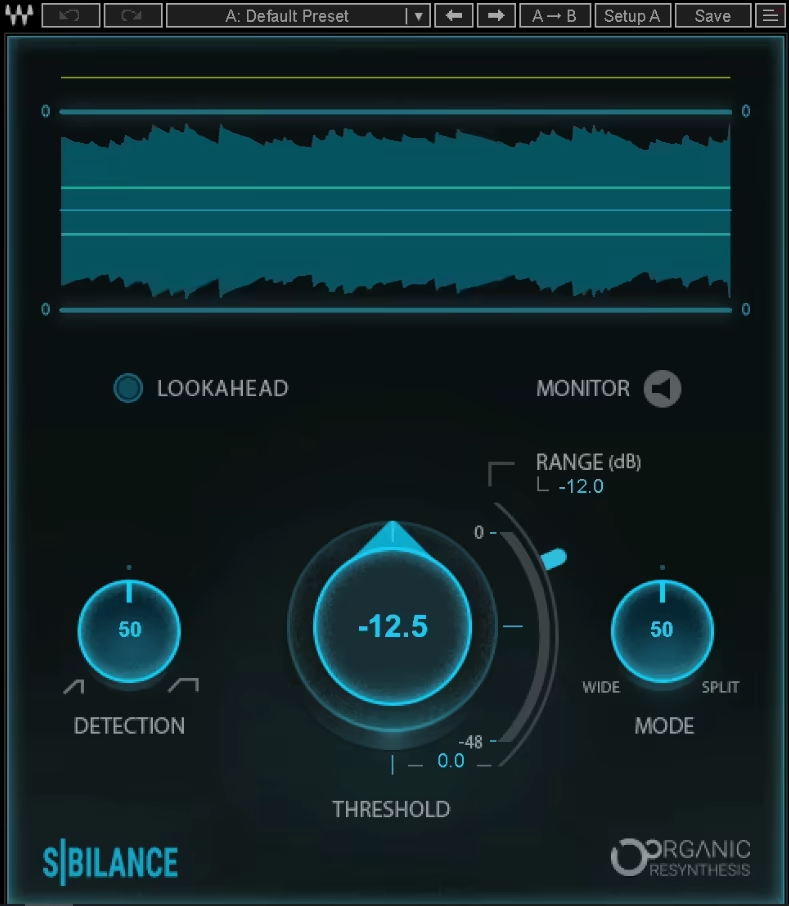
Sibilance de-esser VST plugin shines with the innovative Organic ReSynthesis technology, that gives smoother and more transparent vocals intelligently.
Sibilance caught me off guard the first time I tried it. I’ve used plenty of de-essers, but this one felt different. Within minutes, I noticed how it softened harsh sounds without dulling the vocal, it was like the sibilance just melted away while everything else stayed untouched.
That’s the magic of Waves’ Organic ReSynthesis technology. Instead of just compressing harsh frequencies, it isolates sibilant sounds and reduces them intelligently. The result? A smoother, more transparent vocal without the usual trade-offs.
What I appreciate most is how easy it is to dial in. The detection settings let you fine-tune exactly what’s being processed, and the visual feedback makes adjustments feel effortless.
- Organic ReSynthesis
Unlike traditional de-essers, this one doesn’t just clamp down on high frequencies. Instead, it isolates sibilance from the rest of the vocal, meaning I don’t lose any natural brightness.
- Real-Time Processing with Visual Feedback
The interface shows exactly what’s being targeted, making it easy to tweak settings while listening. I love how quickly I can get results without overthinking the process.
- Minimal Effort, Maximum Clarity
Some de-essers require a ton of tweaking to sound right. With Sibilance, I barely have to adjust anything, as it just works, even on difficult vocals.
That said, it does have some trade-offs. It’s not the most customizable de-esser out there, so if you need fine control over attack and release or multi-band processing, you might find it limiting. Plus, it can be a bit CPU-heavy, especially when stacking multiple instances in a dense mix.
For quick, natural de-essing, this plugin is a solid choice. It’s perfect when you need smooth results fast without diving into complex settings. While it’s not the most flexible option on the market, its ease of use and clean sound make it a go-to for everyday vocal processing.
Waves Sibilance comes in VST3, AU, and AAX formats for macOS and Windows users.
7. Klevgrand Esspresso
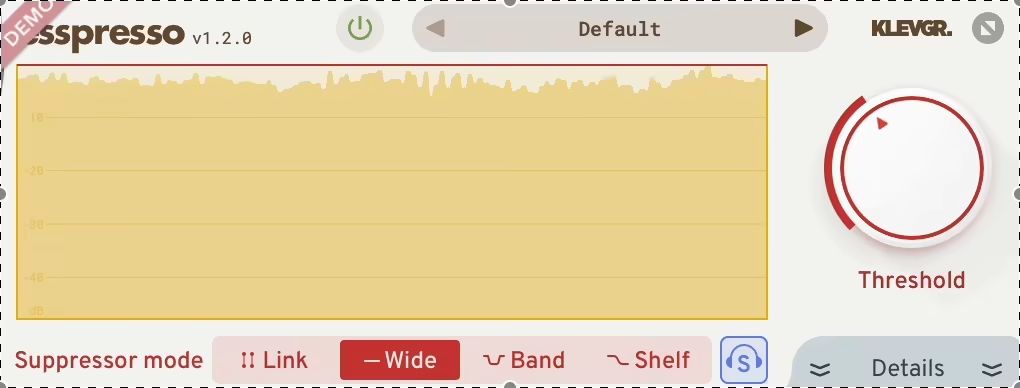
Esspresso is one of those plugins that strips away the clutter and gives you exactly what you need.
Espresso offers a focused, efficient de-esser that gets straight to the point. It’s the kind of tool that doesn’t get in your way but still offers deep control when you need it.
The first thing that caught my attention was its ability to separate detection and suppression frequencies. This means you can listen to the problem frequency in isolation before deciding how much to tame it.
This is a super handy feature when working with vocals that have inconsistent sibilance, letting you fine-tune the de-essing process with pinpoint accuracy.
- Independent Detection & Suppression
Unlike traditional de-essers, this one lets you isolate the sibilant frequency before reducing it. It’s incredibly useful when dealing with harsh, uneven vocals that need a more custom approach.
- 3 Filter Modes (All, Band, Highpass)
These modes offer different ways to shape the processing, making it versatile for anything from gentle sibilance reduction on a soft vocal to aggressive taming on a bright pop mix.
- Minimalist, Yet Functional Interface
The clean, intuitive design gives just enough visual feedback to keep things simple without sacrificing control.
That said, it’s not the easiest plugin for beginners. If you’re unfamiliar with detection vs. suppression, it might take a few tries to grasp how to dial it in effectively. But once you do, the level of precision it offers is pretty great.
I’ve had great results with Esspresso in dense mixes, where vocals need to be upfront but free of harshness. It’s not a set-it-and-forget-it tool, but for those who like to fine-tune their sound, it’s absolutely worth checking out.
Klevgrand Esspresso comes in VST2, VST3, AU, and AAX formats for macOS and Windows users.
8. Harrison Consoles AVA De-Esser
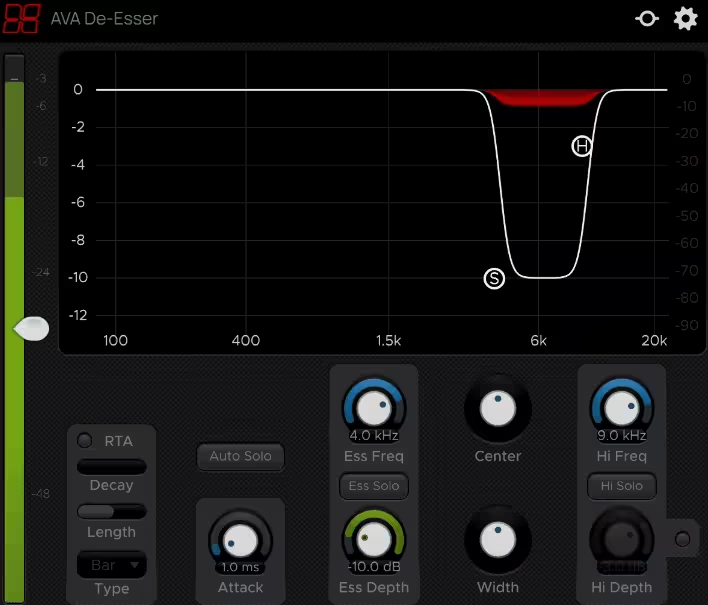
Taming sharp “S” and “T” sounds shouldn’t feel like a battle, and AVA De-Esser makes sure it doesn’t. It’s designed to work quietly in the background, removing sibilance while keeping the vocal’s natural tone intact.
Unlike some de-essers that squash everything in the high end, AVA De-Esser only targets what needs fixing.
What I immediately liked was how effortless the workflow was. The Band Solo feature lets you hone in on the problem area, while the Auto-Solo function automatically highlights sibilance as you tweak.
These features makes fine-tuning quick and painless, eliminating any guesswork.
- Band Solo
Instead of blindly adjusting settings, you can solo the exact frequency range causing trouble, ensuring you only process what’s necessary.
- Auto-Solo
Auto-Solo makes the plugin feel almost automatic, helping you zero in on problem spots without endless tweaking.
- Transparent, Natural Processing
Even when applying heavy de-essing, the plugin doesn’t strip warmth or detail from the vocal, which is crucial when working with delicate performances.
One downside is that it’s designed specifically for vocals. If you’re looking for a de-esser to tame harsh cymbals, hi-hats, or other instruments, this isn’t the one. But for clean, polished vocal processing, it does exactly what you need, nothing more, nothing less.
I love how efficient and intuitive AVA De-Esser is. It’s the kind of plugin you throw on a vocal track, make a few quick tweaks, and move on, knowing it’ll sound clean without extra effort. If speed and simplicity are what you’re after, this one’s a solid pick.
Harrison Consoles AVA De-Esser comes in VST, VST3, AU, and AAX formats for macOS and Windows users.
