
If you have been into music production for a while, you’ve probably noticed that the best ideas sometimes come from a little chaos. That is why I’ve compiled some of the best Randomizer Plugins to bring chaos to your workflow.
Randomizer tools act as creative wildcards, producing patterns, melodies, and textures that take your music in unexpected directions. Whenever I wanna experiment or get stuck, I reach for randomizers as they push me outside my comfort zone to try new sounds and compositions without overthinking them.
I’ve tried a good share of randomizers, from simple and intuitive ones to complex ones with deep, intricate features. In this article, I’ll walk you through the ones I liked due to their ability to inspire fresh ideas in my productions.
Such plugins cover everything from rhythm manipulation to melody generation or evolving textures. Want to jump in? Let’s bring chaos to your creativity!
1. Beatsurfing RANDOM
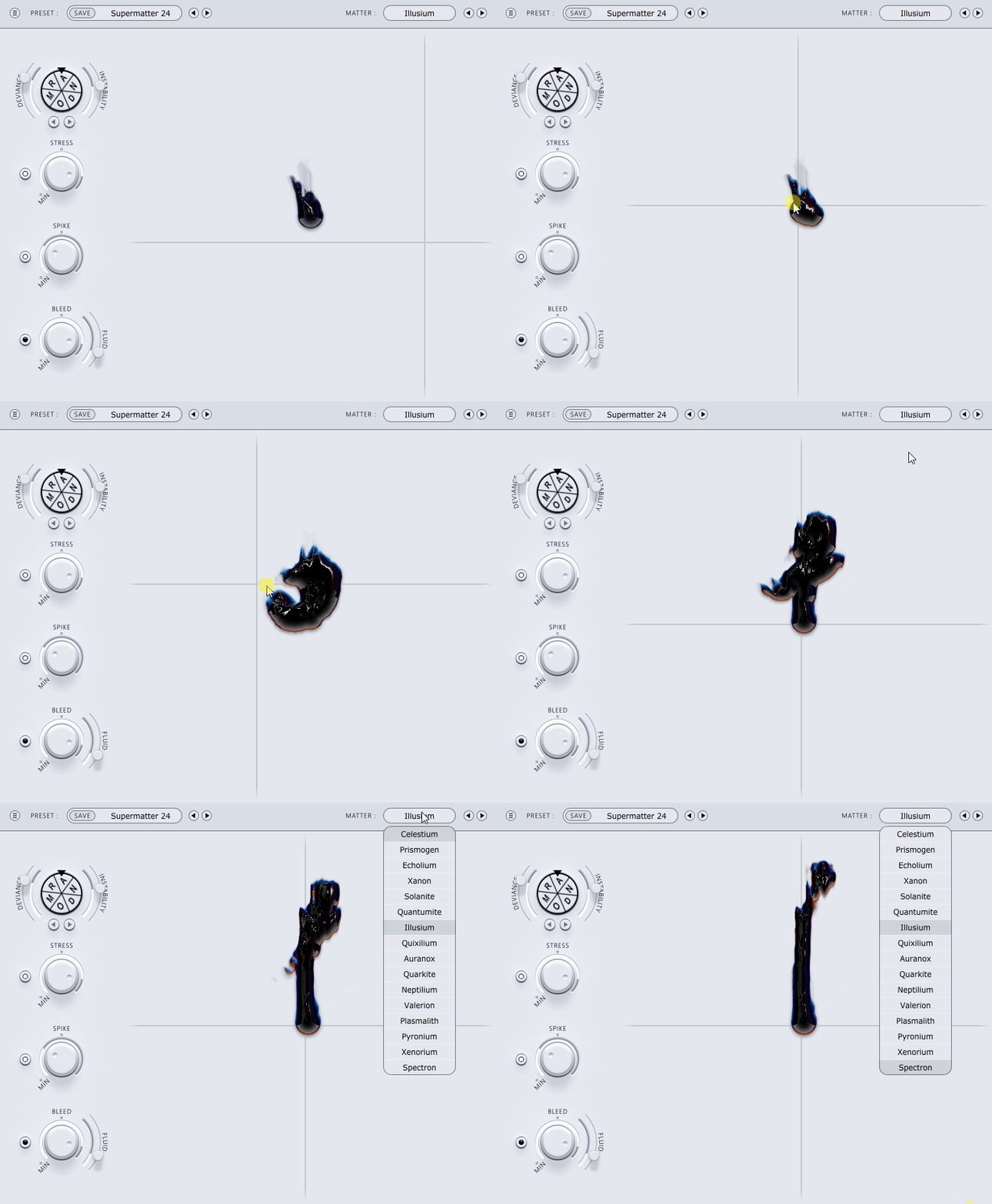
It is this ability to turn randomness into something musical that makes RANDOM a standout plugin, as you can see in the image above.
With its inspiring design, RANDOM brings new ideas every time I use it, bringing controlled chaos. It inspires me, and it takes me to places I could not imagine otherwise. as its unique Random Wheel provides endless sound possibilities with just a spin.
- Deviance Control
What I like about RANDOM is how it gives you flexibility without overwhelming you. The Deviance Control is my favorite feature, as it lets you decide how wild or subtle the randomization should be. Want tiny tweaks to your sound? No problem. Looking for something completely unpredictable? Just crank it up.
- Instability Parameter and XY Pad
The Instability Parameter takes things further by introducing variation on a per-note basis, which is perfect for making repetitive parts sound more organic. Add to that the Expressive XY Pad, and you have a tool that feels alive, responding to your touch in real-time.
- Curated Tables and Presets
The plugin also comes with curated Tables and Presets crafted by producer Phazz, which I find super useful when I need a starting point. These presets aren’t just generic cause they feel carefully designed, offering a range of tones and textures powered by neural networks. Whether you’re looking for inspiration or a quick way to add life to your track, these are a great starting point.
I recommend this randomizer VST plugin if you’re into experimentation or just need to shake up your creative process. The interface is intuitive, so you don’t need to be a sound design expert to get started.
The only downside is that there’s no trial version, which means you’re committing upfront. If you’re looking for a tool that turns randomness into creativity, RANDOM is worth a try.
Compatible with Windows and macOS, supporting VST, AU, and AAX formats.
2. United Plugins Randomachine

This randomizer plugin is all about giving your drum patterns a fresh edge. Randomachine is a powerful drum machine as well as a creativity booster for beats.
What I love most is how it brings randomness into the rhythm without making things feel messy. Randomachine is like having a virtual drummer who’s full of surprises but still listens to your directions.
- Random Pattern Generation
The Random Pattern Generation feature is the core of the plugin with just a few tweaks, you can create drum patterns that feel unique every time. I enjoy how it adjusts the complexity of the patterns, letting you decide how straightforward or intricate they should be.
- Sound Randomization
Pair that with the Sound Randomization option, and you’ve got a tool that makes your drum sounds stand out in a mix.
- Parameter Control
The Parameter Control is a great addition and it lets you fine-tune the randomness, so you’re always in charge of how wild things get.
- MIDI Export
And when you’ve nailed a groove you like, the MIDI Export feature makes it easy to move it into your DAW for further tweaking. It’s these small workflow features that make a big difference when you’re deep in a project.
On the flip side, it’s not the most detailed drum programming tool out there. If you need extreme precision, you might find its simplicity limiting. But for sparking new ideas or adding unexpected flavors to your beats, it’s fantastic.
I’d recommend Randomachine to anyone who wants to break away from predictable drum loops and explore something more dynamic. It’s a fun, efficient way to keep your percussion interesting without overthinking it.
Compatible with Windows and macOS, supporting VST, VST3 AU, and AAX formats.
3. Sugar Bytes Graindad
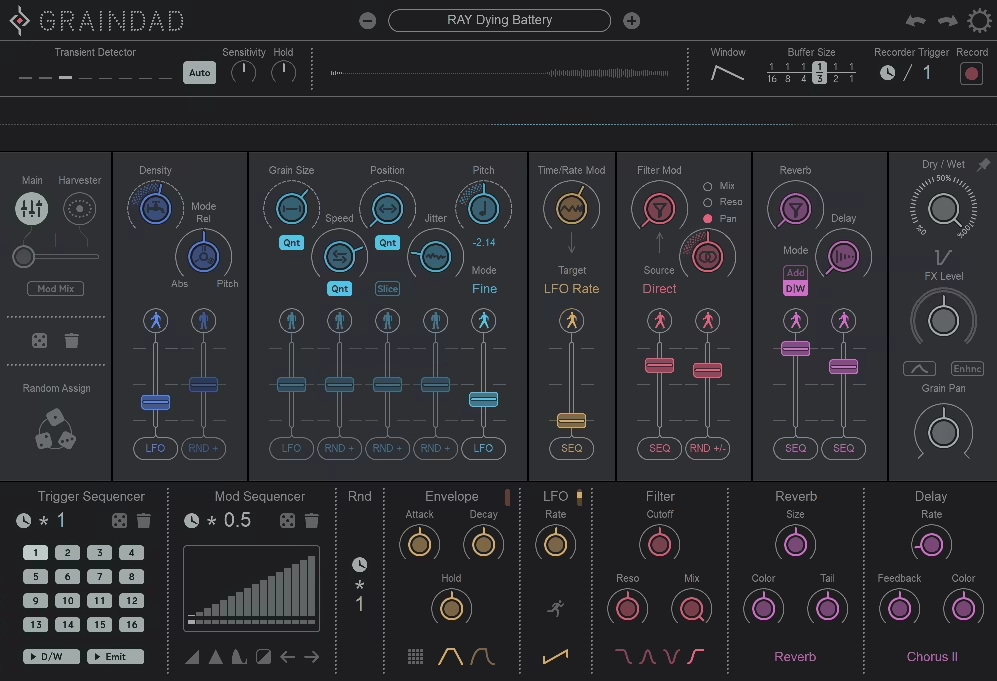
Graindad combines granular synthesis with sound manipulation in real-time.
I like how Graindad changes simple audio inputs to complex textured soundscapes. You get a creative lab for playing with time, texture, and rhythm.
- Grain Engine
Among them is the Grain Engine, which can run 64 grains at a time and lets you create layers of sound that change over time.
- Harvester Modulation System
I enjoy using the Harvester Modulation System, in which you can control many parameters at once – and with the 12 main controllers, you can easily choose which direction the randomization will take.
- 16-Step Trigger Sequencer
Using this plugin feels more like sculpting sound directly than tweaking knobs. My favorite is the 16-step Trigger Sequencer for rhythmic manipulation for adding pulses or chaotic bursts to your audio.
- Built-in Effects
I have also appreciated that Graindad has reverb, delay, and filters. These are not jacked on and are part of the workflow – you can shape your sounds without needing any external plugins. I like the interface, as the balance between functionality and creativity. It is clear enough for quick results but deep enough for serious exploration.
The downside is that you need time to get used to the interface and workflow. But the potential for unique sound design more than makes up for it.
Grandad is a great tool for ambient textures, experimental rhythms, or just getting out there in the new sonic territory. I recommend it to anyone who wants to push boundaries!
Available in Audio Unit, VST2, VST3, AAX, and Standalone formats for macOS and Windows.
4. HY-Plugins HY-RPE2
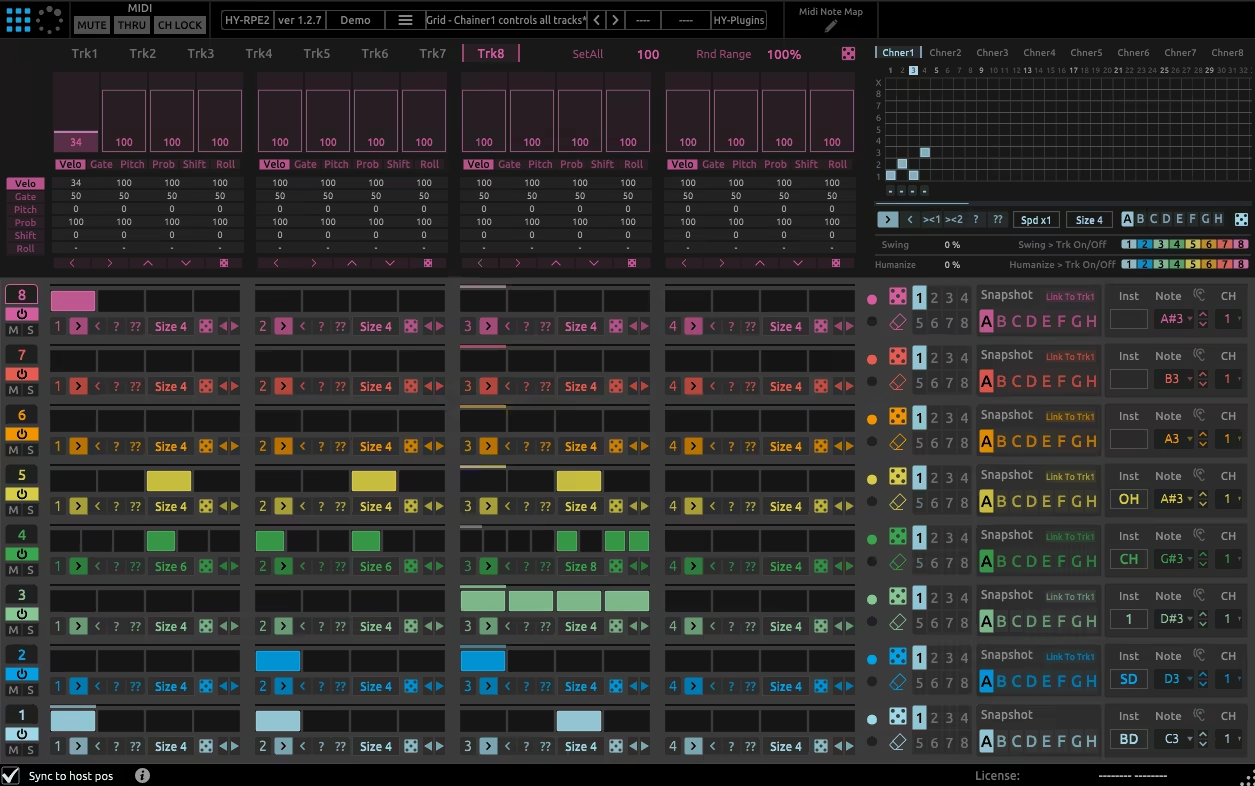
Grid and Euclidean sequencing combined in HY-RPE2 gives you creative control over rhythm generation.
HY-RPE2 is unique in combining traditional step sequencing with generative, algorithmic approaches. For me, it’s the tool for precise control and happy accidents.
- Grid and Euclidean Sequencers
I like the versatility as it has 8 independent tracks with grid and Euclidean sequencers each. Grid mode lets you draw patterns in steps. Euclidean mode produces rhythms based on mathematical principles, great for adding unexpected grooves.
- Drag & Drop Modulation System
With the drag and drop modulation system, you can add movement to your patterns as the 4 LFO and Sample & Hold units as well as 4 macro knobs/buttons are there for dynamic control of parameters.
- MIDI Recorder and MIDI Learn
A further great point is the MIDI Recorder, which captures your sequences for use in other projects. The MIDI Learn feature is another useful addition for integrating external controllers into your workflow. This is a small thing but important when working for long sessions: the plugin interface is resizable!
Well, HY-RPE2 has many features, and it takes time to get used to everything. Still, HY-RPE2 can be used to create complex, evolving rhythms once you get comfortable with it. This random plugin is worth a look for any producer who likes to get really deep into sequencing possibilities like me.
Available in VST2, VST3, and AU formats for macOS and Windows.
5. Sugar Bytes Turnado

Turnado allows real-time audio manipulation with powerful effects that transform your sounds. What really grabs me about this plugin is its simplicity mixed with serious depth; it feels equally at home on stage for live sets as in the studio.
- One-Knob Per Effect Control
The one-knob-per-effect control of Turnado is great for just grabbing a knob and hearing the sound change. It’s intuitive, fast, and great for spontaneous creativity.
- 24 Built-in Effects
With 24 effects ranging from filters to distortions, there are endless creative possibilities.
- Dictator Mode
In Dictator Mode, you can chain several effects to one macro, allowing for sweeping transitions or wild builds, essentially, a DJ-style performance tool baked into your DAW.
- MIDI Learn for External Gear
I also love how Turnado integrates with external gear via its MIDI Learn feature; hardware controllers can be easily set up for a more tactile experience, avoiding tedious menu navigation.
- Preset System
The preset system is another highlight; there are great starting points, but you can also personalize everything to fit your sound. Whether you need subtle enhancements or chaotic transformations, there’s something for everyone.
The con for me is the CPU usage, which could be better. Chaining many effects or using Dictator Mode can strain your system, especially in larger sessions. It’s not a dealbreaker, but it’s something to keep in mind for resource-heavy projects.
Also, while the effects are powerful, some users might miss the finer parameter tweaking options that dedicated single-function plugins offer.
Anyone looking to inject energy and creativity into their sound should check out Turnado. Just be careful; your session may get quite complex when you are pushed to the limit!
6. Sinevibes Rerun v2

For those looking for simple randomization without coding experience, Rerun v2 offers a unique take on looping and stutter effects.
- Accessible Rhythm Manipulation
This smart unit makes rhythm manipulation easy. What I love is how Rerun v2 breaks down complex techniques into something accessible,you can add intricate patterns to your audio with minimal setup. It’s perfect for quick ideas or deep sound design experiments.
- Looping Engine & Variable Loop Length
The looping engine is designed for real-time use, allowing you to grab and repeat audio segments instantly. My favorite feature is Variable Loop Length, which lets you fine-tune the loop duration for anything from quick percussive bursts to long, evolving textures.
- Stutter Effect & Synchronized Timing
The stutter effect is both creepy and glitchy, and I love how adjustable it is; you can create rhythmic variation or complete chaos, depending on your needs. Synchronized timing ensures that all effects stay locked to your project tempo.
- Minimalistic Interface and Low CPU Usage
The minimalistic interface is a plus, as it avoids unnecessary distractions, keeping the focus on creativity. Another major advantage is the low CPU usage; I can run multiple instances in a heavy project, and my system stays smooth and responsive. This makes Rerun v2 a super practical choice for live setups and studio work.
Like most randomizers, Rerun v2 has its limitations; it lacks extensive modulation options, which advanced users might find restrictive. However, I see this simplicity as a strength rather than a weakness, and it gets you results fast!
If you need a tool to add rhythmic energy and cool textures to your tracks, Rerun v2 is a solid choice.
Comes in VST2, VST3, AU, AAX, and Standalone formats for macOS and Windows users.
7. Audiomodern Playbeat 3
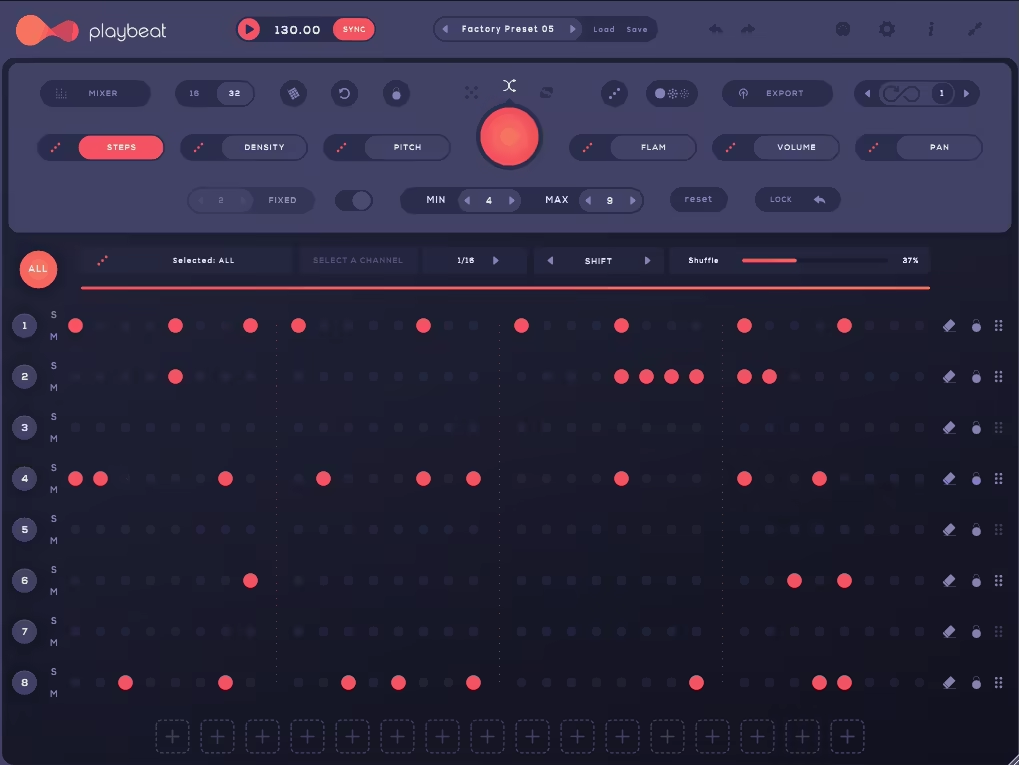
Wanna rethink rhythm creation by mixing controlled randomness with smart design? Playbeat 3 has something for you.
I love how Playbeat 3 (Replaced by Playbeat 4) makes beat-making more spontaneous and moving. They turn it into an engaging collaboration instead of just a structured task, always generating new ideas and keeping the workflow fresh!
- Endless Pattern Generation
It features endless patterns so your grooves never get old. The Smart Algorithm learns your preferences over time and suggests ideas based on your style.
- Remix Control
A feature I like is the Remix Control, you can rearrange patterns in real time; a lifesaver for live performances or impromptu creativity. MIDI drag-and-drop function makes pattern transfer to DAW simple.
- Preset Packs
Preset packs for different genres are included in Playbeat 3 for instant access to professionally crafted grooves. Love how its simple interface allows experimentation without getting too complicated.
- Built-in Randomization Tools
Built-in randomization tools provide just enough chaos-control to keep things interesting.
But its reliance on randomization might not appeal to those who want total control of their beats. But the plugin is still an awesome addition to producers looking to break out of repetitive loops and breathe new life into their rhythms. I recommend Playbeat 3 for producing electronic music, hip-hop, or experimental genres.
Comes in VST, VST3, AU, AAX, and Standalone formats for macOS and Windows users.
8. Audiomodern Gatelab (FREE)

GateLab is a gate sequencer designed to bring movement to static sounds. Its ability to generate evolving patterns and rhythmic effects makes it a useful tool for enhancing your tracks, and it’s completely free.
- Real-Time Gate Sequence Generation
My favorite feature of Gatelab e is the real-time gate sequence generation; this allows you to instantly create rhythmic patterns that sync with your project tempo. Randomization modes offer everything from subtle variations to complex rhythmic chaos.
- MIDI Output
With the MIDI output feature, GateLab can control or randomize parameters of other plugins in your setup.
- Wet/Dry Mix Control
The wet/dry mix control is handy for blending the processed signal with the original audio for nuanced effects.
- Infinity Mode
Another highlight is Infinity Mode, which provides non-stop pattern evolution, perfect for ambient or experimental music. Its user-friendly interface encourages experimentation, even for newcomers to gate sequencers.
This is a free randomizer VST plugin, so there are limits. It’s not as capable as some other units, but GateLab remains a funky take on rhythm production that any producer should have in their toolkit. Great plugin, and it’s free!
Comes in VST, VST3, AU, AAX, and Standalone formats for macOS and Windows users.
