
The best vocoder VST plugins for that sick robotic voice? Oh, I got you. Whether you’re trying to sound like Daft Punk, Kraftwerk, or a futuristic toaster with feelings, these plugins will get you there.
I’ve messed around with a ton of vocoder VSTs, and let me tell you, some are straight fire, while others make you sound like a malfunctioning GPS.
The good ones can turn any boring vocal into an instant synth-powered banger. Perfect for electro bops, funky disco vibes, or just making weird robot noises for fun (we’ve all been there).
Some of these can nail that classic vintage vibe, while others go full sci-fi mode, letting you blend, morph, and tweak your voice in ways that shouldn’t even be legal.
And don’t worry, no actual singing skills required. Just slap one on, press some keys, and boom, instant robo-star.
So if you’re ready to turn your voice into a futuristic masterpiece, let’s check out the best vocoder plugins that’ll have you sounding like a cybernetic legend!
1. Polyverse Manipulator by Infected Mushroom
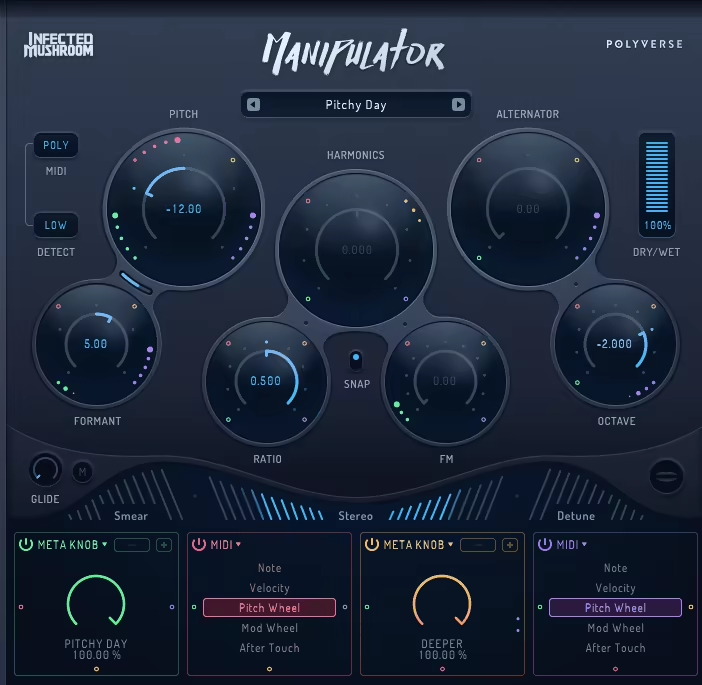
Made in collaboration with Infected Mushroom, Polyverse Manipulator is here to reshape any monophonic audio.
Manipulator is proper VST vocoder plugin that warps, stretches, and bends audio into entirely new sonic territories. From subtle formant tweaks to radical sound transformations, Manipulator is capable of producing everything from organic harmonies to robotic synth-like voices.
I was hooked by how effortlessly it delivers extreme-effect results. There’s no need to dig through layers of menus, you turn just a knob, and the effect happens instantly.
- Granular Pitch & Formant Manipulation
Instead of basic pitch shifting, the Manipulator reconstructs audio through granular processing, offering completely new tonal possibilities and textures. I like how it takes my sound and takes it to different realms.
- MIDI-Controlled Vocal Synth
Another unique feature is that your voice can function as an expressive synth, allowing you to play harmonies or lead melodies in real time, with up to 4 polyphonic voices for added depth.
- Multi-Effect Processing
A suite of 10 creative sound-shaping tools, including harmonic enhancement, stereo expansion, and spectral smearing, ensures that every processed sound feels unique.
- Instant, No-Fuss Sound Design
The drag-and-drop modulation and straightforward interface let you tweak sounds without getting lost in complex settings.
- Signature Processing from Infected Mushroom
If you’ve ever wanted that psychedelic, glitch-heavy vocal sound, this is the exact tool used by Infected Mushroom in their production process. Although Manipulator is incredibly versatile, it demands a fair amount of CPU power, making it a challenge to run multiple instances in large projects.
Also, because of how drastically it alters audio, dialing in precise, musical results takes a bit of practice. To get the most out of it, I found that blending the processed signal with the original vocal helps retain clarity while still achieving that distinctly warped, futuristic effect.
For producers looking to push vocal manipulation to its limits, Manipulator is one of the most exciting tools out there.
Manipulator is available in VST, VST3, AU, and AAX formats for macOS and Windows.
2. OxyMeteor
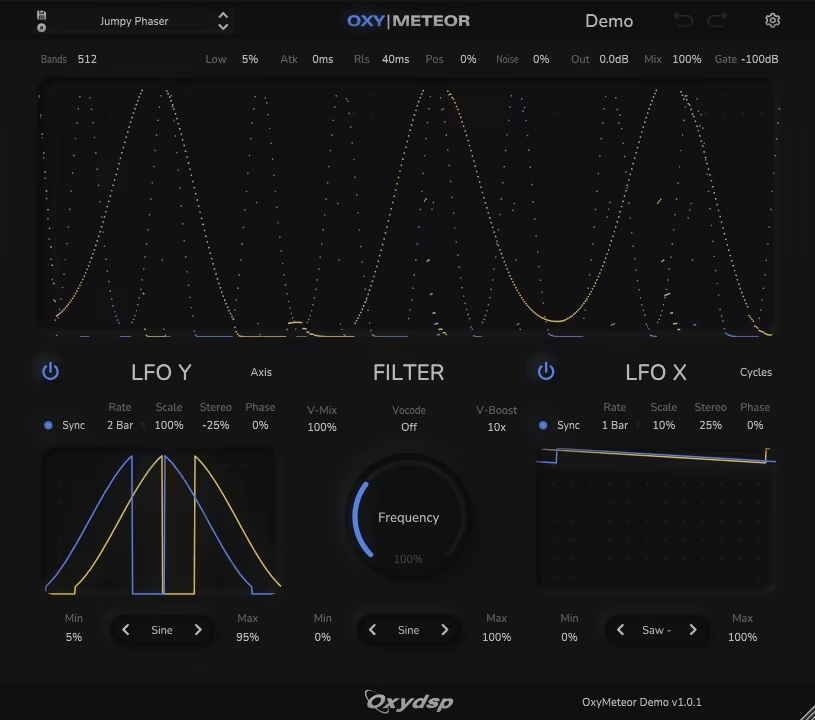
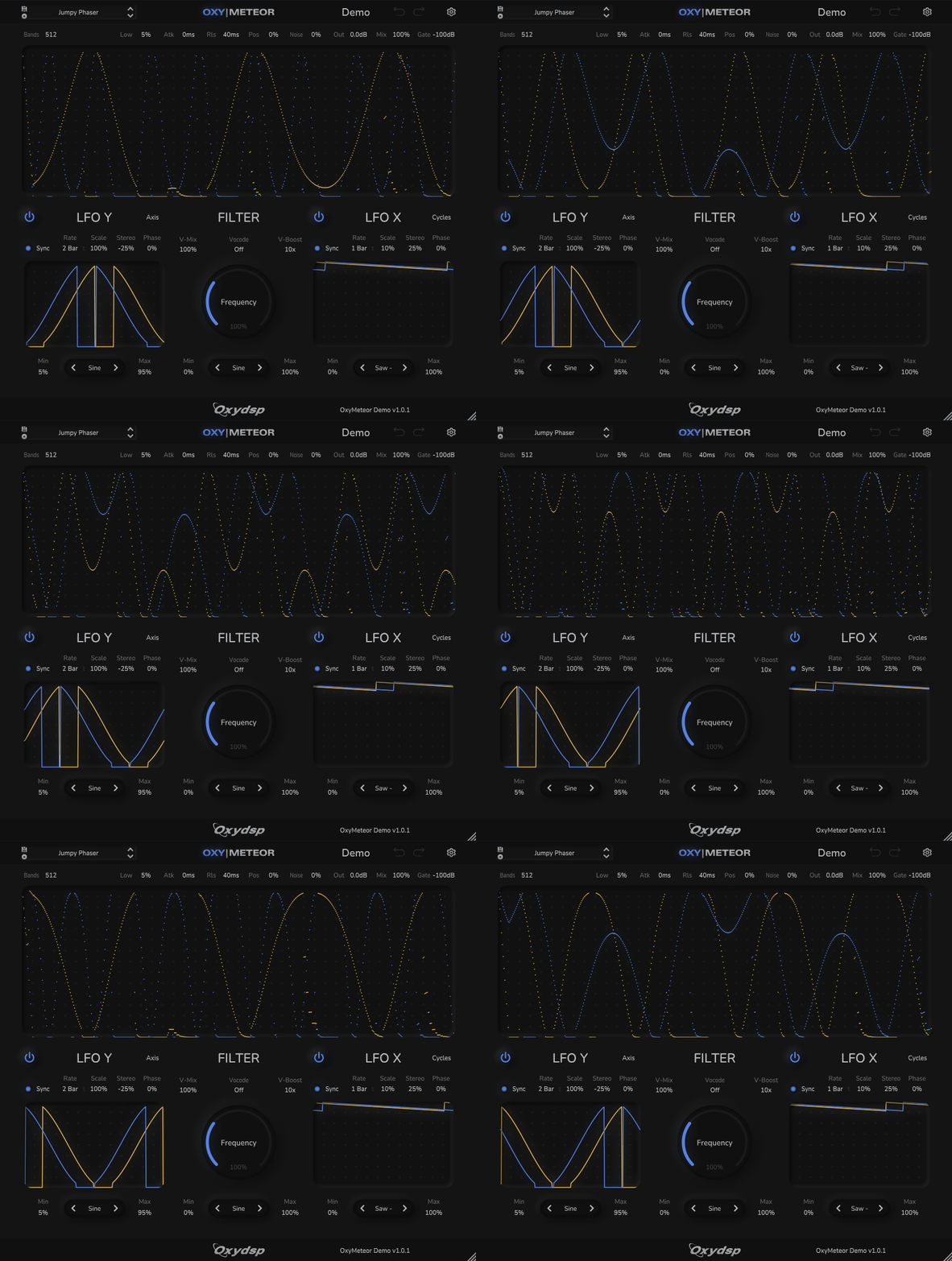
If you’ve ever wanted a vocoder that thinks outside the box, OxyMeteor is here to push boundaries as a spectral manipulation powerhouse.
OxyMeteor is more than just about robotic voices letting you warp, phase, and sculpt sounds in ways most plugins don’t even attempt.
What really grabbed me was the sheer depth of control. You can choose anywhere from 32 to 2048 frequency bands, meaning you can create anything from classic vocoder tones to ultra-detailed sound textures.
The ability to draw your own filters or even import images to shape the spectral filtering is a great feature. I tried loading a simple sketch as a filter, and the results were completely unique like painting with sound.
- Advanced Spectral Vocoding
Instead of just basic effects, OxyMeteor lets you sculpt sound textures with frequency bands ranging from 32 to 2048, offering extreme detail and creative flexibility.
- Customizable Filtering & Modulation
You can draw your own filter curves, import images as spectral filters, or use classic waveforms like sine, saw, and triangle. Add movement with two BPM-synced LFOs for evolving, rhythmic effects.
- Unique Vocoding & Texture Modes
The self-vocoding mode turns any input into digital whispers, atmospheric reverb, or shimmering textures. Use the external vocoder input to hyper-layer vocals or process drum loops into harmonic chaos.
- Deep Sound Shaping & FX
The phase, scale, and filter cycle controls give you insane levels of movement and stereo width, while envelope following and whisperization modes offer even more sound-mangling potential.
- Sleek, Resizable Interface & 100+ Presets
The vector-based UI is fully resizable, making it easy to tweak parameters. And if you just want to dive in, over 100 presets cover everything from robotic voices to underwater textures and futuristic soundscapes.
I feel the sound design potential here is very high, but I’ll admit it can feel overwhelming at first if you’re new to spectral processing. That said, once you start experimenting, it’s addictive.
OxyMeteor is available in VST3 and AU formats for macOS and Windows.
3. Waves OVox Vocal ReSynthesis

OVox vocoder plugin is a complete vocal transformation suite that reshapes your voice into harmonies, instruments, or even entire synth arrangements.
From classic robotic vocals, talkbox-style processing, to completely new textures, OVox provides an inspiring blend of synthesis, modulation, and effects to take vocal production to another level.
What I love about this plugin is how seamlessly it merges vocoding, harmony generation, and MIDI control into one tool.
You can sing and instantly trigger chords, play a synth with your voice, or send MIDI to an external instrument, all without touching a keyboard. It turns live vocal performances into playable instruments, which I believe is a game-changer for spontaneous creativity.
- Transform Your Voice into an Instrument
Instead of just processing vocals, OVox lets your voice control a synthesizer, generating harmonies, basslines, or lead sounds in real time.
- Automatic Note Mapping for Instant Harmonies
The built-in note mapper ensures everything stays in key, automatically aligning your voice to predefined chords, scales, or melodies without needing advanced theory knowledge.
- Built-in Multi-FX Suite
I don’t think you’d need extra plugins as pitch shifting, delay, reverb, distortion, and modulation are all integrated to refine or completely reshape your vocal tone.
- MIDI Output for External Control
If you prefer working with other synths, OVox converts your vocal performance into MIDI data, allowing you to control external instruments or VSTs.
- Deep Sound Design Capabilities
For those who love to experiment, the LFOs, sequencers, and ADSR envelopes provide dynamic movement and intricate modulation options.
The learning curve can feel steep at first, especially with gain staging, pushing the input too hard can introduce unwanted distortion.
Additionally, some presets lean heavily toward electronic and experimental genres, meaning manual tweaking is necessary for more organic styles.
If you’re looking for more than just a vocoder, something that blends voice, synthesis, and effects in a way that feels intuitive yet powerful, OVox is an exciting tool worth diving into.
Waves OVox is available in VST, AU, and AAX formats for macOS and Windows.
4. Arturia Vocoder V
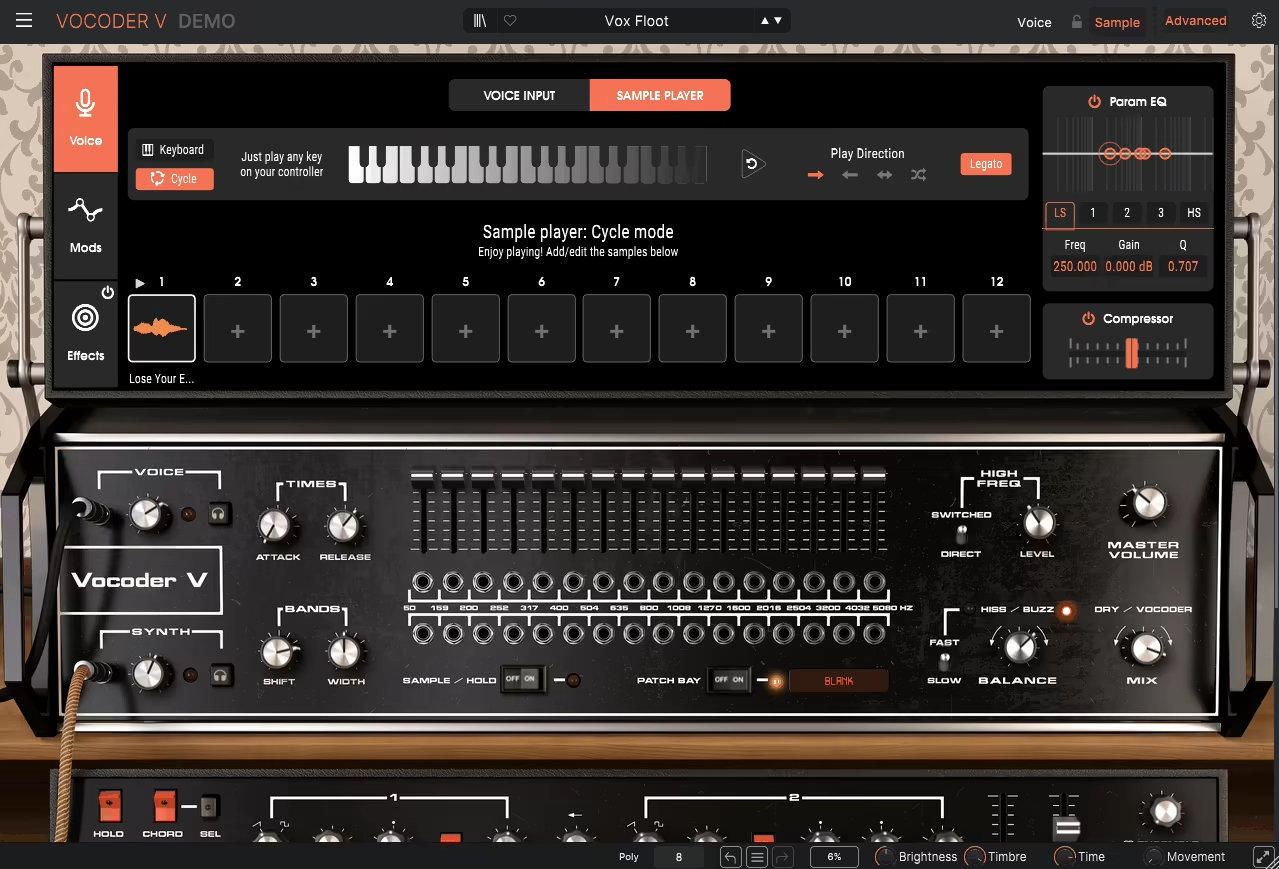
Arturia is no stranger to reviving classic gear, but Vocoder V goes beyond nostalgia as it’s a fully modernized packed with a built-in synthesizer, sampling engine, and deep modulation capabilities.
If you’re after that iconic Daft Punk-style robot voice or looking to experiment with synthetic vocal textures, Vocoder V is your guy delivering a blend of analog warmth and futuristic sound design tools.
What makes this plugin special for me is that you don’t even need an external carrier signal. Its built-in polyphonic synthesizer can generate rich harmonies, funky basslines, and lush pads, which you can process directly with the engine.
This makes setting up classic vocoder effects incredibly simple, no need to load up an extra synth or instrument track.
- Classic 16-Band Vocoder
This VST Vocoder faithfully emulates a legendary 16-band vocoder, but adds deeper frequency control, filtering, and synthesis features to enhance its flexibility.
- Built-In Synthesizer for Instant Vocoding
Unlike traditional units that require an external synth, Vocoder V includes a dual-oscillator carrier synth that lets you generate chords, basses, and textures without extra routing.
- Advanced Modulation for Dynamic Sound Design
You can modulate parameters with LFOs, envelopes, and pitch tracking, creating moving, evolving textures that go far beyond static sounds.
- Real-Time Band Control for Precise Sculpting
Adjusting each of the 16 frequency bands individually allows you to fine-tune the harmonic content of your vocals, making it perfect for both subtle processing and extreme robotic effects.
- Integrated Sampler for Experimental Processing
I also enjoyed that the unit allows you to load vocal stems, drum loops, or ambient textures and transform them into unique harmonic instruments using the vocoder engine.
On the down side these deep controls mean it requires some tweaking. The presets are a great starting point, but customizing your own settings is where this plugin really shines.
I had a blast running layered vocal harmonies through the sampler and tweaking the band levels and the results were otherworldly, yet smooth and musical.
If you’re after a vocoder that blends vintage characters with modern sound design tools, this one is a powerful and inspiring choice.
Arturia Vocoder V is available in VST, AU, and AAX formats for macOS and Windows.
5. XILS Lab XILS 201 Vocoder

If you’re after a true vintage vocoder experience, the XILS 201 delivers with remarkable authenticity.
Modeled after the legendary Sennheiser VSM-201, XILS 201 conquers the analog warmth and intricate modulation that defined classic vocoder sounds.
One of the things I immediately noticed is how flexible the dual 20-band filter banks are.
Unlike many vocoders that limit you to a single bank, this setup lets you shape both the carrier and modulator signals independently, giving you incredible control over tonal clarity and movement.
- Dual 20-Band Filter Banks
With independent control over both the carrier and modulator signals, you can craft clearer, more expressive vocoded effects that hold their own in busy mixes.
- Analog-Style Pitch Tracking
The built-in pitch tracker ensures that pitch-following feels organic and natural, even with fast-moving or complex vocal performances.
- Precision Harmonic Control
Unlike some tools that muddy up the mix, XILS 201 keeps vocal articulations crisp and well-defined, making it great for both subtle vocal enhancements and bold effects.
- Integrated Multi-Effects Section
The onboard reverb, delay, chorus, phaser, and modulation tools add depth and space to your vocoded signals without needing extra plugins.
- Deep Modulation Capabilities for Expressive Movement
LFOs and envelope control allow me to animate and evolve your sounds dynamically, adding a level of expressiveness that goes beyond static vocoding.
Despite its powerful feature set, there are a couple of hurdles. First, the interface sticks closely to the original hardware design, which means some parameters aren’t labeled as clearly as they could be.
I think this might slow down the workflow for those who aren’t familiar with vintage vocoders. Additionally, it requires iLok for activation, which may not be ideal for users who prefer simpler licensing systems.
A small learning curve aside, the sound quality is undeniably impressive. I found that tweaking the filter bands while adjusting the envelope settings unlocked an incredible range of textures.
If you love fine-tuning your sounds, this plugin rewards patience with rich, organic tones that few digital units can match.
XILS 201 is available in VST, AU, and AAX formats for macOS and Windows.
6. Zynaptiq PITCHMAP::COLORS
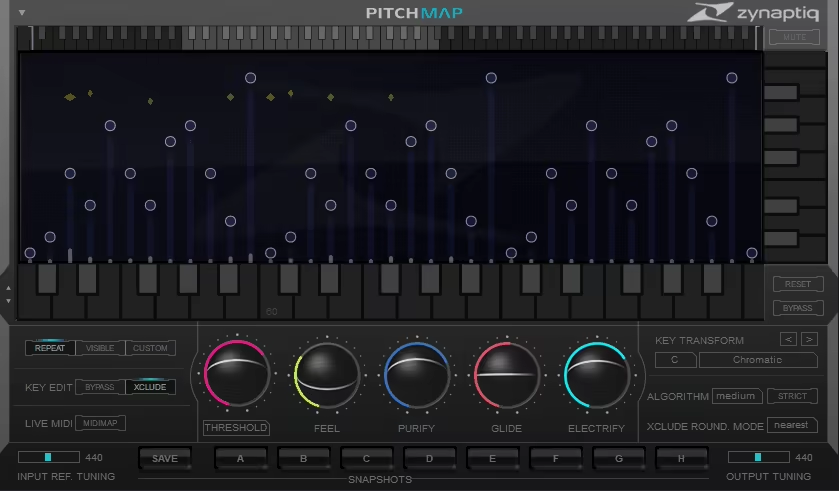
PITCHMAP::COLORS lets you hijack any piece of audio and completely rewire its harmonic DNA, on the fly. You’re not just shifting pitch here; you’re snatching individual notes out of chords and bending them to your will.
Ever wanted to remix a song without touching the stems? Or maybe you’ve got a sample that’s almost perfect, but the chords just aren’t vibing with your track? PITCHMAP::COLORS is your guy.
This thing doesn’t care if your audio is a full mix, a layered synth pad, or some random field recording, as it breaks down the harmonic structure in real-time, so you can reshape it however you want.
When I need to swap out that major chord for a minor or want to force a vocal harmony into a completely new scale, this thing does it easy.
You can even play a MIDI keyboard and this VST vocoder plugin will force the track to match the notes you’re playing like some kind of futuristic music cheat code.
- Advanced Multi-Pitch Processing
If you wish you could move just one note in a chord without wrecking the whole thing? Boom, this lets you do it. It’s like Photoshop for harmonies.
- Real-Time Harmonic Remapping
Play a chord? Nah, reimagine it in real-time. This plugin lets you completely restructure melodies and harmonies on the fly without that weird warbly nonsense most pitch tools give you.
- MIDI-Controlled Note Editing
I like that this unit removes the need to click around like a caveman, just plug in a MIDI keyboard and literally “play” your pitch corrections. Want that bass note to move? Just hit the key. Magic.
- Creative Modes: Sick, Insane & WTF
Yeah, those are actually the names of the processing modes. Sick is clean and smooth, Insane gets all shimmery and weird, and WTF… well, you already know, pure chaos.
- Non-Destructive Pitch & Formant Shaping
Adjust notes like a wizard without turning your track into a glitchy, robotic mess (unless you want that, in which case, go nuts).
Giving heads-up: This thing is a bit of a CPU hog. If your computer’s already wheezing from too many plugins, you might wanna bounce that processed audio before it taps out completely.
I took an old piano loop, completely changed the chord progression, and suddenly, it sounded like I had a jazz band that actually knew what they were doing.
If you’re into remixes, sample flipping, or just casually bending the laws of music, PITCHMAP::COLORS is a must-have.
PITCHMAP::COLORS is available in VST, AU, and AAX formats for macOS and Windows.
7. Softube Vocoder

To be honest, for me, this isn’t just another vocoder plugin. Softube took that classic robotic voice magic and stuffed it into a sleek, modern plugin that does way more than just “talk like a robot.”
Whether you wanna funk up a vocal, add alien whispers to your beats, or straight-up transform a synth into a singing monster, this thing delivers big time.
I think what makes Softube Vocoder special is its built-in 6-voice polyphonic synth. You’re not stuck hunting for a carrier signal, as it’s already inside waiting for you to shape it.
Pick from sawtooth, square, noise, or pulse waves, tweak the Attack Hold Decay envelope, and voila, instant vocoded goodness.
And let me not forget the Unvoiced section, which helps keep the clarity of plosives and sibilants intact, so you don’t sound like a garbled mess.
- 6-Voice Polyphonic Carrier Synth
No need to hook up another synth, this unit brings its own carrier to the party. Choose from saw, square, noise, or pulse waves for full control over the tone.
- Variable Band Selection (4 to 20 Bands)
Wanna go lo-fi and gritty? Keep it at 4 bands. Need pristine clarity? Crank it up to 20 bands for detailed vocal articulation.
- Stereo Widening & Spectral Tilt
You can spread your vocoded sound across the stereo field and tilt the frequency focus to emphasize deep lows or shimmering highs.
- Freeze Mode for Locked Formants
When you want to “pause” a vocoded phrase and hold it in time?, this feature lets you capture and sustain any vocal moment, either manually or synced to your DAW.
- MIDI-Controlled Chord Mode
I love that you can play a chord, lock it in, and transpose it in real-time using MIDI notes. Instant Daft Punk harmonies with zero effort.
I gotta say, this thing sounds massive. On vocals, drums, or even guitars, it keeps everything crisp and musical without turning into a glitchy mess.
The only downside? It’s an iLok plugin, so if you’re not a fan of that licensing system, just be aware.
I ran a dry vocal through it, tweaked the synth settings, and suddenly my voice was a choir of robotic aliens harmonizing in stereo. Absolute fire. If you’re into vocoders but want way more flexibility, this VST is an easy win.
Softube Vocoder is available in AU, VST, VST3, and AAX formats for macOS and Windows.
8. MeldaProduction MVocoder

If you’re expecting a quick, plug-and-play robot voice generator, you might wanna look elsewhere. But if you’re down to go deep, tweak every detail, and unlock some truly wild sound design possibilities, MVocoder is your playground.
One thing that immediately stands out for me is the no built-in carrier synth. Yep, you gotta bring your own.
On one hand, this means MVocoder plugin offers total freedom to pick anything from a fat analog bass to a white noise wash as your carrier. On the other hand, setting it up requires a little extra brainpower. If you’re used to instant results, this might throw you off at first.
- Up to 100 Bands
Most vocoders cap out at 16 or 20 bands but this one? It lets you go all the way up to 100, meaning insane detail in your vocoded sound. More bands = more clarity… but also more CPU usage. You’ve been warned.
- Carrier & Modulator Swap Button
Set up your routing wrong? No problem! Just hit this button and it flips your inputs without needing to rewire everything. Plus, sometimes the “wrong” setup actually creates super cool, unexpected effects.
- Crazy Modulation System
Want your vocoder to pulse with an LFO, react to your playing dynamics, or randomly glitch out? You can modulate literally anything.
This is a sound designer’s dream, but it’s also a rabbit hole of endless tweaking, so prepare to lose a few hours experimenting.
- Surround Sound Processing (Up to 8 Channels!)
Most vocoders work in basic stereo, but this VST supports full surround sound vocoding. Want to make a whole room of voices talk like a robot choir? This plugin can do it.
That said, this thing isn’t exactly beginner-friendly. The interface is packed with options, and if you’re not already comfortable with vocoding, it might feel overwhelming at first.
Also, the manual doesn’t hold your hand, so expect to do some trial and error to get the best results.
I spent an hour just playing with the band distribution and resonance graphs, and let me tell you, you can morph vocals into something straight out of an alien sci-fi film.
If you want maximum control, endless tweakability, and some of the most advanced features out there, MVocoder is a beast.
MVocoder is available in VST, VST3, AU, and AAX formats for macOS and Windows.
9. iZotope VocalSynth 2
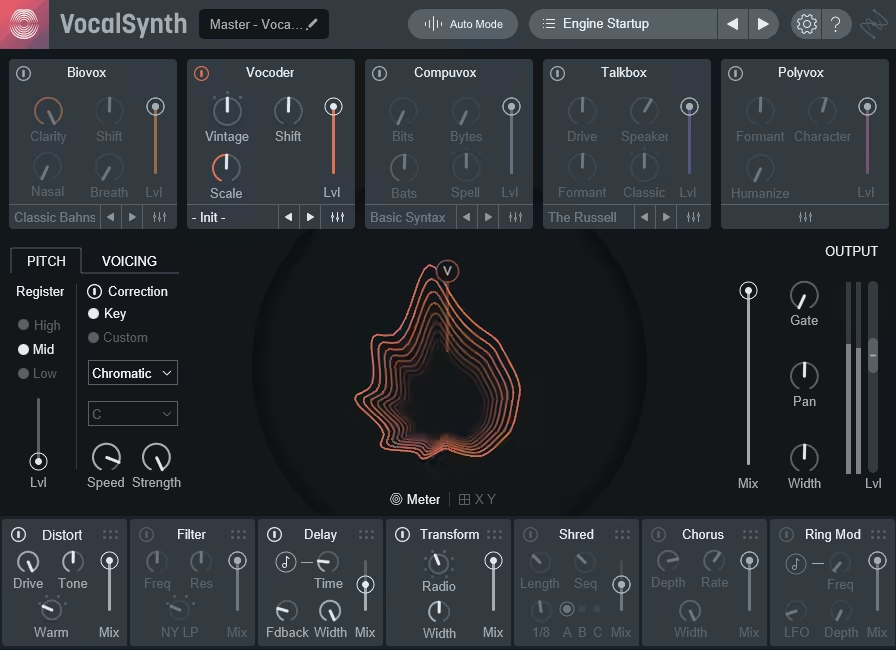
Alright, if you’ve ever thought, “Man, I wish I could turn my vocals into something straight out of a sci-fi movie”, VocalSynth 2 is your golden ticket.
As a full-blown vocal transformation lab where your voice stops being just a voice and becomes a playable, shapeable, otherworldly instrument, VocalSynth 2 models the human vocal tract, letting you tweak formants, breathiness, nasality, and clarity like a mad scientist
The first thing that had me geeking out? The Biovox module. Wanna sound airy and soft? Done. Need a nasal, robotic edge? You got it.
I had way too much fun messing with the Vowel Pad, which literally lets you blend vowels to shape the vocal tone. It’s like being a voice actor… but without the acting.
- Five Vocal Processing Modules (With Serious Power)
The Vocoder, Talkbox, Compuvox, Polyvox, and Biovox modules give you everything from retro Daft Punk vibes to glitchy AI nightmares. Plus, you can stack and blend them however you like.
- MIDI-Controlled Harmonies & Playable Vocals
Ever wanted to play your vocals like a synth? Now you can. Just hook up your MIDI keyboard and trigger harmonies in real-time. It’s like an instant vocoder without the usual hassle.
- The Effects Section Got a Major Upgrade
My favorite is the Ring Mod and Shred Sequencer, as it takes vocal mangling to new levels. You can make your voice sound like it’s being beamed in from a malfunctioning spaceship, for example.
- Advanced View for Deep Tweaking
If you’re the type who likes absolute control, the Advanced View lets you fine-tune oscillators, modulation, and synth parameters for each vocal module. You can even pan individual bands in the Vocoder, which is wild.
I gotta be real though, the built-in synth engine is still kinda basic. If you’re running it in Sidechain mode, you’ll get way more interesting results using an external synth as the carrier.
Also, while the interface is cleaner than version 1, it still has a bit of a learning curve, especially if you’re new to vocal processing.
That said, this is one of the most creative vocal plugins out there. Whether you want subtle harmonies, robotic textures, or completely unrecognizable vocal madness, VocalSynth 2 delivers in spades.
VocalSynth 2 is available in VST, VST3, AU, and AAX formats for macOS and Windows.
