
To bring that metallic, spacey, and otherworldly touch to your sound, here is my list of the best comb filters and resonator plugins.
I used to think filters were just for cleaning up a mix, but these? They twist, warp, and transform basic sounds into something completely new.
If you’re wondering what the heck a comb filter or resonator even does, think of them as the weird cousins of EQ and delay.
A comb filter creates tiny, super-fast delays that mess with the phase, giving you that hollow, robotic, flanger-like vibe. A resonator, on the other hand, boosts specific frequencies, turning anything into a harmonic playground.
When I want my snare to sound like a haunted metal pipe or your synths to shimmer like they’re floating through space, that’s where these come in.
Some of these plugins add subtle resonances for extra depth, while others push things into full-on sci-fi territory. I’ve thrown them on vocals, drums, and even pads just to see what happens, and the results are always wild.
Playing around with these effects is like sending your sounds through an echoing metallic tunnel or bouncing them between invisible walls. The textures, tones, and movement they add can turn the simplest sound into something unpredictable.
1. Polyverse Supermodal
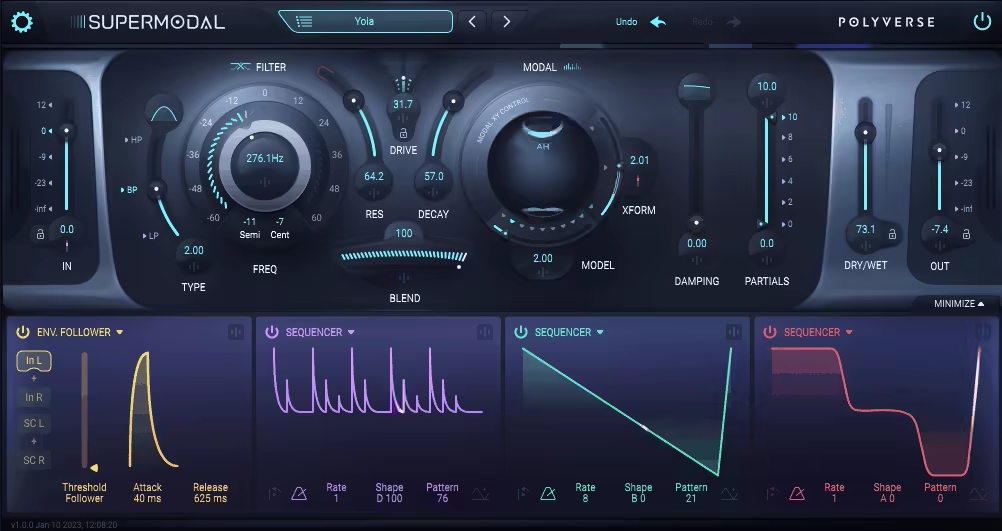
I didn’t think I needed another filter plugin… then Supermodal casually melted my synth loop into sci-fi gold.
What pulled me into Supermodal wasn’t just the fact that it’s a dual filter plugin, it’s how those two filters are designed. One’s a slick, morphable state-variable filter that goes from smooth low-pass to aggressive high-pass with self-oscillation if you push it.
But the real jaw-dropper is the modal filter, which reshapes your audio through the resonant frequencies of physical objects like striking a metal plate, a vowel-shaped mouth, or even virtual strings.
The interface is clean and super fun to use. You’ve got a Blend knob to mix between the filters, a neat XY pad for morphing through modal variations, and a global Drive that can take things from subtle warmth to fiery saturation. And yep, the preset system is well-organized, with lockable settings to stop things from jumping when switching sounds.
- Modal Filter Magic
This thing isn’t just resonant, it’s physical. I slapped the vowel modal filter on a synth and it turned into a robotic monk chanting in a cave. Each mode models real-world objects, and you can morph between variations with smooth, touchpad-style control.
The Decay, Damping, and Partials controls give you tons of tonal shaping over how the resonances evolve and ring out.
- Creative Stereo Modulation
The modulation system is nuts in the best way. I love assigning the Envelope Follower to the Drive or resonance and just letting the incoming audio do the talking. With 4 mod slots and sources like Sequencer, ADSR, MIDI/CV, and Random (which gets real weird in stereo), it’s a playground for sound design.
- MIDI-Controlled Preset Switching
Here’s a gem: you can switch user presets in real-time using MIDI CCs or even MIDI note triggers. I set up a loop where each key on my controller fired off a different effect preset, DJ-style, and it felt like I was live remixing with filters. It’s wild on drums, but I’ve had just as much fun with ambient pads and glitchy vocals.
If I had one tiny gripe, it’s that the factory presets aren’t editable, but you can easily copy and tweak them in user folders. Also, fair warning, once you try it, you might start tossing it on everything (I definitely did).
Whether you want to add subtle motion or break your sound into beautiful, resonant chaos, Supermodal delivers. It’s a go-to for anyone into comb filtering, physical modeling, or just making audio do strange and wonderful things.
Supermodal comes in VST, AU, and AAX formats for macOS and Windows users.
2. Minimal Audio Hybrid Filter

I gotta say, Hybrid Filter is not just another boring old filter plugin, it’s a straight-up sound design weapon.
What I love most about Hybrid Filter is how insanely versatile it is. With over 50 filter types, including comb, formant, morphing, and phaser modes, this thing goes way beyond basic low-pass and high-pass filtering.
Whenever I want to sculpt a mix, warp a synth, or turn a drum loop into an alien transmission, this VST has my back.
Another thing I appreciate is the clean interface, making it super easy to use. No endless menus, no head-scratching moments, just jump in and start shaping sounds.
Plus, it’s got real-time visual feedback, which is a lifesaver when you’re dialing in those perfect filter sweeps. I don’t go the “hope and pray” adjustments way as I can see exactly what’s happening to my sound.
- 50+ Unique Filter Modes
You get classic filters (low-pass, band-pass, high-pass), but also some crazy creative ones like comb, formant, and morphing filters.
The morphing filters are my favorite as instead of manually stacking a ton of modulation, I just turn the Morph knob, and the filter moves through different EQ shapes seamlessly. Instant movement, no headache.
- Low-Frequency Crossover for a Clean Mix
Nothing ruins a mix faster than muddy low-end, and Hybrid Filter actually solves that problem.
The Low-Frequency Crossover keeps my bass punchy and untouched while letting me go crazy on the mids and highs. I don’t have to fight with EQs after the fact, it just works.
- Stereo Spread for Huge Soundscapes
Ever wanted your filters to sound massive? The Stereo Spread feature lets me push filtering effects wide for some super immersive textures.
This is especially clutch on pads and synths, just a little tweak, and suddenly everything feels bigger, deeper, and more alive.
- Soft-Clip Limiter for Added Character
When I push a filter hard, things can get spicy, but sometimes in a good way, sometimes in an oh no, I broke it way.
Luckily, the Soft-Clip Limiter keeps everything in check. I can crank the resonance, push the drive, and still get a controlled, musical saturation instead of a digital mess. It’s like having a safety net for aggressive filtering.
I discovered this by accident, but running a drum loop through the comb filter mode gives it this wild, metallic, robotic texture. I think this is insane for adding some sci-fi flavor to a track or turning a basic beat into something completely fresh.
Now, if I had to nitpick, I’d say Hybrid Filter can be a little overwhelming at first as there’s just so much to explore. But honestly? That’s a good problem to have. Once you get the hang of it, this plugin is pure gold for both mixing and sound design.
If you just need a basic filter, sure, you might be fine with something simpler. But if you want a filter that can do wild, creative stuff and take your sound to another level, this one’s totally worth it.
Hybrid Filter is available in VST2, VST3, AU, and AAX formats for macOS and Windows.
3. Xynth Audio Rezonator

Unlike most VST resonators, Rezonator actually makes it feel musical instead of just chaotic noise.
What I love is the easy workflow and how it transforms even the simplest sound into something rich and evolving. You can create anything from subtle harmonic warmth to outright sci-fi madness with Rezonator.
On the straightforward interface, you’ve got 6 tunable resonators, each highly customizable, so you can dial in perfect harmonies, eerie dissonance, or anything in between. If you love tweaking and shaping tones, you’re gonna have a blast here.
- 6 Tunable Resonators
At the core of Rezonator are 6 powerful resonators that can breathe new life into any sound.
These aren’t just static effects, you can tune, pan, and adjust each one individually to build everything from lush pads to metallic percussive hits.
I’ve been using it to turn basic synth plucks into cinematic textures, and it never fails to add depth.
- States Function
Now, this is where things get wild, the States function lets you program multiple harmonic settings and seamlessly transition between them using just one slider.
This is a dream for dynamic sound design and even live performances. Imagine shifting between different resonant chords mid-track without automation headaches, pure magic.
- MIDI Input for Playable Resonance
I think what really sets Rezonator apart is MIDI support. You can actually play the resonators like an instrument, controlling harmonics in real-time.
This is next-level for creating evolving, expressive textures, especially on vocals, pads, or even percussive sounds. I’ve been using it to add weird, pitch-following resonances to synth leads, and had so much fun with it.
- Built-in Effects
To top it off, Rezonator includes built-in effects that only affect the wet signal, meaning your original sound stays intact while the resonated tones can be fully sculpted.
I love cranking the reverb to create huge, organic ambient layers, it’s like instant otherworldly atmosphere.
I’ll be real, this isn’t an all-purpose sound design tool. It’s laser-focused on harmonic resonance, so if you need a traditional filter or reverb, this won’t replace your go-to plugins.
But if you’re after rich tonal enhancement, lush atmospheres, and unique harmonic textures, Rezonator is hard to beat.
Also, it is quite affordable for what it offers. So, if you love pushing sound design boundaries, this is a no-brainer.
Rezonator is available in VST & AU formats for macOS and Windows.
4. Kilohearts Comb Filter (Free)

Sometimes, simplicity is best, and that’s exactly what makes Kilohearts Comb Filter such a go-to tool.
I love how Comb Filter takes a no-nonsense approach to adding metallic tones and resonant textures without a complex workflow, making it easy to carve out a unique character for your sound.
The interface is pretty simple, which is honestly a huge plus. No messing around, just tweak a few core parameters, and voila, you’ve reshaped your sound.
The Frequency knob sets the spacing of spectral notches, while Damping smooths things out or amps up the bite for a harder, flanged effect.
- Instant Robotic & Metallic Textures
What makes this comb filter plugin shine for me is how effortlessly it transforms sounds. Run it on drums or percussion, and suddenly, you’ve got flanged, robotic textures that take a loop from basic to futuristic.
When you need something edgy for synths or basses, it’s alo perfect for adding unnatural resonance and experimental movement.
- Stereo Processing
One of my favorite features is how it handles stereo processing. It lets you process the left and right channels differently, creating huge, wide filtering effects, but here’s the cool part: it collapses perfectly to mono when needed.
- Modular Integration with the Kilohearts Ecosystem
If you’re a Phase Plant, Multipass, or Snap Heap user, you’ll love how Comb Filter fits right into Kilohearts’ modular system. You can stack, modulate, and combine it with other Snapins to create insane custom effects chains.
I love pairing it with delays and reverbs to build rich, evolving textures that wouldn’t be possible otherwise.
Now, I’ll admit, if you’re looking for a super advanced comb filter with crazy modulation options, this might feel a bit limited. But, that’s not what this plugin is about. It’s here to deliver fast, effective, and musical results without getting in your way.
I would recommend using it sparingly on vocals, as it adds subtle, futuristic harmonics that can make a voice stand out without overpowering the mix.
For quick, creative filtering that adds character without complexity, Kilohearts Comb Filter is a winner. Plus, it’s part of the Kilohearts Essentials collection, which means you can grab a bunch of other useful tools for free.
Kilohearts Comb Filter is available in VST, AU, and AAX formats for macOS and Windows.
5. MeldaProduction MComb

What I liked most about MComb is how deep the modulation goes, as this isn’t just a basic filter; it’s a full-fledged sound design tool.
If you love modulation madness, MComb is for you. Despite being insanely powerful, the interface doesn’t overwhelm you with menus inside of menus. Everything is laid out in a way that makes sense, and once you start tweaking, it’s hard to stop.
- Advanced Modulation System
The star of the show is MComb’s two fully-featured modulators, which can control literally any parameter, even other modulators (yeah, it gets wild).
These can act as LFOs, level followers, MIDI/audio-triggered ADSRs, randomizers, or pitch detectors or a combination of all of the above. The result? You can build dynamic, evolving effects that react to your audio in real time.
- Deep Visualization Suite
I love plugins that give me real-time visual feedback, and MComb nails this. It has classic meters, time-based graphs, stereo width displays, loudness monitoring, waveform views, and even sidechain analysis.
Having this much data at a glance makes fine-tuning your sound way easier, no more guesswork.
- 4 Independent Filters
MComb doesn’t stop at one filter, you actually get 4 independent comb filters, each with its own frequency, feedback, gain, and panorama controls.
You can sculpt precise resonances, delay-like effects, metallic textures, or go completely off the deep end with modulated filter movement.
- Smart Randomization & Safety Features
One of my favorite things is the smart randomization, as it allows you to quickly generate new ideas without things spiraling out of control.
And for those of us who like to push things to the edge, MComb includes automatic gain compensation and a safety limiter, so even when I go full sound-design chaos, my speakers (and ears) stay safe.
MComb is incredibly versatile, but it does take time to master. If you’re new to modulation-heavy plugins, you might need to spend a little time experimenting.
If you’re into complex filtering, dynamic effects, and deep sound design, MComb is an absolute must-have. It’s not just a comb filter, it’s a full-blown modulation powerhouse.
MComb is available in VST, AU, and AAX formats for macOS and Windows.
6. Sugar Bytes WOW 2
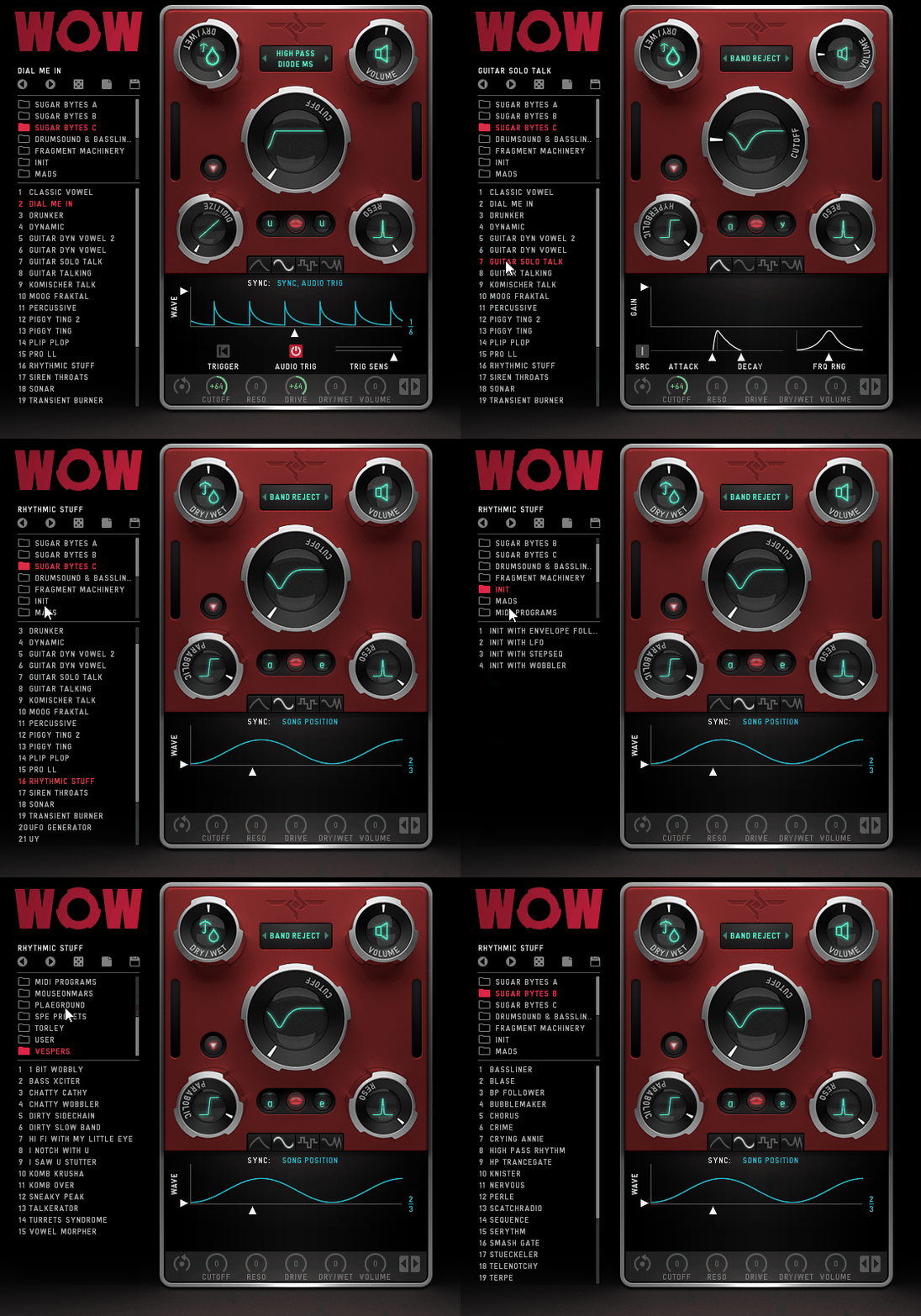
I’ll be real, WOW 2 is a real character machine. This bad warps, twists, and injects personality into anything you throw at it.
With 21 filter types, including comb, vowel, and classic low/high-pass modes, WOW2 got insane versatility, but what really makes it special is how seamlessly it blends creativity with functionality.
In my opinion, the interface is a little busy, but super visual, with graphical representations of cutoff, resonance, distortion shape, and mix levels. It’s not the cleanest layout ever (looking at you, oversized preset browser), but once you get used to it, it’s second nature.
- Vowel Mode
One of my absolute favorite features is the Vowel Mode. This thing gives your sounds a vocal-like, almost living texture.
You can choose from 9 vowels, blend between two at once, and combine them with different filter types for some seriously expressive formant-shaping effects. I’ve used this to make synths talk, turn basslines into growling monsters, and add subtle vocal textures to pads, it’s wildly fun.
- 7 Distortion Types
WOW 2 also distorts in 7 different ways. You get distortion modes (Parabolic, Hyperbolic, Diabolic, Sine, 1Bit, Crush, and Digitize), ranging from smooth warmth to absolute sonic destruction.
And here’s the kicker, you can choose whether the distortion comes before or after the filter, giving you full control over the final tone. It is easy to create anything like gritty, crunchy bass or subtle saturation.
- Modulation with Wobble, LFO, & Envelope
I think, this is where WOW 2 earns its name. The modulation system is fire, with an LFO, envelope follower, and a wobble generator that lets you create insane rhythmic movement.
If you want that signature “wobble bass” sound in dubstep, electro, or hybrid trap, this is your secret weapon. And if you’re more into subtle modulation, it’s perfect for adding motion to pads, leads, and textures.
For creative filtering, WOW 2 is one of the best out there. It’s great for sound design, electronic music, and anything experimental.
That said, it does have one small quirk: it always attenuates some high-end frequencies, even when using high-pass filters.
Sometimes, that’s a good thing (great for taming harsh digital synths), but if you need surgical control over the top end, you might need to compensate elsewhere.
WOW 2 is available in VST, AU, and AAX formats for macOS and Windows.
7. UVI Shade

If there’s a Swiss Army knife of filtering, it’s UVI Shade.
Shade blurs the line between an EQ and a creative filter, packing 35 filter types that range from surgical precision to analog-style warmth.
What I love most about it is the insane modulation system, as it turns a standard filter into a living, breathing effect machine. Whether I need subtle tone-shaping or wild, animated textures, Shade always surprises me with new possibilities.
The workflow is intuitive enough for quick adjustments, but if you want to go deep, trust me, this thing will keep you busy for days.
- Next-Level Modulation System
This is where Shade goes from good to great. You can assign LFOs, envelope followers, step sequencers, and even random generators to almost any parameter.
That means you can create filters that move with your music, like a drum transient-triggered EQ, or modulated resonances that shift in real-time.
I’ve used it to make kick drums punch harder by dynamically filtering out mud and to add rhythmic movement to pads and every time, I discover something new.
- 35 Powerful Filter Types
You get everything from classic peak, shelving, and high/low-pass filters to exotic comb, resonant notch, and phaser filters. And when I say “powerful,” I mean up to 2000dB/oct slope, yes, absurd precision.
The multi-resonant options let you stack multiple resonant peaks, which is amazing for sci-fi sound design or morphing textures.
- External Sidechain & Dynamic EQ Control
Another killer feature for me is the external sidechain support. That means you can use an external audio signal to dynamically shape the filter movements, which is perfect for ducking EQ bands with a vocal, shaping drum bus transients, or creating pumping filter effects.
Shade is really powerful, but I won’t lie, it’s a lot to take in. If you just need a quick filter tweak, this might feel overkill at first.
To summarize, for producers, sound designers, and mix engineers, Shade is an absolute beast.
UVI Shade is available in VST, AU, and AAX formats for macOS and Windows.
8. Waves MetaFilter

Some filters just sit on your track, but MetaFilter actually breathes life into it when you throw it drums, vocals, synths, or even guitars, adding movement, rhythm, and texture with almost zero effort.
MetaFilter combines classic filters with comb filters and resonators, so you can go from subtle tonal shifts to wild, rhythmic effects in seconds.
The interface is clean and simple, which is exactly why I love it. You don’t get lost in endless tweaking, just grab a few knobs, and suddenly, your track has depth and groove.
- Built-in Step Sequencer
One of my favorite features is the step sequencer, as it makes creating rhythmic filter sweeps very easy.
Whether I’m automating filter movement on a drum loop or adding a pulsing groove to a synth line, it keeps things tight and locked to the beat. If you’re into groovy filter modulations, this is a dream tool.
- Envelope Follower
MetaFilter’s envelope follower makes the filter react dynamically to incoming audio, which is perfect for organic, evolving effects.
I love using it on basslines or percussive sounds, as it makes them feel alive and punchy, like the filter is actually listening to the track.
- LFO for Smooth, Evolving Movement
If you want to breathe life into a static sound, the built-in LFO is your best friend.
You can add gentle movement to pads, create classic wobble effects on basslines, or slow filter sweeps for that rising tension effect. It’s easy to dial in, and 5 waveforms (including random!) give you tons of flexibility.
On the dark side, if you’re someone who wants precise visual feedback for the filter curve, you might find it lacking in that area. It’s not a dealbreaker, but it would make fine-tuning certain sweeps easier.
For me, MetaFilter is a go-to for adding rhythmic interest and texture. It’s fast, fun, and musical, making it perfect for both subtle mix tweaks and full-on sound design madness.
MetaFilter is available in VST, AU, and AAX formats for macOS and Windows.
9. Tritik Moodal

With up to 1000 resonant filters to model physical objects and acoustic spaces with crazy precision, Moodal is a sound design playground.
When I tried Moodal I really enjoyed how it turns resonator effects into something intuitive and fun. I’m crafting shimmering chimes, metallic drones, or cavernous reverb-like textures, and Moodal keeps surprising me.
The high-resolution, resizable interface is another win; it’s clean, minimal, and actually fun to use, a rare combo in deep sound design plugins.
Plus, the preset browser makes switching between settings a breeze, and the Freeze function lets me lock specific parameters while browsing presets, which is a small but powerful workflow boost.
- 3 Frequency Curves
Moodal doesn’t just slap some resonance on your sound, as it lets you shape it with surgical precision.
The 3 frequency curves control: Density, for how many resonators are applied at each frequency, Decay Timesi for how long each resonance rings out, and Gains to decide the volume of each resonator.
- Spectral Constraint
For even deeper sound sculpting, Spectral Constraint lets you dial in harmonic or inharmonic variations.
You can keep things musically pleasant or push into experimental, chaotic realms. I’ve used this to create warm, bell-like tones and unsettling, detuned drones and both sound insanely good.
- Cavernous Reverbs & Acoustic Modeling
With up to 10 seconds of master decay, Moodal can create massive, immersive spaces. I also found out that it’s one of the best reverberant tools for sound design.
The Width fader lets you spread the resonator output across the stereo field, which is perfect for making huge, enveloping textures.
I gotta say that the addition of a modulation section or pitch tracking would take this VST to another level (imagine real-time polyphonic pitch tracking?). But even without that, this plugin is next-level for creative sound shaping.
If you’re into crystal-clear tones, evolving resonances, or just want a fresh approach to filtering and reverb, Moodal is a must-have.
Tritik Moodal is available in VST, AU, and AAX formats for macOS and Windows.
10. LMDSP Superchord

Some plugins feel more like instruments than effects, and Superchord is definitely one of them.
Instead of just adding resonance, Superchord creates an entire harmonic environment. It’s like having virtual strings that resonate in sympathy with your audio. Whenever I’m adding shimmering overtones to a piano or turning a dry guitar track into an ambient pad, this thing is insanely fun and inspiring.
I love that you can play the resonators via MIDI, essentially making Superchord a playable instrument. That alone sets it apart from any other resonator VST plugin I’ve used.
- 12 Customizable Resonators
Superchord gives you 12 resonators, each fully tunable in pitch, decay, and level, letting you create subtle harmonic layers or completely surreal textures.
It works like a vocoder mixed with a reverb, but way more organic and fluid. I’ve used it to turn drum loops into ethereal pads and even to add ghostly harmonics to vocals, the results are wildly unique.
- MIDI Integration
What truly sets Superchord apart is that you can tune the resonators via MIDI. This means you’re not just adding random harmonic resonance, as you’re actually playing the resonant strings like an instrument.
I’ve mapped it to a MIDI keyboard and created evolving soundscapes in real-time and got great results.
- Stereo Width & Depth Control
The Width control lets you spread the resonances across the stereo field, making everything feel bigger, deeper, and more immersive.
Layering multiple instances of Superchord in a mix creates breathtaking, lush textures, it’s like a reverb, resonator, and modulation tool all in one.
Superchord is one of the most unique sound design tools I’ve ever used, but it does take some time to master. I must say that if you’re just looking for a basic resonator, this might be overkill.
LMDSP Superchord is available in AAX, AU, VST, VST3, NKS formats for macOS and Windows.
11. FKFX Influx (FREE Resonator)
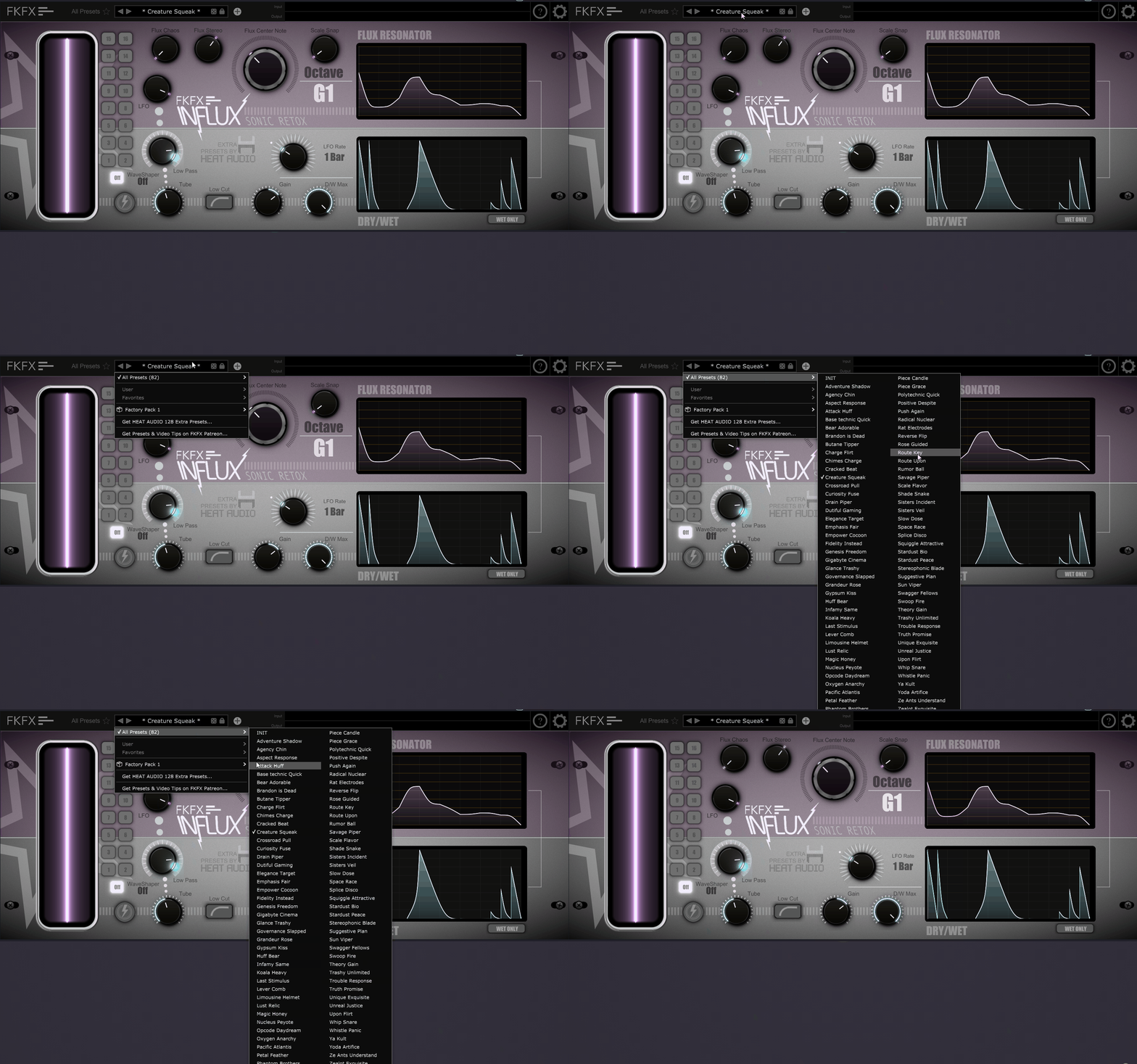
Some free plugins feel basic, but Influx is an absolute monster cause it brilliantly reshapes your sound entirely, mixing a resonator with dynamic wavetable processing for some seriously wild sound design.
Whether I’m after subtle harmonic shifts or full-blown chaos, Influx always delivers something unexpected and that’s what makes it so cool.
You get loads of modulation options, and once you start tweaking, you’ll lose hours just exploring.
- Flux Resonator
The Flux Resonator is the heart of Influx, as it lets you modulate resonance notes with insane detail, thanks to its multi-point LFO editor.
You can create everything from gentle, evolving tones to glitchy, unpredictable textures, and it always feels alive.
- LFOGRID System
Now, here’s where things get crazy, the LFOGRID system. This feature generates billions of LFO shapes with minimal effort, so instead of spending hours fine-tuning, you can let the plugin surprise you.
- Built-in Low Pass Filter & Tube Distortion
I love that Influx doesn’t just resonate, as it also filters and distorts. The Low Pass Filter and Tube Distortion can take your sound from warm and organic to full-on industrial destruction.
- 210 Factory Presets & Deep Customization
Influx comes with 210 factory presets, plus tons of downloadable extras. Even if you don’t want to design from scratch, there’s already plenty of inspiration baked in.
And if you like tweaking, the Preset Locking feature lets you lock certain parts of the plugin, so you can swap presets without losing specific settings, which is super handy.
If you’re into experimental sound design, Influx can be great for you. That said, the depth of the LFO controls might intimidate beginners at first. But honestly? That’s a good problem to have.
What I think in the end is that for a free plugin, Influx is absurdly powerful.
FKFX Influx is available in VST3 and AU formats for macOS and Windows.
12. FabFilter Volcano 3
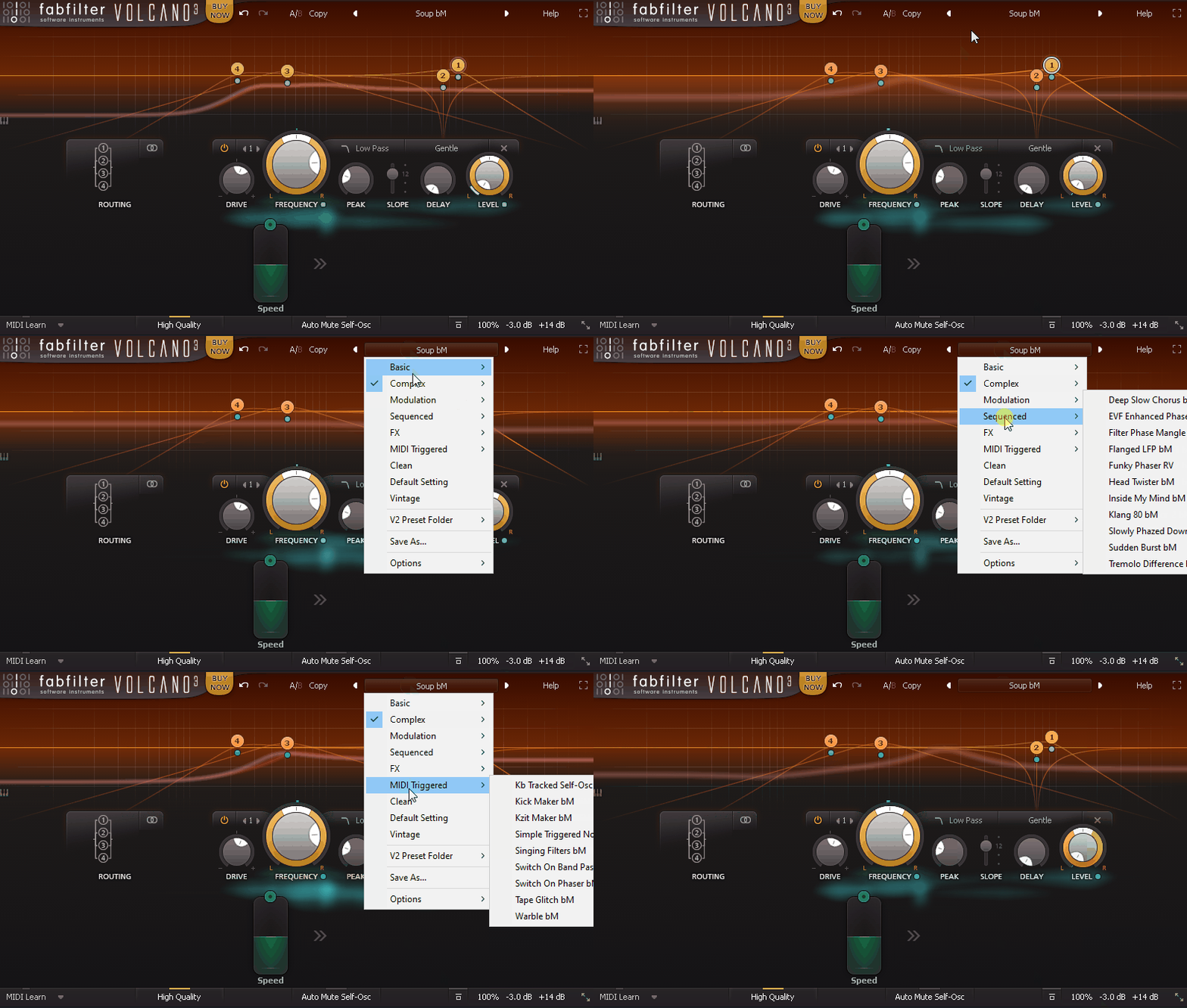
With 4 multi-mode filters, great modulation flexibility, and a ridiculously intuitive visual display, Volcano 3 is way more than just a tool for shaping frequencies.
Volcano 3 is one of my favorite comb filter plugins with its design and workflow. I think FabFilter nailed it with clean, visual, interface and a creative design for workflow.
I really liked how the interactive filter display shows exactly what’s happening in real-time, making even complex setups feel easy to manage.
- 4 Multi-Mode Filters with Analog Flavor
At the heart of Volcano 3 are 4 filters, each offering 11 different filter characteristics. You can go from creamy, vintage-style warmth to razor-sharp resonance, and thanks to the internal drive and non-linear shaping, these filters don’t just cut, they add character.
I’ve used them to sculpt rich formants, build resonant drones, and even create self-oscillating synth tones, as it’s that versatile.
- Deep Modulation with XLFOs & Envelopes
Volcano 3 doesn’t just filter, it moves. You can assign XLFOs, envelope generators, envelope followers, and even MIDI to nearly any parameter, making it an absolute powerhouse for evolving textures.
I’ve built comb filter pulses that sync with my drums and slow-moving filter sweeps that make pads come alive, the results were great and the plugin gives you endless possibilities to try out.
- Interactive Filter Display for Instant Feedback
One of my favorite features is the large interactive display. Instead of guessing how your filters are behaving, you get instant visual feedback, making it super easy to dial in the perfect sound.
This alone makes Volcano feel effortless compared to other modulation-heavy filters.
I would say try modulating filter resonance with an envelope follower tied to your kick drum, this creates dynamic, breathing textures that add rhythmic energy to a mix.
If you’re looking for a simple filter, this isn’t it. But if you want a sound design powerhouse that turns basic audio into rich, evolving textures, Volcano 3 is a must-have.
FabFilter Volcano 3 is available in VST, VST3, AU, and AAX formats for macOS and Windows.
