
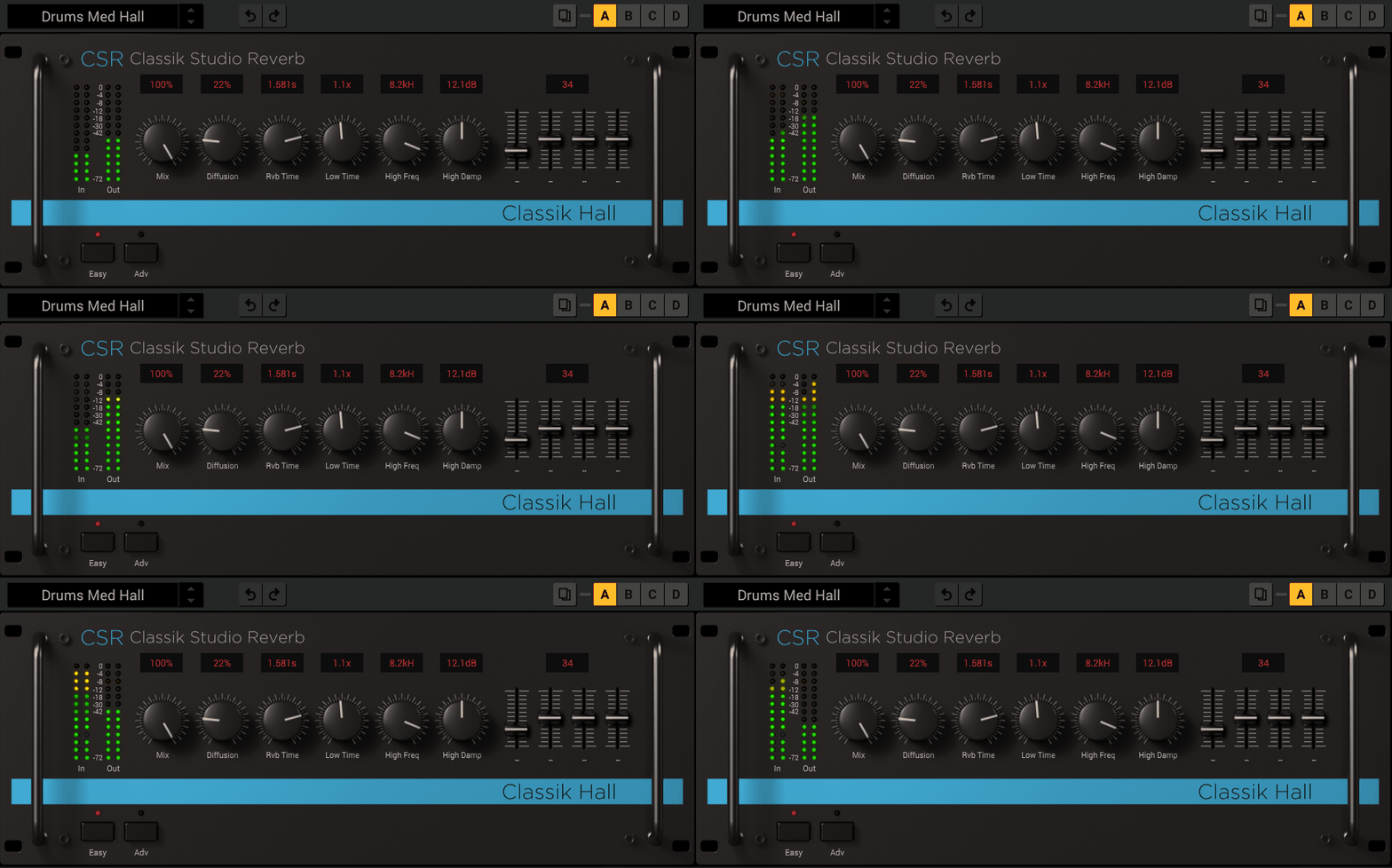
Hall reverbs are among my favorites, and they are grand designers of epic spaces, turning dull tracks into towering cathedrals of sound.
It doesn’t matter if you are after haunting atmospheres of a post-rock anthem, adding cinematic glows to vocals, or wrapping drums in a halo of sonic grandeur; a good hall reverb can be your go-to tool for adding that drama and depth.
I gotta say here that not all the hall reverb VST plugins are the same as some aim to add crystalline clarity that you hear in a concert hall, while others are great for achieving the rich and vintage warmth. Here, it comes down to your needs, as you have to find the right one to suit your vibe.
That is why today I will be talking about some of the great hall reverb units in the digital world to make your mixes breathe, soar and fill the room with energy. If you are ready, fasten your seat belts, and let’s take those great halls to your DAW. Trust me, this is where your tracks go from great to goosebumps-worthy.
1. IK Multimedia CSR Hall Reverb
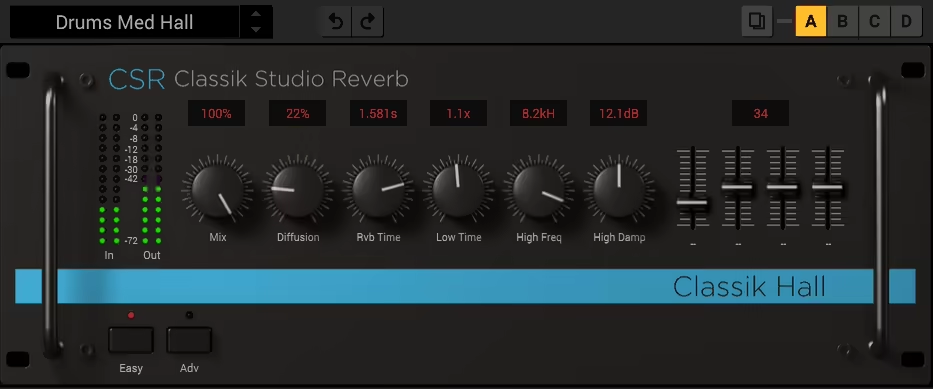
The first plugin on the list is CSR Hall Reverb plugin by IK Multimedia, which captures the essence of a true concert hall with high realism and versatile design.
CSR Hall Reverb does more than add space to your tracks, as its ability to add depth and realism without overshadowing the source makes it truly stand out from the rest. It adds that lush, refined reverb that feels natural and cohesive to anything from vocals and solo instruments to full orchestral arrangements, which I used many items in my workflow.
- Dual-Mode Interface
My favorite feature here is the dual-mode interface with its Easy and Advanced modes, making the plugin incredibly user-friendly.
In Easy Mode, you get streamlined access to the essential controls, great for quick setups and fast workflows, while the Advanced Mode, opens up an entire world of tweakable options, allowing you to fine-tune damping, diffusion, and early reflections with precision.
This flexibility ensures it works for both quick fixes and detailed sound design, making it a favorite in my plugin arsenal.
- Natural Decay and Stereo Imaging
The reverb tail feels smooth and organic, blending seamlessly with the dry signal. This makes it perfect for vocals and solo instruments, adding depth without overpowering the mix.
- Advanced Customization
In Advanced Mode, you have full control over parameters like high and low-frequency damping, diffusion, and early reflections. This makes it easy to tailor the reverb to fit any track perfectly.
- High-Quality Processing
With DSM and SCC technologies, the CSR delivers stunningly realistic results that rival high-end hardware. Plus, it supports sampling rates up to 192 kHz, so it’s ready for even the most demanding projects.
One of my favorite aspects of this plugin is how well it integrates into any mix. On vocals, it adds a gorgeous, enveloping quality that feels natural and airy, while on solo instruments, it brings a 3D depth that’s hard to match. It even works beautifully in dense mixes, creating space without muddying the sound.
The Acoustic Hall Reverb Processor is a must-have for anyone looking to add a rich, realistic ambiance to their projects. Its combination of ease of use, premium sound quality, and versatility makes it a powerhouse for everything from pop to classical music.
CSR Hall Reverb comes in VST, AU, and AAX formats for macOS and Windows users.
2. United Plugins Verbum Entropic Hall by Soundevice Digital
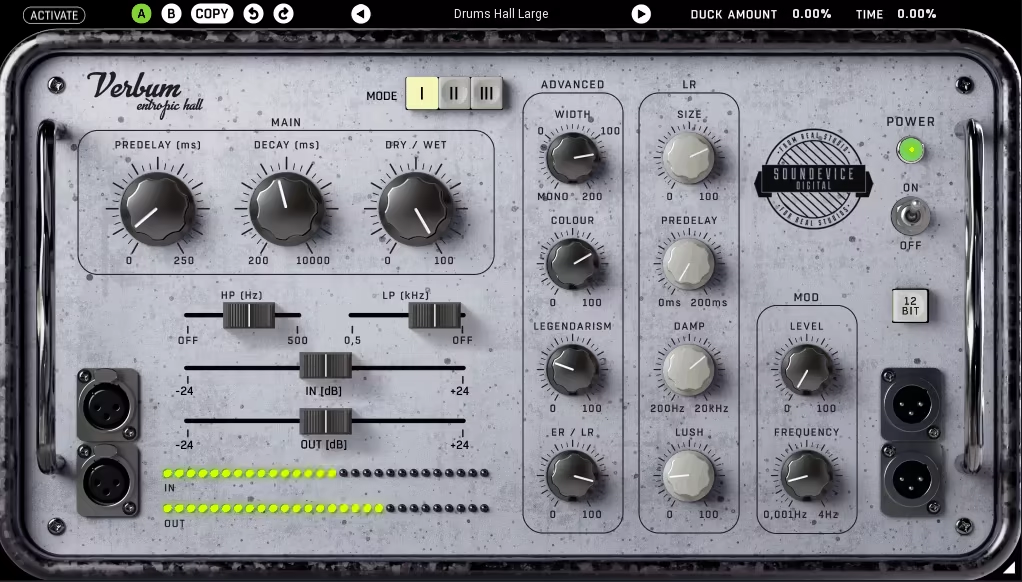
Verbum Entropic Hall is a kind of plugin that feels like it has a personality, as it is slightly chaotic but in a good way.
The standout feature here for me is the chaotic reflections algorithm, which gives it this organic, unpredictable vibe that’s like stepping into a beautifully flawed vintage space. No sterile or overly polished tails here: this reverb feels alive like it’s breathing with your track.
I think the Verbum interface is an absolute win. It’s got that vintage hardware look, which, let’s be honest, makes everything feel cooler. The basic controls on the left get you up and running in seconds, but then there’s the Advanced Section, making things really interesting with more controls.
You can dive into all kinds of tweaks to shape your reverb plugin exactly how you want it, and it somehow makes all this detail feel fun rather than overwhelming.
- Chaotic Reflections Algorithm
This is where the magic happens. Instead of boring, uniform tails, you get a reverb that feels dynamic and alive, perfect for adding character to any track.
- 12-Bit Button
12-Bit Button is like a time machine for your sound as you hit the button, and suddenly, your reverb’s got that gritty, old-school digital vibe that screams retro charm.
- Lush Parameter
Want to smooth out the rough edges? This parameter adds a subtle modulation that makes the reverb tail silky and refined, perfect for a lush ambiance.
- Smart Ducking
If you feel like your reverb is trying to steal the spotlight, the smart ducking feature keeps it in check, making sure your mix stays clean while still giving you plenty of space.
- Legendarism Knob
Great name, no idea where it comes from, but I’m a fan. Turn the Legendarism knob up, and you get this rich, vintage tone that feels straight out of a classic studio.
Verbum is the kind of plugin that makes experimenting fun. I’ve used it on vocals, drums, guitars, synths, you name it, and it always brings something special. Whenever I’m going for lush and dreamy or gritty and vintage, it serves me well.
Verbum Entropic Hall comes in VST/AU/AAX formats for macOS and Windows users.
3. FabFilter Pro-R 2

The Swiss Army knife of reverb VST plugins in terms of virtual spaces, Pro-R 2, is a full-on glow-up with handy features for reverb nerds.
With its new algorithms, immersive audio support, impulse response import, and enough tweakable features, it offers so much, whether for shaping natural spaces, crafting retro vibes, or diving into experimental sound design.
I like the interface as it is classic FabFilter with a sleek, intuitive, and user-friendly design. Everything feels right where it should be in Pro-R 2, and while the additions are substantial, they don’t complicate the workflow.
The Pre-Delay knob now sits front and center, making quick adjustments a breeze, while I loved the expanded preset browser is so well-organized it might just make you forget your messy desktop.
This is a pro-level plugin without distraction or anything else, getting you straight to the point, which I liked for serious projects.
- Space Control
With the Space control you can blend between dozens of room models and automatically adjust decay time for a smooth and natural result.
- Decay Rate EQ
The Decay Rate EQ shapes the decay time across the frequency spectrum with parametric EQ bands, allowing for unparalleled control over the reverb character.
- Ducking and Auto-Gate
Automatically lower reverb levels with the Ducking feature when the dry signal is present for a cleaner mix, and create instant gated reverb effects with the Auto-Gate feature.
- Thickness Control
You can add density and subtle saturation with the Thickness control to reverb tails, giving them a warm and polished feel.
- Immersive Audio Support
I think this is the unique part of the unit, as it fully supports surround and Dolby Atmos with layouts up to 9.1.6, giving you detailed control over how reverb interacts in an immersive space.
While it’s nearly flawless, the lack of a spring reverb algorithm might be a letdown for some, and the IR import feature, though innovative, may require tweaking to match expectations.
To get the most out of Pro-R 2, I recommend experimenting with the Thickness and Character controls for added warmth and dive into the immersive features for creative spatial effects. Pro-R 2 is a must-have for anyone seeking top-tier hall reverb plugin.
Pro-R 2 comes in VST, VST3, AU, AU3, and AAX formats for macOS and Windows users.
4. Valhalla VintageVerb

VintageVerb brings vintage hardware’s lush, nostalgic sound to your DAW, from smooth chamber reverbs to experimental reverb tails.
Whenever I use this unit, I feel like using a time machine for reverb effect. It comes with 9 Lexicon-inspired algorithms to offer the character and depth that can stand out in any mix.
What made me fall in love with VintageVerb was the Color modes as it allowed me to choose between 3 different eras of sound. It is a simple-looking yet powerful unit with a pretty straightforward GUI and workflow, with which you can create hall reverb spaces as well as different effects.
- 9 Reverb Algorithms
From lush halls and plates to dense chambers, each algorithm brings a unique flavor to your mixes.
- Color Modes
Switch between 1970s, 1980s, and modern-era tones for maximum flexibility and creative control. The 1970s mode gives you a gritty, lo-fi vibe; 1980s mode offers a cleaner but still vintage flavor; and Now mode brings a pristine, modern sound.
- Decay and Size Controls
With these smart controls, you can create anything from tight, punchy reverbs to sprawling 70-second tails with just a few tweaks.
- Damping and Bass Multiplier
Damping and Bass Multiplier can shape the reverb’s tone and control how low-end frequencies decay for a balanced sound.
- Modulation and Diffusion
You can add chorus-like movement to your tails and control reverb density for smooth or textured spaces, thanks to the modulation and diffusion controls.
However, I think it lacks some of the detailed control found in ValhallaRoom, and its “always on” presence might not suit every track. For best results, use the High- and Low-Cut filters to fit the reverb into your mix and adjust the Modulation Depth to keep tails from becoming overwhelming. If you want a reverb plugin that combines vintage charm with modern ease, this one’s a must-have.
VintageVerb comes in VST, AU, and RTAS formats for macOS and Windows users.
5. Arturia Rev LX-24
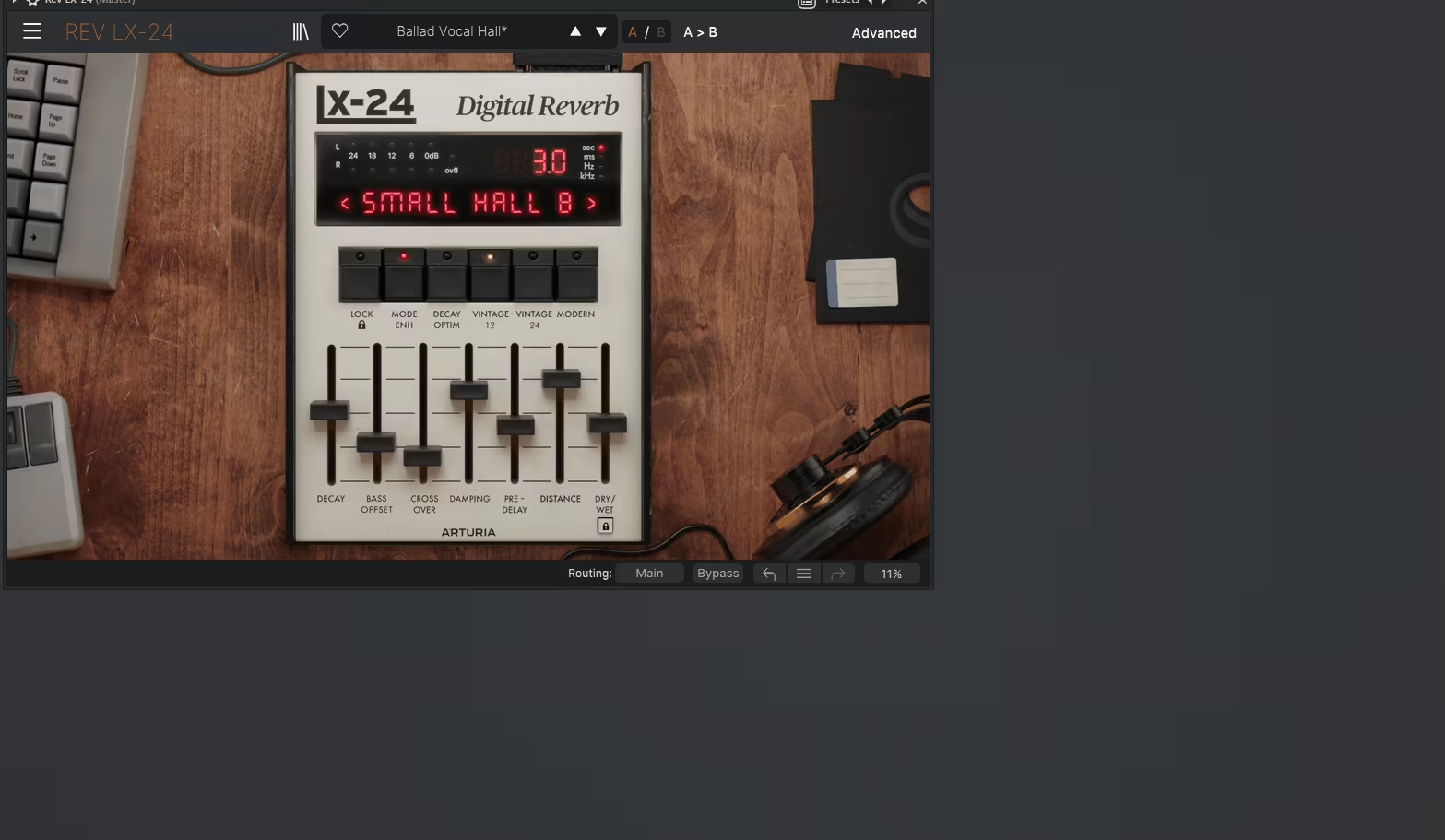
The Arturia Rev LX-24 is a stunning emulation of the iconic Lexicon 224, delivering rich, vintage-inspired reverb with a modern twist.
Its Classic View faithfully replicates the retro slider-based controls, offering an instant throwback to the original’s iconic design. But Rev LX-24 doesn’t stop there cause the Advanced View takes things further with an interactive visualizer for intuitive, drag-and-drop reverb editing.
Packed with modern features like Mode Enhancement for lively pitch-shift modulation and Crossover and Offset controls to shape bass response, I love that it’s built for creative flexibility.
- 8 Classic Algorithms
The classic algorithms include iconic modes like Small Hall B, Constant Plate, and Large Hall B, offering lush, musical reverb tones.
- Converter Modes
You can choose between 12-bit, 24-bit, or Modern modes for different tonal flavors, from vintage warmth to clean precision.
- Dynamic Features
Ducking, gating, and tremolo provide creative options for dynamic reverb control.
- 100 Presets
You know I always appreciate high number of presets and this plugin offers ready-made settings for vocals, drums, synths, and more, covering everything from classic tones to experimental textures.
- Interactive Visualizer
Drag-and-drop reverb editing in the Advanced View for a modern, hands-on approach.
While the LX-24 excels in delivering lush, vintage reverb tones, its sound may overlap with other widely available Lexicon-inspired plugins. Additionally, some users might find the Advanced View slightly overwhelming if they’re looking for a simpler workflow. But, I think it’s great when you wanna have more control.
To get the most out of this hall reverb VST plugin, experiment with the Advanced View tools, especially the Mode Enhancement and Dynamic Features, for unique textures. Use the Bass Offset and Crossover controls to shape the low-end response for a more balanced mix.
The LX-24 is an impressive blend of vintage authenticity and modern creativity, making it a valuable addition to any producer’s toolkit.
Rev LX-24 comes in VST, AU, AAX, and MKS formats for macOS and Windows users.
6. LX480 Dual-Engine Reverb V4
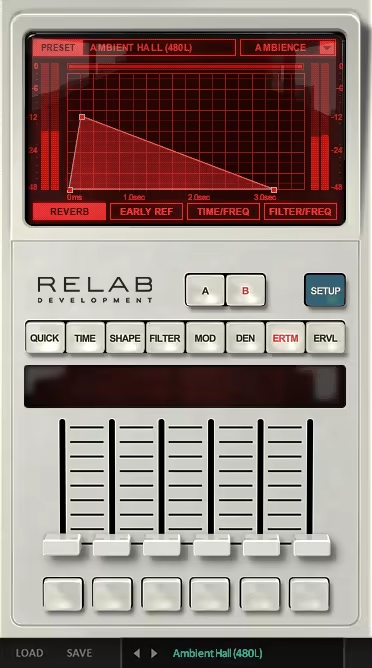
The LX480 brings the Lexicon 480L’s iconic sound if you’re chasing those big, rich hall reverbs that have graced countless hits.
Either you pick the no-nonsense Essentials edition or the all-out sound design playground of the Complete edition, you’re in for a treat with this reverb VST.
The interface comes with a totally retro vibe. Sliders, red-lit displays, and just enough nostalgia to make you feel like you’re tweaking hardware in a high-end studio.
The LX480 Essentials edition is simple and effective, while the Complete edition adds a ton of features, including visualizations and custom skins (the “Dirty” skin is pure gold with scratches, coffee stains, the works). I recommend going with the Complete one as, you know, it has more things to offer.
- Authentic Lexicon 480L Algorithms
This VST delivers the lush, detailed sound of the classic 480L with different effect types including, Plate, Hall, Ambience, and Room. These algorithms are rich, dense, and excellent for crafting dramatic hall spaces that turn your mix into a cinematic masterpiece.
- Dual Engines for Advanced Reverb Design
The plugin ups the ante with dual engines and 4 routing configurations including single, cascade, mono split, and stereo split. This opens up a whole world of layering possibilities, letting you create complex, immersive reverb spaces. I think it’s like stacking reverb on reverb, but in a good way.
- Customizable Interface Skins
Not only does the unit give you extra features, but it also lets you personalize the interface. The “Dirty” skin with its scratched-up, coffee-stained look is a cheeky nod to vintage gear that’s seen some action.
- Enhanced Filtering and Modulation
You also get advanced filters for precise tone shaping, along with delay and modulation stages to add texture and movement. Whether I’m keeping it subtle or going full-on experimental, this plugin adapts to my needs, which is my favorite side of it.
- Streamlined Controls in Essentials
The Essentials edition is all about simplicity. You get five sliders, reverb time, pre-delay, low cut, high cut, and wet/dry balance, and that’s it. It’s lightweight, easy on your CPU, and gets the job done without overloading your workflow.
Now, let’s be real. The Complete edition can be a bit of a CPU hog, and you can’t turn off its second engine, which might be overkill for smaller sessions. Meanwhile, the Essentials version is a steal at its price, but if you’re the type who likes to tweak every little detail, you might hit its limits fast.
I recommend using the presets as they are pretty good regarding quality and quantity offering, a solid way to jumpstart your creativity. The LX480 hall reverb VST plugin bring the timeless Lexicon sound to your mixes, whether you’re after quick fixes or intricate hall designs. They’re a blast to use and sound incredible.
LX480 is available in AAX, AU, and VST formats for macOS and Windows users.
7. Eventide Tverb
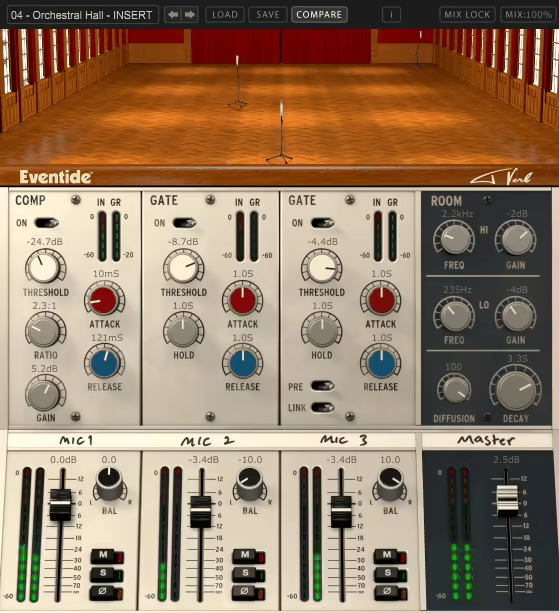
If you like the reverb tones of Bowie’s Heroes, check out the Tverb, aka the reverb VST plugin with swagger.
With Tverb by Eventide you can achieve the same iconic reverb Tony Visconti used for this masterpiece. And the best part is that this is not a nostalgia trip as it is a real creative powerhouse that gives you so much to geek about from different reverb types to mic placements to control your space.
Whenever I use this tool I feel like setting up my own mini Hansa Studio as it offers 3 mics with one fixed and two movable ones, inside a virtual recreation of the legendary hall. The workflow is super easy, as you just drag the mics to move them and easily automate the effect. It feels like a game rather than a plugin.
- 3 Independent Reverbs
So here’s the deal: each mic gets its own reverb tail. That’s 3 lush, overlapping layers of ambiance that you can shape however you like. Those 2 movable mics? They’re the real MVPs. Place them near for tight spaces or throw them across the hall for that cinematic, goosebumps-worthy reverb.
- Polar Patterns
Mic 1 isn’t just a pretty face as it comes with omni, cardioid, and figure-8 polar patterns, meaning you decide how much room vibe you want. Go full omni for maximum hall glory or stick to cardioid if you’re keeping it classy.
- Gates for Days
The other two far mics have these awesome post-reverb gates that open and close based on your input. For that dramatic gated reverb effect or for letting the reverb bloom only when things get loud (the Visconti style), you can adjust these gates. It’s dynamic, it’s fun, and honestly, it’s kind of addictive.
- Room Tweaks
With controls for decay, diffusion, and EQ, you’re basically the boss of this virtual hall. Make it warm, make it bright, or make it sound like the reverb is coming from the other side of the galaxy.
- The Console Vibes
Tverb’s mixer feels like stepping into a vintage studio for me. Mute, solo, invert phase…it’s all there, plus a compressor on Mic 1 for that extra touch of control. And the interface? It’s straight-up charming, inspired by Visconti’s original console.
To be honest, I think the price tag is a bit spicy, and those super-long decay settings can get a little weird (not in a cool way). But if you’re into reverb with character and creativity, this thing’s worth every penny.
I like automating those mics for some wild, evolving effects. And don’t be afraid to mess with the gates as they’re like the secret sauce for turning a good reverb into a “Wow, what plugin is that?” reverb. So, in the end, if you’ve ever wanted to feel like Bowie in the studio, this is your chance.
Tverb comes in VST, AU, and AAX formats for macOS and Windows users.
8. Waves Renaissance Reverb (RVerb)
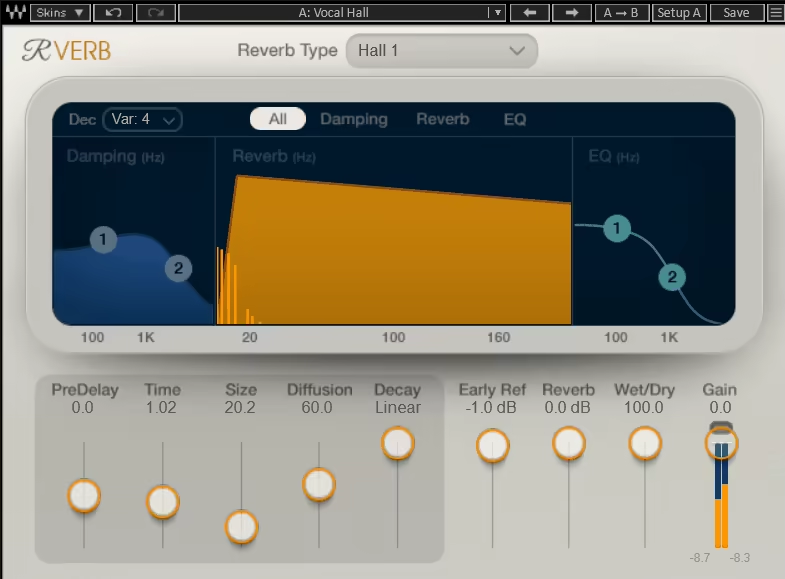
Renaissance Reverb plugin takes the classic algorithmic reverb tech we’ve all come to love and gives it a shiny, modern overhaul.
With 12 reverb types, from hall reverbs to plates to those funky springs, Renaissance Reverb got all the bases covered for creating rich, lush spaces that fit any genre.
I like the interface as it’s clean, straightforward, and easy to navigate, which means you’ll spend less time scratching your head and more time dialing in those dreamy reverb tails. Plus, with its visual display and handy dual-band EQ, it’s super customizable without feeling overwhelming.
- 12 Classic Reverb Types
You’ve got halls, chambers, plates, and even spring reverb at your fingertips. Whether you’re warming up vocals, adding depth to drums, or creating moody guitar tones, there’s a type here for every mix scenario.
- Advanced Early Reflection System
This feature is all about realism. It tweaks those early reflections to make your reverb sound more natural and immersive. Think less “robotic wash” and more “wow, this sounds like a real space.”
- Custom Damping Controls and Dual-Band EQ
Fine-tuning your reverb tail has never been easier. The dual-band EQ lets you sculpt the highs and lows of your reverb, while the damping controls let you control how the reverb behaves across the frequency spectrum.
- Simple, Intuitive Interface
The Renaissance Reverb keeps it simple with easy-to-use controls that make creating beautiful reverb tones a breeze. Plus, the visual display gives you real-time feedback on what’s happening, so you always feel in control.
- 265 Presets by Pro Mix Engineers
If you’re in a hurry or just looking for inspiration, the unit comes packed with 265 presets designed by award-winning engineers. Trust me; these are not your average, throwaway presets cause they’re ready to drop into your mix and work.
I like using the Negative Predelay feature to delay the dry signal for some wild, ambient effects. It’s ideal for adding a unique twist to pads or cinematic moments. And don’t overlook the de-correlation settings cause they’re brilliant for fine-tuning how the early reflections interact with your source.
The Waves Renaissance Reverb plugin is a reverb workhorse that’ll make its way into just about every mix you do. Whether you’re building subtle ambiance or creating epic, room-filling effects, it’s got you covered.
Renaissance Reverb comes in AAX, VST, and AU formats for macOS and Windows users.
9. Wave Alchemy Glow

If you’ve ever wanted to bottle the sound of the 1980s and splash it all over your tracks, Wave Alchemy Glow is here to make your retro dreams come true.
Waves Alchemy Glow takes the legendary AMS RMX16 reverb, which is the studio staple of that era, and gives it a modern twist while keeping all the grainy, nostalgic charm intact. Think gated drums, lush synths, and vocals that sound floating in neon lights…This unit delivers it all without making you rob a bank.
I really enjoy the sleek resizable interface, which even lets you pick your vibe with themes like Classic Black, Phantom Grey, and the fabulously bold Radical Pink. Whether you’re tweaking its 14 reverb algorithms or hitting the randomize button for instant inspiration, Glow makes exploring retro-futuristic spaces a breeze.
- 14 Iconic Reverb Algorithms
Glow comes packed with algorithms ranging from halls and plates to more creative effects like Reverse, NonLin 2, and Freeze. Want that quintessential gated drum sound? NonLin 2’s got you covered. Looking for lush vocal tails? Try the Ambience program with its extended decay times.
- Modern DSP Features
The unit takes things further with tools like Ducking, which lowers reverb levels when the dry signal is present, and Gate, which turns any algorithm into a gated reverb masterpiece. The Smooth control is perfect for taming drum transients, while Flux adds stereo modulation and pitch variation for dreamy, evolving textures.
- Modern Mode
When you need your reverb to play nice in a busy mix you can switch to the Modern Mode, which tightens up the low end by summing bass to mono and adds a subtle dip at 1kHz for extra clarity. It’s like giving your reverb a fresh haircut: sharp, clean, and ready for the spotlight.
- Preset Browser and Randomizer
With 170 presets and a built-in randomizer, Glow makes finding the perfect starting point fast and fun. From classic sounds to abstract, experimental spaces, the presets cover everything you’d need and then some.
Glow’s gritty, vintage sound might not be for every mix, especially if you’re after hyper-clean reverbs. And while it’s incredibly versatile, it’s best used as a character reverb rather than a one-size-fits-all solution.
I suggest using the Gate control creatively on algorithms like Room B1 to craft unique, punchy spaces. And don’t shy away from Flux; it can take a simple reverb tail and turn it into an otherworldly texture.
Alchemy Glow is available for macOS and Windows users in VST3, AU, and AAX formats.
10. Relab Development REV6000 Essentials
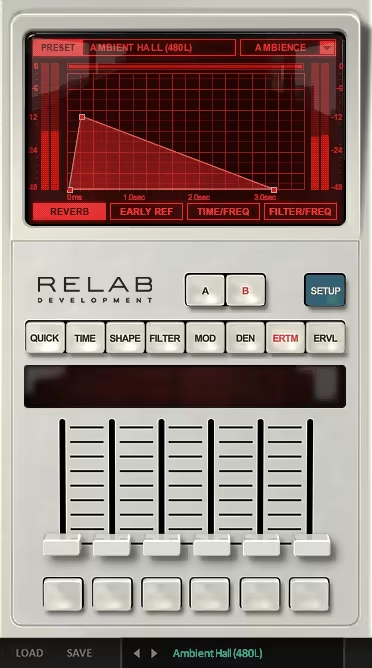
When it comes to hall reverb, the REV6000 feels like a backstage pass to Hollywood’s finest scoring stages.
REV6000 captures the lush, warm sound of a legendary Danish hardware reverb, famously used in blockbuster productions. If you’re chasing those epic “Hollywood Hall” vibes that make everything sound larger-than-life, this is the reverb to reach for.
What sets this plugin apart for me is how effortlessly it delivers authentic hall reverbs with stunning precision. The Hollywood Hall preset, in particular, is pure magic as it fills your mix with rich, cinematic depth, making it feel like it was recorded in a world-class scoring studio.
- Authentic “Hollywood Hall” Sound
The REV6000 is all about nailing that big, warm hall reverb sound. It’s the kind of reverb that makes orchestras soar, vocals shimmer, and synth pads feel like they’re floating in a massive space.
- Ultra-Realistic Imaging
When I tried it, I saw that the plugin’s precision imaging creates a 3D depth that’s perfect for hall reverb, which I loved working with. Instruments sit naturally in the mix, giving everything a polished, professional feel without sounding overly processed.
- Versatile Reverb Options
While the Hollywood Hall steals the show, this plugin is versatile enough to handle anything from focused room tones to expansive halls. It’s your go-to for building the kind of ambiance that elevates any track to cinematic status.
- Hand-Crafted Factory Presets
The included presets make dialing in your hall reverb really easy. From intimate spaces to massive, sprawling halls, the presets are good starting points for finding your sound.
The way I use the plugin is mainly for the Hollywood Hall preset as I increase the decay time and imaging for the mix to create dramatic builds and add a touch of grandeur to vocals or strings without overwhelming the track.
The REV6000 is an absolute standout hall reverb plugin VST for enthusiasts, combining authenticity, lush depth, and ease of use in one streamlined package.
REV 6000 is available in VST, AU, and AAX formats for macOS and Windows users.
11. United Plugins MorphVerb

MorphVerb; the versatile reverb plugin that does it all, and I mean all.
MorphVerb isn’t just your average “hall or plate” decision-maker; this bad boy lets you blend, morph, and mix between a ton of reverb styles, from Spring to Cathedral to that mind-bending Infinite reverb that lasts longer than a Marvel movie’s credits.
Right off the bat, the interface pulls you in with its big, bold wheel. Spin it around, and you’re literally transitioning between reverb types like a DJ crossfading between tracks. It’s a visual treat, but more importantly, it’s stupidly fun. Whether I’m craving 80% Hall and 20% Chamber or just can’t decide, MorphVerb’s got me covered.
- All the Reverbs in One Plugin
MorphVerb doesn’t mess around. You’ve got Spring, Room, Plate, Hall, Cathedral, Ambience, Echoes, and even Infinite reverb at your fingertips. It’s like having every reverb unit ever built crammed into your DAW.
- Smooth Blending for Custom Spaces
Why settle for one reverb type when I can mix them together? MorphVerb lets you blend two neighboring reverb styles seamlessly. Want a touch of Hall with a hint of Cathedral? Spin that wheel, and you’re in business. It’s like mixing paint, but for sound and way less messy.
- Key Effect Controls
This plugin is all about control with Width, Predelay, Size, and more to shape your reverb. It allows me to add some Modulation, Saturation, or Compression to really dial in those reflections. I can go from subtle ambiance to massive, atmospheric washes with just a few tweaks.
- Ducking for Cleaner Mixes
The Ducking feature keeps things in check by lowering the reverb volume when the dry signal’s playing to avoid the effect invading the spotlight. It’s like having a polite roommate who knows when to pipe down.
- Real-Time Spectrogram
For the visual learners out there, MorphVerb’s spectrogram shows you exactly what’s happening with your reverb in real-time. Tweak the HiPass and LoPass filters and see how they affect the sound instantly.
- Presets for Every Occasion
I really appreciate that MorphVerb’s got over 100 presets ready to go, from lush vocals to tight drum spaces. And if you’re feeling adventurous, hit the randomize button. It’s like rolling the dice, but the odds are always in your favor.
Now, let’s keep it real. MorphVerb isn’t trying to recreate the exact acoustics of, say, Sydney Opera House and its Infinite reverb isn’t truly infinite (it’s more like 20 seconds). But honestly? Who cares. This plugin is all about creating musical; vibey reverbs that add depth and character without overwhelming your mix.
MorphVerb is available in VST2, VST3, AU, and AAX formats for macOS and Windows users.
