
Mixing without a good reference plugin is like driving with no GPS: you might get there eventually, but it’s probably not going to be the smoothest ride.
In my experience, comparing your mix to a professionally mastered track is the secret weapon every producer needs, whether you’re chasing those crisp highs or the kind of low-end that makes car speakers weep. I think they are also great tools for beginners to make pro-sounding mixes.
These years, especially with the AI, the game has seriously leveled up. I am talking about tools that don’t just help you A/B your mix but give you the nitty-gritty details, like where your low end might be hanging out a little too long or why your vocal feels like it’s in a different room. And the best part? They make it so easy that it’s almost fun. Almost.
So, today, we will check out some of the great reference VST plugins I chose for you. These are the ones that will have your mixes holding their own against the big leagues or at least give you a fighting chance!
1. sonible true:level
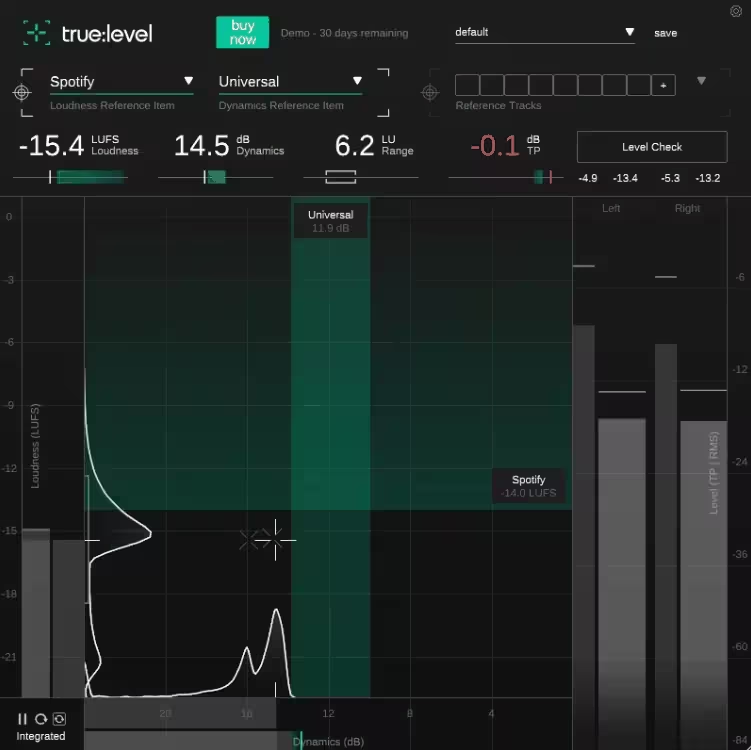
What I love about True:Level is how it makes complex concepts like loudness and dynamics feel simple and intuitive.
True:level is like a sharp-eyed friend who knows exactly what your track needs to sound professional. The unique visualization of loudness and dynamics interplay is what sets it apart. It’s the only reference VST plugin I’ve used that makes this relationship so clear, helping me nail that perfect balance without guesswork.
Everything in the interface is designed to be straightforward and meaningful, from the Loudness and Dynamics Grid to the histograms that give you a clear picture of how your mix evolves over time.
I love how it avoids overwhelming you with unnecessary data, as every feature has a purpose. Plus, the Level Check feature feels like having a tutor on hand, providing actionable advice instead of just spitting out numbers.
- Real-Time Metering for Loudness and Dynamics
The plugin tracks true peak, loudness (LUFS), and dynamics (dB) with precision. The real-time visualizations help quite a lot, as seeing the balance of loudness and dynamics as I tweak settings has saved hours of trial and error.
- Predefined and Custom References
Where the unit shines is the referencing as it includes predefined settings for all major streaming platforms and genre-specific dynamics standards, which are super handy when preparing a track for release.
Even better, you can upload up to 8 custom reference tracks, so comparing your mix to your favorite productions is seamless. This feature alone has made it indispensable in my workflow.
- Level Check with Actionable Suggestions
My favorite feature is the Level Check feature. Instead of just telling you something’s wrong, it suggests exactly what to do, whether it’s reducing dynamics or tweaking true peak levels.
- Loudness and Dynamics Histograms
The detailed histograms are a subtle but essential feature as they show short-term changes in loudness and dynamics, making it easy to identify issues over time.
For example, I’ve used these to spot sections where my mix felt flat compared to the rest of the track. It’s an excellent tool for refining both individual sections and overall flow.
- Loudness and Dynamics Grid
At the core of the unit are these grids that plot your mix against target reference zones, with crosshairs that turn green when everything aligns.
I like watching the crosshairs move in real-time while making some adjustments as it feels like solving a puzzle, making the workflow quite fun, more efficient, and quicker.
On the downside, beginners might experience a bit of a learning curve, as these concepts might be confusing for newbies. The good news is that the detailed tooltips and thorough manual do a pretty good job of helping.
True:Level comes in AU, VST2, VST3, and AAX formats for macOS and Windows users.
2. Sonnox ListenHub
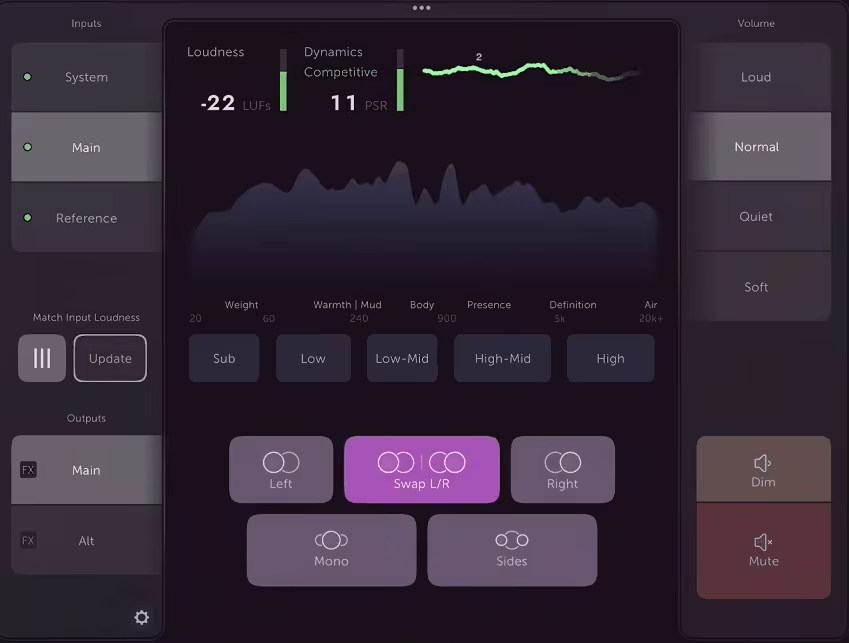
ListenHub blends the powerful monitoring feature with an intuitive interface, offering a hybrid hardware-software monitor controller that fits right into your workflow
I like this unit for comparing mixes to commercial tracks or fine-tuning the stereo image, as it offers great controls that are hard to find on competitor units.
ListenHub offers a beautifully designed and straightforward interface, which makes monitoring tasks precise yet effortless. It has an elegant control panel, which works great as a standalone app, a DAW plugin or as a mobile app for iOS and Android app.
The ability to isolate frequencies, solo channels, or host AU plugins directly on the outputs is pure genius for anyone serious about achieving mix clarity.
- Real-time A/B Referencing
ListenHub lets you A/B your mix against reference tracks from any streaming source, like Spotify, Apple Music, or YouTube, as well as files from your DAW or local storage.
I’ve used it to quickly spot tonal imbalances or dynamics issues, and the instant loudness matching ensures I’m comparing apples to apples, not just louder mixes.
- Frequency Band and Stereo Channel Soloing
This feature has been a real lifesaver as with band solo buttons; you can hone in on specific frequency ranges, perfect for checking the relationship between your kick and bass or fine-tuning the high-end.
The channel solo options (Mid, Side, Left, Right) help ensure your stereo image is on point and your mix holds up in mono. It’s like putting your mix under a microscope and catching details you might otherwise miss.
- Plugin Hosting on Outputs
ListenHub lets you host AU plugins directly on its outputs, making it easy to integrate room correction software like Sonarworks or Slate VSX. This means you can apply different correction profiles for each set of speakers or headphones, saving you the hassle of switching settings manually.
- Auto-Level Matching
One of the smartest features is the automatic input loudness matching, which eliminates the bias of loudness differences when comparing tracks.
- Stepped Volume Controls and Monitoring Presets
ListenHub’s stepped volume controls let you quickly switch between precise listening levels including loud, normal, quiet, and soft, for consistent mixing decisions. This is a feature I’ve come to rely on, as it keeps my monitoring workflow grounded and repeatable, especially when fine-tuning dynamics.
The only major limitation is that ListenHub is exclusive to macOS, leaving Windows users out.
This reference VST plugin’s unique combination of referencing, monitoring, and plugin hosting makes it more than just a metering tool, as it’s a full-fledged audio control system.
ListenHub is available as a standalone app and supports VST3, AU, and AAX formats for macOS users only.
3. Mastering The Mix EXPOSE 2
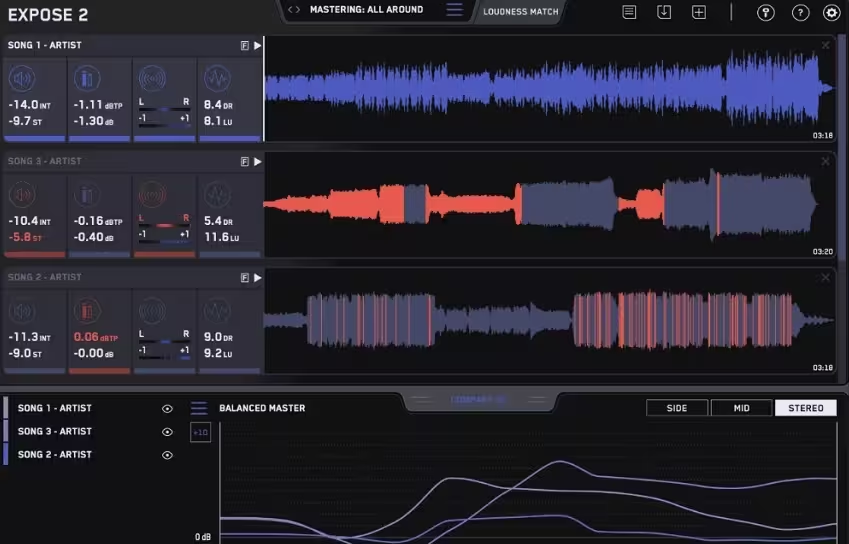
EXPOSE 2 deserves the spot thanks to its brutal honesty as it’s like the friend who won’t sugarcoat your mix’s flaws but will also tell you exactly how to fix them.
Catching a true peak clipping, over-compression, or a wonky EQ balance… EXPOSE 2 deals with the issue as an analysis tool, diagnosing issues and prescribing clear solutions.
This one is a standalone app into which you drag and drop your track, select a preset based on your release format (streaming, club, CD, etc.), and you’re ready to go.
The interface is decent, with a straightforward design consisting of loudness, peaks, dynamics, and stereo/phase issue sections.
- Identify Issues in Seconds
I really appreciate the quick workflow here as you only drop your tracks into the plugin, and it highlights problem areas in red directly on the waveform in seconds. Phase issues, over-compression, poor EQ Balance, be it anything, will show in the plugin for you to fix the issue with the advice the unit gives you.
- Compare EQ with Precision
The unit’s Compare EQ feature shows how your track’s tonal balance stacks up against a reference track or genre-specific presets. I’ve used this to ensure my mixes aren’t too muddy or harsh before releasing them.
Any tonal balance difference within ±3dB is considered solid, while anything beyond ±6dB needs attention. It’s like having a second set of ears but with visual confirmation.
- Loudness Match for Unbiased Comparisons
The Loudness Match feature normalizes all tracks to the same perceived volume using a LUFS algorithm.
This eliminates loudness bias, letting you focus on the mix’s actual quality rather than being swayed by louder tracks. For me, this is handy for preparing tracks for streaming platforms like Spotify or Apple Music.
- Detailed Analysis and Feedback
The detailed analysis and explanations given by the plugin are really great, especially for beginners, to understand what’s wrong and how to address it. The feedback is really clear which can be anything from limiter settings to dynamics adjustments.
I especially love how it points out dynamic inconsistencies, helping me keep my tracks lively rather than overly squashed.
- Custom Presets for Any Distribution Method
The unit offers 27 presets tailored for different release formats, plus 5 slots for user-created presets. Whether you’re mastering for YouTube, a club system, or a CD release, the presets ensure your music meets the required standards.
The biggest limitation is that EXPOSE 2 is a standalone application, not a plugin, so you can’t use it directly within your DAW. Additionally, its honesty can be a bit humbling; seeing your track light up in red is not for the faint of heart!
I believe this is a great unit for producers and engineers who want to ensure their tracks meet professional standards without leaving anything to chance with its clear visual feedback, detailed analysis, and intuitive interface.
EXPOSE 2 is available as a standalone application for macOS and Windows.
4. ADPTR AUDIO Metric AB
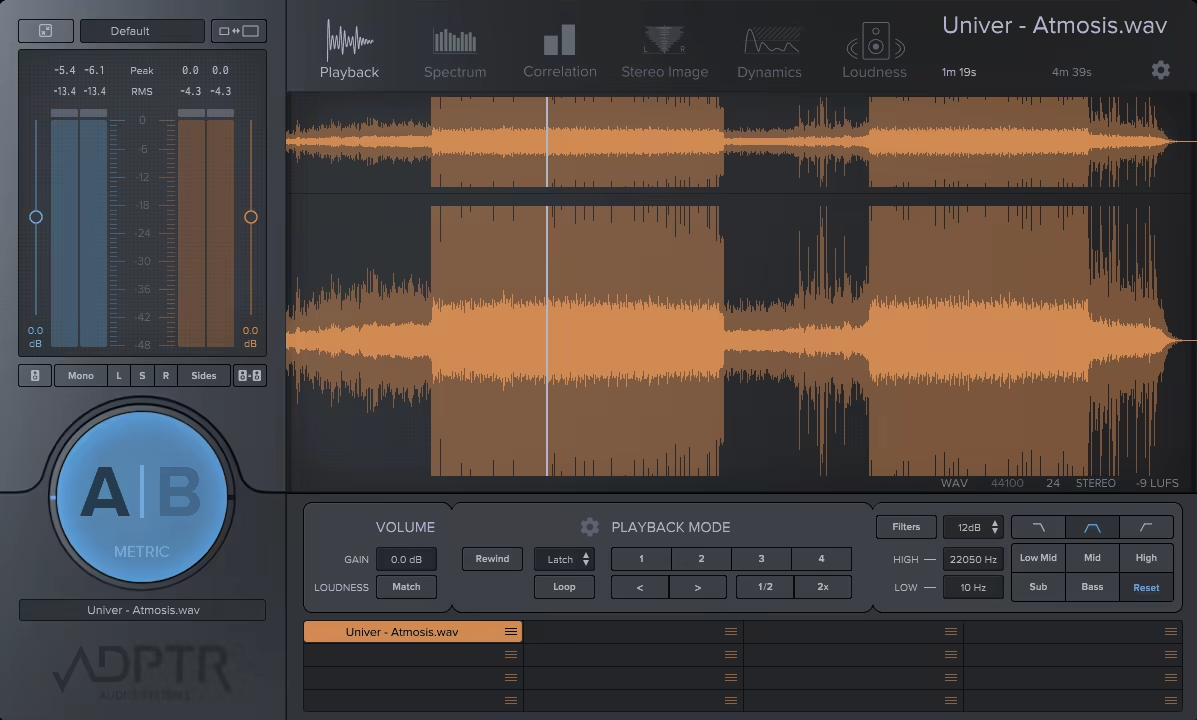
Metric AB takes the simple idea of A/B referencing and elevates it into a powerhouse for mix and mastering analysis.
Metric AB’s design is both sleek and functional, with a layout that makes complex analysis feel intuitive. I like its resizable UI, as it offers Small, Medium, Large, and extra-large options to suit your screen setup.
The flexibility is one of my favorite features as it allows you to drag and drop up to 16 reference tracks and each slot has individual playback controls. The workflow is also pretty straightforward for syncing playback with your DAW, setting cue points, or using the filters to solo specific ranges.
- Instant Loudness Matching
One of the stars here is the Loudness Match button, which eases the workflow by automatically matching the loudness of the mix and reference tracks. It immediately avoids the loudness bias, for objective comparisons.
- Comprehensive Mastering Meters
With 5 detailed analysis modes, including Spectrum, Correlation, Stereo Image, Dynamics, and Loudness (LUFS), Metric AB offers great info for curious producers.
I enjoyed the meters here as they can visualize the mix and reference tracks side by side, overlaid, or individually for different workflows.
- Precise Playback Options
This audio tool comes with 4 playback modes: Latch, Cue, Sync, and Manual These modes let you control how reference tracks play in relation to your mix, whether locked to the DAW timeline or starting from specific cue points.
I particularly recommend the Cue mode, which is great for looping sections of the mix and reference tracks for in-depth comparisons.
- Customizable Filter Bank
Metric AB’s filters for frequency isolation are true highlights. You can solo low, mid, or high frequencies to focus on specific areas of the mix, like the kick-bass relationship or vocal clarity.
The 12dB or 24dB/octave roll-off slopes are really helpful to deal with the issues, but here I think editable preset filters are lacking.
- Integrated Spectrum and Loudness Analysis
The Spectrum analyzer is another strong point as it comes with different choices with Plot, Octave, and Critical bands, for detailed frequency analysis.
On the other hand, the Loudness analyzer is pretty great for hitting LUFS targets for platforms like Spotify and YouTube.
Metric AB’s intuitive workflow, robust analysis tools, and seamless loudness matching make this unit one step ahead of the rest.
Metric AB is available in AAX, AU, VST2, and VST3 formats for macOS and Windows users.
5. Mastering The Mix REFERENCE 2
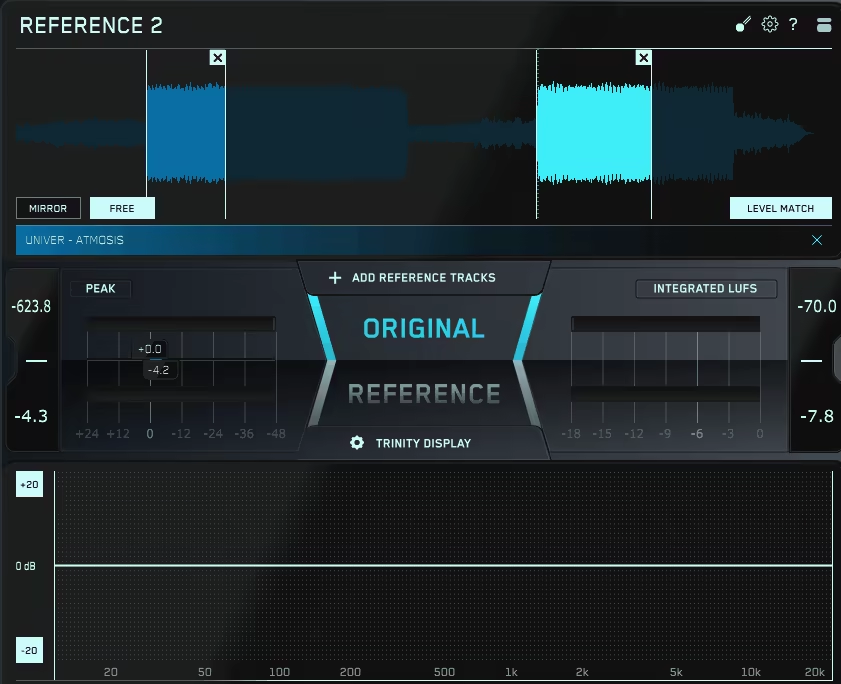
If you want to eliminate the guesswork from mix referencing, REFERENCE 2 is worth checking out.
The first things that catch the attention here, are the intuitive tools and powerful visual insights. Especially the intelligent features are the stars of the show, helping you through your mix.
REFERENCE 2 features a sleek and intuitive interface, making the workflow beginner-friendly.
The Trinity Display provides instant feedback on EQ balance, stereo width, and dynamics, all in one place. Drag-and-drop functionality for reference tracks, real-time level matching, and detailed visualizations make this reference plugin a joy to work with.
I also appreciate the new REFSEND plugin, which lets you analyze any point in your signal chain, ideal for A/B testing your processing.
- Real-Time Level Matching
REFERENCE 2 has an intelligent level-matching system, which eliminates the guesswork, makes the workflow quick and easy, and ensures objective comparisons for your mixes.
Whether matching individual references or aligning everything to -14 LUFS for streaming, this feature eliminates loudness bias, allowing you to make informed mix decisions. It’s a lifesaver for accurately gauging your track’s low end and high-frequency clarity.
- Trinity Display for EQ, Stereo, and Dynamics
The Trinity Display is a standout as it shows key aspects.
-
- EQ Balance: Instantly see where your track’s frequency spectrum deviates from the reference or switch to
- EQ Match mode: for seeing the EQ adjustment suggestions to align the mix with the reference.
- Stereo Width: Create a balanced stereo field by visualizing how wide your track is across the spectrum.
- Punch Dots: Compare the track’s dynamic range with the reference to figure out if some frequencies are too compressed or need more punch. This unique display is a highlight in the section.
- REFSEND Plugin
The new REFSEND plugin allows you to bypass entire FX chains and route audio directly into REFERENCE 2 for analysis.
I’ve used it to A/B my mix before and after processing, ensuring my master doesn’t lose dynamics or tonal integrity. You can even use it to analyze streaming audio from Spotify or YouTube alongside your mix.
- Expanded Track-Align and Playback Features
I like the unit’s s track-align feature, which automatically syncs your references to your mix’s start point, saving you the hassle of manual adjustments.
Its playback modes let you loop specific sections for detailed comparisons, whether you’re refining a chorus or tweaking a bass-heavy drop. This is especially useful when comparing multiple versions of a track.
The biggest drawback is the lack of a mono button, which would have been helpful for isolating spectral differences.
I love this reference unit with its visual feedback, real-time analysis, and flexible referencing options making it an invaluable tool for ensuring my tracks sound professional and competitive.
REFERENCE 2 is available in VST, VST3, AU, and AAX formats for macOS and Windows users.
6. iZotope Audiolens (FREE)

If you are looking for a free audio tool for track referencing, Audiolens is a great choice to match the tonal balance, dynamics, or stereo width of your favorite songs.
What I love about Audiolens is how it simplifies the often tedious task of track referencing. It is a free desktop app, that allows you to analyze audio directly from a streaming platform or source without the hassle of complicated routing setups.
- Streamlined Referencing
Unlike other referencing tools, Audiolens doesn’t require you to manually import files or configure anything. Just hit Capture, and it analyzes the key characteristics like loudness, EQ, dynamics, and stereo width of any audio playing through your device.
- Seamless Integration with iZotope Ozone 10 and Neutron 4
Audiolens shines even brighter when paired with Ozone 10 and Neutron 4. The app’s captured reference data automatically syncs with the Target Library in these plugins.
From there, you can use Ozone 10 to match your master’s tone, dynamics, and width to your reference with its AI-powered Master Assistant.
You can also leverage Neutron 4 to match individual mix elements like bass, snares, or hi-hats to your reference track’s profile.
If you’re already an Ozone 10 or Neutron 4 owner, updating to the latest version ensures seamless compatibility with Audiolens.
- Save and Build Tonal Profiles
I think it’s also quite handy that Audiolens lets you save tonal profiles to its Target Library, creating a personal catalog of reference data. You can name your tracks for easy access, and compare your mix to any stored profile.
With its ability to analyze streaming audio and integrate with iZotope’s flagship plugins, I beleive Audiolens is a must-have tool for anyone who wants a cost-free solution for improving their mixes and masters.
Audiolens is available as a standalone application for macOS and Windows users.
