
Finding the best compressor plugin for mixing drums can be super handy in your projects, but I admit it’s a pretty long and winding road!
Oh man, I’ve been down that rabbit hole so many times, testing every compressor I could get my hands on. That’s why I’ve done the hard work for you!
Compression is what brings life and energy to a mix, balancing dynamics, adding punch, and sometimes even defining the character of a track. But here’s the deal, no single compressor does it all. Some are smooth and transparent, perfect for taming vocals, while others are gritty and colorful, ideal for making drums slam or giving basslines some extra swagger.
Over the years, I’ve built up a solid collection of drum compressors, each with its own flavor. Some days, I need a clean, modern compressor that barely leaves a trace. Other days, I want something dripping with vintage mojo. When I need my snare to smack hard, I reach for a FET compressor. But if I’m just leveling things out, an optical compressor does the trick.
So, after years of tweaking, testing, and probably overthinking things way too much, here’s a list of my go-to compressor plugins for drums, the ones I swear by when I need punch, character, and control. Let’s get into it!
1. Tone Empire Pythor (Rare)
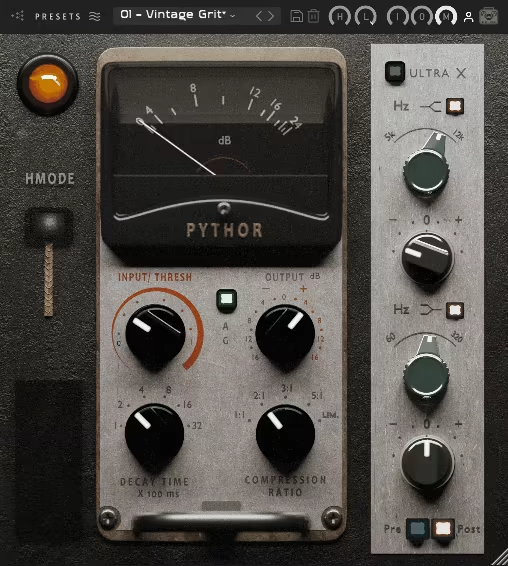
I love how Pythor brings something fresh to the compression game with its rare Pulse Width Modulation (PWM) topology.
Pythor isn’t just fast and aggressive; it’s got character. Whether I’m locking in drums, shaping vocals, or making instruments cut through, it does the job without sounding robotic. It’s the kind of compressor that actually adds some vibe instead of just flattening everything.
What makes it even better is the 2-band parametric EQ built right in. I don’t just control dynamics, I get to shape the sound before or after compression. That means I can boost some punch in the lows or add sparkle up top without grabbing another plugin.
I threw it on some overheads, and, bam, instant glue, crisp attack, and no weird artifacts messing with my mix.
- Thor Mode
This is my go-to when I need something to sound insanely aggressive. Think gritty, in-your-face compression that’s anything but polite. It’s not for the weak, but when I want a track to punch people in the face, this is how I do it.
- Saturation & EQ
The Pythor‘s preamp brings a sweet saturation that makes everything warmer, while the EQ section is broad and musical. I love how I can thicken up drums or brighten snares without getting those nasty resonances.
- High-Quality Models
Running up to 192kHz with oversampling, this thing keeps the sound clean, punchy, and free from that nasty digital grit. No weird aliasing, no mushy transients, just solid, pro-level compression.
I keep coming back to Pythor because it doesn’t just squash, it actually enhances. Whether I need tight control or all-out aggression, it delivers. If you’re into compressors that add flavor and not just volume control, this one’s a no-brainer.
Pythor comes in VST3, AU, and AAX formats for macOS and Windows users.
2. UAD Empirical Labs EL8 Distressor
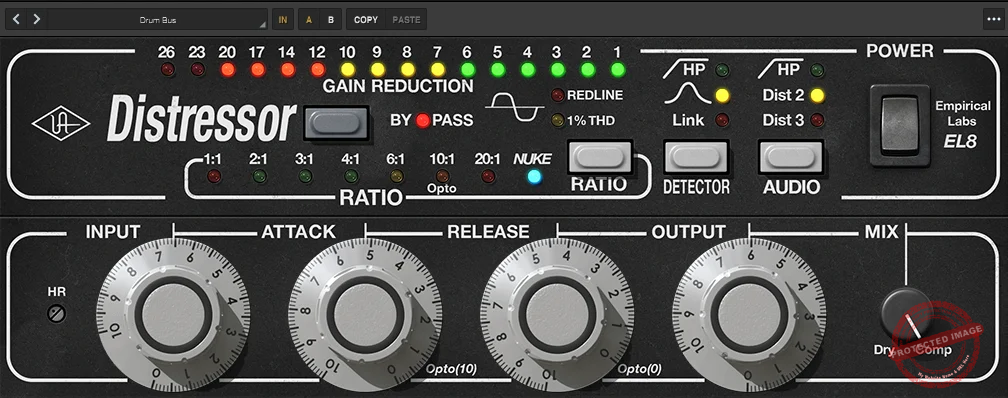
What sets the EL8 Distressor apart is its blend of utility and creativity. Built on the legacy of classics like the UA 1176 and Teletronix LA-2A, it adds modern features and flexibility that fit any workflow.
I’ve used the EL8 Distressor for everything from warming up vocals to smashing room mics, and it never disappoints.
- “Dist 2” and “Dist 3” Harmonic Distortion
I have to mention the “Dist 2” and “Dist 3” modes, which let you add harmonic distortion to your tracks. Whether you’re after a touch of analog warmth or full-on tape-like saturation, this thing delivers. It’s like having a saturation plugin built into your compressor, perfect for adding character.
- Parallel Compression Made Easy
If you’re into parallel compression, the built-in Dry/Wet Mix feature makes it effortless to balance punch with transparency. No need to set up extra routing, just dial in the blend you want, and you’re golden.
- Versatile Compression Ratios
The Distressor gives you everything from subtle (1:1) to extreme (Nuke) compression. I love using 2:1 for lightly coloring drums without over-compressing them, while Nuke mode is my go-to when I want room mics to explode with energy.
- Sidechain Control & Band Emphasis
The sidechain control is a lifesaver. Whether I’m cleaning up low-frequency pumping on a drum bus or softening vocal harshness, the sidechain filters and Band Emphasis feature give me surgical control over dynamics. Most compressors don’t even come close to this level of precision.
- Industry-Designed Presets
If you need a quick starting point, the Distressor’s presets, developed by heavyweights like Vance Powell (Jack White) and Joe Chiccarelli (The Strokes), are solid options to get you going.
This beast is available in two versions, UAD Native, which runs on your computer without UA hardware, and Apollo Realtime & UAD‑2, which uses Universal Audio interfaces and hardware to accelerate processing.
No matter how I use it, the Distressor always finds a way to make things sound bigger, warmer, or more aggressive, whatever the mix needs.
EL8 Distressor comes in VST3, VST2, AU, and AAX formats for macOS and Windows users.
3. Waves API 2500
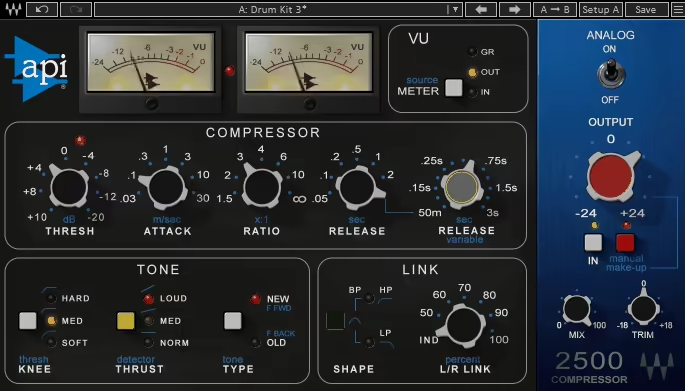
Modeled after the iconic API bus compressor, the API 2500 delivers punch, energy, and glue to your mixes, just like the legendary hardware that inspired it.
I love how versatile API 2500 is, you can go from smooth, subtle compression that ties everything together to full-on aggression that makes drums explode and basslines hit hard.
- Two Compression Topologies
One of its standout features is the ability to choose between two compression styles: Modern feedforward compression for tight, precise control.
Vintage feedback compression for a smoother, more musical response.
I switch between them depending on the mix, modern mode keeps things clean and snappy, while vintage mode gives that classic API warmth.
- Thrust Control for Frequency Balance
The Thrust control, an API classic, lets you manage low-end pumping while boosting high-frequency energy. It’s killer for fat, punchy kicks or crisp, airy overheads without the mix getting out of control.
- Variable L/R Linking for Stereo Control
Another standout is the variable L/R linking, which controls how the left and right channels interact. Sometimes, I unlink them slightly to add width to stereo elements while still keeping the overall mix tight.
- Flexible Knee and Attack Options
I love pairing that with the flexible knee options, soft for gentle glue, hard for aggressive control. With its wide attack range (0.03ms to 30ms), I can shape transients with precision, making drum buses pop with punch and depth.
- Analog Saturation and Limiting Mode
One trick I always use is driving the Analog feature for subtle saturation when I don’t need heavy compression.
It adds warmth and richness, making tracks feel more alive. And if I want to crush things hard, the infinity:1 ratio turns the API 2500 into a limiter, perfect for squashing room mics or getting that modern, aggressive drum sound.
No matter how I use it, the API 2500 always brings that classic API punch and energy that makes mixes feel polished and powerful.
API 2500 comes in VST2, VST3, AU, and AAX formats for macOS and Windows users.
4. FabFilter Pro-C 2
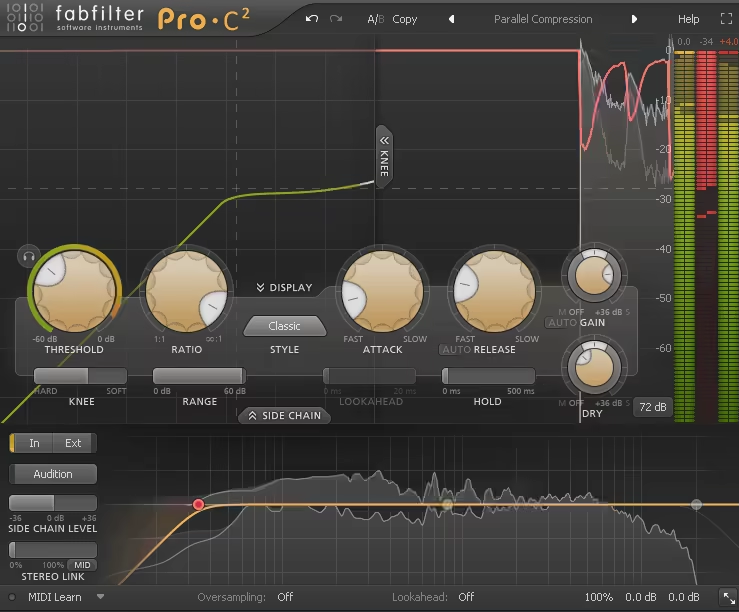
What makes the Pro-C 2 stand out is its eight unique compression styles, each designed for specific needs.
For example, the “Vocal” mode is incredible for upfront, controlled vocals, but surprisingly, it also works for squashing drums in parallel compression.
Meanwhile, “Bus” and “Mastering” modes bring cohesion to groups or an entire mix.
- 8 Compression Styles
When it’s time to get creative, “Punch” and “Pumping” modes in Pro-C 2 offer a classic pumping effect, perfect for modern dance music and high-energy beats.
It’s like having eight compressors in one, each with its own distinct vibe and purpose.
- Advanced Features for Total Control
Beyond its sound, the Pro-C 2 includes lookahead processing, auto-gain, variable knee, and external side-chaining, everything you need for precise drum dynamics and smooth mix control.
- Mid/Side Processing & Stereo Linking
It also packs mid/side processing, stereo linking, and a range control to limit maximum gain reduction, making it as powerful as it is versatile.
- Intuitive Visual Feedback
FabFilter is known for intuitive, visually rich designs, and this plugin doesn’t disappoint.
The animated knee and level displays don’t just look cool, they actually help you understand how and why the compressor is working.
- Real-Time Sidechain Input Metering
I’ve found the circular sidechain input meter particularly useful for dialing in the perfect threshold, it visualizes everything in real-time, so there’s no guesswork.
Whether I’m isolating frequencies with the HP/LP filters or experimenting with the mid/side EQ, it always feels like I’m in complete control.
No matter the mix scenario, the Pro-C 2 is a go-to compressor that combines power, versatility, and ease of use, all while looking slick on the screen.
Pro-C 2 comes in VST2, VST3, AU, and AAX formats for macOS and Windows users.
5. Pulsar Audio Mu
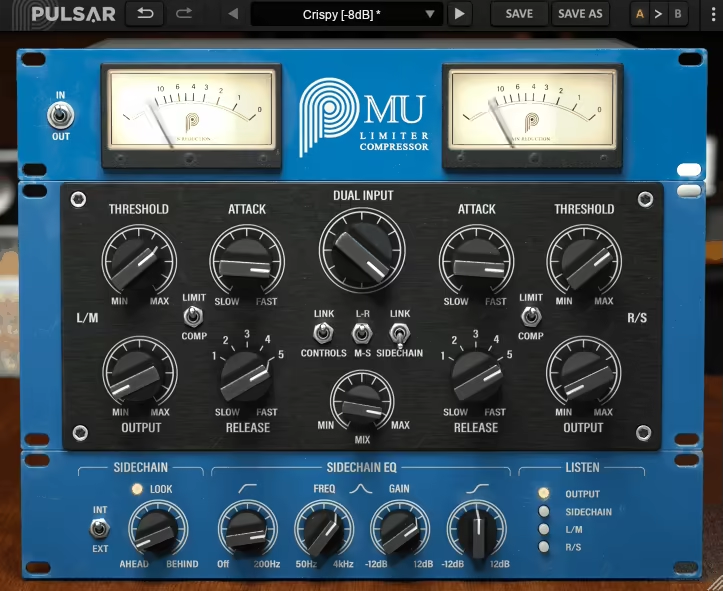
The Mu is built around the legendary variable-mu tube compression design, delivering a sound that’s warm, transparent, and full of character.
The main reason MU deserves a place on my list is its versatiliaty. Whenever I’m gluing a mix together, adding subtle polish to a master, or shaping a drum bus, it always brings a musical touch that’s hard to beat.
- Organic and Musical Compression
One thing I noticed right away when using the Mu was how effortlessly it handled dynamics. Unlike the aggressive snap of a FET or the surgical precision of a VCA, this thing controls transients in a way that feels organic and musical.
- Natural Feel
Even when I push it to more extreme settings, it still retains the natural feel of the audio. It adds movement and depth without crushing the life out of a track, which is something a lot of compressors struggle with.
- Flexible Attack and Release
Whether I’m using it as a subtle leveler (long attack/release), a glue compressor (slow attack/fast release), or even a limiter (fast attack/release), it always brings warmth and cohesion to the mix.
- Mid/Side Mode for Stereo Control
Switching to Mid/Side mode unlocks even more creative possibilities. I love using it to expand the stereo image or tighten up an overly wide mix, bringing focus exactly where it’s needed.
No matter how I use it, the Mu always feels smooth, musical, and effortlessly rich, making it a go-to for adding analog warmth and glue to a mix.
Mu comes in VST2, VST3, AU, and AAX formats for macOS and Windows users.
6. Baby Audio IHNY-2
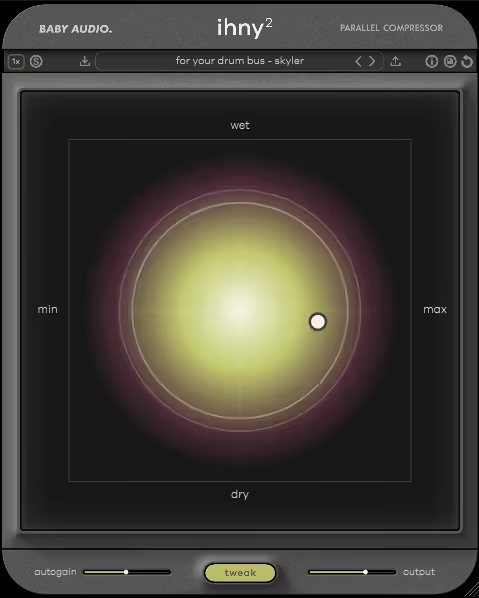
The IHNY-2 is built specifically for parallel compression, splitting your audio into two signals: one stays completely untouched (dry), while the other is heavily compressed (wet).
My favorite side of IHNY-2 is its XY Pad makes it ridiculously easy to blend these two signals while controlling both wet/dry balance and compression intensity in one motion.
- Aggressive Yet Musical Compression
What I really like about this plugin is that its compression style is clinical, aggressive, and full of character.
It nails that perfect balance between precision and analog-inspired warmth, making it a beast for drum buses, vocals, and even synths.
- Harmonics for Saturation & Grit
With the Harmonics control, you can push it into saturation territory, adding grit and edge to the compressed signal. If you want clean parallel compression, it does that too, but I love how easily it can add extra vibe and dirt when needed.
- XY Pad for Real-Time Adjustments
The XY Pad is a game-changer, letting you adjust the wet/dry blend and compression intensity in real-time.
Plus, the built-in autogain algorithm ensures levels stay consistent as you tweak, so you’re not constantly riding the fader.
- Tweak Panel for Deep Customization
If you want to go deeper, the Tweak Panel has all the controls you need. You can shape transients with Attack & Release, dial in the right Ratio, and use the Punch feature to keep transients intact for a more dynamic sound.
- Shape, Tilt & Preserve Controls for Frequency Focus
The Shape control applies a smiley EQ curve, emphasizing lows and highs for extra punch.
Meanwhile, the Tilt feature lets you focus compression on the high or low end, and Lo/Hi Preserve keeps specific frequency ranges untouched, great for protecting kicks or airy top-end details.
To refine the sound even further, IHNY-2 supports Oversampling with options for 1x, 2x, or 4x processing, making sure everything stays crisp and high-quality.
Whether I’m adding punch to a drum bus or gluing a mix together, the IHNY-2 makes parallel compression fast, easy, and powerful, exactly how it should be.
IHNY-2 comes in VST, VST3, AU, and AAX formats for macOS and Windows users.
7. Kazrog True Iron
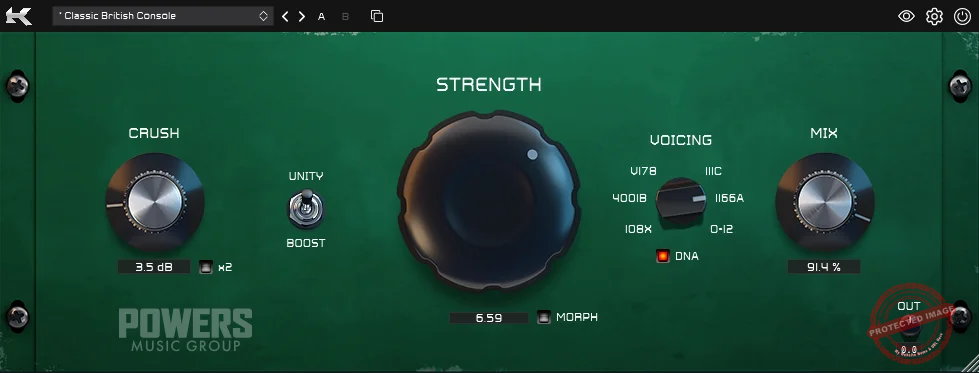
If you want simplicity combined with versatility, I think Kazrog True Iron is worth checking out.
With True Iron, you get 6 different transformer emulations, including the Western Electric 111C, Malotki E4M-4001B, UTC 108X, Marinair LO1166/A, Haufe V178, and UTC O-12. Sonically, it’s a powerhouse, it can smooth out digital harshness, add warmth, or completely crush a signal for creative saturation.
- Distinct Transformer Models
Each model has its own unique flavor, letting you experiment with smooth warmth to grittier, aggressive tones. The Haufe V178 has a thick, punchy tone that I love on drum buses, making the entire kit feel glued but still alive.
- Silky Vocal Processing & Stereo Bus Glue
The UTC O-12 adds a silky smoothness to vocals, helping them sit perfectly in the mix without sounding over-processed. And when I’m working on a full stereo bus, the Marinair LO1166/A, inspired by Neve consoles, is fantastic for cohesion and stereo width.
- Strength & Crush Controls
The Strength knob is perfect for dialing in just the right amount of saturation, from subtle warmth to full-on analog grit. Meanwhile, the Crush knob pushes the signal beyond clean saturation, making it easy to add character and energy.
- Input Impedance Selector
One feature I really appreciate is the input impedance selector, something you don’t see in many plugins. It lets you fine-tune the transformer response to better match the source material, making tonal shaping incredibly precise.
- CPU-Friendly for Multi-Instance Use
I have to applaud True Iron for being surprisingly CPU-friendly. I’ve stacked multiple instances across drums, bass, vocals, and even synths, and my session still runs smoothly. For something that adds so much character and polish, that’s seriously impressive.
No matter where I use it, True Iron delivers authentic transformer warmth without the CPU overload, making it a go-to for subtle glue or full-on saturation mayhem.
True Iron comes in VST, AU, and AAX formats for macOS and Windows users.
8. Tone Empire OptoRED

My final recommendation, OptoRED is designed to deliver the feel of real analog gear, capturing the essence of a classic American optical compressor but with a modern twist.
OptoRED starts as a 1:1 emulation of the original hardware, an iconic tube optical compressor used on countless hit records, but then takes it to the next level.
Unlike the original hardware, which was mainly used for vocals and bass, OptoRED adds a sidechain circuit, wet/dry mix, and a Lo-Cut filter, making it way more versatile.
- Lo-Cut Filter for Clean, Punchy Sound
The Lo-Cut filter automatically removes unnecessary low frequencies, keeping the compressed signal clean and low-latency, perfect for tightening up mixes without mud.
- Transparent Compression
Unlike many optical compressors that add heavy tube warmth (sometimes a little too much), OptoRED delivers a cleaner, more modern response.
That doesn’t mean it’s boring, though! With the Comp|Limit switch, you can toggle between gentle compression and hard-hitting limiting, letting you shape dynamics with precision.
- Sidechain Circuit
The sidechain circuit takes things further by letting you trigger the compressor with a filtered version of the input signal, keeping it from overreacting to low-end energy.
- Make-Up Gain, AutoGain & Input Control
You also get Make-Up Gain and AutoGain, plus an In Knob to control how hard the signal hits the compressor, making it super easy to fine-tune dynamics without guesswork.
For anyone who loves optical compression but wants modern flexibility, OptoRED delivers clean, punchy results with just the right amount of control.
OptoRED comes in VST3, AU, and AAX formats for macOS and Windows users.
