
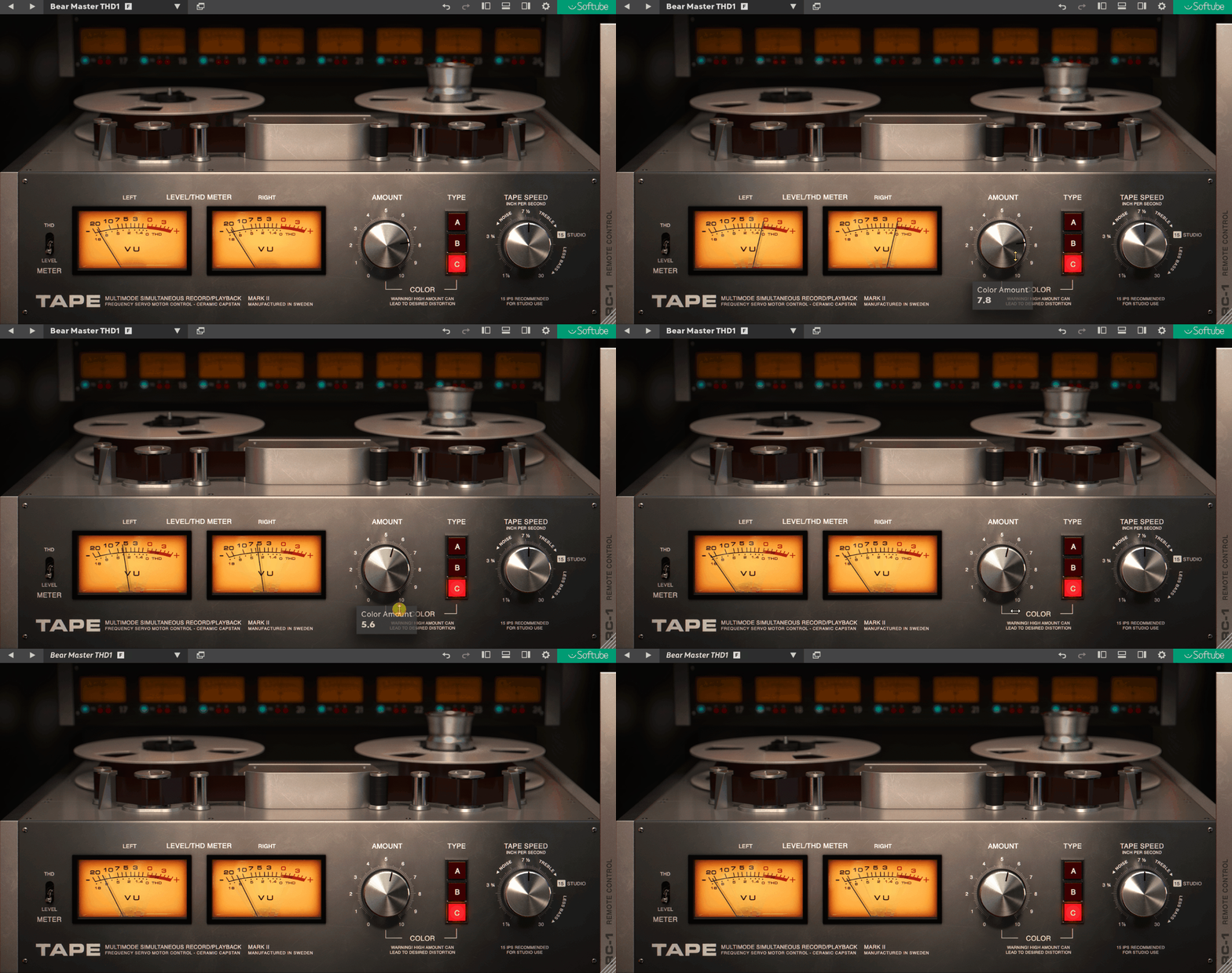
I will compare two of the major tape plugins, Softube Tape and UAD Studer, so you can decide for yourself which one to buy.
“I’ma take your grandpa’s style” – Macklemore
In the mid-20th Century, the dominant form of recording was the magnetic tape, a recording technology that has now been replaced for most parts but has still stood the test time. I am still in awe of Frank Sinatra’s early recordings and many albums from that era, and they still translate so well and stand out as some of the smoothest recordings ever!
To get the same warm, analog, vintage, and nostalgic texture and tone, developers and plugin companies are breaking their backs and creating digital versions of these tape machines and their nuances and imperfections and are selling them as ‘Tape’ plugins.
Also, Until I Found You by Stephen Sanchez, which sounded like fresh from your local thrift store, was one of the biggest songs of recent times, which proves how much listeners still crave that nostalgia. Many artists and producers today, like Steve Lacy and Tyler, The Creator, took Macklemore’s above quote too seriously and embraced this vintage aesthetic, proving that the charm of analog tape is far from obsolete.
It’s the bell-bottom jeans or vinyl records; they keep coming back, and everyone acts like it’s the first time they’ve seen them. And 2025 is all about diverse and inclusive musical tastes and sounds.
Can you get that Authentic “Magnetic Tape” Sound in Digital Environments?
Sure, modern DAWs can give you pristine, crystal-clear audio, but sometimes that’s just as eating plain tofu when what you really want is a smoky, sizzling barbecue. I love the flavor that Tape brings, with all its quirks, like the faint hiss that remind you of your old cassette mixtapes or the slight wobble that makes your speakers dance.
And let’s be real, plugin developers know this nostalgia sells and are out here bottling the essence of a technology your grandparents probably cursed for chewing up their favorite Beatles record, and we’re all lining up to slap it on our tracks like it’s magic fairy dust.
Now, if tape is the fairy dust of audio production, then tape plugins are the gourmet spice rack: endless options, all promising to take your mix from “meh” to “masterpiece.” Among the big players in this arena are Softube Tape and UAD Studer A800—two plugins that have producers debating like it’s the playoffs of analog emulation.
Softube Tape is the slick, budget-friendly contender, which is versatile, user-friendly, and surprisingly powerful for its price tag. On the other hand, the UAD Studer A800 is the Rolls Royce of tape plugins, offering “Universal Audio” realism and detail.
Let the showdown begin!
Installation
Before you can dive into the warm, analog bliss these plugins offer, there’s the small matter of installation. Trust me, it’s not rocket science, but it’s also not “double-click-and-forget-it” easy. Let me break it down. For Softube Tape, you’ll need to download Softube Central, which acts like a backstage pass to all your Softube goodies.

Bonus: They give you a 20-day free demo, which is generous enough to let you slap some tape saturation on a whole EP before deciding if it’s love or just a fling.
For the UAD Studer A800, you’ll be working with UAD Connect, Universal Audio’s all-in-one app for plugin downloads and activations. Installation here is as smooth as a Sinatra ballad. Once installed, both plugins will appear in your DAW’s plugin search window (or wherever your DAW hides its treasures).
In this application, you can either search for the plugin in the search bar or filter plugins by using categories. Studer will show up in its ‘Saturators and Tapes’ filter category.

For both plugins, installations are straightforward enough, but here’s the kicker: iLok. Yes, you’ll need an iLok account, and if you’re new to this little dongle-free digital world.
My experience with Softube Central was a little sloppy, though, as it takes a little time to load the plugins and may need a reopen or refresh at times. This is something that I believe Softube can work on.
Price and Compatibility Comparison
| Feature | Softube Tape |
UAD Studer A800
|
| Price | $99 |
$69 (also included in UAD Spark subscription)
|
| Operating Systems | macOS: Monterey 12, Ventura 13, Sonoma 14 Windows: Windows 10 (64-bit), Windows 11 |
macOS: Catalina 10.15, Big Sur 11, Monterey 12, Ventura 13, Sonoma 14, Sequoia 15
Windows: Windows 10 or 11 (64-bit editions) |
| Plugin Formats | AU, VST, VST3, AAX | VST3, AU, AAX |
| Additional Requirements | Softube account iLok account |
Requires UAD interface or Spark subscription
|
| Trial Period | 20 days free demo |
14 days free trial
|
User Interface & Controls
Let’s start with Softube Tape, which features a fully resizable interface that fits like a glove on any screen, and the rotating tape reels add a playful touch that screams, “Hey, I’m old-school, but I still groove!”
The left/right VU meters are right where you need them, and there’s even a THD Level Meter switch so you can see exactly how much harmonic distortion you’re cooking up. The controls are refreshingly simple yet deceptively powerful.
Its Amount knob handles your saturation intensity, while the Tape Type selector offers three unique flavors: Type A, inspired by a Swiss high-end reel-to-reel machine, is clean and precise; Type B adds a creamy, weighty low-end; and Type C leans into a vintage British vibe that’s pure nostalgia.
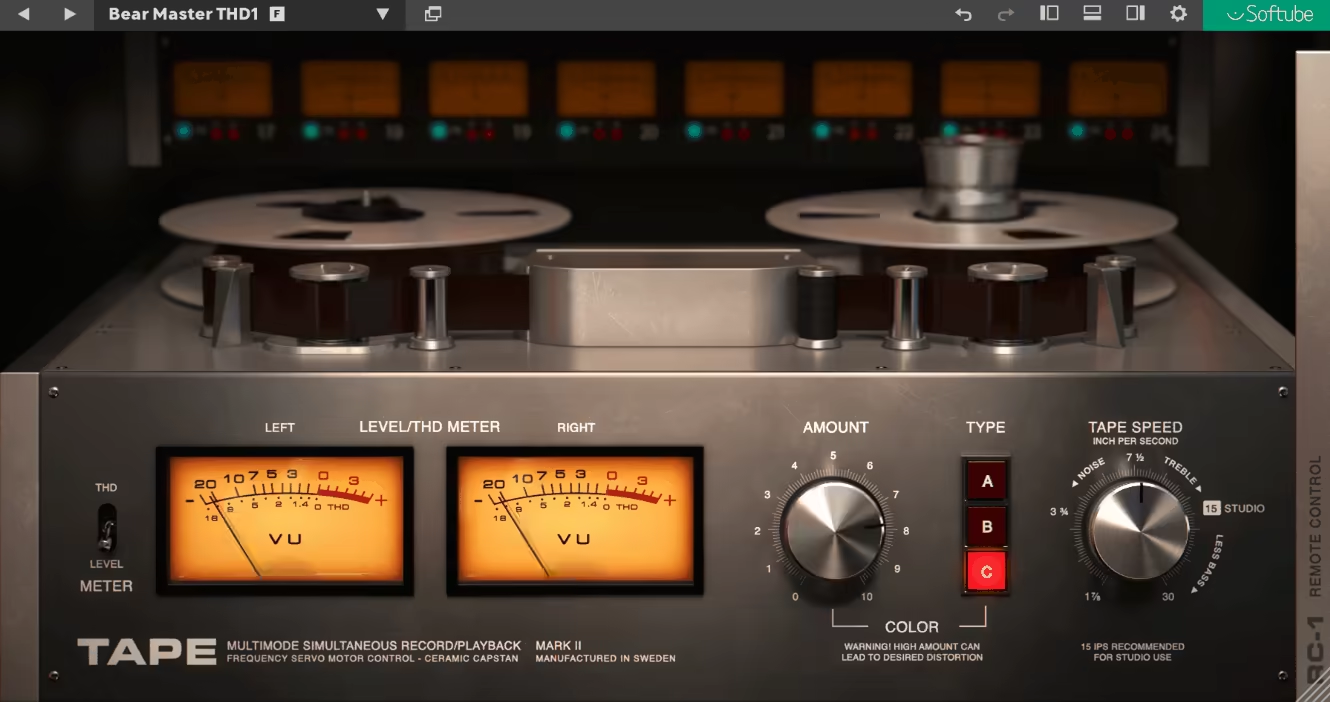
Plus, the Tape Speed control (1.5, 7.5, and 30 IPS) lets you dial in everything from warm, noise-laden tones to cleaner, brighter sounds. It’s like having three tape machines and a tone sculptor rolled into one.
Now, the UAD Studer A800 feels more like stepping into a high-end studio where you’re the engineer with all the fancy tools at your disposal. The interface is also resizable (in percentages), and it’s multichannel, meaning you can use it on individual tracks, buses, or even your master channel.
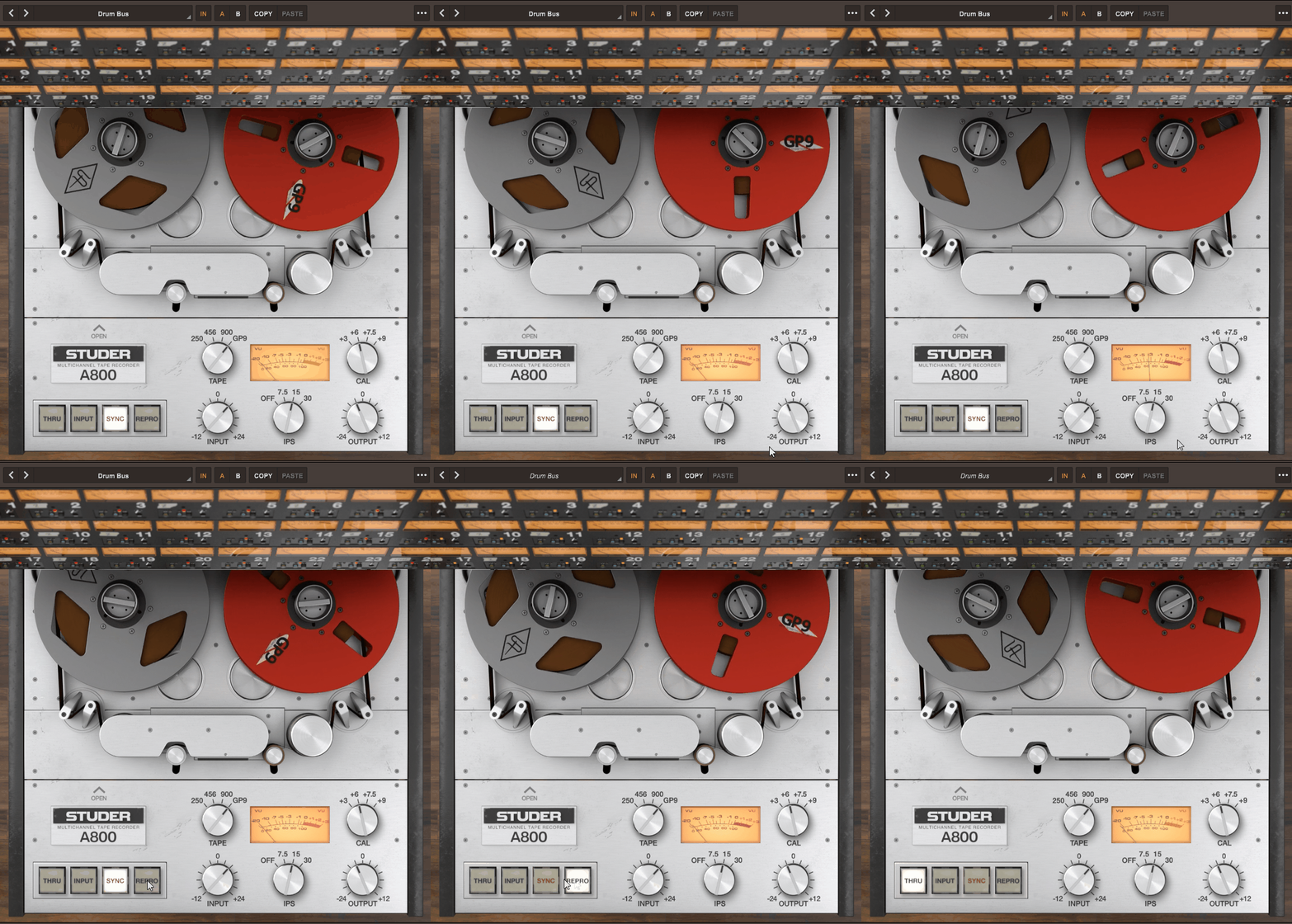
The rotating tape reels and VU meters are here also. But what really sets the A800 apart is the depth of its controls. You get different signal paths for modeling a real-life magnetic tape.
- Thru
This is essentially a bypass mode and lets the audio pass through the plugin without adding any tape emulation. Think of it as your “clean slate” option, perfect for comparing the processed signal to the original.
- Input
This mode emulates the sound of the tape machine’s electronics without the tape itself. In real tape machines, this is what you’d hear during live monitoring when the tape isn’t running yet. It’s raw and clean, capturing the essence of the A800’s circuitry without the added flavor of tape saturation or compression.
- Sync
Sync mode mimics the sound of recording and playback using the tape machine’s sync/record head. This is what you’d use for overdubbing in a traditional tape workflow when you’re layering new audio over existing tracks while still monitoring the playback of previously recorded material. It adds the distinct coloration of the sync head, which tends to be slightly different from the playback head.
- Repro
Short for “reproduction,” this is where the magic of the playback head comes into play. Repro mode gives you the full glory of the tape emulation, including the warm compression, subtle distortion, and silky-smooth high-end roll-off that make the tape sound so addictive. This is the mode you’d use for the final playback of your recorded material, capturing all the charm and quirks of a real tape machine.
The Tape knob offers four tape formulas (250, 450, 960, and GP9), each with its own sonic character, while the Input/Output knobs let you fine-tune your gain staging with surgical precision. The IPS settings (Off, 7.5, 15, and 30) and Calibration options (+3, +6, +7.5, +9) give you even more control to shape your sound exactly the way you want.

Whether you’re using it as the first insert for classic multitrack warmth, experimenting with creative processing on buses, or slapping it on your stereo out for a tape-emulated mixdown.
Moreover, the Studer A800 also has a hidden EQ window that works like an analog tape-like equalizer.

Here are different controls and ways you can use these EQ features:
| Feature | Description |
| Equalization Types |
|
| Hum Noise |
Dependent on EQ setting: 60 Hz for NAB (US) and 50 Hz for CCIR (Europe). No hum adjustment in AES mode.
|
| Hiss Noise |
Reflects tape head interactions and varies based on settings like Tape Speed, Tape Type, and EQ. Disabled when “Input” mode is selected.
|
| Auto Calibration |
Automatically adjusts Bias, HF EQ, and Playback EQ when changing Tape Type, Speed, or EQ.
|
| Manual Calibration |
Allows for custom tweaks to Bias, HF Record EQ, and Sync/Repro EQ. Disabling Auto Cal ensures manual settings are preserved.
|
| Sync/Repro EQ |
Separate adjustments for Sync (overdub playback) and Repro (final playback), allowing fine-tuning of high and low frequencies for optimal sound or creative experimentation.
|
How do UAD Studer and Softube Tape compare in terms of sound?
Okay, let me get straight to it. If you’re looking to add that luscious, warm analog vibe, both these plugins do the job, but they do it in their own unique ways. Think of it like choosing between two equally talented chefs: one specializes in subtle finesse, the other in bold, savory flavors.
Softube Tape, and for me, feels like adding a sprinkle of seasoning to your meal. The “B” tape type is my go-to for adding that meaty, ballsy low-end, which is perfect for making basslines pop and giving drums a bit more oomph. It’s got this airy, creamy vibe that feels right at home when I’m mixing pop or indie tracks.

But don’t let the simplicity of its controls fool you. This plugin can dish out some serious saturation if you turn it up, and when you do, you get this ear-pleasing vintage warmth without it turning into a mess. The wobble dial gives you that authentic tape flutter, adding movement and life to your tracks. If you’re looking to experiment with the classic “wobble” tape effect or even some subtle flanging, Softube Tape’s got your back.
However, for more aggressive sounds or projects where I need to push the saturation into overdrive, I’ll reach for the UAD Studer A800. The depth of control here is just…chef’s kiss. I’m talking about real precision, from the way it handles signal paths to how it lets you shape the tape’s coloration. UAD’s model lets me toggle between different formulas (like 250, 450, and GP9) to dial in the exact sound I’m after.
Honestly, I feel very satisfied with the versatility I get with Studer A800. Whether I’m looking for vintage warmth or pristine clarity, it’s akin to wearing a custom-tailored suit every time. Plus, the Repro mode could be parallel to wrapping your tracks in a velvet blanket. Smooth, saturated, and just… right.

I’ll be honest. I use the Studer A800 pretty much on every mix I do now. It’s a tool that makes everything sound better. One click, and the difference is night and day for that rich, analog gloss. But while it’s fantastic, it also feels a little more serious, much the same as stepping into the big leagues and needing a bit more precision with your settings.
Final Thoughts
I would suggest Softube Tape if you’re looking for a quick, intuitive way to add warmth and character to your tracks without getting too technical. It’s great for those looking for vintage flavors that are easy to dial in and effortless to use.
Now, if you’re more of the “I need my tape to sound exactly like a real tape machine, and I want to tweak every tiny detail until it’s perfect” kind of person, then the UAD Studer A800 is where you’ll want to park your mouse. It’s got that detailed, nerdy, “I’m gonna tweak the heck out of this and get it to sound exactly like I want” thing about it. Sure, you’ll probably spend a bit more time getting everything dialed in just right, and you really need to know the controls.
So I would use Softube Tape for quick mixes or projects where I want a bit of analog seasoning without overcomplicating things. But for a mix where I’m dialing in every inch of the sound, UAD Studer A800 all day, every day. Plus, the UAD plugin is also $30 cheaper, so that’s also a significant point to consider.

Berk Öztuna, a musician from Istanbul, is skilled in handpan, percussion, and guitar, performing and recording his own compositions globally. With expertise in music production and audio technology, he integrates virtual instruments and sound design tools seamlessly into his work. He also writes insightful articles on music production and gear for platforms like Plugin Noise and shares his music on Spotify and Instagram.
DONATE: Love our content? Help us keep Plugin Noise alive in the age of AI — Your donation fuels better content for music creators like you! You can donate here: pluginoise@gmail.com (Every amount counts.)