

Today, I will look at some of the best clipper VST plugins for musicians that can give your tracks a unique character and push loudness in your masters.
One must be really careful with clipping, as it could lead to unwanted digital distortion, listener fatigue, and loss of dynamics. That is why I think it’s important to work with the most suitable clipper and know your way through it.
I prefer plugins with good algorithms that can handle the right clipping applications. For example, when processing a kick drum, I prefer a clipper with a softer knee, allowing it to maintain the transient impact while preserving peak amplitude. Conversely, for bass instruments, a hard-knee clipper can add the right amount of grit and sustain without muddying the low end.
Mastering, however, often requires a different approach, using a clipping algorithm that enhances loudness while keeping the overall mix clean and balanced. Similarly, for mastering, you may need a different clipping algorithm. For both production and mixing effects, I have crafted a list of the best clipping plugins that can help you with your specific needs.
The list includes everything from gentle dynamic processors perfect for preserving dynamics to more aggressive hard-knee options that add punch and presence. Whether you’re looking to give your drums an edge, add warmth to your bass, or push your mix to competitive loudness levels without sacrificing clarity, this selection has you covered.
Here is our list of the best clipper plugins, (including 2 freebies) enjoy!
1. Softube Clipper

My first choice on the list is Softube Clipper, which offers the ideal workflow for mastering.
With dual clipping stages, RMS and Peak, plus an analog color option and a smooth, soft knee feature, the plugin is the perfect blend of precision and character, ready to bring out the best in your sound.
This is quite a versatile plugin that you can use for both mixing and mastering. Whether you want to add more thump to the kick drum or clip the entire track to bring out its full energy, Clipper can help with both.
- Dual Stage Clipping
The dual-stage clipping lets you find just the right level of punch without compromising clarity. And if you’re after a touch of warmth or some analog-style grit, the analog color option adds the required depth and natural texture.
- Soft Knee Feature
The soft knee feature also lets you smooth out the clipping effect for a more subtle, controlled sound, making it easy to adjust the impact to your liking.
- Extra Controls
With options for analog color, separate headroom and ceiling settings for RMS and Peak, and high/low-frequency filters for precise auditioning, Clipper offers tons of flexibility.
What I love about Clipper is that it can instantly cap peaks without introducing the side effects you’d get from a limiter or compressor, such as pumping or gradual level reduction. I find it handy when I have sharp transients that might otherwise trigger your limiter to pull down the track’s overall loudness.
Softube Clipper is available in AU, VST, VST3, and/or AAX plugin formats and is compatible with Monterey 12, Ventura 13, Sonoma 14, and Windows 10 (64-bit) and 11 operating systems.
2. Schwabe Digital Gold Clip

The feature-packed design of Gold Clip by Grammy-nominated engineer Ryan Schwabe offers so much flexibility to those who want more control over their clipping workflow. That said, Gold Clip definitely deserves its place in this list of the best clipper plugins.
With 3 powerful tools, Clipper, Gold, and Alchemy, Gold Clip gives you a solid range of sonic possibilities.
- Clipping Algorithm
The Clipping algorithm of Gold Clipin this clipper VST plugin emulates high-grade mastering converters and has three different modes: Modern, Classic, and Hard modes that let you go from a soft, gentle knee to a stronger, edgier effect, depending on what the track calls for.
- Gold and Alchemy Knobs
For me, this unit is perfect for preserving the clarity of the signal while adding punch. Along with these clipping algorithms, you get Gold and Alchemy knobs. The Gold control compresses the audio signal, while Alchemy adds that classic digital tape effect. What’s unique about this plugin is how the Alchemy knob works.
Typically, clipping plugins don’t address the buildup of mid and high-frequency harmonics that often occur during clipping. Alchemy solves this by subtly reducing the mid and high frequencies by 1 dB post-clipping, keeping the sound clean and balanced.
- Added Low-Pass Filter and Unity-Gain
The added low-pass filter is another bonus that can smooth things out when you require more aggressive clipping. Plus, with the Unity Gain feature, you can keep loudness consistent while lowering peaks when needed, which is great for fine-tuning mixes and ensuring the final sound is exactly where you want it.
I can’t imagine a mastering chain without this plugin in the mix. It’s become absolutely essential for me. I love the range of harmonic colors it can add to different sounds. Plus, the visual feedback and presets are also super helpful!
Schwabe Digital Gold Clip is available in AU, VST, VST3, and AAX, running smoothly on macOS Monterey and above, as well as Windows 10 and 11. You can subscribe to it for $25/month or buy the entire plugin for $249.
3. Signum Audio SKYE Clipper
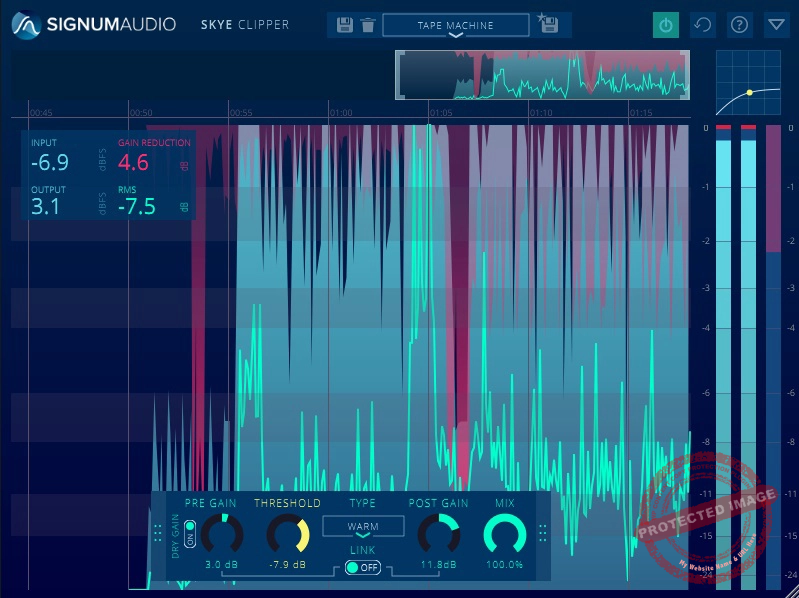
Signum Audio SKYE Clipper goes beyond just a clipper or loudness enhancer by allowing you to add just the right amount of saturation for unique texture on individual instruments.
- 7 Different Clipping Styles
With 7 different clipping styles and real-time anti-aliasing algorithms, SKYE Clipper combines precision with ease of use in a sleek, intuitive interface.
With versatile clipping options, you can use SKYE Clipper to control peaks, bring out more loudness in a mix, or enhance audio with tailored saturation.
- Smart GUI
I like how the scalable history view lets me fine-tune processing and track my adjustments visually. When added to the master bus, SKYE can even emulate A-D converter clipping for a professional finish.
SKYE Clipper’s proprietary anti-aliasing minimizes artifacts without heavy upsampling, saving on CPU usage and keeping performance smooth. The control panel offers full DAW automation for parameters like Pre-Gain, Threshold, and Post-Gain, and the mix control makes parallel processing easy.
- Automated Parameters
The unit offers automated parameters such as Pre-gain, Threshold, Clipping Type, Gain Link, Post-Gain, and Dry-Wet Mix to craft your effect as you like, giving the user plenty of control. I like to automate all these parameters from my DAW whenever necessary. You can hold the shift modifier while dragging to fine-tune the parameters.
For immersive mixing, SKYE Clipper Surround supports formats up to 7.1.4, including Dolby Atmos, alongside standard Stereo and Mono.
Compatible with VST, VST3, AU, and AAX formats, SKYE Clipper runs on macOS and Windows, making it a go-to for modern audio workflows.
4. Yum Audio Crispy Clip
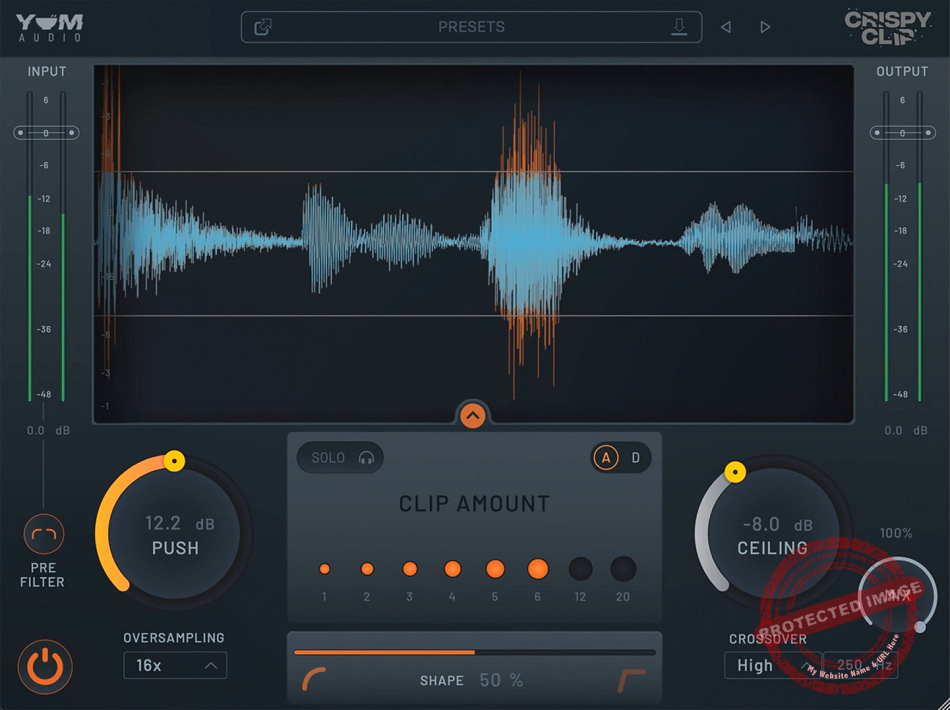
One of the best clipper plugins out there. Crispy Clip offers flexible clipping settings and lets you switch seamlessly between soft and hard clipping styles using the Shape control, giving you a balanced tonal character.
- Push and Ceiling Knobs
At the heart of the Crispy Clip lies the Push and Ceiling knobs. The Push knob lets you dial in more volume, while the Ceiling knob lets you set the ceiling at which the signal gets clipped. I also like the Shape slider that allows you to adjust the knee of the clipping between different degrees of softness and hardness.
- Mix and Crossover Controls
With the Mix Control, you can blend the clipped and clean signals to taste, making it easy to get the perfect mix. Crispy Clip’s Crossover Control is a game-changer, allowing you to clip specific frequency bands for added detail, while oversampling ensures top-notch audio quality.
- Solo Switch
You can also solo your clipped signal using the ‘Solo’ switch and apply a pre-filter. Another underrated feature of Crispy Clip is its dual-band workflow that lets you set a crossover frequency and process different bands separately.
Now, coming to its interface, I am impressed with the Analog and Digital (A/D) switch that lets you switch between analog and digital views. Further, the plugin’s Clip Amount Display and innovative waveform view give real-time feedback so you can visually track the sound changes.
Overall, the plugin promises a “razor sharp” clipping precision and delivers exactly that. If you’re a nerd about the intensity and precision of clipping required on your masters or individual elements or buses, this is the perfect plugin for you, as it goes above and beyond just basic clipping and offers a well-rounded clipping workflow.
Yum Audio Crispy Clip is compatible with AAX, VST3, and AU formats on both Mac and Windows operating systems.
5. Kazrog KClip 3

If you are looking for a versatile clipper vst for different tasks, KClip 3 can serve you well with its feature-packed design.
Starting with the interface, it’s all packaged in a sleek, resizable interface, and the perpetual license means no subscription or extra hardware is needed, just pure, unfiltered sound-shaping power.
With up to 32x oversampling and real-time eco mode, KClip 3 maintains high-quality rendering, monitoring, and processing. I found that the color-coded visualizer makes it easy to monitor clipping in real-time, and EBU metering ensures your tracks hit the target loudness levels for streaming.
- 8 Clipping Modes
KClip 3 puts pro-grade multiband clipping right at your fingertips, offering a powerhouse of 8 distinct clipping modes, including smooth, crisp, tube, tape, germanium, silicon, broken speaker, and guitar amp modes. Well, the names are self-explanatory, in my opinion, clearly signaling each mode’s uses.
- Multiband and Mid-Side Processing
With multiband and mid-side processing, it lets me dial in precision control across every part of my mix. It’s ideal for transparent loudness and can help you gain those extra 2-3 dBs of headroom without compromising the mix’s clarity, giving your tracks that polished competitive edge.
- Transient Control
The plugin’s transient control is a big plus, too; it smooths out sharp digital peaks, allowing tracks to sit in the mix more naturally without over-processing.
This highly versatile clipper can serve most producers well for different tasks. It’s a no-brainer for those who want to have one clipper for most projects without breaking the bank.
KClip 3 is compatible with VST, AU, and AAX on macOS (Apple Silicon ready) and Windows operating systems.
6. Modern Music Solutions NovaClip

Whether you want to push your drums to hit hard, prep a guitar DI for an amp, or tighten up a master, NovaClip clipper plugin makes clipping easy and impactful without needing deep audio knowledge.
With its cost-effective design, Novaclip helps me to infuse aggression and consistency into my tracks. It is a great choice for modern heavy music, and the intuitive interface and straightforward workflow make it quite beginner-friendly.
- Crossover-THD-Shape Controls
The Crossover control is fantastic for achieving a clean, powerful low-end while keeping that signature high-end clip punch. With the THD (Total Harmonic Distortion) control, you can add warmth and saturation, bringing extra depth to your tracks. I also like the Shape parameter lets you tweak the clipper’s knee, giving me precise control for any mixed scenario.
- Auto Gain Function
I found the Auto Gain function to be a lifesaver, as it lets you adjust settings without any volume surprises. The Delta mode, on the other hand, lets you isolate the clipped audio so you can hear the exact effect. I particularly enjoy working with the plugin because of its zero latency, which runs seamlessly in my mixing and mastering chains, even while recording or writing.
- Extensive Presets Collection
With a library of presets designed by MMS for drums, guitar, bass, and mastering, Novaclip allows you to nail that aggressive edge, whether you’re creating punchy beats or powerful, polished masters. I’d recommend it to most producers, especially to beginner musicians.
NovaClip is available in VST3, AU, and AAX formats, compatible with Windows 7 and later and macOS 10.13 or newer, supporting both Intel and Apple Silicon M1.
7. Venn Audio V-Clip

Whether you want to add warmth and saturation or just need a super-clean clipper plugin for mastering, V-Clip can help you with all.
V-Clip consists of a simple workflow that is divided into 3 tabs: Shaper, Visualizer, and Oversample. Outside of that, I really loved that I could adjust the Ceiling, Input, and Output levels. The Shaper tab lets me set the ‘Clip Type’ to a range of different knees.
- Versatile Range of Clipping Shapes
You would not find such a comprehensive menu of clip shapes in any other plugin. V-Clip offers a versatile range of clipping shapes, split into standard and complex options, to help precisely shape and color your sound.
When I tried it I enjoyed that I can choose from basic shapes like Hard Clip and Variable Soft Knee, which offer straightforward, reliable clipping control, or explore more nuanced shapes like Quintic, Cubic, and Sine for softer transitions and harmonic saturation.
For a more advanced touch, complex shapes such as Hyperbolic Tan, Algebraic, Arctangent, and Error Function add unique tonal variations, allowing you to craft anything from subtle warmth to intense distortion.
- Multiple Waveform Displays
That increases the scope of applications for the plugin, meaning you can rely on it for a bunch of applications, from pushing your snare to maximizing your bass. V-Clip offers multiple waveform displays, letting me independently adjust positive and negative samples and add options for custom DC offset.
- Live-Tracing
One of my favorite parts is the live tracing, which gives you a real-time visual representation of what the plugin does. The 64-bit processing keeps the sound quality top-notch, and with up to 256x oversampling, even heavy clipping settings come out clean and smooth. For me, the custom clipping mode is awesome for unique sounds, too.
I use it to shape positive and negative samples separately and add harmonics that give my mix its own character. With the zoomable waveform display and options like Auto-Gain and Auto-Ceiling, you can keep everything balanced, even when I’m pushing the clip.
Venn Audio’s V-Clip is compatible with Windows (VST, VST3, AAX) and macOS 10.9+ (AU, VST, VST3, AAX) in both 32-bit and 64-bit versions.
8. Plugin Boutique DualClip

Another tool that deserves to be part of the best clipper plugins. With DualClip, you get a versatile range of clipping and saturation effects in one simple plugin.
It features a 16-band soft clipper for smooth, rich saturation and a single-band hard clipper for grittier, more intense effects.
- 4 Clipper Variations
I think DualClip‘s workflow is pretty simple. It consists of two windows: Soft Clipper and Hard Clipper. You get 3 colors, Warm, Clean, and Bright, to choose the tonal character of the clipping effect. Plus, you have low, mid, and high transient emphasis choices to control the punch.
- Soft Clipper
The Soft clipper on DualClip replicates the warmth of analog gear. You can dial in just the drive color with the Tape and tube-style drive effects, while the curve control is there to target low or high frequencies and use the Smooth control to extend the release to give a softer feel.
- Hard Clipper
For a more aggressive sound, the Hard clipper adds a bit of a crusher-style effect, which I relly appreciated to have the possibility. Also, it’s great for me to have the option to use the Breach control to keep transients intact and the Soften parameter to smooth the edges, giving you a flexible range of distortion.
The built-in brick wall limiter ensures your levels stay controlled, and the real-time metering gives a visual of the waveform and gain reduction while adjusting settings.
Compatible with macOS and Windows in all major formats (VST, VST3, AU, AAX, and standalone), DualClip integrates seamlessly with most DAWs.
9. Native Instruments Transient Master

Transient Master offers powerful clipping control to enhance dynamics, add punch, and tighten up mixes.
Listen, guys, I think this one is a true hidden gem for those who like straight-to-the-point style clipper vst plugins. It has a super easy interface, and the basic design gets the job done without confusing you or making the route longer.
- 3-Knob Design
Transient Master’s intuitive Attack and Sustain controls act as dynamic shapers for dialing in just the right amount of clipping to give your sounds a controlled edge, while the Gain knob is there to adjust the, well, surprise, gain level. This straightforward design makes the unit super beginner-friendly.
- Attack Knob
The Attack control is essential for clipping transients, adding a crisp punch to kicks and snares, or sharpening up any instrument that needs more bite.
- Sustain Knob
Meanwhile, the Sustain knob is another great feature for me, as it can tame reverb tails or reduce muddiness, acting like a dynamic clipper that helps focus the sound by trimming excess noise and keeping things clear.
This feature gives me more room to sculpt each track’s place in the mix, creating an immersive stereo field without jostling volume levels. On a guitar track, Transient Master’s clipping power can eliminate pick noise by dialing down Attack or add presence by boosting it, creating a polished and balanced sound. Even with over-compressed or processed tracks, Transient Master revives the sound through controlled clipping.
With formats available for VST, VST3, AU, and AAX, Transient Master runs smoothly on macOS and Windows, is compatible with Intel and Apple Silicon Macs.
2 Best Free Clipper Plugins:
1. Venn Audio Free Clip 2

Free Clip 2 is a clipper plugin that offers a scalable, resizable, and zoomable interface that makes it easy to dial in precision clipping.
I love this plugin, not just because it’s free, but mainly because of the value it offers with a pretty simple interface, which I think is great for beginner producers to get used to clipper vst plugins.
- Multiple Clipping Curves
Multiple clipping curves, such as Hard, Quintic, Cubic, Hyperbolic Tangent, Algebraic, and Arctangent, provide creative control over the clipping style to suit any track.
- 32x oversampling
Additionally, 32x oversampling ensures clean, high-quality clipping, minimizing artifacts even at extreme settings, making it a versatile tool for mixing and mastering.
- Oversampling Clipping Choices
Free Clip 2 brings advanced control and flexibility to the table with several options for managing post-oversampling clipping. It allows me to choose between “No Post-Oversampling Clip,” “Post-Oversampling Clip at 0dBFS,” and “Post-Oversampling Clip at Ceiling.” I love it as these settings allow for precise handling of peaks following oversampling, making it easy to control output levels for a clean and balanced sound.
Venn Audio Free Clip 2 is available in AU and VST plugin versions and is compatible with Windows and Mac operating systems.
2. Yum Audio – Crispy Clip Light

If you are looking for the best free clipper plugins, Crispy Clip got you covered. Light is a streamlined version of the powerful Crispy Clip, designed for precise audio clipping and dynamic sound shaping.
As the free version of the before-mentioned Yum Audio Crispy Clip, Crispy Clip Light is surprisingly powerful for a free unit. In my experience, it has a super simple interface that hides its real power.
- Ceiling and Push controls
Just like Crispy Clip, the Ceiling and Push controls let you precisely set the clipping threshold and fine-tune gain levels, ensuring smooth, controlled clipping results.
- Shape Control
I believe the star here is the Shape control, as it offers a range between soft and hard clipping, so you can dial in exactly the warmth and harmonic depth you need.
- Straightforward Interface
What stands out for me is the plugin’s straightforward yet powerful interface, paired with clear analog-style metering. Crispy Clip Light is perfect for enhancing tracks without bogging you down with unnecessary complexity.
Yum Audio – Crispy Clip Light is available in AAX, VST, and AU plugin versions and is compatible with Windows and Mac operating systems.
