
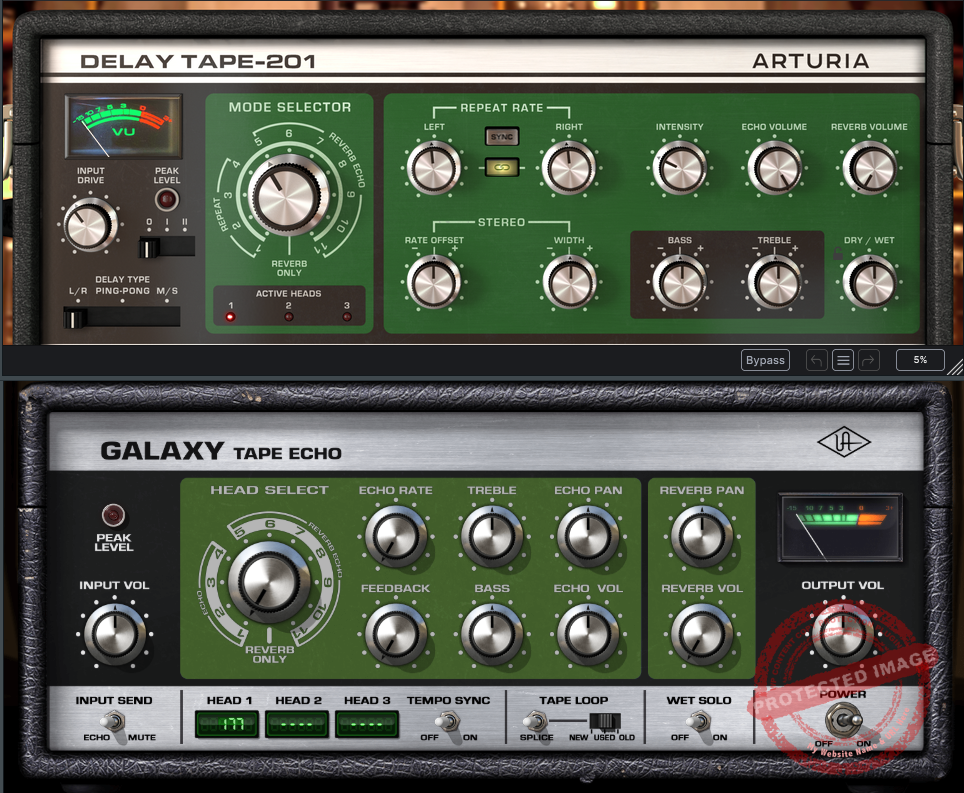
In this post, I’m diving into a head-to-head (or head-to-tape-head?) comparison between two tape delay plugins, the UAD Galaxy Tape Echo and Arturia Delay TAPE-201.
Both of these plugins are modeled after the legendary Roland Space Echo, which is as iconic as a Fender Strat or spilling coffee on your MIDI controller during a session. But while they share the same inspiration, they bring something different to the table.
The Roland Space Echo tap delay effects were used widely in the 70s and 80s, and engineers and producers are crazy for their natural and warm analog texture and delay flavor. What’s unique about them are the multiple playback heads playing together in coherence and complicated patterns to create a distinct delay sound.
Whether you’re chasing the authentic quirks of vintage gear or looking for a souped-up delay with all the modern trimmings, there’s a lot to love (and maybe a little to scratch your head over) with both of these plugins. Let’s roll up our sleeves, warm up those preamps, and see which one earns its place on your next mix.
Features
| Feature | UAD Galaxy Tape Echo |
Arturia Delay TAPE-201
|
|
Emulation Focus |
Faithful recreation of Roland Space Echo quirks |
Combines vintage accuracy with modern features
|
| Delay Times | Limited to fixed head positions |
Adjustable with flexible mode selector
|
| Head Combinations | Combines heads for varied effects |
Mode selector cycles through combinations easily
|
| Reverb Type | Spring reverb with basic volume control |
Spring reverb with tone-shaping options
|
| Feedback and Oscillation | High feedback allows self-oscillation |
Natural decay, but lacks true self-oscillation
|
| Tape Modes | “New,” “Used,” and “Old” with varying tape quality |
Simulates tape wear with added flutter and wobble
|
| EQ Options | Bass and treble EQ for delay only |
Bass and treble EQ for both delay and reverb
|
| Modulation Features | Minimal, based on analog tape imperfections |
Includes LFO with routing options
|
| Special Features | Wet solo, splice mode for tape imperfections |
Mid-side processing, motor inertia, advanced modulation
|
| Preamps | Not included |
Includes clean, RE-201, and Germanium preamp models
|
| CPU Efficiency | Lightweight and optimized |
CPU-intensive, better for send/return setups
|
| Target Audience | Purists seeking authentic vintage sounds |
Producers seeking flexibility and experimental options
|
Sound and Character
- UAD Galaxy Tape Echo
UAD Galaxy Tape Echo felt like stumbling onto a time machine, the dusty, analog kind, where every knob and slider promised a bit of character and chaos. It sounds rich, warm, and unapologetically gritty. Its delays decay into a beautifully dark abyss, and when I cranked up the feedback, the plugin started to howl and self-oscillate in a way that felt wonderfully unpredictable.

I’ve found this plugin works like a charm on guitars and vocals, especially when I’m going for that retro, dreamy vibe. The Head Select control is where the Galaxy Tape Echo truly stood out for me. This knob offers 11 distinct head combinations, each unlocking a unique blend of tape echo and reverb modes.
With three tape playback heads faithfully emulated from the original hardware, you can access 12 total modes, including four echo-only, 7 echo-plus-reverb, and a standalone reverb-only setting. Each of the three Delay heads has different time ranges, between 69 and 489 milliseconds, that can help you introduce a more natural (and not stuck to the grid) delay sound.

I also love its Tape Age Control, which lets you choose between New, Used, or Old tape settings. Newer tape offers cleaner fidelity and is great for vocals, while older tape introduces a character with pronounced wow, flutter, and gritty wear. These settings make it easy to match the plugin’s character to your desired vibe.
It also shines in genres like reggae and dub, where the tape wobble and spring reverb add a ton of atmosphere. Speaking of reverb, the spring emulation has this lovely cavernous quality that’s great for slapback or giving a mix some depth.
That said, it’s not the most flexible tool in my arsenal. If I’m trying to match a delay to a specific tempo or want precise control over modulation, I’d probably look elsewhere.
- Arturia Delay TAPE-201
This plugin has all the warmth and character of the original Space Echo, but it’s like someone handed it a toolbox full of modern gadgets. The delays are lush and smooth, and the decay feels natural, but the real fun starts when you start diving into the extra features.

For me, the mid-side and L/R processing combined with detailed tape effects were instant game-changers. Being able to give the center and sides of a mix of different delay treatments opened up a whole new world of stereo imaging. I had so much fun unlinking the left and right delays to create these wild, ping-ponging echoes that added a ton of movement to my tracks. And let’s talk about the modulation section: LFOs galore! Whether I wanted a subtle shimmer or full-blown warbly chaos, this plugin delivered.

I also loved the preamp options. The Germanium mode became my go-to when I wanted to dirty things up a bit, while the clean mode was perfect for more transparent applications. Honestly, I spent hours just tweaking the preamps and flutter settings to see how far I could push the lo-fi vibe.
If I had to nitpick, the fixed reverb tail time bugged me a bit. I like to have control over that sort of thing, but it’s not a deal-breaker. And yes, it’s a bit heavy on the CPU, but with all the creative potential packed in, I think it’s worth it.
- Comparison
Here’s where the rubber meets the road: the UAD Galaxy Tape Echo is like your reliable, vintage amp. simple, soulful, and a little rough around the edges. It’s all about nailing that classic tape delay vibe with as few frills as possible. On the other hand, the Arturia Delay TAPE-201 takes the same core concept and gives you the tools to push it into uncharted territory.
I find myself reaching for the Galaxy Tape Echo when I’m working on a track that needs authenticity and simplicity or something warm, raw, and nostalgic. However, when I’m in a more experimental mood, I would prefer the TAPE-201 because of its flexibility.
Features and Interface
Delay Types
The UAD Galaxy Tape Echo keeps it classic with its simple, tape-head-based delay structure. You choose a head, set the feedback, and let the vintage magic happen. It’s straightforward and perfect for quick setups.

In contrast, the Arturia Delay TAPE-201 offers multiple delay modes and the ability to unlink the left and right channels, giving you a playground of stereo and ping-pong effects. If you’re like me and enjoy experimenting with depth and movement, Arturia’s versatility is a winner here.
Reverb Integration
Both plugins bring the classic spring reverb, but they approach it differently. The Galaxy Tape Echo sticks to its roots with a raw, vintage-sounding spring reverb. It’s simple to use and blends beautifully with its delay.

The TAPE-201, however, lets you tweak only the reverb volume.
Modulation
The Arturia TAPE-201 includes an LFO section with adjustable waveforms and destinations, making it a playground for sound design. You can go from subtle movement to all-out tape chaos. Meanwhile, the Galaxy Tape Echo relies on its inherent tape imperfections for modulation, organic and authentic but limited in control. If you want precision and variety, Arturia wins. If you want raw, unpredictable charm, UAD has your back.
Delay TAPE-201 also gives you access to a 3-band input EQ and flutter and noise controls for more realism.

Interface
Galaxy Tape Echo interface and layout are minimalistic, featuring large knobs for input level, echo volume, feedback, and echo rate, plus switches for selecting tape heads and reverb modes. It’s refreshingly straightforward, making it easy to dial in classic sounds without getting bogged down in options.
The UAD plugin gives you access to the following parameters/controls:
| Control | Function | Details |
| Input Volume | Adjusts the signal level entering the plugin. |
Unity gain is at 12 o’clock. Increasing the input can add desirable clipping distortion, while reducing it allows for cleaner tones.
|
| Head Select | Selects active combinations of tape heads and reverb. |
Offers 12 modes: 4 echo-only, 7 echo+reverb, and 1 reverb-only. Lower processing load in single-mode selections.
|
| Echo Rate | Controls the delay time of the echoes. |
Adjust delay speed by altering tape capstan motor speed. Delay ranges: Head 1 (69–177ms), Head 2 (131–337ms), Head 3 (189–489ms). Tempo sync is available.
|
| Feedback | Determines the number of echo repeats and enables self-oscillation. |
Higher values cause oscillation. Oscillation characteristics vary based on head configuration and input.
|
| Treble | Adjusts high-frequency response of the echo. |
Boost or cut. Does not affect dry or reverb signals.
|
| Bass | Adjusts low-frequency response of the echo. |
Boost or cut. Does not affect dry or reverb signals.
|
| Echo Pan | Places the echo signal in the stereo field. |
Active in mono-in/stereo-out or stereo configurations. Disabled in mono-in/mono-out.
|
| Echo Volume | Sets the volume of the echo effect. |
Reducing to minimum disables the echo. No effect in reverb-only mode.
|
| Reverb Pan | Places the reverb signal in the stereo field. |
Active in mono-in/stereo-out or stereo configurations. Disabled in mono-in/mono-out.
|
| Reverb Volume | Sets the volume of the spring reverb. |
Higher output compared to original hardware, eliminating noise floor issues.
|
| Input Send | Toggles the signal sent into the echo processor. |
Mute mode disables the echo input signal, commonly used for “dub” effects.
|
| Delay Time Display | Shows delay times or rhythmic note values (when synced). |
Displays values for active tape heads. Proportions reflect physical head spacing.
|
| Tempo Sync | Synchronizes echo delays to the host DAW’s tempo. |
Adjusts delay time to rhythmic values. Superscript + or – indicates imprecise note values due to head relationships.
|
| Splice Switch | Resets the location of the tape splice. |
Creates wow, flutter, and dropouts, particularly during self-oscillation.
|
| Tape Age | Emulates the condition of the tape (New, Used, Old). |
New offers clean fidelity, Used adds subtle character, Old introduces prominent wow, flutter, and wear.
|
| Wet Solo | Toggles between wet-only and wet/dry output. |
Useful for auxiliary sends.
|
| Output Volume | Adjusts the overall output level. |
Ranges ±20 dB from unity gain.
|
| VU Meter | Indicates the signal recorded to tape. |
Monitors signal post-input and pre-feedback. Reacts to input levels, not feedback gain.
|
| Power | Global bypass for the plugin. |
Disabling power reduces the processing load and clears the tape loop to reset oscillation.
|
On the other hand, the Arturia Delay TAPE-201 feels like a modern studio console dressed in retro aesthetics. The interface is packed with controls, including dedicated sliders for left and right delay times, a comprehensive modulation section with visual feedback, and buttons for mid-side processing.
The idea here also is just as simple. You select delay modes and one out of three tape heads and then adjust the rest of the parameters to fit your liking.

It also includes detailed EQ knobs for the reverb and delay signals, as well as an easy-to-use sync feature for locking to your DAW’s tempo. For beginners, the UAD interface might feel more inviting, while Arturia’s abundance of controls can be overwhelming at first. But once you get the hang of it, the TAPE-201 rewards you with unparalleled control over every aspect of your sound.
Here’s a table of all the parameters in Arturia Delay Tape 201.
| Control | Function | Details |
| Input Drive | Sets the input signal level and saturation amount. |
Increasing the level introduces analog-style distortion and coloration.
|
| Peak Level | Displays the signal’s peak level. |
Helps monitor input clipping.
|
| Delay Type | Selects the delay mode. |
Modes include L/R, Ping-Pong, and M/S.
|
| Mode Selector | Chooses the combination of tape heads and reverb settings. |
Positions range from Repeat, Reverb+Echo, to Reverb Only.
|
| Active Heads | Lights indicate which tape heads are currently active. |
Supports up to three tape head combinations.
|
| Repeat Rate (Left/Right) | Adjusts the delay time independently for left and right channels. |
Sync option aligns the delays to the host DAW’s tempo.
|
| Rate Offset | Controls the offset between left and right delay times. |
Useful for creating stereo spread or rhythmic delay effects.
|
| Width | Adjusts the stereo width of the delay effect. |
Wider settings enhance the stereo field.
|
| Intensity | Determines the amount of feedback in the delay effect. |
Higher values result in longer feedback loops or self-oscillation.
|
| Echo Volume | Sets the output level of the delay effect. |
Increasing the level amplifies the delay signal.
|
| Reverb Volume | Controls the level of the spring reverb effect. |
Blends reverb with the delay or creates standalone reverb effects.
|
| Bass | Adjusts the low-frequency response of the delay effect. |
Boosts or cuts bass frequencies in the delayed signal.
|
| Treble | Adjusts the high-frequency response of the delay effect. |
Boosts or cuts treble frequencies in the delayed signal.
|
| Dry/Wet | Blends the unprocessed (dry) and processed (wet) signals. |
Set fully wet for use on aux buses, or adjust for direct insert effects.
|
Personally, I love how the Arturia interface gives me a visual representation of modulation and delay time. Moreover, Arturia Delay Tape-201 also has a completely resizeable interface, which you can simply adjust by dragging it from the corner, unlike the UAD plugin, which gives you many different sizes to select from.
Performance
Both plugins are compatible with major DAWs, including Ableton Live, Logic Pro, Pro Tools, and Cubase. The UAD Galaxy Tape Echo requires UAD hardware to function, which might be a dealbreaker for some users. In contrast, the Arturia Delay TAPE-201 is a standalone plugin, making it more accessible for producers without UAD gear.
Compatibility & Price
|
Arturia Delay TAPE-201
|
UAD Galaxy Tape Echo
|
|
| Operating System (Windows) | Windows 10+ (64-bit) |
Windows 10 or Windows 11 (64-bit)
|
| Operating System (macOS) | macOS 11+ (Intel and M1 compatible) |
macOS 10.15 (Catalina) to macOS 14 (Sonoma)
|
| RAM Requirements | 4 GB RAM |
N/A (uses UAD hardware DSP)
|
| CPU Requirements | 4-core CPU, 3.4 GHz (4.0 GHz Turbo) |
N/A (uses UAD hardware DSP)
|
| Plugin Formats | VST, AU, AAX, NKS | VST3, AU, AAX |
| GPU Requirements | OpenGL 2.0 compatible GPU | N/A |
| Price | $99 | $39 |
CPU Use
Here’s where things get interesting. The UAD Galaxy Tape Echo offloads processing to UAD hardware, meaning it barely touches your computer’s CPU. This is a huge win if you’re running large sessions or working on an older machine.
On the other hand, the Arturia Delay TAPE-201 is more CPU-intensive, especially when you start layering modulation and using mid-side processing. While my computer handled it well, I’d recommend using it on a send/return track to manage resources better if you’re running on less powerful hardware.
In Practice
Use Case 1: Mixing Individual Instruments (e.g., Guitar, Vocals, or Keys)
When mixing individual instruments, both the UAD Galaxy Tape Echo and Arturia Delay TAPE-201 bring their own unique advantages to the table. The Galaxy Tape Echo is suitable for delivering a pure, vintage vibe that enhances the warmth and character of guitars or vocals.
Its simple controls make it easy to dial in rich, organic slapbacks or dreamy reverb-drenched delays that fit snugly into retro or ambient mixes. The spring reverb integration, while basic, has a lush, cavernous quality that complements instruments without overpowering them. I would use it for authentic analog textures as its minimal modulation options allow the natural tape imperfections to subtly enhance the sound.
Moreover, the presets in the Galaxy Tape give you a great starting point for mixing guitars, drums, mix bus, and other individual elements.

In contrast, the Arturia Delay TAPE-201 shines in flexibility and unique sound design potential. For instruments like keyboards, its modulation and mid-side processing capabilities open up a playground of creative possibilities. The ability to unlink left and right channels or adjust delay rates independently lets you craft dynamic stereo effects or ping-pong delays that add depth and movement to your mix.
I also tried it for guitarists, and features like motor inertia and flutter simulation transformed simple riffs into evolving and cool soundscapes. The built-in preamp modes further enhance tonal versatility, offering subtle warmth or gritty saturation that pairs beautifully with electric guitars or synth patches.
Use Case 2: Live Performance
In a live setting, ease of use and CPU efficiency are critical. The UAD Galaxy Tape Echo’s reliance on UAD hardware ensures minimal strain on your computer’s processing power, making it an ideal choice for users running large, multi-plugin setups. Its straightforward interface is a major advantage during live performances, where simplicity and reliability are key.
The tactile, knob-driven controls mimic real hardware, allowing performers to quickly tweak delay rates, feedback, or reverb levels on the fly.
On the other hand, the Arturia Delay TAPE-201, while more resource-intensive, offers quite some creative potential for performers seeking experimental sounds. You can modulate features like the motor inertia effect in real-time and create unique textures and dramatic transitions.

The mid-side processing is another standout feature, enabling performers to shape the stereo field dynamically, making it a fantastic tool for immersive live soundscapes. However, the plugin’s CPU demands may necessitate using a high-powered laptop or running it on a dedicated send/return track to avoid hiccups.
Conclusion
So, after spending hours tweaking knobs, dialing in feedback, and swimming in lush echoes, here’s where I stand. UAD Galaxy Tape Echo and the Arturia Delay TAPE-201 are like two siblings from the same legendary Space Echo lineage but with entirely different vibes and personalities.
The Galaxy Tape Echo is your vintage-obsessed, analog-loving friend who swears by vinyl records and tube amps. It’s gritty, raw, and has all the unpredictable quirks that make tape delay so magical. If I’m working on something that demands authenticity, like a reggae track or a lo-fi dreamscape, I would prefer this plugin.
The “Old” tape mode and spring reverb alone are worth the price of admission. But let’s be real! It’s not built for precision or wild experimentation. If you’re a purist, you’ll love it; if you’re a tinkerer, you might hit a creative wall.
Then there’s the Arturia Delay TAPE-201, which feels like the cool, tech-savvy cousin who just got back from Burning Man. It’s packed with features that let you push boundaries, whether you’re crafting stereo-spanning delays or tweaking LFOs to create otherworldly textures.
I’ve lost entire evenings experimenting with motor inertia and preamp settings. Yes, it’s a bit of a CPU hog, but hey, power comes at a price. The Arturia Tape Delay-201 costs $99, and the UAD Galaxy Tape Echo costs about $39 (at an 80% discount at the time of writing this article) and is also available in UAD Spark and Arturia’s FX Collection 5. So you must also take that into consideration.
So, which one will you choose?

Berk Öztuna, a musician from Istanbul, is skilled in handpan, percussion, and guitar, performing and recording his own compositions globally. With expertise in music production and audio technology, he integrates virtual instruments and sound design tools seamlessly into his work. He also writes insightful articles on music production and gear for platforms like Plugin Noise and shares his music on Spotify and Instagram.
DONATE: Love our content? Help us keep Plugin Noise alive in the age of AI — Your donation fuels better content for music creators like you! You can donate here: pluginoise@gmail.com (Every amount counts.)