
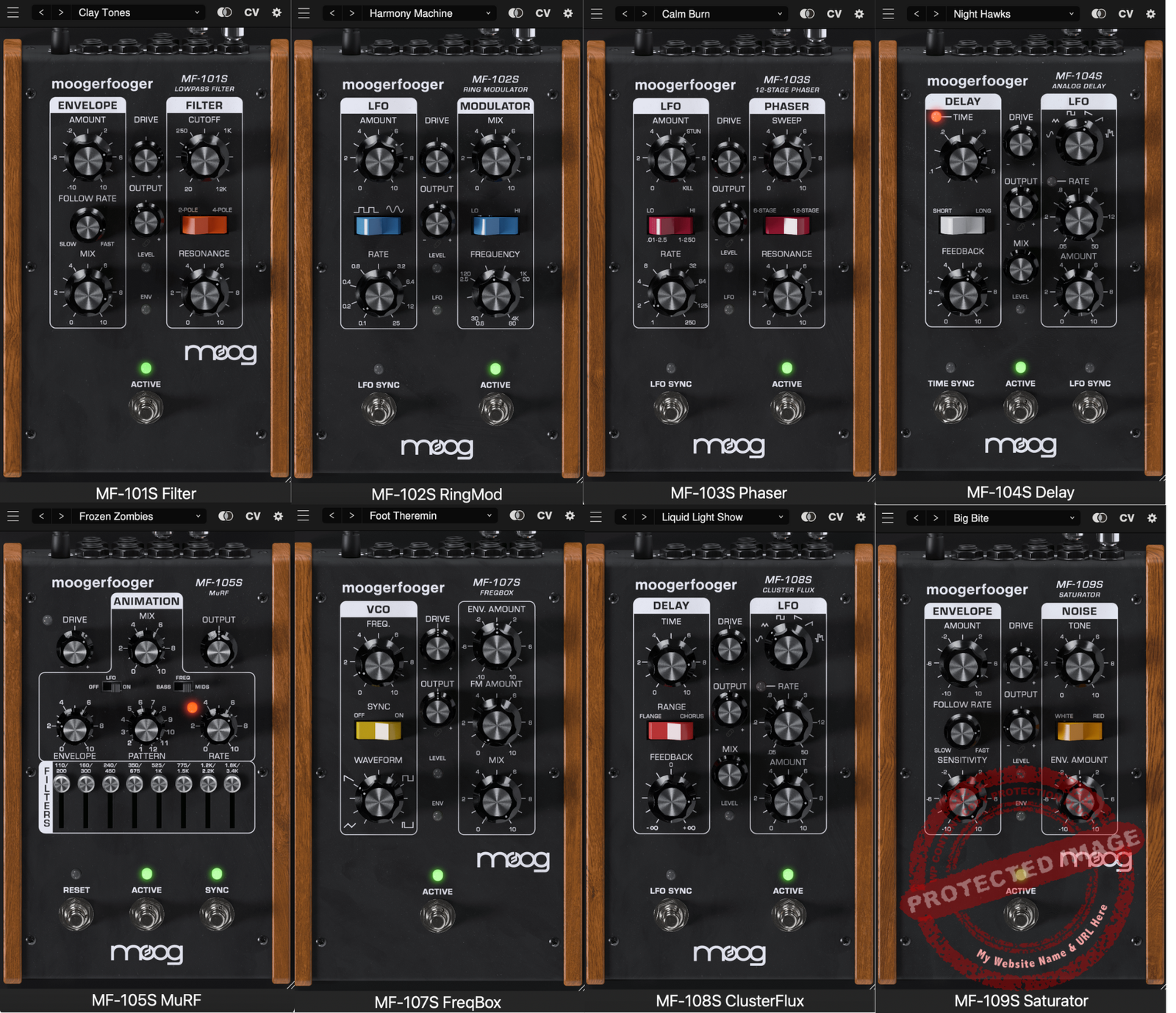
The Moogerfooger Effects Bundle offers a solid recreation of Moog’s classic hardware with useful modern enhancements like stereo functionality and CV interconnectivity. It delivers warm, character-filled tones and versatile sound-shaping tools that can fit into various production styles. While the price may feel steep to some, the detailed emulations and added features make it a strong option for those seeking a blend of vintage sound and digital flexibility. If you value authentic Moog tones in a plugin format, this bundle is worth considering.
Pros
- Exceptional sound quality with authentic Moog character.
- Wide range of effects, from subtle modulation to wild, experimental sounds.
- Intuitive interface that combines vintage aesthetics with modern functionality.
- CV interconnectivity offers modular-style flexibility for creative sound design.
- Low CPU usage, making it suitable for larger projects.
Cons
- Pricey for casual users or those looking for just one or two effects.
- No MIDI Learn feature, which limits controller integration.
- Slight learning curve for beginners unfamiliar with modular-style setup
Today, I will do moogerfooger effects bundle review in a great depth. Imagine if someone told you you could bottle up the Moog sound and put it in your digital setup without having to hunt down rare, overpriced pedals. That sounds like a dream. That’s what this bundle promises.
The grandmaster of analog synthesis, Moog, is turning their legendary pedals into plugins, and this is big news.
Like me, you probably drooled over those Moogerfooger pedals back in the day. They were a kind of gear that made you feel like a mad scientist sculpting sound with knobs and cables.
They’re also less common than unicorns in a guitar shop since Moog discontinued them in 2018. And now there is this bundle with 8 faithfully recreated digital effects that have all the soul of the originals plus more!
Well, these plugins go beyond nostalgia as they have some key modern touches, such as DAW automation, presets, and interconnectivity between plugins. It’s like giving a classic sports car a hybrid engine magic. Either a veteran Moog fan or someone just getting started in this world, there’s a lot to love here. Let’s begin with what’s inside this bundle worth your attention.
“With stereo functionality, an extended feature set, the ability to run multiple instances, and presets, these effects tailor the classic Moogerfooger functionality to the modern digital creator.” Moog
Features
The Moogerfooger Effects Bundle recreates Moog’s classic hardware pedals in a plugin suite for your DAW. It’s a trip down memory lane with this bundle. It adds digital conveniences to make these legendary effects more flexible than ever. You can be a Moog aficionado or a newcomer to Moogerfoogers with this bundle of nostalgia mixed with innovation. Look inside.
- MF-101S Lowpass Filter

This is the heart of the Moogerfooger bundle, the ladder filter. It has an envelope follower that reacts dynamically to your input for creating auto-wah effects as well as deep growling bass tones. This plugin version adds new stereo options and adjustable filter responses with exponential and smooth modes, allowing maximum flexibility.
- MF-102S Ring Modulator

Unique effect that combines your input with a sine-wave carrier to produce metallic, bell-like tones. The onboard LFO allows subtle tremolo to wild warbling modulation. Modern updates add stereo processing modes like panning carriers and unipolar/bipolar LFO options to the original hardware.
- MF-103S 12-Stage Phaser

This rich phaser effect has 6-stage/12-stage modes with different tonal characteristics. Use the onboard LFO for synced, sweeping modulations that add depth to synths, guitars, or even drums. The plugin also has the option to add stereo processing and precise tempo-syncing to your tracks.
- MF-104S Analog Delay

A true classic, this analog delay recreates the warmth of the original Bucket Brigade Device (BBD) circuitry. Delay times from 8ms to 800ms and self-oscillation available, it’s a must have for lush echoes or experimental soundscapes. Added features include ping-pong delay, spillover for seamless bypassing, and selectable delay tonalities with Legacy, Analog, or Modern options to fit your creative needs.
- Multi Resonance Filter Array MF-105S MuRF (Multiple Resonance Filter Array)

Another Moogerfooger bundle contender, this innovative plugin combines a resonant filter bank with a pattern generator to produce rhythmic animated effects. Its step-sequenced modulation is perfect for moving static sounds. It also introduces a visual pattern editor for more precise sequence control and rhythmic possibilities.
- MF-107S Freqbox

This is a special addition for the sound designers. Basically, it’s a VCO that hops around your input signal in wild, chaotic modulations. It has hard sync and frequency modulation and is ideal for making gritty textures and unusual tones. The steep learning curve might intimidate some, but depth awaits the adventurous soul.
- MF-108S Cluster Flux

A modulation tool that changes between flanger, chorus, and vibrato effects. It’s based on a BBD delay line and can produce thick, characterful analog modulation. Expanded stereo options & LFO phase adjustments deliver immersive, spatial effects far beyond the original hardware!
- MF-109S Saturator

This plugin models the input drive stage of the original pedals. It offers everything from soft saturation to aggressive overdrive for warmth or bite on any track. It also has a modeled noise generator from Minimoog Model D with filter controls for some really unique sound design possibilities.
Interface and Workflow
Let’s dive into the Moogerfooger Effects Bundle interface and workflow. Honestly, this bundle feels like a love letter to anyone who’s ever admired a Moog pedal.
It’s got all the vintage charm you’d expect but with modern ease. I couldn’t wait to get my hands on it, and once I did, it felt like sitting down with an old friend, familiar, but with a few surprises up their sleeve.
Interface

The first time I loaded up one of these plugins, I had a little grin on my face cause I thought they really nailed the classic Moog aesthetics with the wooden side panels and chunky nice-looking knobs.
I really felt like dealing with the real hardware. It really brings you the best of both worlds with the retro design and modern versatility.
I liked the intuitive design with the same straightforward design used in different effects units. You don’t have to hunt through menus or tabs, as all the important controls you need are there in the front and center.
It’s clean, organized, and, dare I say, fun to use. I felt like a kid playing with Legos, building wild soundscapes piece by piece.
Workflow

Using these plugins is like playing with an old-school Moog pedal but without any of the hassle. I love how I can just drop one into my DAW and instantly start creating. There’s no learning curve here cause it’s plug-and-play, but for audio geeks like me, there’s still plenty of depth to explore.
One of the coolest things I discovered was the CV interconnectivity. It’s wild! The first time I linked my phaser to modulate the filter, which was also tweaking the delay, I felt like a mad scientist.
It’s like you’re building your own modular synth but without the tangled mess of patch cables. And because everything’s automatable, I could set up some crazy effects that evolve over time, perfect for adding movement to a track.
Another thing I love is the preset system. It’s straightforward but powerful. I’ve already saved a few custom patches that I keep coming back to, and switching between them with the A/B button feels seamless. Plus, organizing my favorite tweaks is such a time-saver.
I don’t have to dig through menus to find “that one sound” I made two weeks ago. Honestly, these plugins have made me rethink how I approach sound design. Whether I’m working on a subtle touch or going all-in on experimental tones, the workflow just gets out of my way and lets me create.
First Impressions and Sound
Right from the first effects unit, you can tell these aren’t your average digital effects. They’ve got that unmistakable Moog vibe with a warm and rich sound, dripping with character.
It’s like they bottled up the soul of their legendary hardware pedals and somehow crammed it into the DAW. Each plugin feels like its own playground, inviting you to mess around and discover something new. Here are some of my favorite features in the bundle and how I use them.
- Lowpass Filter
The Lowpass Filter isn’t just a filter as it’s a full sculpting tool. Sure, you can use it for standard stuff like trimming the high end, but pair it with the envelope follower, and suddenly your drums or guitar tracks come alive.
I’ve gotten some killer auto-wah effects out of it, perfect for adding groove to clean guitar parts. A little trick: push the drive knob just enough to add a touch of grit. It’s subtle, but it makes everything sound richer.
- Phaser
Take the Phaser, for example. You’ve got 6- and 12-stage options, which means it can do everything from subtle shimmer to full-on psychedelic madness. I’ve been using it to add some life to synth pads and make guitars sound like they’re swimming in a trippy vortex. It’s that good.
- Analog Delay

And let’s talk about the Analog Delay for a second, I think this thing is the MVP here. It nails that dark, gooey bucket-brigade tone we all love, but it’s also got modern tricks up its sleeve. Use the Modern tone setting for crisp, clean delays when you’re working on vocals, and switch to Legacy mode when you want that gritty, vintage vibe on guitars.
And yes, you can finally bypass the effect without awkwardly chopping off your delay tails. It’s perfect for live gigs or creating those smooth, dreamy fades in a mix.
- Cluster Flux
The Cluster Flux is your go-to for modulation effects like chorus, flanger, and vibrato. This one’s a total playground for creating lush stereo effects.
I had a blast using it on synth pads, where the stereo spread made everything feel like it was floating in the air. Want to take it up a notch? Try playing with the feedback and rate settings for some seriously otherworldly sounds.
- Freqbox and Ring Modulator
Now, if you’re into weird, experimental textures, the Freqbox and Ring Modulator are where it’s at. The Freqbox, in particular, is perfect for transforming basic sounds into snarling, aggressive monsters. I had some fun running it on drum loops as it turned a dull pattern into something that sounded like it came straight out of an industrial record.
The Ring Modulator, on the other hand, is great for metallic sci-fi textures. If you’re working with vocals, try blending them subtly to add an eerie, robotic quality. Just a pinch, though, you don’t want your singer sounding like a Dalek.
- CV Interconnectivity

For me, the real magic here is the CV interconnectivity, as it is like opening Pandora’s box, but instead of chaos, you get endless creative possibilities. I linked the Freqbox to modulate the Phaser, and suddenly, my track was alive, constantly shifting and evolving.
I also really appreciate that these plugins are super easy to use, even with all the features packed in. The interfaces stay true to their hardware roots but add modern touches like presets and an A/B comparison button.
A quick tip: spend some time exploring the hidden settings on the “rear panels.” These options, like tweaking envelope responses or stereo modes, can totally transform the sound.
- MuRF
For example, on the MuRF, playing with the step sequencer and editing patterns unlocked some crazy rhythmic textures. And if you’re new to modular-style effects, don’t stress and just start small. The first time I linked the Phaser’s sweep to the Lowpass Filter’s envelope follower, I got this organic, constantly shifting effect that I couldn’t stop using.
Compatibility
The Moogerfooger Effects Bundle works on MacOS (11.7+) and Windows (10+), supporting VST3, AU, and AAX formats.
CPU usage is solid, even with analog-style processing, so it runs smoothly in most DAWs without breaking a sweat.
