
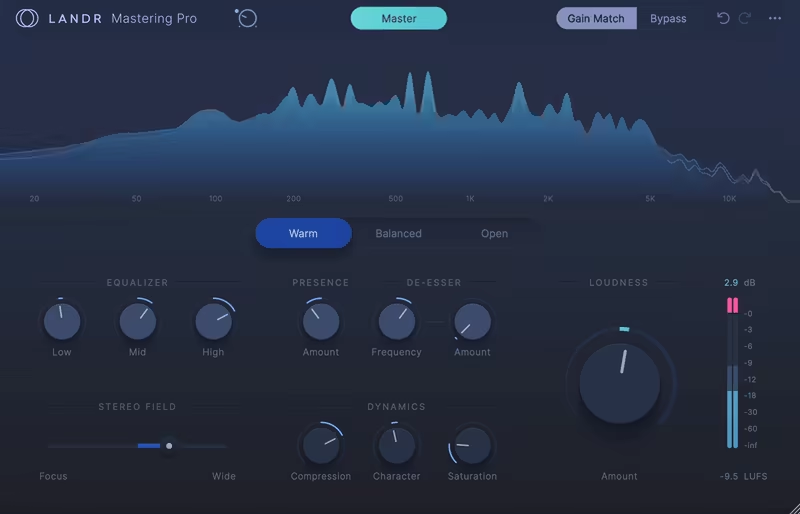
The LANDR Mastering Plugin impresses with real-time processing, versatile mastering styles, and customizable tools like EQ and saturation, making it ideal for quick, polished results in a DAW. While it lacks advanced controls like true peak targeting and can’t replace a human engineer’s touch, it’s a solid choice for independent creators and smaller projects.
Pros
- Quick and easy to use with real-time processing directly in your DAW
- Produces balanced and polished sound quality suitable for most genres
- Customizable tools like EQ, saturation, and stereo width for added control
- Fully integrated into your workflow without the need for exporting or uploading
- Great for independent artists and small projects with tight deadlines
Cons
- Lacks advanced controls like true peak target levels and high/low-cut filters
- CPU-heavy during real-time processing, especially on older systems
- AI can’t match the nuanced creativity of a professional mastering engineer
Today, I will take you to the LANDR Mastering Plugin, tackling the big question: Can AI really handle mastering well?
Well, AI mastering tools have always been a debate in the music production world since they first started to get released. While the first steps were far from delivering anything close to good results, with time and advances in AI technology, today, they are closing the gap between human mastering. Or aren’t they?
Today, you can hire a mastering engineer (if you’ve got the cash), build a chain of plugins and cross your fingers, or let the LANDR Mastering plugin step in like a friend to master your tracks for you and doesn’t judge your taste in reverb.
I’ll admit I am not a big fan of AI mastering tools. Like, how could a plugin really understand the soul of your music? But after spending some time with LANDR’s SE and PRO versions, I can honestly say I’m impressed.
It’s not trying to replace mastering engineers, and that’s not the promise. It’s giving the rest of us an easy way to polish our tracks without feeling overwhelmed. Think of it like having a reliable co-pilot for your mix bus or one that knows all the shortcuts.
In this review, I’ll walk you through the SE and PRO versions, their standout features, and where they might fit into your workflow. Whether you’re a bedroom producer, indie artist, or someone just dipping their toes into music production, this plugin might be the simple tool you didn’t know you needed to create quick and efficient mastering. Let’s get into it!
Features
| Features | LANDR Mastering SE | LANDR Mastering Pro |
| AI Analysis | ✔ | ✔ |
| Loudness | ✔ | ✔ |
| Loudness Meter | ✔ | ✔ |
| Output Meter | ✔ | ✔ |
| Input Trim | ✔ | ✔ |
| Gain Match | ✔ | ✔ |
| Bypass | ✔ | ✔ |
| Visualizer | ✔ | ✔ |
| Mastering Styles | X | ✔ |
| EQ | X | ✔ |
| De-Esser | X | ✔ |
| Presence | X | ✔ |
| Stereo Width | X | ✔ |
| Dynamics | X | ✔ |
The LANDR Mastering Plugin brings the power of AI mastering directly into your DAW, making it faster and easier than ever to achieve polished, professional-quality masters.
With the updated SE and PRO versions, LANDR has added new tools and enhanced controls to give you more flexibility while keeping the process beginner-friendly. Let’s take a closer look at what makes this plugin tick.
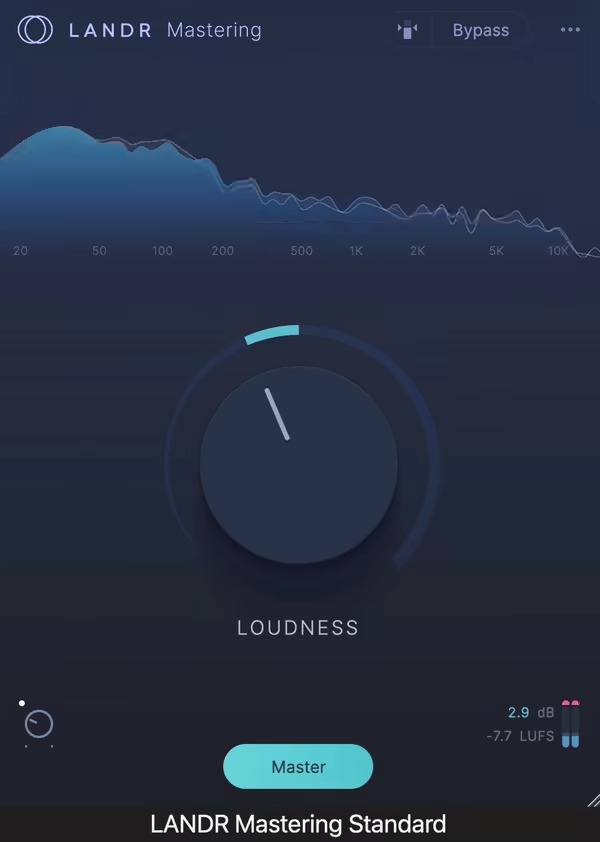
In the rest of the article, I will talk about the Pro version mainly, as the SE version does not provide any control over your sound besides the Loudness and Gain Match features.
- Real-Time AI Mastering in Your DAW
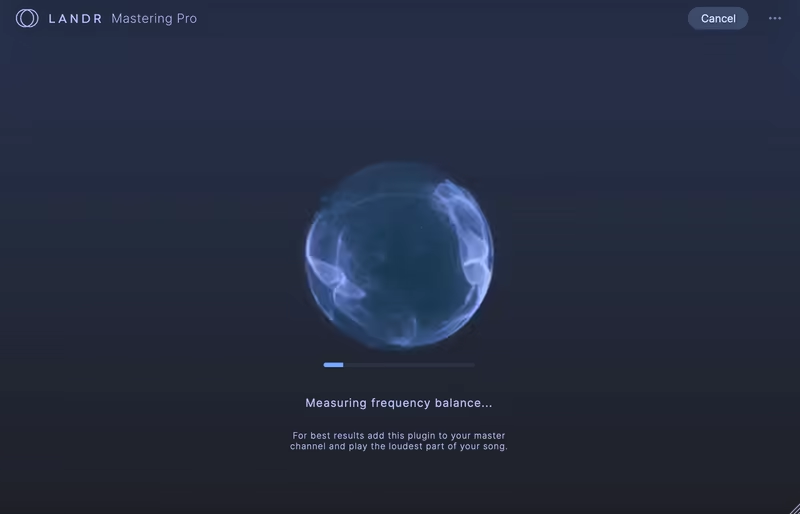
At the heart of the LANDR Mastering Plugin is its real-time AI processing. Unlike traditional mastering tools that require you to export, upload, and download your track, this plugin works within your DAW.
I really liked that you can hear how mix tweaks affect the master instantly, saving time and removing the back-and-forth guesswork. Whether you’re balancing the kick and bass or brightening the vocals, LANDR gives you a preview of the mastered sound as you go.
For producers who love experimenting or need quick revisions, I think this is a super handy tool. It keeps things smooth and helps you make creative decisions with confidence.
- 3 Mastering Styles
LANDR’s AI provides 3 distinct mastering styles tailored to different vibes:
-
- Warm: Perfect for tracks that need a smooth, vintage-like sound with softened highs.
- Balanced: A versatile option that keeps things neutral and well-rounded, ideal for most genres.
- Open: Adds punch and clarity, bringing out the energy and brightness in your track.
Each style serves as a starting point, and you can tweak it further with the plugin’s additional controls. It’s like choosing between 3 outfits that already look great but can still be accessorized.

- Advanced Customization Tools
While the AI-generated master is impressive on its own, LANDR gives you the tools to refine it to your taste. These include:
-
- EQ: Adjust lows, mids, and highs with simple, broad controls.
- Presence: Adjust the upper-mid and treble frequencies of the track
- De-Esser: Tame harsh sibilance or sharp frequencies in the upper-midrange with Amount and Frequency knobs.
- Stereo Field: Widen or narrow your mix to control how the elements sit in the stereo space.
- Dynamics: Control dynamics with Saturation, Compression, and Character knobs.
- Loudness: Dial in your preferred LUFS levels for a perfect balance between loudness and dynamics.
These options strike a balance between simplicity and depth, making the plugin equally appealing to beginners and experienced producers.

- Spectral Display for Frequency Analysis
For the visually inclined, the plugin’s spectral display is a huge plus. It shows a side-by-side comparison of your original mix and the mastered version, highlighting changes in frequency balance.
I really love working with this kind of display as it’s like having a translator for your ears, helping you understand exactly what’s happening to your track.
- AI-Driven Track Analysis
LANDR’s AI doesn’t just slap a preset on your mix; it analyzes your track’s genre, dynamics, and frequency response to create a custom mastering profile.
This tailored approach ensures your track sounds polished and ready for release, whether it’s a lo-fi chill beat or a high-energy dance banger.
With these features, the LANDR Mastering Plugin aims to simplify the often-daunting mastering process while giving you enough control to make your masters truly your own.
Interface and Workflow
Regarding interface and workflow, LANDR is super clean and intuitive and feels like it’s designed to make mastering less of a headache.
Interface
First off, I must say the GUI (graphical user interface) is refreshingly simple. You know how some plugins make you feel like you’re piloting a spaceship with 800 tiny knobs? LANDR skips that stress.
The layout is spacious, modern, and straight to the point. The Master Button is sitting there, ready for action, and the Gain Match and Bypass toggles are front and center for quick comparisons. Honestly, it’s like the plugin is saying, “Don’t worry, I’ve got this covered.”
One of my favorite parts is the spectral display as you can literally see how the frequencies are changing between your mix and the master, making you feel like you are watching a before-and-after makeover in real time.
It’s not just pretty; it’s super helpful for catching balance issues or deciding if your track is hitting the right vibe. The colors are maybe a bit boring but bright enough to grab your attention but not so wild that you feel like you’re at a laser show.
I think that it’s clear that LANDR wanted this plugin to be approachable to everyone. Whether you’re a beginner or you’ve got a few hundred mixes under your belt, the interface makes you feel at home. I think it’s also a good addition that you also see the descriptions of the controls when you move your cursor on them, which is great for beginners.

Workflow
Using the LANDR Mastering Plugin is quite straightforward, especially if you’re used to traditional mastering workflows that feel like you need a Ph.D. in audio engineering to figure out.
You just slap it on your master bus, hit play, and let the AI do its thing. Within around 30 seconds, it spits out 3 mastering styles, Warm, Balanced, and Open, for you to try. It’s like a digital stylist picking out outfits for your track.
Here’s a little tip: loop a section of your track when you’re comparing the styles. That way, you can really focus on what’s changing without getting distracted by your song’s transitions.
Picking a vibe is half the fun, as the unit’s customization tools include EQ, saturation, and stereo field adjustments, which are simple but powerful.
For me, the real-time processing is one of the features that really sets this plugin apart. You don’t have to export and import tracks to hear how the master sounds. Instead, you can make changes on the fly and hear the results instantly. It’s like cooking with a taste-as-you-go method, with no surprises at the end of each bite.
The workflow is simple to use and intuitive, which is the strongest aspect of the unit, in my opinion. If you’re not a master of the game, LANDR makes mastering feel like a collaboration, not a chore. It might not give you the best-sounding master in the world, but it is probably the easiest.
First Impressions and Sound
After trying out the LANDR Mastering plugin for different projects and genres, I can say it’s a surprisingly practical tool for specific situations. It makes the mastering workflow easy and quick, and the results are pretty decent without the usual hassle of exporting, uploading, and downloading tracks like with the online mastering services.
The fact that it’s fully integrated into your DAW means you can tweak your mix or bus processing as you go, which is a big plus for refining your sound without breaking your workflow.
The sound quality is respectable, as LANDR keeps your mix balanced and polished, with a controlled low end and clear, smooth highs. I like that it doesn’t try to reinvent your track, but it enhances what’s already there, making it sound more cohesive and ready for release.
I feel this plugin shines for creators who need to move quickly without sacrificing too much quality. It’s great for demos, podcasts, or even singles for streaming, especially for those of us juggling multiple hats in the DIY music world.
I still think that it can’t match the depth or finesse of professional human mastering, but it’s not trying to compete at that level anyway. Instead, it’s aimed at self-recording and self-publishing artists, who often need to handle everything themselves, from recording to distribution.
In the end, for independent artists and content creators without the time or budget for professional mastering, I think this is a great unit to have. It’s a practical tool that serves its purpose well.
Compatibility
The LANDR Mastering Plugin comes for both Mac (macOS 10.14 and higher) and Windows (Windows 10 and higher) platforms in VST3, AU, and AAX formats.
In terms of CPU usage, it’s a bit heavier than your average plugin. Analyzing and processing tracks in real-time comes with the CPU cost, but if you have the basic system requirements, you should be good.
Last Words
My conclusion is that the LANDR Mastering Plugin is a solid unit for those who want and need quick, reliable mastering without the cost of a mastering engineer or the complexity of traditional workflows.
It can’t replace the creativity and the specialized approach of an expert engineer, and it is nowhere near when working on complex projects. However, it is a great option for polished results that are efficient and quick.
If you are someone wearing all the hats, like producing, publishing, and promoting, this might be a valuable addition to your plugin arsenal.
