
Good news, everyone! This year, some seriously impressive free reverb plugins hold their own against paid options.
Finding a great-sounding reverb plugin without spending a dime can feel like searching for a needle in a haystack. I’ve been through countless free reverb plugins over the years and found out that some are absolute gems, while others… well, they don’t quite make the cut.
I love how modern free reverb VSTs are no longer just basic room effects. Some of them offer deep modulation, lush textures, and pro-level realism from clean and transparent spaces to ethereal shimmers or massive cavernous washes.
So, if you’re looking to expand your reverb collection without spending a fortune, here are some of the best free reverb plugins in 2026. Let’s dive in!
| Plugin | Reverb Style | Best For | Strength |
|---|---|---|---|
| Variety of Sound epicCLOUDS | Ambient / cinematic | Pads, atmospheres, film scoring | Huge spaces that stay clear (very long tails) |
| Flex Reverb (Platone Studio) | Plate | Vocals, instruments, subtle depth | Built-in graphic EQ + separate Dry/Wet controls |
| TAL-Reverb-4 | Vintage plate-ish | Retro vocals, synths, drums | Fast build-up + simple “always works” tone |
| Magic7 M7 Reverb | Multi-space (M7-style) | Vocals, drums, mix depth | Preset workflow + ducking + modulation |
| Lotus Sound Ocean Plate | Plate | Vocals, guitars, synths | Warm plate tone + built-in EQ section |
| Dragonfly Reverb (bundle) | ER / Room / Hall / Plate | All-purpose mixing | 4-plugin suite + EQ, natural tone |
| Soundjuce JuceVerb | Simple room/plate-style | Quick utility reverb | Low CPU, minimal controls, easy presets |
| Valhalla Supermassive | Massive delay + reverb | Ambient, cinematic, experimental | 21 modes, huge sound, CPU-friendly |
| Variety of Sound epicPLATE mkII | Plate | Vocals, snares, classic plate | Dense build-up, drive, gate/80s vibe |
| BPB Dirty Spring | Spring + bitcrush | Guitars, dub, lo-fi textures | Spring character + “Dirt” crusher + Kick clang |
| OrilRiver (Denis Tihanov) | Algorithmic hall/room | Realistic spaces, general mixing | Natural tails + ER control + 3-band EQ |
1. Variety of Sound epicCLOUDS

| Plugin | Variety of Sound epicCLOUDS |
|---|---|
| Description | Free ambient reverb built for huge, cinematic spaces while keeping the source clear and unmuddy |
| Award | Best for Ambient Washes |
If you are after creating wide, open textures with clarity without spending a dime, EpicCLOUDS is a free ambient reverb plugin you have to check.
I’ll start with the epiCLOUDS, as it produces really big, immersive spaces without getting too messy, making it ideal for atmospheric music, film scores, and sound design. Unlike some long-decay reverbs that overwhelm a mix, it keeps the source material intact but delivers cinematic reverb.
- Lush, High-Density Ambient Reverb
epicCLOUDS emulates massive spaces like cathedrals and open halls, making it great for deep, evolving textures. It runs high-density settings internally, ensuring a smooth and even reverb tail without unwanted artifacts or resonances.
- Bloom and Decay for Shaping Reverb Tails
The Bloom effect lets me control how the reverb builds up, from instant impact to a slow, atmospheric swell. Paired with the decay control, which goes up to 60 seconds, it allows for both subtle room effects and massive, infinite-like spaces.
- Simple Interface with Real-Time Visualizer
Despite its deep, ambient character, epicCLOUDS is surprisingly easy to use. The tone and modulation controls help fine-tune the reverb, while the quality switch lets me choose between high-fidelity sound and lower CPU usage.
While it doesn’t offer as many algorithmic options as Valhalla SuperMassive, it excels at creating a clean, atmospheric reverb without signal masking.
epicCLOUDS is available for Windows in VST2 and VST3 formats.
2. Flex Reverb
| Plugin | Flex Reverb (Platone Studio) |
|---|---|
| Description | Clean plate reverb with a built-in graphic EQ and separate Dry/Wet controls for easy tone shaping |
| Award | Best for Vocals |
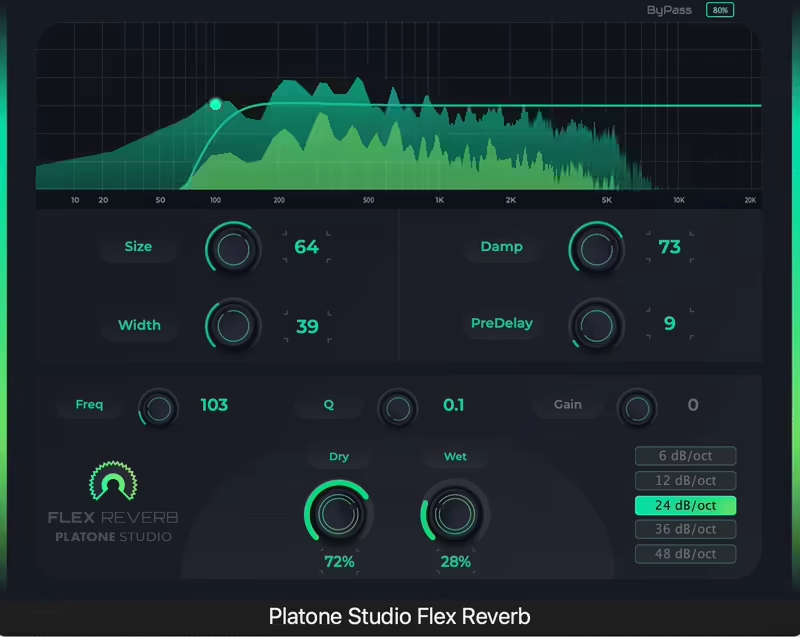
Flex Reverb by Platone Studio is a clean, high-quality plate reverb that stands out with its built-in graphic EQ, making it easy to shape the reverb’s tone without needing an external filter.
The star here for Flex Reverb is the effective design, as it works great and quickly when adding subtle depth to vocals or creating expansive soundscapes, getting the job done without cluttering the mix.
- Modern Interface
The modern UI features Pre-Delay, Size, Width, Damp controls, and separate Dry/Wet knobs for batch mixing. The built-in EQ is a nice addition, allowing you to snip out unwanted frequencies right inside the plugin.
- Clean, Diffused Plate Reverb with Tonal Control
The algorithmic plate reverb offers a lovely, natural-sounding decay that works beautifully on vocals, instruments, and atmospheric effects. Plus, the graphic EQ makes it super easy to adjust the reverb just right, ensuring it fits perfectly in your mix without getting in the way of other sounds.
- Independent Dry/Wet Controls for Parallel Processing
Unlike many free reverb VST, Flex Reverb features distinct Dry and Wet controls, which makes it perfect for parallel processing without the need for an auxiliary channel. This functionality allows you to precisely mix the reverb to my liking without any additional routing.
For a free reverb plugin, Flex Reverb exceeds expectations, providing strong plate emulation and user-friendly workflow features. If you’re looking for a clear, adjustable reverb that includes built-in EQ, this is definitely worth checking out.
Flex Reverb is available in VST, VST3, and AU formats for macOS and Windows users.
3. TAL-Reverb-4

| Plugin | TAL-Reverb-4 |
|---|---|
| Description | Simple vintage-flavored reverb with fast build-up and subtle modulation for retro space. |
| Award | Best for Beginners |
TAL-Reverb-4 is a free vintage reverb VST that deserves this spot with its diffuse, modulated sound as well as the fast build-up time, making it a solid option.
TAL-Reverb 4 excels at capturing the airy quality of classic reverb units while keeping the workflow simple and intuitive. For vocals, synths, or retro drum sounds, it adds a nice character without overwhelming the mix.
- Intuitive GUI
Regarding the interface, you get the essentials like wet/dry mix, size, pre-delay, and high/low cut filters, along with a subtle modulation that gives it that vintage plate feel.
There’s no dedicated decay control, which might be a drawback for some, but honestly, I haven’t missed it much. The reverb tail naturally evolves and it sounds way better than I expected.
- Fast Build-Up for Instant Impact
This reverb feels immediate, even with longer settings. That quick build-up time makes it great for percussive sounds, keeping drums snappy while still adding space.
It’s also great for synths and guitars when you want a vintage vibe without things getting too washy.
- Simple and Easy to Use
There’s not much to overthink here, and that’s what I love about it. The pre-delay and size controls help shape the space, while EQ filters prevent the reverb from becoming too muddy or harsh.
Well, it’s not a fancy multi-algorithm reverb with deep customization, but that’s not the promise here, anyway. It nails the classic plate sound in a way that even beginners will find easy.
So, if you want a warm, spacey reverb with no frills and super easy workflow, TAL-Reverb-4 is for you.
TAL-Reverb-4 is available for macOS and Windows users in VST, AU, and AAX formats.
4. Magic7 M7 Reverb Plugin

| Plugin | Magic7 M7 Reverb Plugin |
|---|---|
| Description | Preset-driven M7-style reverb with true-stereo depth plus modern tools like ducking and modulation |
| Award | Best Overall |
Magic7 İS a great recreation of the legendary Bricasti M7 reverb, making it one of the best free reverb plugins in 2026.
I love how Magic M7 delivers the lush, high-end sound of a $4,000 hardware unit in plugin form. It is a pretty versatile free reverb VST as it gets the job done, either working on subtle room reflections or massive cathedral spaces with its depth and clarity.
- Resizable UI and 234 Presets
I always appreciate a high-definition resizable UI as it makes the navigation smooth, while features like preset tagging, favorites, and instant shuffle are great for finding the sweet spot and easing the workflow.
Plus, with 234 well-crafted presets, it helps you by fine-tuning decay times or diffusion instead of doing it manually.
- Authentic Bricasti M7 Reverb Sound
Magic7 is pretty versatile with its 11 reverb types, covering Ambience, Halls, Plates, Rooms, Spaces, and more.
I like that each reverb type has the true stereo depth and realism of the M7, giving the mixes a professional, polished sound. I tried it on vocals, drums, or orchestral arrangements, and it added dimension and warmth without overwhelming the mix, which surprised me in a very good way.
- Modulation and Transient Control for Extra Depth
Unlike basic reverb plugins, Magic7 includes Flux and Ensemble modulation options for stereo spatialization and chorus-like movement to create more immersive reverb tails.
The Smooth control helps you when taming transients so that the reverb blends seamlessly without any harsh reflections or unwanted ringing.
- Built-In Ducking for Mix Clarity
One of my favorite features is the Duck slider, which automatically lowers the reverb tail when the dry signal is present.
This is a smart feature as it prevents the muddiness perfectly, making it ideal for vocals and drums, keeping them upfront while still benefiting from rich, atmospheric reverb.
Magic7 captures the depth and character of the Bricasti M7 while adding modern workflow enhancements like ducking, modulation, and an intuitive preset system.
Magic7 comes in VST3, AU, and AAX formats for macOS and Windows users.
5. Lotus Sound Ocean Plate
| Plugin | Lotus Sound Ocean Plate |
|---|---|
| Description | Warm plate reverb with filters and a 3-band EQ for shaping the tail without extra plugins |
| Award | Best Value |
Lotus Sound is a warm, analog-inspired free plate reverb plugin that brings authentic and warm reverb to your tracks.
My favorite part of the Ocean Plate is that it delivers a lush, immersive ambiance without being overly complex, ideal for subtle vocal enhancements to huge atmospheric washes.
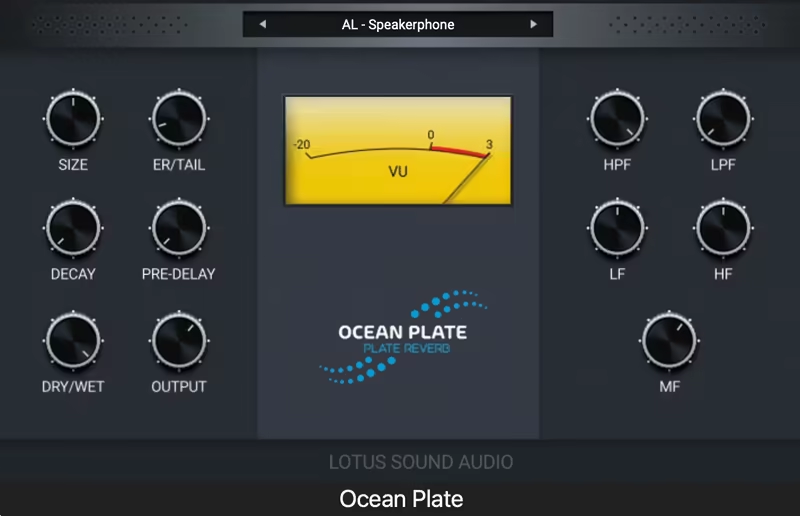
Unlike some free VSTs, it comes with a built-in EQ section to tweak the reverb’s tone without adding another plugin.
- Warm, Lush Plate Reverb
Ocean Plate nails that classic plate sound, giving me smooth, natural decay with a rich analog feel.
The unit has a nice warmth and depth in the tones it provides, making it great for vocals, guitars, and synths without sounding too digital or artificial.
- Built-in EQ for Shaping the Reverb Tone
For me, the unit having an EQ built right into the plugin is a huge plus.
With 2 filters and a 3-band EQ, I can cut unwanted lows, smooth out highs, or bring out presence, all within the reverb itself. It saves time and keeps my workflow clean.
- Easy and Flexible Controls
Even though it’s simple, Ocean Plate gives me enough control to shape the reverb exactly how I need it. The pre-delay and early reflections let me add dimension without overpowering the dry signal, making it great for both subtle mixing and creative sound design.
The high and low filters plus 3-band EQ are a game-changer, letting me tweak the reverb’s tone directly instead of reaching for an external EQ.
The only real downside is that there is no AAX support for Pro Tools, but for a free reveb tool, it’s surprisingly powerful and well-thought-out. If you want a warm, classic plate reverb with extra tone-shaping options, this is definitely worth grabbing.
Ocean Plate is available in VST3 and AU formats for macOS and Windows users.
6. Dragonfly Reverb

| Plugin | Dragonfly Reverb |
|---|---|
| Short Description | Free bundle of early reflections, room, hall, and plate reverbs with built-in EQ for flexible mixing. |
| Award | Most Versatile |
Designed by Michael Willis and built on Freeverb3, Dragonfly is a bundle of 4 reverb plugins: Early Reflections, Room, Hall, and Plate.
Unlike most free reverb units, Dragonfly Reverb feels and sounds quite professional, and the built-in graphic EQ makes tone shaping a breeze. I really liked how warm and natural these units sound, which is great for adding space and depth to any mix.
- 4 Different Reverb Types for Maximum Flexibility
Each plugin in the bundle does something. Room for a natural ambiance, Early Reflections for subtle space, Hall for huge immersive reverbs, and Plate for classic smooth reverb tails. Having all four means I can shape my space how I want without relying on external plugins.
- Visual Controls for Simple Tweaking
Color-coded knobs make adjustments easy. Orange knobs control the reverb’s tone, and blue knobs adjust volume and balance, so no more guessing about sound settings.
In the end, I can say the sound quality is impressive, but some UI bugs are reported in some DAWs like Ableton. A downside is that there is no native preset saving. However, these are minor trade-offs since it is completely free and open-source.
If you want a flexible reverb suite that sounds great, then Dragonfly Reverb is for you.
For macOS and Windows users, Dragonfly Reverb is available in VST2, VST3, and AU formats.
7. Soundjuce JuceVerb

| Plugin | Soundjuce JuceVerb |
|---|---|
| Short Description | Lightweight reverb with minimal controls and presets for quick, natural space on any track. |
| Award | Best Fast Workflow |
One of the newer units on the list, JuceVerb, is a simple free reverb plugin that gives you great-sounding space without the fuss.
The reason I chose JuceVerb is how it removes all the fancy controls of traditional reverb plugins and just lets you tweak the sound to perfection! Adding depth to vocals, drums, synths, or guitars with natural reverberation is a breeze with the plugin.
And the interface: it’s as clean and simple as it gets. A single wet level knob makes adjusting reverb intensity intuitive, while additional controls such as damping, room size, and stereo width give just enough flexibility not to overwhelm the workflow.
- Effortless Reverb Control
JuceVerb sticks to basic controls. No unnecessary settings, only wet level, damping, room size, stereo width, and freeze, for quick adjustments in any genre.
- Works on Any Instrument
Vocals, drums, synths, and guitars can work with any source. It uses very little CPU, so I can use it across multiple tracks without crashing my session.
- Customizable Presets
I like the preset selector to dial in a sound quickly, and I like having my own custom settings saved for different projects. The bypass button also allows A/B testing. For a simple, good-sounding reverb without unnecessary complexity, JuceVerb is a solid free reverb VST.
For macOS and Windows, JuceVerb is available in VST3 and AU formats.
8. Valhalla Supermassive

| Plugin | Valhalla Supermassive |
|---|---|
| Short Description | Huge delay/reverb hybrid for massive atmospheres, evolving tails, and experimental textures. |
| Award | Best for Sound Design |
Valhalla Supermassive isn’t just another reverb unit, as it’s designed for massive delays and reverbs that push the boundaries of space and depth.
I won’t lie, this is my favorite free reverb plugin as it gives pro sound in every case. Whether you want luscious clouds of reverb, cascading echoes, or swelling waves of feedback, Super Massive delivers a level of atmosphere you won’t find anywhere else.
I’ve spent hours experimenting with it, and I love how each mode creates a different spatial character. Some offer clean and ethereal textures, while others lean into deep, resonant echoes. It’s a playground for ambient music, cinematic soundscapes, and experimental production.
- Massive Reverb & Delay Modes
With 21 unique algorithms, Supermassive lets you create everything from short, shimmering verbs to epic, evolving soundscapes. Each mode changes how the reverb builds, sustains, and decays.
- Effortless Sound Shaping
The EQ High Cut is one of my go-to controls, as it helps tame the highs and smooth out the reverb tail. Density, Warp, and Feedback interact in unique ways, making it easy to fine-tune massive reverb textures.
- Huge Sound Without the CPU Hit
Despite its enormous sound, Supermassive is incredibly CPU-friendly. I’ve loaded it across multiple tracks without any slowdown. It’s perfect for layering deep reverbs on vocals, synths, and cinematic effects without bogging down my session.
Given its power and flexibility, it’s hard to believe this one is a free reverb plugin. If you want otherworldly reverb and delay, this plugin is a must-have.
For macOS and Windows, Valhalla Supermassive is available in VST, VST3, AU, and AAX formats.
9. epicPLATE mkII

| Plugin | Variety of Sound epicPLATE mkII |
|---|---|
| Short Description | Classic plate reverb with dense build-up, drive, and gated/colored modes for vintage character. |
| Award | Best for Drums |
Variety of Sound has returned with epicPLATE mkII, a free plate reverb plugin that effectively simulates the rapid, dense reverb build-up characteristic of vintage plate units.
You can unlock the full potential of your sound, thanks to the epicPLATE mkII, as it makes working with vocals and drums, or diving into innovative sound design with this tool delivers the unmistakable smoothness and consistency that plate reverb is known for.
What sets epicPLATE mkII apart as a free reverb VST is its sweet spot of simplicity and intelligent design. The updated interface is sleek and modern, making the workflow easy and efficient.
- Classic Plate Reverb with Enhanced Processing
This update keeps the same lush, musical sound but now offers VST3 support and improved stereo processing for a richer spatial feel.
- More Control for a Tailored Sound
The new version refines the filter section, now with separate high-pass and low-pass filters for better tonal shaping. The Drive knob is still here, adding subtle saturation for extra warmth.
- Instantly Iconic Effects
The Gate switch brings instant ‘80s vibes (think Phil Collins’ snare), while the Color mode lets you toggle between bright and dark plate tones, perfect for dialing in the right mood.
epicPLATE mkII is a must-have for classic plate reverb lovers, offering authentic character with modern flexibility.
For Windows users, epicPLATE mkII is available in 32/64-bit VST2 and VST3 formats.
10. BPB Dirty Spring

| Plugin | BPB Dirty Spring |
|---|---|
| Short Description | Spring reverb with a built-in bitcrusher for gritty, lo-fi tails and ‘kicked tank’ effects. |
| Award | Most Characterful |
Spring reverbs are already fun, but BPB Dirty Spring takes things further by adding a built-in bitcrusher for a crunchy, lo-fi edge.
If you are after that classic guitar ambiance, dubby drum textures, or trippy synth echoes, this free reverb VST delivers a gritty yet musical character.
For me, BPB Dirty Spring is a great plugin because of how simple and easy it is to use. Just tweak the Decay and Tone knobs to shape the reverb and use the Pre-delay for an echo-like effect.
But the Dirt control is where things get interesting cause it lets you apply bit crushing in 6 different modes, from subtle saturation to full-on digital destruction.
- Classic Spring with a Dirty Edge
At its core, BPB Dirty Spring delivers authentic spring reverb vibes with a dedicated Kick button that lets you ‘bump’ the reverb tank for that classic metallic clang.
- Bitcrushing for Extra Character
This is more than just a free reverb plugin, as it’s also a bitcrusher unit. The Dirt knob introduces gritty textures to your reverb tail, making it great for lo-fi effects on drums, synths, and vocals.
- Intuitive, No-Fuss Controls
The unit has a pretty nice amount of controls and tweaking options. Some key features include:
-
- Decay (up to 6 seconds)
- Tone for shaping the brightness
- Pre-delay (up to 1 second)
- Dirt (6 bitcrushing modes)
- Mix knob for blending dry/wet signal
This is one of the most fun free reverbs out there. The bitcrusher effect adds a unique layer of character and unpredictability, making it a go-to for lo-fi lovers.
For macOS and Windows users, BPB Dirty Spring is available in VST2, VST3, AU, and AAX formats.
11. OrilRiver by Denis Tihanov

| Plugin | OrilRiver (Denis Tihanov) |
|---|---|
| Short Description | Smooth algorithmic reverb with strong early reflection control and built-in EQ for realistic spaces. |
| Award | Best for Realistic Rooms & Halls |
What I love about OrilRiver, the last plugin on the list, is its ability to deliver high-quality algorithmic reverb that feels as good as many paid options.
The lush, natural reflections make OrilRiver an ideal choice for different reverb workflows like subtle room ambiance, or massive hall reverbs. It is a free reverb plugin that easily holds its own against commercial reverb pluginswhen it comes to sonic quality.
I also enjoyed how everything is laid out clearly, allowing for quick adjustments without digging through menus. You can shape the reverb effortlessly and get the depth you need for anything from cinematic soundscapes to drums and vocal reverbs.
- A Lush and Natural Sound
The standout feature here is how OrilRiver simulates realistic reverb spaces. When I need a tight, intimate room or an expansive cathedral-like tail, it always delivers a convincing sense of space without sounding artificial or metallic.
I really love the tones here, as it’s rare to find a reverb plugin free with this level of clarity and smooth decay.
- Powerful Early Reflection and Reverb Tail Control
Having 12 early reflection variations and 5 reverb tail types means you can tweak how the reverb sits in a mix however you like.
Sometimes I want a tighter, more controlled response, while other times I need a washy, atmospheric feel. OrilRiver lets me shape both the attack and sustain of the reverb, which makes it incredibly versatile.
- Built-in 3-Band EQ for Shaping the Tone
I love that the reverb has a built-in EQ for adjusting the wet signal. Instead of adding an extra EQ plugin to tame highs or bring out warmth, I can quickly shape the reverb’s tonal balance right inside the plugin.
This makes it a super efficient free reverb plugin for dialing in the perfect reverb character without muddying up a mix.
If you want to check the best reverb plugins out there, paid or free, you can check my best reverb plugins list!
OrilRiver comes in VST2 and VST3 formats for macOS and Windows users.
How do I stop reverb from making my mix muddy?
Start with these quick fixes:
- High-pass the reverb (often somewhere around 150–300 Hz, depending on the source).
- Use shorter decay and/or more pre-delay so the dry signal stays upfront.
- If the plugin has it, use ducking so the reverb tail drops while the vocal/instrument plays.
What’s a good starting point for vocal reverb in a busy mix?
Try a plate or small hall with:
- Decay: ~1.2–2.2s
- Pre-delay: ~20–60ms (helps clarity)
- High-cut / damping: roll off some top end so the tail doesn’t hiss
Then blend the reverb until you notice it when you mute it, not when it’s on.
Why does my reverb sound “cheap” or metallic on some sources?
Common causes:
- Too much early reflection energy or diffusion too low (can create ringing).
- Bright tails with no damping/high-cut (reveals artifacts faster).
- Wrong size/decay for the material (long decays on percussive sources can smear).
Fixes: increase diffusion, add damping/high-cut, shorten decay, or pick a different algorithm/mode that’s smoother on transients.
Last Words
This list of the best free reverb plugins can get the job done, either mixing vocals, building depth around drums, or designing huge atmospheric spaces.
- If you need realistic rooms and halls, start with OrilRiver or Dragonfly.
- For classic plate tone, Ocean Plate, Flex Reverb, and epicPLATE mkII cover the essentials.
- If you’re chasing big cinematic tails, epicCLOUDS and Valhalla Supermassive are the easy picks.
Choose based on the job: clean utility verbs for everyday mixing, plates for vocals and snares, and ambient/shimmer-style tools when you want the reverb to become part of the sound!
