
Deelay PE strikes a good balance between creativity and usability. It’s packed with fun and useful features without feeling bloated, and it’s affordable enough to justify the upgrade. If you want a delay that can go from clean to experimental without a headache, this one’s worth a shot.
Price
Pros
- Creative sound design features like pitch shifting, frequency shifting, and mid/side processing
- Ducking control keeps mixes clean by lowering delay volume when the dry signal is active
- 15 distortion types allow for unique tonal shaping and textural effects
- Intuitive interface with customizable themes and A/B testing for quick comparisons
- Lightweight on CPU while still offering high-quality sound and flexible processing
Cons
- No built-in preset browser, so managing and saving presets relies on the DAW
- High feedback settings with heavy distortion can get chaotic quickly
- Limited modulation options, with only basic controls for movement
- Learning curve for beginners
The Deelay PE delay plugin is more than just an echo machine. Let’s dive into what it offers and whether it’s worth the upgrade.
Delay is one of those effects that can be simple or completely transformative, depending on how much control you have. Sometimes, you just want a clean, tempo-synced echo, but other times, you want to reshape your sound entirely. That’s where Deelay PE (Platinum Edition) by Sixth Sample comes in.
I spent some time with it, and it’s a solid step up from the free version, adding frequency shifting, pitch shifting, mid/side processing, and extra distortion modes.
It’s still got the same clean and intuitive interface, but now with more ways to tweak and shape your delays beyond just repeats and feedback.
With the relatively affordable price tag, it’s a budget-friendly plugin that sits somewhere between a traditional delay and a creative sound design tool. But how well does it actually work? And is the upgrade worth it? Let’s break it down.
| Feature | Description |
| Frequency & Pitch Modes | Adds frequency and pitch shifting to the feedback loop for unique sound manipulation. |
| Mid/Side Processing | Lets you position delays in the stereo field, working alongside ping-pong mode. |
| 4 New Distortions | Expands the total distortions to 15, adding more ways to color your effects. |
| Adjustable Filter Resonance | Allows fine-tuning of high and low-cut filters for creative sound shaping. |
| Master Panning Slider | Enables precise control over effect positioning between left, right, mid, and side. |
| 10 Color Themes + Custom Theme | Fully customizable interface to match your workflow. |
| Full DAW Sync | Supports Normal, Triplet, and Dotted timing for seamless tempo-matched delays. |
| Ducking Feature | Automatically reduces effect volume when the dry signal is active for a cleaner mix. |
| Reverse & Chaos Modes | Experimental modes for unpredictable and evolving echoes. |
| A/B Testing Mode | Lets you compare two different delay settings side by side. |
Features
Deelay PE builds on the already solid free version by adding more control, more creativity, and a few unexpected twists. If you liked the original, this version gives you even more ways to shape your delays, whether you want subtle ambiance or completely warped echoes.
If you wanna check the free version, here is our review!
- Frequency & Pitch Modes
The new addition, Frequency Mode, acts like a frequency shifter, gradually altering the pitch of each echo.
Meanwhile, the Pitch Mode introduces a pitch shifter, making each repetition move up or down in musical steps. These aren’t just small tweaks, as they can turn a simple delay into a lush shimmer, an eerie detuned wash, or something completely unpredictable.

- Mid/Side Processing
Most delay VSTs let you pan your echoes left and right, but Deelay PE takes it further with mid/side processing. This means you can place your delays in the center (mid) or the sides (stereo width) instead of just bouncing between channels.
Plus, this works alongside ping-pong mode, so you can create wider, more immersive delay patterns that aren’t locked into the usual left/right movement.

- 4 New Distortions
Distortion and delay can be a great combo, and Deelay PE expands on this by adding 4 new flavors from F(l)atter, bringing the total to 15 distortion types.
Whether you want warm saturation, crunchy clipping, or aggressive digital destruction, there’s a distortion mode to help shape your repeats in subtle or extreme ways.
- Adjustable Filter Resonance
Deelay PE gives you more control over the tone of your effects by adding resonance sliders to both the high and low-cut filters.
This means you can make certain frequencies pop out more, which is especially useful when combined with distortion, modulation, or diffusion.
Interface and Workflow
A plugin can have all the best features in the world, but if the interface is cluttered or confusing, it’s no fun to use.
Thankfully, Deelay PE keeps things straightforward with an easy-to-navigate layout that feels familiar if you’ve used any VST delay before.
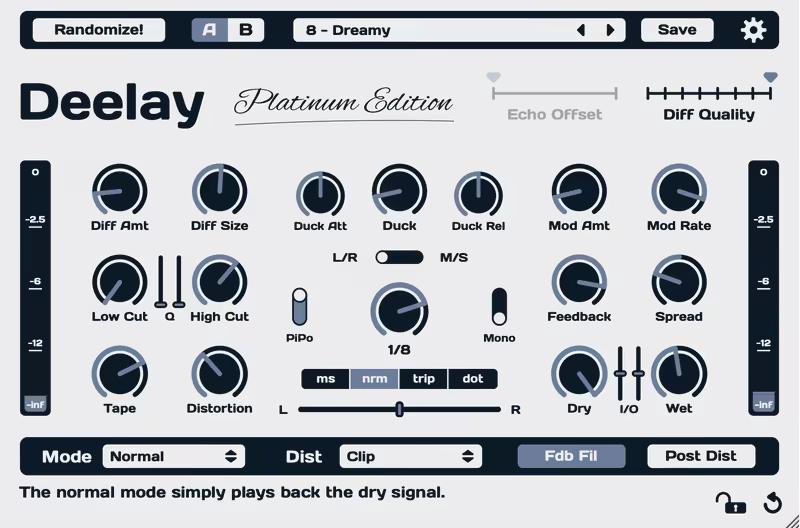
- Same Familiar Layout, More Power
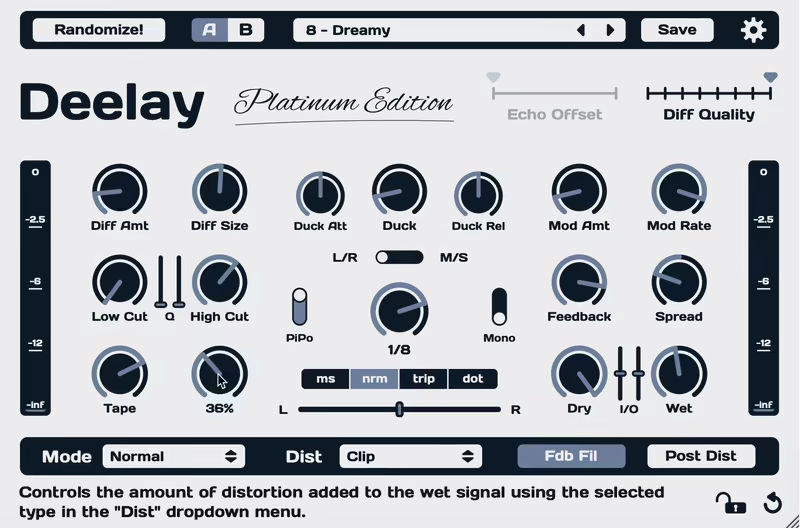
If you’ve used the free version of Deelay, you’ll feel right at home. The core layout remains the same, with sliders for delay time, feedback, ducking, diffusion, and modulation sitting front and center.
The difference? Deelay PE adds extra distortion options, pitch and frequency modes, mid/side processing, and filter resonance controls, but without making things feel cluttered.
- A/B Testing
One of my favorite workflow additions is the A/B testing mode cause it allows you to dial in a delay setting, tweak it a bit more, and then suddenly forget which version you liked better? This mode lets you store two different setups and switch between them instantly, which is perfect for quick comparisons without messing up your mix.
- Customizable UI
Looks don’t affect sound, but a clean interface definitely makes working easier. Deelay PE gives you 10 color themes to match your personal style, plus a custom theme option if you want to tweak it further.
| Control | Description |
| Delay Time | Adjusts the time between repeats (0-1000ms) or syncs to BPM. |
| Feedback | Controls how many times the signal repeats. |
| Ducking (Attack & Release) | Lowers delay volume when dry signal is present for a cleaner mix. |
| Diffusion (Amount, Size, Quality) | Blurs delay into a reverb-like effect for added space. |
| Modulation (Amount & Rate) | Adds movement to delay repeats by slightly altering pitch. |
| Reverse & Chaos Modes | Reverse flips the echoes, Chaos introduces unpredictable shifts. |
| Distortion (15 Types) | Adds saturation, clipping, or digital artifacts to the signal. |
| Mid/Side Processing | Places delays in the stereo field beyond just left/right panning. |
| Pitch Mode | Shifts the pitch of each repeat for melodic or warped effects. |
| Frequency Mode | Shifts frequencies in the feedback loop for evolving tonal changes. |
| Adjustable Filter Resonance | Fine-tunes the high and low-cut filters for precise shaping. |
| Master Panning Slider | Controls placement of the wet signal across the stereo field. |
| A/B Testing Mode | Allows instant comparison between two different settings. |
| 10 Color Themes + Custom Theme | Lets you personalize the UI with different colors. |
First Impressions & Sound
The best delay plugins aren’t just about repeating sounds, cause they also shape, enhance, and sometimes completely transform them.
After spending time with Deelay PE, I can say it covers both the practical and the creative sides of delay. Whether you need a simple tempo-synced echo or something more experimental, this plugin gives you plenty of room to play.
Right out of the box, Deelay PE sounds clean and smooth when used in a traditional way. You can get anything from short slapbacks to long, evolving echoes easily. The added pitch and frequency modes bring something extra, letting you create shimmering, cascading repeats or eerie, detuned soundscapes.
For me, the mid/side processing is the standout feature in the Premium version as it lets you keep delays tucked into the stereo field instead of overwhelming the whole mix.
And if you want more grit, the extra distortion options let you add warmth, crunch, or even full-on destruction to your echoes, which increases the versatility significantly for my workflow.
I think one of the coolest features of Deelay PE is its diffusion control, which blurs the edges of your echoes and makes them sound more like a reverb tail. Pair that with the new filter resonance controls, and you get more tone-shaping options than most standard delays offer.
Finally, ducking is one of those “why doesn’t every plugin have this?” features. Deelay PE automatically lowers the delay volume when the dry signal is playing, so your vocals, guitars, or synths don’t get drowned out.
I must say, while the plugin offers good control to shape your sound, the amount of knobs and controls can be overwhelming for beginners. Also, I think a bit of experience with effect plugins is necessary to take advantage of this unit, as, for example, high feedback settings with heavy distortion can get chaotic quickly. The combination of effects should be done carefully.
Plus, personally, I would have liked to see more modulation options to play with, but I think it offers enough controls and effects already for most cases.
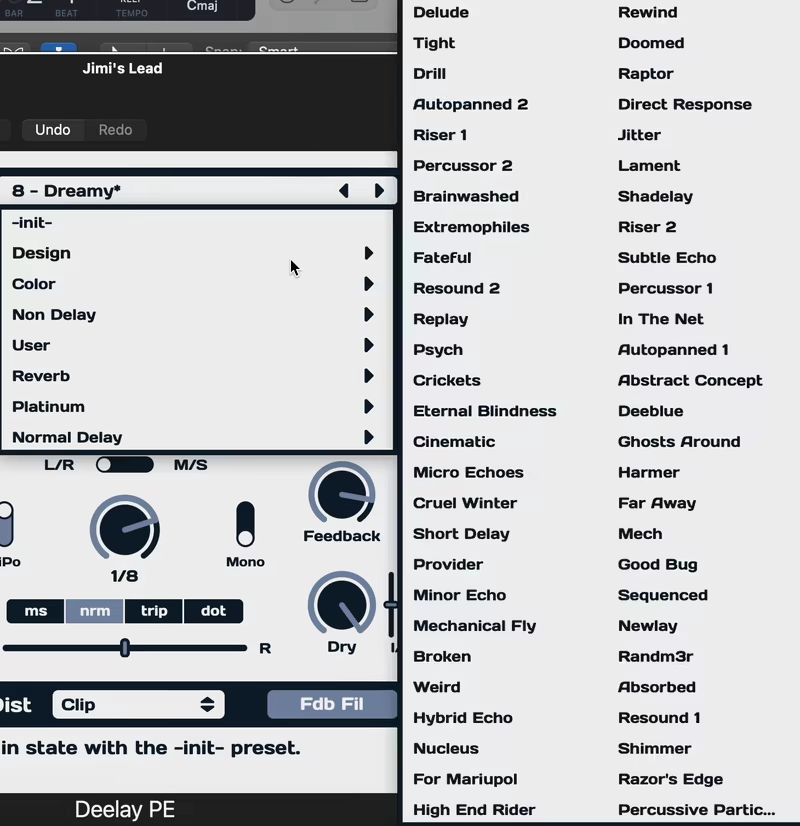
It’s simple, effective, and saves you from having to automate levels manually. Also, it has around 100 presets for you to get started quickly.

Compatibility
| Category | Details |
| Plugin Formats | VST3, AAX (Windows) / AU, VST3, AAX (macOS) |
| Windows Support | Windows 8.1 or newer |
| Mac Support | macOS 10.13 or newer (Universal Binary) |
| DAW Compatibility | Works with all major DAWs supporting VST3, AU, or AAX (Ableton Live, FL Studio, Logic Pro, Pro Tools, Cubase, Reaper, Studio One, etc.) |
| Bit Depth | 64-bit only |
| Trial Version | Fully functional but mutes audio for a few seconds every 40 seconds |
Conclusion
Deelay PE does a great job of keeping things simple while offering enough creative flexibility to make it stand out from standard delay audio tools.
The pitch and frequency shifting, mid/side processing, and extra distortion options add plenty of sound-shaping potential, making it a solid choice for both traditional and experimental uses.
If you need a straightforward delay with extra creative tools, Deelay PE is absolutely worth considering.
It’s easy to use, fun to experiment with, and at €29.95, it’s not going to drain your budget. Whether you’re upgrading from the free version or looking for a new delay to spice up your productions, this one’s definitely worth a try.
