
Looking for the best mid/side EQ plugins for analog sound? This list is packed with tools that bring vintage warmth, stereo control, and rich harmonic color to your mixes and masters.
Mid/Side EQ isn’t just a fancy mixing trick, it’s a creative superpower. When paired with plugins that emulate analog gear, it becomes an essential way to add width, depth, and that unmistakable analog vibe to your tracks.
I’ve handpicked some of the best EQs because they don’t just process audio, they shape it with musicality and soul. Whether you’re enhancing vocals, tightening low end, or adding shimmer to the sides, these plugins do it with character.
1. Pulsar Audio Poseidon EQ
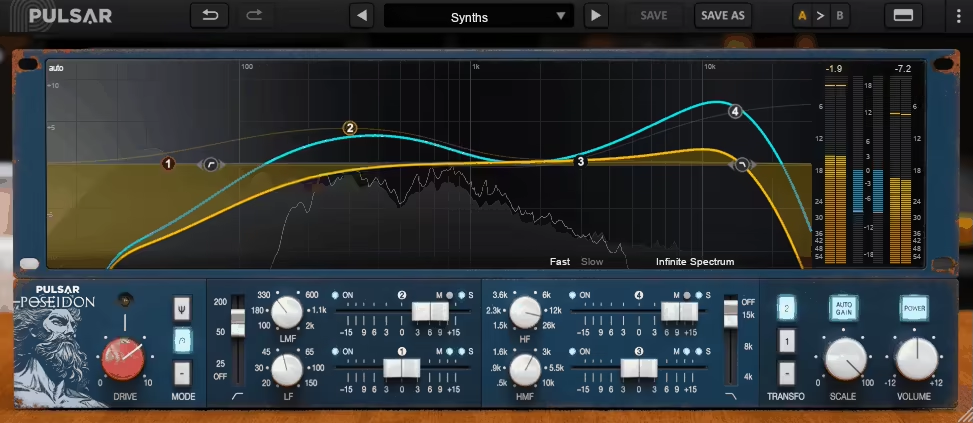
I’ll start with Poseidon EQ, which stands out with how it captures the mojo of a rare Trident console EQ, along with some handy modern enhancements.
Most analog-style EQs just mimic the tone, but Poseidon EQ feels like it’s thinking analog, with the way the bands interact organically. I love how it never sounds surgical as it always sounds musical, even when you’re doing bold moves.
The interface is split into two vibes: old-school knobs and faders for that console feel, and a sleek, curve-editing modern view that shows your frequency tweaks in real time.
I usually start with the vintage side to get the sound, then flip to the curve view to fine-tune. It’s not just eye candy, as it actually helps you understand how those analog-style interactions are shaping your EQ curve.
The workflow is smooth once you get used to it, and I really enjoy the little touches, like the transformer selector and the subtle Drive controls tucked into each band.
- Mid/Side Processing with Band Flexibility
Poseidon lets you process any band in Mid or Side independently, which is crazy powerful.
I’ve used it to add shimmer only to the stereo reverb tails while keeping the mids clean and punchy. It’s perfect for sculpting wide pads or narrowing muddy mix buses without killing the vibe.
- Analog Band Interaction Modeling
As the core of Poseidon, the EQ bands interact with one another, just like the original hardware, which results in these complex, musical curves.
I love how unpredictable (in a good way) it gets. You boost one band, and suddenly the one next to it shifts subtly. It’s like EQ jazz.
- Drive and Transformer Options
You get 2 Drive circuits and 3 transformer flavors, each adding a different kind of saturation.
I usually reach for the Marinair-inspired transformer when I want something vintage and thick. It’s amazing for warming up sterile tracks or adding low-end character on a kick drum.
One thing to note: there’s no L/R mode, just M/S. Not a huge deal for me, but it’s worth knowing. Also, the analog-style band interaction means it’s not the best choice for ultra-precise surgical cuts. But if you want vibe and tone? This thing’s a beast.
What I enjoy most about Poseidon is how it brings analog EQ sculpting into a flexible digital space. It’s been killer on mix buses, vocals, guitars, even mastering chains when I want some classy color. If you like EQs that “play back,” give this one a spin.
Poseidon EQ comes in VST, VST3, AU, and AAX formats for macOS and Windows users.
2. FabFilter Pro-Q 4
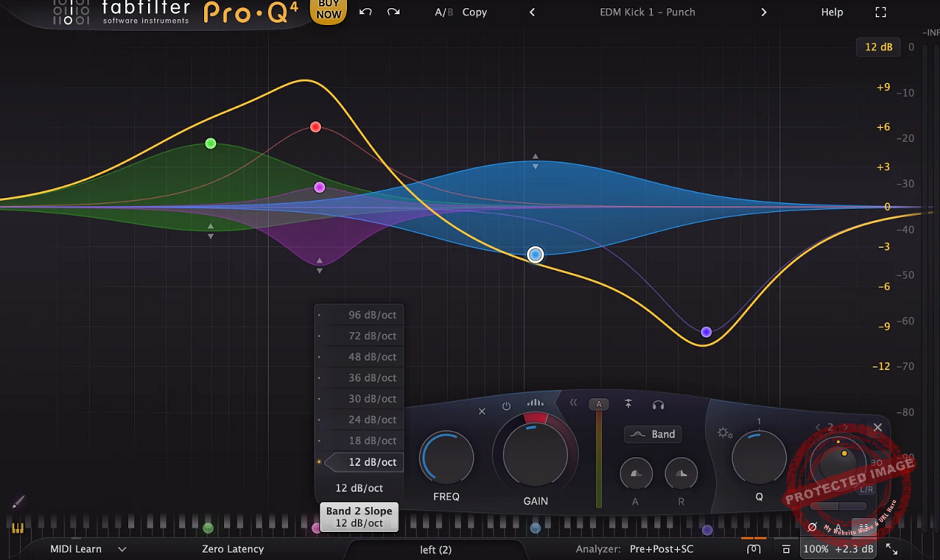
One of my regulars, Pro-Q 4, deserves this spot with how it blends surgical EQ with reactive dynamics in a way that feels seamless.
One of the major upgrades from Pro-Q 3 is the new Spectral Dynamics mode, which lets me tame harshness or control boominess with almost zero effort. It’s like having a multiband compressor built into each band, but way more intuitive.
The Pro-Q 4 interface is classic FabFilter: clean, fluid, and addictively easy to use. I can drag, draw, and tweak bands faster than my brain can overthink it.
The real-time analyzer is gorgeous and insanely detailed, and the new EQ Sketch tool lets me freehand EQ curves like I’m finger painting frequencies.
I’ve used it to quickly shape harsh overheads or dial out boxiness in vocals before diving into precise edits. Even with 24+ bands going, the layout stays readable and never feels cramped.
- Spectral Dynamics Mode
This feature changes everything. Each band can react to the input signal dynamically, like a mini multiband comp, but with full EQ precision.
I’ve used this to clean up resonant low mids in acoustic guitars or de-ess vocals without pulling up another plugin. It responds naturally and feels invisible in the best way.
- EQ Sketch & Smart Analyzer
The new Sketch mode is stupidly fun. I just draw the curve I want on the spectrum and then go back to refine it.
It’s perfect for getting a vibe fast. Combined with the smart spectrum analyzer that shows collision points with other tracks, I’ve been able to carve out space in dense mixes way faster than before.
- Character Modes & Dynamic Gain
You get 3EQ “characters”: Clean, Natural Phase, and Vintage, each with different filter behavior.
I’ve been loving the Vintage mode on drums and electric guitars, as it adds a bit of musical smudge.
Also, Dynamic Gain for each band makes Pro-Q 4 ridiculously powerful for transparent fixes or gentle movement.
The only downside? It’s so full-featured that it might feel overwhelming at first, but trust me, once you get the flow, it’s addictive.
A tip: enable Gain Scale to audition broad boosts or cuts across all bands, which is killer for subtle mastering moves.
What makes Pro-Q 4 a staple in my mixes is how flexible it is. I use it for tone shaping, problem-solving, creative automation, and even subtle master bus polishing. Whether I’m doing surgical cuts on metal guitars or gentle boosts on ambient pads, this EQ never lets me down.
FabFilter Pro-Q 4 comes in VST, AU, AAX, and VST3 formats for macOS and Windows users.
3. JST EQ
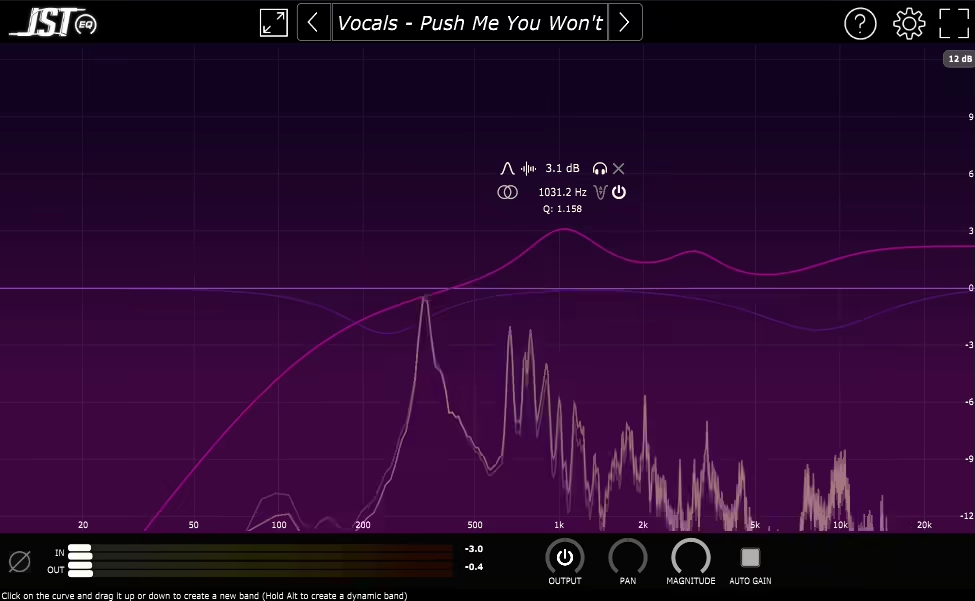
What I enjoy about JST EQ is how it takes everything I want in a modern EQ, like dynamic controls, mid/side flexibility, transient shaping, and drops it all into one no-BS interface.
JST EQ gives you up to 24 bands to play with, and every single one feels like a customizable beast. Whether I’m carving nasty boxiness out of snare mics or building smooth, wide curves on synth pads, this thing has range.
The layout is nice as everything’s on one screen, and it’s honestly a joy to use. I can resize the plugin, go full screen if needed, and get real-time visual feedback from both input and output spectrums.
It never feels bloated or cluttered, even with a full 24-band curve running. Just click, tweak, and boom, done.
- 24 EQ Bands With Deep Control
Each band comes with a full set of controls: gain, frequency, Q, filter type, mid/side placement, and dynamic behavior.
I’ve stacked aggressive notches and broad musical boosts all in the same session, and JST EQ handled it like a champ.
- Dynamic EQ Per Band
With just one click, I can turn any band into a dynamic EQ, complete with threshold, attack, and release settings.
I’ve used this to make DIY de-essers, transient tamer bands, and dynamic tonal shapers all from within a single instance. It’s fast, transparent, and ridiculously useful.
- Transient/Sustain & Mid/Side Modes
For me, this is the best side of the plugin, as I can choose to have a band affect just the transient or sustain portion of a sound, which makes it feel more like a hybrid EQ/compressor/saturator.
Plus, mid/side options per band let me clean up stereo width or boost central vocals without touching the sides. It’s a control freak’s dream.
If there’s a downside, it’s that JST EQ might fly under the radar because it’s not flashy-looking, but don’t let that fool you. It’s lean, fast, and seriously powerful.
I also love that you can disable visualizers if you want to mix by ear only, great for ear training or just not getting distracted by the pretty lights.
JST EQ has totally replaced a few other EQs in my chain. It’s perfect for surgical tasks, tone shaping, and creative mixing all in one go. I reach for it on guitars, vocals, master bus… when I need total control without stacking plugins.
JST EQ comes in VST, VST3, AU, and AAX formats for macOS and Windows users.
4. Tone Projects Michelangelo
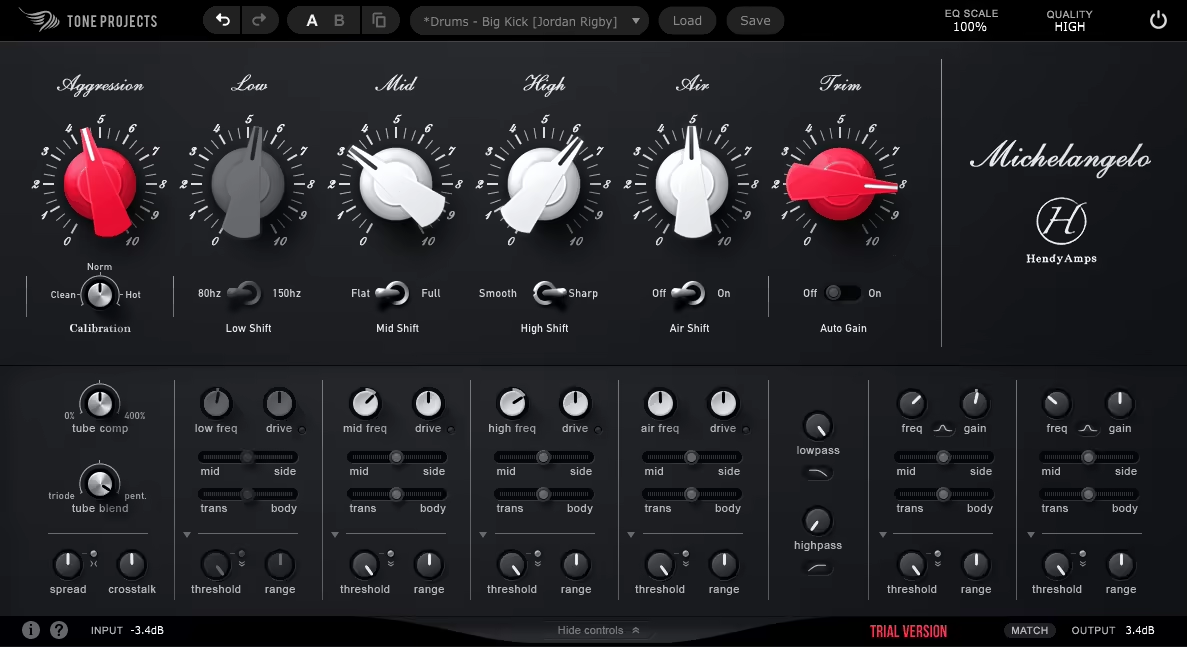
As the name suggests, Michelangelo paints your mix, as it got that elusive “mix glue” vibe, but with character, subtle movement, and warmth that feels less like a plugin and more like a beautifully aging piece of analog hardware.
I’ve used it on entire mixes, bus channels, and even single instruments, and every time, it’s like Michelangelo stepped in with a paintbrush.
The interface is slick without being flashy. You get rich, reactive meters, intuitive controls, and some hidden depth if you want to go there.
Honestly, I didn’t even crack the manual until my third session, it’s that approachable. What I enjoy most is how the layout invites you to listen, not just tweak. There’s no cognitive overload, just great sound, fast.
- Huge amount of presets
As you can see in the image above, amount of presets is just vast also including presets from artists.
- Deep Phase-Coherent Parallel EQ
I used this EQ VST to shape a drum bus and ended up leaving it on the master chain, it’s that clean and cohesive.
Unlike typical digital EQs that can get clinical or harsh, this one keeps things buttery. You can go wide and bold or super subtle without the phase nastiness.
- Perceptual Saturation with Tone Glue
The saturation circuit isn’t just a spice, it’s the secret sauce. It blends harmonics and transient smoothing in a way that feels like a pro mastering chain.
I’ve used it to gently lift vocals, smooth guitars, and add just the right richness to synth layers without overcooking them. What’s wild is how musical it always sounds, even when pushed.
- Nonlinear Tilt Circuit with Adaptive Response
This tilt EQ is no gimmick, cause it adapts to your signal in ways that make your life easier. Instead of fighting brightness or muddiness,
I just use the tilt, and it balances things out. It’s saved me from going down rabbit holes more than once, especially when I’m working fast and need instant clarity or weight.
There’s not much to complain about, but if I can say: it’s a CPU-hungry beast. If you’re stacking instances in a big session, bounce them or freeze early.
Also, it’s not the cheapest plugin around, but honestly, it earns its price tag within a few mixes.
While I don’t regularly use it, Michelangelo can be a great addition to any mastering and mix bus toolkit.
It’s perfect for adding polish, weight, and cohesion without sounding processed or artificial. For chasing analog mojo or just wanting a mix that feels finished, Michelangelo delivers the goods.
Tone Projects Michelangelo comes in VST3, AU, and AAX formats for macOS and Windows users.
5. Wavesfactory Equalizer
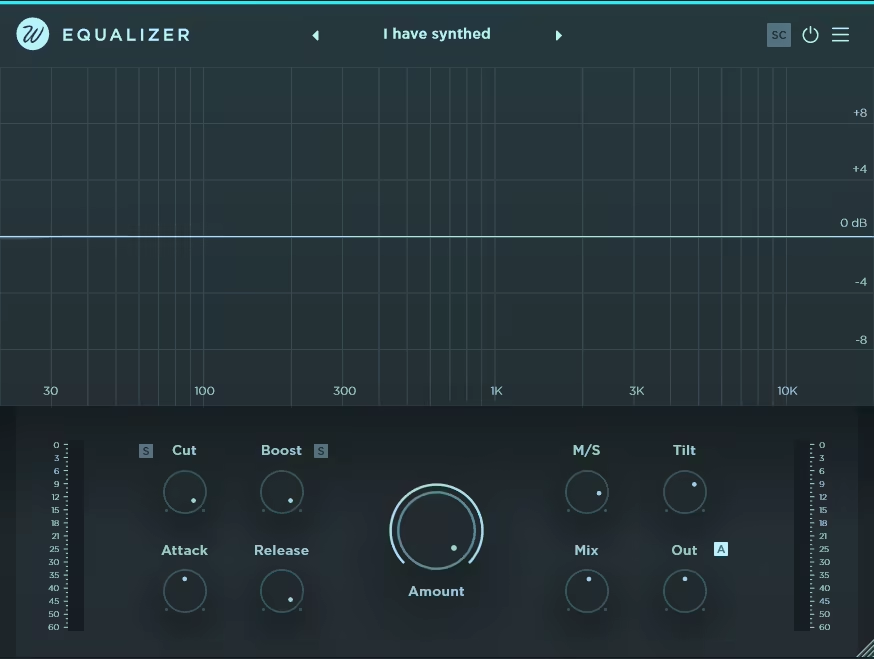
Wavesfactory Equalizer feels like having that one friend who always knows exactly what your mix needs, but without making you jump through hoops.
You slap Wavesfactory Equalizer on a track, and bam, it’s already doing half the work for you. I’ve used plenty of smart EQs, but this one’s my go-to because it actually listens and adjusts your sound in real time across 32 frequency bands, which makes mixing feel way less like guesswork.
The interface is super clean and straightforward, which means no steep learning curve or overwhelming menus. What I enjoy most is how you can visually see the automatic adjustments happening on the dynamic graph; it’s like watching your mix get better right in front of you.
Plus, the layout is intuitive enough that you can jump right in and start tweaking without the usual EQ paranoia.
- Smart Frequency Processing
Instead of random boosts and cuts, the plugin analyzes each frequency band and applies precise corrections that make your audio sound more natural and balanced.
I love using this on muddy basses or harsh leads because it gently pulls everything back to where it belongs, kind of like a calming influence on your mix.
- Amount Knob
The Amount knob is pure gold as it controls how much of the automatic EQ curve is applied, so you’re never stuck with something too over-the-top.
I usually keep it around 50% for subtle balance, but it’s cool to push it further when I want to get creative and make some noticeable tonal shifts.
- Tilt Control
This tilt control is basically a cheat code for instantly shifting the vibe of your track. It lets you smoothly balance highs and lows without making the mix sound unnatural. You can use it to brighten up a dull vocal or add warmth to a sterile synth in a snap.
On the con side, I gotta say that it’s easy to push it a bit too hard on full mixes, and things can sound over-processed if you’re not careful.
Wavesfactory Equalizer has become my go-to early mix assistant, especially when I want to set a solid foundation before layering on other effects. It’s like having an AI-powered EQ that respects your ears and your vibe.
Wavesfactory Equalizer comes in VST, VST3, AU, and AAX formats for macOS and Windows users.
6. Arturia EQ SITRAL-295

I love how the EQ SITRAL-295 brings something truly special to the plugin world, a loving recreation of those coveted ’70s German broadcast consoles that helped shape the golden age of radio.
The star of EQ SITRAL-295 is its ability to deliver that elusive transistor warmth while maintaining pristine clarity.
The interface is a beautiful blend of vintage and modern design. I particularly enjoy how they’ve maintained the authentic stepped controls of the original hardware while giving users the option to switch to continuous controls for more precise adjustments.
The layout is intuitive, and the added spectrum analyzer (which can be hidden) doesn’t detract from the classic feel.
- Authentic Analog Character
What I really appreciate about this EQ is its faithful reproduction of the original Siemens Sitral modules’ sound signature.
The TAE modeling technology captures every nuance of the transistor circuitry, giving you that sought-after grainy warmth and dynamic response that’s perfect for adding character to digital recordings.
- Versatile Stereo Processing
The dual-channel configuration is great, offering both traditional left/right and mid-side processing.
I’ve found this particularly effective when working with electronic music, where you can enhance the stereo field of synth basslines without compromising the mono compatibility of your mix.
- Enhanced Filtering Options
The combination of variable High and Low pass filters, 3-position High and Low Shelf filters, and a semi-parametric Presence filter gives you incredible tonal control.
I love using the high-pass filter (20–320Hz range) to gently clean up tracks while maintaining their natural bottom end.
While the stepped controls are part of its vintage charm, some users might initially find them limiting, though the continuous control option effectively addresses this concern.
A fantastic feature is the auto-gain compensation, which helps maintain consistent levels while making adjustments.
EQ SITRAL-295 comes in VST, AAX, Audio Unit, and NKS formats for macOS and Windows users.
7. Pulsar Audio 8200
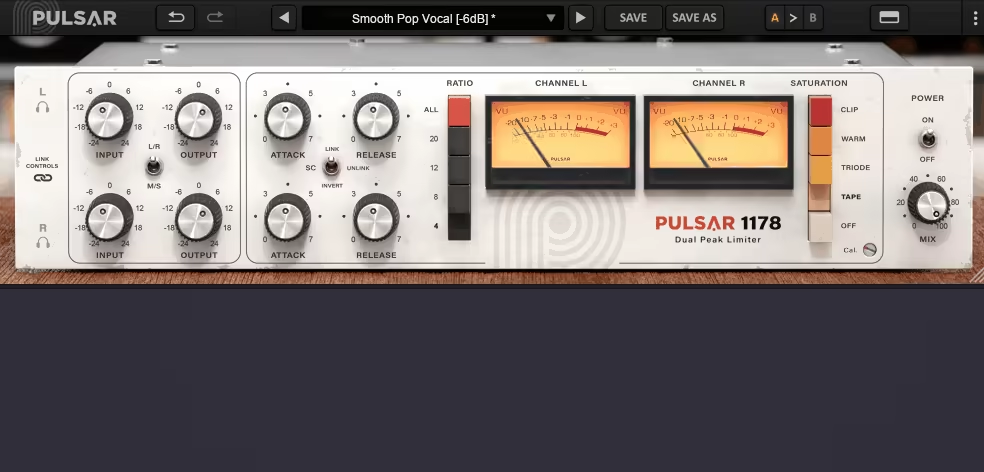
Going on with a standout pick, Pulsar 8200 EQ delivers the kind of open, precise tone you’d expect from a GML 8200 but with a modern twist that streamlines mixing and mastering.
Rather than being a straight-up clone of classic gear, Pulsar Audio 8200 brings thoughtful enhancements that make it faster and more flexible in real-world sessions.
The interface is super clean and user-friendly and I really like the adjustable window and how the plugin splits its layout between familiar hardware-style knobs and an interactive EQ graph.
It’s got everything where you need it: filter names, stereo modes, and a smooth, responsive feel even when your project’s stacked with plugins.
- Visual Curve Editing
The real-time curve display is one of the shining points, as I can grab and move EQ bands with ease, and naming each one helps me stay organized when I’m jumping between projects.
- Built-In De-Esser
There’s a built-in de-esser that’s especially handy for smoothing out harsh vocals or cymbals.
You can target sibilance with precision using bell or shelf shapes, depending on how surgical or broad you want to be.
- Mid-Side and Left/Right Processing
Switching between stereo modes is quick and intuitive. Being able to solo the mid or side channels helps me dial in the stereo image with confidence.
- Auto-Gain Compensation
This feature keeps your perceived loudness consistent while you EQ. I like that it uses a C-weighted algorithm to avoid getting tricked by louder = better.
- Tilt Filter
The 6-pole analog-style tilt filter is perfect for fast tone shaping. I’ll often use it to push a track slightly brighter or darker without touching individual bands.
- Sub & Air Bands
I lean on the dedicated Sub and Air bands when I want some tasteful low-end weight or airy sparkle. They’re incredibly musical and work great on the master bus.
For more surgical tasks, the stepped controls are ideal as they make it easy to match settings across sessions and maintain recall accuracy.
Whenever I want fast, precise tonal sculpting with a transparent touch, Pulsar 8200 is one of the tools at the top of my list. If you value clarity, speed, and flexibility, this one’s well worth checking out.
Pulsar 8200 supports VST2.4, VST3, AU, and AAX formats on both macOS and Windows platforms.
8. Eventide SplitEQ
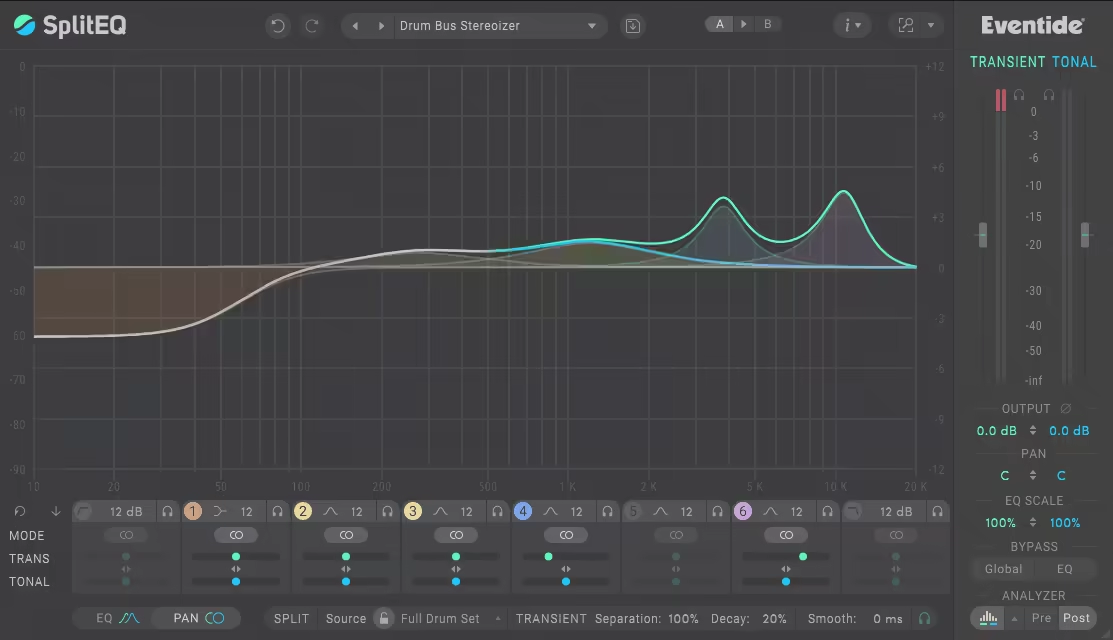
Most EQs fall into two camps: either they’re precision tools for cleanups or creative sculptors for tone shaping. SplitEQ manages to be both, and then some.
What makes SplitEQ different is its ability to separate a sound into transient and tonal components. That means you can adjust the snap of a snare without muddying its body or tame a sharp vocal without losing its shine.
I found the interface to be more approachable than you’d expect from such a deep plugin. You get an 8-band parametric EQ with all the standard filter types, plus support for Mid/Side and Left/Right processing for advanced stereo shaping.
The real-time analyzer is one of my favorite parts, cause it helps you clearly see how the tonal and transient aspects are behaving. If balancing impact and warmth has ever been a headache for you, this tool makes it way easier.
- Structural Split Technology
This is the heart of what makes SplitEQ special. You can process the transient and tonal parts of your signal independently, which feels like using an EQ and a transient designer at once.
- Stereo Imaging Control
This goes beyond typical stereo tools, as you can pan the attack and body of a sound separately, widen the crack of a snare while keeping its weight dead center, or push plucks outward while the warmth stays put.
- Over 150 Presets
There’s a massive preset library here, covering everything from subtle cleanups to wild sound design. While I often tweak manually, these presets have saved me time more than once.
It’s not a “throw it on and forget it” EQ; there’s definitely a learning curve. But once you get comfortable, you’ll start hearing mix details that were invisible before.
I personally love using it on vocals to boost the air while keeping sibilance under control. Whether you’re solving mix issues or chasing new sonic textures, SplitEQ opens up creative options most EQs just can’t touch.
Eventide SplitEQ is available in VST, VST3, AU, and AAX formats for macOS and Windows.
9. sonible smart:EQ4
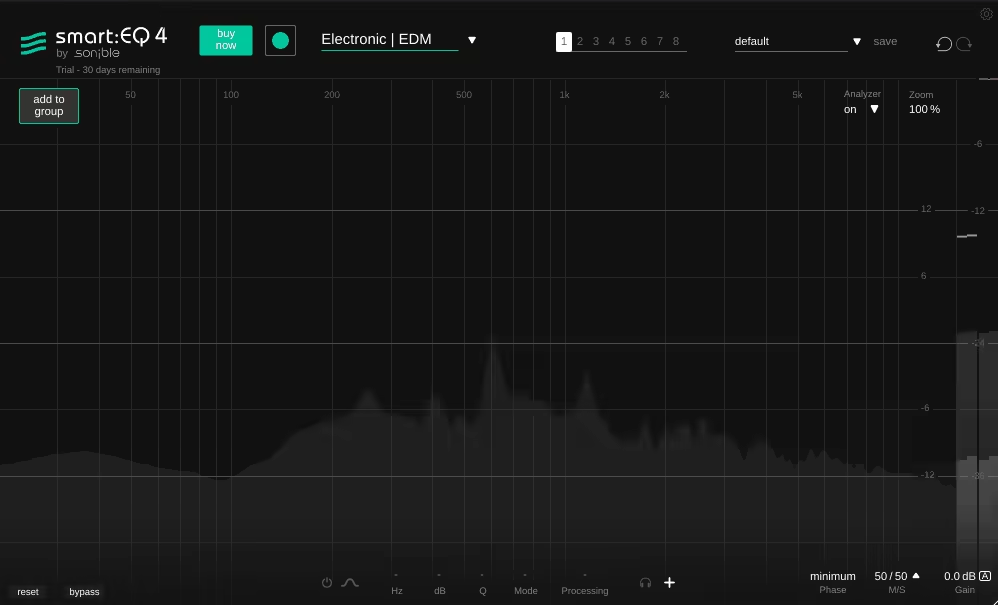
As a full-blown assistant for spectral mixing. smart:EQ 4 takes things to the next level with AI-driven technology that can identify and resolve frequency clashes across multiple tracks, saving hours of tedious work.
First, I gotta say it really struck me how easy smart:EQ4 unit is to use, considering how much power is under the hood.
The dual-view layout is genius: the Group View gives you control over your entire mix at a glance, while Track View lets you zoom in for detailed tweaks. Everything is laid out clearly, with visuals that actually help you understand what’s going on in the mix.
- Smart Filter Technology
This VST EQ listens to your audio and applies intelligent EQ curves using its built-in sound profiles. I enjoy how it adapts to different styles of music, and if you have a reference track, it can even mimic that tonality.
The Smoothing control is a nice touch that keeps the results sounding musical and not overly robotic.
- Group Processing and Hierarchy
You can organize up to 10 tracks into a group and create a frequency priority list by simply dragging them into order.
I find this super useful when deciding which elements should lead the mix, like giving vocals priority over pads. Plus, being able to adjust multiple instances from one place is a serious time-saver.
- Dynamic EQ Integration
Each EQ band can now act dynamically with full control over threshold, ratio, attack, and release, which makes this a killer tool for chasing down resonances that only pop up here and there.
It’s a good idea to use this alongside the smart:filter to tame harshness without dulling the overall tone.
It’s definitely not plug-and-play in the traditional sense. There’s a bit of a learning curve, especially if you’re used to old-school EQing, but once it clicks, it changes how you approach mixing entirely.
Sonible smart:EQ 4 supports VST2, VST3, AU, AAX, and MultiRack Native formats for both macOS and Windows platforms.
10. Waves F6
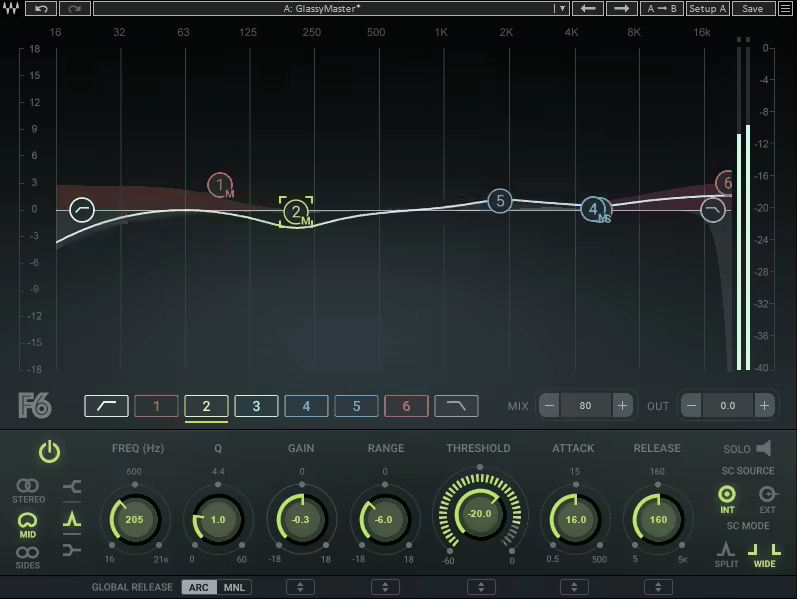
If you’re after surgical EQ control with a dose of musical responsiveness, F6 delivers both in spades.
What sets it apart is how each of its 6 bands operates like a standalone dynamic EQ, adapting intelligently to the signal in real time.
The Waves F6 interface packs a lot in, but doesn’t feel overwhelming. I really like the color-coded bands and intuitive layout, especially the real-time visuals that make it easy to track your adjustments, even when dynamic shifts are subtle.
- Dynamic Band Processing
I believe this is where the magic happens in the plugin. Every band includes full dynamic control, threshold, range, attack, release, letting you react to frequency content that changes over time.
It’s ideal for controlling sibilance, taming honky mids, or tightening up a bass line without over-EQing.
- Advanced Routing Options
You can work in stereo, mid/side, or even use external sidechain signals. I often use this for mastering or fixing stereo imbalances. Being able to EQ just the sides or the center independently is a major win for clarity and focus.
- Flexible Band Configuration
Bands can overlap, solo, and morph between bell, notch, high/low-shelf, and pass filters. I find the solo mode especially useful when I’m isolating a stubborn frequency that only rears its head during certain phrases.
- Real-Time Frequency Spectrum Display
The built-in spectrum analyzer updates live with every tweak, helping you pinpoint issues visually. It’s a lifesaver when working on dense mixes or problem-heavy vocals.
The one minor drawback is that preset variety is a bit thin, so newcomers might not have many templates to learn from.
But honestly, this forces you to get comfortable with the controls and the payoff is a much deeper understanding of how dynamic EQ works. A good starting point? Try one band on a vocal harshness issue and build from there.
F6 is available in VST3, AAX, and AU (Mac only) formats, supporting macOS 12+ and Windows 10+ systems.
11. iZotope Ozone 11 EQ (FREE)

I really appreciate how Ozone 11 Equalizer by iZotope/Native Instruments delivers a professional mastering-grade EQ and it’s completely free.
Unlike typical basic EQ plugins, Ozone 11 EQ packs some impressive, advanced features that make it stand out.
The interface strikes a great balance between ease of use and depth, offering a clean, modern design that makes both subtle tweaks and broad tonal shaping feel natural and precise.
- Transient/Sustain Processing:
With this feature you can separately shape the attack and sustain phases of your audio, which is especially useful on drum buses or full mixes. It lets you enhance the punch and presence of transients without muddying the overall tone.
- Delta Monitoring:
The Delta mode lets you hear exactly what parts of the signal are being affected by your EQ moves. This is incredibly helpful for avoiding over-processing, particularly when making subtle mastering adjustments.
- Flexible Processing Modes:
With both Mid/Side processing and switchable Analog/Digital modes, this EQ offers fantastic versatility. I often use the analog mode for smooth, musical shaping and the digital mode for pinpoint surgical fixes. The Mid/Side option is perfect for controlling stereo width while keeping mono compatibility intact.
My advice would be to begin with the analog mode for broader tone adjustments, then switch to digital mode for precise tweaks.
If you are after an easy-to-use and effective EQ unit without spending a dime, iZotope Ozone is a great choice to take a look at.
The Ozone 11 Equalizer is available in VST3, AU, and AAX formats for both Windows and macOS.
12. Analog Obsession RARE-SE (FREE)
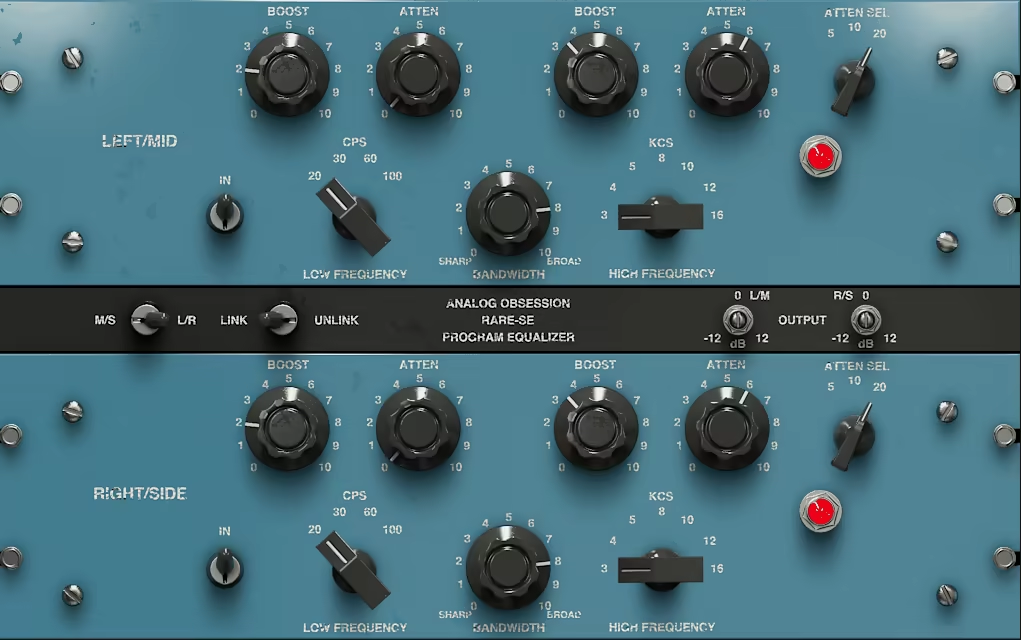
RareSE brings that unmistakable Pultec character into a modern mixing environment with support for dual-mono, stereo, and mid/side workflows.
If you know me, you know that I really appreciate Analog Obsession plugins and RARE-SE is a great pick for both bus processing and mastering, thanks to its blend of vintage tone and modern versatility.
What I love most is how it stays true to the classic Pultec feel with its rich low end, silky highs, and unmistakable warmth, while adding the kind of control we actually need in today’s mixes.
- Mid/Side and Left/Right Processing:
RareSE lets you fine-tune your stereo image with independent Mid/Side or Left/Right EQing. I often use it on my mix bus to add clarity and dimension without throwing off the balance.
- Classic Controls with Modern Enhancements:
You get the iconic separate boost and cut knobs, along with variable bandwidth and oversampling for higher fidelity. The link function is a nice touch, it keeps adjustments smooth when working in stereo or M/S modes.
RareSE nails the vintage analog vibe without sacrificing modern precision. I keep coming back to it when I want musical tone-shaping that feels effortless and clean.
RareSE is available in VST3, AU, and AAX formats for both macOS and Windows.
13. SIR StandardEQ
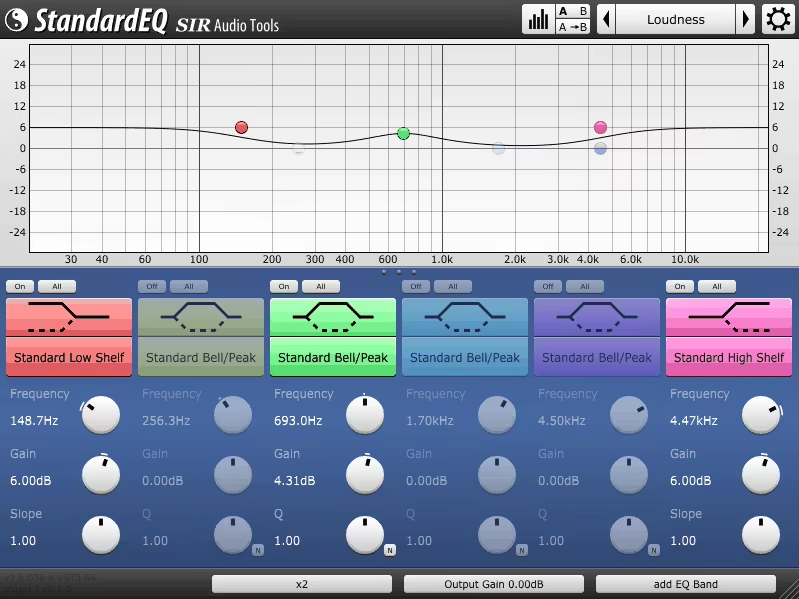
The last unit on the list is StandardEQ, a powerful and highly accurate equalizer plugin designed for surgical mixing and mastering.
I used it for total control over frequency content without any coloring. It combines 24 advanced filter types, flexible channel routing, and a detailed dual-mode spectrum analyzer, making it an ideal choice when precision matters more than flash.
You can load up to 50 filters per instance, and each one can operate in Left/Right, Mid/Side, or per-channel mode. I’ve used it for everything from delicate mastering tweaks to aggressive corrective EQ, and it always delivers.
The StandardEQ GUI is flexible, meaning that you can resize it, tweak color themes, and zoom in on problem areas.
- Filter Variety & Depth:
You get Butterworth, Bessel, and Legendre filters, plus shelves, bandpasses, and high/low cuts. I love how surgical it can get, and the full automation support makes it great for dynamic sessions.
- Visual Analysis Engine
The dual analyzer with FFT and analog-style IIR really helps me see what my ears are hearing. Whether I’m hunting down harsh resonances or fine-tuning a bass line, the analyzer is accurate and responsive.
- Intelligent Peak Detection
One of my favorite features. It highlights resonant peaks quickly, saving me tons of time when cleaning up a vocal or a muddy mix.
- Natural Sound & Oversampling:
Oversampling ensures smooth behavior near Nyquist, and I’ve never run into aliasing issues. I also like the gain/Q linking, it gives me both proportional and inverse options depending on the task.
That said, I’ll be honest: the interface looks a bit dated. While it’s functional, it’s not the prettiest interface out there. If you’re used to sleek, modern UIs, this one might feel more utilitarian than inspiring.
StandardEQ might not win any beauty contests, but when it comes to surgical accuracy, flexibility, and serious analysis tools, it’s a handy plugin. You can use it when you want results, not distractions, and for that, it does the job exceptionally well.
StandardEQ comes in AU, VST, AAX formats for macOS and Windows users.
Extra: Minimal Audio Morph EQ

Well, here is something extra for you: Minimal Audio Morph EQ, which is more than a typical mixing tool. It’s more like a living, breathing sound-sculpting machine.
Where most EQs offer surgical cuts and clinical precision, Morph EQ brings movement, creativity, and straight-up fun into your workflow.
This plugin lets you draw filter paths, morph between shapes, and treat EQ like an expressive instrument. I’ve found myself tweaking it more like a synth than a utility and it turns frequency control into performance.
- Custom Filter Morphing
Imagine sketching your own filter motion across time. With drawable morph paths and a single Morph knob, I can glide between wildly different EQ states like it’s nothing. It’s hypnotic, inspiring, and genuinely useful for adding life to static sounds.
- Macro Controls
Instead of manually juggling 20 knobs, I just assign key parameters to global macros. Whether I want a filter sweep, stereo movement, or resonance shift all at once, it’s a breeze. I’ve saved so much time and gained creative freedom in the process.
- Spectrum Analyzer
The real-time analyzer is clean and responsive. I used it to make sure I’m not just tweaking blindly, but seeing those frequency changes as I hear them is a game-changer, especially when you’re animating filters.
My advice? Start with the presets. Not because you need help, but because they show just how weird and wonderful this plugin can get. I’ve had great results using it on synths and vocals with slow morph sweeps, it adds motion without clutter.
If you’re looking for an EQ that breaks the mold and turns mixing into a more dynamic, musical process, Morph EQ is a must-have. It’s bold, playful, and powerful and for me, it’s one of those rare tools that actually makes me want to EQ more.
Minimal Audio Morph EQ is available in VST, VST3, AU, and AAX formats for macOS and Windows.
Last Words
All of these EQs share one thing: they sound unapologetically analog. If you’re after clean, clinical tools, this probably isn’t your list. But if you want color, vibe, and stereo control that feels musical and alive, you’re in the right place.
I’d say go with the one that speaks to your workflow and sonic goals. Whether you love the silky highs of a Pultec-style curve or the gritty punch of vintage mastering gear, there’s something here to bring your mixes to life with width, warmth, and a whole lot of analog charm!
Happy mixing!
