
Today, we will look at 13 of the best saturation plugins out there to add that vintage warmth to your mixes.
I’ll admit it: there’s something magical about the warmth and grit of analog gear. That subtle saturation, that almost intangible depth… It’s like a secret gravy for music production.
Sadly, not all of us have those beautiful racks of vintage hardware just lying around. So, that’s where these plugins swoop in to save the day, bringing the richness of analog to our digital workflows without breaking the bank (or our backs).
Whether you’re looking to add tape-like glue to a mix, inject tube-driven crunch into a vocal, or just give your tracks that analog mojo, these plugins are sure to spark some creative heat in your sessions. Let’s dive into it!
| Plugin | Short Description | Best For | Strength |
| Kalifornia Dynamic Alkane | Modern, natural-sounding saturator with multiple analog modes | Drums, synths, mix bus | Musical tone, zero latency, simple workflow |
| PSP Saturator | Highly flexible multi-band saturation toolbox | Sound design, buses, mastering | Extreme control, multiband, oversampling |
| SSL Native X-Saturator | Analog-style harmonic distortion with blendable harmonics | Vocals, guitars, drums | Precise harmonic shaping, easy parallel |
| iZotope Plasma | Intelligent, dynamic saturation with adaptive processing | Beginners, vocals, full mixes | Smart algorithms, minimal tweaking |
| XLN Audio RC-20 | Multi-effect vintage color and saturation suite | Lo-fi, hip-hop, textures | Huge presets, creative character |
| Moog MF-109S Saturator | Moog-style dynamic drive with noise generator | Bass, synths, sound design | Authentic analog vibe, modulation |
| Denise Audio Bad Tape 2 | Creative tape saturation with extreme modulation | Ambient, experimental, FX | Wild sound design, detune & phasing |
| Black Box HG-2MS | Dual-tube analog saturation for mixing & mastering | Mix bus, drums, vocals | Rich tube tone, mastering-grade |
| Waves BB Tubes | Simple dual-harmonic saturator | Drum bus, bass, quick color | Fast workflow, musical results |
| BLEASS Saturator | Modular distortion and waveshaping system | Sound design, electronic | Deep modulation, visual feedback |
| Softube Dirty Tape | Lo-fi tape-style saturation and degradation | Beats, lo-fi, textures | Character, simplicity |
| Newfangled Audio Saturate | Transparent spectral clipping saturator | Mastering, clean enhancement | Ultra-clean, auto gain |
| PROCESS.AUDIO Spicerack | Multi-algorithm distortion with linear EQ | Drum bus, vocals, mix color | Console workflow, precision |
| SoundToys Decapitator (Bonus) | Classic aggressive analog saturator | Everything | Iconic tone, Punish mode |
1. Kalifornia Dynamic Alkane

| Plugin | Kalifornia Dynamic Alkane |
|---|---|
| Description | Modern, natural-sounding saturator with multiple analog modes |
| Award | Best for Everyday Warmth |
What makes the Alkane saturation plugin different for me is how naturally it adds life to tracks without feeling fake or hyped up.
I love that it gives you that analog-like warmth without making everything sound cartoonishly “vintage.” I’ve used a lot of saturators that either overcook the sound or barely do anything, but Alkane finds a pretty sweet middle ground.
The interface is actually a joy to use; clean, stylish, and not trying too hard. What I enjoy most is how everything you need is right there without menu-diving or second-guessing.
- 4 Distinct Saturation Modes
One thing I really like is the four different saturation modes: Tube, Tape, Transformer, and Synth. Each one has a slightly different flavor without being gimmicky.
Tube thickens the mids, Tape rounds out the lows, Transformer adds a bit of top-end sparkle, and Synth (my personal favorite) gives a bit more energy to the mids and highs. I found Synth mode especially nice for drums and synths, where I wanted extra snap without messing up the transients.
- Thud and Shine Controls
The Thud and Shine knobs are also pretty clever. They’re not just boring EQ boosts, as they interact with the saturation itself. A little Thud made my kick drums hit harder, and Shine helped my synths poke through the mix a bit better. It’s subtle but useful, and it saves me from stacking extra saturation plugins later.
-
Dry/Wet Mix Control
The Dry/Wet mix knob makes it easy to control how much of the saturation effect you actually hear. It allows you to blend in just a little to keep the original dynamics intact while still getting the warmth and color I’m after.
-
Zero Latency Processing
Alkane runs with zero added latency, which makes it a real lifesaver when tracking or playing with ideas live. I never have to worry about lag or weird timing issues when dialing in the sound.
- Post-Saturation EQ/Filters
The EQ and resonant filters are super handy too. After saturating a track, it’s nice to have quick fixes for any unwanted boominess or harshness. I used the low cut a lot to clean up bass-heavy sources after pushing them harder. It’s nothing fancy, but it does the job well.
Overall, Alkane is one of the best saturation plugins that feels reliable once you start using it. It’s great for drums, basses, synths, and even full mixes if you’re careful.
Alkane comes in VST3, AU, and AAX formats for macOS and Windows users.
2. PSP Saturator
| Plugin | PSP Saturator |
|---|---|
| Description | Highly flexible multi-band saturation toolbox with detailed control over tone and harmonics |
| Award | Best for Precision Control |
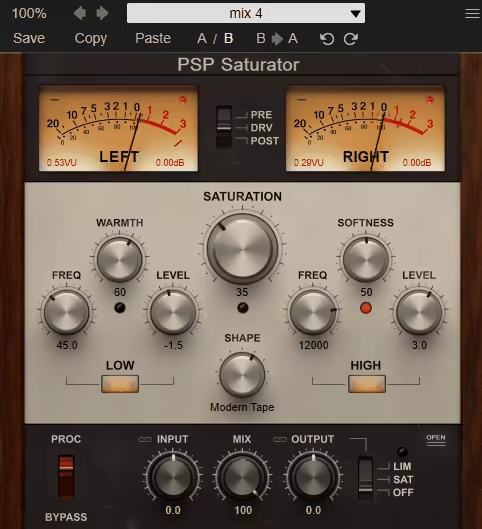
PSP Saturator isn’t just about adding a bit of grit; it’s about completely controlling how your audio gets colored and warms up.
From subtle tape-style coloration to full-on harmonic distortion, this saturation VST feels more like a Swiss army knife for saturation.
The PSP Saturator interface is clean and logically organized, but what sets this plugin apart is the sheer variety of tools under the hood. With 3 sculpting engines, including Low, High, and Overall, alongside 8 unique saturation shapes, you can dial in just the right tonal flavor for any instrument, bus, or master.
- 8 Saturation Shapes
The plugin comes loaded with 8 distinct saturation shapes, ranging from gentle harmonic warmth to aggressive clipping. Each shape gives your audio a unique vibe, so you can experiment until you find the perfect match for your mix.
- Low and High Band Processing
The Low and High saturation engines give you precise control over specific frequency ranges. Use the Low engine to thicken your bass or kick, and let the High engine add shine and clarity to your highs.
- FAT Quad-Sampling
The optional FAT mode (x4 oversampling) ensures pristine audio quality, even at extreme levels. It reduces aliasing and keeps your tracks sounding clean and polished, no matter how hard you push it.
PSP Saturator is packed with features like parallel mix options, intelligent phase alignment, and 3 output modes (Off, Sat, and Lim) that make it a versatile tool for both subtle enhancements and bold creative effects.
PSP Saturator comes in VST, VST3, AU (Mac only), and AAX formats for macOS and Windows users.
3. SSL Native X-Saturator
| Plugin | SSL Native X-Saturator |
|---|---|
| Description | Analog-style harmonic distortion with blendable even/odd harmonics and fast parallel mixing |
| Award | Best for Harmonic Shaping |
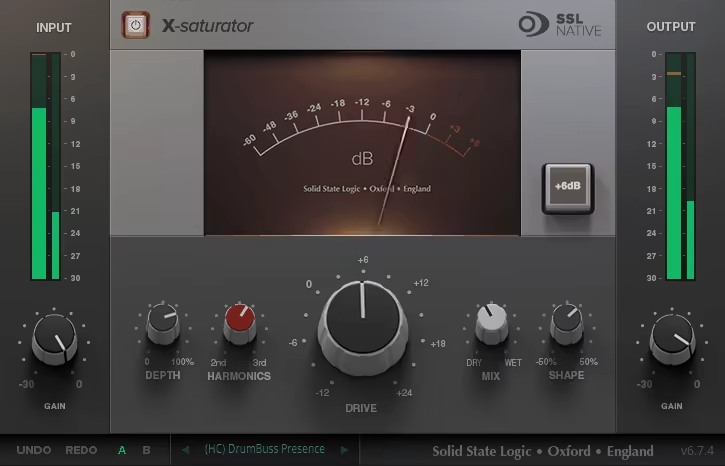
When I first loaded up the SSL X-Saturator, the thing that hit me was its uncanny ability to mimic analog vibes, whether you want buttery warmth or ferocious grit.
The interface keeps things super straightforward. You’re not bogged down with a million knobs, but the few controls you do have pack a serious punch, which I found to be pretty handy in X-Saturator.
From blending tube-style 2nd harmonics with transistor-style 3rd harmonics to shaping distortion with the Shape knob, everything feels purposeful. Plus, the Wet/Dry knob makes parallel processing a breeze, which I absolutely loved for layering distortion subtly.
- Blended Harmonics for Sonic Precision
The Harmonics control is where the magic happens. You can dial in valve-style warmth for those sweet even-order harmonics or go for transistor-style grit for odd-order harmonics. The ability to blend the two gives you control to craft your perfect tone.
- Shape and Drive for Full-on Customization
With the Shape knob, you decide if your distortion is smooth and creamy or hard-edged and aggressive. Pair that with the Drive control, and you can go from subtle to full-on chaos, making this one of the best satuaration plugins for drums, guitars, or even synths.
- Parallel Processing Made Easy
The Wet/Dry mix knob is a lifesaver. It lets you layer distortion subtly or go all in without drowning out the original signal. Whether it’s vocals that need warmth or snares that need extra crack, this knob gets the job done.
This unit is for anyone who wants analog-style warmth and grit with total control. It’s perfect for vocals, guitars, and mix buses. I recommend experimenting with the Harmonics blend; it’s where you’ll find the sweet spot that makes your tracks pop.
X-Saturator comes in AAX Native, VST2, VST3, and AU (Mac only) formats for macOS and Windows platforms.
4. iZotope Plasma

| Plugin | iZotope Plasma |
|---|---|
| Description | Intelligent dynamic saturation that adapts to your audio for warmth and punch with minimal tweaking |
| Award | Best for Beginners |
iZotope’s Plasma saturator VST is a smart unit, that analyzes your audio and decides exactly where and when to apply that warm, gooey goodness. It’s like having a saturation genie in your DAW!
What struck me first was how Plasma doesn’t just slap saturation across everything like butter on toast. Instead, its Flux Saturation technology adapts dynamically, adding richness and depth only where it’s needed.
The interface is clean and intuitive, with easy-to-use sliders and presets that let you dive right in. Whether you’re warming up vocals or dialing in subtle harmonic color on a drum bus, this saturation VST plugin feels both surgical and creative.
Plasma doesn’t stop at static processing as it offers targeted profiles for different instruments and full mixes, along with attack, release, and overdrive controls that let you fine-tune the character of the tone. It’s both a tool and a playground for your sound.
- Dynamic Saturation with Flux Technology
Plasma’s adaptive algorithm analyzes your audio and applies saturation precisely where it’s needed. This dynamic approach means it enhances your sound without overloading it, adding warmth and punch only where it counts.
- Customizable Frequency Handles
With separate controls for highs, mids, and lows, you can shape the tone exactly how you want. Whether you’re boosting silky highs on vocals or thickening up a bassline, this feature lets you zero in on the sweet spots.
- Mid/Side and Transient Processing
Plasma lets you tweak stereo width or focus on the transient and sustain of your audio. Add bite to a snare’s attack or smooth out a guitar’s sustain. This is a creative control at its finest.
I think this is a great plugin for beginners and intermediate producers to create good-sounding mixes without that much effort. Try it on vocals for a polished, radio-ready sheen, or go wild on drum buses for a mix that punches through effortlessly. You’ll see it’s like having a cheat code.
Plasma is available in VST3, AU (Mac only), and AAX formats for macOS and Windows.
5. XLN Audio RC-20 Retro Color
| Plugin | XLN Audio RC-20 Retro Color |
|---|---|
| Description | Multi-effect vintage color suite for saturation, wobble, noise, and lo-fi character in one plugin |
| Award | Best for Lo-Fi Texture |
RC-20 can be considered one of the best saturation plugins. But not only that. It’s a full multi-effects unit that adds warmth, character, and a touch of beautifully imperfect nostalgia to your music.
From subtle tape hiss to full-blown vintage madness, this is the kind of plugin you didn’t know you needed until you tried it.
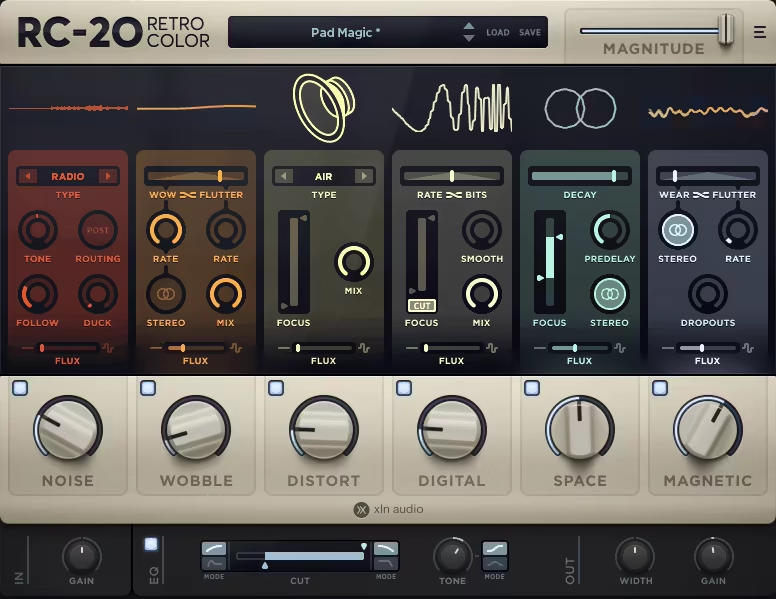
The RC-20 Retro Color interface is as inviting as a cozy vinyl shop, with 6 chunky knobs that control its unique effect modules. Whether you’re after subtle texture or bold transformations, it gives you everything in a neat, vintage-inspired package. And the presets? Oh, they’re gold. I caught myself flipping through them like a kid in a candy store.
- Noise Module: The Imperfect Charm
Noise brings back the magic of analog imperfections. From vinyl crackles to tape hiss, this module makes your audio feel lived-in and authentic.
You can control how the noise interacts with your sound using the Follow and Duck features, which are perfect for keeping things tasteful. The Post button lets you decide whether the noise comes before or after the other effects, giving you creative freedom.
- Wobble Module: Sweet, Analog Wonkiness
If you’ve ever loved the fluttery pitch warbles of an old tape machine, Wobble is your jam. It creates pitch modulation that’s as charming as it is musical.
The Wow and Flutter controls let you blend between smooth pitch shifts and jittery wobbles, while the Stereo slider spreads the effect across the stereo field. It’s like a chorus pedal got a lo-fi makeover.
- Distort Module: The Grit King
Need grit? Distort has you covered. It offers 6 types of distortion, from warm tube tone to gnarly fuzz.
The Focus knob lets you zero in on specific frequencies, so you can keep the distortion where it matters most. The Big Knob cranks the heat, and the Mix control keeps everything balanced.
- Digital Module: Lo-Fi Love
This is where RC-20 dials in the retro-digital vibe. Think bitcrushing, sample-rate reduction, and crunchy textures.
The Rate and Bits sliders give you control over how crushed the sound gets, while the Smooth knob rounds off harsh edges. It’s perfect for adding retro charm without going overboard.
- Space Module: Subtle Reverb Goodness
The Space module adds depth and dimension without stealing the show. It’s a reverb that’s simple, effective and blends beautifully with the other effects.
Adjust the Decay for reverb length and use Focus to hone in on specific frequencies. It’s not a Valhalla Verb killer, but it’s excellent for quick, musical results.
- Magnetic Module: Tape Chaos, Done Right
Magnetic simulates tape degradation, complete with volume dropouts and fluttering randomness.
The Dropouts knob introduces chaotic volume dips, while the Flutter adds subtle tape-like modulation. It’s a brilliant tool for creating characterful imperfections.
I can honestly say this is the best saturation plugin if you need an all-in-one solution. It shines on everything from lo-fi beats to polished pop tracks, adding warmth, texture, and a sense of life.
RC-20 Retro Color is available in AAX, VST3, and AU (Mac only) formats for macOS and Windows platforms.
6. Moog Moogerfooger MF-109S Saturator

| Plugin | Moog Moogerfooger MF-109S Saturator |
|---|---|
| Description | Moog-style dynamic drive with a built-in noise generator and modulation-ready controls |
| Award | Best for Analog Vibe |
The MF-109S Saturator brings that wish to life, giving you Moog’s legendary input drive stage with a twist: dynamic control that dances between smooth compression and fiery distortion.
With its dynamic input drive and built-in noise generator from the Minimoog Model D, this plugin puts you in the driver’s seat of your journey, blending analog charm with modern flexibility.
Within minutes, I was tweaking the dynamic drive and shaping the noise tones like a pro. The CV inputs open up a world of modulation possibilities, making this plugin equally at home in creative sound design or subtle mix enhancements.
- Dynamic Input Drive Control
The signature Moog input drive is the star here, letting you dial in anything from subtle harmonic color to full-on analog crunch. It’s smooth, responsive, and surprisingly versatile.
- Integrated Noise Generator
Borrowed from the Minimoog Model D, the noise generator adds texture and character to your tracks. The adjustable tone and level make it perfect for creating ambient layers or adding a vintage vibe.
- Filter Flexibility
Multiple filter modes let you shape the sound to fit your mix, from subtle low-end warmth to crispy high-end sheen. The options make this tool a chameleon in your plugin arsenal.
As one of the best plugins in the Moog effects bundle, I think this saturation VST is best used on basslines to make them stand out without overwhelming the rest of your track.
MF-109S Saturator comes in VST3, AU (Mac only), and AAX formats for macOS and Windows, while it is available in AUv3 for iOS.
7. Denise Audio Bad Tape 2
| Plugin | Denise Audio Bad Tape 2 |
|---|---|
| Description | Creative tape saturation with heavy modulation, detune, phasing, and transition-style effects |
| Award | Best for Tape Weirdness |
Bad Tape 2 isn’t your average saturation plugin, as it’s an adventurous, feature-packed tool for sonic mayhem that lets you warp, wobble, and saturate like never before.
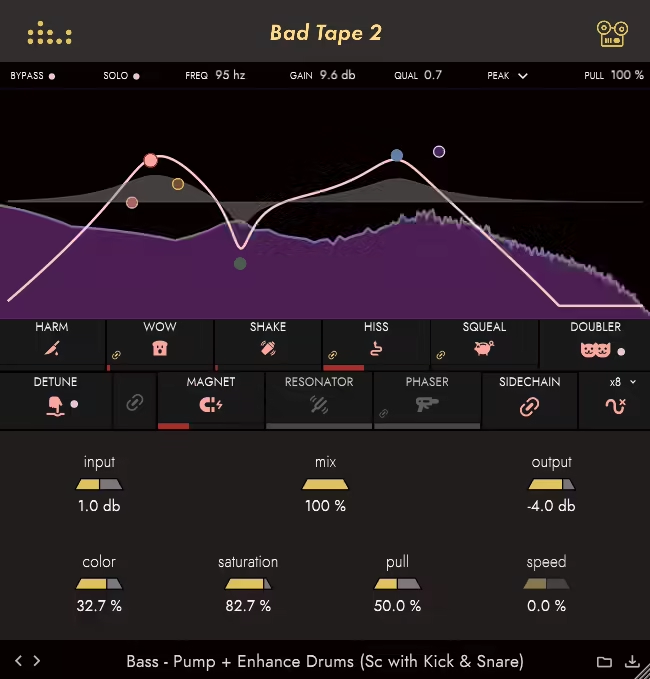
At first glance, Bad Tape 2 might seem a bit intimidating with its jam-packed interface and endless tweaking possibilities. But once you dive in, you’ll see just how much control and creativity it offers.
What I love most is the combination of traditional tape color and wild detuning, squealing, and phasing effects. For me, it’s like a fun fair to experiment with sound design cause it doesn’t just emulate tape; it takes the concept and flips it into something entirely its own.
- Multi-Effects for Versatility
The new version comes with new effects, including Phaser, Doubler, Resonator, and Magnet, along with the usual suspects from the previous version, such as Saturation, Detune to mimic stopping and starting a reel-to-reel machine, and Speed for Wow and Shake effects.
- Push-Pull EQ: Craft Your Harmonics
The Push-Pull feature is a standout, allowing you to emphasize specific frequencies before saturation and then pull them back post-effect. This dual control gives you incredible tonal flexibility, making it easy to craft harmonics exactly where you want them.
- Detune and Freeze: Play with Time
The detune effects are where the fun really kicks in. You can slow the signal down, freeze the pitch, or even emulate tape stop effects. It’s perfect for adding dramatic, glitchy transitions or creative breakdowns.
- Phaser & Resonator: Add Sonic Depth
Want your track to shimmer and wobble? The built-in phaser and 6-band resonator add movement and depth, turning static sounds into dynamic textures. These are especially cool for ambient tracks or experimental soundscapes.
Bad Tape 2 is a sound designer’s dream, perfect for those who love pushing creative boundaries. It’s brilliant for creating unique textures on synths, vocals, or even entire mixes. My tip? Start simple and get the hang of the basic saturation before diving into the crazy detune and phaser features. Once you’re comfortable, the possibilities are endless!
Bad Tape 2 comes in VST, VST3, AU (Mac only), and AAX formats for macOS and Windows users.
8. Black Box Analog Design HG-2MS

| Plugin | Black Box Analog Design HG-2MS |
|---|---|
| Description | Dual-tube saturation built for mix and master duties with rich harmonics and depth |
| Award | Best for Mix Bus Weight |
I’ve messed around with a lot of saturation plugins, but the HG-2 hits differently. It’s like having a boutique tube box at your fingertips, no fancy studio required.
Analog Design HG-2MS isn’t just about adding warmth; it’s about crafting tones with personality, whether you’re polishing a mix bus or making a snare punch harder.
The interface had me scratching my head for a minute, but once I figured out how the Pentode, Triode, and Saturation circuits play together, it clicked. I love how easy it is to get everything from a subtle analog shimmer to gritty, textured distortion. It’s like the plugin knows when to hold back and when to go full-on beast mode.
- Pentode and Triode Tubes: Sweet vs. Savage
What I appreciated most was how these two circuits complement each other. Pentode gives you that smooth, rich warmth, which sits perfectly for vocals or pads. Triode? It’s the wildcard, adding edgy harmonics that make drums or guitars cut through the mix like butter.
- Air Circuit: Brightness with a Twist
The Air circuit works great as a high-end boost. Add a touch, and suddenly, dull tracks feel alive again. I’ve been throwing it on vocals and acoustic guitars, and the clarity it brings really impressed me.
- Saturation Modes: Fine-Tune the Fatness
What I loved is the flexibility here. Flat keeps things balanced, Low beefs up the bottom end, and High gives your highs a lift without being harsh. Switching between them feels like flipping a sonic light switch as it’s very noticeable.
This saturator plugin is a blast, especially if you’re into crafting those “analog but better” vibes. Try not to slap it on every track (tempting as it is) and use it where it counts, such as vocals, mix buses, or anything you want to stand out. As with most cases with these plugins, subtlety is the key.
Analog Design HG-2MS comes in VST3, AU (Mac only), and AAX formats for macOS and Windows users.
9. Waves BB Tubes

| Plugin | Waves BB Tubes |
|---|---|
| Description | Simple dual-harmonic saturator for fast warmth or bite with minimal controls |
| Award | Best for Quick Color |
Waves BB Tubes, another saturation plugin VST, hits the balance, delivering analog-inspired warmth and bold energy with just two intuitive knobs.
The first thing I can say about BB Tubes is the straightforward and easy-to-navigate interface. With just a handful of controls, it doesn’t overwhelm you, and you can dial in the exact vibe you want without overthinking.
What I loved most is how easy it is to balance subtle analog warmth with unapologetic distortion, which is something that’s often tricky with other plugins.
But, fair warning: you might find yourself tempted to slap this plugin on every track. While it does wonders in the right places, going overboard can muddy your mix. Use it wisely, and it becomes one of the best saturation plugins you can work with.
- The Beauty Knob: Subtle Harmonics
The Beauty control is all about adding smooth, even harmonics for warmth and richness. It’s perfect for rounding out vocals or giving the mix bus a silky analog glow that feels expensive without sounding overdone.
- The Beast Knob: Controlled Chaos
Need grit? The Beast knob dials in odd harmonics for aggressive, in-your-face distortion. Whether you’re giving drums more punch or adding bite to a bassline, this control is a quick route to bold, dynamic energy.
- Bass Relief: Clean Low End
This clever feature keeps your low-end articulate by shelving out bass frequencies before saturation. It’s great for retaining clarity on kick drums and bass while still adding warmth and character to the rest of the spectrum.
I enjoy using it on drum buses to bring dull snares and kicks to life without losing clarity. This tool is for anyone looking to add life and personality to their tracks, whether you’re after a subtle polish or dramatic color, and it is available in the Waves Creative Access subscription model.
BB Tubes is available in VST3, AAX, and AU (Mac only) formats for macOS and Windows platforms.
10. BLEASS Saturator
| Plugin | BLEASS Saturator |
|---|---|
| Description | Modular distortion and waveshaping system with visual feedback and deep modulation options |
| Award | Best for Sound Design |
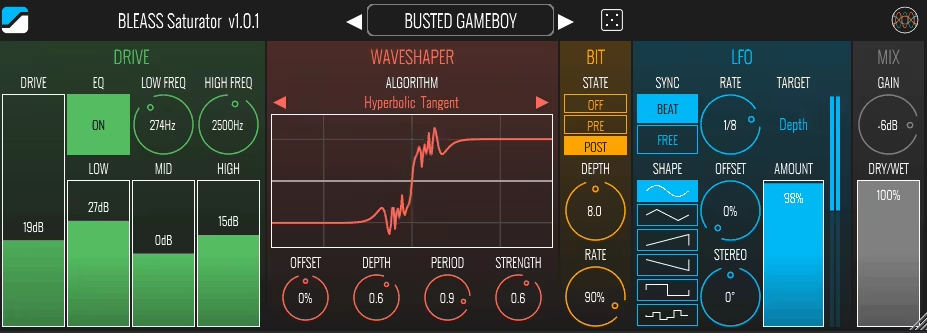
BLEASS Saturator is a creative tool designed for those who want more control over their tone.
It offers a range of distortion options, from subtle warmth to bold, chaotic textures, all within a clean and intuitive interface.
My favorite side of Bleass is the interface, with its colorful, intuitive design, which doesn’t overwhelm you with endless knobs and sliders. You can quickly see what’s happening thanks to visualizations that update in real-time.
Plus, the built-in EQ and modular approach mean you’re always in control of the tone and impact of the analog color. It’s like having a mini-laboratory for saturation in your DAW, and I’ve loved seeing how far I can push it without things falling apart (unless I want them to).
- Drive Module: From Warm to Roasted
This module is your go-to for analog-style overdrive. You can keep it subtle for warmth or crank it for aggressive tones. The EQ section lets you fine-tune which frequencies get roasted, making it perfect for bass or drums that need a little extra grit.
- Waveshaper: Infinite Distortion Possibilities
The Waveshaper is where things get wild. With 9 different algorithms, you can craft everything from subtle harmonic color to full-on audio chaos. The real-time visualization makes tweaking intuitive, and the Offset and Depth controls let you sculpt exactly the distortion you want.
- Bit Crusher: Digital Chaos at Its Finest
The Bit module is all about adding that crunchy, lo-fi vibe. Whether you apply it before or after the Waveshaper, it gives your sound a glitchy edge that’s pure digital fun. Lower the bit depth or sample rate for aliasing and character that screams “retro gaming console.”
I had fun using the LFO to modulate parameters like Depth or Bit crushing, as it adds a nice amount of movement and rhythm that can really spice up your mixes. Whether it’s for crunchy drums or evolving leads, this plugin delivers.
Bleass Saturator comes in VST3, AU (Mac only), and AAX formats for macOS and Windows, while it is available in AUv3 for iOS.
11. Softube Dirty Tape
| Plugin | Softube Dirty Tape |
|---|---|
| Description | Lo-fi tape-style saturation with wobble, dropouts, and quick controls for instant grit |
| Award | Best for Lo-Fi Texture |
Dirty Tape is all about embracing imperfection and turning it into a musical vibe.
With its simple controls and grungy character, Dirty Tape is like adding a touch of vintage grit and warmth to your tracks without overthinking.
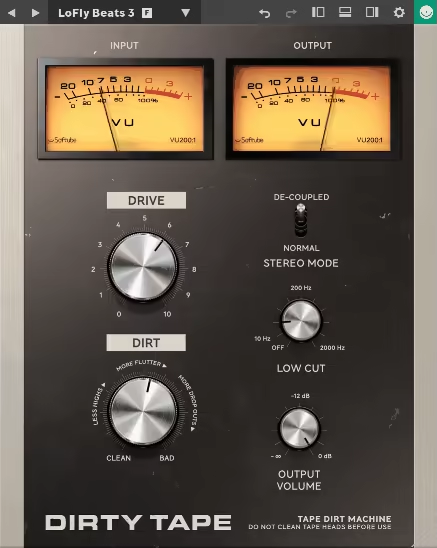
The interface is as straightforward as it gets, as 2 main knobs, Dirt and Drive, handle all the heavy lifting. Whether you want to subtly warm up a piano loop or dive headfirst into glitchy, pitch-warped chaos, it gets you there fast. It even has a low-cut filter to clean up the low-end rumble while keeping the lo-fi aesthetic intact.
- Dirt and Drive: The Dynamic Duo
The Dirt knob adds subtle degradation or full-on vintage distortion to your signal, while Drive controls how hard you’re hitting that imaginary tape. Together, they deliver everything from smooth to gritty destruction. I love using the Dirt knob sparingly on vocals, as it adds a great color.
- Stereo Mode and Lo-Fi Control
Choose between Normal Stereo or De-coupled (dual mono) mode for different stereo imaging effects. The Low Cut Filter lets you focus on the midrange and highs, dialing up that retro charm.
- Flutter, Wow, and Dropouts
This isn’t just about warmth cause it introduces analog-inspired effects like random pitch modulation, flutter, and tape dropouts. These add an unpredictable, lively character, which I love and use often for beats and textures.
Dirty Tape is for producers who love lo-fi charm and want quick, effective results. This saturation VST is great for hip-hop beats, chill synths, or anything that needs a retro vibe. This plugin’s simplicity and character make it a joy to use.
Dirty Tape is available in AAX Native, VST, VST3, and AU (Mac only) formats for macOS and Windows platforms.
12. Newfangled Audio Saturate
| Plugin | Newfangled Audio Saturate |
|---|---|
| Description | Transparent spectral clipping saturator that adds loudness and harmonics without muddying the mix |
| Award | Best for Clean Saturation |
For those after a cost-effective saturation VST solution, Saturate is there to bring warmth and control to the table in spades.
Built on the Spectral Clipper algorithm from their Elevate Mastering Limiter, this plugin lets you crank up harmonic richness without throwing your tonal balance out of whack.
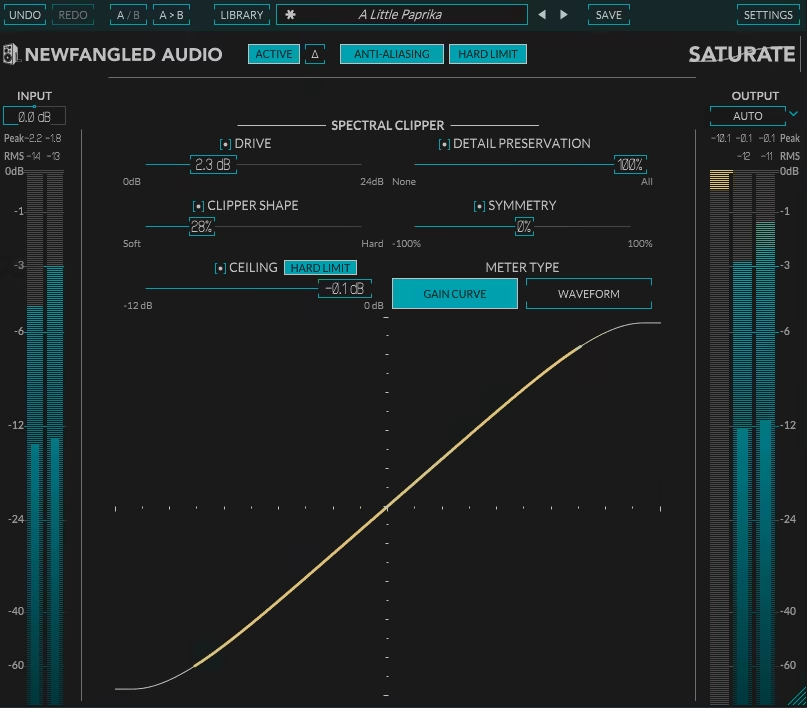
Saturate’s design is refreshingly simple, making it perfect for fast workflows. With individual input/output controls, variable clipping shapes, and auto-leveling, you get all the tools you need to fine-tune your mix without endless tweaking.
My favorite feature, the “mastering-grade” metering is the cherry on top, giving you precise insights into your signal’s peak and RMS levels.
- Transparent Harmonic Enrichment
This VST can add up to 24dB of gain without the usual muddiness or tubbiness that comes with heavy overdrive. This means punchier drums, clearer vocals, and fuller instruments, all without compromising clarity.
- Shape Your Saturation
The variable clipping shape control allows you to dial in exactly how aggressive or subtle the tone feels. From delicate shimmer to bold grit, it adapts beautifully to different genres and production styles.
- Auto Gain Management
With separate input and output controls and a level feature, gain staging is a breeze. You can focus on your sound without worrying about the volume spikes that often come with these types of plugins.
This one is a great tool for mixing and mastering engineers who want precision and ease of use without breaking the bank. I like using it lightly on acoustic instruments to add body without losing their natural detail. It’s subtle but oh-so-effective!
Saturate is available in AAX Native, VST VST3, and AU (Mac only) formats for macOS and Windows platforms.
13. PROCESS.AUDIO Spicerack

| Plugin | PROCESS.AUDIO Spicerack |
|---|---|
| Description | Multi-algorithm distortion with linear-phase EQ and console-style control across instances |
| Award | Best for Precision Control |
If you’ve ever wanted a saturation plugin VST that feels like a Swiss Army knife for distortion, Spicerack might just hit the sweet spot.
With its 5 distinct algorithms, linear-phase EQ, and console-style control across your entire session, this saturator VST is designed to handle everything from subtle warmth to chaotic fuzz with precision and ease.
Let me compliment the Spicerack interface first; it is clean, intuitive, and refreshingly free of clutter. The vertical EQ design is a standout, letting you shape pre- and post-distortion sounds while keeping your phase issues in check.
The Auto Gain Compensation is a lifesaver, meaning no wild volume spikes as you crank up the Drive. Plus, the Console Remote feature is great for managing multiple instances without juggling windows.
- 5 Flavors of Distortion
Spicerack comes with Tube, Amp, Fuzz, Lo-Fi, and Drive algorithms, each engineered to bring a different vibe. Whether you’re warming up a mix bus or tearing apart a guitar track, there’s a setting here that fits.
- Linear-Phase EQ
The built-in EQ isn’t just functional cause it’s brilliant. Use the low/high-pass filters and tonal shaping tools before or after the distortion stage. And that vertical layout? Surprisingly intuitive once you start tweaking.
- Gate Control for Precision
Messy distortion ruining your mix? The gate feature only processes the loudest parts of your signal, so your sound stays clean and focused where it matters most.
Spicerack excels at adding character to individual tracks or subtly coloring an entire mix. I found it especially useful on drum buses for tight, punchy warmth and on vocals for a little extra edge.
Spicerack is available in AAX Native, VST3, and AU (Mac only) formats for macOS and Windows platforms.
Bonus: Old Standard
SoundToys Decapitator
| Plugin | SoundToys Decapitator |
|---|---|
| Description | Classic analog-style saturator with five flavors and the famous Punish mode for extra drive |
| Award | Best All-Rounder |
There’s something about Decapitator that makes me feel like I’m behind an old-school console, pushing hardware to its limits and loving every second of it.
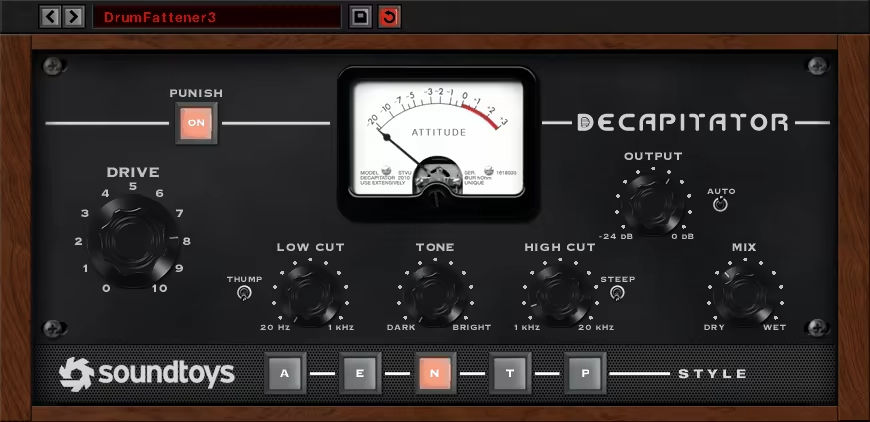
As it comes with 5 unique saturation models and the infamous Punish button, this saturator VST isn’t just about adding warmth; it’s about bringing raw character and vibe to your tracks.
You’ve got your Drive knob front and center, a Mix control for instant parallel processing, and tone-shaping filters to sculpt the sound just right.
What I appreciate most in Decapitator is the Auto Level Compensation, which no more deafens your ears when you crank up the distortion! And let’s not forget the vibe: whether you’re going for subtle harmonic enhancement or full-on sonic destruction, Decapitator delivers without fuss.
- 5 Distinct Saturation Models
Each of Decapitator’s 5 algorithms has its own personality. Whether it’s the smooth warmth of an Ampex tape machine or the bite of a germanium preamp, there’s a flavor here for every mix need.
- Tone and Filter Controls
Shape your tone with a modeled tone control and high/low-pass filters. The steep filter mode mimics speaker cabinet roll-offs, making it perfect for taming highs on aggressive settings.
- The Punish Button For Extra Grit
This isn’t just a gimmick as it’s the soul of Decapitator. Add an extra 20dB of gain for distortion that feels like it’s tearing through the speakers yet somehow stays musical.
Decapitator shines on anything from drums to vocals, but I’d argue it’s a secret weapon for bass tracks. Add a pinch of Drive for warmth, or go all-in for gnarly, mix-piercing tones.
Spicerack is available in AAX, VST, VST3, and AU (Mac only) formats for macOS and Windows platforms.
Is saturation the same as distortion?
Not exactly. Distortion is usually more aggressive, while saturation is typically subtle and musical. Saturation is basically “controlled distortion” designed to enhance tone rather than destroy it.
Where should I use saturation in a mix?
Common use cases:
- Vocals: warmth and presence
- Drums: punch and energy
- Bass: harmonic richness for small speakers
- Mix bus: glue and analog feel
- Mastering: very subtle loudness and density
How much saturation is too much?
If you can clearly hear the effect in a full mix, it’s often already too much. The best saturation usually works at 1–10% wet, or just a few dB of drive. If you mute it and miss it, you nailed it.
Last Words
Saturation plugins have become one of the most powerful creative tools in modern music production. Whether you want subtle analog warmth, gritty distortion, or full-on sound design chaos, there’s a plugin here that fits your workflow and your style.
From transparent tools like Newfangled Saturate and Plasma to character monsters like Decapitator, RC-20, and Bad Tape 2, the real magic happens when you start using saturation not just as an effect, but as a tone-shaping instrument. Used subtly, saturation makes mixes feel richer, louder, and more alive. Used creatively, it becomes a sound design weapon.
In most cases, less is more. A few dB of well-chosen saturation often beats stacking five plugins in a chain.
