
The UAD Topline Vocal Suite brings character and creativity to vocals with its standout analog saturation and modulation feature, even tough its EQ and compression customization options are limited. Definitely not an all-in-one vocal mixing solution, but it still inspires creativity and delivers vintage tones through its intuitive presets and tools. Suitable for most production styles with its versatility for both subtle enhancements and bold effects.
Pros
- Combines tuning, EQ, dynamics, modulation, delay, and reverb for a versatile vocal toolkit.
- Analog saturation adds warmth and character with Hyped, Present, and Vintage options.
- Key Finder and real-time tuning streamline recording and mixing workflows.
- Creative, genre-specific presets provide inspiration and practical use.
- Clean, intuitive interface ensures ease of use for beginners and professionals alike.
Cons
- Limited customization options for compression and EQ may not suit advanced needs.
- Lacks noise suppression and de-reverb tools found in some competing plugins.
- Requires modern hardware and operating systems, limiting compatibility with older setups.
Let’s dive into the UAD Topline Vocal Suite Review, and discuss the plugin’s features, pros and cons, and best use cases so you can decide for yourself whether to invest in it or not.
So, what’s the usual expectation from a vocal plugin? I am used to working with a bunch of plugins that specialize in different things. My typical setup starts with a de-reverb or noise suppression plugin like NS1, making sure I’m working with clean, noise-free vocals. From there, I might add a tuner if needed to ensure the pitch is just right.
Then, the real processing starts, using different equalizers, compressors or dynamic processors, and harmonic processors (saturation and distortion plugins) in different order and combinations, depending on the vocals. After that, I add reverb, delay, and other effects.
What’s great about UAD is that it takes care of all of that except the vocal suppression or de-reverb part.
Interface/GUI
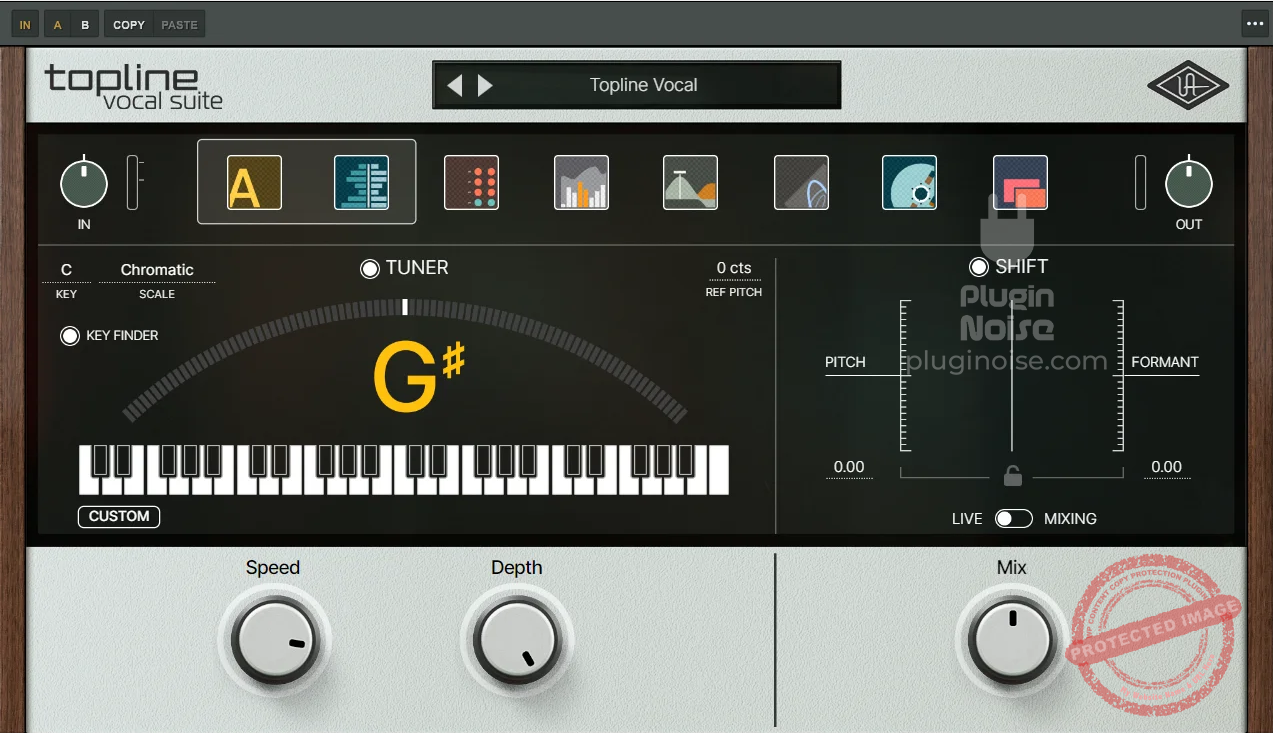
The plugin consists of the following switchable tabs:
Tuner/Shift
The first tab in the UAD Topline Vocal Suite is the Tuner, which is packed with a lot more than just pitch correction basics.
- Vocal Tuning
Right off the bat, it allows you to set the key and scale, something that seems small but saves a ton of time in the vocal processing workflow. You can adjust the root note and scale for automatic tuning, ensuring your vocals are always on the pitch without extensive manual adjustments.

One of the standout features here is the Key Finder. This tool is incredibly useful, as it detects the key of the song, making it easier to apply accurate pitch correction right from the start. For fine-tuning, you have control over speed and depth.
The speed knob adjusts how quickly the tuner corrects pitch, which is perfect for achieving anything from subtle, natural tuning to that stylized, fast-correction sound that’s popular in hip-hop and pop. The depth knob lets you control how strongly the tuning affects the vocal, so you can make the correction as smooth or pronounced as you need.
- Pitch/Formant Controls
Then, there are the pitch and formant controls, which allow for detailed pitch adjustments while maintaining the natural timbre of the voice. I found the Mix knob particularly handy here, as it lets you blend in the amount of corrected pitch with the original signal, which is great if you want a touch of correction without fully committing to an overly processed sound.
Lastly, the LIVE/Mixing switch lets you toggle between real-time tuning (ideal for recording sessions where you need low-latency feedback) and mixing mode, where you can fine-tune settings after the recording session for an even more precise result. This is a great addition for those who prefer to monitor their voice in real time but want to retain full control over the processing during the mix.
Analog/Dynamics/EQ
This tab presents you with all the tonal alterations you need for your vocals.

- Analog
This section is for adding different analog colors to your sound. The Color and Saturate Knobs let you dial in just the right amount of analog warmth and saturation.
The Color knob adds depth, helping vocals sound fuller and richer. In contrast, the Saturate knob injects subtle harmonic distortion, lending an analog warmth that can make vocals feel more alive and dynamic. You get the following types of colors:
-
-
- Flat: This setting keeps the vocals clear and natural, with no added tonal enhancement, which is ideal for when you want transparency.
- Hyped: This boosts brightness and presence, giving the vocals a modern edge that’s perfect for pop or hip-hop.
- Present: Enhances clarity and mid-range presence, allowing vocals to sit confidently in the mix.
- Vintage: A classic, warm tone reminiscent of old-school analog gear, adding character and depth for a soulful or retro feel.
-
I personally loved the hyped, present, and bright analog types. Hyped makes the vocals really upfront and can make them stand out in the mix. Present, on the other hand, slightly spreads the vocals across the mix and makes it sit better. The ‘Bright’ saturation type is perfect for male vocals.
- Dynamics
Gate and De-Esser Switches are features in this section that help manage vocal clarity and smoothness. The Gate reduces low-level background noise, while the De-Esser targets harsh “s” sounds, keeping sibilance in check. Both are adjustable for precision, allowing for a polished vocal sound.
-
- Warm: Adds a gentle compression that maintains vocal warmth and makes the sound feel intimate.
- Transparent: Keeps the compression subtle and clean, ideal for vocals that need dynamic control without sounding compressed.
- Focused: Narrows the dynamic range to make vocals sound more distinct and tight in the mix.
- Tight: Provides firm, controlled compression, perfect for keeping vocals contained without overwhelming the natural sound.
- Aggressive: Offers bold, powerful compression, pushing the vocals to the forefront for genres that call for an energetic, in-your-face presence.
You also get a Compress Knob that lets you adjust the intensity of compression, giving you direct control over vocal dynamics and allowing for everything from subtle control to impactful, punchy compression.
While the gate and de-essing controls seem sufficient, I wish the plugin had more in-depth compression controls than just a single knob.
- DYN>EQ and EQ>DYN Signal Flow Switch
These are switches that let you decide whether you want the audio to flow into the EQ first or the dynamics processor first.
- EQ
The EQ section of the UAD Topline Vocal Suite is remarkably versatile, offering 8 bands for precision control over a broad frequency range. To further clean up the vocal sound, High-Pass (HP) and Low-Pass (LP) filters are available. When it comes to tonal character, the EQ section offers several types.
-
-
- Brilliant: This type enhances high-end sparkle, bringing added clarity and openness to vocals that might otherwise sound flat or dull.
- Midrange: This targets the crucial mid frequencies, boosting the vocal’s presence and making sure it stands out in the mix.
- Full Range: This covers the entire frequency spectrum, allowing for a balanced, comprehensive tonal profile that supports the vocal across lows, mids, and highs.
-
The ‘Air’ knob essentially functions as a high-shelf band, adding a subtle lift to the high end. However, I did notice the absence of bandwidth, or Q-value controls in the EQ, which limits the precision with which you can shape each band.
While the gain controls will likely suffice for general adjustments, the lack of bandwidth customization restricts the more detailed, hands-on control that some producers might look for when fine-tuning vocals.
Modulation/Delay/Reverb
This is the section where you add time-based effects.

- Modulation
This section offers a range of effects that can add unique movement and depth to vocals, with types such as chorus, doubler, widener, flanger, and wow & flutter. The Intensity control lets you adjust the effect’s strength from 0 to 100, offering subtle modulation or more pronounced, creative effects.
Paired with the Blend knob, this section allows for smooth control over how much of the modulated signal is mixed with the dry vocal, making it easy to find the perfect balance for each track.
- Delay
You get access to various delay types, including digital, studio tape, and cassette, each bringing a unique character to the vocal’s echo effects. The Feedback control helps manage the number of repeats, while the Time knob adjusts the interval between each echo, giving you complete control over the delay’s rhythm and depth.
Additionally, High-Pass (HPF) and Low-Pass (LPF) filters are included to filter out unwanted low or high frequencies from the delay, ensuring it blends well with the vocal without muddying the mix. Then, you can change the delay modes between mono, stereo, wide, and ping-pong. Finally, you also get a mix knob.
- Reverb
UAD Topline Vocal Suite’s Reverb section provides a variety of reverb types that range from ambient spaces to larger halls and chambers, enabling you to add realistic depth and space to the vocals. The Predelay control allows for precise timing adjustments, which helps keep the reverb from overwhelming the vocal by delaying the effect slightly.
The Mod control introduces modulation to the reverb tail, giving it a richer, more complex sound, while the Mix knob adjusts the overall balance between the dry vocal and the reverb effect.
You can also control the amount of delayed signal that goes into reverb by adjusting the Send slider between the delay and reverb sections.
Overall, the plugin’s interface is both visually appealing and user-friendly. With three organized tabs, each containing a selection of 2-3 key effects, it provides a streamlined and clutter-free workflow. The effects are intuitively arranged and remain easily accessible, making it simple to navigate without feeling overwhelmed or having to search through complex menus.
Presets
This is the section where I found the juice of this plugin. This is where things get creative! The preset section is fantastic, filled with interesting, fun, and genuinely creative patches. Unlike many other plugins where presets can feel uninspired or forced, these are not only usable but can also spark new ideas and inspiration.
You can browse the presets via these categories: Genre, Type, and Artist. There’s also a search bar where you can type the preset name and look for it in the menu. You can also give some presets a “favorites” tag.

The closest comparison that comes to mind is with OVox by Waves. OVox is a wonderful plugin, but I am not usually happy with its presets, as they are “too experimental” and not as useable. Presets in this plugin, on the other hand, are quite fun and usable!
Compatibility
It runs smoothly on both Mac and PC as part of the UAD Native lineup, meaning it doesn’t require any additional UA hardware to operate.
It’s compatible with macOS 10.15 Catalina and newer, as well as Windows 10 and 11, covering a wide range of modern setups.
Final Thoughts: Topline Vocal Suite Review
While the compressor and EQ sections might lack some customization options, the UAD Topline Vocal Suite makes up for it with its distinct analog saturation and modulation features, which add depth and character in ways other plugins can’t. I wouldn’t rely on this as a comprehensive, all-in-one plugin for mixing vocals, but that doesn’t seem to be its main purpose.
The best use of is to add a unique character, timber, or quality to your vocals and get creative with them. The preset section is the perfect place to get inspired. The plugin’s ‘Analog’ section lets you get that classic 70s, 80s, and other vintage flavors.
One of my favorite aspects of this plugin is its versatility. It allows you to go from subtle, polished adjustments to bold, upfront effects, adapting to various styles and production needs. Whether adding a touch of nostalgia or pushing for a modern edge, this plugin delivers a solid creative toolkit for vocal production.
