
Here are some of the top plugins for Psytrance & GOA to reach those twisted synth lines, evolving arps, and cosmic atmospheres.
PsyTrance and GOA aren’t just music genres, they’re sonic journeys designed to bend perception and move dancefloors at 140+ BPM. Every element matters, from the sub-bass and rolling grooves to the synth lines, arpeggiators, and atmospheric textures that pull you deeper into the trance.
And if you’ve ever tried producing these styles, you know not just any plugin will cut it. You need instruments and effects that can sculpt, morph, and transform sound in ways that feel alive and otherworldly.
I’ve spent countless hours experimenting with tools that deliver the punch, detail, and flexibility PsyTrance production demands, and 2026 is shaping up to be an incredible year for producers. From synths capable of spitting out acid riffs to FX plugins that manipulate space and time, there’s no shortage of ways to push your sound design to new dimensions.
In this guide, we’ll dive into the seven best PsyTrance and GOA plugins, plus a few free tools that punch way above their weight. Whether you’re going for full-on sunrise vibes, dark and twisted nighttime energy, or the hypnotic spirit of classic GOA, these tools will transform your DAW into a psychedelic playground.
1. Xfer Serum 2 (Synth)
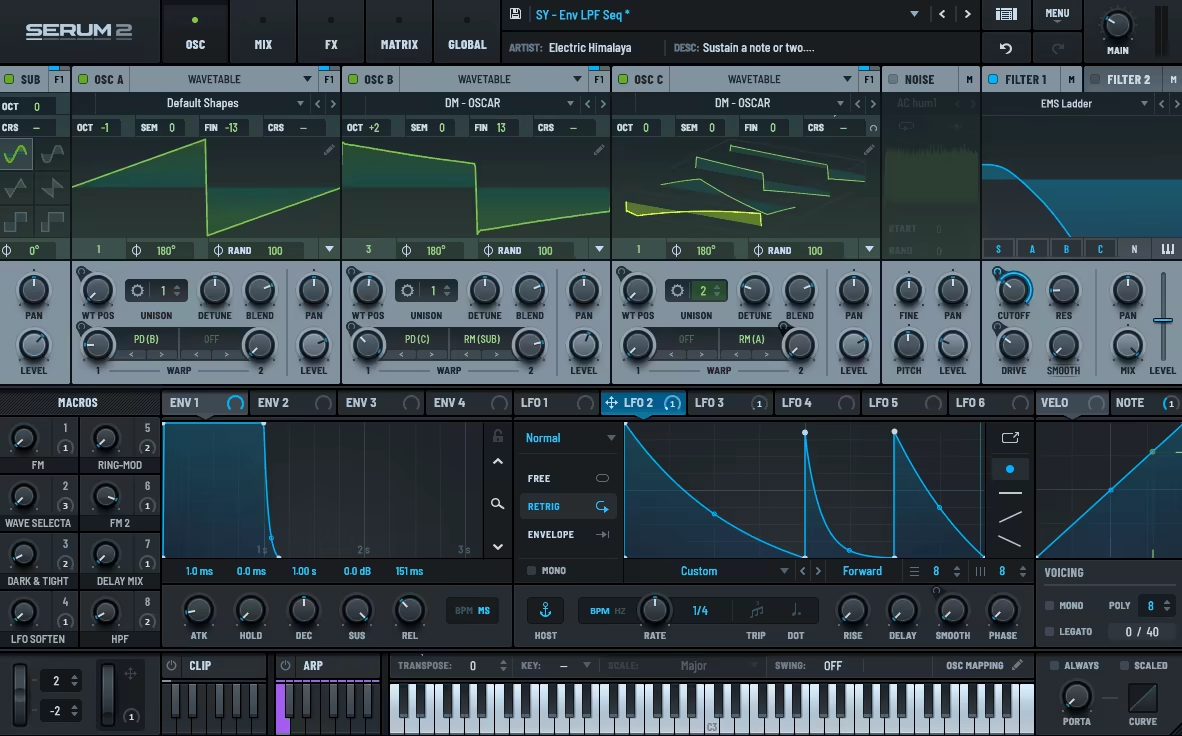
When it comes to psytrance and GOA, Serum has been a household name for years, and now Serum 2 takes things to an entirely new level. The extra oscillator, hybrid engines, modulation expansion, and updated FX section make it feel like a synth built for psychedelic sound design. I loaded it up expecting a small update, but instead got a full-on playground for textures and basslines.
The workflow stays true to the original: clean, visual, and instantly tweakable. The updated interface is wider and more polished, but still familiar. I was able to dive into sound design immediately, and the new modulation tools offer tons of creative routing options.
- New Oscillator Engines
Granular, multi-sample, and spectral synthesis now join the classic wavetable engine. Spectral resynthesis especially stands out for drones and atmospheres.
- Warp & Routing Upgrades
Each oscillator supports dual warp modes, with new options like FM, phase distortion, and saturation. These are perfect for creating shifting, aggressive tones.
- FX Overhaul
There are now multiple FX racks, convolution reverb, and a Bode shifter. Complex delay-distortion chains are easier and more flexible than ever.
- Modulation
You get up to 10 LFOs with chaos, remap curves, and custom shapes. Great for driving animated patterns and evolving sequences.
- Arp & Clip Player
Serum now includes an integrated arpeggiator and clip launcher. This allows riff writing and phrase triggering directly from within the synth.
The only real downside is that it doesn’t feel quite as revolutionary as going from no Serum to Serum 1. Still, in 2025, Serum 2 is easily one of the most capable synths for Psytrance. If you’re making leads, atmospheres, or basslines, it’s absolutely worth the upgrade.
Serum 2 is available as VST3, AU, and AAX on macOS and Windows (64-bit) and is compatible with all Serum 1 presets and packs.
2. Polyverse Supermodal (Modal Filter / Resonator)
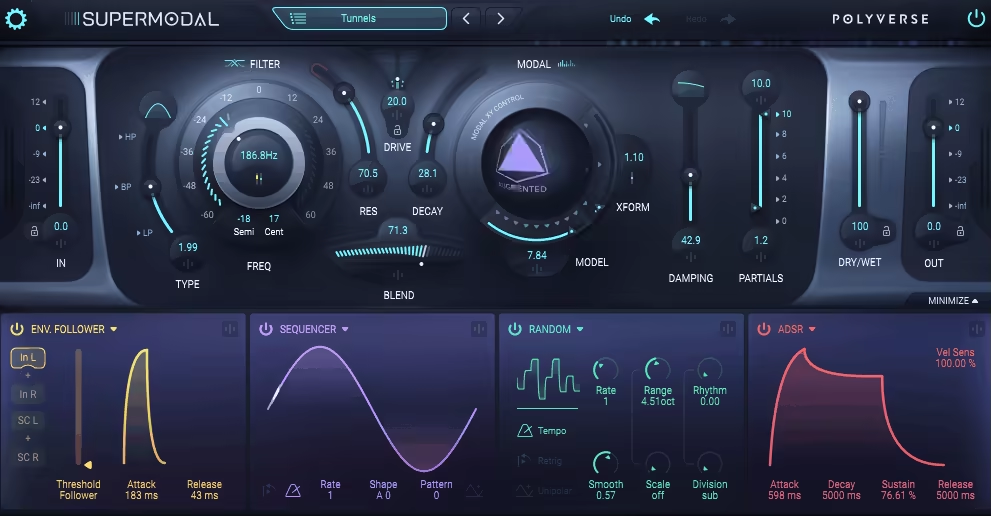
I love how Supermodal takes the concept of dual filters and turns it into a playground for sonic experimentation. What really grabbed me is the combination of a state-variable filter with a modal filter; it’s like having two completely different worlds of sound in one plugin. I’ve honestly found myself getting lost for hours just exploring them.
The interface is clean and intuitive, which is a joy because some dual-filter setups can feel intimidating. The top half focuses on the filters, while the bottom is all about modulation, and everything is color-coded. I especially appreciate the stereo options; they let me create wide left/right movement without any extra routing.
- Twin Filter Engine
I love switching between the SVF and modal filters. The SVF covers all the basics , low-pass, band-pass, high-pass , and can be pushed into self-oscillation. The modal filter adds unique resonant modes like vowel and laser/spring, which completely reshape a sound.
I’ve used it on drum loops and synth pads, and it always adds character and motion. It’s the kind of tool that turns a basic sound into something alive and animated. Sometimes, I just sweep through modes and listen to the transformations unfold.
- Flexible Modulation System
Supermodal has four modulation slots, and they’re insanely flexible. You can assign ADSR, sequencer, envelope follower, Meta Knob, and more to almost any parameter. I’ve built rhythmic filter patterns with the sequencer that bring static sounds to life.
Linking multiple sources to multiple targets is fast and intuitive. The GUI’s color-coded layout helps me stay organized and prevents routing confusion. It’s rare to find a modulation system this deep that’s also this usable.
- Real-Time Preset Switching
One of my favorite tricks is using MIDI CC or notes to switch presets in real time. It’s amazing for live performance or jamming ideas on the fly. I’ve played entire drum loops using different presets per hit , no glitching, just smooth transitions.
The only downside is that you can’t directly edit factory presets without copying them first. It’s a minor inconvenience, but worth noting. Honestly, the creative payoff outweighs that small friction.
Overall, Supermodal has become a go-to for injecting motion into pads, synths, and drums. It’s playful, inspiring, and technically deep enough for serious sound design. Every session with it feels like a mini exploration in sound.
Plugin name comes in [VST3, AU, AAX] formats for macOS and Windows users.
3. Polyverse Gatekeeper (Volume Shaper / Noise Gater)

I’ve been producing music and running A&R for years, and one thing I’ve learned is that movement , subtle or wild , makes the difference between a good song and one that feels alive. That’s why I was hyped to dive into Gatekeeper from Polyverse. What I love about it is how it lets you sculpt, chop, and shape sound while keeping everything automatable in real time , a total game-changer for adding energy and pulse.
The interface is clean but packed with options, a delicate balance that Gatekeeper nails. The top bar handles your input/output and trigger controls, while the main window focuses on envelopes and modulation. I found myself bouncing between envelopes, painting curves, and experimenting with MIDI-learn features quickly. It’s complex enough to get creative with, but intuitive enough that I didn’t feel lost.
- 8 Envelopes With Precision
Gatekeeper gives me eight separate envelopes, each with on/off switches and background views showing active ones. Paired with trigger, grid, smoothing, and paint tools, I create intricate volume modulation patterns.
I’ve used this on reverb tails to subtly gate space, adding life without cluttering the mix.
- MIDI Modulation & Dynamic Control
What makes Gatekeeper fun is the MIDI modulation. You can manipulate envelope parameters using velocity, key range, and add random variations for unpredictability.
I often tweak Time, Amp, and Pan to create stuttered synth patterns or evolving noise sweeps, a Swiss army knife for volume and rhythm modulation.
- Dry/Wet Control for Live Automation
The dry/wet knob is a lifesaver. Automating the amount of stutter live gives creative control and keeps listeners engaged without overdoing it. Paired with envelope tweaks, it makes sections feel alive, especially in breakdowns and subtle fills.
I would have loved enhanced visual feedback, like envelopes dynamically reflecting changes in Smooth or Amp, a nice quality-of-life upgrade. Also, individual envelope inputs and routing outputs as an external modulation source would be cool. But these are minor gripes in such a powerful plugin.
Gatekeeper has quickly become my go-to for adding movement, energy, and life to everything from pads and synths to reverb tails and risers. Whether sculpting intricate envelopes for builds or lightly gating elements for groove, this plugin delivers unmatched precision and creative freedom.
Gatekeeper is available as VST2, VST3, AU, and AAX on macOS and Windows.
4. Polyverse Manipulator (Vocoder/Pitch Shifter)
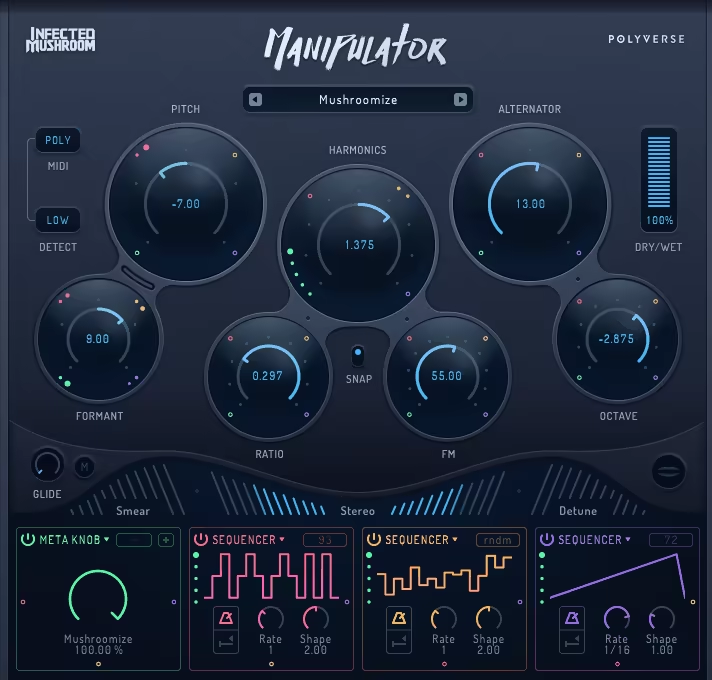
Polyverse Manipulator immediately stands out as a playground for sound experimentation. From subtle pitch shifts to total vocal mangling, this plugin opens doors to sonic possibilities I didn’t even know I needed. Every tweak feels creative, whether I’m shaping a synth line or giving a vocal a robotic edge.
The interface is surprisingly approachable given how much is under the hood. Ten main effects are neatly organized, and the global controls, MIDI, pitch detection, dry/wet, and more, sit right where I want them. It’s easy to jump in and start creating without feeling overwhelmed, which is rare for a plugin this deep.
- Pitch Shifter & Formant Tweaks
The Pitch Shifter is a game-changer. Smooth grains deliver natural-sounding shifts, while rougher settings produce that gravelly, robotic vibe I love. Formant adjustment reshapes vowels, giving unique, playful textures I can’t get elsewhere.
- Harmonic Shifter & Grain Alternator
Harmonic Shifter subtly morphs timbre without affecting pitch, perfect for adding character. The Grain Alternator slices audio into overlapping grains and alternates pitch, producing shimmery, otherworldly textures.
I’ve turned ordinary vocals into Dalek-like voices and transformed synth lines into evolving, ethereal soundscapes with a few moves.
- Smear, Stereo & Detune Effects
The Smear effect is ideal for ambient, evolving textures. Stereo widening keeps mono compatibility intact , a rare and welcome feature.
Detune adds thickness and movement, making even simple sounds feel alive. Together, these effects build energy and depth in tracks.
- Modulation System
Manipulator shines when modulators come into play. Five types, Meta Knob, Follower, ADSR, MIDI, and Sequencer, let me link multiple parameters, convert audio into modulation signals, or create custom sequences. Chaining modulators produces entirely new textures and keeps sessions unpredictable.
It’s easy to push the plugin into chaotic territory, and sometimes a randomization button would save time when I just want to experiment. Otherwise, the plugin is rock-solid, and the vast preset library makes it easy to jump in without feeling lost.
Manipulator has become an essential tool for me. It transforms ordinary audio into something entirely new, inspiring experimentation every session. Whether for subtle harmonization or total sonic destruction, it’s a playground that rewards curiosity.
Manipulator is available as VST2, VST3, AU, AAX on macOS and Windows.
5. Polyverse Filterverse (Must have for Psy)
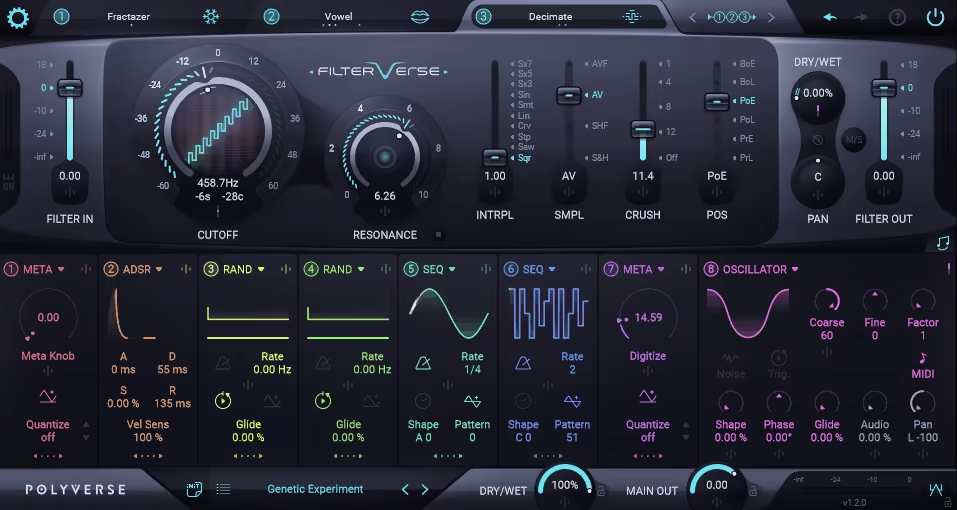
I’ve always felt that in psytrance, the filter isn’t just an effect, it’s the heartbeat of the track. Without movement, the groove just doesn’t breathe. That’s why Filterverse instantly grabbed me.
Instead of being just another filter, it feels like a playground where I can twist, bend, and reinvent sounds until they’re dripping with psychedelia. The layout is surprisingly welcoming. Three filter slots stare back at you, and the routing options let me chain them, split them, or make them fight against each other.
Watching the visual cutoff curves dance as I sweep through frequencies is weirdly addictive. Sometimes I’d load up a flat pad, toss on a few vowel and comb filters, and it would morph into something completely alien.
- 26 Filter Types
You can go from basic low-pass to chaos with things like Robo Comb or Space. Half the fun is stacking unexpected types together and seeing what happens.
- Advanced Modulation
There are eight modulators you can assign to almost anything. I’ve routed envelope followers to resonance, sequencers to panning, and pitch detection to cutoff; it feels like real-time sound puppeteering.
- Creative Presets
I usually skip factory presets, but these pulled me in. Within minutes, I turned a flat kick loop into a pulsating, trippy rhythm just by cycling patches.
- Performance Tricks
One standout feature is being able to trigger preset changes via MIDI notes. It felt like jamming on a groovebox, but inside a swirling filter matrix.
The only catch? Filterverse isn’t a “throw it on and forget it” kind of tool. It takes time to explore, and while the interface makes sense, it goes deep fast.
And yeah, it’s not exactly cheap, but after a few sessions, I knew it was worth it. For me, Filterverse nails what psytrance producers crave: movement, unpredictability, and sculpting power for evolving textures. It’s the kind of plugin that pulls you into a sound design rabbit hole and makes you want to stay there.
Filterverse is available as VST2, VST3, AU, AAX on macOS and Windows.
6. Polyverse I Wish
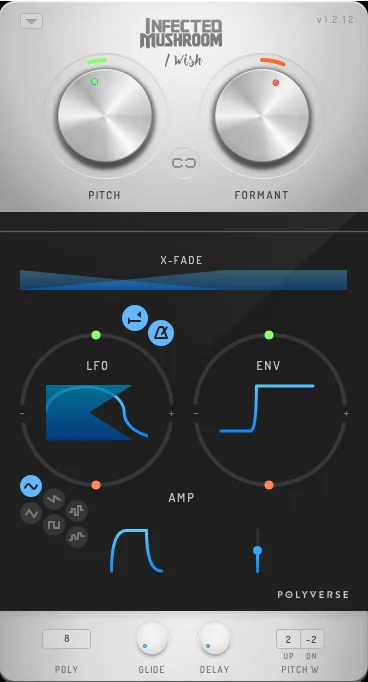
When I first loaded up I Wish, I was immediately struck by how different it felt from any plugin I’d used before. This isn’t your typical synth or standard effect; it’s something in between, and that’s exactly what makes it so fun. The core idea is brilliantly simple: it takes a tiny slice of any audio input and turns it into a single-cycle waveform that you can play via MIDI.
I remember doing this manually for a past project, spending hours chopping, looping, and tuning waveforms, with I Wish, that entire process happens instantly and live. Honestly, it felt like discovering a secret shortcut in my production workflow. Getting it up and running is surprisingly painless.
Yes, it asks for both audio and MIDI inputs, which threw me off at first, but once I followed the setup steps for FL Studio, I was immediately experimenting. Within minutes, I had my first looped hi-hat sounding like a playable synth, already imagining all the wild textures I could create.
- Single-Cycle Waveform Wizardry
The part that blew me away most is how each MIDI note produces a distinct color of buzz. I’ve fed it everything from vocals to percussion, and the tuning is perfect every time. No more manually matching pitch or wrestling with inconsistent waveforms, I can just focus on playing and sculpting the sound.
I did notice very low notes can sound a little hollow, but dialing down the formant fixes that in a heartbeat, giving me full control over the sonic character.
- Creative Pitch & Vibrato Controls
I’ve had so much fun with the vibrato and pitch envelope. The vibrato isn’t just a gimmick; I use it to create sirens, wobbles, or chaotic pitch jumps that feel organic. The pitch envelope is my secret weapon for quick sweeps or dramatic drops.
I’ve actually used it to turn a static hi-hat loop into a percussive melody that evolves over time. The fact that these controls are powerful and fun to play with makes I Wish feel more like an instrument than a plugin.
- Intuitive, Minimal Interface
The GUI is small but thoughtful. Big, easily accessible controls mean I can tweak multiple parameters on the fly, especially fun on a touchscreen, where I literally use both hands to shape the sound.
I never feel lost in a forest of tiny knobs, which is a relief because complex plugins often intimidate me. Here, I can dive straight into experimenting, and it actually encourages me to try things I normally wouldn’t.
I Wish really shines when I want harsh, buzzy leads or glitchy textures. Softer pads are possible but need some extra effects, which I enjoy doing because it pushes me to layer creatively. For tracks that demand energy and attitude like electro house, psytrance, dubstep, it’s a perfect fit.
That said, I’ve also dropped it on subtle elements, like adding tiny stutters or unexpected sonic textures, making my mixes feel more alive.
If I had one wish for I Wish (pun intended), it’d be a built-in detune and width control. I’ve layered multiple instances to fatten up sounds, but having this baked in would make the process smoother and even more immediate.
If you’re looking for something to inspire fresh ideas and bring unpredictability to your tracks, I Wish is a tool you’ll keep reaching for. Just don’t be surprised if you spend an hour playing around and lose track of time.
I Wish is available as VST2, VST3, AU, AAX on macOS and Windows.
7. DS Audio TANTRA 2 (Multi Effect)
I first stumbled upon Tantra 2 while hunting for plugins that could really transform a dull synth pad or a static drum loop into something that felt alive.
I have to say, this one immediately grabbed my attention. From the moment I loaded it up, I loved how it felt like a sonic playground, a place where I could experiment without limits and let my creativity run wild.
The name makes perfect sense, too: inspired by the idea of “weaving” from its Sanskrit root, Tantra 2 genuinely lets you weave layers of movement, texture, and modulation into your sounds in ways that feel intuitive yet incredibly powerful.
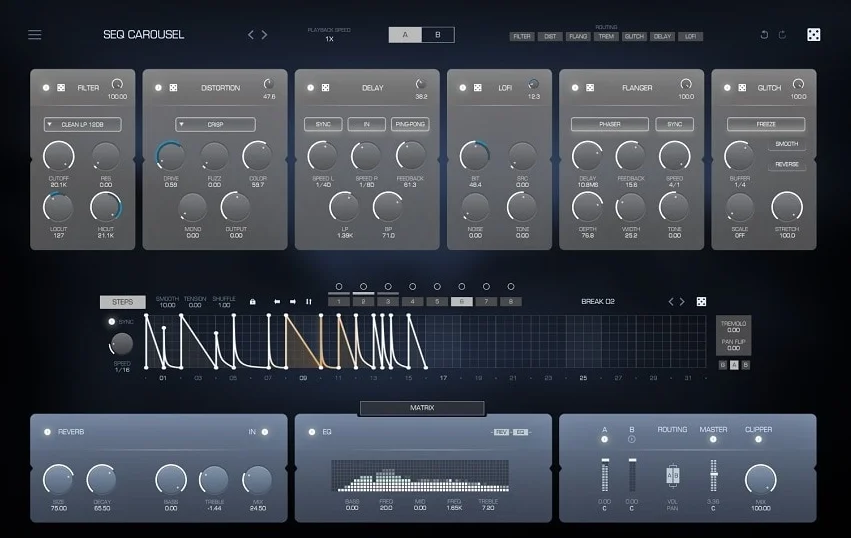
Getting into the plugin itself, I immediately appreciated the dual signal chains, A and B, each with six dedicated effects modules: Filter, Distortion, Delay, LoFi, Flanger, and Glitch.
On top of that, there’s a global reverb and EQ section, along with eight modulation sources capable of curve- or step-based sequences up to 32 steps. Honestly, this combination had me geeking out. I could link almost any parameter to almost any modulator and watch the sound evolve in real time.
The UI redesign makes all of this surprisingly accessible; everything is laid out cleanly, with large, responsive controls that make me want to click, drag, and experiment.
- Flexible Effects Chains
One of my favorite things about Tantra 2 is the freedom to switch the A and B chains between parallel or serial routing, adjust their volumes and panning independently, and even apply different processing to each side of a stereo signal.
I found myself spending hours exploring different chain setups, especially when layering complex textures over pads or rhythmic elements.
The global Mix control is a lifesaver, letting me dial back processed sounds without touching the dry signal in the chains themselves. It keeps things musical and under control.
- Powerful Modulators
The modulation system is where Tantra 2 really shines. I love tabbing between the eight sequencers, experimenting with step or curve mode, adjusting gate, smoothness, tension, and shuffle, and seeing how a single curve can morph an entire sound over time.
Linking modulators is as simple as click-drag-drop, which encourages me to dive in and start sculpting movement without getting bogged down in menus. I often found myself layering multiple modulators on a single parameter, creating intricate rhythms and textures that would’ve taken hours to design manually.
- Preset Inspiration
I always like to start by exploring presets, and Tantra 2’s collection is excellent. The presets are thoughtfully categorized, from FLT-heavy filter experiments to GL-based glitch patterns, and PAD or SEQ-focused sounds, and they often sparked ideas I wouldn’t have thought of on my own.
Sometimes I’d take a preset, tweak a few parameters, and end up with a completely new sound in minutes. For me, this balance of ready-to-go creativity and deep customization is what makes Tantra 2 addictive.
Of course, there are a couple of practical things to keep in mind. The Glitch module takes some learning if you want to master it, and heavy usage of Tantra 2 can chew through CPU cycles, so I tend to be mindful when stacking it with other intensive plugins.
Apple Silicon users should also double-check compatibility. Still, these are minor trade-offs considering the massive sonic possibilities on offer.
For anyone into electronic music or experimental sound design, Tantra 2 is a joy. I’ve found it invaluable for transforming basic loops into evolving, dynamic textures, creating psychedelic rhythms, and breathing life into pads and leads.
It’s fun, flexible, and incredibly powerful, and once I started exploring its modulation system, I honestly didn’t want to stop.
TANTRA 2 is available as VST2, VST3, AU, and AAX on macOS and Windows.
