
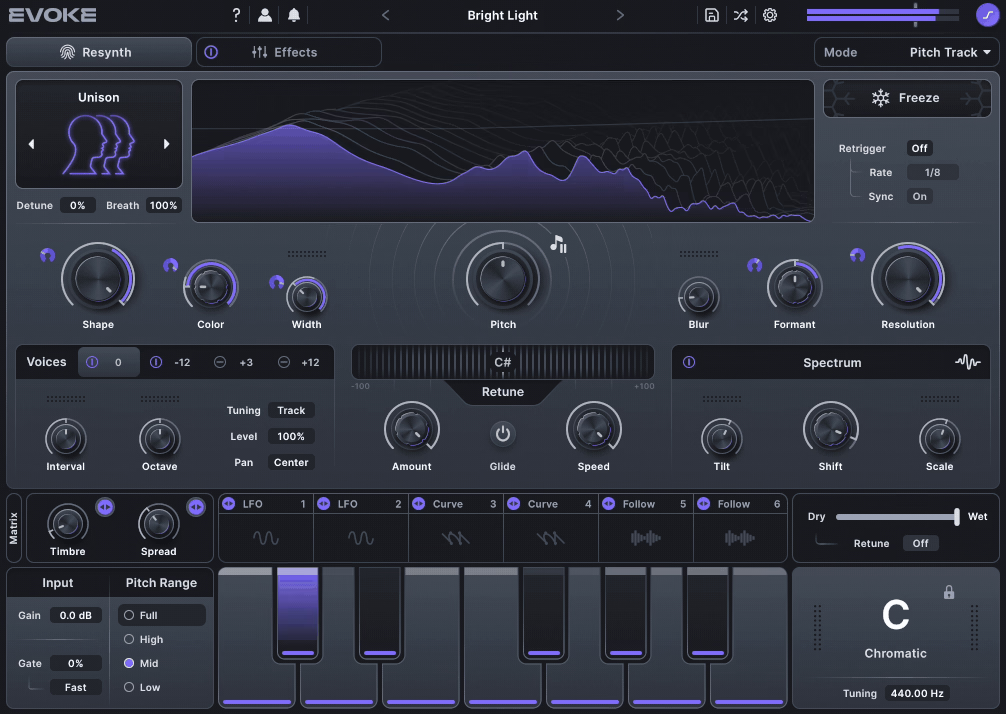
Minimal Audio Evoke is a vocal resynthesis plugin with 15 Character Modes, a four-voice harmonizer, 12-slot FX Rack, and deep modulation. It transforms vocals, synths, and monophonic sources into natural, robotic, or glitchy tones with real-time visual feedback.
Price
Pros
- Resynthesis Engine creates new audio from the input signal
- 15 Character Modes for natural, robotic, or glitchy tones
- Four-Voice Harmonizer stacks vocals instantly
- 12-Slot FX Rack with chorus, reverb, distortion, and more
- Deep Modulation with LFOs, curves, and envelope followers
- Intuitive Interface with real-time visual feedback.
Cons
- No bypass for resynthesis; can’t use solely as a multi-effect
- Primarily for monophonic sources; polyphonic input less stable
- Some modes can be extreme for subtle mixes
Today we have the new hypermodern” vocal resynthesis plugin from Minimal Audio, Evoke!
Minimal Audio’s Evoke isn’t your typical vocal processor or autotune clone; it’s a bold rethinking of what “vocal effects” can mean in modern production. Built around a resynthesis engine that uses vocal modeling and spectral processing, Evoke doesn’t just correct or color your vocals; it rebuilds them from the ground up.
When I first loaded up Evoke, it immediately felt like more than just another vocal processor. Minimal Audio calls it a “hypermodern” resynthesis engine, and that’s exactly what it is, as it rebuilds them using vocal modeling and spectral analysis.
In practice, that means I can turn a dry vocal into a harmonized stack, robotic layer, or even a shimmering texture in seconds. It’s the kind of plugin that blurs the line between utility and creativity. I’ve used it to tighten a pop lead, to warp a synth pad, and to mangle noise into something musical, all with the same tool.
The more I tried, the more I liked this plugin, so let’s dive deeper into it to see what it puts on the table!
| Feature | Technical Description | Musical Application / Use Case |
| Resynthesis Engine | Rebuilds the input signal using vocal modeling and spectral processing rather than simple pitch shifting. | Creates everything from realistic tuning to robotic tones and evolving textures. Great for modern pop vocals or experimental sound design. |
| 15 Character Modes | Unique timbral algorithms that reshape the resynthesized voice. | Choose between natural, robotic, or textural effects, perfect for harmonized leads or glitchy FX layers. |
| Four-Voice Harmonizer | Adds up to four harmonized voices following the key or MIDI input. | Instantly builds vocal stacks or complex chords without layering multiple takes. |
| Retune / Pitch Correction | Real-time pitch tracking and key-based correction with adjustable speed and depth. | Smooth pop tuning, subtle tightening, or stylized autotune effects. |
| Effects Rack | Chain up to 12 effects from 8 processors (chorus, multiband compressor, delay, distortion, EQ, filter, reverb, frequency shifter). | Sculpt tone and space; add drive, width, or motion to vocals and synths. |
| Modulation System | Six modulators (LFOs, curves, envelope followers) assignable to nearly any parameter. | Animate harmonies, morph formants, or modulate reverb for evolving movement. |
| Spectral Sculpting EQ | Frequency-domain shaping of the resynthesized signal. | Adds phasing, focus, or motion; useful for vocal tone or sound design textures. |
| Preset Library | 350+ curated presets for vocals and creative FX. | Jump-start ideas, everything from subtle polish to experimental transformations. |
Features
- Resynthesis Engine: The Core of Evoke
At the center of Evoke is a resynthesis engine that rebuilds audio using spectral and vocal modeling. Instead of reshaping the original waveform, it generates a new one that follows your vocal’s pitch and tone.
In use, it sounds strikingly natural when you want subtle pitch correction, yet it can get robotic or metallic when pushed harder. I’ve used it on both vocals and synths and it turns simple sources into something alive and slightly unpredictable, perfect for modern electronic textures.
- Modulation System: Motion Made Simple
The 6 modulators (LFO, Curve, and Follower) bring Evoke to life. You can assign them to nearly any control just by dragging, making it quick to animate formants, reverb size, or harmonizer levels.
I love using Curves for rhythmic motion and Followers for reactive dynamics; it’s intuitive, visual, and easy to integrate into any workflow.

- 15 Character Modes: From Realism to Experimentation
Evoke’s 15 Character Modes are where the fun starts. Each mode has its own sonic identity, with Shape and Color controls that adjust tone and intensity.
Some modes keep things musical and harmonically rich; others dive into glitchy, liquid, or robotic territory. I often reach for the Synthetic modes on leads or the Texture modes for ambient sound design; they can make almost anything feel new.
- Harmonizer & Retune: Instant Vocal Stacks
The 4-voice harmonizer instantly builds layered harmonies that follow your key or MIDI input. There is no need for extra routing or duplicate tracks; just drop it in and blend.
The Retune section delivers smooth, natural correction or the tight, stylized tuning used in modern pop and R&B. Together, they make Evoke feel equal parts utility and instrument.
- Effects Rack: Modular and Mix-Ready
Evoke’s FX Rack lets you stack up to 12 effects from eight processors, including chorus, reverb, delay, distortion, filter, EQ, multiband compression, and a frequency shifter.
They’re compact but sound excellent. The Frequency Shifter especially stood out with subtle shifts added width and dreamy motion to vocals and synths. It’s the kind of rack where you can finish a vocal chain without ever leaving the plugin.

- Spectral Sculpting EQ: Shape and Movement
Evoke’s Spectral EQ is more of a tone shaper than a traditional equalizer. You can shift spectral focus, randomize curves, or modulate parameters for subtle phasing effects.
I like adding slow modulation here; it adds gentle motion that keeps vocals or pads feeling fresh without crowding the mix.
Interface & Workflow
Evoke’s interface feels clean, modular, and instantly playable. Everything is organized into three main areas: Resynthesis, FX Rack, and Modulation, and you always know what’s shaping your sound. The layout encourages experimentation without confusion, and even when stacking multiple effects or mod sources, it never feels cluttered or CPU-heavy.
What I really like is how immediate it is. You drop Evoke on a vocal, set the Key Detection, and it starts tracking and rebuilding the sound right away. There’s no extra routing or sidechain setup to slow you down.
The interface responds fluidly as you tweak; sliders, curves, and Harmonizer controls update in real time, making it feel less like technical setup and more like musical performance.

The FX Rack follows that same philosophy. Each processor loads quickly, can be reordered or bypassed on the fly, and responds instantly to modulation. I’ve found it perfect for quick A/B testing, adding a Compressor or Filter mid-chain to tighten tone, or experimenting with Frequency Shifting to add motion. Even complex modulation setups feel visual and intuitive thanks to the Drag-and-Drop Modulation Links.
In practical use, it fits into a mix workflow easily. I often use it for tightening vocal peaks before harmonizing, or to turn dry mono synths into wide, expressive layers. For ambient or textural work, the combination of Character Modes and Modulation can turn static sounds into living, evolving layers. And while it can get experimental, it’s also reliable; I rarely run into any instability, even with long automation or dense effect chains.
My best results came from balancing subtle and bold moves: gentle Formant Shifts for lead vocals, slow Spectral Modulation for synth pads, and always a True Peak Limiter after Evoke when pushing reverb or distortion. It’s the kind of plugin that rewards exploration but still feels fast and musical.
Sound & Impressions
The first thing that stood out to me with Evoke was how musical it sounds, even when pushed.
The Resynthesis engine doesn’t just rebuild the signal; it reshapes it in a way that keeps the source character intact while adding depth and clarity. On vocals, it feels almost holographic, enhancing the formants without the usual phasing or digital smear you sometimes get from heavy spectral tools.
When I tested it on drums, the Transient Preservation was great. Snare hits stayed punchy even when adding dense harmonic layers, and overheads gained a subtle lift without sounding artificial.

On synths, Evoke can morph a simple saw wave into a harmonically rich pad that evolves with movement, especially when using slow modulation on the harmonics or formant filters.
Sonically, it can be either transparent or bold, depending on how you drive it. With the Drive and Saturation stages low, it feels clean and modern, which is perfect for pop or film scoring work where clarity matters. Push them higher, and it starts to bloom with grit and harmonic weight, which works beautifully for electronic and industrial styles.
In mastering tests, I found Evoke’s Spectral Balance to be its strongest asset. It adds detail and stereo depth without over-brightening or collapsing the mix. Paired with a True Peak Limiter, it can add perceived loudness and presence without sacrificing headroom. It’s one of those plugins that makes a mix feel “finished” even before you hit the final limiter.

The presets section is well-organized and rich both in quantity and quality, which is great. Beginners who can get overwhelmed can easily get started with these presets and tweak some controls to find their way in the plugin. Experienced users can also find some joy in the presets, as there are some wild ones in the provided 350 choices.
Overall, Evoke strikes a nice balance between a sound design tool and a mix processor. It rewards subtlety but encourages experimentation, and its sound always feels cohesive and high-end, no matter how far you push it.
Compatibility
Despite its depth, Evoke is surprisingly efficient. On my system, even complex modulation chains and resynthesis layers ran in real time with minimal CPU spikes. I gotta say I use an M1 Macbook Pro.
The visual feedback and spectral display remain smooth at all times, which makes it ideal for long sessions or live use.
It scales well across modern DAWs, and the combination of Apple Silicon optimization and GPU acceleration makes it feel lightweight without sacrificing fidelity.
| Category | Details |
| Plugin Formats | VST3, AU, AAX |
| Operating Systems | macOS (10.13 or later, Apple Silicon & Intel), Windows 10 or later |
| DAW Compatibility | Works smoothly with Ableton Live, Logic Pro, Cubase, FL Studio, Pro Tools, Studio One, Bitwig |
| Authorization | Online activation or iLok Cloud (optional) |
| Sample Rate Support | Up to 192 kHz |
| CPU Load | Moderate; optimized for real-time performance |
| Oversampling Options | Up to 8x with real-time anti-aliasing |
| GPU Acceleration | Supported for visual rendering and spectral displays |

Last Words
Evoke feels more like a creative instrument than a traditional vocal processor. Its Resynthesis engine, Character Modes, and Harmonizer make it capable of subtle enhancements or wild transformations, while the FX Rack and Modulation system add depth and motion.
For me, its strength lies in versatility. I’ve used it on vocals, synths, basses, and even sound design textures, and it always responds musically. The workflow is intuitive, the interface is clear, and it encourages experimentation without slowing you down.
While it isn’t a replacement for a dedicated multi-effect or pitch correction tool, Evoke shines as a hybrid: part sound design playground, part mix-ready processor. Whether you’re layering harmonies, morphing leads, or adding expressive textures, it rewards curiosity and produces consistently professional results.
In short, Evoke is a plugin I keep coming back to when I want something that inspires new ideas while remaining reliable in a mix. It’s creative, playful, and musically intelligent; exactly the kind of tool I’d reach for on both experimental and commercial projects.
