
Every producer knows that drums make or break a track, so it’s crucial to work with the best drum VSTs for professional mixes.
Whether you’re chasing punchy acoustic realism, gritty analog grooves, or ultra-modern electronic kits, having the right drum VST is like finding the heartbeat of your entire mix. Over the years, I’ve worked with countless drum instruments from vintage samplers to cutting-edge hybrid engines and few have become my absolute go-to tools for everything from rock sessions to cinematic scoring.
In this guide, I’ll share some of the best drum VSTs that deliver exceptional tone, flexibility, and workflow. Some lean toward realism with meticulously recorded kits; others dive into deep synthesis and creative percussion design.
I’ve included my personal favorites that I keep reaching for in different genres, whether I’m programming tight hip-hop snares, layering electronic textures, or building a live-sounding drum bus from scratch.
These are not just plugins that sound great, they feel great to play, program, and mix with. Let’s explore the instruments that, in my opinion, truly define modern drum production.
1. Addictive Drums 2
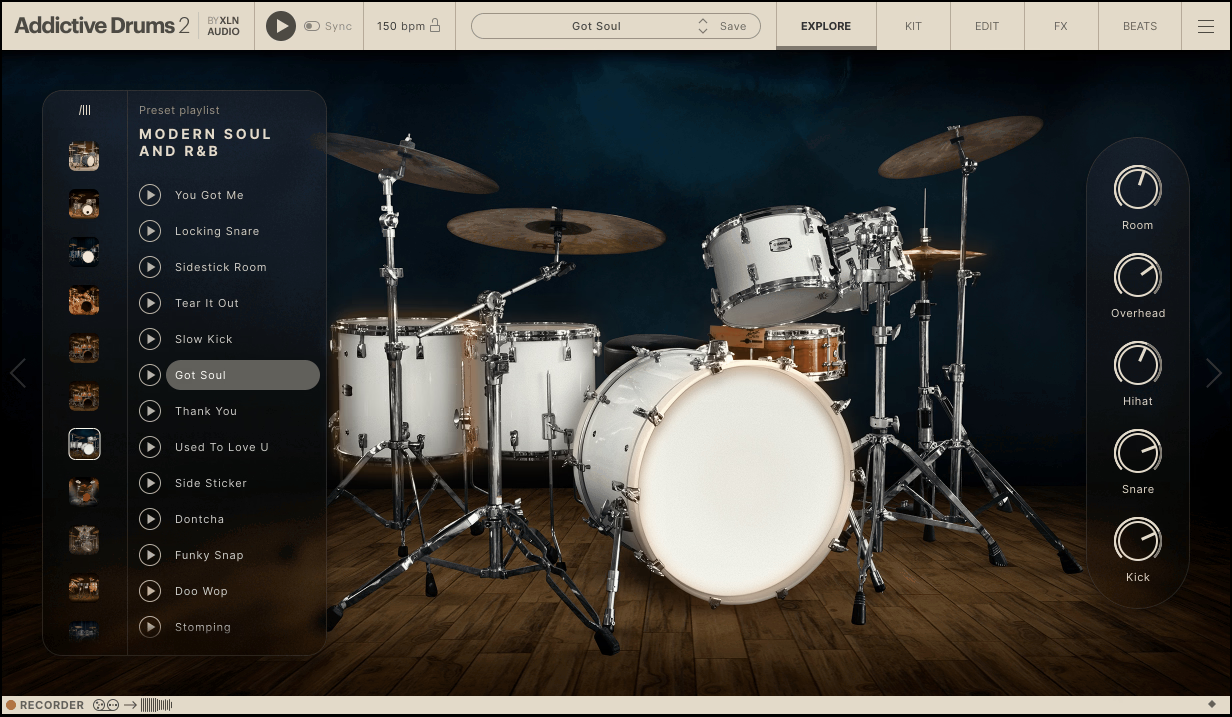
Some drum instruments sound pristine but feel clinical; AD2 hits that sweet spot where every kit sounds alive right out of the box.
I remember the first time I loaded up the Fairfax Vol. 1 kit in Addictive Drums 2, it had that “record-ready” punch and warmth that made me stop tweaking and just start writing. It’s not about having endless mic positions or obscure tweak menus, it’s about musical immediacy.
The interface is nicely designed as everything feels logically laid out with kits on the main view, a proper mixer, and a Beats page that lets you browse, transform, and even “play” grooves with intuitive controls.
The design feels alive; you’re not just editing samples, you’re producing drums. I find myself switching between presets, shaping tones, and dragging grooves to my DAW within seconds. That’s what makes AD2 a joy, it lets me stay creative without feeling like I’m programming a machine.
- Expansive Kit Architecture
The jump from 12 to 18 kitpiece slots made a world of difference. I can finally load all the cymbals, extra toms, and secondary snares I need in one setup.
The new Flexi slots are brilliant, I often drop white noise or extra snare triggers there to layer textures without cluttering the mix. Linking multiple kitpieces (like stacking two snares) opens endless sound design options, and it’s shockingly easy to set up.
- Tone Designer and MultiFX Power
The Tone Designer is like having a frequency-specific envelope shaper built right into the snare or kick channel. When a snare rings too long, I just tame those specific overtones instead of killing the entire body.
Combined with the expanded MultiFX inserts (now with Tape, Shape, and Noise modules), I can sculpt drums that feel tactile, gritty when I need attitude, clean when I need polish. It’s easily one of the best transient shaping systems I’ve ever used in a drum VST.
- Groove Customization Like No Other
The revamped Beats page is where I spend most of my creative time. The Transform tab lets me invert dynamics, adjust articulations, or even morph a 4/4 groove into 6/8.
It’s like re-composing drums without touching a MIDI editor. The Grid Search is another killer feature, I can audition and remix grooves visually, building complex variations in seconds. When I’m stuck on a song idea, I just browse grooves, tweak accents, and something fresh always emerges.
If there’s one downside, it’s that AD2 doesn’t dive as deep into raw mic detail as something like Superior Drummer, but honestly, that’s the point. It’s built for producers who want realism and punch without a technical rabbit hole.
I reach for Addictive Drums 2 when I need inspiration fast, especially for rock, pop, or tight funk productions. It’s quick, versatile, and it always sounds like a finished record straight out of the gate.
Addictive Drums 2 comes in VST, AU, and AAX formats for macOS and Windows users.
2. GGD Modern & Massive 2

What immediately struck me about Modern & Massive 2 is how alive it feels.
Most drum libraries sound great until you start looping, then you hear the static repetition. But, Modern & Massive 2 breathes, thanks to Fluid+ technology, every hit reacts differently, just like a real kit in a real room.
I love that sense of unpredictability, the subtle stick dynamics, the cymbal shimmer that never repeats quite the same way. It’s the kind of realism that makes you forget you’re working inside a plugin.
The interface feels like stepping into a high-end studio, smooth, modern, and refreshingly intuitive. Everything from the mixer to the sampler flows naturally, with no need to dig through menus.
I appreciate how visually balanced it is: you can see routing, tweak processing, and audition grooves in seconds. I’ve used it on everything from demo mixes to final productions, and the workflow never slows me down. It just feels musical.
- Fluid+ Realism
The Fluid+ engine is what separates Modern & Massive 2 from other drum libraries I’ve tried. It models the natural interaction between drums, cymbals, and the recording space in stunning detail.
You can actually hear the room respond to every performance nuance. When I dial in ghost notes or cymbal swells, it reacts organically, not just velocity mapping, but spatial behavior. That’s why it works as well on delicate progressive tracks as it does on dense metal mixes.
- Pro Mixer with Studio-Grade FX
The built-in mixer and effects suite make it feel like you’re behind a console at Middle Farm Studios. I often use the included EQ, compression, and saturation tools before even touching my DAW inserts.
And those 100+ mix presets from top producers are gold. When I’m in a hurry, I’ll load a preset, tweak the overhead blend, and the drums already sound radio-ready. It’s fast, polished, and incredibly punchy.
- Kick & Snare One-Shot Sampler
My favorite part is the one-shot layering system. You can blend up to four samples for each kick or snare, I’ll often layer a deep Ludwig snare with a brighter brass tone to get both body and bite.
It’s like sculpting your own signature kit in seconds. Add in 1500+ human-played MIDI grooves, and you’ve got instant inspiration whether you’re sketching an idea or finalizing an arrangement.
The only downside? It’s big, both in tone and in file size. You’ll want decent RAM and disk space. But honestly, that’s the trade-off for drums this detailed.
My tip would be to start with the default mix, then gradually tweak mic balance and humanization for your track. It’s shockingly easy to make it sound “real” without over-processing.
Modern & Massive 2 has quickly become my go-to for high-impact rock and metal drums, though it’s versatile enough for cinematic or pop sessions too. It doesn’t just give you great samples; it gives you a performance.
Modern & Massive 2 comes in VST3, AU, and AAX formats for macOS and Windows users, and also runs as a standalone instrument via Cradle Hub.
3. Toontrack EZDrummer 3

What makes EZdrummer 3 special to me is how “producer smart” it feels. I don’t have to fight it to get a usable drum performance, as it already thinks in song sections, styles, and human feel.
With EZDrummer 3, I enjoy that I can drag in a riff or a rough piano ide,a and it literally goes, “Cool, here’s a drummer that would play over that.” It’s still the same EZ workflow we’ve all used for years, but now it actually talks to the rest of your track instead of just looping beats.
The interface is cleaner, bigger, and way more musical to work in. The new Bandmate and Grid Editor live right where you expect them, the kit view looks gorgeous, and everything is drag-and-drop friendly.
I really like that you can stay inside EZdrummer 3 and finish a whole drum arrangement without ever touching your DAW’s MIDI editor, but if you want to, it plays nicely with that too. It’s one of those plugins where 5 minutes in, you’re already arranging.
- Smart Groove Matching (Bandmate)
This is the “whoa” feature, as you can drop in a guitar or keys audio clip and EZdrummer 3 suggests grooves that actually follow that rhythm. Then you can tell it, “more kicks,” “less hats,” “busier snare,” and it adjusts intelligently instead of just spamming notes.
I’ve used this on modern metal chugs and mellow singer-songwriter stuff, both locked surprisingly well. It feels like having a drummer in the room reacting to what you played.
- Super flexible MIDI workflow
The updated Browser and Mix & Match combo is slept on. I can audition a new hi-hat pattern inside an existing groove without replacing the whole thing, which is brilliant when your verse is almost right but the hats are too straight.
Tap2Find is still there, but now there’s also a step-style pattern builder to search grooves from. I use this a lot to keep the verse simple, then steal toms or ghost notes from other MIDI to make a chorus lift.
- High-end drums without SD3-level hassle
The new Hansa-recorded core library sounds ridiculously polished, tight room, bright room, roomy main space, and it covers pretty much every pop/rock style out of the box.
I love how the Mixer macros (tape, room, bleed, saturation) let me go from clean Nashville to chunky alt-rock in two knobs, not 28 mics. And if I need more control, I can just route kit pieces to separate DAW outputs and treat it like a real session.
If you’re the type who wants to solo snare bottom mic #3 and ride the room decay in half-dB moves, Superior Drummer 3 is still the deeper tool. EZdrummer 3 is about speed, songwriting, and finishing ideas. Also, yes, like all Toontrack stuff, you’ll eventually want EZX expansions. That’s kind of the model.
In short, this drummer plugin is massively upgraded, but it’s still EZ, which is the whole point.
EZdrummer 3 comes in VST, AU, and AAX formats for macOS and Windows users.
4. Toontrack Superior Drummer 3
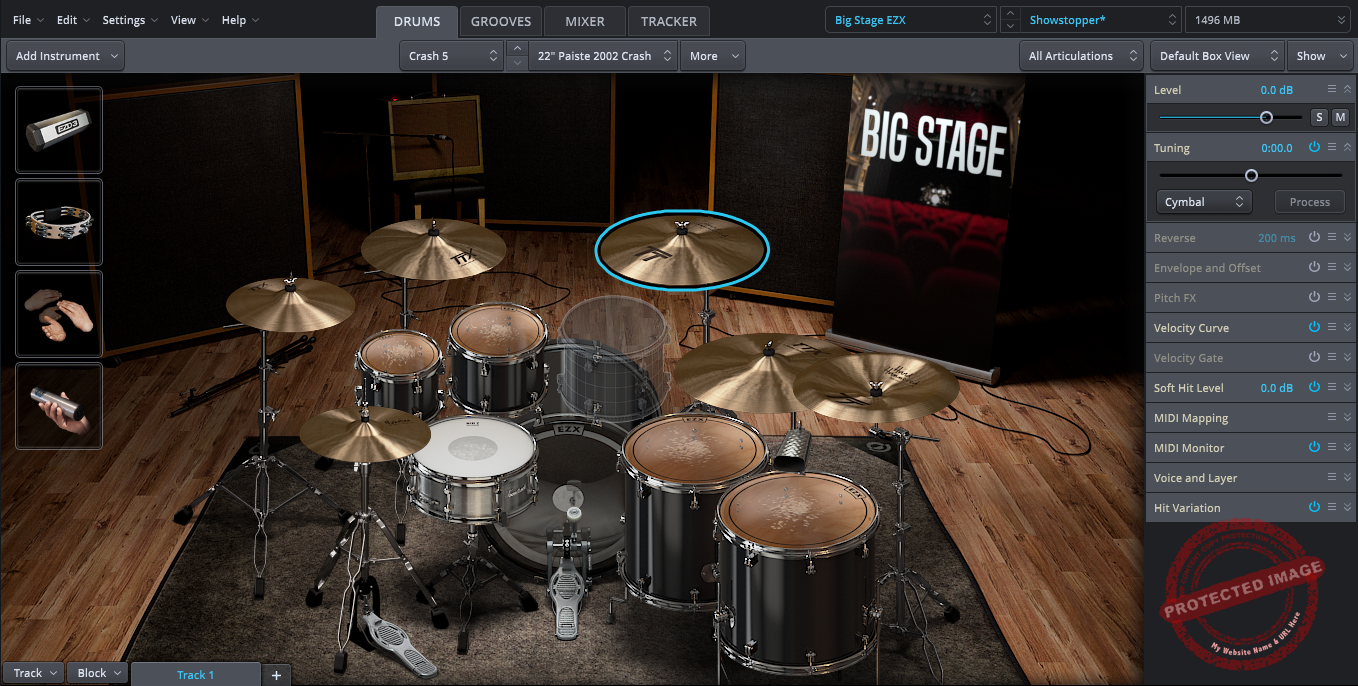
I gotta say, if you are looking for the “studio-level” feel, this is your drummer.
Not just good drums, not just a nice MIDI browser, this is “I just hired George Massenburg, rented Galaxy Studios, and put 11 room mics up” energy.
I love that SD3 is not pretending to be a songwriter toy; it’s a full-on drum production environment where you can build kits from multiple libraries, stack acoustic and electronic hits, edit the MIDI performance, mix it with 35 built-in effects, and do drum replacement, all inside one window.
The interface is big, clean, and modular and I really like that I can just pull out the Grooves, Mixer, or Tracker into their own floating panels and work like I’m in a DAW. The kit view is clear, the right-hand panels make sound-design stuff way faster than in SD2, and the Song Track running along the bottom means you can build full drum arrangements without leaving the plugin.
- 230 GB Core Library
This is where SD3 flexes, as 6 full acoustic kits, tons of snares and kicks, 3 rooms from Galaxy, close mics, overheads, and a huge choice of ambience channels, including enough material for 11.1 surround.
I like being able to say, “Nah, I want the tighter room on the kick but the big hall on the snare,” and SD3 just lets me do that. And because it was recorded by Massenburg, it’s all super controlled, super phase-coherent, and takes processing really gracefully.
- Smart Groove Building
The Tap2Find to Song Creator to Song Track pipeline is still one of the smartest things Toontrack has ever done. I can tap in a dumb two-bar kick/snare idea, SD3 finds matching grooves, and with one drag I get a whole verse/chorus/bridge layout.
Then I can open Edit Play Style and tell it “less kick,” “ghost the snare,” or “put the power hand on the ride for the chorus.” That’s the kind of realism that makes drum MIDI feel played, not programmed.
- Tracker: Built-in Drum Replacement
For me this was the surprise element. Drop in your multitrack drums, SD3 figures out what’s kick, what’s snare, what’s hats (even the articulations!), and turns it into MIDI you can trigger with the SD3 kits.
I’ve used it on less-than-perfect home drum recordings, and it’s scary how well it ignores bleed. And the best part is that you can blend the original audio with the SD3 replacement inside the plugin, so you don’t have to export and reimport stems.
On the dark side, well, it’s big. Like, really big. If you pull the full 230 GB library, you need disk space, and preferably an SSD.
It’s also at the pricier end of drum VIs, worth it if you actually produce or mix a lot, maybe overkill if you just need a quick kit for demos (that’s where EZdrummer 3 wins). And yes, SD3 sounds so finished out of the box that sometimes your guitars, bass, and vocals suddenly feel small next to it. That’s a funny problem to have, but it’s real.
For me, SD3 is the plugin I open when the drums actually matter: full-band productions, commercial work, drum replacement on live sessions, or anything where the client will listen only to the snare first. It’s deep, it’s nerdy, but it’s also ridiculously musical.
Superior Drummer 3 comes in VST, AU, and AAX formats for macOS and Windows users.
5. Steven Slate Drums 5

When I first loaded up SSD5, I wasn’t expecting it to feel quite this direct. There’s no warm-up period; no endless tweaking to make things sound natural.
Basically, I hit a pad, and it just worked. The sound felt complete, not overproduced, but like something I could leave untouched and still mix around confidently.
The SSD 5 interface feels much smoother than older versions and I appreciate how the new kit, mapping, and mixer pages are laid out; everything’s clear, labeled, and fast to access.
I didn’t have to fight with MIDI mapping this time, which was a relief. My Roland kit synced perfectly, and I could start playing right away. The workflow feels less like programming drums and more like shaping a performance.
- Deluxe 2 Library
What stood out to me in the Deluxe 2 library was how consistent everything feels. Each kit sits nicely in its own space: some are dry and tight, others big and roomy, but none feel overprocessed.
I tend to reach for the more open kits when I’m sketching rock or cinematic parts. The toms have that natural decay that fills space without reverb. Even the little extras like claps and cowbells are handy; they’re simple tools, but they save me time when layering percussion.
- Dynamic Feel and Control
I noticed the difference in how SSD5 handles dynamics right away. Fast rolls and ghost notes sound less repetitive and the velocity transitions feel smoother.
I often use the close vs. room mic blend to bring a bit more life to my playing. When I need that extra detail, tweaking the pitch or ADSR envelope per drum helps me fit things better in a dense mix. It doesn’t feel like heavy editing; it’s just subtle shaping that makes the kit respond more naturally.
- Straightforward Workflow
What I like most is how SSD5 stays out of the way. There are no unnecessary effects or fancy visuals slowing me down.
The internal mixer gives enough control to get things balanced, and from there, I can record straight into my DAW. It’s a no-fuss workflow that fits perfectly for quick writing sessions or live e-drum setups.
If I had to point out a limitation, it’s that SSD5 still leans toward modern rock and pop, you won’t find intricate jazz brushes or experimental textures here. But for solid, reliable drum tones that slot easily into a mix, it’s dependable.
SSD5 has become the kit I use when I just want to sit down, play, and get usable results fast. It’s not flashy, but it’s honest and efficient and that’s why many people choose it.
Steven Slate Drums 5 comes in VST, AU, and AAX formats for macOS and Windows users.
6. MT Power Drum Kit 2 (FREE)

Last but not least, comes a free option for the producers on a budget; enter MT Power Drum Kit 2.
I’ve tried a lot of free drum plugins over the years, and MT Power Drum Kit 2 is one that’s hard not to recommend if you’re after something quick, clean, and musical. It’s lightweight, simple, and sounds surprisingly polished for a freebie, especially if you work in pop, rock, or singer-songwriter styles.
The interface is stripped down but well thought out. Everything loads fast, and I can get a usable drum groove going in minutes. The built-in mixer is basic, just a few faders and a one-knob compressor per channel, but that simplicity actually helps. I find it’s enough to give the kit a bit of punch without pulling me into endless tweaking.
- Natural, Focused Drum Sounds
The sound set is small, but the kit has a balanced tone that fits easily into most mixes. The kick feels tight and centered, the snare has a bright pop to it, and the overheads add just the right amount of air.
You can’t swap individual drums or room types like in premium libraries, but honestly, this one kit covers a lot more ground than it should.
- Built-in MIDI Grooves and Fills
The included MIDI groove library is what really makes MT Power Drum Kit useful. Each groove comes with matching fills, and the drag-and-drop workflow works flawlessly in any DAW.
When I don’t feel like programming drums from scratch, I can grab a few grooves, link them together, and have a solid backbone for a demo in minutes.
- Practical Tools for Quick Mixing
I like that you can route each drum to its own output for mixing in your DAW. The built-in compressor isn’t fancy, but it does enough to tighten things up. For something that’s free, having that level of control feels generous.
You gotta know that it’s not the most versatile or detailed drum instrument out there. There’s just one kit, and you won’t find brush articulations or complex room miking options, but for songwriting, demos, or quick mockups, it’s incredibly handy.
MT Power Drum Kit 2 is available in VST and AU formats for macOS and Windows users.
Last Words
Well, that wraps up my list of the 6 best drum VSTs I recommend. Each one earns its place for a different reason, from Superior Drummer’s realism and EZdrummer’s speed, to the tight punch of SSD5 and the instant mix-ready sound of MT Power Drum Kit 2. They all scratch a different creative itch, whether I’m sketching a quick demo or chasing a full, detailed production.
If you’re just starting out, grab one that fits your workflow and stick with it until you really know its tone. And if you’re a veteran producer, layering two or three of these together can open up some pretty inspiring textures.
