
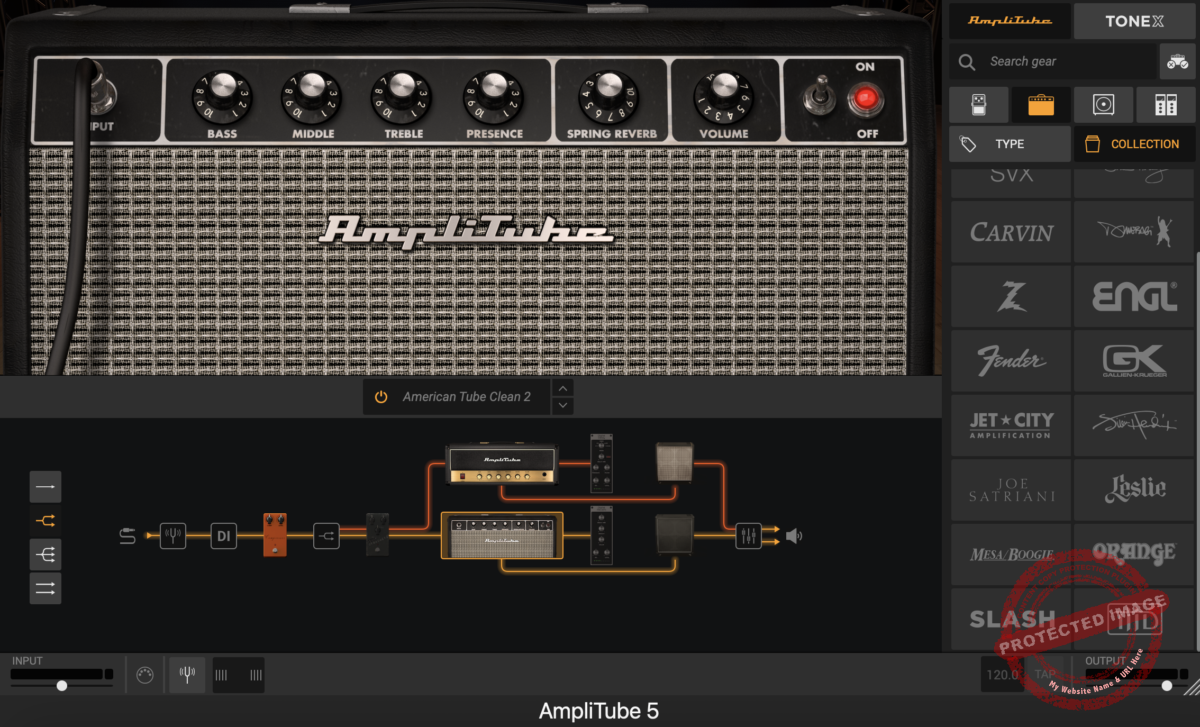
AmpliTube 5 is a guitarist’s dream, blending killer tones, endless gears, and pro-level features. Whether you’re noodling in your bedroom with the free CS version or diving deep with MAX’s 400+ models, there’s something here for everyone. The free CS version gets you started, while SE and Standard suit intermediate players. MAX is the top-tier yet pricey, but oh-so-worth it for tone nerds!
Pros
- Massive gear library with 435 models offers endless tonal possibilities
- VIR technology enables precise 3D mic positioning for realistic cabinet tones
- Dynamic Interaction Modeling delivers authentic amp behavior and responsiveness
- Drag-and-drop signal chain allows creative setups with ease
- Expanded mixer and rack effects add studio-grade polish to your tone
Cons
- Lack of undo/redo function can be frustrating when tweaking setups
- Skeuomorphic interface design can slow down navigation at times
- High system requirements may challenge older computers
- MAX version’s price tag may not fit every budget
When it comes to guitar amp sims, AmpliTube 5 plugin is like the rockstar that everyone’s still talking about at the afterparty.
Amplitube 5 VST has been around for almost 20 years, basically a grandpa in digital years, but somehow, it keeps reinventing itself, staying relevant, and making the rest of us wonder, “Wait, how do they keep pulling this off?”
With this plugin, IK Multimedia isn’t just flexing; they’re promising the works. A totally revamped interface? Check. Some wild cabinet simulation tech that sounds like sci-fi but for sound nerds? Yep.
And let’s not forget the absolute buffet of gear with over 400 pieces in the MAX version. That’s enough amps, pedals, and cabs to keep tone nerds twiddling knobs until the next decade.
But let’s get real: Does it live up to the hype, or is this just another shiny update? So, today, we will dive deep into the features, pros-cons, and everything of Amplitube 5 to see if the sound quality and versatility are as good as the promises and figure out if this thing is worth your hard-earned cash.
Grab your guitar, warm up those fingers, and let’s take this bad boy for a spin!
We also included AmpliTube 5 in roundup of the best bass amp plugins!
Features
AmpliTube 5 plugin is not just another update; it’s a serious overhaul. IK Multimedia clearly went all-in to make this version stand out, and it shows.
With features like a completely redesigned interface, jaw-dropping cabinet simulations, and the ability to build massive signal chains, this isn’t just for guitar nerds; it’s for anyone chasing premium sound.
But I must remind you that the plugin comes in 4 different versions with different price tags and feature sets. So, here is a quick comparison table.
AmpliTube 5 VST Versions Comparison
| Feature | AmpliTube 5 CS | AmpliTube 5 SE | AmpliTube 5 | AmpliTube 5 MAX v2 |
| Unlocks previously owned gear | ✓ | ✓ | ✓ | ✓ |
| Scalable Interface | ✓ | ✓ | ✓ | ✓ |
| Drag-Drop style signal chain | ✓ | ✓ | ✓ | ✓ |
| Photo-realistic visuals | ✓ | ✓ | ✓ | ✓ |
| Simultaneous models | 24 | 57 | 57 | 57 |
| Pre-Amp-FX Loop-Post-amp Position Stomps | ✓ | ✓ | ✓ | ✓ |
| Post-mixer-On DI Position stomps | ✓ | ✓ | ✓ | |
| Simultaneous amps | 2 | 3 | 3 | 3 |
| VIR™ cabinet technology | ✓ | ✓ | ✓ | |
| Per Speaker Impulses | 16 | 600 | 600 | 600 |
| Simultaneous cabs | 2 | 3 | 3 | 3 |
| 3D mic movement | Click & drag only | Tech View | Tech View | Tech View |
| Special IR Loader | ✓ | ✓ | ✓ | |
| Pre-Amp-FX Loop- Post-amp Rack FX positioning | ✓ | ✓ | ✓ | ✓ |
| Post-mixer – On DI Rack FX positioning | ✓ | ✓ | ✓ | |
| Mixer and Looper | ✓ | ✓ | ✓ | |
| Recorder | 2-track | 8-track | 8-track | 8-track |
| RACK Models | 6 | 14 | 40 | 48 |
| AMP Models | 6 | 13 | 35 | 111 |
| CAB Models | 7 | 14 | 28 | 106 |
| STOMP Models | 10 | 19 | 46 | 111 |
| SPEAKER Models | 3 | 9 | 16 | 33 |
| MIC Models | 3 | 5 | 11 | 18 |
| ROOM Options | 6 | 6 | 8 | 8 |
| TOTAL Gear Models | 41 | 80 | 183 | 435 |
- Volumetric Impulse Response (VIR) Cabinet Simulation

Alright, this is the big deal, as VIR Tech allows you to position mics in a 3D space around your virtual speaker cab. Think about it: 600 impulse responses per speaker, giving you insane precision for mic placement.
Want that mic smack in the center of the cone? Done. Or maybe just grazing the edge for a darker tone? Easy. You can even adjust for speaker bleed and floor reflections.
I spent way too long messing with mic angles, and I think it’s dangerously addictive. The realism is high, as you can actually hear how small mic movements change your tone. If you’re the type who geeks out over mic placement in real life, this feature will hook you.
- Drag-and-Drop Signal Chain

The new drag-and-drop signal chain is like Tetris for tone junkies. It lets you stack amps, pedals, racks, and cabs in any order you want, up to 57 models at once. Yes, you have heard it right, 57. It is quite fun to create wet-dry-wet setups with parallel amps and a sprinkle of rack effects.
IK also nailed the visuals here, too. As you drag gear into the chain, the available connection points light up like a Christmas tree, making it dead simple to figure out what goes where. I even swapped out pedals mid-jam just because I could. If only real pedalboards worked this smoothly.
- Redesigned GUI

The new GUI is like putting glasses on your tone. Everything looks sharper, cleaner, and somehow more “pro” while still being beginner-friendly. The interface is now resizable, which means no more squinting at knobs on tiny laptop screens. It’s all very touch-friendly, too, if you’re into that kind of thing.
But the real win for me is the better organization. The sidebar now sorts gear by type (clean, crunch, lead, etc.), and you can filter it to show only the stuff you own. No more scrolling past locked items like some kind of tone window shopper; it’s all about what’s in your collection.
- Expanded Mixer and Rack Effects

The mixer has leveled up big time, as you can now add effects directly to individual buses or even the DI channel. Plus, the rack effects roster has expanded with goodies like delay, reverb, and even cassette tape emulation. It’s like having a full studio crammed into your signal chain.
For me, the standout was adding subtle room mics to a dirty amp tone; it made everything feel more alive. And with up to 6 master bus effects, you can polish your mix right inside the plugin.
- Massive Gear Library with New Additions

AmpliTube 5 plugin is like a fun fair for gearheads with 34 amps, 27 cabinets, 13 speakers, 11 microphones, 47 stompbox models, 36 racks, and 8 rooms, meaning it’s packing serious heat. IK didn’t stop there as they threw in 5 new amps, 2 stomps, 19 new rack FX, and 2 fresh rooms.
The new stuff isn’t just filler, either. The amps are dripping with character, the stomps are versatile, and the rack effects borrow the best tech from IK’s T-RackS suite. And those new rooms? They let you go from a Subway reverb vibe to a bathroom slapback. No shame in saying I spent an hour jamming in the virtual bathroom; it’s surprisingly fun.
- UltraTuner and Speaker Customization

Tuning and speaker swapping just got a glow-up. The UltraTuner is insanely precise, accurate to 1/100th of a cent, which means no excuses for being out of tune now. It also looks big and bold, perfect for live setups.
As for speakers, you can now swap individual ones inside your cab. You can mix vintage Celestions with modern high-watt beasts, like Legos, for sound design. Pair this with the VIR mic placement tech, and you can basically rebuild your dream cab from scratch without lifting a screwdriver.
- Artist-Crafted Presets

One of my favorite things about this plugin is its preset collection. From Joe Satriani and Slash to Alex Skolnick and Marty Friedman, there are many artists who created presets for you to take advantage of. The library is so vast you can play any genre with these presets, and they are not just starting points as they are pretty great how they already are.
Interface and Workflow
If there’s one thing AmpliTube 5 VST plugin nails, it’s blending nostalgia with modern practicality. The interface strikes a balance between realism and usability, though it does trip over its hyper-realistic approach in a few spots. Let’s break it down.
Interface
The GUI is a head-turner right out of the gate. It’s redesigned and scalable, so you can go full-screen without squinting at tiny knobs. The skeuomorphic design, making everything look like real-world gear, makes it feel like you’re sitting in front of a giant wall of amps and pedals.
Every button and dial feels tactile, which is satisfying, but it also means some things are harder to find. It’s like trying to locate the light switch in a dimly lit recording studio: cool but slightly clunky.
That said, the drag-and-drop signal chain editor is a standout. The layout keeps things visually intuitive, and adding an amp, pedal, or rack effect is as simple as grabbing it from the sidebar and dropping it into the chain.

You can also filter your gear by type, brand, or category, which saves a ton of time. Plus, the scalable window feature lets you adjust the workspace size to match your monitor setup. It’s a little detail, but it makes a huge difference for longer sessions.
While the interface is great for creating complex signal chains, it’s not all sunshine. Switching between certain functions, like tweaking mic positions or diving into advanced settings, can feel a bit clunky.
Plus, the ultra-realistic aesthetic is nice for immersion, but it sometimes slows you down. A sleeker, more streamlined approach in some areas would’ve been welcome.
Workflow
Let’s talk about usability, where AmpliTube 5 VST really shines. The completely customizable signal chain is a dream for tinkerers, as with up to 57 models in one chain, the possibilities are wild.
You can do anything, such as stacking up 3 amps, 5 pedals, and some rack effects in parallel. The drag-and-drop interface makes this process simple, and everything lights up intuitively when you’re creating connections.
One of the coolest features is the VIR (Volumetric Impulse Response) technology, which lets you position mics around a cab in 3D space. It’s incredibly detailed, you can adjust distance, angle, and even which speaker in the cab you’re miking.

I also love the preset collection, which you can download from the IK Multimedia Manager. There are great preset sets crafted by iconic guitarists like Joe Satriani and Slash, which are great for beginners and first-time users to find their way in the plugin or start playing quickly with great tones.
But it’s not all flowers and butterflies here, as the lack of an undo/redo function sometimes gets really frustrating. Imagine getting your perfect tone and accidentally dragging something out of the chain; oops, it’s gone. In that case, you’ll have to recreate it manually.
On the upside, the extensive routing possibilities are a game-changer. Wet-dry-wet setups? Parallel chains? A/B splits? It’s all here, and it’s easy to configure. The built-in mixer also lets you fine-tune everything, from mic blends to DI levels, and even add some rack effects at the bus level. It’s powerful but stays user-friendly.
First Impressions and Sound
Let’s cut straight to the chase: AmpliTube 5 sounds fantastic. Whether you’re chasing warm vintage cleans, gritty blues tones, or face-melting metal distortions, this plugin delivers.
IK Multimedia clearly poured its heart into the new Dynamic Interaction Modeling and VIR (Volumetric Impulse Response) technology, and it shows. The amps feel more responsive, the cabs sound richer, and the overall realism is just… there. It’s like playing through real gear but without the back pain from hauling a 4×12.
The versatility here is insane with 5 new amps, 2 stomps, 19 rack FX units, and 2 new rooms, while the VIR technology takes speaker-cab-mic interaction to a whole new level.

The ability to position mics in 3D space, not just horizontally but also vertically, gives you precision control over tone shaping. Want a close-mic’d, punchy tone? Go for it. Or maybe a roomy, atmospheric vibe? Easy. The sheer depth of customization is staggering, but it’s also intuitive enough for newcomers to grasp quickly.
One of the standout use cases is for high-gain tones. Crank up one of the new amps, add a bit of EQ, and you’ve got crushing metal tones that cut through a mix.
But AmpliTube 5 isn’t just about melting faces. It excels at clean and crunchy tones, too. The dynamic response is on point; you can dig in for more breakup or ease up for shimmering cleans, and the amps react like the real deal. Pair this with the new 19 rack effects, and you’ve got a studio-grade tone-shaping powerhouse.
Compatibility
AmpliTube 5 is available in AU, VST2, VST3, AAX, and standalone formats. It supports both Mac and Windows platforms, with macOS requiring 10.13 or later and Windows needing 7 64-bit or later.
You’re covered whether you’re running an Intel or Apple Silicon Mac. While AmpliTube 5 is a CPU-friendly plugin, the VIR technology and high-resolution graphics can demand a bit more processing power, so having a decent system (think Intel i7 or better) is a smart move for smooth operation.
Conclusion
AmpliTube 5 plugin is a real workhorse in the amp sim world, combining modern, innovative tech with an extensive library of gear. For seasoned guitarists after authentic tones or bedroom producers after versatility, this plugin offers quite a lot.
With improved sound modeling, VIR technology, and an intuitive (though occasionally clunky) interface, it’s a worthy contender in the amp simulation world. Sure, it’s not cheap if you’re eyeing the MAX version, but the range of features makes it a solid investment for serious tone chasers.
One of the standout aspects is the variety of versions available, catering to different needs and budgets. AmpliTube 5 CS is free and a great starting point.
AmpliTube 5 SE adds more gear for the casual user, while the standard AmpliTube 5 offers an extensive library and advanced features. For the ultimate experience, AmpliTube 5 MAX brings the full arsenal with 435 pieces of gear. Check out the official AmpliTube website for more details or to grab a version that suits you!
