
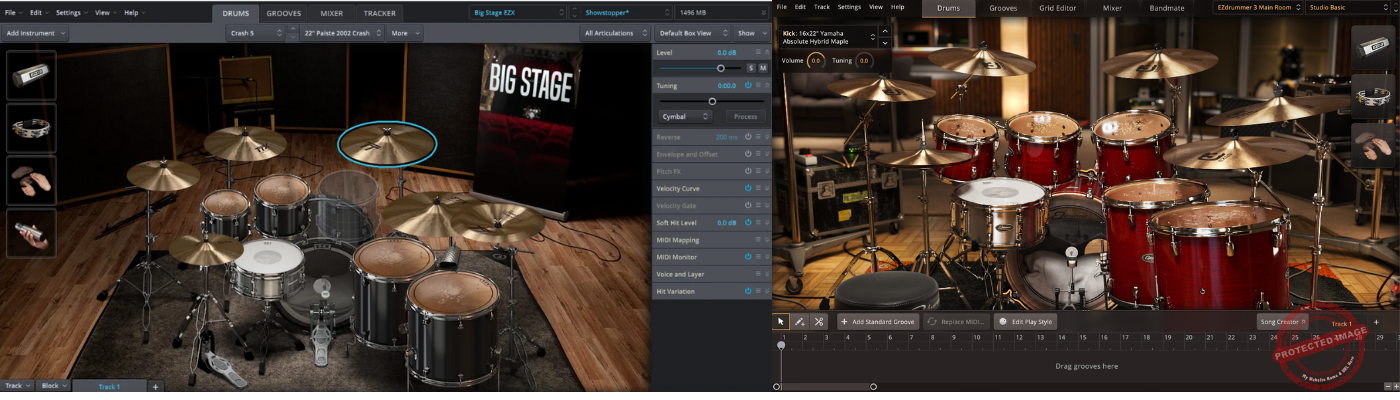
Today, we have two legendary drum virtual instruments from Toontrack. On the red corner, there is Superior Drummer 3, and on the blue corner, there is EZ Drummer 3.
Drum programming can be a game of two extremes: you either want something quick and easy to get ideas down fast, or you want total control over every mic, bleed, and room sound.
Toontrack gets this. That’s why they created EZdrummer 3 for those who want a no-fuss songwriting tool and Superior Drummer 3 for deep-diving sound designers and mix perfectionists.
But which one is right for you? Should you keep it “EZ” or go “Superior”? Both are fantastic in their own right, but they cater to different workflows.
EZdrummer 3 is all about instant, mix-ready drum tracks, while Superior Drummer 3 gives you the raw, unprocessed power of a high-end drum studio at your fingertips. One is a speedboat; the other is an aircraft carrier. You can take an aircraft carrier fishing, but is it really the best tool for the job?
Today, we’re diving deep into the details, checking out their features, sound, usability, performance, and real-world applications. So, grab yourself a drumstick or a mouse in this case, and let’s get into it!
| Feature | EZdrummer 3 | Superior Drummer 3 |
| Price | $179 | $399 |
| File Size | ~18GB | ~230GB |
| Number of Drum Kits | 7 | 7 (with more customization) |
| Snares & Kicks | 24 snares, 14 kicks | 25 snares, 16 kicks |
| Cymbals & Percussion | 33 cymbals, various percussion | 32 cymbals, 350+ extra percussion & electronic sounds |
| Rooms / Ambience Options | 3 studio rooms (Hansa Tonstudio) | 11 surround mic positions (Galaxy Studios) |
| Pre-Mixed Sounds | Yes, mix-ready presets | No, raw unprocessed samples |
| MIDI Groove Library | Extensive, song-oriented | Extensive, with more tweakability |
| Tap2Find | Yes | Yes |
| Bandmate Feature | Yes | No |
| Grid Editor | Yes | Yes (more advanced) |
| Mixer & Effects | Basic with presets | Full DAW-like mixer with 35 effects |
| Audio-to-MIDI Conversion | No | Yes (Tracker feature) |
| Standalone Version | Yes | Yes |
| Plugin Formats | VST3, AU, AAX | VST2, VST3, AU, AAX |
| Best For | Songwriters, fast workflow, minimal tweaking | Producers, sound designers, mix engineers |
| CPU/RAM Usage | Light | Heavy (depends on features used) |
Sound and Character
Let’s talk about the most important part before anything else! Because at the end of the day, it doesn’t matter how many fancy features a plugin has if the drums sound like they were recorded in a cardboard box.
Both EZdrummer 3 and Superior Drummer 3 bring top-tier drum recordings to the table, but they have very different personalities. One is polished and ready to go, the other is raw and customizable to the extreme.
EZdrummer 3
EZdrummer 3 is all about getting a professional drum sound with zero effort. Every kit is pre-processed and mix-ready, meaning you don’t have to spend hours tweaking levels, adding compression, or dialing in reverb cause it’s done for you.
This makes it perfect for songwriters, demo production, and anyone who wants great-sounding drums without getting lost in mixing rabbit holes.
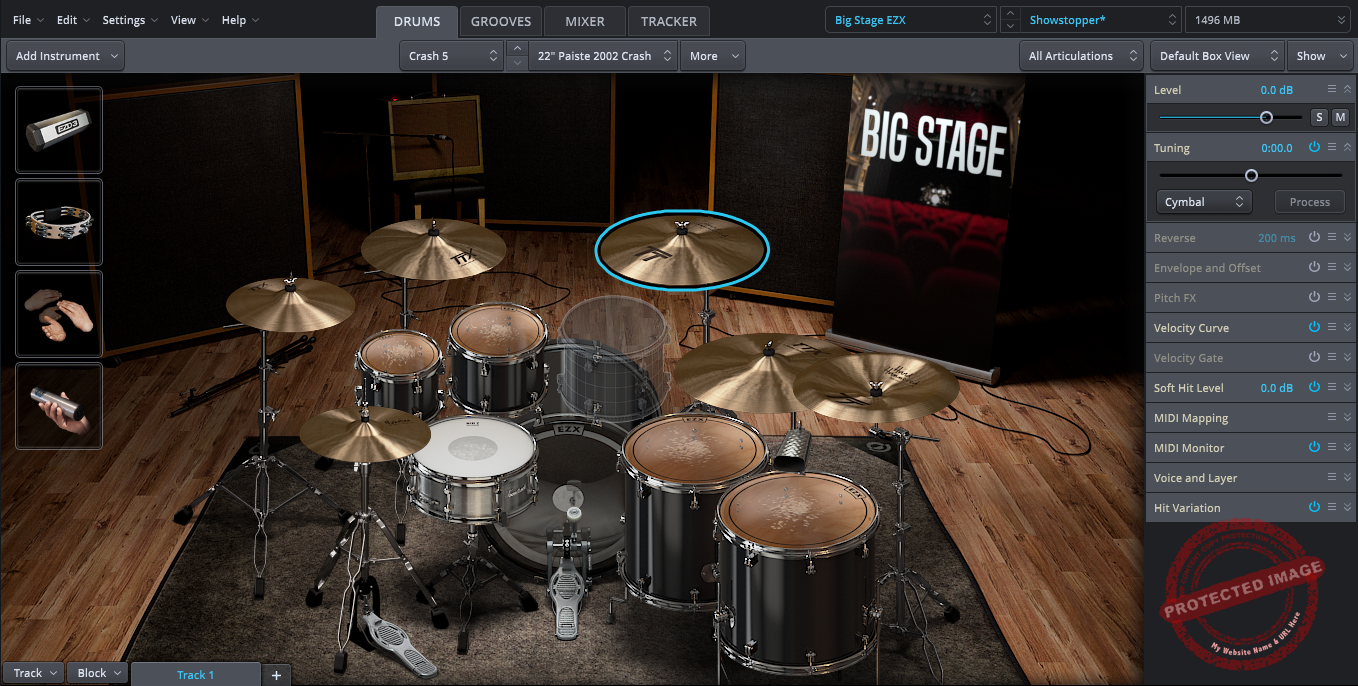
The core kits, recorded at Hansa Tonstudio, have a tight, punchy, and modern sound. Whether you’re working on pop, rock, indie, or even some metal, the kits just work.
It features 3 room options with Bright, Main, and Tight choices, which give you some control over the vibe, but don’t expect to reshape the sound like you can in SD3 fully.
For example, if you’re writing a song and need nice-sounding drums in 5 mins, EZdrummer 3 is there to help you like an efficient session drummer.

Superior Drummer 3
If EZdrummer 3 is a ready-made drum track, Superior Drummer 3 is a multi-room recording session waiting for you to take control.
The 230GB of samples, recorded at Galaxy Studios by George Massenburg, give you unprocessed, natural drum sounds that you can mold into literally anything. Need a tight, punchy metal kit or a huge, roomy vintage jazz sound? All done.
You can even blend up to 3 different snare samples and tweak the mic bleed until it sounds like it was recorded in an underground cave.
Unlike EZdrummer 3, SD3 doesn’t hold your hand, meaning that the raw samples require mixing, EQ, and processing. This makes it ideal for producers, sound designers, and mix engineers who love sculpting their own drum tones.
The room sounds in SD3 are next-level, as you get 11 mic positions, meaning you can go from a dry, intimate kit to a huge cinematic space just by tweaking the room mics.
There’s also a massive collection of percussion, electronic sounds, and custom articulations, making SD3 a true drum production powerhouse.
Which One Sounds Better?
Well, ultimately, it all comes down to workflow and control.
If you want instant, polished drums that sound amazing right out of the gate, EZdrummer 3 is the way to go. It’s perfect for songwriters, demo creators, and anyone who wants a solid drum mix without fuss.
If you want complete control over every sonic detail, Superior Drummer 3 is the better choice. It’s made for producers and sound designers who love to shape and mix their drums from scratch.
No wrong choice; just depends on what kind of project you are working in!
Features and Interface
Both EZdrummer 3 and Superior Drummer 3 come with pretty great features, but the features are aimed in different ways. One opts for efficiency and simplicity, while the other goes for high control and precision.
MIDI Groove Editing – Simplicity vs Power
Both plugins come with a huge MIDI groove library, but how you use them is where things get interesting.
- EZ Drummer 3
EZdrummer 3 makes groove selection effortless. You can drag and drop grooves into your DAW, tweak them using the Bandmate feature, or use Tap2Find to match a beat by simply tapping it in.
This new Grid Editor adds basic MIDI adjustments without the need for a separate DAW for those who don’t want to get too deep into MIDI programming.
So, the workflow here is fast, efficient, and intuitive, meaning that EZdrummer 3 is a great choice for songwriters and producers who need quick results.
- Superior Drummer 3
Superior Drummer 3, on the other hand, turns groove editing into a serious production tool.
The Grid Editor in SD3 is on another level, offering advanced velocity shaping, articulation control, and humanization features. You can create ghost notes and tweak them as you like, adjust their timings, and even create fully custom drum parts note by note.
Instead of using premade grooves, SD3 lets you program your drums exactly how you want them to be, which is an ideal solution for people who like precision and flexibility in their drum tracks.
If you want quick and easy MIDI drum editing, EZdrummer 3 is the clear winner. If you need advanced control over every drum hit, Superior Drummer 3 takes the crown.

Mixing and Effects – Plug-and-Play vs DAW-Level Control
This is where Superior Drummer 3 flexes its muscles and shows its true power.
- EZ Drummer 3
EZdrummer 3 gives you a basic but effective mixer. You can balance levels, tweak the room sound, and use mix-ready presets for instant, professional-quality results.
But beyond that, it doesn’t offer deep control, as there are no routing options, FX chains, or mic bleed controls. The idea is to get a solid drum mix right out of the box, without requiring a ton of mixing experience.
- Superior Drummer 3
Superior Drummer 3 comes with a fully-fledged DAW-like mixer packed with 35 studio-quality effects, including EQ, compression, transient shaping, reverb, and more.
You have control over mic bleed, drum resonance, and individual drum processing, allowing you to tweak every aspect of the drum mix.
Unlike EZdrummer 3, SD3 gives you multi-channel routing, meaning you can send different drums to separate outputs in your DAW and mix them just like a real drum recording session.
EZdrummer 3 is ideal for musicians who want great drums without mixing them. Superior Drummer 3 is for producers who love full control over their drum mix and want to shape their sound from the ground up.

Sound Customization – Pre-Mixed vs Fully Customizable
Regarding sound customization, the plugins continue to hold their stands in their simplicity versus control war.
- EZ Drummer 3
EZdrummer 3 is built for instant gratification; the drum kits are pre-processed for you to just keep getting inspired. This means they’re already EQ’d, compressed, and mix-ready to give you a nice drum tone.
Still, you can take control of some settings like tuning and velocity response, but the rest, which is the heavy lifting, is already done for you. This is great for those who want nice-sounding drums without spending time tweaking.
- Superior Drummer 3
On the contrary, Superior Drummer 3 provides you raw, unprocessed drum samples to allow you to customize the sound fully.
You get full control over your drums to blend multiple drum layers, adjust mic positioning, tweak drum resonance, and even sculpt the tone of each individual drum hit. Every detail is open to adjustment, which is perfect for control freak producers after the perfect sound.
If you want pre-mixed drums that sound great instantly, EZdrummer 3 is your best choice. If you want total control over sound design and mixing, Superior Drummer 3 is the way to go.

Interface – Simple vs. Deep
The interfaces of both EZdrummer 3 and Superior Drummer 3 are aligned with their core philosophies: EZdrummer 3 is streamlined and efficient, while Superior Drummer 3 is deep and powerful.
- EZ Drummer 3
Its EZdrummer 3 interface is simple and clean as the layout is attractive, intuitive, and pretty easy to use, even for beginners. The main workflow style is drag-drop, so no more navigating through menus or tabs.
You can create drum tracks quickly and easily, as the interface is built to help you, making it suitable for those without any previous experience with drum mixing or programming. It is a highly beginner-friendly VST as it shows you everything and gets you started within minutes.
- Superior Drummer 3
While still pretty well designed, Superior Drummer 3 is much more complex VST compared to EZdrummer. It features multiple tabs, deep menus, and dozens of options for tweaking every sound.
It is not as beginner-friendly cause even navigating through the software takes more time and effort, especially for those who are new to drum programming. It gives you many different options to shape your drum sound and every detail, making it a hard-to-use plugin, yet the control over drum production you have is unmatched.
A key difference is the flexibility of the interface. EZdrummer 3 has a single-window layout, which keeps everything compact and straightforward. Superior Drummer 3, however, offers detachable, scalable windows, allowing you to move the mixer, drum browser, and grid editor to different screens.
This makes it perfect for multi-monitor setups, where having multiple panels open at once can significantly improve workflow.
Performance
| Feature | EZdrummer 3 | Superior Drummer 3 |
| CPU & RAM Usage | Low, runs smoothly on most machines | High, requires strong CPU & RAM |
| Storage Requirement | 18GB | 230GB (SSD recommended) |
| Loading Speed | Fast, instant kit loading | Slower, depends on mic positions & bleed settings |
| Live Performance Use | Excellent, stable & low-latency | Not ideal, heavy resource usage |
| Platform Compatibility | Windows 7 SP1 or later
OS X 10.9.5 or later |
Windows 7 SP1 or later
OS X 10.10 or later |
| Plugin Formats | VST3, AU, AAX, Standalone | VST3, AU, AAX, Standalone |
| DAW Support | Works in all major DAWs | Works in all major DAWs |
Compatibility
Both units come in VST3, AU, AAX, and standalone formats for Mac and Windows platforms.EZdrummer 3 requires only 18GB of storage, while Superior Drummer 3 can take up to 230GB of storage and needs SSD storage for optimal performance. Both units are supported in major DAWs.
CPU Use
EZdrummer is more lightweight and is made for speed, requiring less CPU and RAM. But, SD3, is more CPU-hungry as it comes with 230GB of raw samples and multi-mic processing. You will need a stronger machine to work with SD3.
In Practice
For me, choosing between EZdrummer 3 and Superior Drummer 3 isn’t just about features and specs. It’s about how they fit into my workflow.
Whether you’re writing songs, mixing full productions, or even performing live, each of these plugins has a sweet spot where it shines.
Songwriting and Quick Demo Production
If you’re like me, sometimes you just want to get an idea down fast. You don’t want to spend an hour tweaking mic bleed levels or adjusting snare overtones, you just want to lay down a groove and keep the creative flow going. This is where EZdrummer 3 absolutely crushes it.
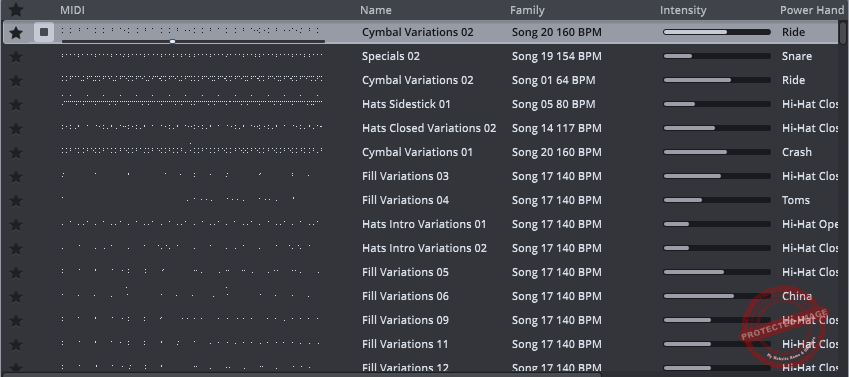
With Bandmate, you just drag in a guitar or bass track, and EZdrummer 3 will automatically generate a matching drum groove. It’s like having a session drummer who’s been listening in on your writing process.
Tap2Find is a super handy tool for it as you just tap a beat on your MIDI keyboard (or even your trackpad), and EZD3 will find the closest matching groove for you. No more scrolling through endless MIDI loops, hoping to find the right one!
Superior Drummer 3? Well, it’s not really built for speed. Sure, you can get ideas down, but it takes more effort to get it sounding polished.
The raw samples need mixing, and there’s no Bandmate to guide you. If you’re in “quick and dirty demo” mode, it can feel like trying to make a sandwich in a five-star restaurant with too many options when you just need something fast.
Mixing and Sound Design
Now, if we’re talking serious drum mixing, Superior Drummer 3 is the king. The level of control here is insane. It’s like having a multi-million-dollar drum tracking session in your DAW.
I love that you can control the bleed of every single mic, just like in a real studio recording.
For example, when you want a snare with a bit of natural hi-hat spill or need to remove that kick drum resonance in the overheads, the plugin takes care of it easily. The built-in mixer feels like a full-blown DAW, with 35 effects, parallel compression, and bus routing.
EZdrummer 3, on the other hand, keeps things simple. The mixer is there, but you don’t get deep routing or individual mic control. You can adjust the room sound, tweak the levels, and apply some basic FX, but it’s nowhere near as deep as SD3.
If you just need a solid, radio-ready drum mix without fussing over tiny details, EZD3 is all you need. But if you love shaping and sculpting your drum sound like a mad scientist, SD3 is where the magic happens.

Live Performance and Triggering
I’ve seen a lot of folks use EZdrummer 3 for live performances, and honestly, I get it, cause it’s fast, lightweight, and stable. It loads quickly, doesn’t hammer your CPU, and responds super well to MIDI triggers.
If I were running a backing track setup or playing e-drums live, I’d trust EZdrummer 3 in a heartbeat.
Superior Drummer 3, on the other hand, can be risky for live use. The sheer size of the sample library and the amount of CPU power it needs make it harder to run on the fly.
If your system is powerful enough, it can work, but if you’re dealing with lower latency buffers or a crowded session, things can get messy real fast.
So, I would go with EZdrummer for live use without hesitation.

Electronic and Hybrid Drum Production
Here’s where things get interesting: Both of these plugins can handle electronic and hybrid drum setups, but in very different ways.
EZdrummer 3 gives you access to processed kits that blend well with electronic elements. You can layer in drum machine sounds, but you don’t have deep-level control over sample stacking or sound shaping. It’s great for quick hybrid drum production, especially if you’re working in pop, hip-hop, or electronic music.
Superior Drummer 3, however, is a sound designer’s dream. You can stack multiple samples on top of each other, adjust the attack and release times independently, and even create custom layered drum kits.
The built-in electronic drum library gives you tons of classic drum machine sounds, but the real fun comes in blending them with acoustic kits. If you want to create a snare that’s 50% live and 50% 808, SD3 makes that incredibly easy.

Last Words
So, the choice between Superior Drummer 3 vs Ez Drummer 3, comes down to how deep you want to go with your drum production. If you want fast, mix-ready drums with minimal tweaking, EZdrummer 3 is the way to go. It’s ideal for songwriting, quick demos, and live performance.
If you love tweaking, mixing, and shaping every detail, Superior Drummer 3 is the better choice. It’s a full drum production environment but requires more CPU power and setup time. So, for recordings and pro-level results, SD3 is your best bet.
Can’t decide? Well, many producers (including me) use both, EZD3 for writing and SD3 for final production. Either way, you’re getting one of the best drum plugins available!

Shaurya discovered his passion at the intersection of writing and music. Starting his career as a songwriter and rapper, he gradually picked up FL Studio and soon delved deep into the world of audio engineering and music production. Based in Delhi, India, he has worked with top studios, been featured on Red FM, garnered millions of streams on Spotify, and released music with major labels like Sony and Hitz.