
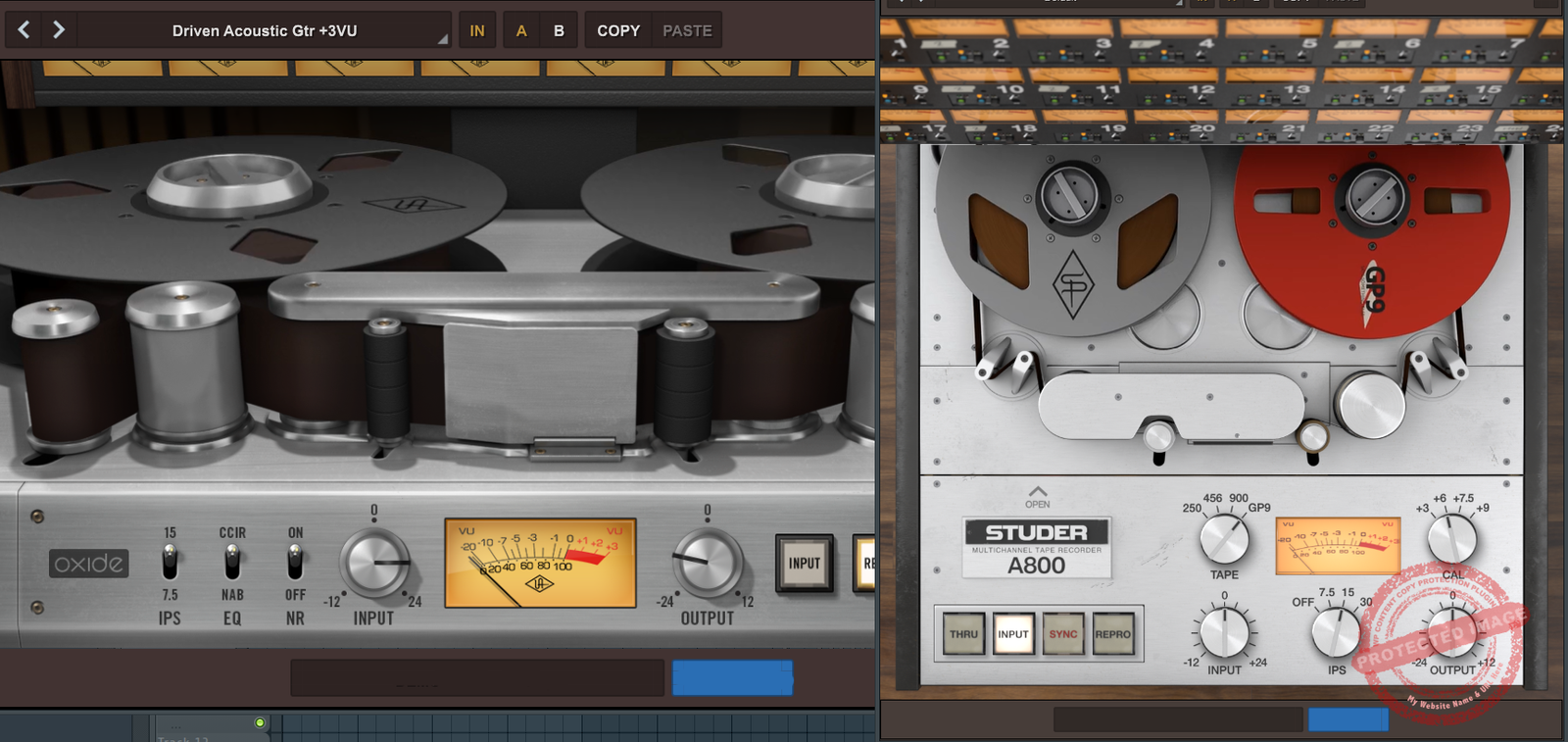
In this article, we’ll dive into two tape titans from Universal Audio: the sleek and straightforward Oxide and the studio-favorite, the Studer A800.
Ah, tape emulation plugins, a love letter to the golden days of analog, wrapped in a CPU-friendly package. As producers, we dream of that “warm and fuzzy” sound, only to wonder if your plugins add character or just your bad-gain staging.
Now, before you start yelling, “But dude, real tape machines are the only way to go!” I hear you. I’ve wrestled with enough finicky reel-to-reel monsters to know the joys of tape hiss, the smell of overheating motors, and the pain of accidentally mangling your favorite take. But let’s be honest: plugins let us have all the tape magic without the maintenance headaches or the astronomical repair bills.
So, what’s the deal with these two plugins? Oxide is simple, affordable, and surprisingly effective. Meanwhile, the Studer A800 is packed with controls, vintage mojo, and a “break all the rules and make it sound cool” attitude. But which one deserves a permanent spot in your DAW’s plugin folder? That’s what we’re here to find out.
Features
| Feature | UAD Oxide | Studer A800 |
| Purpose | Simplified, low-cost tape emulation for quick workflow |
High-fidelity, customizable tape emulation for detailed work
|
| Target Use | Budget-friendly option for quick tone and vibe |
Versatile, pro-grade tool for tracks, subgroups, and full mixes
|
| Tape Types | Single tape type with warm, saturated character |
Four tape types (250, 456, 900, 499) for varied tonal options
|
| Tape Speed (IPS) | Two speeds: 7.5 IPS and 15 IPS |
Multiple speeds: 7.5, 15, and 30 IPS
|
| EQ Options | NAB and CCIR EQ curves |
Full repro and sync EQ controls with high and low-frequency filters
|
| Saturation Control | Adjustable via input and output gain |
Extensive control via tape calibration, bias, and tape formulation
|
| Noise Reduction | On/Off switch for added flexibility |
No dedicated noise reduction, but tape hiss can be managed via settings
|
| Additional Parameters | Simple controls for quick adjustments |
Deep parameter tweaking (bias, flux, head type, etc.)
|
| CPU Usage | Light—optimized for minimal impact |
Moderate—more processing power for detailed emulation
|
| Best For | Producers looking for easy-to-use tape color |
Engineers seeking precise tonal shaping and tape behavior
|
| Creative Features | Emphasizes simplicity and tonal warmth |
Includes features for extreme saturation and “destructive” effects
|
| Price Point | $29 (Affordable, entry-level plugin) |
$69 (Premium, professional-grade plugin)
|
| Apollo Tracking Compatibility | Yes, for real-time tracking |
Yes, with advanced customization options
|
Sound and Character
- Oxide Tape Recorder
Let’s start with the scrappy underdog, Oxide. This plugin is all about simplicity, but don’t let that fool you, as it sounds anything but basic. Oxide delivers a warm, punchy tone that instantly makes your tracks feel “finished.” The rich saturation it adds could breathe more life into your digital recordings. Oxide can add warmth and cohesion, whether you’re tracking vocals, bass, or even entire mixes.

I think it’s best suited for rock, pop, and even EDM producers looking for that classic analog tape sound without a steep learning curve. The two IPS settings (7.5 and 15 inches per second) give you distinct tonal options: go slower for a thick, colored low end, or faster for a cleaner top end.
And if you’re mixing in a hurry? The John Paterno presets (yes, that John Paterno) are a godsend, offering tailored settings for different vibes, “Warm” for smooth sweetness and “Drive” for aggressive saturation.
- Studer A800 Multichannel Tape Recorder
Now, let’s talk about the heavyweight champ: Studer A800. This plugin oozes vintage mojo and precision and doesn’t just add warmth. It also adds dimension. The sound is tighter, more refined, and, dare I say, more “expensive” than Oxide.
With 4 tape formulations (250, 456, 900, and GP9) and three IPS speeds, the A800 offers unmatched versatility. Each tape type has its own personality, from the soft saturation of 250 to the punchy modern edge of GP9.

Genres? The Studer A800 shines in jazz, classical, and high-end productions where subtlety is needed. It’s also a beast on multitrack recordings. Slap it on individual tracks during mixdown to get that cumulative “tape glue” effect, or go nuts with creative biasing to crank out some gritty, distorted magic on drums.
- Comparison
So, how do they stack up? I would use Oxide for instant results with minimal tweaking. On the other hand, I prefer Studer A800 for when I need a deep-dive tool and want granular control over their tape sound. While Oxide is great for quick, colorful saturation, the A800 lets you fine-tune every detail, from tape type to bias and even hiss levels.
If Oxide is your “set it and forget it” plugin, the Studer is your “tweak it until it’s perfect” tool.
Features and Interface
Calibration and Controls
Studer A800 is loaded with extensive calibration options that allow you to fine-tune every aspect of your tape emulation. For starters, you can adjust HF Record EQ, a tool designed to counteract high-frequency losses caused by bias optimization or system filtering.
That lets you inject extra sparkle into your signal before it even hits the tape, affecting how saturation behaves downstream.

Next, the Bias Control lets you tweak the voltage applied to the tape head. Overbias for a smooth, compressed warmth is great for taming harsh transients like snare hits or underbias for gritty distortion effects that add edge to drums or loops. With Sync and Repro EQ, you can precisely shape the high and low frequencies during playback, mimicking real-world calibration for hardware tape machines.
On the simpler end of the spectrum, the Oxide Tape Recorder focuses on delivering tape warmth and saturation with minimal fuss. Its Input and Output controls are straightforward yet effective, letting you balance signal levels while dialing in harmonic richness or fat compression.

Path Select
The Repro and Input buttons provide quick toggles between hearing the Oxide’s full effect or just the electronics of the virtual machine, giving you flexibility in how many colors you want to inject.

By comparison, the Studer A800 adds more options to the table with Thru, Sync, Repro, and Input paths. The Thru mode bypasses all processing for a clean comparison, while Sync and Repro emulate the sound of recording and playback via different tape heads, which is suitable for matching the exact sound of analog workflows.

Comparison of Calibration Depth
If Oxide is a plug-and-play solution for those who just want the classic “tape vibe,” the Studer A800 is a deep-sea dive into tape engineering. Studer’s detailed calibration options let you sculpt sound with precision, adjusting everything from the hiss level to playback head EQ.
For seasoned engineers or adventurous producers, the A800 is an open playground for analog experimentation. Oxide, on the other hand, is the sonic equivalent of a fast-food meal: reliable, satisfying, and ready in minutes.
Noise Controls
Both plugins emulate the tape hiss and hum inherent in analog machines. Still, the Studer A800 goes further with independent Hum and Hiss sliders, allowing you to control these elements creatively or remove them altogether. Oxide keeps it straightforward with a single Noise Reduction toggle to cut down on “hiss” when it’s not desired.
Interface
Oxide’s interface is sleek and minimalist, ideal for quick tweaks without overthinking with its single window and 8-control workflow. The Studer A800, while more complex, is still intuitive and includes a secondary panel for detailed EQ and calibration settings.
Both interfaces are resizeable and have an aesthetic rotating tape visual in their interfaces. The preset window in both has a well-organized menu with different categories of tape saturation.

Performance
Both UAD plugins are optimized for UAD hardware, but Oxide is lighter on CPU, making it ideal for sessions with many tracks. The Studer A800 is more demanding but justifiable for its versatility and sound quality.
Compatibility
Both the UAD Oxide and Studer A800 share identical compatibility features, offering seamless integration for both standalone use (UAD Native) and hardware-accelerated workflows (Apollo Realtime & UAD‑2). They support the latest macOS and Windows operating systems, making them accessible for any modern production setup.
| Feature | Details |
| Compatibility |
UAD Native and Apollo Realtime/UAD‑2
|
| Plugin Format |
VST3, AU, AAX
|
| Supported Mac Operating Systems |
macOS Catalina 10.15, Monterey 12, Big Sur 11, Sonoma 14, Ventura 13, Sequoia 15
|
| Supported Windows Operating Systems | Windows 10 & 11 |
In Practice
Drum Bus Magic
If there’s one thing both Oxide and the Studer A800 excel at, it’s making your drum bus sound like it came straight off a vinyl record pressed in the ’70s. The question is: how much seasoning do you want?
With Oxide, I slap it on the drum bus, dial up the Input until the VU meter dances just shy of the red, and boom: Instant Punch! It rounds out the transients, adding a beefy low-end that makes the kick feel like it’s stomping through your chest. The 7.5 IPS setting is my favorite here, as it gives the snare a bit of weight and makes the cymbals shimmer without being harsh. If I’m in a rush (aren’t we all?), the John Paterno “Drive” preset gets me 90% of the way there without touching a knob.

Now, enter the Studer A800, in which I went full geek mode: chose the 456 tape formulation for its midrange punch, set the speed to 15 IPS, and spent 15 minutes tweaking the bias and repro EQ until the snare sounded like it was recorded in Abbey Road. The beauty of the A800 lies in the details. I even boosted the HF Record EQ to give the cymbals extra air.
To my surprise, the entire kit was glued together with that legendary “tape compression” while retaining clarity. It’s more work than Oxide, sure, but when I’m chasing perfection, it’s worth every click.
Bass Guitar Treatment
When I’m working on bass, I want it to sit in the mix, commanding but not overpowering. Oxide gets me there with minimal effort. I grab the Input control, nudge it until the low end feels like it’s been dipped in honey, and call it a day. The 15 IPS speed gives me a tight, controlled sound that keeps the bass punchy without muddying the waters.
One time, I used it on a DI bass track from a metal session. The result? It is fat, gritty, and low-end, with just enough saturation to make the player’s pick attack pop through the mix like a slap to the face.
The Studer A800, on the other hand, is where I go when I’ve got time to finesse. I experimented with GP9 tape for a modern, polished low end and set the calibration to +6 dB for a little extra headroom.

Here’s where it gets interesting: I underbiased the signal slightly, which gave me just a touch of distortion, making the bass growl in the sweetest way. Add a pinch of hiss for that analog vibe, and suddenly, the bass track had so much character it practically introduced itself to the other instruments in the mix.
Mix Bus Cohesion
When I have a jazz ensemble or a high-end orchestral piece, that’s Studer A800 territory. I set it to 30 IPS for its pristine fidelity, chose the NAB EQ curve for a hint of American-style warmth, and let the calibration do its thing. I even adjusted the Sync HF EQ to make the strings pop out a bit more. Oxide is also a good option for more glue and would suit well on genres like indie rock, punk, etc., which are more raw or edgy.
UAD Oxide vs Studer A800: Conclusion
If you’re like me on a tight deadline, juggling 20 open tabs, a half-empty coffee mug, and a client breathing down your neck, Oxide could be your go-to. It’s quick, easy, and punches way above its price point. Think of it as the plugin equivalent of your favorite hoodie: cozy, reliable, and always makes you feel good.
But if you’re the type who obsesses over every frequency bump and saturation nuance (guilty), Studer A800 might be the more suitable plugin for you. It’s not just a plugin; it’s an experience. From the joy of tweaking bias and EQ to dialing in the perfect tape formulation, it’s a playground for sonic sculptors. Sure, it’s a little heavier on the CPU and requires more time, but the payoff is pure analog joy.
In the end, there’s no wrong choice — only the right tool for the moment. Whether you’re smashing a rock mix, finessing a jazz quartet, or just trying to make your podcast sound like it was recorded in a vinyl-scented dream, both of these Universal Audio plugins deliver the goods.

Shaurya discovered his passion at the intersection of writing and music. Starting his career as a songwriter and rapper, he gradually picked up FL Studio and soon delved deep into the world of audio engineering and music production. Based in Delhi, India, he has worked with top studios, been featured on Red FM, garnered millions of streams on Spotify, and released music with major labels like Sony and Hitz.