
In this guide, I’m walking you through 11 of the best DAWs in 2026.
Choosing a DAW is kind of like picking your forever bandmate; you’ll spend hours together, celebrate your best tracks, and probably argue a little along the way. I’ve hopped between more DAWs than I’d like to admit, from old-school setups that felt like rocket science to slick modern ones that make producing actually fun. Each has its quirks, strengths, and little frustrations, but that’s what makes this list exciting.
Here, I’m not just rattling off specs; I’ll share what stood out to me, where each DAW really shines, and a few moments where I almost pulled my hair out. My goal isn’t to tell you there’s a single “best” DAW, because honestly, the right one depends on your workflow, your style, and sometimes just your gut.
I gotta say my choice of weapon here is Logic and Cubase, as I mainly work in recording projects and less in electronic music. So, I will be looking at all the DAWs from a Logic user perspective.
Whether you’re producing EDM, recording a full band, mixing film scores, or just dipping your toes into beat-making, there’s a DAW on this list that can feel like home. So grab your coffee and cookies, and let’s dive into the digital playgrounds that keep our music alive!
1. Audiocube (3D DAW)
What makes Audiocube stand out is how it ditches the flat DAW timeline we’ve all grown used to and throws you straight into a 3D world of sound.
I’ve played around with a lot of DAWs, but none have ever let me literally place, move, and interact with audio like I’m sculpting clay. That freedom instantly makes me want to experiment, and I love how it blurs the line between music production and sound design.
The interface feels slick and surprisingly intuitive for something so different. I was able to drag and drop samples, set up devices, and build a sonic playground without fighting menus or technical clutter. What I enjoy most is that I can zoom around my virtual studio like it’s a little world, tweaking soundwalls and devices in a way that feels fun instead of clinical.
- True 3D Sound Design
This is where Audiocube shines, as being able to place sound in a virtual environment gives me spatial control I just can’t get in a traditional DAW. I’ve used it to create evolving ambiences that feel alive, almost like walking through a soundscape instead of just listening to it.
- Ripple Spatial Audio Engine
The built-in acoustic simulation is great with reflections, occlusion, distance filtering, all happening in real time. I remember throwing a simple clap into a “virtual room” and suddenly it sounded like I was recording in a cathedral. That level of realism makes spatial mixes feel effortless.
- Generative Devices
There are 7 devices that respond to physics, logic, and even chaos, and I’ve had a blast chaining them together. One session had me accidentally creating an evolving drone that pulsed in ways I never could’ve sequenced by hand, those happy accidents are where the magic happens.
Well, Audiocube asks you to rethink how you make music, which can feel overwhelming at first. My tip is to start simple, play with one or two devices, and let yourself explore instead of trying to replicate a “normal” DAW workflow.
For me, Audiocube is less about replacing my main DAW and more about giving me a whole new space to create. It’s a go-to when I want immersive textures, experimental ideas, or just a fresh perspective on sound. If you’re into cinematic scoring, spatial audio, or even just breaking out of creative ruts, this is a tool that feels more like a playground than software.
Audiocube is a standalone application for macOS, Windows, and Linux.
2. FL Studio
Jumping into FL Studio as a Logic Pro user felt like walking into a playground built entirely for rhythm.
The sequencer-focused workflow immediately grabbed me as it’s addictive, almost like the DAW is nudging you to create beats and patterns instead of overthinking every note. I love that I can sculpt a groove almost by instinct, even before fully understanding all the menus.
Visually, the interface is sleek, crisp, and surprisingly inviting. I found myself clicking around without hesitation, dragging loops into the Playlist and experimenting with patterns.
Recording audio or playing live MIDI, though? That took some extra patience. It’s not broken, but it’s a very different approach than what I’m used to, you have to wrap your head around how the DAW handles tracks and clips, or you risk your recordings ending up scattered across the timeline.
- Gopher AI Chatbot
This little AI companion is unexpectedly handy. I’ve thrown all sorts of questions at it, from “Where did my mixer go?” to “How do I copy a plugin?” and it actually steers me straight to the answers.
While it’s not lightning fast, it definitely beats scrolling through forums or endlessly pausing YouTube tutorials. Honestly, it makes the steep learning curve a lot less intimidating.
- FL Cloud Subscription
Even if you skip the cloud, the built-in sample library is strong, but FL Cloud takes it to another level.
Over a million royalty-free sounds, AI-assisted mastering, and direct distribution to streaming platforms make it feel like a mini production ecosystem. I’ve dabbled with it on a few tracks, and having that kind of ready access to textures and loops is a massive time-saver.
- Lifetime Free Updates
This is a feature I can’t overstate; buy it once, keep it forever. Having seen other DAWs force paywalls with every new version, it’s a relief to know my projects won’t become obsolete. I can keep exploring FL Studio without worrying about hidden costs or software locks.
I think the recording workflow still has quirks. MIDI and audio capture don’t behave as intuitively as I’d like, and for more organic, free-form music, FL Studio can feel a bit confining. But when it comes to electronic production, sequencing, and loop-based composition, this DAW shines.
I often find myself abandoning my keyboard entirely and just letting the pattern editor guide the rhythm, it’s that fun.
For me, FL Studio is a beat-making haven. I don’t replace Logic, but whenever I want to experiment with grooves, textures, and electronic ideas, this DAW becomes my playground.
The combination of clever automation, versatile stock plugins, and a workflow that practically encourages pattern exploration keeps me coming back, especially when I’m in the mood for something fast, rhythmic, and playful.
Runs on Windows and macOS, with optional FL Cloud subscription and lifetime free updates.
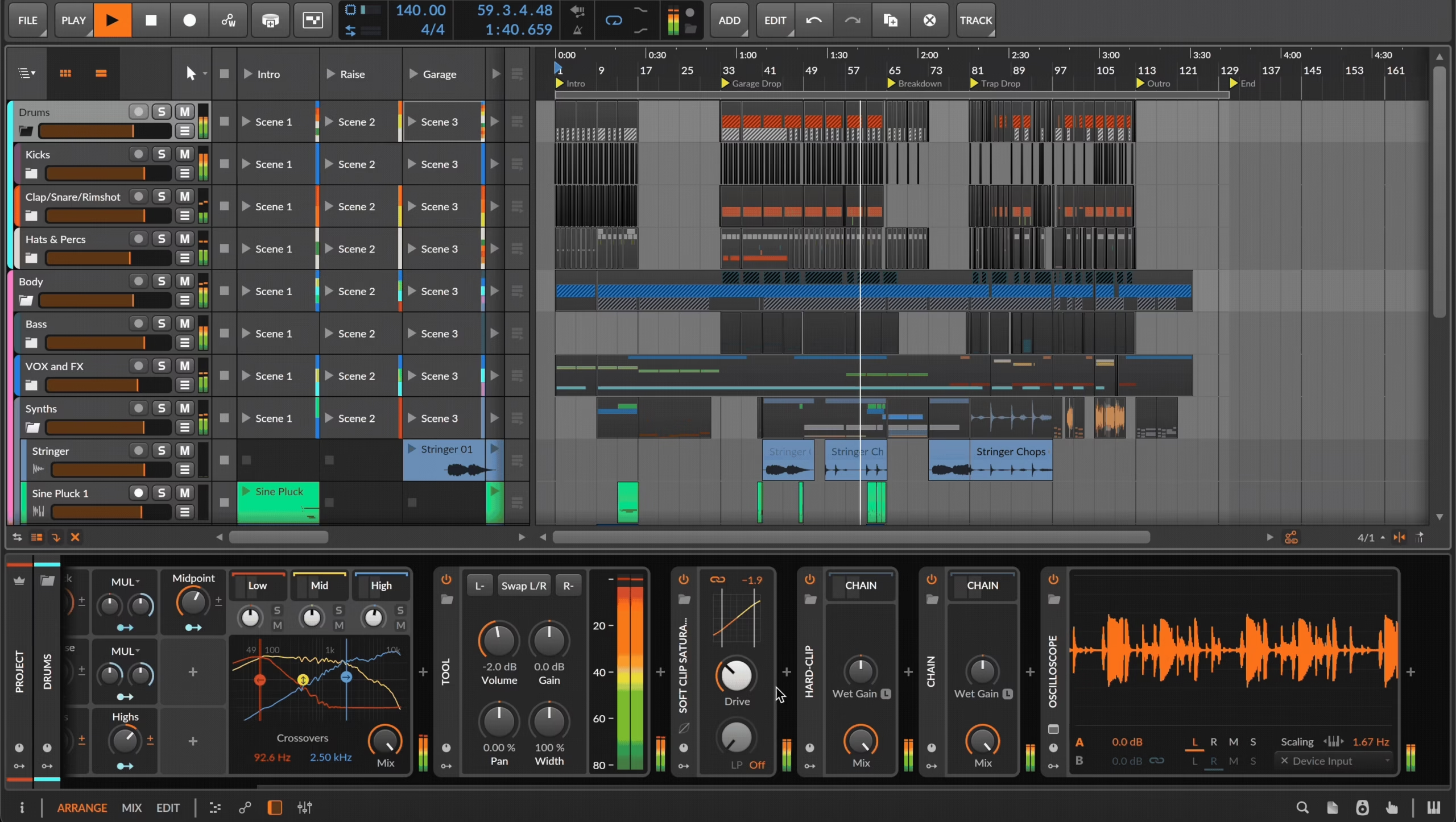
3. Bitwig
When I tried Bitwig Studio 6, I felt like I’d stumbled into a DAW that refuses to play by the usual rules.
For me this isn’t just software; as it’s more like a creative instrument, built for people who want to push sound design and modulation to extremes. I loved how the interface makes experimentation feel intuitive, yet deep, almost like the DAW is daring you to get inventive.
Opening a project, I was immediately drawn to The Grid. It’s a virtual modular playground where instruments, effects, and audio signals interact freely.
I spent a good hour just patching modulators to seemingly random destinations, and it worked beautifully. Everything in Bitwig can modulate everything else, and I found that this freedom sparks ideas in ways a traditional DAW can’t.
- Spray Can and Audition Tools
I didn’t think I needed a Spray Can in my DAW until Imet with Bitwig 6. Quickly painting in repeating notes or automation feels surprisingly fun and useful, and it speeds up idea generation.
The Audition tool, on the other hand, has already become a daily go-to for me, it’s so much faster to solo and hear exactly what I want without fumbling with track solo buttons.
- Automation Clips and Curved Lines
Automation in Bitwig has always been flexible, but version 6 finally makes it intuitive. Drawing curves instead of jagged staircases feels natural, and being able to move segments as a whole is a lifesaver.
The real gem, though, is Automation Clips. Treating automation like any other clip, arranging, saving, and reusing it, completely changes how I think about shaping dynamics and movement in a track.
- Clip Aliases
This one made me grin because it reminds me of old-school sequencers. Having Clip Aliases means I can tweak a part once and instantly hear the changes across every duplicate.
- Modulators Everywhere
Mapping modulation across tracks has never been simpler. The blue “wireless” system makes it straightforward to send a single modulator to multiple destinations at once.
I’ve been experimenting with instrument parameters, effect chains, and even channel settings simultaneously, and the results feel organic, evolving, and utterly unique. It’s a playground for sound sculptors.
I’d say Bitwig Studio 6 isn’t for everyone, beginners might find its depth overwhelming, especially if they jump straight into the full version.
But for anyone who loves modulation, experimentation, and building sounds from the ground up, it’s a goldmine. I often lose myself in The Grid, trying combinations of modulators and envelopes just to see what happens, and every session ends with something fresh and unexpected.
Overall, Bitwig Studio 6 feels like the DAW the developers always wanted it to be: a modulating monster with boundless creative potential. It’s not just a tool for arranging tracks; it’s a laboratory for sonic exploration. For those willing to embrace its complexity, it’s utterly addictive and I can already tell this one will stay on my desktop for a long time.
Compatible with macOS, Windows, and Linux.
4. Ableton
If you want a DAW specially built for electronic music and live usage, Ableton is hard to beat.
I love that I can sketch a quick drum loop in Session View, then seamlessly tweak the same ideas in Arrangement View. I liked exploring generative MIDI tools, and what excited me most is how the DAW practically nudges you toward happy accidents and unexpected inspiration.
The interface strikes a nice balance between simplicity and depth. The new layout makes it possible to peek at devices, clips, and the mixer all in one window, which is a game-changer when juggling complex projects.
I initially felt a little overwhelmed with everything on-screen, but once I embraced the side-by-side clip/device workflow, it became easier, like having a studio that molds itself to my ideas.
- Generative MIDI Tools
Ableton’s MIDI generators and transformations are like having a co-writer that never complains. I often start with Stacks to create chord progressions, then tweak them with Transformations to humanize rhythms or add ghost notes.
It’s a thrill watching simple clips blossom into rich, evolving musical ideas, and it’s perfect for diving deep into creative rabbit holes.
- Meld and Roar Devices
Meld feels like a sound designer’s dream with dual engines, animated textures, and modulation routing that lets me sculpt everything from subtle harmonics to chaotic digital mayhem.
Then there’s Roar, a distortion powerhouse that can be gentle or ferocious, shaping pads, drums, and even vocals. I love how both devices reward experimentation without ever feeling intimidating.
- Drum Sampler and Updated Auto Filter
The Drum Sampler has quickly become my percussion Swiss Army knife. With its X/Y pad and effects, I can bend and twist one-shots into entirely new rhythms on the fly.
The upgraded Auto Filter adds layers of character with new modes like vowel, comb, and bidirectional filters. The Wander LFO is a personal favorite, it adds subtle, unpredictable movement that keeps loops feeling alive.
Some MIDI tools can feel finicky; overwriting clips happens faster than you expect. My workaround is to duplicate clips before experimenting, keeping my original ideas safe while I get adventurous.
In short, Ableton Live 12 Suite feels like a DAW that grows with you. Whether I’m jamming, composing, or sculpting soundscapes, the combination of generative MIDI, innovative devices, and flexible UI keeps me engaged and inspired. This is the version that makes me want to explore every corner of my sonic imagination, there’s always something new waiting to be discovered.
Compatible with macOS, Windows, and Linux.
5. Cubase
Cubase Pro 14 completely reshaped how I approach patterns and modulation.
Dropping into the Pattern Editor, I can sculpt drum grooves and MIDI riffs that almost seem to write themselves. Playing with the Modulators, from LFOs to Step Modulators, and even ModScripter, I started hearing movement in my patches I didn’t know was possible. Controlling multiple parameters at once gave my synths more personality than I expected.
The interface feels familiar, yet smoother, which I liked. Editing on the timeline is less of a chore now, thanks to tweaks like the Range tool and event volume curves.
I noticed that moving or adjusting audio clips doesn’t interrupt my flow as much, and the Drum Tracks fit naturally into my projects without extra fuss.
- Modulators
Experimenting with these modulators was a highlight for me. LFOs and Step Modulators can sync or trigger via MIDI, while sidechain support creates rhythmic effects I didn’t think I’d use until now.
Routing an Envelope Follower to a drum loop brought unexpected grooves to life. What I like most is tweaking each destination separately I can shape a sound subtly without it feeling mechanical.
- Pattern Editor and Drum Tracks
Layered beats became intuitive the moment I started. Each drum pad handles multiple layers, sampled or synthesized, and controlling velocity, gate, and probability per step adds a natural feel to patterns.
That said, setting up pitched instrument lanes quickly became tedious, and knowing that edits aren’t tracked in the undo buffer made me double-check everything.
- Event Volume Automation
I started using event-based volume curves for gain staging, and it immediately reduced headaches. Moving or editing audio blocks no longer feels risky, and the curves allow me to be precise without micromanaging the mixer. This small tweak changed how I think about balancing recordings in real time.
As an old Cubase user, I struggle a bit with the lack of ModScripter documentation, it required trial and error. Patterns remain project-specific, so I can’t pull a beat from one project into another easily. Multi-lane workflows for pitched instruments are less smooth than with drums, which slows me down occasionally.
Cubase Pro 14 feels like a meeting point between the DAW I grew up on and the modern tools I crave. Diving into modulators, patterns, and event-based automation opened new creative doors.
While I still encounter a few quirks, it’s one of the first DAWs I feel I can experiment in freely without breaking my workflow. This version makes me rethink how I compose, without forcing me to abandon the way I’ve always worked.
Compatible with macOS, Windows, and Linux.
6. Logic Pro
Logic Pro 11 has become my go-to DAW for almost everything I do.
Dropping into a project, I’m immediately impressed by how the new AI-powered Session Players with keyboard, bass, and Drummer, that fit into my workflow.
They don’t feel like gimmicks; they actually respond to the Global Chord Track in ways that make arranging chord progressions far less tedious. Even when I’m juggling multiple players, the DAW stays responsive and intuitive.
The interface feels familiar but smarter. I love the small but impactful tweaks, like the Slip and Rotate tools for shifting content inside regions without affecting boundaries.
The mixer and track layouts are comfortable, though I wish the color scheme were a bit more flexible. Still, the logic of the workflow means I spend less time hunting for commands and more time shaping sounds.
- AI-Powered Session Players
Playing with the keyboard and bass AI players, I quickly realized they could act as a creative springboard rather than a crutch. I used them to sketch ideas in minutes that might have taken hours otherwise.
The Drummer updates, with bigger, more versatile kits, make rhythm programming feel effortless. Assigning multiple players to one session really changed the way I approached building arrangements.
- Mastering Assistant
I ran Mastering Assistant on an electro track and a few singer-songwriter demos, and I was impressed by how much it tightened mixes.
The EQ adjustments and dynamics tweaks gave me polished results without touching a single fader manually. In one instance, the Valve preset smoothed out harsh upper mids on the drums and vocals, which immediately lifted the track. It doesn’t replace a skilled mastering engineer, but it’s saved me time and provided a reliable reference point more than once.
- Sample Alchemy and Beat Breaker
I experimented with Sample Alchemy to warp a single sample into a full instrument. It was surprisingly deep and gave me sounds I wouldn’t have imagined otherwise. Beat Breaker became my playground for mangling chord progressions, stutters, and scratches in real-time, some experiments were weird, some worked brilliantly, but all of them sparked ideas I kept.
Well, the obvious downside is that it is only for macOS users. Besides that some of the instrument-heavy projects get messy with extra aux buses, and patch merging must be enabled manually.
The Multipressor still feels a bit dated compared to newer multiband compressors, and I sometimes wish the console meters were bigger. Aslo I think, video scoring has a few quirks, especially around SMPTE tempo alignment.
For me, Logic Pro 11 isn’t just a DAW, it’s a complete music production hub. I’ve written, recorded, mixed, and even sketched arrangements across iPad and desktop, and the roundtripping works almost seamlessly.
It handles everything I throw at it without feeling bloated, and the new tools genuinely inspire creativity rather than interrupt it. Out of all the DAWs I’ve used, Logic Pro is my top pick, hands down.
Compatible only with macOS.
7. Reaper
For those who want power without breaking the bank, Reaper is a solid choice.
Right out of the gate, I’ll admit, it’s not the prettiest or most intuitive interface. The first time I opened it, I stared at a blank slate and thought, “Where do I even start?” But the more I used it, the more I realized just how flexible it is. Once you get past the learning curve, Reaper practically rewards your effort with endless customization and professional-level features.
The customizable interface is a highlight for me. You can spend hours tweaking toolbars, track layouts, and even colors to match your workflow. Adding free skins from the Reaper community made the program feel more alive and approachable, and suddenly the blank canvas turned into a studio that felt mine.
I even set up different keyboard shortcuts for recording, MIDI editing, and mixing, which makes switching between tasks feel seamless.
- Recording and Editing
Recording is simple: arm the track, hit Record, and go. I tested Reaper with multiple audio channels, running both live instruments and virtual synths, and it never skipped a beat.
The Track Lanes with Swipe Comping feature became a lifesaver for vocals, I could record multiple takes, compare sections instantly, and comp a polished track in minutes. Flexibility is the word here: everything from region gain to automation is at my fingertips.
- Mixing and Effects
I’m not gonna lie, the mixer looks basic at first, but it’s powerful unlike how it looks. Grouping tracks, creating parallel plug-in chains with FX Containers, and routing audio in complex ways all feel natural once you experiment.
I tested both stock plug-ins like ReaEQ and third-party VSTs from Komplete 14, and the results were professional-grade. The built-in compressor and ReaLimit helped me get clean mixes quickly, and the convolution reverb, ReaVerb, sounded surprisingly realistic for a stock effect.
- Performance and Flexibility
Reaper’s light footprint is one of the reasons I love it. It ran flawlessly on my M1 MacBook Pro with 16GB RAM, and even when I loaded dozens of VSTs and audio tracks, CPU usage stayed manageable. The 64-bit audio engine means I never felt limited by the program itself; it’s just me, the interface, and whatever instruments I want to throw at it.
There are no built-in instruments or loops, so you’ll need to rely on third-party libraries. Beginners might find the interface unintuitive at first, and the default UI isn’t the most visually inspiring. Still, the incredible customization options and low price make these minor frustrations worth it.
Ultimately, I can say that for tight budgets, Reaper is a powerhouse. It might not have the polish of Logic Pro or the bundled sounds of GarageBand, but its flexibility, low cost, and sheer efficiency make it my top pick for anyone serious about recording, mixing, and mastering without spending a fortune.
Compatible with macOS, Windows, and Linux.
8. Pro Tools
Pro Tools has long been the DAW for precision, reliability, and industry-standard workflows.
I’ve used it across multiple projects, and what I love is how it scales from a simple home studio setup to massive HD systems in professional environments. It’s the DAW that most engineers and studios trust, and for good reason, it’s built for real-world production, mixing, and collaboration.
Walking into the Edit window for the first time can feel a little intimidating, but once you spend a few sessions there, it’s like coming home. Everything, the Smart Tool cursor, crossfades, Clip Gain, and Beat Detective, feels purpose-built for serious audio editing, and I appreciate that level of detail when assembling tracks or fine-tuning a mix.
The interface may feel dense at first, but once you get used to it, Pro Tools’ workflow is surprisingly smooth. I enjoy how intuitive it becomes when combining keyboard shortcuts, track presets, and automation tools, once I set up my workspace, I can fly through sessions efficiently.
- Edit Page & Smart Tool
The Edit window is a powerhouse. I love using the Smart Tool for trimming, fading, and crossfading audio clips on the fly. Loop recording and color-coded Track Markers make assembling multiple takes quick, and I often use Clip Gain to adjust volume levels without cluttering the mix with automation.
- Virtual Instrument Suite
Pro Tools comes with a solid set of instruments, including Xpand! 2, Mini Grand, GrooveCell, PlayCell, and Vacuum. I’ve used PlayCell for quickly sketching ideas without diving into complex menus, it’s perfect for starting a project or layering quick samples.
While it’s not as extensive as Cubase or Logic, these instruments are surprisingly versatile when paired with third-party libraries.
- Mix Window & Automation
The Mix window is my favorite for dialing in mixes. Drag-and-drop plug-in reordering, VCA support, and fully customizable aux busses make complex sessions manageable.
I also love the included Pro Compressor, BF76, and Space convolution reverb, which let me craft professional-sounding mixes without additional purchases. Full track and parameter automation works flawlessly, even during live recording.
- Dolby Atmos & Spatial Audio
I’ve been experimenting with immersive mixes recently, and Pro Tools’ Dolby Atmos integration is a game-changer. It lets me render in real-time from binaural to 9.1.6, export stems with delay compensation, and monitor mixes using Apple Spatial Audio. For any project that needs cinematic or immersive audio, this feature is indispensable.
The main cons are subscription-focused pricing (though perpetual licenses are available via resellers) and the MIDI workflow, which can feel a bit unintuitive for beginners. My tip would be to spend time customizing your keyboard shortcuts and workspace layouts, it pays off big.
Overall, Pro Tools remains my go-to DAW for professional mixing, recording, and post-production projects. It’s reliable, scalable, and packed with tools that make even complex sessions manageable.
I recommend it for anyone working in professional studios, post-production houses, or collaborative projects where compatibility and precision are key.
Compatible with macOS, Windows, and Linux.
9. PreSonus Studio One
What I love about Studio One Pro 7 is how it balances professional-grade features with an approachable workflow.
The new version really feels like “one DAW for all,” especially now that PreSonus has retired the Prime and Artist editions. The combination of perpetual licensing with optional subscription perks gives me flexibility I actually enjoy.
The interface is sleek and intuitive. I like how the Arranger, Clip Launcher, and Timeline work together, letting me flip between linear and non-linear workflows without breaking my flow. Everything feels accessible without sacrificing power, and the dark-mode design is easy on the eyes during long sessions.
- AI-Powered Stem Separation
I’ve had a lot of fun using the stem separation feature to breathe new life into old mixes. Just drag a mixed track onto a timeline, select Vocals, Drums, Bass, or Other, and Studio One generates separated stems almost instantly.
It’s not perfect, ghostly vocals sometimes linger, but it’s brilliant for remixing, isolating samples, or building new ideas from existing tracks.
- Integrated Clip Launcher
The Launcher is fantastic for non-linear, clip-based workflows. I can stack loops and scenes vertically while keeping my timeline intact, swap clips on the fly, and even record directly into a cell.
While it’s a bit rudimentary, clip sizing and automation recording are limited, the scene playlist lets me experiment with arrangements easily, which is a huge time-saver.
- CV Instrument & MIDI Enhancements
I’m excited by the CV Instrument, which generates control voltages from MIDI tracks to sequence modular or analog gear. While setup can be tricky, the potential for modular integration is huge.
Studio One’s Global Transpose, user-defined scales, and polyrhythmic step editing in the piano roll also give me more creative freedom with melodic patterns than ever before.
- Tempo Map Detection
Another standout is Tempo Map Detection, which lets the grid follow a live performance rather than forcing timing to a rigid grid. I tried this on demo recordings or guitar/vocal tracks that weren’t recorded to a click, and it makes arranging loops and patterns feel effortless.
Well, some features are still basic, like the Launcher, and no new synths or mastering tools were added. Splice integration is great, but only if you subscribe. Setting up the CV Instrument can be fiddly depending on your gear.
Overall, Studio One Pro 7 is a solid, mature DAW with a ton of versatility. I use it for both remixing old tracks and producing entirely new compositions, and the combination of stem separation, the Launcher, and creative MIDI tools makes it a pretty nice workflow.
Compatible with macOS, Windows, and Linux.
10. GarageBand
GarageBand turns music-making into something immediate and joyful.
I’ve opened it just to experiment with a piano riff or drum groove and ended up building a full sketch in minutes. It’s approachable enough for beginners yet clever enough to let me experiment with more complex arrangements without feeling limited.
The interface flows naturally. Smart Controls put the parameters I care about most right in front of me, and the track area, piano roll, and score editor all snap together with minimal fuss.
Dragging windows, zooming, or switching views feels intuitive, and I get a kick out of using Logic Remote to play instruments or tweak sounds from my iPad while staying at my Mac.
- Smart Controls & Real-Time Automation
Tinkering with sounds is a blast. Smart Controls highlight the most meaningful knobs, buttons, and sliders, letting me shape instruments as I play. Every adjustment is captured automatically as automation, which makes evolving textures feel effortless and organic.
- Vast Instrument Library & Producer Packs
I’m always finding inspiration in the built-in instruments, from pianos and basses to synths, guitars, and orchestral elements.
The included Producer Packs pack thousands of loops and patches from artists like Tom Misch and Mark Ronson, giving me instant fuel for creative sessions. It’s like having a professional studio right inside my Mac, without the steep price tag.
- Drummer & Pedalboard
Creating rhythm tracks is a delight with Drummer. Drop a session player on a track, pick a style, and GarageBand handles the groove while letting me adjust intensity or complexity on the fly.
When I plug in a guitar or bass, Pedalboard and amp presets make dialing in tones intuitive and fun, it’s immediate and satisfying.
- 24-Bit Recording & Flex Time
I can record high-quality 24-bit audio effortlessly, and Flex Time makes it simple to fix timing issues while preserving the natural feel. Even on multi-layered tracks, it’s smooth and transparent, letting me polish performances without ever losing groove.
- Lessons & iCloud Integration
I’ve dipped into the built-in lessons for piano and guitar, and the real-time feedback feels like having a teacher in the room. Plus, with iCloud syncing, starting a track on my iPad and finishing it on my Mac is completely seamless, it’s perfect for working wherever inspiration hits.
GarageBand may not have a full mixing console or the advanced mastering tools of Logic Pro, but it doesn’t need them. I find myself reaching for it to sketch ideas, jam, or even build entire tracks from scratch. It’s free, it’s fun, and it makes music creation feel surprisingly professional without ever intimidating me.
Compatible only with macOS.
11. Acoustica Mixcraft
Opening Mixcraft 10.5 Pro Studio, I was immediately struck by how much power the DAW packs into a relatively affordable package.
On first glance, the interface might feel a little busy, tiny buttons and text everywhere, but once you start exploring, the workflow starts to make sense. The timeline stretches across the top right, tracks line up neatly, and the Performance Clip view gives you a taste of Ableton-style live sequencing that’s actually fun to experiment with.
The bottom section houses the Piano Roll, Step Sequencer, Score view, and Mixer, letting me switch contexts without breaking my creative flow. The Library is where all the loops, effects, and samples live, ready to spark inspiration.
Even though a few windows and drop-down menus feel a bit dated, the scalable redesign and new color options make working with clips and automation a lot easier than in previous versions.
- Recording & Instruments
Recording is straightforward once you figure out the layout. I tested acoustic and electric pianos, synths inspired by Minimoog and Roland classics, and some quirky boutique patches.
The new Quick Access panel makes pulling up instruments and effects per track a breeze. While a few older plug-in interfaces feel like a blast from the past, the stock library is impressive, and additional instruments and effects can be added from the integrated Mixcraft Store.
- Video Editing & Remote Control
What sets Mixcraft apart from other entry-level DAWs is its built-in video support. You can import AVI, WMV, or MP4 clips, trim, align, and even automate effects like lighting changes or sepia tones, all without leaving the DAW.
Pair that with the Mixcraft Remote app for iOS or Android, and I could control playback, transport, and master volume while standing at my piano or mic. Editing individual tracks remotely isn’t possible yet, but being able to start, stop, and monitor projects from anywhere in the room is surprisingly handy.
- AI Stem Separation & Mixing Tools
The AI stem separation tool is genuinely exciting. Drag in a mixed track, and Mixcraft can isolate vocals, drums, bass, piano, and “everything else”, perfect for karaoke, remixing, or practicing individual parts.
While it’s not flawless, it’s impressively usable for most casual applications. Mixing is also approachable: a draggable board with EQ, reverb, compression, and routing options lets me polish tracks quickly, and iZotope Mastering Essentials provides a full suite of mastering tools in one plug-in.
Mixcraft isn’t flawless, the audio engine can be a little temperamental, and track comping isn’t as seamless as in some competitors, but it punches well above its weight.
For newcomers or budget-conscious producers, it offers a wealth of instruments, loops, and creative tools that make recording and mixing feel like a premium experience. Even after two decades of development, Mixcraft manages to stay relevant, flexible, and fun, proving that a lower-priced DAW doesn’t have to mean compromising on creativity.
Compatible with Windows and macOS.
Last Words
No matter your experience level or budget, there’s a DAW out there that can match your workflow and creative vision. From GarageBand’s beginner-friendly charm to Mixcraft’s budget-friendly versatility, Audiocube’s 3D world to Logic’s all-in-one workflow, these tools prove that making music has never been more accessible or more fun. Pick one, dive in, and let your ideas take center stage!
