
Today, I’m diving into one of the most essential effects in music production: distortion plugins! If your tone needs grit, power, and attitude, here are some of the best Distortion plugins that will get the job done.
Distortion isn’t just an effect; it’s the soul of loud, raw, and unapologetic music. It makes riffs hit harder, solos scream louder, and basslines shake the ground like a dinosaur in your mix.
And today we have the plugins instead of the hardware that can bring that vintage tube warmth, or go full sonic destruction to your DAW.
I’ve tested a ton of plugins, and I’ve found some absolute monsters. Some are industry legends, some are fresh fire, but they all bring serious heat. Let’s crank it up!
| Plugin | Best For | Strength |
|---|---|---|
| Kalifornia Dynamic Alkane | Mix-friendly saturation | Musical color that stays punchy + built-in post EQ |
| Dist COLDFIRE (Arturia) | Creative distortion & sound design | Dual-engine, flexible routing (series/parallel/M/S), deep modulation |
| Trash (iZotope) | Extreme sound design | Dual-stage distortion + multiband + convolution for “shape-shifting” tones |
| MicroFX Obscene (Heavyocity) | Aggressive/industrial textures | 3 brutal modes + X/Y motion for glitchy movement |
| Thermal (Output) | Evolving distortion & motion | Multi-stage drive with addictive X/Y control + lots of algorithms |
| MultiMod Rack (Waves) | Distortion stacking & multiband tone | Build-your-own rack across frequency bands + modulation |
| Motion: Harmonic (Excite Audio) | Rhythmic, animated dirt | Hexagon macro control + path-based motion for evolving crunch |
| DST (Future Audio Workshop) | Surgical multiband distortion | 4-band control for “warm lows / savage highs” precision |
| Cyberdrive (United Plugins) | Big, experimental distortion palettes | 64 modes + reorderable chain + built-in FX for “world building” |
| Shaper Table (Kilohearts) | Experimental waveshaping | Wavetable-driven distortion with modulation-friendly chaos |
| CrushStation (Eventide) | Versatile “all-in-one” dirt | Drive + EQ/comp + Sag + Ribbon/Hotswitch for performance moves |
| Dist TUBE-CULTURE (Extra) | Tube character on buses | Triode/Pentode flavors + presence + dynamics in one plugin |
1. Kalifornia Dynamic Alkane
| Plugin | Kalifornia Dynamic Alkane |
|---|---|
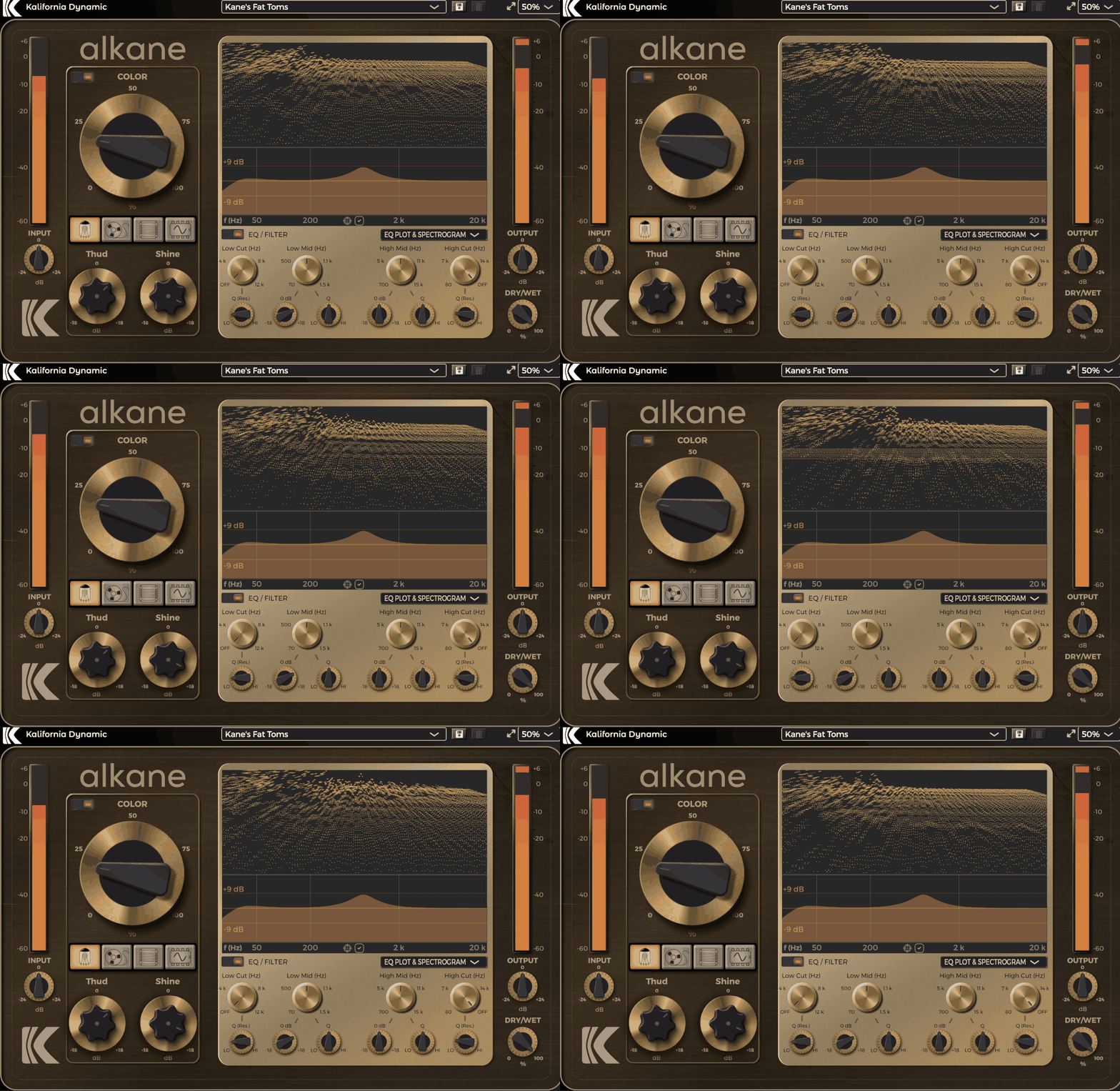
| Description | 4-mode analog-style saturator (Tube/Tape/Transformer/Synth) with Thud/Shine tone shaping and Dry/Wet blend |
| Award | Best for Subtle Character |
When it comes to plugins that add real character without crushing your dynamics, Alkane quickly became one of my go-tos.
Developed by Matt Phillips under his new brand Kalifornia Dynamic, Alkane packs 4 different analog-modeled saturation circuits into one sleek distortion plugin and it doesn’t try too hard to impress. It just sounds good.
What I enjoy most is how Alkane stays musical no matter how much you push it, perfect when you want to beef up drums, bass, synths, or even a whole mix without turning everything into fuzz soup.
- Saturators
Tube adds warm, smooth breakup, Tape thickens the lows, Transformer brings a bit of high-end shine, and Synth mode gets wild and spanky when driven hard. I found Synth especially great on transient-heavy material like drums and synth stabs.
- Thud and Shine Controls
These knobs shape the low and high frequencies inside the saturation process, not just with plain EQ boosts. It’s an easy way to fatten up kicks or make synths sparkle without needing another plugin.
- Dry-Wet Mix
Alkane includes a Dry/Wet mix knob that lets you easily blend the saturated signal with the original. I like the option of dialing it back a bit when I want the saturation to add character without completely taking over the original sound.
- EQ
After the main saturation stage, there’s a simple but really musical EQ with sweepable high/low cuts and two mid bands. Handy for cleaning up mud or tucking back harshness after things get heated.
Overall, Alkane sounds rich, warm, and lively right out of the box. It’s a little pricey compared to other distortion plugins, but you can grab a 14-day free trial first to see if it clicks with your workflow.
Alkane comes in VST3, AU, and AAX formats for macOS and Windows users.
2. Arturia Dist COLDFIRE

| Plugin | Arturia Dist COLDFIRE |
|---|---|
| Description | Dual-engine distortion with 11 algorithms per engine, flexible routing (series/parallel/M/S), and deep modulation |
| Award | Most Versatile |
If distortion plugins had a mad scientist, Dist COLDFIRE would be in the lab cooking up something wild.
For me, it would be an insult to call COLDFIRE a distortion plugin cause it’s a sound design powerhouse that lets you blend analog warmth with digital destruction in some of the most creative ways I’ve seen. Whether you need subtle saturation or all-out chaos, this distortion VST has you covered.
- Dual-Engine Distortion Setup
You get two independent engines, each with 11 different algorithms, including tube, tape, transistor, bit-crushing, and wavefolding.
Often I find myself stacking warm analog drive on the lows with aggressive wavefolding on the highs and the results are incredible.
- Flexible Routing Options
Run the two engines in series, parallel, or even mid-side mode, giving you complete control over how the tone interacts.
This setup makes basslines thicker, synths wilder, and drum loops punch through the mix like a wrecking ball.
- Deep Modulation Capabilities
With LFOs, envelope followers, and step sequencers, you can modulate pretty much anything.
I’ve set up pulsing effect on synth pads and rhythmic crunch on drum loops, making static sounds feel alive.
This is no doubt one of the best distortion VSTs, as it’s deep, experimental, and rewards those who love tweaking. If you’re looking for a simple drive knob, this might feel overwhelming, but if you love pushing sonic boundaries, it’s pure gold.
Arturia Dist COLDFIRE comes in AAX, AU, VST2, and VST3 for macOS and Windows users.
3. iZotope Trash

| Plugin | iZotope Trash |
|---|---|
| Description | Dual-stage distortion with multiband control and convolution textures for everything from warmth to controlled chaos |
| Award | Best for Sound Design |
I think Trash deserves a place as one of the all-time best distortion plugins with its vast sound design capabilities.
Firing up Trash by iZotope feels like stepping into asound lab. Besides slapping grit on a track, Trash excels at sculpting controlled chaos with ridiculous precision.
- Dual-Stage Distortion Engine
With over 60 distortion types, you can dial in anything from smooth saturation to absolute destruction.
The best part? You get two stages of effect, meaning you can stack, blend, and experiment like a scientist. I love using this to push synths into total mayhem or add subtle warmth to drums.
- Multiband Processing
Multiband Processing lets you split your signal into different frequency bands, applying separate effect types to each.
It’s great for keeping your low end thick while letting your highs stay crisp. I’ve cranked up bass distortion without touching the mids, and the results? Pure filth in the best way possible.
- Convolve Module
Instead of just distorting, you can run your sound through impulse responses that mimic amps, weird resonant spaces, and even abstract textures. It’s like turning the effect into a shapeshifting monster. I’ve run drums through amp cabs and suddenly had punchy, aggressive, and room-filling sounds.
Now, here’s the thing: some Trash 2 fans might feel a little burned. Features like custom waveshaping, delay, and dual filters are gone, and the Scream filter? Yikes, that thing bites pretty hard.
I still reach for Trash when I want wild, flexible, and unpredictable tones, and even though it’s changed, it’s still a beast for sound design and heavy processing.
iZotope Trash comes in AAX, AU, and VST3 for PC/Mac, plus AUv3 for iPad users.
4. Heavyocity MicroFX Obscene

| Plugin | Heavyocity MicroFX Obscene |
|---|---|
| Description | Aggressive distortion toolkit (Blaster/Crusher/Nuke) with an X/Y pad for animated, glitchy movement |
| Award | Best for Extreme Distortion |
If distortion had an evil twin, MicroFX Obscene would be it.
MicroFX Obscene isn’t the kind of plugin you use for gentle warmth or vintage saturation, as this is pure sonic mayhem. It thrives in industrial, electronic, and cinematic music, adding raw, glitchy, and unapologetically aggressive textures to anything you throw at it.
- 3 Distortion Modes
With Blaster (high-gain pedal), Crusher (bit-crushing madness), and Nuke (broken fuzz destruction), this plugin is built for brutal, over-the-top sound design. I often use Nuke on drums to make them sound like they’re falling apart in the best way possible.
- X/Y Modulation Engine
The X/Y pad lets you draw modulation paths that shape your distortion over time. You can customize movement, feedback, and ring modulation, which makes this way more than just a static effect. It’s wild, unpredictable, and insanely fun to mess with.
- Simple Yet Powerful Controls
With Drive, Tone, and Mix knobs, it’s easy to dial in a filthy, glitch-ridden mess without overthinking.
Now, MicroFX Obscene is not for the faint of heart. It’s all about extreme tones, so if you’re looking for subtle saturation or multiband flexibility, this won’t be your go-to.
But if you need something that rips your sound apart in creative, chaotic ways, this thing is the real deal.
I love having MicroFX Obscene in my arsenal when I want to break rules, destroy sounds, and inject raw energy into a track. It’s not an all-rounder, but if you’re into experimental sound design, this is one of the best distortion VSTs.
Heavyocity MicroFX Obscene comes in AAX, AU, and VST3 for macOS and Windows users.
5. Output Thermal

| Plugin | Output Thermal |
|---|---|
| Description | Multi-stage distortion platform with an XY pad, layered drive flavors, and built-in modulation/FX for evolving tones |
| Award | Best Creative Workflow |
If Distortion had its own theme park, Thermal would be the main attraction with its deep and complex design.
What I like about Output Thermal is that it reinvents your sound, blending multiple layers of grit, warmth, and chaos into something alive and interactive.
- Multi-Stage Distortion Engine
Instead of just slapping a single type onto your track, Thermal stacks layers of saturation, overdrive, and grit, making it feel fluid and evolving.
- Interactive XY Control
The XY pad is the heart of Thermal, letting you tweak multiple parameters at once without getting lost in menus. It makes exploring the effect feel less like tweaking knobs and more like sculpting sound in real-time.
This is so addictive that I’ve lost way too much time just dragging it around, watching my sound morph in real time.
- Built-In Effects & Modulation
With 19 analog and digital distortion algorithms, mid-side processing, and built-in FX, you can go from subtle harmonic enhancement to full-scale destruction.
I’ve run drum loops through it and ended up with alien soundscapes I didn’t even know I needed. But, I have to say, Thermal is not for quick fixes. It’s deep, complex, and built for sound designers who love to experiment.
If you’re just looking for a touch of drive on a bassline, this might be overkill. But if you’re down to push boundaries and explore wild, unpredictable textures, this thing is pure magic.
Output Thermal comes in AAX, AU, VST, and VST3 for macOS and Windows users.
6. Waves MultiMod Rack
| Plugin | Waves MultiMod Rack |
|---|---|
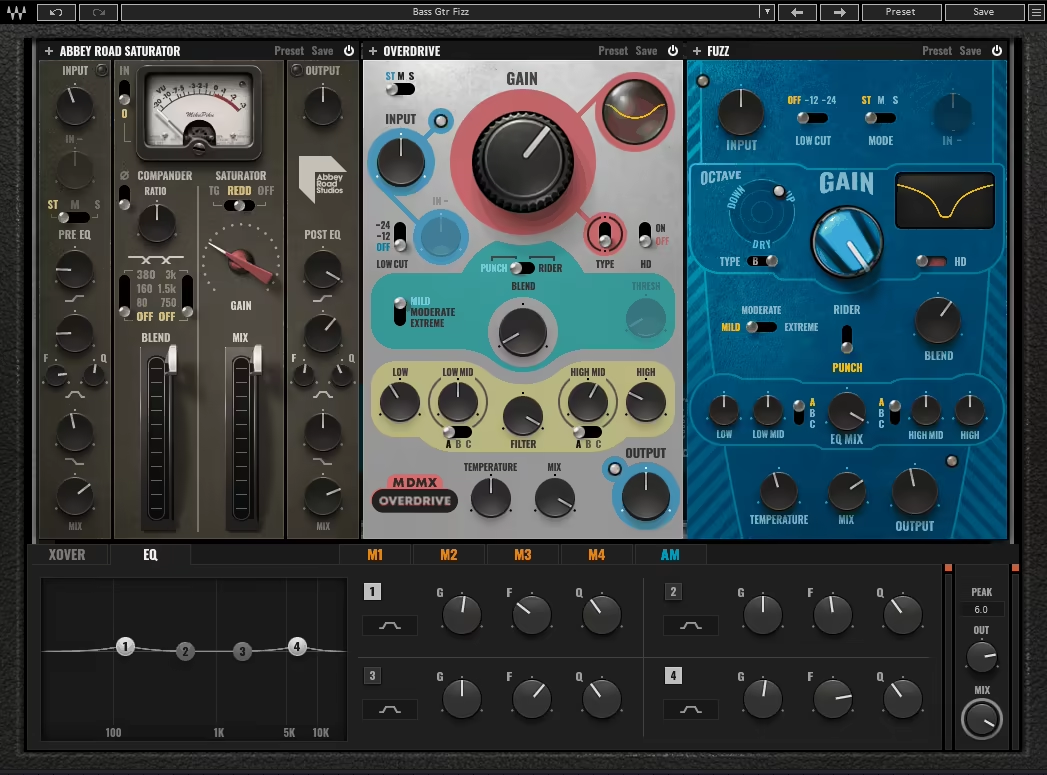
| Description | Modular rack that stacks up to 3 distortion modules with multiband splits and built-in modulation options |
| Award | Best Modular Distortion |
If you’ve ever wished you could stack different distortion flavors like a crazy modular synth, then MultiMod Rack is your dream come true.
MultiMod Rack distortion VST plugin lets you combine up to 3 distortion modules, like Abbey Road Saturator, Berzerk, and MDMX, and shape them across different frequency bands. It’s like a choose-your-own-adventure, and that’s exactly why I put it on this list.
- Modular Distortion Stacking
You can mix and match 3 different effects in one rack, tweaking how they interact.
I love running saturated lows, crunchy mids, and screaming highs all at once. It’s like building a custom pedalboard inside your DAW.
- Multiband Processing
Each module can be assigned to different frequency bands, so you’re not just slapping distortion on everything. I’ve used this to keep bass punchy while driving mids and highs into chaos, and it works like a charm.
- Modulation Engine
With LFOs, step sequencers, and envelope followers, you can make your effect move, pulse, and evolve. When you want a rhythmic tremolo on your mids or some wild movement on your top-end fizz, for instance, the plugin gets it done easily.
Now, let’s talk downsides; the modules are sold separately, so unless you’re on Waves’ subscription plan, it can get expensive.
While it’s not the cheapest option, MultiMod Rack is the best distortion plugin in the list regarding modular distortion for sound design, creative mixing, and stacking insane textures.
Waves MultiMod Rack comes in AAX, AU, and VST3 for macOS and Windows users.
7. Excite Audio Motion: Harmonic

| Plugin | Excite Audio Motion: Harmonic |
|---|---|
| Description | Hexagon-controlled distortion/bitcrush/filter system designed for animated, performable movement and automation |
| Award | Best for Motion |
The first time I loaded up Motion: Harmonic, I felt like I was playing an instrument rather than using a plugin.
Well, the Hexagon controller isn’t just about fancy visuals; it’s about a completely interactive way to manipulate distortion, filtering, and bit-crushing all at once.
Until Motion: Harmonic, I’ve never worked with anything quite like it, and within minutes, I was experimenting in ways I hadn’t even considered before.
- Hexagon Control System
Instead of turning knobs like a lab experiment, you control 6 macro sliders with a magnetic cursor, which means you can draw modulation paths, automate movement, and create evolving soundscapes.
- Bitcrusher & Distortion Combo
You get classic bit-depth reduction, sample rate destruction, and multi-flavor distortion, all in one place.
I really enjoyed it obliterating drum loops, adding movement to synths, and even creating shimmering, glitchy textures that shift over time.
- Modulation That Feels Alive
With customizable paths, timeline editing, and real-time automation, this plugin makes your sound breathe, pulse, and mutate.
With its off-the-track design, I like this plugin for creating alive, textured, and unpredictable tones. It’s a great creative tool if you wanna get surprised.
Excite Audio Motion: Harmonic comes in VST, VST3, AU, and AAX for macOS and Windows users.
8. Future Audio DST

| Plugin | Future Audio DST |
|---|---|
| Description | 4-band distortion where each band can run different drive styles for precise, mix-friendly tone shaping |
| Award | Best for Multiband Control |
For those after precision instead of just an all-or-nothing chaos button, DST distortion VST is here to make give you control for tonal shaping.
With 4 separate frequency bands, you can apply different distoriton types to each, making it feel like you’ve got 4 little engines working together. DST is like having a custom workshop inside your DAW.
- Multiband Distortion Control
Each band has its own gain, frequency range, and effect type, so you can sculpt your tone with ridiculous precision. You can add warmth to a bassline while keeping the mids and highs crisp and it works on everything, from synths to drum loops.
- 3 Distortion Modes
You get smooth saturation, crunchy overdrive, and full-on destruction, making it insanely versatile. I’ve used the softer settings on vocals, then cranked it for aggressive synth leads, and it handled both like a champ.
- Modern 3D Interface
The sleek, futuristic design makes tweaking fun, even though there’s a lot of control under the hood. Dragging frequency bands around feels intuitive, and once you get comfortable, it’s hard to go back to basic distortion plugins.
This isn’t one of those “slap it on and go” plugins. The amount of control can feel overwhelming at first, but once you dig in, it’s totally worth it.
I recommend using DST to bring lifeless tracks back to life, and the fact that Armin van Buuren and Steve Angello are fans says a lot about that this is among the best distortion VSTs.
Future Audio DST comes in VST3 and AU formats for macOS and Windows users.
9. United Plugins Cyberdrive

| Plugin | United Plugins Cyberdrive |
|---|---|
| Description | Massive distortion playground with 64 modes, reorderable modules, and extra FX for heavy creative processing |
| Award | Best for Advanced Users |
Cyberdrive distortion VST plugin is considered the final boss of distortion, thanks to its shredding, smashing tone.
Cyberdrive feels more like science fiction than audio processing with 3 independent modules, 64 distortion modes, and total control over the signal chain. It’s a real playground for producers who like to break the rules.
- 64 Distortion Modes Across 8 Categories
You’re not just getting a few flavors of drive; you get amps, pedals, bit-crushing, wave-shaping, and even full-on spectral madness.
I’ve put drums through the Doom category, and suddenly, they sounded like they were recorded inside an active volcano.
- Reorderable Signal Chain
It’s not just about stacking effects; it’s about reshaping how they interact. Toss in feedback, modulation, and spatial controls, and you’re not just applying distortion, as you’re sculpting entire sound worlds.
- Built-In FX & Motion Controls
Chorus, reverb, delay, and transient shaping are all baked in. I appreciate that I can push a bass into oblivion, then soften it with some spacey diffusion without needing another plugin.
I think the sheer number of options can feel overwhelming at first, but once you start experimenting, it can become the best distortion plugin if you crave for deeper adjustments.
I reach for Cyberdrive when I want full-scale sonic destruction. It’s a really aggressive and greatly experimental distortion VST to try out!
United Plugins Cyberdrive comes in VST, VST3, AU, and AAX for macOS and Windows users.
10. Kilohearts Shaper Table

| Plugin | Kilohearts Shaper Table |
|---|---|
| Description | Wavetable-driven waveshaping distortion with 3D visualization and modulation-friendly curve morphing. |
| Award | Most Innovative |
If you think you know distortion, Shaper Table is here to flip that idea on its head, cause it’s all about bending, warping, and completely reimagining how the effect behaves.
Instead of just shaping your sound, it ties waveshaping to wavetables, letting you redraw how the effect works in real-time. As you know, I really enjoy using innovative plugins and Shaper Table is the distortion version of that definition.
- Wavetable-Driven Waveshaping
Instead of static curves, this plugin lets you scan through wavetables, morphing and evolving your distortion on the fly.
- Real-Time 3D Visualization
The visual feedback isn’t just for show, as it actually helps you see how your sound is being bent and reshaped as you tweak parameters. It’s insanely useful, especially for experimental sound design.
- Modulation-Friendly Chaos
With the Shaper Table, you can modulate the behavior, creating sweeping, rhythmic, or evolving textures that feel more like sound design than just adding dirt.
I gotta admit that this plugin isn’t for everyone. It’s highly experimental, which means if you need precise, controlled distortion, it might feel a bit unpredictable. Also, the CPU usage can spike when you start layering heavy modulations, so watch your system if you’re going all-in.
If you opt for completely reshaping a sound rather than just a standard effect, Shaper Table is the distortion VST for you. It’s wild, flexible, and built for producers who love pushing boundaries.
Kilohearts Shaper Table comes in VST, VST3, AU, and AAX for macOS and Windows users.
11. Eventide CrushStation
| Plugin | Eventide CrushStation |
|---|---|
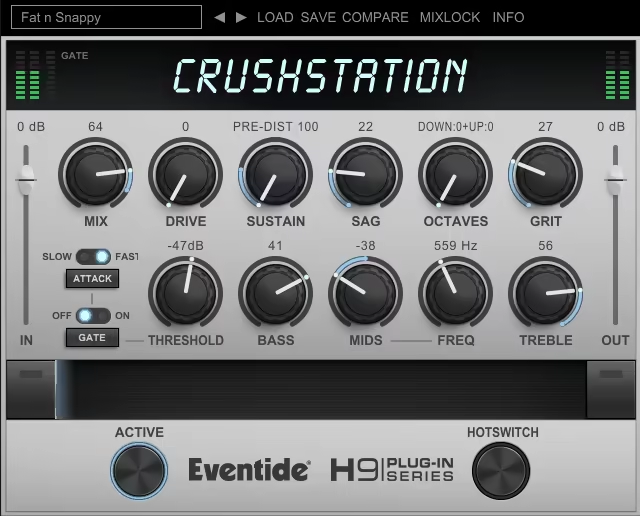
| Description | Characterful distortion with built-in EQ, compression, sag, and performance controls (Ribbon + Hotswitch). |
| Award | Most Versatile |
If you need a distortion plugin that can go from smooth and creamy to absolute sonic carnage, CrushStation is the one.
Packed with EQ, compression, octave blending, and a few tricks you won’t find anywhere else, CrushStation is a full-tone-shaping tool that can be as versatile as you want it to be. It’s the best distortion plugin for the versatility-seekers.
And my favorite part is that even though it offers so many effects and controls, the interface is pretty intuitive, even for beginners, to craft their sound.
- 3-Band EQ & Compression
Dial in your distorted tone with surgical precision. I really like using the EQ here to bring out midrange bite in guitars while tightening up the lows on bass and drums.
The compression keeps things controlled, so your distortion doesn’t turn into a total mess.
- SAG Control for Analog Madness
Inspired by failing vintage gear, this feature mimics the power sag of old-school amps, adding a natural instability to your sound.
I cranked this on a drum bus, and suddenly, it felt like my mix was falling apart in the best way possible.
- Ribbon & Hotswitch for Real-Time Tweaks
The Ribbon lets you morph between two settings in real time, and the Hotswitch lets you jump between two different presets instantly. This is a lifesaver for live performances or creating dynamic shifts within a track.
CurshStation is versatile, powerful, and packed with character, well, just the way I like it.
Eventide CrushStation comes in AAX, AU, VST2, and VST3 for macOS and Windows users.
Extra:
Arturia Dist TUBE-CULTURE
| Plugin | Arturia Dist TUBE-CULTURE |
|---|---|
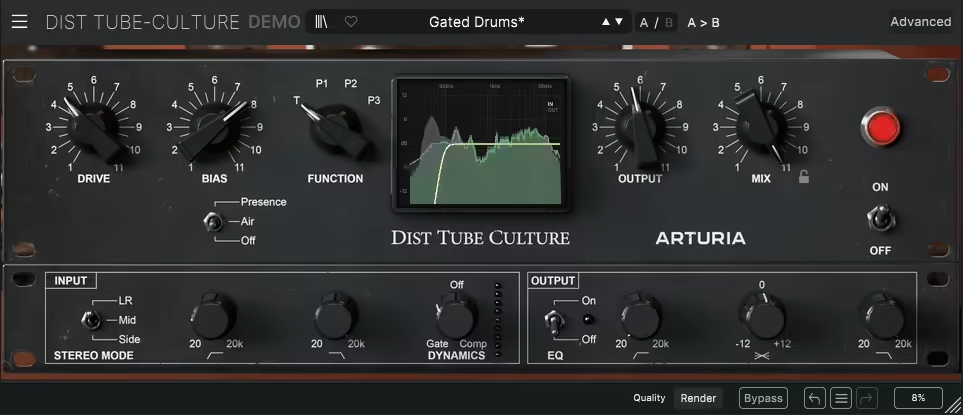
| Description | Tube-modeled saturator/distortion with Triode/Pentode flavors plus Presence and dynamics for thick, lively drive. |
| Award | Best Analog-Style Drive |
I knew TUBE-CULTURE was special the moment I ran a bassline through it, as it instantly made the tone feel alive.
TUBE-CULTURE distortion VST is modeled after vintage tube gear (as the name suggests), and the way it adds richness and harmonic depth makes it excellent for anything from vocals to synths to drum buses.
- Triode & Pentode Modes
The modes are where the magic happens. Triode mode brings a smooth, rounded saturation, perfect for gentle warmth on acoustic instruments.
Flip to Pentode, and suddenly, you’ve got aggressive, gritty distortion that makes synth leads punch through the mix. I’ve used both, and switching between them feels like changing amps on the fly.
- Presence Control
Brightening high frequencies can be tricky, but this feature keeps things crisp without becoming harsh. When I tried it on vocals to add clarity without sibilance, it gave a pretty good top-end polish.
- Built-in Dynamics Section
Having compression and gating inside a distortion plugin is a brilliant touch. Instead of stacking multiple plugins, I can control dynamics and saturation in one place, which makes workflow so much smoother.
I won’t pretend this thing is subtle. If you’re after completely transparent saturation, you might find it a little too heavy-handed.
I keep TUBE-CULTURE in my chain whenever I want warmth, richness, and a mix that breathes. It’s more than just distortion with its character, attitude, and pure analog soul.
Arturia Dist TUBE-CULTURE comes in AAX, AU, VST, and VST3 for macOS and Windows users.
Was distortion really “invented” by accident in 1960?
Pretty much yes: At least in the popular origin story. A famous early moment came from a faulty/busted transformer during a Nashville session in 1960, where the “bad” sound was kept because it was exciting. That kind of happy accident helped kick off the chain reaction that led to fuzz pedals and the distortion sounds that defined rock history.
Last Words
